Tinycast is a free, open-source launcher for macOS that combines application search, global hotkeys, clipboard history, file search, quick actions, snippets, window management, and other utilities in a native SwiftUI and AppKit interface. It is designed as a lightweight alternative to larger launcher applications and uses no third-party dependencies or Electron.
Features
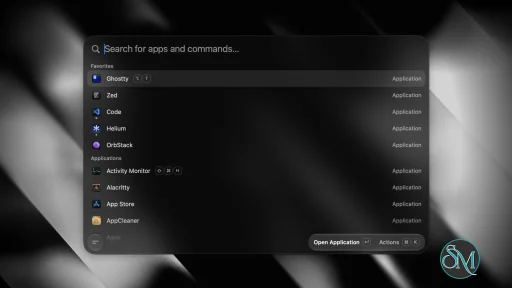
Tinycast provides a fuzzy-search application launcher that can find and open installed applications, pin favorites, show running applications, and quit applications. A global hotkey opens the launcher from anywhere in macOS. Per-application hotkeys can also be assigned to quickly focus or hide applications.
The built-in clipboard history stores searchable text and images and allows previously copied content to be pasted back into the application being used. File search uses Spotlight instead of maintaining a separate file index.
Tinycast includes a calculator with mathematical operations, unit conversions, and live currency and cryptocurrency conversions. Quicklinks can turn URLs, searches, files, and deep links into searchable commands.
The application also includes Apple Shortcuts integration, Markdown snippets, custom shell commands, system actions, and 34 window-management actions based on common Rectangle-style operations.
Additional features include calendar and meeting integration, a Markdown notes editor, an emoji picker, AI chat, text Quick Actions for rewriting and translation, and support for running Raycast extensions natively through SwiftUI. Settings can also be exported or imported from Raycast.
Download Tinycast v0.12.11 - Software Mirrors |
|---|
Tinycast v0.12.11 for macOSTinycast-Universal-0.12.11.zip | 17.67 MB Tinycast-Universal-0.12.11.dmg | 17.86 MB |
Tinycast v0.12.11 Source Code |
Tinycast v0.12.11 Release Notes:What's Changed
New Contributors
com.tinycast.app
Built from 58168bf7e0b721f7c5fbfc7f4e8a068a48cff446. Full changelog
Install via Homebrew, or open the DMG below and drag Tinycast to Applications:
|
Performance and Compatibility
Tinycast is built with SwiftUI and AppKit rather than Electron. The project states that it has zero third-party dependencies and targets a memory footprint of under 100 MB.
The current development requirements specify macOS 26 or later and Xcode 26 for building the application from source. The project provides separate installation options for Apple silicon and Intel Macs running macOS 26.
macOS 15 Sequoia is supported through a separate Homebrew package, but the project identifies this build as no longer maintained. This means users on Sequoia can still install the dedicated version, but it does not receive the same ongoing maintenance as the current macOS 26 release.
Tinycast requires Accessibility permission for features that paste or expand text into other applications. The project states that snippet keystrokes are matched locally and are not stored or sent elsewhere.
System Requirements
Current version:
macOS 26 or newer
Apple silicon or Intel Mac
Accessibility permission for text pasting and snippet expansion
macOS 15 Sequoia:
A dedicated Sequoia build is available
The Sequoia build is no longer maintained
Developers building Tinycast from source need macOS 26 or later and Xcode 26.
Pros and Cons
Pros
Free and open source
Native SwiftUI and AppKit application
No Electron
No third-party dependencies
Low memory target
Fast application launcher
Global and per-app hotkeys
Searchable clipboard history
File search through Spotlight
Calculator and conversions
Apple Shortcuts support
Markdown snippets
Custom shell commands
Window management
System actions
Markdown notes
AI chat
Text rewriting, translation, and summarization
Native Raycast extension support
Raycast settings import
Backup and restore
No telemetry
Cons
Current maintained release requires macOS 26
macOS 15 Sequoia build is no longer maintained
Accessibility permission is required for some features
AI functionality requires the user to provide an AI key or have a supported AI account
Raycast extension compatibility may vary by extension
How to Install
The easiest installation method is Homebrew. First, add the Tinycast Homebrew tap and trust the third-party tap, then install the package matching your Mac. Apple silicon Macs running macOS 26 use the standard Tinycast package, while Intel Macs use the universal package.
For macOS 15 Sequoia, the project provides a separate tinycast-sequoia package. Beta builds are also available for Apple silicon Macs running macOS 26 or newer.
After installation, open Tinycast and configure a global shortcut under Settings > General. Pressing the shortcut opens the launcher, where applications and commands can be searched immediately. Additional shortcuts, snippets, and other features can be configured from their respective settings sections.
Final Verdict
Tinycast is a feature-rich macOS launcher that goes beyond application search. Its native implementation combines launching, clipboard history, file search, shortcuts, snippets, window management, notes, system controls, and Raycast extension support without relying on Electron.
The biggest limitation is its current operating system requirement. The maintained release targets macOS 26, while the macOS 15 Sequoia build is no longer maintained. Users who meet the current requirements get a lightweight, open-source launcher with a broad feature set.
For Mac users looking for a native alternative to larger launcher utilities, Tinycast provides a comprehensive collection of everyday productivity tools in a single application.
Post a Comment/Report Broken Link: