openGym is an open-source, self-hosted fitness and body-weight tracker designed for people who want complete control over their workout data. Instead of storing training history on a third-party service, it runs on your own server and keeps your data in files you control.
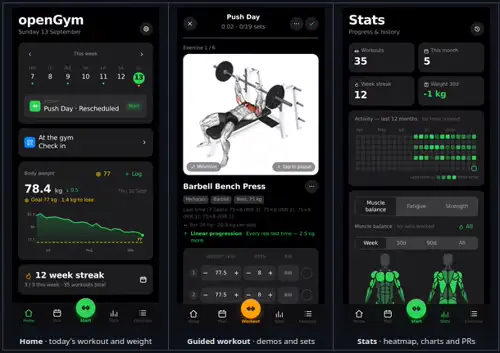
The application combines workout planning, guided training, body-weight tracking, statistics, muscle analysis, and cross-device synchronization in a web application that can also be installed as a Progressive Web App.
Features
openGym provides a weekly workout planner with routines organized by day. Users can create and modify training sessions, move workouts between days, and choose from predefined workout plans such as Push/Pull/Legs, Upper/Lower, Full Body, and 5×5.
The exercise library contains more than 1,300 exercises with animated demonstrations. Exercises can be searched, browsed by muscle group, and filtered according to available equipment.
During workouts, the application supports regular sets, supersets, warm-ups, cardio, rest timers, and exercise tracking. It records training history and provides statistics including personal records and progress charts.
Muscle analysis is another notable feature. openGym can show which muscles are being trained, fatigued, or detrained, helping users understand how their training volume is distributed over time.
The application can import workout history from services and applications including FitNotes, Strong, and Hevy. This makes switching to a self-hosted system considerably easier for existing users.
Authentication uses passkeys, while the application can operate offline and synchronize data when connectivity returns. The synchronization system uses revisions to prevent one device from silently overwriting changes made by another device.
Download openGym APK v1.4.4 - Software Mirrors |
|---|
openGym APK v1.4.4 for AndroidopenGym-Plus-1.4.4.apk | 406.31 MB |
openGym APK v1.4.4 Source Code |
openGym APK v1.4.4 Release Notes:The biggest openGym yet: a fresh look, Modules to switch off what you don't use, every set against last time, and openGym is coming to Google Play (closed test, join below). Google Play testers wanted: join https://groups.google.com/g/opengym-testers/about, then opt in at https://play.google.com/apps/testing/ch.duartesantos.opengym. Google lets us go public after 12 testers for 14 days. Which APK?openGym-1.4.4.apk (Standard, 180 px animations), openGym-Plus-1.4.4.apk (240 px), openGym-HD-1.4.4.apk (360 px). Same app and key: each installs over another and keeps your data. Checksums in SHA256SUMS.
Modules: as much app as you want. Settings → Modules switches whole parts of openGym on and
off: Effort, Plates and warm-ups, Strength levels, Form videos, Watch, Gym check-in, Body, Health,
Motivation, the AI Coach, Integrations and Seasonal themes. Pick Just training, Training and body or
Everything, or flip them one by one. A module that's off is gone from Home, Stats, Settings and the
search, and stops its notifications; health sync, the watch, webhooks and Coach reviews pause until
it's back. Nothing is ever deleted, and everything stays on after the update. New profiles get the
choice on their first screen. The idea came from seals187 and Shadowbyte on Discord.
Integrations, all in one place. Settings → Integrations is a short list of what openGym can
talk to, each with whether it's on and the one thing to do next: Apple Health or Health Connect
(their switches moved here from Data & backup, which still has a way in), the Hevy and file imports,
the CSV export, the Coach and the MCP server. Nothing new talks to anything until you switch it on,
and a card only shows where it can do something. Garmin, COROS, Polar, Fitbit, Samsung Health, Oura,
Withings and Renpho get an honest "works with": they reach openGym through Apple Health or Health
Connect, no fake Connect button.
Webhooks (self-hosted, INTEGRATIONS=webhook). Tell Home Assistant, n8n, ntfy or Node-RED when
you finish a workout, set a record or weigh in, from whichever device you logged it on. Each message
is signed, retried for about an hour if the other side is down, never sent twice, and a test event
is one tap away. Home Assistant on your home network needs INTEGRATIONS_ALLOW_LAN=1 from your
admin. Payloads and a signature checker are in docs/INTEGRATIONS.md.
On its way to F-Droid. A new Android build without anything from Google, made to be built by
F-Droid from the source: the gym card scanner uses the camera in the app instead of Google's,
updates come from F-Droid, and Wear OS watches (they need Google Play services) are left out,
which the app says in Settings → About. Everything else is the same app.
openGym on Amazfit watches (Zepp OS 3 and later: Balance, GTR 4, GTS 4, Active, T-Rex, Cheetah,
Bip 5 and friends). Same deal as Wear OS: start a routine on the wrist, turn the crown (or tap + and
-) for weight and reps, Done, a rest ring that buzzes, heart rate on every set, a summary, and a
shortcut card with your streak. It talks to openGym through your own server, so pair it in
Settings → Zepp OS watch and type the code into the Zepp app. Works with the web app too.
A fresh coat of paint. The whole app got a proper look-and-feel pass, the kind where nobody
can point at what changed but everything sits better. Home's cards all introduce themselves the
same way now (a small line, a title, one button), so the screen stops sounding like five apps
talking at once. Stats is in four parts, Overview, Body, Lifts and Effort, with an index that
sticks to the top and jumps you there; #/stats?section=lifts links straight to one. The Library
keeps its filters in one row: Filters opens a sheet with the type and the equipment, and tapping
the chosen body part again shows them all. The end of a workout is one tidy list (Add exercise,
the session note) with Finish under it, the routine editor's Copy, Share and Print sit together
with Delete on its own and saying what it removes, and an exercise's Delete waits at the bottom
of its sheet instead of shouting next to Edit. Empty screens put their first button right where
your stuff will appear. Under the hood: one type scale in rem (your browser's text size and zoom
now grow the layout too), pinch zoom in the browser and the installed web app (the phone apps
stay as they were), lifted surfaces for things that float, a readable text shade for your own
accent colour, and one press feel per kind of control. Same app, better posture.
The new bits of this release got the same treatment: the set-vs-last arrows sit in a little
raised chip and stay readable on ticked sets, green and orange have proper light-mode shades,
the weekly sets and strength cards line up like every other Stats card, Merge into… lives at
the end of an exercise's sheet (Delete still last), and narrow phones no longer squash the
muscle names in the ranges sheet.
openGym on Garmin, almost. A Connect IQ app for Garmin watches is built and waiting for its
store listing: Forerunner, fēnix, epix, Venu, vívoactive, Instinct and friends, round or square,
colour or the sunlight-proof black and white. The same deal as the other watches: today's routine
with one press, big numbers you nudge with the buttons or a swipe, Done, a rest that buzzes, heart
rate on every set and a summary at the end. It can also save the workout to Garmin Connect as
strength training, so Garmin's own training load counts it too. It reaches the Connect IQ Store
and talks to the phone app in a later update; docs/GARMIN.md has the plan.
Every set against last time (#907, thanks @lodepav for the idea and the first version). A
finished set now wears a small ↑, = or ↓ on its number: the same set last time, weight first and
then reps, and when those pull apart (heavier but fewer) the estimated 1RM settles it. On an
assisted machine less help counts as more, holds go by seconds and cardio by minutes. Saved
workouts in History get the arrows too, held against the workout before them, never a later one.
Screen readers hear it in words ("2.5 kg more than last time"). Settings → Workout → Compare sets
with last time switches it off.
Workouts left this week (#753, thanks @unabomberlive). Home now counts the week down under the
week strip: "2 of 4 left this week", and "All done this week. Nice." once it is. A fixed week
counts its planned days, the same numbers as the streak card. A rotation has no week of its own,
so Settings → Plan & schedule → Workouts per week gives it a target to count against (off says
nothing). The widget snapshot carries it too, for the widgets to pick up.
Spoken cues. Settings → Timer alerts → Spoken cues (off until you want it) gives the timer a
voice, so the phone can stay on the bench: it says your next set as the rest starts ("Set 3, 80
kilos, 8 reps", with the exercise's name when it changes), "10 seconds" before a rest ends, "Rest
is over", and counts holds down, 3, 2, 1, go, the ones that start by themselves included. In the
app's language, slow, normal or fast, with a Try it button. The apps use the phone's own voice
and your music only turns down for a moment, it never stops; a browser uses its built-in voice.
Only while the app is on screen: a locked phone still gets the end tone and the notification.
Merge two exercises into one (#656, thanks @dbanno). Imported "Bench Press (Barbell)" from
FitNotes and now have two bench presses? An exercise's details have Merge into…: pick the one it
should be, see what moves ("38 workouts, 3 routines move"), confirm. Every logged set, note, form
video and record goes over, and so do routine slots (with their warm-ups and backups), programme
targets, the kept working weight, the standing note, aliases, the favourite star and its bar and
plate settings. Your own exercise is then deleted; a catalogue one is hidden from your lists, and
searching for its name finds the one you merged it into. Undo on the toast puts everything back.
Another device that still logged against the old one is brought in line when it syncs, and the
MCP bridge reads it the same way.
A note on any set. Tap a set's number and pick Note: "grip slipped", "a little twinge", "felt
easy". It shows as a quiet line under the row (tap it to change it), sticks with the set when the
workout is saved, and appears in History under that exercise's sets. It goes into the CSV export
(a new set_note column) and the MCP bridge's get_workout, and it reaches the Coach the way your
workout notes already do.
Weekly sets per muscle, against a target range. A new Stats card lists this week's working
sets for each main muscle next to the range it aims for, "Chest 14 / 10–20", with a bar that shows
the range: room for more, in range or above range, never a telling-off. A set counts fully for the
muscles it mainly trains and a bit under half for the ones that help (the same weights as the
muscle map and the fatigue model), warm-ups don't count. The ranges start from hypertrophy
research (roughly the minimum that grows a muscle to the most you can recover from) and each one
is yours to change under Settings → Plan & schedule → Weekly sets per muscle. Settings → Look &
Home → Weekly sets on Home adds one line under your streak: the muscle with the most room left.
Strength level per lift. Bench, squat, deadlift, overhead press, rows, curls and a few more
now say where you stand: Beginner, Novice, Intermediate, Advanced or Elite, from your best
estimated 1RM against your latest weigh-in, graded on published strength standards (bodyweight
ratios, dumbbells per bell). It sits in the exercise's details with what the next level takes,
and a Stats card lists every lift you have one for. Add your sex and year of birth under Settings
→ Units & language → About you for a fairer read (from 40 on, the masters age coefficients ease
the lines). Worked out on your device, and hidden until you have weighed in.
Your week, your month. When a new week starts (your first weekday) Home shows a small "Your
week" card about the one that just ended, and on the 1st a "Your month": workouts, volume, new
bests, the streak and the muscle that did the most work. Tap it for the numbers, share them as a
picture (story or square, dark or light) or save that stretch as the performance report PDF. A week
off gets no card, nobody needs a recap of the sofa. The × puts it away, and Settings → Look & Home →
Week and month recap switches it off.
openGym on your Wear OS watch, as a beta (thanks @vampireJSV for the idea and the first take in #673).
Galaxy Watch, Pixel Watch, TicWatch, OnePlus and friends now get what the Apple Watch has: the
workout follows you to the wrist, big numbers you turn with the crown, Done, a rest ring that buzzes
you back to the bar, heart rate on every set, a summary at the end, and a Tile with your streak and
today's plan. Start today's routine right from the watch. Your phone stays in charge, the watch just
saves you the walk to the bench where you left it. It's a beta: it shows up as "openGym Beta" on
the watch and hasn't met many real wrists yet, so tell us on Discord or GitHub what breaks.
Warm-ups that build themselves (#156, thanks @giulioleuci). Settings → Workout → Automatic
warm-ups: Off (the default, nothing changes), Compound lifts or Every loaded lift. The ramp comes
from your work weight, the way a coach would scribble it: a heavy squat gets the bar for ten and
then 40, 60 and 80 percent, a medium press two sets, a light curl one, a 6 kg raise none, and a
pull-up none until you hang weight on it. Every rung is rounded down to what this gym can load
(its plates, its dumbbells, the machine's stack), never under the bar. Bump the first work set
from 100 to 110 mid-workout and the warm-ups you have not done yet follow it. Rest between
warm-ups and per-side sets work as before.
Your own warm-ups, kept (#525, thanks @inchigor). Each exercise's settings have Warm-ups:
Default, Auto, My own, A number of ramp sets (the old stepper) or None. My own is a few rows as a
share of the work weight (or the bare bar), so 20 × 12, 30 × 8, 40 × 5 on a 60 kg bench stays
yours and grows when the bench does. Did them your way today? The exercise's ⋯ menu has Keep these
warm-ups, and Update routine offers it too. A routine's own warm-ups win over Your last session.
Ask the Coach mid-workout. The exercise's ⋯ menu has Ask the Coach: say it hurts, the machine
is taken, you are short on time, feeling great or running on empty, and the Coach suggests up to
six changes to what is left of the workout (swap, fewer or more sets, reps, a lighter or slightly
heavier weight, add, skip, do it next or last, rest), as cards you tick. Logged sets and your
routine are never touched, and the suggestion only applies to the workout you asked in. Works with
your server's Coach and with your own key on the phone.
The Coach does more. A review can now set an exercise's warm-ups and write or revise a
multi-week programme (saved under Plan → Programmes, it starts when you start it), and Undo takes
both back. It reads more of you too: weekly sets and recovery per muscle, the plates and dumbbells
of the gym you are at, this month's challenges and the weigh-in that stands for each day. Every
change to how something progresses now says what you will notice at the gym, in plain words,
next to the Coach's reason.
Film a set and check your form. Tap a set's number and pick Film this set (or Film a set under
More in the exercise's ⋯ menu) to record a short video with the phone's camera or pick one from
your videos. It sticks to that set: a little camera badge under the row plays it right there, muted
and looping, at 0.5x if you want to see the bottom of your squat, or full screen. Every exercise's
history and details now have Your form videos, newest first, and Compare two dates puts two
side by side (so, deeper than in August?). In local mode the videos stay on the phone. Signed in,
they go to your server like your workout photos, inside the same size, length and space limits,
unless you switch on Keep videos on this phone only. They are yours alone: never sent to the Coach
or MCP (it only learns how many), never in share cards, Wrapped or PDFs. Remove the set or the
workout and the video goes with it.
Each gym keeps its own equipment (#808, thanks @hoechstleistungshaartrockner). Plates, dumbbells,
your bars and machine weight stacks now belong to an equipment profile instead of being one list
for everywhere, so the home setup with one pair of 20s and the big gym down the street each get the
plate math, dumbbell steps, warm-ups and progression that fit. Settings → Equipment shows the active
gym at the top with a switcher, the Plates, Dumbbells and Your bars pages say which gym they are
for and can copy another gym's list. During a workout the gym sits small next to the clock: tap it
to switch, and the sets you have not done yet move onto that gym's plates and dumbbells. Saved
workouts remember where they were done. On the phone, a gym reminder place can say "Equipment
here": arrive, tap a check-in sticker or start a workout there and openGym switches by itself, with
a little "Using Home gym equipment" so you know (only with location already allowed, it never asks).
Nothing changes when you update: every profile starts with the lists you have today.
Christmas, with an advent calendar. From 1 December to the end of the year the app gets
cosy: a little snow drifting behind the cards when you open it, fairy lights along the top of Home
and Stats, a Santa hat on your streak flame, holly in a corner, a snowman and a gingerbread person
peeking around Stats, and once a day a sleigh flying past. There is a present hiding on the streak
card, tap it. On Home, from the 1st to the 24th, the advent calendar: 24 doors, today's one glows,
a door you missed waits for you, and the ones still to come stay shut (no peeking). Behind them: fun
facts, small challenges you tick off for a badge, training tips, a joke or two, a cosy stretch
routine to add, a number from your own year, and something special on the 24th. Opened doors sync
between your devices. It all works like Halloween: Settings → Look & Home → Seasonal themes has
Auto, On and Off, optional berry red colors, a switch for the workout screen (never on your sets),
and the calendar for all of December. Nothing moves with reduced motion, nothing shows during the
app tour, and none of it is downloaded outside the season. On the phones there is a festive app
icon too, the barbell in a Santa hat, and Home asks once whether you fancy it.
Weigh in as often as you like, with the time (#859, thanks @Borgna02). A day can now hold several weigh-ins, each with
its time: the weigh-in sheet has a time field (now for today, the day's first time or 08:00 for an
earlier day), All weigh-ins lists every one of them under its day, and a tap on one changes its
weight, time or day. Delete still has Undo. The chart, the trend, the goal, widgets, Your year and
the Coach use one value per day, and Settings → Units & language → Daily weigh-in value says which:
the morning one (the default, it is the one worth comparing), the day's average or the last.
Apple Health and Health Connect bring in every reading with its time, an Apple Health export keeps
all of its records instead of one a day, and the body CSV has a row per weigh-in. Your old weigh-ins
stay exactly as they were, and an older app on another device keeps the extra ones when it syncs.
Monthly challenges. Every month Home has three small goals for you, picked from how you have
trained the last few months and set a little above your usual: 14 workouts this month, lift 50 t,
train every week, hit 3 new PRs, 100 pull-ups (only if you do pull-ups), 60 minutes of cardio (only
if you do cardio), log your weight on 10 days, try 3 exercises you have never done, or every muscle
group at least once. The bars move as soon as you finish a workout, and each challenge you make
earns a badge with a small party (it stays put with reduced motion). All three is a gold month.
Stats → Challenges shows this month and a trophy shelf of every badge so far, and the widgets can
show them too. A challenge you do not make simply ends with its month: new month, new challenges.
The card folds away, its × hides it until next month, and Settings → Look & Home → Monthly
challenges turns it off. It is all worked out on your device from your own workouts, phone-only or
with a server, and nothing new is sent anywhere; the badges sync with your profile.
A kind word about recovery on Home. Now and then a small card tells you what has rested and what
has not, from the same recovery data as the muscle map: "Your legs are still recovering from
yesterday. Upper body today?", or that your back has had a week off. If today's plan leans on
something still recovering, it suggests going a bit lighter or swapping the session, never skipping
it, and a rest day only ever hears that the timing is good. One hint at a time, × hides it for the
day, and Settings → Look & Home → Recovery tips turns it off.
Your year in openGym. From 1 December to the end of January, Home has a card: your year is ready.
Tap it and your year plays as full-screen stories, tap or swipe through: how many workouts, the hours,
the tonnes you moved (in blue whales, pianos or house cats, whatever fits), your longest streak, your
signature move and the muscle it built, your records and the biggest one, your favourite day and time,
your best month, your body weight if you logged it (one tap leaves it out for good, and it never
judges), a training personality from your habits (Early bird, Leg-day loyalist, Night owl and friends)
and a summary. Every card shares as a picture, 9:16 for Stories or 1:1, dark or light, with a small
openGym logo. It is all worked out on your phone from your own data and nothing is sent anywhere.
Stats → Your year plays it for any year with workouts, the current one too. On 1 December there is
one notification at 18:00: the phone plans it for itself when you open the app in November (only if
notifications are already allowed, it never asks), and your server sends a web push to the browsers
that get notifications. Once per year, and Settings → Notifications has a switch for it.
Share a workout as a picture, right after it. The "Workout complete!" summary has Share next to
the way out: a card with the routine, date, duration, volume, sets, records, the muscle map and your
week streak, as a Story (9:16) or a square, dark or light. History's Share as image makes the same card.
Widgets you set up yourself, and a streak with backup. Long press the Home Screen, add the
openGym widget and pick what it shows: your week streak, the weight goal (how many kg or lb to go,
with a little curve of your last weigh-ins), this week, the next workout, records this month or this
week's volume against last week. The wide one shows two side by side. On the iPhone it also comes for
the Lock Screen, round, wide or as one line. A tap takes you where it makes sense: Stats, the weigh-in,
or straight into the next workout. Android gets it too, small or wide, light or dark with the phone.
The streak itself grew up: it remembers your best run, and every 4 weeks with a workout earn a
freeze (two at most). Miss a week for a holiday or a cold and a freeze covers it by itself, shown as a
snowflake, no switch to remember. Badges at 4, 12, 26, 52 and 104 weeks, a small party on Home when
you finish a week or reach one, and Stats shows it all. Points to the next level come later.
Share a routine with a friend. A routine's page and a past workout's options now have Share
with a friend: one link through your phone's share sheet ("Here's my Push Day on openGym 💪"). Your
friend taps it, sees the exercises and sets, and Add to my routines puts it next to theirs, never
over one they already have. A workout goes as a routine, so "do what I just did" is one tap. Your
weights and your name only go along if you switch them on. The routine rides inside the link
itself (the part after the #), so no server, not even opengym.ch, ever sees it. No openGym yet? The
link opens a page that shows the routine and where to get the app, or opens it in your own web app
or the demo. A really long routine goes as a plan file instead.
Watch on YouTube, for every exercise. An exercise's details (and the More group of its ⋯ in a
workout) have a quiet Watch on YouTube button that searches for the exercise plus "form" in the
YouTube app or your browser. Nothing goes to YouTube before you tap it, and a video link of your
own still comes first.
Tidier menus (thanks seals). An exercise's ⋯ now opens with the five things you reach for
mid-workout: note, swap, warm-up set, rest and history. Settings, plate loading, the how-to, moving
and supersets wait under one More row, Remove is still last. The set menu and the workout's ⋯ got
the same trim. A past workout in History shows the workout, the note, Edit and Repeat today; date
and time, duration, save as routine, sharing, export and Delete sit behind one Workout options row
instead of a long column of buttons.
Timed holds that run themselves. Planche, L-sit, front lever, plank: your hands are busy, so the
app now keeps going without them. Switch on Settings → Workout → Timed holds start by themselves and
the rest ends with a 3, 2, 1 (beeps and buzzes the way your timer alerts are set, also with the phone
locked), the hold starts, at zero the set is logged with the planned time, the rest starts, and round
again. Per-side holds still get their short switch pause, and supersets keep their order. Big buttons
under the clock let you pause for a breather, restart a hold that went wobbly, or stop auto for the
rest of the workout; +15 s and Skip still work on the rest. Tap Done early and it logs what you
actually held. It never starts a hold while a sheet is open, and an exercise can opt in or out in its
own settings. The Lock Screen counts the hold down with a Stop auto button, and the Apple Watch counts
in by itself too. Thanks Mirco for the idea and the perfect description, and to our calisthenics friend
on Discord who was tired of tapping play between every plank.
A 1-minute tour, and four tutorials. Right after the first setup, openGym asks if you want a quick
look around. Say yes and it points at the real thing, screen by screen: today's session, week or
rotation, the Library, a practice workout (tick a set, meet the rest timer, swipe, the ⋯ menu, Finish),
Stats and Settings. It never just teleports you: to get to the next screen it points at the real tab,
the gear or the back button and waits for your tap (or taps it for you with Show me), so you learn the
way. Scroll, turn the phone or open the keyboard and the spotlight sticks to what it's pointing at. The
practice session is pretend: never saved, never synced, gone when the tour moves on. At the end it
offers four short tutorials, each its own little guided run: Build your first plan (a real routine:
name it, add exercises, set sets, reps and weight, give it a day; quit before Save and nothing is left
behind), Create your own exercise (the real form, nothing made until you tap Create), Edit your
data (fixing workouts, weigh-ins and the rest, on a pretend copy so your own data stays untouched)
and Export & import (backups, spreadsheets, imports from other apps and syncing, pointed at, never
run for you). Back, Next and Skip whenever you like; close the app halfway through the tour and it
offers to pick up once. It works with a screen reader and reduced motion, and the Halloween guests
take a break while it runs. Settings → About & updates → Tutorials runs any of them again.
Pictures on the printed plan (#817, thanks @Teo230). Print / Save as PDF asks one thing first:
With pictures. On, every exercise gets a small picture next to its sets, rest and note, two to a
row, like the paper plan your gym hands out. It's on by default and this device remembers your
choice; off gives you the plain list. Your own exercises print their own photo, and one without a
picture simply prints as text.
Programmes (#159, thanks Giulio Leuci; #679, thanks @peteh and @Gthbacc). Plan → Programmes runs
your routines as a block of 1 to 16 weeks, and each week can say how hard: a %1RM per lift, an RPE for
the week, or a deload. Start one and its schedule takes over your plan (Home says "Week 2 of 6"), end it
and your old plan comes back as it was. A %1RM opens the session at that share of your best estimated
1RM, rounded to plates, dumbbells or a machine's stack you own, and beats your progression while it
runs. Pause it for a holiday, run it again a bit heavier when it's done, share it as a plan file. Three
starters to try: a 4-week strength block, 6 weeks of upper/lower by effort, and 12 weeks of 5×5-style
linear with a deload every fourth week. The MCP server can read it too (get_programme).
kg and lb in the same gym (#657, thanks @ifrankerem, and @connor-johnstone, @XinwangTao and
@youssmohmail-create for the use cases). Any exercise can have its own weight unit: lb dumbbells and
kg plates, or kg free weights next to the lb machines. Pick it under the exercise's settings, in a
workout or in the routine editor. That exercise is then shown and typed in its unit everywhere: the
rows, + and −, plates and bar, your dumbbell and stack lists, steps, warm-ups, last time, records,
history and its chart. Type 45 lb and you'll see 45 lb again, no 44.9 creeping in. Totals like
volume and Lifted in total stay in your profile's unit, and so do backups, the CSV, the Coach and
the MCP server. The Apple Watch shows and edits it in its unit too, and shared plans carry it.
Your own app icon on Android too. The picker from 1.4.3 leaves the iPhone: Settings → Look &
Home → App icon has all nine on Android, Halloween included. It's per phone, so your iPhone and
your Android can disagree. On Android the new icon moves in once you leave the app, and some
launchers need a second to notice. The Halloween one pulled its cobweb in from the corner, so round
launchers no longer snip the spider's home in half.
Back to the top, fast. Deep in Exercises and want the search again? Tap the tab you're on and
the page glides back up, and tap Exercises once more at the top to land in the search field. Every
tab does it, like on the iPhone. Long pages (Exercises, History and friends) also grow a small
arrow button once you're a few screens down: one tap and you're back at the top. It stays out of
your workout, and with Reduce Motion on it jumps instead of gliding.
Adding your gym works like a maps app now (#614). Tap Add a gym and you get a search, the
same field as everywhere else in openGym: start typing and gyms show up as you go, with their
address (and how far away they are, when the phone knows), or tap Current location if you're
standing in it. Pick one and a small map opens with the pin in the middle: drag the map, not the
pin, to nudge it onto the door, and pick Small, Medium or Large for the circle around it. Name,
notification text and an on/off switch are plain rows like the rest of Settings, with Remove at the
bottom. Your gyms are a simple list again. On the iPhone the search is Apple Maps, the one you
already know; on Android it's OpenStreetMap, dark in dark mode, with "Open in Google Maps" for a
second opinion. Your gyms still never leave the phone; only what you type goes to Apple or
OpenStreetMap, and the app says so right under the search field.
AI Coach works with picky OpenAI-compatible gateways (#804). Some endpoints answer the Coach
with a plain 400 "please check the request parameters" and no hint why. The Coach now tries a
simpler request on its own (a looser JSON mode, the other token-limit field, no temperature, and
as a last resort JSON asked for in the prompt only), remembers what that endpoint and model
accepted so the next run asks right away, and if nothing works shows you the endpoint's own words.
"Is that right?" before a likely typo (#811, thanks @lodepav). Tick a set at 300 kg when your
best is 30 and openGym asks first, because whatever you tick becomes last time, the next target and
maybe a shiny fake PR. Fix it leaves the set open, Log as typed means you really did. Only on a tick
by hand: never an untick, a hold's timer, the watch, a first time or an assisted lift's weight.
Dates pick like the rest of openGym (#809, thanks @lajawi). On iOS 27 the date in Log body weight
stuck out past the edge and the whole sheet scrolled sideways. Every date field (body weight,
measurements, progress photos, a workout's date, a past workout, the PDF report and CSV export) is
now openGym's own: it shows the date the way the app writes it and opens a month grid like the
calendar's, with Today one tap away, days after today greyed out, and a tap on the month to jump
years. Same look on every phone, light or dark, in your accent colour. And no sheet scrolls sideways
any more, whatever ends up in it.
The installed iPhone web app fills the screen (#810, thanks @kurktchiev). On iOS 26 a Home
Screen app could leave the tab bar floating a status bar's height above the bottom edge until you
dragged the page. WebKit's bug, our workaround. The App Store app and Safari tabs were never affected.
Tap the picture in a past workout for the how-to (#805, thanks @sg41). The thumbnail opens the
exercise's description, the rest of the row still opens its history.
Discarded means discarded, also in Apple Health (#776). A workout you discard on the iPhone or
the Apple Watch no longer shows up in Apple Health anyway. A watch that was away when you discarded
it drops it as soon as it hears, and takes out any copy it saved in the meantime.
Server dependencies patched (#806, thanks @lodepav). body-parser, fast-uri, qs and zod move to
their fixed versions in the API and the MCP server, nothing you'll notice except fewer CVEs.
How long each exercise takes (#812, thanks @lodepav). A past workout shows a little timer under
every exercise, and Stats has a Time per exercise card (1M, 3M, 1Y, All), longest first. It's read from
when you ticked the sets, rest and setup included, so it's what an exercise really costs you.
Imported history has no tick times, so it stays quiet there.
Pull-ups count your body weight, if you want (#794, thanks @theatosam). A session of pull-ups
read 0 kg of volume, however many you did. Settings → Units & language → "Count body weight in
bodyweight lifts" adds your nearest weigh-in to every rep: all of it for pull-ups, chin-ups and dips
(a belt goes on top), about two thirds for a push-up (less on your knees or hands raised, more with
feet up), and your weight minus the help on an assisted machine. It's off by default and only moves
volume and Lifted in total. Records, e1RM and progression stay as you logged them, so a weigh-in never
hands you a PR.
Every exercise under the muscle it's known for (#788, thanks @lodepav). The catalogue filed
every squat and leg press under glutes, a Romanian deadlift under glutes, a Russian twist under abs
and a tibialis raise under calves. 668 exercises now have the main muscle you'd expect: squats,
leg presses and hack squats → quads, lunges, step-ups and hip thrusts → glutes, Romanian and
stiff-leg deadlifts and leg curls → hamstrings, most rows → upper back, pulldowns and high rows →
lats, twists and side bends → obliques, knee raises → hip flexors, tibialis work → shins. No muscle
falls off an exercise's map (the old one stays as a secondary), but the full weight moves, so
your recovery, fatigue and muscle balance numbers will shift after the update, with your history
recounted the new way. Your quads will suddenly look a lot busier on squat day. That's the fix.
"Your last session" brings your warm-ups too (#525, #658, thanks @ifrankerem). With Settings →
During a workout → Planned sessions start from → Your last session, the warm-ups you set up yourself
(typed, stepped, added by hand, from the phone or the watch) come back next time just as you left
them. The ramp the routine builds for you stays automatic and follows today's work weight, so a
50 % rung from your 60 kg days doesn't stay stuck at 30 kg once you bench 100.
YouTube demos play right in the app (#613, thanks @Space-Hermes). A YouTube link on an exercise
you added, or in a routine's notes, becomes a "Watch video" card. Nothing talks to YouTube until you
tap it; then it plays in place from youtube-nocookie.com, YouTube's privacy-enhanced player, with
Close and Open link underneath. On the iPhone the tap opens YouTube instead, because Apple's web view
and YouTube's player don't get along there yet. Self-hosting with your own CONTENT_SECURITY_POLICY?
Add frame-src https://www.youtube-nocookie.com to it, or the card can only open the link.
Swap suggestions (#674, thanks @Space-Hermes). Swapping an exercise now leads with up to three
suggested substitutes that fit your equipment, right under your planned backups: the same movement
when there's a close match, else the same muscle and type, and it tells you when a pick is a
different kind of exercise. The list still opens on the same muscle. Got more than one gym set up?
A Gym row at the top filters the list for another one, just for this swap: your gym in Settings
stays put. A dead hang now needs a pull-up bar, as it always did in real life.
AirPods Pro 3 count your heart rate, no Apple Watch needed (#818, iPhone on iOS 26). With Apple
Health on and no Apple Watch taking the workout, the iPhone now runs the workout session itself, so
AirPods Pro 3 and Powerbeats Pro 2 measure along. Every set and rest gets its heart rate just like
with the watch, a little ♥ in the workout header shows the latest beat, and the workout lands in
Apple Health once, with its heart rate. Take the buds out and the readings simply pause; pop them
back in and they carry on. Wearing the watch? It keeps the job, so there's never a second workout.
No new switch: the Apple Health one covers it.
|
Performance and Compatibility
openGym is designed primarily as a self-hosted web application, but it also provides an Android application and can be installed as a PWA. The Docker deployment supports both AMD64 and ARM64, making it suitable for conventional servers as well as ARM-based systems.
The deployment architecture is relatively lightweight. The API uses Node.js, while the frontend is served through nginx. User data is stored under the application's data directory, including profiles, workout state, settings, and the session signing key. This makes backups straightforward because backing up the data directory effectively backs up the application data.
Offline functionality is particularly useful for a fitness tracker because workouts can continue even when the phone temporarily loses connectivity. Changes that have not reached the server are retained, and the application indicates when it is operating offline.
There are some important self-hosting considerations. Passkey authentication requires a properly configured HTTPS origin when accessing the application from a phone. The project provides guides for Cloudflare Tunnel, Caddy, Traefik, nginx, LAN HTTPS, and Kubernetes deployments.
The exercise media also deserves attention. The application downloads the exercise images and animations from an upstream dataset rather than redistributing them directly. The repository explicitly notes that the media has separate third-party licensing considerations and should not automatically be treated as covered by openGym's AGPL license.
System Requirements
Docker with Docker Compose for the recommended self-hosted deployment
AMD64 or ARM64 system for the provided container images
Persistent storage for application data and exercise media
HTTPS and a suitable domain when using passkeys from external devices
Android device for the native Android application
Modern web browser for the web/PWA interface
Pros and Cons
Pros
Open-source and self-hosted
Your workout data stays under your control
No subscription
No advertising
No required third-party account
Passkey authentication
Offline workout support
Cross-device synchronization
Progressive Web App support
Android application
Extensive exercise library
Animated exercise demonstrations
Workout planning and guided sessions
Supersets, warm-ups, and cardio tracking
Body-weight tracking
Muscle fatigue and detraining analysis
Personal records and statistics
Imports from FitNotes, Strong, and Hevy
Docker deployment
AMD64 and ARM64 container images
Kubernetes deployment support
Cons
Self-hosting requires some technical knowledge
HTTPS configuration is necessary for convenient passkey access from phones
Users are responsible for server backups and maintenance
Exercise media has separate third-party licensing considerations
The project is relatively young compared with established commercial fitness platforms
Some advanced functionality is still actively evolving
How to Install
The simplest deployment method is Docker Compose.
Clone the repository, create the environment file, pull the prebuilt images, and start the services:
git clone https://github.com/DuarteSantos8/openGym
cd openGym
cp .env.example .env
docker compose pull
docker compose up -d
The application can then be accessed through the configured web port. The first startup downloads the exercise media required by the application.
For access from a phone, configure HTTPS and a domain before relying on passkey authentication. The project documentation provides deployment examples for common reverse proxies and tunnel solutions.
Once installed, create a profile and configure your weekly routine. Existing workout history can also be imported from supported fitness applications.
Final Verdict
openGym is an impressive self-hosted alternative to conventional workout tracking services. Its strongest feature is not simply workout logging, but the combination of data ownership, offline support, passkey authentication, cross-device synchronization, exercise analytics, and a surprisingly complete training workflow.
The Docker-based deployment is particularly attractive for technically inclined users. The application can run on relatively inexpensive hardware, while its data directory makes backup and migration straightforward.
The main drawback is that self-hosting transfers responsibility for availability, HTTPS, backups, and updates to the user. The separate licensing situation surrounding exercise media is another consideration for anyone redistributing an installation.
For users who want a modern fitness tracker without handing their workout history to a third-party service, openGym is an excellent project and one of the more compelling self-hosted fitness applications available.
Developer:
Duarte Santos
Operating System:
Android
Date Added:
2026-11-03T18:07:19.928Z
Categories:
Post a Comment/Report Broken Link: