God's Eye View v0.3.0

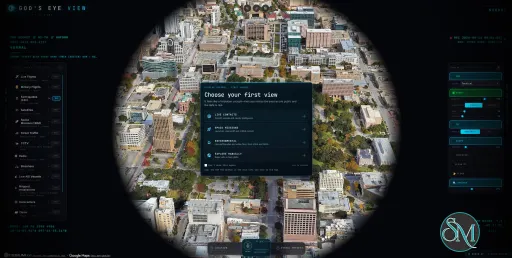
God's Eye View is an open-source geospatial visualization application that combines public data feeds with a photorealistic 3D globe. Built around CesiumJS and vanilla JavaScript, it brings aircraft, ships, satellites, earthquakes, weather, and public camera locations into a single interactive interface.

The application is designed for people interested in geospatial data, open-source intelligence (OSINT), geographic exploration, and real-time situational awareness. Users can track objects, inspect available metadata, change the globe's visual appearance, and interact with the interface using voice commands.

Unlike a conventional mapping application, God's Eye View emphasizes combining multiple public information sources into one exploration and visualization environment. However, not every displayed element represents a live observation, and the accuracy of individual layers depends on the underlying data source.

Features

Interactive 3D Globe

God's Eye View uses a 3D globe to visualize geographic information at global and local scales. Users can navigate between regions, zoom in on tracked objects, and inspect available information without switching between separate tracking websites.

Its photorealistic imagery and terrain make the application useful for geographic exploration and demonstrations, while its modular architecture allows individual data layers to be extended independently.

Live Aircraft, Ships, and Satellites

The application combines multiple tracking sources to display aircraft, maritime traffic, and satellites. Users can select tracked objects, inspect their available metadata, and follow their movement across the globe.

Additional tracking features include a nearby-contacts view and a cockpit-style camera mode that follows selected aircraft. Satellite pass predictions can also provide estimated rise, peak, and set times for loaded satellites.

These capabilities depend on the availability and freshness of the relevant data feeds. They should not be interpreted as unrestricted access to every aircraft, vessel, or satellite.

Earthquakes, Weather, and Environmental Data

Beyond transportation and satellite tracking, God's Eye View includes environmental layers for earthquakes and weather.

Its documented weather features include forecast wind visualization, observed radar playback, satellite cloud imagery, lightning, and tropical cyclone tracks. These layers help users explore changing environmental conditions alongside other geographic information.

The application combines data from multiple sources, so update frequency, geographic coverage, and accuracy can differ between layers.

Public Camera Locations

The application can display public camera locations, including mapped automatic license plate recognition (ALPR) camera locations sourced from OpenStreetMap.

Camera positions and metadata should be distinguished from live video availability. The presence of a mapped camera does not necessarily mean that its footage is accessible, current, or available for viewing.

AI-Powered Voice Control

God's Eye View supports hands-free interaction through a real-time AI agent. Users can issue voice commands to navigate the globe, inspect tracked objects, and query supported data layers.

Its analyst-style answers can help count, filter, and rank supported objects or geographic features. The application also includes voice-driven annotations, allowing users to add marks, boundaries, and routes to the globe.

AI capabilities depend on the configured provider and available credentials. The basic application can start without optional API keys, but some enhanced features require additional setup.

Tracking, Visualization, and Camera Controls

The interface includes tools for following selected objects, displaying movement trails, and showing contextual metadata. Other features include:

  • Detection overlays: Display bounding boxes and identifiers over objects in view.

  • Visual styles: Apply shader-based effects such as thermal, night-vision, monochrome, and CRT-inspired appearances.

  • Military-style HUD: Present selected information in a tactical interface.

  • Scene director: Create cinematic camera movements for demonstrations and recordings.

  • Shareable links: Preserve selected camera positions, visual styles, layers, and tracking context in a URL.

These features make the application useful not only for data exploration but also for presentations, educational demonstrations, and geospatial visualization projects.

Download God's Eye View v0.3.0 - Software Mirrors

God's Eye View v0.3.0 Source Code

God's Eye View v0.3.0 Source code (zip)

God's Eye View v0.3.0 Source code (tar.gz)

God's Eye View v0.3.0 Release Notes:

v0.3.0 brings God's Eye View down to the street, into your pocket and into three new languages. Open street-level photos from four providers without leaving the globe, use the app on a phone with a layout built for it, and read the interface in Spanish, Russian or Simplified Chinese. Short share links, a rebuilt voice assistant, your own map files, GNSS interference and aircraft emergencies, ten new camera packs and about thirty new bikeshare systems come with it.

Street Level

street-level-panoramax-photo-paris See the street from the globe (Cameras ▸ Street Level). Coverage lines drape on the terrain and Google 3D tiles; click a street and the nearest photo opens in the panel, flat or 360°, with view cones along its sequence and ‹ › to step through it.
  • Four providers, one at a time: Panoramax and KartaView, which need no key at all, Mapillary with a free client token, and Google Street View on the Google 3D map with your Google Maps key.
  • Every caption names the photo's author and licence and links to the original.
  • Filter by 360° or flat imagery and by capture date; share links remember the provider and filters.
  • Host apps can compose their own provider list, and point Mapillary at a server-side Graph endpoint so no token reaches the page.
street-level-google-nyc

On your phone

combo-phone On screens 720 px wide and narrower, the globe stays full screen and a bottom tab bar (Layers, Cameras, Context, Search, More) opens one panel sheet at a time. Swipe a sheet down to close it.
  • Pinch zoom is three times as responsive, aircraft and ships are easier to tap, and opening Context shows the aircraft you are tracking.
  • Add it to your home screen: the app ships a web app manifest and icons, so it installs with the God's Eye View mark instead of a blank tile.

In your language

combo-languages The interface now speaks Spanish, Russian and Simplified Chinese. Pick a language from the globe button in the bottom-right corner, or open the app with ?lang=es, ?lang=ru or ?lang=zh-CN; by default it follows your browser.
  • Each language is one JSON file keyed by the English text, and npm test fails on missing or broken translations, so adding a language is a contained piece of work.

Also in this release

Short share links

  • The share button makes short /share/ links. The code is a compact, versioned description of the view, so a link opens the same way on any copy of the app, including your own local install.
  • A link can follow an aircraft, military aircraft or satellite. If it has stopped reporting, the view opens at its last known position and says so.
  • A mistyped link is refused instead of opening the wrong view, and older long #v=2 links keep working.
  • The codec is a package export, so a server can read share links, for example for link previews (format).

Voice

  • Answers you can trust. Voice can turn on and query every data layer by its everyday name ("buses", "hurricanes", "military bases"). It counts up to 250,000 records per layer, says when a layer is off or still loading instead of answering zero, and marks partial answers.
  • Short spoken answers, details on screen. A card above the mic shows captions, the steps of a slow request and the result with its sources.
  • Point and ask. Hold Space with the cursor on an aircraft, ship or place and ask "what's that?" or "track that one".
  • Gemini Live as an alternative to OpenAI Realtime, ChatGPT sign-in for OpenAI voice (experimental), a Voice Preview and Settings panel, and globe rotation.

New on the map

  • Your own files. Import GeoJSON, KML, KMZ and GPX from DISPLAY or drop them on the globe. KML keeps its styles and heights, and the files never leave your device.
  • GNSS Integrity (Events) maps the navigation accuracy aircraft report, which is where GPS interference shows up. It is evidence, not confirmation, and its method and limits are documented. Flights and military flights also highlight emergency squawks and ADS-B emergency statuses.
  • A real sky: the 9,096 stars of the Yale Bright Star Catalogue where they are at the scene's time, over a soft Milky Way.
  • Air quality in the Weather group, starting with Canada's AQHI, and S2 GhostMaps, S2 Underground's public intel products, updated as new editions are published.
  • Scope controls for the HUD, a cloud-filter slider for satellite clouds, offline geo: links in search, and area tools that break results down by airline, country, aircraft type or ship type.

Cameras, bikes and transit

  • Ten new CCTV packs: Taiwan's national freeways (about 1,800 cameras), Hong Kong (about 1,000), Norway's Statens vegvesen (about 850, with live video for about 135), City of Toronto, Catalonia, Washington State's WSDOT and King County, and opt-in packs for Florida FL511, New York City and Lithuania, whose terms or unconfirmed licences require it.
  • Cameras with a known model show its datasheet resolution, night vision and field of view, and live-video cameras are coloured apart from stills.
  • About thirty new bikeshare systems: seven Brazilian Bike Itaú cities, Bogotá and Santiago, Toronto, Detroit, Pittsburgh, Aspen and Kona & Hilo, six Norwegian cities, Barcelona's Bicing and AMBici, and nine more Spanish cities.
  • Nine Ontario transit feeds, including TTC, MiWay, HSR and YRT/Viva, with each city's own names for its vehicles and routes.

Install, performance and security

  • Docker: docker compose up runs the app with no local Node install, with a health check and SELinux support. Pinokio now opens the app in your system browser.
  • Faster rendering: aircraft models skip Cesium's per-model environment map (about 2 ms less GPU time per frame with 150 models in view), turned-off layers release their memory, and hidden tabs stop polling.
  • Hardening: cross-site requests are refused and rates limited on the terrain, traffic, Overpass and bikeshare proxies; the remaining upstream reads are size-capped; and dependency CVEs are patched.
  • Correctness: dozens of fixes for the antimeridian, impossible dates, and values that should read as unknown instead of zero, across satellites, fires, cyclones, ships, launches, directions and the HUD.
See CHANGELOG.md for the full list.

Community

Thank you to everyone who contributed since v0.2.1. Street Level
  • @asturksever — Street Level and its Mapillary, Google Street View, KartaView and Panoramax providers (#768, #966, #1121, #1134)
  • @gekh — the leaner Street Level rebuild with one provider registry and one photo viewer (#974)
Languages
  • @meirm — the localization foundation and the Spanish translation (#601, #602), with the Russian catalog started from #312
  • @gekh — the Simplified Chinese catalog and its style guide (#1298), and work on the localization foundation (#602)
  • @abiyeenzo and @EDIT-Aeterna — the Simplified Chinese translations the zh-CN catalog is built on (#914, #979)
Phone and app
  • @mazy1998 — shared sliders, selectors, dropdowns, buttons and status badges across the panels (#1287, #1301, #1302, #1305, #1306, #1309)
  • @blearymoth — the phone tab-shell the phone layout is adapted from (#203)
  • @cliph — the web app manifest and home-screen icons (#636)
  • @KnottyDyes — a first-run hint touch screens can close, and isolated terrain tests (#1226, #1244)
Voice, agents and tools
  • @manjunath22466 — Gemini Live, the Voice Preview and Settings panel, globe rotation, work on the voice core, and voice fixes (#872, #1299, #1225, #837, #1205, #1220, #1235)
  • @devv-shayan — ChatGPT sign-in for Realtime voice (#621), with credential handling from #653 by @TheSmokeDev
  • @kvnloo — the model-free World Packet boundary, right-rail and Radio layout fixes, Pinokio performance docs, and spotting the MCP panel-key repair race (#880, #816, #918, #917, #789)
  • @quanticsoul4772 — area-tool breakdowns, the aircraft-model GPU saving, memory release for turned-off layers, stale wind and traffic flags, OpenSky credentials, Ontario 511's new key, Windows QA gates and more (#1056, #1366, #1367, #1303, #1239, #1229, #1228, #1234, #997, #1057, #1061, #1062, #1064, #1304, #1384, #1398, #1399)
  • @jibraaan — one MCP panel key across an install's servers (#958), from the report and diagnosis by @MarvinNL046 (#927)
  • @xiehuanyi and @shirunjies8-png — MCP setup on the default port (#934, #959)
  • @daikaginza — verticalRateMps for tracked aircraft, one changelog file per PR, the terrain-heights cache and rate bounds, the GBFS rate limit, configurable tile origins, Overpass cache correctness and more (#718, #787, #686, #690, #935, #937, #1326, #792, #1207, #772)
Layers and data
  • @leopechnicki — GNSS Integrity and emergency squawk highlighting (#855, #856)
  • @mazy1998 — integrating GNSS Integrity, file import, GBFS v3 names and S2 GhostMaps onto main (#1108, #1122, #1120, #1297), and steady local RTL-SDR playback (#1183)
  • @gekh — the star field and Milky Way (#1243)
  • @kapturner — importing GeoJSON, KML, KMZ and GPX files (#925), requested by @Coming-Clouds (#890)
  • @rileygramlich — the Air quality layer (#568)
  • Black Pine Defense (@GPTmadeit) — the S2 GhostMaps layer (#1297)
  • @NotProniss — the satellite cloud-filter slider (#1084)
  • @cj-vana — offline geo: links in search (#1071)
  • @21sagge — geocoding through the server so a restricted browser key works (#693)
Cameras
  • @ch-bas — datasheet specs for identified cameras, and the WSDOT and King County packs (#452, #644, #645)
  • @419vive — the Taiwan Freeway Bureau pack (#1237), following @tbdavid2019's note in #652
  • @JCY2515 — the Hong Kong Transport Department pack (#990)
  • @trygvehhh, with @h4lden — the Statens vegvesen pack and Kartverket ground heights (#929, #945)
  • @cliph — the City of Toronto RESCU pack (#640)
  • @ulihhhh — the Open Catalonia pack (#595)
  • @Danielslay86 — the FL511 Florida pack, live-camera colours and stills at their own aspect (#605, #1200, #1201)
  • @mvanhorn — the NYC DOT pack (#1085)
  • @Reloded — the Lithuania Eismoinfo pack (#607)
  • @yaka0007 — hardened Tarktee DATEX catalog fetches (#1233)
  • @PoBruno — live HLS on plain-HTTP LAN pages (#950)
  • @omerbberk — missing camera numbers stay unknown (#1172)
Bikes and transit
  • @cliph — nine Ontario transit feeds and Bike Share Toronto (#634, #641)
  • @ulihhhh — Barcelona's Bicing and AMBici, and nine Spanish city systems (#1176, #1190)
  • @MiguelGFerreira — seven Brazilian Bike Itaú cities (#359)
  • @trygvehhh — Norway's city bikes (#946)
  • @jeffblakely — Detroit, Pittsburgh, Aspen and Kona & Hilo (#1082)
  • @YosolosoY — Bogotá and Santiago (#1063)
  • @KristofKekesi — GBFS v3 station names (#61)
  • @Bortlesboat — stations with invalid coordinates are skipped (#1232)
Install and setup
  • @SM-26 — the Docker install path (#208), with @jklaze diagnosing the container-to-host key fix, and @14traits, @PoBruno and @milu70hub testing on Apple silicon, Linux and NAS hosts. #94 by @nitsuah, #55 by @DarshSinghKushwaha and #42 by @samaritan-maxjb covered the same ground first.
  • @14traits — the Docker health check (#1394), requested by @shahab-cl (#1240)
  • @anilguvenc — Docker on SELinux hosts (#1391)
  • @NukeThemAII — Pinokio opens the app in the system browser (#1222)
  • @blowing-a-raspberry and @monwiss — keeping local logs and cache out of the dev server (#948, #761)
Correctness and hardening
  • @asturksever — hidden tabs stop polling, and fixes across Overpass, radio, aircraft, space, share links, search, military history, import, weather, terrain, launches and traffic (#1282, #1264, #1268, #1269, #1270, #1271, #1272, #1273, #1274, #1275, #1276, #1278, #1279, #1281), plus the new-layer PR checklist (#957)
  • @rudycelekli — 49 fixes across search, directions, weather, fires, cyclones, ships, launches, terrain, imagery and the HUD, each with a regression test (#1022, #1023, #1024, #1026, #1027, #1030, #1031, #1032, #1033, #1036, #1038, #1039, #1040, #1041, #1042, #1043, #1044, #1045, #1046, #1047, #1051, #1114, #1115, #1117, #1118, #1186, #1197, #1199, #1283, #1284, #1339, #1340, #1341, #1342, #1343, #1349, #1350, #1351, #1352, #1353, #1354, #1385, #1386, #1387, #1388, #1389, #1390, #1395, #1396), with the Launch Library changes prompted by @lucas-stauder (#1192)
  • @Rohilalala — the SDR seek-wrap fix, military track hold, map fallback retry, OpenSky partial snapshots, director shots and antimeridian fixes (#1174, #1096, #1097, #1102, #1110, #1111, #1171, #1173, #1431)
  • @Sunil56224972 — cross-site gates for the TomTom and terrain routes (#973, #975, from #923)
  • @Mikejr314159 — bounded upstream body reads (#581)
  • @hneogy — Alpha-5 satellite catalog numbers (#767), and the reports behind it and the TLE fixes (#751, #906)
  • @xiehuanyi and @VG31OP — TLE parsing that keeps later sets and rejects mismatched pairs (#936, #1101)
  • @djabhi31 — director save status, and launch and earthquake tests (#1135, #1136, #867)
  • @ianblenke — test timing, Recent Imagery details, and the director bug report (#969, #970, #971)
  • @hifiguy — HTTPS Bing tiles (#1092), with @ulihhhh suggesting the focused fix
  • @ariannamethod — fire perimeters across the antimeridian (#1142)
  • @dvilrgamerz — no 404 from the keyless Google token probe (#1066)
  • @NurstarK — dependency CVE patches (#1094)
  • @nu-stats — weather frame pacing (#1345)
  • @HEOJUNFO — bounded snow sway (#782)
  • @onionviolet — one shared great-circle distance (#287)
  • @SomaFroghyar-TomTom — TomTom links (#903)
  • @dajiaohuang and @HyperionBurn — docs fixes (#839, #1196)
Thanks also to @jsawyerdev for the security reports behind several proxy fixes, and to @raysung-2026, @RealBenAnderson, @dawtcalm, @kareemaiman, @amirshahab89 and @BennyBread for reports and requests.

Verification

  • Node 24.14, Node 26.x and Windows onboarding CI passed.
  • Unit suite: 8,794 passed, 0 failed, 1 skipped.
  • Format, module-boundary and changelog checks and the production build passed.
  • Tracking regression: 109 passed, 0 failed.
Existing Pinokio installs can choose Update; terminal and Docker installs can run git pull. Compare v0.2.1...v0.3.0

Performance and Compatibility

God's Eye View runs locally and presents its interface in a web browser. Its frontend uses CesiumJS and Vite, while local server components provide access to data sources and optional AI services.

The project supports installation through Pinokio or a terminal-based development workflow. It is available for Windows, macOS, and Linux through the documented Pinokio installation path. Developers can also run it directly from the repository with Node.js.

The application can start without optional API keys by using its default imagery and terrain sources. Additional providers, including Google Maps and Cesium ion integrations, can improve the available imagery, terrain, and place-search capabilities when configured.

Performance depends on browser WebGL support, graphics hardware, the size of the visible scene, network connectivity, and the data layers enabled. A detailed 3D globe with multiple live data sources can demand more resources than a basic two-dimensional map.

An important limitation is that the interface combines different kinds of information. Some sources are live or periodically refreshed, while traffic may be simulated using aggregate location data and certain camera positions or launch trajectories are estimates. Users should check source details before treating a visualization as authoritative intelligence.

System Requirements

The project does not specify a single minimum CPU, RAM, or GPU configuration. The following requirements are based on its documented installation and architecture.

  • Operating system: Windows, macOS, or Linux through the supported installation workflow.

  • Runtime: Node.js 24.14 or later within the supported Node.js 24 or 26 release lines for terminal installation.

  • Browser: A modern browser with WebGL support.

  • Graphics: A GPU capable of handling interactive 3D globe rendering is recommended.

  • Internet connection: Required for external map imagery and most live data feeds.

  • API keys: Not required for the basic installation. Optional provider credentials unlock additional imagery, place search, vessel tracking, and AI voice capabilities, depending on the provider.

  • Installation options: Pinokio or a local Node.js development environment.

The application can be started without API keys using its default imagery and terrain sources. However, photorealistic 3D imagery and some enhanced features require additional configuration. (GitHub repository, contribution guide)

Pros and Cons

Pros

  • Combines aircraft, ships, satellites, earthquakes, weather, and other geographic data in one interface.

  • Provides an interactive 3D globe with detailed imagery and terrain options.

  • Includes AI-powered voice control and natural-language queries.

  • Offers tracking, object metadata, visual effects, and camera-following modes.

  • Can run locally without mandatory API keys.

  • Open-source code allows developers to inspect, customize, and extend the application.

  • Supports Windows, macOS, and Linux through Pinokio.

  • Uses a modular architecture that makes adding data layers more manageable.

Cons

  • Requires a capable browser and graphics hardware for a smooth 3D experience.

  • Depends on external data providers, whose availability, accuracy, and update frequency can vary.

  • Some enhanced features require API keys and may be subject to provider quotas or usage charges.

  • Voice interaction requires additional AI configuration.

  • Some displayed information is simulated or estimated rather than directly observed.

  • The number of features and configuration options can overwhelm first-time users.

  • It is primarily a visualization and exploration tool, not a replacement for authoritative intelligence or specialized GIS software.

How to Install

Option 1: Install with Pinokio

Pinokio provides the simplest installation path for users who do not want to manage Node.js dependencies manually.

  1. Install or update Pinokio to a supported version.

  2. Open the God's Eye View repository and follow its linked Pinokio installation instructions.

  3. Click Install, then start the application.

  4. Open the local address provided by the launcher.

  5. Explore the globe using the default data sources.

  6. Configure optional provider credentials through the application's settings if you need additional capabilities.

Option 2: Install from the Source Code

For developers who prefer a terminal-based installation, ensure that a supported Node.js release is installed first.

Clone the repository and install its dependencies:

git clone https://github.com/bilawalsidhu/gods-eye-view.git
cd gods-eye-view
npm ci
npm run doctor
npm run dev

Open the local address shown by the application, typically:

http://localhost:4173

The setup doctor checks the local environment and helps identify configuration issues. You can start without optional API keys, then add credentials for enhanced functionality.

For a production build or development work, follow the project's current README and contribution guide, since the development server and preview server have different purposes.

Final Verdict

God's Eye View is an impressive open-source geospatial application that brings multiple public data sources together in a visually engaging 3D environment. Its combination of live tracking, environmental information, object-following controls, customizable visual styles, and AI-powered voice interaction makes it stand out from conventional map applications.

The project is especially appealing to OSINT enthusiasts, developers, geography enthusiasts, and anyone interested in exploring public real-world data. Its modular architecture and open-source license also make it a promising foundation for experimentation and customization.

However, users should understand the difference between live observations, estimates, and simulations. The application presents a unified picture of the world, but its usefulness depends on the quality and availability of the underlying data. Some of its most advanced features also require external credentials and additional setup.

God's Eye View is an excellent choice for interactive geospatial exploration and public-data visualization. It combines an ambitious feature set with an accessible installation path, while remaining extensible for developers who want to build on it.
God
Free
Software Informations:
Developer:

Operating System:
All Platforms
Date Added:
2026-10-28T22:07:23.609Z
Categories:

Post a Comment/Report Broken Link: