REA - Reverse Engineer Anything - rea-agents-6.7.0

REA, short for Reverse Engineer Anything, is an open-source toolkit that helps AI coding agents investigate how software works, even when its original source code is unavailable. Hosted on GitHub, the project connects agents to analysis tools for native binaries, JavaScript applications, Electron apps, and other software.

Rather than attempting to recover an application's exact original source code, REA collects evidence from decompilers, disassemblers, strings, symbols, function references, and other analysis techniques. An AI agent can use that evidence to explain a feature, document an implementation, or build a compatible alternative for another project.

REA provides a command-line interface (CLI), a Model Context Protocol (MCP) server, and guided workflows for compatible AI coding tools. It is particularly useful for developers who need to understand undocumented behavior, investigate legacy software, or reproduce a feature without access to its implementation.

Features

AI-Assisted Reverse Engineering

REA is designed to let developers investigate software by describing what they want to understand in natural language.

For example, you could ask an AI agent to investigate how an application's offline search works, trace the relevant functions, explain the evidence, and implement similar functionality in your own project.

REA supplies the investigation tools and findings, while the AI agent performs the reasoning and writes the new implementation. This division makes it easier to investigate unfamiliar software without manually navigating every analysis tool.

The workflow generally follows three stages: decompile or inspect the target, trace the relevant behavior through the available evidence, and recreate the desired functionality in a separate implementation.

Native Binary Analysis

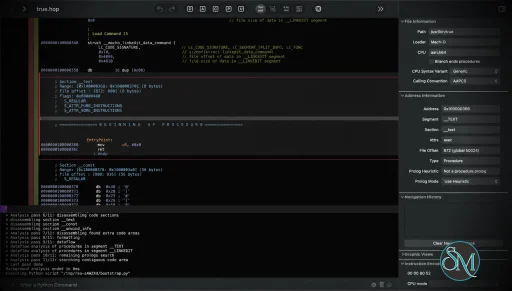
REA connects AI agents to tools that inspect compiled native applications. Depending on the configured analysis provider, developers can examine functions, strings, symbols, assembly instructions, pseudocode, references, and call relationships.

These capabilities help investigate how a binary implements a particular feature or interacts with other components.

For native analysis, REA supports integration with Hopper and Ghidra. The project also documents IDA-related support in its broader development direction, although provider availability and individual capabilities depend on the installed version and platform.

Hopper is a separate product with its own licensing requirements. Ghidra must be installed independently and configured before REA can use it.

Importantly, decompilation produces an approximation of the original program logic, not the original source code with all its comments, names, and design decisions intact.

JavaScript and Electron Application Inspection

REA can analyze JavaScript applications and Electron packages without executing the target application.

It can inspect application directories and ASAR archives to identify modules, imports, dependencies, and relationships between components. This is useful for understanding how a desktop application's frontend communicates with its underlying services.

For example, developers can investigate how an Electron application handles authentication, storage, updates, or networking by examining the available code and tracing the relevant modules.

Static analysis is especially convenient because it does not require a native decompiler for supported JavaScript targets. It also reduces the risks associated with running unfamiliar applications during an initial investigation.

Command-Line Interface

REA provides a CLI for running analysis tasks directly from a terminal or through automation scripts.

Install the command-line package globally with npm:

npm install --global rea-agents

Then start the guided setup:

rea setup

To check the environment and configured analysis tools:

rea doctor --json

For a JavaScript application or Electron package, you can run an analysis directly:

npx -y rea-agents@latest analyze-javascript-application \
  /absolute/path/to/app --json

The JSON output makes it easier to process analysis results programmatically or pass structured findings to another tool.

Native binary analysis requires an appropriate provider to be installed and configured. The CLI therefore serves as a common entry point rather than replacing the underlying analysis engines.

MCP Integration for AI Coding Agents

One of REA's strongest features is its MCP server, which exposes analysis operations to compatible AI assistants.

The setup utility can configure supported clients, including Claude Code, Claude Desktop, Codex, Cursor, Gemini CLI, and Windsurf. Additional clients can connect through manual MCP configuration if they support local MCP servers.

After setup, an agent can call REA's tools to inspect a target, search for strings, examine functions, trace references, and collect evidence without requiring the user to execute each analysis command manually.

This integration is valuable for AI-assisted software development because it allows reverse engineering to become part of the same workflow used to modify and test code.

Guided Workflows and Evidence-Based Results

REA provides structured investigation workflows intended to guide an agent from an initial question toward a supported explanation.

Instead of returning only a conclusion, the tools can provide evidence and identify unresolved questions or limitations. Developers can then distinguish observed behavior from assumptions that require further testing.

The project also supports reusable analysis results and snapshots in relevant workflows, reducing the need to repeat expensive analysis operations unnecessarily.

This evidence-oriented approach is particularly useful when examining unfamiliar or poorly documented software, where an unsupported conclusion could lead to an incorrect implementation.

Local Analysis and Privacy

REA is designed to analyze target applications locally rather than uploading them to a hosted REA analysis service.

This is beneficial when investigating internal tools, proprietary software, or applications that cannot easily be shared with an external service.

However, the privacy boundary also depends on the AI agent and model provider being used. Analysis results returned to an agent may be sent to its configured model service, so developers should review that provider's data-handling policy before investigating confidential software.

Guided Installation and Diagnostics

REA includes a setup utility that configures the CLI, MCP server, and matching agent instructions. It can connect existing analysis tools and offer to install Hopper when needed.

The setup process presents proposed changes for review and approval and backs up existing agent configuration before applying changes.

Its diagnostic command checks dependencies, host compatibility, analysis tools, and agent configuration:

npx -y rea-agents@latest doctor

This helps developers identify missing dependencies or configuration problems before attempting a more involved investigation.

Performance and Compatibility

REA is distributed as a Node.js application and supports the command line and local MCP workflows. Its documented runtime requirements include Node.js 22.19 or newer in the 22.x line, Node.js 24.11 or newer in the 24.x line, or Node.js 26 and later.

Native analysis depends on the configured provider and supported host environment. The project documents support for macOS and selected Linux distributions, while Windows support varies by analysis provider and workflow.

Static JavaScript and Electron analysis has fewer dependencies because it does not require a native analysis engine. This makes it a convenient starting point for developers who want to try REA without installing a separate disassembler.

Actual analysis speed depends on the target application's size, the chosen provider, and the complexity of the behavior being investigated. Large native binaries may require more time and resources than a small JavaScript application.

REA is an analysis framework rather than a universal decompiler. Its capabilities depend on the tools available for the target platform, and the accuracy of conclusions depends on the evidence that can be recovered. It cannot guarantee recovery of original source code or perfectly reproduce every behavior of an application.

System Requirements

  • Runtime: Node.js 22.19 or newer in the 22.x line, 24.11 or newer in the 24.x line, or 26 and later.

  • Package manager: npm.

  • Operating systems: Supported macOS and Linux environments, with Windows support depending on the selected workflow and provider.

  • Native analysis: Hopper or Ghidra for the corresponding supported workflows.

  • AI integration: An MCP-compatible agent for interactive, agent-driven investigations.

  • JavaScript analysis: A local application directory or ASAR archive; no native decompiler is required for this workflow.

Ghidra integration has additional requirements, including a compatible Ghidra installation and Java Development Kit. Consult the current installation documentation for exact versions and platform-specific instructions.

Pros and Cons

Pros

  • Free and open-source under the MIT license.

  • Connects AI coding agents to reverse engineering tools through MCP.

  • Supports native binary investigation using decompilation and disassembly.

  • Analyzes JavaScript applications and Electron archives without executing them.

  • Provides CLI access for scripting and automation.

  • Collects evidence to support explanations of application behavior.

  • Offers structured workflows for investigating and recreating software features.

  • Designed for local analysis without a hosted REA analysis service.

  • Guided setup and diagnostic tools simplify configuration.

  • Can help developers understand legacy software and undocumented implementations.

Cons

  • Native analysis depends on external tools such as Hopper or Ghidra.

  • Some analysis providers have platform-specific limitations.

  • Decompilation cannot reliably recover the original source code.

  • Investigation quality depends on the available evidence and analysis engine.

  • Requires an AI agent for the full natural-language investigation workflow.

  • Additional setup may be necessary for native binaries.

  • Model-provider privacy policies still matter when sending analysis results to an AI service.

  • Reverse engineering complex applications can require substantial technical knowledge and time.

Download REA - Reverse Engineer Anything - rea-agents-6.7.0 - Software Mirrors

REA - Reverse Engineer Anything - rea-agents-6.7.0 Source Code

REA - Reverse Engineer Anything - rea-agents-6.7.0 Source code (zip)

REA - Reverse Engineer Anything - rea-agents-6.7.0 Source code (tar.gz)

REA - Reverse Engineer Anything - rea-agents-6.7.0 Release Notes:

6.7.0 (2026-10-18)

Highlights

  • Client configuration edits follow the duplicate-member semantics used by MCP clients.

Changes

Fixes

  • Client configuration: Setup edits the last repeated JSON/JSONC member, matching the value clients actually read. Setup and uninstall refuse a removal that would reactivate a shadowed duplicate, preserving the original configuration. (#4957, morluto/rea#4952). Thanks @kaoru0822-kitauji, @xu91102.
Full contribution record: 4 commits and 1 merged PR.

6.6.0 (2026-10-18)

Highlights

  • Add Kuna as a caller-supplied static-analysis provider.
  • Query selected JavaScript facts and multiple APK locale tables without repeating the underlying analysis.
  • Extend Ghidra analysis to Windows ARM PE targets and explicit raw m68k images.
  • Preserve completed Evidence, cancellation reasons and retryable cleanup across provider and CLI finalization.

Changes

  • Kuna analysis: Use a caller-installed Kuna for procedure listings, pseudocode, assembly, call relationships, exact-address xrefs and cached string searches. Project exports retain source spans and digests; repeated requests reuse completed work. Recorded real-provider coverage uses Kuna 1.833 on Linux; Windows, PE and universal Mach-O are unsupported. See the provider guide. (#3832, #3854, #4071, #4095). Thanks @gensokyo-dev, @kaoru0822-kitauji, @N0zoM1z0.
  • Retained JavaScript facts: Query exact application paths, selected properties and filtered module references through inspect_analysis_view, with paging and complete row Evidence. These views reuse completed analysis and preserve source selection and unknown coverage. (#4265, morluto/rea#4190, #4097, morluto/rea#4092). Thanks @kaoru0822-kitauji, @N0zoM1z0.
  • APK locale tables: Request several resource locales in one decode with repeatable CLI --locales or MCP locales. Each table reports its status and coverage; existing single-locale fields remain available. (#4804, morluto/rea#4777). Thanks @abhay-2108, @N0zoM1z0.
  • Windows ARM binaries: Ghidra admits ARMNT/Thumb-2 and ARM64 PE applications and DLLs on the Windows x64 host lane. Recorded Ghidra 12.1.4 verification uses WindowsResourceReference disabled and raised startup budgets; default-analyzer completion, ARM64EC/ARM64X and Windows-on-Arm hosts remain unverified or unsupported. See the exact scope. (#3965, morluto/rea#2186). Thanks @N0zoM1z0, @WestLabsAI.
  • Raw m68k images: Analyze explicitly selected big-endian m68k raw binaries using Ghidra’s fixed 68000 profile and a caller-supplied aligned entry. Real CLI/MCP verification used Ghidra 12.1.4 on macOS arm64; Linux is unverified and Windows P0 does not admit m68k. See mapping requirements. (#4018). Thanks @icedac.
  • JADX deadlines: Set REA_JADX_OPERATION_TIMEOUT_MS to extend APK loading and upstream operation deadlines together. Doctor reports the effective value and setup forwards an explicit selection. (#4466, morluto/rea#3918). Thanks @jaychou813, @SandstromPL.
  • Electron window options: Resolve stable local constant BrowserWindow options while retaining source provenance. Relevant writes and escapes keep the result unknown. (#4400, morluto/rea#4366). Thanks @kaoru0822-kitauji, @N0zoM1z0.
  • Language editions: Add the Greek website edition and Malayalam documentation, with Korean typography and translation corrections across the site. (#3520, #4792, #3821, morluto/rea#3820, #3799, morluto/rea#3798, #4344, #3856, #4166). Thanks @gensokyo-dev, @hi2242, @kalayciburak, @kaoru0822-kitauji, @kraken-503, @kukinghan, @N0zoM1z0, @yeseong0412.

Fixes

  • Cancellation and cleanup: Keep completed observations, exact cancellation reasons and the original physical failure through finalization. Failed cleanup retains its process or file owner for retry; recovered resources disappear from pending-cleanup reports without replacing the original error. (#4238, morluto/rea#4232, #4274, morluto/rea#3923, 3e82366, 16924e2, bbfe6ed, 1f23e97, 08fbeb8). Thanks @coygeek.
  • Provider startup: Join prerequisite probes and in-flight readiness work before shutdown, preserve typed timeout and JVM-memory failures, and retain startup diagnostics through cleanup. Ghidra recognizes keg-only Homebrew JDKs and names the setting responsible for a startup timeout. (376eeca, ceeff5a, 3ad1032, 964decd, 3fa972a, #4557, morluto/rea#4556, #4590, morluto/rea#4241). Thanks @DanielCvz1, @J0UH, @Rinkia, @RishTheFish21, @vadlachary2002.
  • Client configuration: Preserve the selected launcher, destination file, caller timeout choices and unresolved configuration evidence. Setup/uninstall recovery stays bound to the exact published file, keeps current verified backups, and transfers failed cleanup ownership for retry. (d0253c9, 7e4eed9, 2fb5e20, 8235210, d818c3d, 19329e4, dadf909, 333e0ab, c15c206). Thanks @Adolanium.
  • Configuration formats: Read signed 64-bit TOML integers without rounding, handle large TOML documents without argument-spread failures, preserve JSONC trivia and Hermes YAML scalar text, and reject NUL bytes in registration environment values. (#4937, morluto/rea#4917, c43bc0b, 4fd28fc, #3568, #4335). Thanks @alfredo1491, @gensokyo-dev, @kaoru0822-kitauji, @N0zoM1z0, @ShuaixinHuang, @xu91102.
  • Claude Code configuration: Setup, doctor and uninstall now accept only the strict JSON format Claude Code reads, including a leading UTF-8 BOM. Comments and trailing commas are refused before backup or writing; clients that support JSONC retain their existing behavior. (#4944, morluto/rea#4940). Thanks @kaoru0822-kitauji, @xu91102.
  • CLI output and dispatch: Accept --flag=value and spaced global output values, keep array positions in filtered JSON, validate integer tokens before coercion, and exit quietly when the output reader closes. Cancellation remains effective through command finalization; app bundles and static native inspections select the intended workflow. (#3811, #4823, 2ae4e16, 8d82579, #3781, 279c590, #3511, morluto/rea#3321, f31b231). Thanks @arjunprabhulal, @coygeek, @kaoru0822-kitauji, @ShuaixinHuang, @Sriram-PR, @Tapraj-Pathak.
  • Updates: Route --update through the verified updater and bound retained package-manager diagnostics. (4f7b5fb, 01cdbbd).
  • MCP contracts: Advertise self-contained tool inputs while preserving tuple, array, Boolean and nested-JSON constraints across schema profiles. Schema-reference handling no longer rewrites literal metadata; catalog identity includes the output-schema profile. (5e30969, 10aa74d, 204b9f3, b3389a5, a2e3016, ba98130, c5fb86d). Thanks @akushonkamen, @HarsH-1877, @kaoru0822-kitauji, @xingzihai.
  • Session ordering: Keep snapshot admission ahead of later calls on the same connection, retain shutdown signals until cleanup succeeds, and preserve inspection authority through investigation publication. (#3661, morluto/rea#3334, 8873b39, 663d07f). Thanks @coygeek, @rudycelekli, @Swatantra-66.
  • JavaScript relationships: Distinguish Map reads from network endpoints, associate response endpoints only with writes that reach the read, and preserve child-process receiver ownership and effective stdio choices. Version comparisons keep relocation and unknown relationships distinct from application changes. (fbfdb6a, #4759, morluto/rea#4606, #3819, morluto/rea#3362, #4336, morluto/rea#3355, 556504e, 4d980d0). Thanks @Abdooo2235, @coygeek, @kaoru0822-kitauji, @Xinglan233.
  • Browser capture: Bound CDP handshakes and command responses, preserve malformed inventory uncertainty and partial cleanup diagnostics, and report cancellation after content reads and final cleanup. Accessibility comparisons require observed coverage; attached emulation teardown limits remain explicit. (#3555, morluto/rea#3553, #3901, morluto/rea#3379, 4cc044b, #4406, morluto/rea#4403, #2893, 0123d59, 2ff0867). Thanks @coygeek, @dakjdakd, @kaoru0822-kitauji, @maxazure, @N0zoM1z0, @YunzhouLi-hub.
  • Browser page facts: Preserve URL path bytes when removing credentials, repeated document Link headers and complete COOP/COEP structured items. WebMCP discovery reads the actual schema properties and exact receiver path. (#4731, df2fc25, c360cfc, ebd5a82, 38f92d1). Thanks @Abdooo2235, @geekwolf, @ShuaixinHuang.
  • APK resource accuracy: Retain completed tables and decode facts after interrupted or failed reads. Derive locale limits from resource configuration fields, disclose unselectable qualified tables, distinguish document failures from omitted entries, and bind Evidence to the decoded snapshot. (34a88d6, f5fcf52, 6385ef4, 98886ad, dc2e811, #4771, morluto/rea#4768). Thanks @abhay-2108, @gensokyo-dev, @Iyanuoluwa007, @kaoru0822-kitauji, @N0zoM1z0.
  • Apktool guidance: Retain the observed version and disclose the matching platform/release advisory windows without treating a version string as proof of decoder safety. Missing prerequisites and decode refusals identify the selected APK or launcher. (d38f099, 63696d2, cc038da). Thanks @GovinduSasanka, @peter-research.
  • Android method bodies: Recover original bytecode bodies when Java source is omitted while preserving genuine native/abstract body absence and primary failures during retryable cleanup. (63c65a2, 742b6f5, 9fa6d2b). Thanks @balkan16, @Chessing234.
  • ADB observations and transfers: Preserve display-scoped focus, distinguish missing declarations from absent focus, retain numeric physical density and mark unknown permission coverage partial. Transfers use consumed snapshot identity and refuse unknown destination existence; uninstall requests explicitly select user zero. (7086768, 3d028db, #4074, morluto/rea#3942, #4663, #4665, 1342127, 61e6880, be0b2d1). Thanks @Copilot, @coygeek, @gongfpp, @Tapraj-Pathak, @yankikucuk.
  • Apple application structure: Derive bundle components and launchd domains from their owning directories, retain unavailable components, and select only exact Assets.car names as asset catalogs. Interface Builder keeps unresolved classes and counts hierarchy records beyond the returned object page. (149a0fc, 5d6029e, c192c58, #4094, morluto/rea#3914, #4118, morluto/rea#3958, #4162, morluto/rea#3950). Thanks @coygeek, @kaoru0822-kitauji.
  • Native analysis providers: Keep Ghidra byte matches within examined coverage, retain PE PDB/function-boundary limitations and preserve configured MIPS choices. Attached IDA refuses universal Mach-O rather than silently choosing a slice; request timeout identity and captured output survive adapter handling. (#4531, #2933, morluto/rea#2259, 01a1b3f, 50dd9fc, #4765, morluto/rea#3871, c0cfccb). Thanks @BeLit-Development-2, @coygeek, @kaoru0822-kitauji, @N0zoM1z0, @ShuaixinHuang.
  • Recorded crashes: Prevent GDB from discovering an executable named by an untrusted core, reject core mapping paths that escape the isolated sysroot, and preserve pwntools worker ownership across launcher exec. Completed decode facts and cancellation reasons remain available through failed final cleanup. (5bf4fff, b33c0df, #4435, morluto/rea#4011). Thanks @coygeek, @N0zoM1z0.
  • Windows cleanup: Retain unpublished runtimes after failed removal, handle read-only attributes and sharing conflicts, preserve primary snapshot failures and honor caller environment overrides. (f78d137, d69acc3, 0679a79, 5f9ac2c, 1bbf4bd). Thanks @DeryFerd.
  • Managed metadata: Compare nominal signatures and declaring identities across builds, preserve empty names without display substitutions, verify ABI-prefixed Mach-O exports exactly, and charge cached metadata once. Metadata errors report artifact file offsets; mixed-mode assemblies retain their actual boundary classification. (#3059, #3079, #3853, morluto/rea#3352, #3974, morluto/rea#3961, #3491, morluto/rea#3449, #4418, morluto/rea#4372, #3516, morluto/rea#3366). Thanks @8rulerstar, @coygeek, @duckhunt113, @Hahaa909, @JayOfTheKeyboard, @kaoru0822-kitauji, @keeponlight, @N0zoM1z0, @tomyrms.
  • Archive and filesystem identity: Reject colliding extraction paths before writing, classify ZIP offsets beyond EOF as malformed, normalize ZIP current-directory prefixes once, and preserve symlink and unreadable-path provenance. A directory named *.map is no longer mistaken for a source-map file. (862a0b2, c209dcb, 6b1c36e, 25c2222, d6e4fe4, #4131, morluto/rea#3909). Thanks @Adkid-Zephyr, @coygeek, @jackie-cqz, @kaoru0822-kitauji, @maxazure, @XY-code1.
  • Evidence and reconstruction: Authenticate all retained inventory substeps, preserve source-attributed caveats in composed workflows, and require comparable cited Evidence before declaring reconstruction coverage or readiness. Missing Evidence and residual replay uncertainty stay explicit. (9ac91e0, c4608a2, #4075, morluto/rea#3357, #3526, morluto/rea#3363, 153017d). Thanks @coygeek, @gensokyo-dev, @kaoru0822-kitauji, @N0zoM1z0, @rudycelekli.
  • Offline data: Preserve exact UTC packet-capture instants, SQLite column identity and snapshot admission failures, and cooked WASM directive literals. Cleanup cancellation retains completed EVM/WASM observations rather than losing them. (796faa0, 748ac7f, bc51d0e, 4f87f02, d694aef, 321cacb). Thanks @himamaheswarreddy, @mertkayacs, @rollroyces, @viniciusdsandrade.
  • Kuna recovery: Share concurrent single-function requests and cache repeats, validate warm exports once, stream string inventories beyond the former fixed buffer ceiling, and keep unproven processes in their run slots until close confirms release. Failure messages distinguish final buffer refusals from configurable deadlines. (#4045, #4169, #4049, #4318, #4052, #4098, #4343). Thanks @kaoru0822-kitauji.
  • Document selection: Preserve explicitly selected plist paths and bundle defaults, and only use document fallback after confirming its applicability. Finalization keeps completed selection facts and cancellation outcomes. (e6c4877, #3774, 9df559b). Thanks @kaoru0822-kitauji.
  • Capture and comparison accuracy: Admit schema-valid HAR numeric values while retaining exact-publication limits, preserve empty URL path segments, and keep unrelated process traces and unnamed reference endpoints distinct or unknown. (#3159, morluto/rea#3145, #3792, morluto/rea#3307, #4178, morluto/rea#3931, #3809, morluto/rea#3388). Thanks @coygeek, @gensokyo-dev, @kaoru0822-kitauji, @N0zoM1z0, @pablodiazjorge, @xu91102.
  • Evidence publication: Recheck staged output identity after its final write, classify missing review Evidence and duplicate ledger entries as caller input, and preserve the selected freshness requirement in comparison parameters. (#4764, morluto/rea#4613, #4452, morluto/rea#4444, #4065, morluto/rea#4000). Thanks @amyanger, @coygeek, @kaoru0822-kitauji, @Rinkia, @Swatantra-66.

⚠ BREAKING CHANGES

  • Saved Evidence: Evidence and analysis snapshots now require explicit nullable relationship_coverage in their identity commitments. Artifact inventories require scoped coverage and explicit integrity_contradictions; obsolete coverage_status and prose-based coverage inference are removed. Regenerate old Evidence/snapshots and inventory observations with this release: saved files are not migrated and omitted facts are not filled with guessed defaults. (db8128d, 0405c9d, a9588be).
  • Browser capture results: Consumers must retain resolved capture limits, event families and omission facts. Set desired budgets through the supported capture options; omitted caller inputs still select defaults, but stored observations must report the resolved values. Admitted content reads queue behind bounded concurrency. (57a23f0).
  • Android version codes: inspect_adb_package.version_code is a decimal string rather than a JSON number. Read it as a string, or use BigInt for numeric comparison. (#3485, morluto/rea#3368, 7666a48). Thanks @coygeek, @kaoru0822-kitauji.
  • Native UI failures: Failed or cancelled native UI scenarios now return typed errors with the collected report in partial_observation. Handle the error path and read that report instead of expecting a successful result containing failed steps. (d909919).
  • Provider status: binary_session candidate availability can be unknown during owner finalization. Preserve that state rather than treating it as unavailable; internal consumers must await the asynchronous session status API. (150e996).
  • Swift symbol locations: swift_symbols entries may have a null address when the provider supplies no location. Handle unknown addresses; optional evidence.reported_address retains the original provider value. (8116dc0).
  • Linux Hopper admission: Older builds previously admitted by a fixed allowlist need retained publisher-signed package evidence or an approved update to the current public demo. Update explicit HOPPER_LAUNCHER_PATH selections when migrating; the live feed offers only its current release. The official RPM metadata mismatch remains unresolved and is refused. (#3590, morluto/rea#3577, 70cd4cb). Thanks @gensokyo-dev, @kaoru0822-kitauji, @N0zoM1z0.
Full contribution record: 571 commits and 236 merged PRs.

How to Install

The recommended approach is to install REA through its guided setup utility.

First, ensure that a supported Node.js runtime and npm are installed. Then run:

npx rea-agents@latest setup

Choose the AI agents you want to configure, review the proposed changes, and approve them. Setup configures the MCP connection and installs the corresponding workflow instructions.

Restart the configured AI client after setup so it can load the new MCP server.

To use REA as a regular command-line application, install it globally:

npm install --global rea-agents

Then verify the installation:

rea doctor --json

For native binary analysis, configure Hopper or an existing Ghidra installation according to the official documentation. Static JavaScript and Electron analysis can be used without installing either tool.

To update an existing installation, follow the update instructions for the installation method you used. If you use the npx workflow, refresh the agent configuration with:

npx rea-agents@latest setup

Review the proposed changes and restart the relevant client when its MCP registration changes.

Final Verdict

REA is a compelling open-source toolkit for developers who want to combine reverse engineering with AI-assisted software development. Its biggest advantage is the way it connects analysis tools, structured evidence, and MCP-compatible agents into a single investigation workflow.

Support for native binaries, JavaScript applications, and Electron packages gives it a broad range of uses, from understanding undocumented features to investigating legacy software and building compatible implementations. The CLI and evidence-oriented results also make it useful beyond interactive AI sessions.

Its main limitation is that REA depends on external analysis engines for many native workflows, and its capabilities vary by operating system and provider. It also cannot recover original source code automatically or guarantee that an implementation recreated from analysis will behave identically to the original.

For developers working with unfamiliar applications, REA is worth exploring, particularly if they already use an MCP-compatible coding agent. It is best viewed as a bridge between reverse engineering tools and AI development workflows rather than a replacement for established disassemblers or the expertise required to interpret their results.
REA - Reverse Engineer Anything - rea-agents-6.7.0
Free
Software Informations:
Developer:

Operating System:
All Platforms
Date Added:
2026-10-18T12:07:22.080Z
Categories:

Post a Comment/Report Broken Link: