REA, short for Reverse Engineer Anything, is an open-source toolkit that helps AI coding agents investigate how software works, even when its original source code is unavailable. Hosted on GitHub, the project connects agents to analysis tools for native binaries, JavaScript applications, Electron apps, and other software.
Rather than attempting to recover an application's exact original source code, REA collects evidence from decompilers, disassemblers, strings, symbols, function references, and other analysis techniques. An AI agent can use that evidence to explain a feature, document an implementation, or build a compatible alternative for another project.
REA provides a command-line interface (CLI), a Model Context Protocol (MCP) server, and guided workflows for compatible AI coding tools. It is particularly useful for developers who need to understand undocumented behavior, investigate legacy software, or reproduce a feature without access to its implementation.
Features
AI-Assisted Reverse Engineering
REA is designed to let developers investigate software by describing what they want to understand in natural language.
For example, you could ask an AI agent to investigate how an application's offline search works, trace the relevant functions, explain the evidence, and implement similar functionality in your own project.
REA supplies the investigation tools and findings, while the AI agent performs the reasoning and writes the new implementation. This division makes it easier to investigate unfamiliar software without manually navigating every analysis tool.
The workflow generally follows three stages: decompile or inspect the target, trace the relevant behavior through the available evidence, and recreate the desired functionality in a separate implementation.
Native Binary Analysis
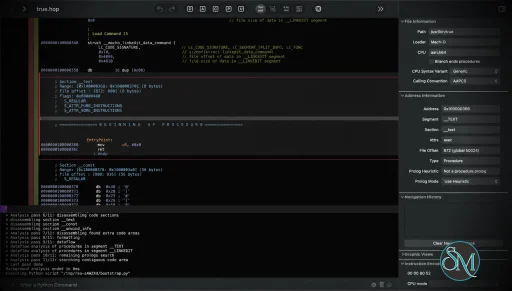
REA connects AI agents to tools that inspect compiled native applications. Depending on the configured analysis provider, developers can examine functions, strings, symbols, assembly instructions, pseudocode, references, and call relationships.
These capabilities help investigate how a binary implements a particular feature or interacts with other components.
For native analysis, REA supports integration with Hopper and Ghidra. The project also documents IDA-related support in its broader development direction, although provider availability and individual capabilities depend on the installed version and platform.
Hopper is a separate product with its own licensing requirements. Ghidra must be installed independently and configured before REA can use it.
Importantly, decompilation produces an approximation of the original program logic, not the original source code with all its comments, names, and design decisions intact.
JavaScript and Electron Application Inspection
REA can analyze JavaScript applications and Electron packages without executing the target application.
It can inspect application directories and ASAR archives to identify modules, imports, dependencies, and relationships between components. This is useful for understanding how a desktop application's frontend communicates with its underlying services.
For example, developers can investigate how an Electron application handles authentication, storage, updates, or networking by examining the available code and tracing the relevant modules.
Static analysis is especially convenient because it does not require a native decompiler for supported JavaScript targets. It also reduces the risks associated with running unfamiliar applications during an initial investigation.
Command-Line Interface
REA provides a CLI for running analysis tasks directly from a terminal or through automation scripts.
Install the command-line package globally with npm:
npm install --global rea-agentsThen start the guided setup:
rea setupTo check the environment and configured analysis tools:
rea doctor --jsonFor a JavaScript application or Electron package, you can run an analysis directly:
npx -y rea-agents@latest analyze-javascript-application \
  /absolute/path/to/app --json
The JSON output makes it easier to process analysis results programmatically or pass structured findings to another tool.
Native binary analysis requires an appropriate provider to be installed and configured. The CLI therefore serves as a common entry point rather than replacing the underlying analysis engines.
MCP Integration for AI Coding Agents
One of REA's strongest features is its MCP server, which exposes analysis operations to compatible AI assistants.
The setup utility can configure supported clients, including Claude Code, Claude Desktop, Codex, Cursor, Gemini CLI, and Windsurf. Additional clients can connect through manual MCP configuration if they support local MCP servers.
After setup, an agent can call REA's tools to inspect a target, search for strings, examine functions, trace references, and collect evidence without requiring the user to execute each analysis command manually.
This integration is valuable for AI-assisted software development because it allows reverse engineering to become part of the same workflow used to modify and test code.
Guided Workflows and Evidence-Based Results
REA provides structured investigation workflows intended to guide an agent from an initial question toward a supported explanation.
Instead of returning only a conclusion, the tools can provide evidence and identify unresolved questions or limitations. Developers can then distinguish observed behavior from assumptions that require further testing.
The project also supports reusable analysis results and snapshots in relevant workflows, reducing the need to repeat expensive analysis operations unnecessarily.
This evidence-oriented approach is particularly useful when examining unfamiliar or poorly documented software, where an unsupported conclusion could lead to an incorrect implementation.
Local Analysis and Privacy
REA is designed to analyze target applications locally rather than uploading them to a hosted REA analysis service.
This is beneficial when investigating internal tools, proprietary software, or applications that cannot easily be shared with an external service.
However, the privacy boundary also depends on the AI agent and model provider being used. Analysis results returned to an agent may be sent to its configured model service, so developers should review that provider's data-handling policy before investigating confidential software.
Guided Installation and Diagnostics
REA includes a setup utility that configures the CLI, MCP server, and matching agent instructions. It can connect existing analysis tools and offer to install Hopper when needed.
The setup process presents proposed changes for review and approval and backs up existing agent configuration before applying changes.
Its diagnostic command checks dependencies, host compatibility, analysis tools, and agent configuration:
npx -y rea-agents@latest doctorThis helps developers identify missing dependencies or configuration problems before attempting a more involved investigation.
Performance and Compatibility
REA is distributed as a Node.js application and supports the command line and local MCP workflows. Its documented runtime requirements include Node.js 22.19 or newer in the 22.x line, Node.js 24.11 or newer in the 24.x line, or Node.js 26 and later.
Native analysis depends on the configured provider and supported host environment. The project documents support for macOS and selected Linux distributions, while Windows support varies by analysis provider and workflow.
Static JavaScript and Electron analysis has fewer dependencies because it does not require a native analysis engine. This makes it a convenient starting point for developers who want to try REA without installing a separate disassembler.
Actual analysis speed depends on the target application's size, the chosen provider, and the complexity of the behavior being investigated. Large native binaries may require more time and resources than a small JavaScript application.
REA is an analysis framework rather than a universal decompiler. Its capabilities depend on the tools available for the target platform, and the accuracy of conclusions depends on the evidence that can be recovered. It cannot guarantee recovery of original source code or perfectly reproduce every behavior of an application.
System Requirements
Runtime: Node.js 22.19 or newer in the 22.x line, 24.11 or newer in the 24.x line, or 26 and later.
Package manager: npm.
Operating systems: Supported macOS and Linux environments, with Windows support depending on the selected workflow and provider.
Native analysis: Hopper or Ghidra for the corresponding supported workflows.
AI integration: An MCP-compatible agent for interactive, agent-driven investigations.
JavaScript analysis: A local application directory or ASAR archive; no native decompiler is required for this workflow.
Ghidra integration has additional requirements, including a compatible Ghidra installation and Java Development Kit. Consult the current installation documentation for exact versions and platform-specific instructions.
Pros and Cons
Pros
Free and open-source under the MIT license.
Connects AI coding agents to reverse engineering tools through MCP.
Supports native binary investigation using decompilation and disassembly.
Analyzes JavaScript applications and Electron archives without executing them.
Provides CLI access for scripting and automation.
Collects evidence to support explanations of application behavior.
Offers structured workflows for investigating and recreating software features.
Designed for local analysis without a hosted REA analysis service.
Guided setup and diagnostic tools simplify configuration.
Can help developers understand legacy software and undocumented implementations.
Cons
Native analysis depends on external tools such as Hopper or Ghidra.
Some analysis providers have platform-specific limitations.
Decompilation cannot reliably recover the original source code.
Investigation quality depends on the available evidence and analysis engine.
Requires an AI agent for the full natural-language investigation workflow.
Additional setup may be necessary for native binaries.
Model-provider privacy policies still matter when sending analysis results to an AI service.
Reverse engineering complex applications can require substantial technical knowledge and time.
Download REA - Reverse Engineer Anything - rea-agents-6.4.0 - Software Mirrors |
|---|
REA - Reverse Engineer Anything - rea-agents-6.4.0 Source CodeREA - Reverse Engineer Anything - rea-agents-6.4.0 Source code (zip) REA - Reverse Engineer Anything - rea-agents-6.4.0 Source code (tar.gz) |
REA - Reverse Engineer Anything - rea-agents-6.4.0 Release Notes:6.4.0 (2026-10-11)Highlights
Changes
Fixes
⚠ BREAKING CHANGES
Contributors
|
How to Install
The recommended approach is to install REA through its guided setup utility.
First, ensure that a supported Node.js runtime and npm are installed. Then run:
npx rea-agents@latest setupChoose the AI agents you want to configure, review the proposed changes, and approve them. Setup configures the MCP connection and installs the corresponding workflow instructions.
Restart the configured AI client after setup so it can load the new MCP server.
To use REA as a regular command-line application, install it globally:
npm install --global rea-agentsThen verify the installation:
rea doctor --jsonFor native binary analysis, configure Hopper or an existing Ghidra installation according to the official documentation. Static JavaScript and Electron analysis can be used without installing either tool.
To update an existing installation, follow the update instructions for the installation method you used. If you use the npx workflow, refresh the agent configuration with:
npx rea-agents@latest setupReview the proposed changes and restart the relevant client when its MCP registration changes.
Final Verdict
REA is a compelling open-source toolkit for developers who want to combine reverse engineering with AI-assisted software development. Its biggest advantage is the way it connects analysis tools, structured evidence, and MCP-compatible agents into a single investigation workflow.
Support for native binaries, JavaScript applications, and Electron packages gives it a broad range of uses, from understanding undocumented features to investigating legacy software and building compatible implementations. The CLI and evidence-oriented results also make it useful beyond interactive AI sessions.
Its main limitation is that REA depends on external analysis engines for many native workflows, and its capabilities vary by operating system and provider. It also cannot recover original source code automatically or guarantee that an implementation recreated from analysis will behave identically to the original.
For developers working with unfamiliar applications, REA is worth exploring, particularly if they already use an MCP-compatible coding agent. It is best viewed as a bridge between reverse engineering tools and AI development workflows rather than a replacement for established disassemblers or the expertise required to interpret their results.
Post a Comment/Report Broken Link: