PhotoCraft is an open-source image editor designed as a clean-room reimplementation of Adobe Photoshop, built entirely in Rust. It provides a surprisingly broad set of professional image-editing features, including layers, masks, adjustment layers, filters, vector shapes, editable text, brushes, and native PSD support.
The project is particularly interesting for users who want a local, open-source Photoshop alternative without relying on Electron, cloud services, or proprietary software. However, PhotoCraft is still in early alpha, so it is better viewed as a promising alternative under active development than as a complete replacement for Photoshop.
Features
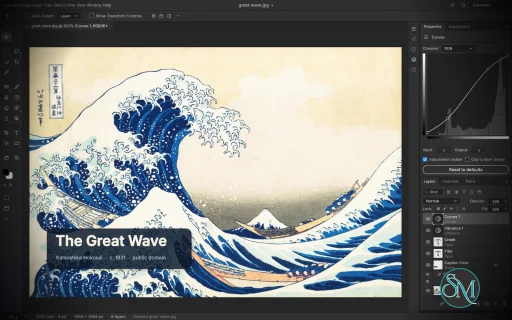
PhotoCraft offers a substantial collection of image-editing tools:
Layer groups, clipping masks, pixel and vector masks
Adjustment layers for Curves, Levels, Vibrance, Hue/Saturation, Black & White, Gradient Map, Selective Color and more
Layer styles including Drop Shadow, Inner Shadow, Glow, Bevel & Emboss, Stroke, and overlays
Brush, Pencil, Mixer Brush, Clone Stamp, Healing Brush and other painting tools
Marquee, Lasso, Magic Wand, Quick Selection, Object Selection and Select Subject
Editable point and paragraph text
Pen and vector shape tools
Smart objects and smart filters
Free Transform with scale, rotate, skew, distort and perspective
History and History Brush
Multiple blend modes, opacity, fill and layer controls
Color management with RGB, Grayscale, CMYK and Lab
8, 16 and 32-bit-per-channel documents
PSD and PSB support
PNG, JPEG, TIFF, WebP, GIF, BMP, TGA, ICO, OpenEXR, HDR, AVIF and other formats
Export preview with quality, transparency, scale and estimated file size
Command palette and recorded actions
Its PSD support is one of its strongest features. The project tests its implementation against real-world PSD files and reports very high rendering compatibility across its test corpora. Unsupported data is designed to be preserved rather than simply discarded when documents are saved.
Another unusual feature is its automation architecture. PhotoCraft exposes its editing engine through the desktop interface, CLI, JSON control channel and MCP, making the application suitable for scripted workflows and AI-agent automation.
Download PhotoCraft v0.5.0 - Software Mirrors |
|---|
PhotoCraft v0.5.0 for Windowsphotocraft-0.5.0-windows-x86.msi | 52.05 MB photocraft-0.5.0-windows-x86-portable.zip | 62.39 MB photocraft-0.5.0-windows-x64.msi | 53.2 MB photocraft-0.5.0-windows-x64-portable.zip | 64.58 MB photocraft-0.5.0-windows-arm64.msi | 50.36 MB photocraft-0.5.0-windows-arm64-portable.zip | 62.03 MB |
PhotoCraft v0.5.0 for macOSphotocraft-cli-0.5.0-macos-universal.zip | 54.66 MB photocraft-0.5.0-macos-universal.dmg | 71.38 MB |
PhotoCraft v0.5.0 for Linuxphotocraft-0.5.0-linux-x86_64.tar.gz | 64.24 MB photocraft-0.5.0-linux-x86_64.rpm | 64.71 MB photocraft-0.5.0-linux-x86_64.flatpak | 48.32 MB photocraft-0.5.0-linux-x86_64.deb | 65.12 MB photocraft-0.5.0-linux-x86_64.AppImage.zsync | 214.9 kB photocraft-0.5.0-linux-x86_64.AppImage | 61.33 MB photocraft-0.5.0-linux-aarch64.tar.gz | 61.82 MB photocraft-0.5.0-linux-aarch64.rpm | 62.83 MB photocraft-0.5.0-linux-aarch64.flatpak | 45.57 MB photocraft-0.5.0-linux-aarch64.deb | 63.35 MB photocraft-0.5.0-linux-aarch64.AppImage.zsync | 207.03 kB photocraft-0.5.0-linux-aarch64.AppImage | 59.08 MB |
PhotoCraft v0.5.0 for BSDphotocraft-0.5.0-freebsd-x86_64.tar.gz | 64.12 MB |
Others Download related to PhotoCraft v0.5.0photocraft-web-0.5.0.zip | 8.93 MB |
PhotoCraft v0.5.0 Source Code
PhotoCraft v0.5.0 Source code (zip)
PhotoCraft v0.5.0 Source code (tar.gz)
|
PhotoCraft v0.5.0 Release Notes: What's Changed- Add rendering modes and CPU fallback recovery by @TheSeanLavery in #434
- Type layers keep their name in step with their text (#483) by @mnmlyw in #501
- Unsaved-changes prompt: (D)on't Save / (C)ancel / (S)ave keys, Tab order by @sommerper in #533
- Layer Style: the shadow/bevel Angle slider now moves the light (#350) by @agorevski in #411
- Color Picker: sample colours from the image with a pipette by @carterwsmith in #508
- Polygonal Lasso: double-click closes the polygon; a new polygon replaces the selection in one step by @rosematcha in #361
- Type: the Color panel, Swatches and Color Picker recolor selected text by @rosematcha in #364
- Free Transform: Undo steps through the transform; handles are easier to grab by @rosematcha in #365
- 32-bit documents: Levels don't clip the input and output ranges by @floflo777 in #403
- rustfmt discard_ui.rs (CI Format step red since #533) by @echelon in #597
- Smart objects keep their four-corner (Distort / Perspective) placement by @jason4short in #426
- feat(ui): add bounded Liquify redo history by @agorevski in #435
- Lasso inside liquify mode , with hotkeys L, alt , ctrl+i, ctrl+h for … by @siraxe in #453
- Expose the Mixer Brush as a UI tool (#213) by @agorevski in #433
- Control protocol docs: file.open/file.save are refused over --control (#379) by @floflo777 in #391
- docs: sync scorecard with implemented behavior by @arpitkjaiswal in #348
- Focus PhotoCraft for unsaved close prompt by @TheSeanLavery in #547
- PSD: read/write the artboard lock at Photoshop's lspf bit 3 (#395) by @agorevski in #406
- Show active ICC profile in the status bar (#321) by @agorevski in #432
- Clarify integer and float bit-depth labels (#324) by @agorevski in #428
- Wayland: explain native file drag-and-drop limitation (#386) by @agorevski in #430
- Preferences › Interface: Show bounding box when dragging layer by @sommerper in #484
- Hide unconfigured layer effects from Layers panel by @agorevski in #559
- Paste: a copied image file pastes its pixels (part of #338) by @Ar-maan05 in #384
- Content-Aware Scale: 13x faster seam removal, bit-identical output (part of #211) by @Ar-maan05 in #385
- PSD: read smart-filter masks (FEid) with one section per smart object by @EthanSuquet in #396
- Open documents in bounded reads, with a clear out-of-memory error (#375) by @ljkx in #401
- Camera Raw: interactive histogram, clipping warnings and scopes (part of #215) by @tiredIsa in #407
- Add the Patch tool with a live preview (#213) by @alexanderalber in #381
- Add blend modes to the Gradient tool by @TheSeanLavery in #543
- Start context-menu parity across canvas, paths, and document tabs by @TheSeanLavery in #556
- i18n: complete Simplified Chinese catalog and localize brush sections by @flyyangX in #359
- i18n: add French (fr) UI translation by @leblanc-simon in #410
- i18n: "id" indonesian translation by @trokute in #449
- Report per-language UI translation coverage (#220) by @agorevski in #427
- Add style warp splits and grid presets by @juansebsol in #388
- Add Edit Contents to the Smart Object context menu by @CQMHV in #599
- Edit type layers by double-clicking their thumbnails by @CQMHV in #598
- Monitor profile auto follows each window's display; what is applied is visible (#569) by @ha1des in #591
- feat(i18n): add Korean and live language switching by @neko233-com in #582
- Add fixed UI scale steps from 75% to 300% by @Sirsyorrz in #611
- algo: fix flaky cancel/progress test - tile workers report out of order by @Elvis33LE in #609
- Apply Image onto a transparent layer no longer turns it black by @cristianmoroaica in #607
- Remember desktop window and panel sizes across restarts by @Webificio in #587
- monitor_profile test: Unix only (fixes Windows CI after #591) by @echelon in #633
- README: remove a stray "ArtCraft" line before Star history by @echelon in #636
- Open HEIC/HEIF photos (#355) by @ljkx in #372
- Rename PrintCraft to PdfCraft by @echelon in #766
- Persist migrated presets with preferences by @CQMHV in #728
- Select Linked Layers excludes an unrelated active layer by @CQMHV in #764
- fix(cms): check LUT declared sizes before arithmetic by @agorevski in #725
- i18n: add German (de) UI translation (#309) by @Elvis33LE in #663
- fix(ui): search palette: the Enter that opens a dialog no longer closes it by @Mawfyy in #640
- scorecard: BUG-203 (atomic saves) is done - flip the stale rows (#203) by @Elvis33LE in #687
- layer.showOnly: ⌥-click a layer's eye to show only that layer by @jason4short in #665
- Text fields stop resetting the input method every frame, so keys no longer repeat endlessly on Wayland (#585) by @ianswope in #723
- fix(color): match Photoshop blend corner values by @agorevski in #699
- Box Blur: up to 26x faster at large radii (same running-sum boxes as Gaussian Blur) by @Ar-maan05 in #628
- Layers panel: drag down the eyes to show or hide layers; empty eye when hidden by @jason4short in #666
- Minimum / Maximum (Squareness): up to 37x faster at large radii, bit-identical output by @Ar-maan05 in #630
- Surface Blur: 13x to 40x+ faster on 8-bit layers (sliding histogram) by @Ar-maan05 in #631
- Free Transform: picking another tool applies the transform by @rosematcha in #732
- Layer › Remove Background: one-step subject cutout (layer.removeBackground) by @mvanhorn in #734
- Brazilian Portuguese UI translation (pt-br) by @gangldiego in #700
- fix(linux): AppImage registers its desktop entry and icon on launch by @Mawfyy in #617
- macOS: menus open on press; only the title bar's free gap drags the window by @jason4short in #669
- Color panel: click a chip to edit that color, double-click to open the Color Picker (#655) by @rosematcha in #664
- Fix #497: group type edits and renames in undo by @agorevski in #652
- Numeric fields evaluate typed arithmetic by @rosematcha in #726
- Transform modes: Skew / Distort / Perspective as real modes; legacy corners as a preference by @jason4short in #671
- document.pixel: no panic at x or y = i32::MAX, and no wrap-around past it by @Ar-maan05 in #629
- Fix #570: Shift-click connects brush strokes by @agorevski in #654
- Type: a forced line break (U+0003) breaks the line instead of drawing a box by @EthanSuquet in #644
- Fix multi-file open dialog (#595) by @agorevski in #657
- Fix Hue/Saturation range editor drag panic by @agorevski in #727
- JPEG export no longer fails when the document's XMP is over 64 KB by @EthanSuquet in #645
- Improve Korean terminology and dynamic UI translation coverage by @kijoong-kim in #604
- Image Size keeps the canvas border opaque instead of fading it by @EthanSuquet in #646
- Fix #695: validate Layer Style effect fields by @agorevski in #729
- type.edit: a reversed runs range is a bad-params error, not a panic (#714) by @mnmlyw in #754
- Arbitrary rotation starts at the ruler line's straightening angle by @rosematcha in #660
- Prevent "Export As" from saving webp files as "*.webp.psd" by @Cyanoxide in #724
- rustfmt xtask/src/i18n_coverage.rs (Format red on main since #663 + #700) by @tanish2k09 in #798
- Find and Replace Text: no panic searching a non-type active layer (#703) by @mnmlyw in #762
- Apply the Interface UI Font Size preference by @CQMHV in #616
- codecs: decode deep OpenEXR (deepscanline/deeptile), composited flat or structured by @Elvis33LE in #642
- Selections: drag to move the outline; ⌘-drag floats the selected pixels (engine commands) by @jason4short in #686
- Filter › Render › Relight: redirect a photo's lighting by @mvanhorn in #735
- rustfmt crates/codecs/tests/deep_exr.rs (Format red on main since #642) by @tanish2k09 in #804
- Fix document run and ID overflow (#684, #685) by @agorevski in #749
- Fix bridge preview PNG budgeting by @agorevski in #753
- Clamp Variables data-set indices from control input by @Ni-zav in #772
- Fix ui.set brush size command journaling by @agorevski in #744
- Fix TIFF WhiteIsZero and BigTIFF orientation by @agorevski in #746
- Shapes: a hairline vector stroke no longer darkens the shape's edge pixels by @EthanSuquet in #397
- Spot Healing: Sample All Layers heals onto an empty layer (#731) by @rosematcha in #769
- fix(i18n): follow native UI languages on first launch by @neko233-com in #661
- Support Alt-held polygon segments in the freehand lasso by @jerrykimo in #711
- Type: hitTest, caret and navigate commands so agents can edit text by position (part of #219) by @mvanhorn in #623
- Korean labels for Relight's Ambient and Warmth options by @tanish2k09 in #811
- fix(raw): validate DNG default crop bounds by @agorevski in #745
- Fix vector pixel bounds overflow by @agorevski in #747
- Layered TIFF: open and save Photoshop layer data in TIFF files, in either byte order (part of #215) by @ljkx in #672
- Reject overflowing slice rectangles by @Ni-zav in #768
- Fix hostile PSD pattern geometry by @agorevski in #743
- Bound paint stroke work (#678, #679) by @agorevski in #751
- Actions: actions.record/stop/play/list commands for agents and the CLI (part of #219) by @mvanhorn in #622
- Fix text ink bounds overflow by @agorevski in #750
- Repair corrupt directory-save objects by @agorevski in #752
- fix(automation): close ambient filesystem authorization gaps by @agorevski in #763
- rustfmt crates/ui-egui/src/canvas.rs (Format red on main since #711) by @echelon in #819
- Flat exports embed no document XMP by default; Export As gains a Metadata choice (#647) by @Elvis33LE in #733
- pcraft directory saves: re-verify a rolling share of cached objects; stronger file signature by @tanish2k09 in #821
- rustfmt crates/ui-egui/src/export_dialog.rs (Format red on main since #672 + #733) by @tanish2k09 in #822
- Follow-ups to #665, #666, #734: Photoshop's mask-only Remove Background, one-step eye sweep, no-clone Show Only by @bflatastic in #824
- Headless saves write a flat TIFF unless they ask for layers by @tanish2k09 in #825
- Dialog buttons follow the OS order; Windows/Linux unsaved-changes prompt asks Yes / No / Cancel (#627, #776) by @bflatastic in #826
- Layers panel: a double-click just above or below a layer name renames it (#651) by @rosematcha in #823
- Open .psdt templates as new untitled documents by @rosematcha in #807
- fix(algo): blur small sigmas instead of silently no-oping (#706) by @bfenty in #783
- fix(algo): gallery colour injection covers Colored Pencil and Neon Glow (#709) by @bfenty in #805
- fix(algo): HDR Toning gamma follows its documented direction (#710) by @bfenty in #801
- fix(engine): keyboard shortcut bulk set reports in-call clashes (#719) by @bfenty in #799
- Auto-Align Layers: the dialog no longer sends reference 0 (#674) by @rosematcha in #795
- fix(engine): view.newGuideLayout rejects absurd column/row counts (#704) by @bfenty in #797
- Windows DX12: never load a foreign dxcompiler.dll from PATH (#712) by @bflatastic in #817
- Cancel stale Warp drags when the mesh changes by @Ni-zav in #774
- Handle Stack Mode sources with no visible layers by @Ni-zav in #770
- Camera Raw: read and write settings as a live PSD Smart Filter (part of #215) by @tiredIsa in #459
- fix(engine): clone source_rect clamps huge mapped coordinates (#716) by @bfenty in #809
- Geom: Rect::width and height no longer overflow on i32-extreme rects (#675) by @Luna161 in #808
- New Document: changing Resolution keeps the physical size when a physical unit is shown (#758) by @Luna161 in #818
- Reject geometry params that would silently wrap through i64->i32 narrowing by @Elvis33LE in #803
- ⌘⌥⌃-click on the canvas selects the topmost layer under the pointer by @jason4short in #813
- Help › Search: find any menu command by name by @jason4short in #815
- i18n(ko): drop the duplicate Ambient and Warmth rows (main red since #811 + #824) by @echelon in #834
- rustfmt crates/engine/tests/hdr_gamma_direction.rs (Format red on main since #801) by @echelon in #842
- Copy works on smart object, type and shape layers (#541) by @bflatastic in #841
- Add the Content-Aware Move tool (#213) by @alexanderalber in #814
- Rework Camera Raw filter preview and navigation by @abc2cb in #781
- Bound layer-group nesting at import and Group Layers (stack-overflow guard) by @Elvis33LE in #796
- fix(photocraft): reject an unparseable --control port instead of silently dropping it (#701) by @bfenty in #777
- M9: create vertical type from the Type tool flyout by @midasdf in #784
- Drag-and-drop: place onto the canvas in Free Transform, open at a tab slot by @carterwsmith in #739
- Large PSBs open with their pixels: decode planes past 2 GiB, plus 4-5 GB PSB fixtures (#375) by @alexanderalber in #782
- Layer Style: complete multi-instance effects and dialog parity (#157) by @remidesbois1 in #786
- Italian UI translation (it) by @giallorosso84 in #853
- Add the Magnetic Lasso tool by @louwers in #864
- CI: never cancel main's runs; trim per-PR runner time by @tanish2k09 in #800
- tiff_corpus: ask for layers explicitly (corpus job red since #825) by @tanish2k09 in #876
- agent_tasks: wait for the MCP server task before removing the test folder (Windows os error 32) by @tanish2k09 in #877
- Preset store: a store directory that doesn't exist yet reads as empty on Windows too by @tanish2k09 in #878
- Locking a group locks the layers inside it by @rosematcha in #847
- fix(engine): Camera Raw clamps the noise amounts to their range (#707) by @bfenty in #839
- Test: press-drag-release across menu titles and into submenus (#775) by @bflatastic in #837
- Filter previews stay inside the selection on large documents (#740) by @bflatastic in #836
- fix(test): find sleep on PATH in monitor profile test by @simonwjackson in #855
- ui-egui tests: GPU adapter catch_unwind stops swallowing setup-command failures (#760) by @Luna161 in #854
- Warp: reject extreme rect params with BadParams instead of running a giant warp (#808 follow-up) by @Luna161 in #849
- fix(algo): Path Blur clamps per-path speeds (#708) by @bfenty in #840
- fix(io): artboard guide indices follow resource 1032 order (#722) by @bfenty in #845
- fix(codecs): large PNG exports no longer lose bytes at a band's sync flush by @ajsongpilot in #827
- PSD: decode the merged composite only when something consumes it by @Elvis33LE in #846
- Lossy WebP: a pure-Rust VP8 encoder with quality and lossless controls (#648) by @ljkx in #880
- Gaussian Blur: large radii are fast, live preview included (#464) by @bflatastic in #867
- Resampling reads a bounded window, however small the target (#713) by @mnmlyw in #860
- About: contributor and model credits compiled in (grab bag + table, self-submitted names) by @echelon in #898
- Automation: Apply Data Set works for text and visibility data sets (#806) by @rosematcha in #870
- Document tab × sits after the title on Windows and Linux, as in Photoshop (#619) by @bflatastic in #832
- Brush size and hardness keys are remappable in Keyboard Shortcuts (#626) by @bflatastic in #828
- Menu rows touch, as in native menus: long menus are a fifth shorter (#402) by @bflatastic in #844
- actionlint: declare the org macos-release runner label by @echelon in #927
- Slice Options and Divide Slice are one undo step; a rejected one changes nothing (#910, #911, #912) by @echelon in #928
- Selection tools: Photoshop's full right-click menu (#614, #738) by @bflatastic in #831
- CI: craft-fonts run uses the Test step's exact build again (Linux runner out of disk since #800) by @tanish2k09 in #955
- TIFF: BigTIFF, every IFD and SubIFD, banded parallel decode (FILE-215-8, part of #215) by @ljkx in #859
- Direct Selection tool: reshape pen and shape paths after they're drawn (#790) by @bflatastic in #865
- Windows and Linux: one title bar with the app icon (no stacked OS bar); long context menus scroll by @bflatastic in #986
- Filter Gallery: Angled Strokes paints strokes, not a smear; Rough Pastels' texture shows in dark areas (#879) by @echelon in #942
- Save for Web: slices never overwrite each other; overlapping slices keep their HTML cells (#908, #909) by @echelon in #929
- Out-of-range slice, layer comp and type style ids are rejected, not wrapped (#914) by @echelon in #930
- Invert (⌘I) inverts the targeted layer mask (#780) by @bflatastic in #838
- Drag layers onto another document's tab to copy them there (#589) by @bflatastic in #851
- Layer › Smart Objects › Convert to Layers (#535) by @bflatastic in #829
- Photo Filter and gradient glows render like Photoshop (#442, #443) by @bflatastic in #850
- Fix main: classify the Direct Selection path commands; Czech for "{n} layer" by @echelon in #1074
- Automation: an allowed command can't run a denied one on its behalf by @tanish2k09 in #861
- Variables dialog: malformed entries can't crash an edit by @tanish2k09 in #875
- Layers panel: drop layers on the footer's New Layer, New Group and Delete buttons (#736) by @echelon in #965
- Crop tool starts with a frame around the canvas (or the selection), as in Photoshop (#668 item 7) by @echelon in #971
- Type: ⌘/Ctrl+T while typing shows or hides the Character panel (#668 item 15) by @echelon in #983
- Shape tools: Shift and Alt pressed during the drag constrain it, as in Photoshop (#668 item 12) by @echelon in #984
- Layer via Copy, Copy and Cut read only the selected area: 33× faster on 24 MP (#668 item 18) by @echelon in #985
- Windows: selection and other crosshair tools stay visible over grey (#737) by @echelon in #954
- Clone Stamp / Healing Brush: the source crosshair shows only while painting (#668 item 10) by @echelon in #969
- Preferences: colour settings take a typed #rrggbb value (#668 item 2) by @echelon in #1001
- macOS: use the native menu bar instead of the in-window menus (#887) by @brennanMKE in #894
- README: Downloads section listing every release build by @echelon in #1210
- README Downloads: where to get it, then builds (Windows first) by @echelon in #1219
- Release workflow: only signing and draft-release jobs use the release environment by @echelon in #1220
New Contributors- @TheSeanLavery made their first contribution in #434
- @mnmlyw made their first contribution in #501
- @rosematcha made their first contribution in #361
- @jason4short made their first contribution in #426
- @siraxe made their first contribution in #453
- @arpitkjaiswal made their first contribution in #348
- @EthanSuquet made their first contribution in #396
- @alexanderalber made their first contribution in #381
- @flyyangX made their first contribution in #359
- @leblanc-simon made their first contribution in #410
- @trokute made their first contribution in #449
- @ha1des made their first contribution in #591
- @neko233-com made their first contribution in #582
- @Sirsyorrz made their first contribution in #611
- @Elvis33LE made their first contribution in #609
- @cristianmoroaica made their first contribution in #607
- @Webificio made their first contribution in #587
- @mvanhorn made their first contribution in #734
- @gangldiego made their first contribution in #700
- @kijoong-kim made their first contribution in #604
- @Cyanoxide made their first contribution in #724
- @tanish2k09 made their first contribution in #798
- @jerrykimo made their first contribution in #711
- @bfenty made their first contribution in #783
- @Luna161 made their first contribution in #808
- @abc2cb made their first contribution in #781
- @remidesbois1 made their first contribution in #786
- @giallorosso84 made their first contribution in #853
- @louwers made their first contribution in #864
- @simonwjackson made their first contribution in #855
- @ajsongpilot made their first contribution in #827
- @brennanMKE made their first contribution in #894
Full Changelog: v0.3.0...v0.5.0 |
Performance and Compatibility
PhotoCraft is built as a native Rust application rather than a web wrapper or Electron application. Its rendering architecture uses wgpu for GPU compositing with support for graphics APIs including Metal, Vulkan, DirectX 12 and WebGPU.
The application also uses multithreaded filters and copy-on-write sparse tiles. This design is intended to reduce unnecessary copying and make large layered documents more manageable.
The project reports extensive automated testing, including PSD round-trip tests, compositor comparisons and multi-depth testing. Its architecture also includes a CPU compositor used as a reference against the GPU compositor.
PhotoCraft can run natively on Windows, macOS, Linux and FreeBSD, with a WebAssembly build for browser use.
The main limitation is maturity. The developers explicitly describe the project as early alpha and acknowledge that it is not yet suitable as a complete replacement for Photoshop in professional daily workflows. Missing areas include AI and generative features, some tools, deeper typography and professional workflows, and plugin compatibility.
System Requirements
PhotoCraft supports:
Windows
macOS
Linux
FreeBSD
WebAssembly/browser
Linux distributions can use AppImage, DEB, RPM, tarball or Flatpak packages.
Hardware requirements are not presented as a simple minimum specification. Because PhotoCraft uses GPU acceleration, actual performance will depend heavily on the graphics hardware and the size and complexity of the documents being edited.
Pros and Cons
Pros
Open-source and available under permissive MIT or Apache-2.0 licensing
Native Rust application
No Electron or embedded web browser required
Excellent focus on PSD compatibility
Extensive layer and adjustment-layer support
GPU-accelerated rendering
Supports CMYK, Lab and high-bit-depth documents
Strong brush and vector capabilities
Windows, macOS, Linux and FreeBSD support
Can also run through WebAssembly
Powerful CLI and automation capabilities
MCP support makes it interesting for AI-assisted workflows
Offline-first approach
Cons
Still early alpha
Not yet a complete Photoshop replacement
Missing some tools and professional workflows
No Photoshop plugin compatibility
AI and generative editing features are limited or absent
Typography capabilities are not yet as mature as established professional editors
Some rough edges should be expected
How to Install
The easiest approach is to download the appropriate package from the project's GitHub releases.
Linux users have several packaging options, including AppImage, DEB, RPM, tarball and Flatpak. Windows has a portable package, while macOS has a universal disk image.
Developers can also build PhotoCraft directly from source using Rust:
git clone https://github.com/storytold/photocraft
cd photocraft
cargo run --release -p photocraft -- image.psd
The repository also provides CLI functionality for automated editing and batch processing.
Final Verdict
PhotoCraft is one of the more ambitious open-source Photoshop alternatives currently available. Its combination of native Rust performance, extensive layer support, serious PSD compatibility work and an unusually capable automation architecture makes it much more than a basic image editor.
The strongest reason to watch PhotoCraft is its engineering approach. The project is building a real image-editing engine rather than simply creating a Photoshop-like interface, and its extensive PSD testing provides a useful foundation for compatibility.
The biggest problem is maturity. The project itself acknowledges that it is still early alpha and lacks several areas required for professional Photoshop replacement workflows. Users who depend on plugins, advanced typography, AI features or highly polished production workflows should not switch completely yet.
For enthusiasts, developers, Linux users, open-source advocates and anyone interested in building automated image-processing workflows, however, PhotoCraft is particularly compelling.
Post a Comment/Report Broken Link: