FigCraft v0.17.0

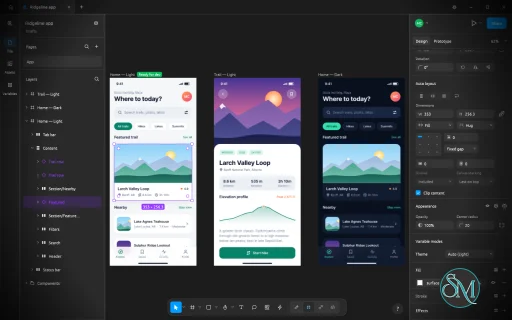
FigCraft is a free, open-source interface design and prototyping application built in Rust. It aims to reproduce core design workflows found in Figma while providing a native desktop experience, local file storage, and support for offline work.

The application includes tools for creating layouts, reusable components, vector graphics, design systems, and interactive prototypes. It also supports developer handoff, multiple export formats, command-line automation, and integration with AI agents through the Model Context Protocol (MCP).

FigCraft is an ambitious alternative for UI designers and developers who want greater control over their design files without depending entirely on a cloud-based platform. However, it is still in alpha, and its developers estimate that it has reached approximately 49% of the functionality needed to replace Figma for real-world work. It is best treated as an actively developing alternative rather than a complete replacement.

Features

Interface Design and Auto Layout

FigCraft provides a canvas-based editor with a familiar interface featuring a toolbar, layers panel, design properties, and keyboard shortcuts.

Its auto-layout system supports horizontal and vertical layouts, wrapping, grid layouts, spacing, padding, alignment, and flexible sizing. Designers can combine nested frames, constraints, and layout grids to create responsive interface structures.

These tools are useful for building application screens, dashboards, landing pages, and reusable interface layouts without manually positioning every element.

Components and Design Systems

FigCraft supports reusable components, instances, variants, and component properties. Changes to a main component can propagate to its instances while preserving supported overrides.

The application also includes an asset panel for searching and inserting reusable components, along with a variables system supporting colors, numbers, strings, and Boolean values. Variables can have multiple modes, aliases, and scopes, making them useful for maintaining design systems and light or dark themes.

These capabilities provide a foundation for consistent UI development across larger projects.

Vector Graphics and Drawing Tools

The application includes vector editing tools that go beyond basic shapes. Users can draw paths, edit points and handles, create variable-width strokes, and combine overlapping shapes using Boolean operations.

Supported operations include union, subtraction, intersection, and exclusion. The editor also provides a shape builder, masks, gradients, adjustable corners, and editable vector geometry.

This makes FigCraft useful for designing icons, interface illustrations, diagrams, and other vector-based assets without requiring a separate drawing application for every task.

Colors, Effects, and Typography

FigCraft supports solid colors, linear and radial gradients, angular and diamond gradients, image fills, multiple strokes, blend modes, shadows, and blur effects.

Additional effects include noise, texture, glass-like treatments, and masks. Color handling supports sRGB and Display P3 profiles, with exported files tagged with their color profile.

The text editor supports mixed formatting within paragraphs, variable fonts, OpenType features, text styles, spacing controls, lists, and right-to-left text. These capabilities are useful for multilingual interfaces and more sophisticated typography.

Interactive Prototyping

FigCraft allows designers to connect frames and create interactive prototypes with triggers, actions, transitions, and back navigation.

Its interaction system also supports variables and conditional expressions, enabling more dynamic prototypes. A presentation view provides device frames and interaction hints, while a live preview helps designers test their work.

These features allow teams to explore interface behavior before implementing the final design in code.

Developer Handoff and Code Inspection

The application includes a developer-oriented inspection workflow with measurements, annotations, ready-for-development status, and frame comparisons.

Developers can inspect design properties and generate code representations in formats such as CSS, HTML, React, SwiftUI, and Jetpack Compose. Components can expose their properties as parameters in the generated code.

The output is intended to help bridge design and implementation, although generated code should be reviewed and adapted to the conventions and architecture of the target project.

AI Agent and CLI Automation

One of FigCraft's most distinctive features is its command-driven architecture. The same underlying command system powers the graphical interface, CLI, JSON control channel, and MCP server.

This enables scripts and compatible AI agents to create or modify designs, inspect documents, render files, and export assets without relying exclusively on manual interaction.

The command-line tools also support headless rendering and batch export, making the application potentially useful in automated design workflows and development pipelines.

Local Files and Offline Privacy

FigCraft stores projects as local .figcraft archives and can work without requiring an account. The project states that it does not use telemetry and does not contact a server until users share or join a file.

It supports importing and exporting common formats, including SVG, PNG, JPG, WebP, and PDF. Existing Figma .fig files can also be opened on a best-effort basis, although compatibility with real-world documents has not been fully validated.

For collaborative work, FigCraft offers preview-stage live sessions and an optional self-hosted server. These features are not equivalent to a mature cloud collaboration platform, and online sharing has important privacy limitations discussed below.

Download FigCraft v0.17.0 - Software Mirrors

FigCraft v0.17.0 for Windows

figcraft-0.17.0-windows-x64.msi | 77.51 MB

figcraft-0.17.0-windows-x64-portable.zip | 97.16 MB

figcraft-0.17.0-windows-arm64.msi | 73.9 MB

figcraft-0.17.0-windows-arm64-portable.zip | 93.8 MB

FigCraft v0.17.0 for macOS

figcraft-cli-0.17.0-macos-universal.zip | 86.43 MB

figcraft-0.17.0-macos-universal.dmg | 106.34 MB

FigCraft v0.17.0 for Linux

figcraft-server-0.17.0-linux-x86_64.tar.gz.asc | 228 B

figcraft-server-0.17.0-linux-x86_64.tar.gz | 4.35 MB

figcraft-server-0.17.0-linux-aarch64.tar.gz.asc | 228 B

figcraft-server-0.17.0-linux-aarch64.tar.gz | 3.99 MB

figcraft-0.17.0-linux-x86_64.tar.gz.asc | 228 B

figcraft-0.17.0-linux-x86_64.tar.gz | 97.46 MB

figcraft-0.17.0-linux-x86_64.rpm.asc | 228 B

figcraft-0.17.0-linux-x86_64.rpm | 98.39 MB

figcraft-0.17.0-linux-x86_64.pkg.tar.zst | 73.48 MB

figcraft-0.17.0-linux-x86_64.flatpak.asc | 228 B

figcraft-0.17.0-linux-x86_64.flatpak | 68.54 MB

figcraft-0.17.0-linux-x86_64.deb.asc | 228 B

figcraft-0.17.0-linux-x86_64.deb | 98.9 MB

figcraft-0.17.0-linux-x86_64.AppImage.zsync.asc | 228 B

figcraft-0.17.0-linux-x86_64.AppImage.zsync | 320.33 kB

figcraft-0.17.0-linux-x86_64.AppImage.asc | 228 B

figcraft-0.17.0-linux-x86_64.AppImage | 91.45 MB

figcraft-0.17.0-linux-riscv64.tar.gz.asc | 228 B

figcraft-0.17.0-linux-riscv64.tar.gz | 95.67 MB

figcraft-0.17.0-linux-riscv64.rpm.asc | 228 B

figcraft-0.17.0-linux-riscv64.rpm | 96.64 MB

figcraft-0.17.0-linux-riscv64.deb.asc | 228 B

figcraft-0.17.0-linux-riscv64.deb | 96.93 MB

figcraft-0.17.0-linux-aarch64.tar.gz.asc | 228 B

figcraft-0.17.0-linux-aarch64.tar.gz | 94.15 MB

figcraft-0.17.0-linux-aarch64.rpm.asc | 228 B

figcraft-0.17.0-linux-aarch64.rpm | 95.84 MB

figcraft-0.17.0-linux-aarch64.pkg.tar.zst | 71.12 MB

figcraft-0.17.0-linux-aarch64.flatpak.asc | 228 B

figcraft-0.17.0-linux-aarch64.flatpak | 64.58 MB

figcraft-0.17.0-linux-aarch64.deb.asc | 228 B

figcraft-0.17.0-linux-aarch64.deb | 96.49 MB

figcraft-0.17.0-linux-aarch64.AppImage.zsync.asc | 228 B

figcraft-0.17.0-linux-aarch64.AppImage.zsync | 309.39 kB

figcraft-0.17.0-linux-aarch64.AppImage.asc | 228 B

figcraft-0.17.0-linux-aarch64.AppImage | 88.33 MB

FigCraft v0.17.0 for BSD

figcraft-0.17.0-freebsd-x86_64.tar.gz | 97.17 MB

figcraft-0.17.0-freebsd-aarch64.tar.gz | 92.62 MB

Others Download related to FigCraft v0.17.0

release-signing-key.asc | 803 B

figcraft-web-0.17.0.zip | 10.02 MB

FigCraft v0.17.0 Source Code

FigCraft v0.17.0 Source code (zip)

FigCraft v0.17.0 Source code (tar.gz)

FigCraft v0.17.0 Release Notes:

What's Changed

  • M3: glass's docs say which centre splay bends away from and where a shape gets no core by @aleksei-suholita in #2058
  • M9: share a file on the local network read-only, with a view-only code by @StrajnarFilip in #2052
  • M8: glass takes one sample where its colours split under 1/256 px by @aleksei-suholita in #2057
  • Minimize: a click that shows the right sidebar no longer moves the frame it selects (#2051) by @TrevorBrown-dev in #2053
  • M7: #1360 follow-up: decode a clipboard PNG before pasting it by @denisg0mes in #2038
  • M3: Go to main component opens the library file of a library component by @denisg0mes in #2037
  • Keep object snapping when Snap to Pixel Grid is on by @Silvertree2010 in #2031
  • Reject negative and fractional index in variable.moveMode by @Silvertree2010 in #1787
  • Release: refresh contributor credits for each release (#2059) by @Luis-0508 in #2060
  • Styles: the style and variable pickers grow back to their full height (#2043) by @ZIDAN44 in #2056
  • Reject negative or fractional index in page.move by @Silvertree2010 in #1783
  • M1: the boolean operation buttons carry original icons (#2003) by @TrevorBrown-dev in #2024
  • Reject invalid entries in vector.create points instead of dropping them by @Silvertree2010 in #1778
  • M8: unify Selection colors input and align sidebar icons by @Carbocode in #2011
  • M7: FIGCRAFT_WEB_FONTS embeds more craft-fonts families in the web build by @Salah1St in #1213
  • M4, #1747: a text layer's name follows the characters typed into it by @Hamza0101 in #1900
  • Reject negative and fractional indexes in node.reorder by @Silvertree2010 in #1777
  • fix(format): import a .fig blob once however many hashes name it by @bflatastic in #2063
  • fix(format): import a .fig blob once however many hashes name it by @dylanmtaylor in #1895
  • docs: credit Hamza Naveed in contributor names by @Hamza0101 in #1901
  • Boards: connectors attached to a side start 4 pt outside the border, as FigJam's do (#1916) by @TrevorBrown-dev in #1971
  • fix(doc): stop frame_relative on a looping parent chain by @bflatastic in #2062
  • fix(doc): stop frame_relative on a looping parent chain by @dylanmtaylor in #1943
  • M9: one auto layout edit on each side of a branch is one conflict (#2026) by @StrajnarFilip in #2046
  • fix(engine): an unknown stroke cap lists the caps node.set takes (#2005) by @JonRC in #2007
  • perf(format): index the lookups that made style-heavy files quadratic by @bflatastic in #2064
  • perf(format): index the lookups that made style-heavy files quadratic by @dylanmtaylor in #1932
  • M6: JPG exports take a quality and embed the sRGB profile (#2004) by @JonRC in #2006
  • Make undo while drawing with the pen remove only the last anchor by @Silvertree2010 in #1760
  • M3: a layer binds an effect's field only when its effect has it, and a bound glass light angle turns round by @aleksei-suholita in #2055
  • M6: SVG import: a dash offset on a closed outline is kept by @TrevorBrown-dev in #1789
  • M10: translate German text-wrap controls and tooltips by @markx77 in #1992
  • M4: a paragraph's base direction can be forced: Text ▸ Text direction ▸ Left to right / Right to left (#1830) by @TrevorBrown-dev in #2012
  • M8: joining the ends of a path broken open closes its fill loop through the new segment (#1951) by @TrevorBrown-dev in #1991
  • M3: importing a file keeps its own variables and styles when their ids are already taken by @MortenHusted in #1958
  • M9: a slow join in a busy room isn't dropped for other people's cursors by @cheyras in #2000
  • M6: correct architecture guide for existing .fig support by @MMexicann in #1996
  • M8: a minimised window under Wayland answers control requests (#1906) by @StrajnarFilip in #2047
  • M7: a click on a page opens it after a rename that changed nothing by @cheyras in #1994
  • Reject duplicate Kiwi field IDs by @TheGalitube in #1798
  • feat(ui): mouse buttons 4 and 5 pan the canvas like the middle button (#1758) by @ashokram-si in #2009
  • M10: the UI takes a system face for Ethiopic, the Indic scripts and the other scripts its fonts lack (#2014) by @TrevorBrown-dev in #2018
  • i18n(fi): translate the 43 labels Finnish lacks by @Janiz-zzz in #1993
  • M6: the arrows show and move a placement crosshair with a shape or frame tool chosen, and Enter places there (#1839) by @TrevorBrown-dev in #1869
  • fix(format): bound the characters Sketch text runs write in all by @dylanmtaylor in #1984
  • M4: justified Chinese, Japanese and Korean text spreads the room between its characters (#1970) by @TrevorBrown-dev in #1989
  • M4: closed vectors take corner smoothing by @dotCooCoo in #1756
  • M3: text styles carry paragraph spacing and indent, the list style and the OpenType features (#1829) by @TrevorBrown-dev in #1876
  • fix(pdf): drop an oversized hyperlink before it is copied once per line by @dylanmtaylor in #1931
  • M7: closing a tab with unsaved changes asks Don't Save / Cancel / Save (#2032) by @StrajnarFilip in #2048
  • M8: CSS colours take none and every hue unit, refuse nan and inf, and to_css keeps the 8-bit alpha by @TrevorBrown-dev in #1773
  • Auto layout: baseline alignment puts a layer without text with its bottom on the baseline (#1825) by @TrevorBrown-dev in #1907
  • fix(format): cap the bytes copied to fill a variable's missing modes by @dylanmtaylor in #1983
  • fix(doc): give render bounds a visit budget so a repeating child list ends by @dylanmtaylor in #1982
  • M8: draw continuous rounded highlights in the layers tree by @Carbocode in #2010
  • fix(pathops): cap an arrowhead's weight like a stroke's width by @dylanmtaylor in #1981
  • fix(server): a refused batch counts toward a log's size, not toward a snapshot rewrite by @dylanmtaylor in #1979
  • M5: proto.settings refuses an unknown device and answers the settings (#2027) by @StrajnarFilip in #2049
  • fix(engine): escape Vue attribute values that follow literal text in a Code Connect template by @dylanmtaylor in #1956
  • Number fields: Alt held over the field scrubs it, as the label does by @TrevorBrown-dev in #1855
  • i18n(ka): Georgian for the 6 text-wrap strings by @devius in #1954
  • Boards: drag a "+" handle to drop the next shape anywhere, or onto another object to join them (#1919) by @TrevorBrown-dev in #1947
  • fix(engine): check the opened file, not the looked-up path, before reading it by @dylanmtaylor in #1930
  • fix(collab-net): give a management request one deadline for its answer by @dylanmtaylor in #1944
  • fix(engine): install a directory plugin only with the permissions that were shown by @dylanmtaylor in #1946
  • M1: Set default properties gives new shapes and text the layer's properties (#2028) by @StrajnarFilip in #2050
  • fix(engine): bound the keys an effect object is probed for by @dylanmtaylor in #1940
  • fix(text): load at most 64 faces from a font collection given as bytes by @dylanmtaylor in #1938
  • fix(format): charge an archive member's unpacking even when the read fails by @dylanmtaylor in #1937
  • M3: the Local variables window selects several variables with Shift and Cmd/Ctrl, and acts on them at once (#2002) by @TrevorBrown-dev in #2025
  • Web fonts: FIGCRAFT_EMBED_SCRIPTS embeds other scripts' craft-fonts faces, so Persian and Arabic draw (#1902) by @TrevorBrown-dev in #1908
  • fix(engine): refuse document URLs with shell syntax or a malformed authority by @dylanmtaylor in #1936
  • M1: the Fill section shows a text's characters' fills, mixed when they differ, and a layer fill edit reaches every character by @TrevorBrown-dev in #1857
  • fix(figcraft): write the recovery copy's online note owner-only by @dylanmtaylor in #1934
  • perf(vectordrawable): keep warning names in a set by @dylanmtaylor in #1933
  • fix(collab-net): hold a health check's header read to the handshake deadline by @dylanmtaylor in #1929
  • fix(engine): compare online servers' paths with their case by @dylanmtaylor in #1928
  • FigJam import: an elbow connector saved with its path keeps it instead of being routed again (#1910) by @TrevorBrown-dev in #1987
  • fix(engine): keep plugins out of branches, saved versions and library links by @dylanmtaylor in #1920
  • M4: Increase and decrease font weight step through the styles the family has (#1831) by @ljkx in #1884
  • M8: a spread round a stroke with corners keeps its whole shadow by @samhyun in #1847
  • docs: add a combined browser and collaboration Caddy example by @michaelgiraldo in #1818
  • M2: Suggest auto layout adds nested auto layout frames by rows and columns and keeps the placement (#1823) by @TrevorBrown-dev in #2020
  • Reject overflowing u32 varints by @TheGalitube in #1800
  • Preserve finite values at large rounding precision by @TheGalitube in #1797
  • M8: dots halfway between pixels stay put across pans, bands and patches by @samhyun in #1796
  • M9: a joined live session keeps reconnecting and says when it's disconnected by @cheyras in #1997
  • fix(vectordrawable): M2.1: use inclusive range checks by @AxylumRust in #1782
  • fix(engine): refuse linked files when publishing a plugin folder by @bflatastic in #2066
  • fix(engine): refuse linked files when publishing a plugin folder by @dylanmtaylor in #1939
  • fix(geom): keep arc subdivision bounded whatever the radius by @bflatastic in #2067
  • fix(geom): keep arc subdivision bounded whatever the radius by @dylanmtaylor in #1942
  • FigJam import: a connector end with an AUTO or CENTER magnet leaves the side facing the other end (#1909) by @TrevorBrown-dev in #1914
  • M8: grains stay in their cells whatever origin a render starts from by @samhyun in #1795
  • M3: Selection colors rows apply library color styles and create a style by @dotCooCoo in #1762
  • fix(text): M2.1: simplify font file filter by @AxylumRust in #1781
  • M8: a stroke's square dash ends and brush shapes paint within its bounds by @samhyun in #1849
  • fix(pathops): M2.1: keep Fenwick indices Rust 1.95 compatible by @AxylumRust in #1780
  • M1: the page background opacity can be edited in the Page section (#1748) by @TrevorBrown-dev in #1770
  • Control channel: ui.key arrows pan the view when nothing is selected, as the window does by @TrevorBrown-dev in #1854
  • M4: the Pencil draws white on a dark page or frame, and previews in that colour (#1741) by @TrevorBrown-dev in #1775
  • M8: a fill per region: the Fill section and the fill commands edit the regions selected in vector edit mode (#1875) by @TrevorBrown-dev in #1878
  • M7: a gap between Import and Export in the Local variables window (#1754) by @TrevorBrown-dev in #1769
  • M8: posting a comment in the browser no longer stops the app (#1764) by @TrevorBrown-dev in #1766
  • .fig import: resolve library variables and collections by asset key (newest copy) by @mortezanaeemi-ops in #1801
  • M9: joining a live session again merges what you did while disconnected by @cheyras in #1998
  • Layers panel: the list is as wide as its widest name and scrolls sideways (#1904) by @TrevorBrown-dev in #1912
  • M2: a Cmd/Ctrl-click on a padding field sets all four sides with the value typed by @TrevorBrown-dev in #1858
  • M10: Traditional Chinese (Taiwan) interface draft by @tommy1616 in #1913
  • Export: each export setting chooses a color profile by @dotCooCoo in #1759
  • Fix Tailwind export breaking JSX when font family has quotes or brackets by @Silvertree2010 in #2068
  • figcraft-web: window.figcraft takes its request functions from craft-web-api by @helenkwok in #2065
  • M8: shape builders cap sizes, radii and angles at 1e9, so an absurd value cannot build millions of segments by @TrevorBrown-dev in #1774
  • M10: a right-to-left UI language mirrors the window by @SoldierPePe in #1772
  • Layers panel: component rows in the theme's component tint, at AA contrast (#1903) by @TrevorBrown-dev in #1911
  • fix(cli,ui): escape control characters in document and plugin text sent to the terminal by @bflatastic in #2061
  • fix(cli,ui): escape control characters in document and plugin text sent to the terminal by @dylanmtaylor in #1952
  • M1: scrubbing a field faster or slower by the pointer's height, with a notice of the speed (#1837) by @TrevorBrown-dev in #1873
  • M1: pick select: Tab while the keyboard selection box shows walks the layer tree with a pink outline, Space selects (#1836) by @TrevorBrown-dev in #1879
  • M7: the left rail and tab strip use larger icons (#553) by @avhn in #1729
  • M6: .fig import draws a scaled instance's layers at its scale factor (#2091) by @TrevorBrown-dev in #2100
  • M6: scale per-point vector radii in scaled instances by @FredApps in #2123
  • Updates: the updater reports installing, ready, installed and failed, and installs at exit by @dotCooCoo in #2130
  • Updates: take craft-update from craft-libs main at 1b34eba41 by @dotCooCoo in #2136
  • fix(naming): use direct FigCraft feature descriptions by @FredApps in #2131
  • Naming: use Developer Mode instead of Figma's Dev Mode by @skylartaylor in #2135
  • fix(web): allow up to Cloudflare 25 MiB cap in package.sh by @dylanmtaylor in #2155

New Contributors

  • @Luis-0508 made their first contribution in #2060
  • @ZIDAN44 made their first contribution in #2056
  • @JonRC made their first contribution in #2007
  • @cheyras made their first contribution in #2000
  • @TheGalitube made their first contribution in #1798
  • @ashokram-si made their first contribution in #2009
  • @ljkx made their first contribution in #1884
  • @michaelgiraldo made their first contribution in #1818
  • @mortezanaeemi-ops made their first contribution in #1801
  • @tommy1616 made their first contribution in #1913
  • @SoldierPePe made their first contribution in #1772
Full Changelog: v0.16.0...v0.17.0

Performance and Compatibility

FigCraft is built primarily in Rust and uses a native desktop interface rather than Electron or an embedded web view. Its document engine is designed to update only the parts of a design that change, which can reduce unnecessary work when editing complex documents.

The project also supports a WebAssembly build, making browser-based use possible. Desktop installers are provided for Windows, macOS, Linux, and FreeBSD, subject to the available release packages.

Its main limitation is maturity. The developers explicitly identify the application as alpha software. Although its core editor and many design features are implemented, the project has not been fully validated against real Figma documents. Importing .fig files is best-effort, and its plugin system uses WebAssembly plugins rather than Figma's native plugin ecosystem.

Live collaboration is also in preview. Users can share a document through the default collaboration server or a self-hosted server, but the project does not yet provide accounts, team management, or a complete cloud workspace.

Privacy also requires attention when sharing. Online sessions upload files to a server, and the shared documents are not end-to-end encrypted. Anyone with an edit link or code can modify the file. Sensitive projects should therefore remain local, use a trusted self-hosted server, or be shared only through a trusted local network.

System Requirements

The project does not publish a single minimum CPU, RAM, or GPU specification. Its documented technical requirements include:

  • Operating systems: Windows, macOS, Linux, and FreeBSD, depending on the available build.

  • Development toolchain: Rust and Cargo for building from source.

  • Web build: WebAssembly support, with Trunk used for the browser build.

  • Storage: Local disk space for the application, design files, and assets.

  • Fonts: System fonts can be used, while the project's separate craft-fonts repository provides additional bundled fonts.

  • Internet connection: Not required for normal offline design work, but needed for online collaboration and other network-dependent workflows.

The easiest installation method is to download an appropriate installer from the project's GitHub releases. Developers who prefer building from source should follow the repository's current setup instructions.

Pros and Cons

Pros

  • Free and open-source under the MIT or Apache-2.0 license.

  • Native application built in Rust without Electron.

  • Works offline without requiring an account.

  • Includes auto layout, components, variants, variables, and design-system tools.

  • Provides advanced vector editing and Boolean operations.

  • Supports interactive prototyping and developer handoff.

  • Exposes design operations through a CLI, JSON control channel, and MCP server.

  • Supports common image, vector, and document export formats.

  • Offers cross-platform desktop builds and a WebAssembly version.

  • Provides a foundation for local and self-hosted collaboration.

Cons

  • Still in alpha and not yet a complete replacement for Figma.

  • Figma document import is best-effort and has not been fully validated against real documents.

  • Does not support Figma's native plugin ecosystem.

  • Multiplayer collaboration remains a preview feature.

  • Lacks mature account, team, and cloud-workspace management.

  • Online sharing is not end-to-end encrypted.

  • Generated code requires review before production use.

  • Building from source requires familiarity with Rust and Cargo.

How to Install

Option 1: Download a Prebuilt Release

  1. Visit the FigCraft GitHub repository.

  2. Open the Releases section.

  3. Download the installer or package appropriate for your operating system.

  4. Install or extract the package according to its format.

  5. Launch FigCraft and create a new design or open an existing .figcraft project.

Prebuilt releases are the most convenient option for users who want to try the application without setting up a development environment.

Option 2: Build from Source

Install Rust and Cargo first, then clone the repository:

git clone https://github.com/storytold/figcraft
cd figcraft

Start the desktop application in release mode:

cargo run --release -p figcraft

To start the collaboration server separately:

cargo run --release -p figcraft-server

To run the workspace test suite:

cargo test --workspace

The project also provides a CI command for formatting, linting, tests, layering checks, and asset validation:

cargo xtask ci

For additional fonts, clone the shared font repository alongside FigCraft:

git clone https://github.com/storytold/craft-fonts ../craft-fonts

Without the additional font repository, FigCraft can fall back to system fonts. Consult the project's documentation for platform-specific dependencies and further configuration.

Final Verdict

FigCraft is an ambitious open-source design application that combines many of the features expected from a modern UI design tool with the benefits of native software and local-first storage.

Its strongest advantages are its component system, vector editor, prototyping tools, and command-driven architecture. Support for CLI automation and MCP is particularly interesting for developers who want AI agents to generate or modify interface designs as part of their development workflow.

However, its alpha status is a significant consideration. Figma import compatibility, collaboration, and plugin support are not yet mature enough to assume a seamless transition from established design platforms. Users working on critical production projects should evaluate these limitations before adopting it as their primary tool.

FigCraft is a promising choice for developers, designers, and open-source enthusiasts who want a native, offline-capable interface design tool. It is worth testing for new projects and automated design workflows, but teams that depend on Figma's complete collaboration ecosystem should treat it as an emerging alternative rather than a direct replacement.
FigCraft v0.17.0
Free
Software Informations:
Developer:

Operating System:
Windows / macOS / Linux / BSD
Date Added:
2026-11-09T16:07:19.084Z
Categories:

Post a Comment/Report Broken Link: