Craft Anything is an open-source tool designed to help users understand existing software and create their own versions using AI. Developed by the ArtCraft team, the tool integrates software inspection, reverse engineering utilities, and AI-driven programming into a single workflow.
Rather than simply generating applications from text-based queries, Craft Anything analyzes a target website, desktop application, mobile app, or game. It then uses the gathered information to build a new project, compares the result against the original, and further refines the output.
Features
AI-Powered Software Recreation
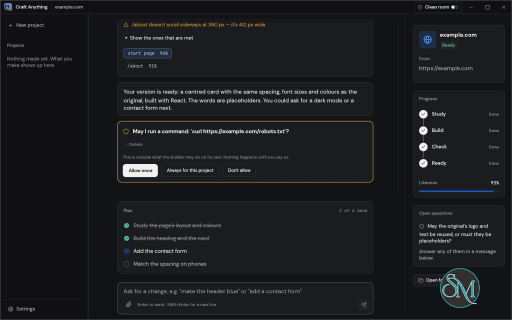
Craft Anything follows a four-stage workflow: Study, Build, Check, and Refine. Users provide a target and describe what they want to create. The software examines the target, sends the findings to a coding agent, generates a new project, and checks how closely the result matches the original.
It supports recreating websites, applications, and games. Users can also specify their preferred programming language, framework, or game engine.
Reverse Engineering and Inspection
The underlying engine is written in Rust and includes a large collection of inspection tools for different software formats and platforms.
It can examine native applications, Java and .NET programs, Android packages, Apple applications, Electron applications, websites, firmware, databases, game files, and other formats.
The Advanced workbench exposes tools such as disassembly, decompilation, function analysis, call graphs, hexadecimal inspection, and evidence records. Users can investigate software without necessarily starting a recreation project.
Clean Room and Deep Modes
One of the more interesting features is the separation between Clean Room and Deep modes.
Clean Room is the default mode. It studies software through publicly visible behavior, screenshots, and other permitted observations without reading the original application's source code or files. This approach is intended to reduce the risk of copying protected implementation details.
Deep mode enables more extensive inspection, including reading application files and using additional reverse-engineering tools. Ghidra integration provides further decompilation capabilities when installed.
AI Coding Agent Integration
Craft Anything relies on an external coding agent to build applications. Claude Code is the primary supported integration and runs using the user's existing installation and authentication.
The project also includes adapters for other agents, although some integrations are not yet verified in real-world installations.
For analysis and questions, it supports Anthropic, OpenAI, OpenRouter, and local OpenAI-compatible servers.
CLI and MCP Support
The software is not limited to its desktop interface. It also provides a command-line tool and an MCP server.
This allows compatible AI agents and automation workflows to use the same inspection engine. The project advertises 284 tools across its engine, AI, and setup layers, with each tool accessible through the CLI and MCP interfaces.
Build Verification
Generated applications are not simply accepted after the coding agent finishes. Craft Anything checks the output against the original target.
For websites, it captures and compares layouts at desktop, tablet, and mobile widths. It also identifies differences in layout, typography, spacing, page structure, and other visual details.
Game projects can use their own self-tests to check basic functionality. The system can then ask the coding agent to refine the result when checks identify problems.
Download Craft Anything v0.3.0 - Software Mirrors |
|---|
Craft Anything v0.3.0 for Windowscraft-anything-0.3.0-windows-x86.msi | 50.58 MB craft-anything-0.3.0-windows-x86-portable.zip | 59.47 MB craft-anything-0.3.0-windows-x64.msi | 52.67 MB craft-anything-0.3.0-windows-x64-portable.zip | 62.73 MB craft-anything-0.3.0-windows-arm64.msi | 49.82 MB craft-anything-0.3.0-windows-arm64-portable.zip | 60.22 MB |
Craft Anything v0.3.0 for macOScraft-anything-web-0.3.0.zip | 2.53 MB craft-anything-cli-0.3.0-macos-universal.zip | 24.11 MB craft-anything-0.3.0-macos-universal.dmg | 121.94 MB |
Craft Anything v0.3.0 for Linuxcraft-anything-0.3.0-linux-x86_64.tar.gz | 63.56 MB craft-anything-0.3.0-linux-x86_64.rpm | 64.11 MB craft-anything-0.3.0-linux-x86_64.pkg.tar.zst | 49.74 MB craft-anything-0.3.0-linux-x86_64.flatpak | 46.89 MB craft-anything-0.3.0-linux-x86_64.deb | 64.51 MB craft-anything-0.3.0-linux-x86_64.AppImage.zsync | 211.63 kB craft-anything-0.3.0-linux-x86_64.AppImage | 60.39 MB craft-anything-0.3.0-linux-riscv64.tar.gz | 62.45 MB craft-anything-0.3.0-linux-riscv64.rpm | 63.13 MB craft-anything-0.3.0-linux-riscv64.deb | 63.37 MB craft-anything-0.3.0-linux-aarch64.tar.gz | 60.89 MB craft-anything-0.3.0-linux-aarch64.rpm | 62.06 MB craft-anything-0.3.0-linux-aarch64.pkg.tar.zst | 47.81 MB craft-anything-0.3.0-linux-aarch64.flatpak | 43.89 MB craft-anything-0.3.0-linux-aarch64.deb | 62.62 MB craft-anything-0.3.0-linux-aarch64.AppImage.zsync | 203.17 kB craft-anything-0.3.0-linux-aarch64.AppImage | 57.98 MB |
Craft Anything v0.3.0 for BSDcraft-anything-0.3.0-freebsd-x86_64.tar.gz | 61.17 MB craft-anything-0.3.0-freebsd-aarch64.tar.gz | 58.21 MB |
Craft Anything v0.3.0 Source Code
Craft Anything v0.3.0 Source code (zip)
Craft Anything v0.3.0 Source code (tar.gz)
|
Craft Anything v0.3.0 Release Notes: What's Changed- A .utoc naming billions of empty compression methods no longer runs out of memory by @Agapenordev in #61
- Find the Windows shim, not npm's POSIX script, for a bare program name by @muraa-p in #51
- Every engine listing finds a Ghidra installed in a versioned folder or set through its folder setting by @aweussom in #55
- Leave a pin's old program copies out of the copy by @muraa-p in #56
- Look for Claude Code where WinGet installs it by @justinjohn0306 in #65
- Analysing code at the top of the address space finishes instead of running forever by @Agapenordev in #78
- The macOS app ships craft-anything-cli beside its executable by @bflatastic in #99
- Codex runs in project folders that aren't git repositories by @bflatastic in #101
- Find Ghidra installed from a Linux package by @bflatastic in #103
- Emit object schemas for compare inputs by @TheGalitube in #93
- Wait for asset facts to load in the asset spending smoke test by @WadahBadawi in #76
- Scope test structs FlakyKind and FlakyCheck to unix by @WadahBadawi in #52
- Frida lists devices and processes on Windows instead of hanging or finding none by @vdidon in #59
- Add a French UI translation by @VakzOs in #70
- Add a Japanese README by @zitann2020 in #80
- The Make screen says Craft Anything looks at the original, not an unnamed "we" by @bflatastic in #107
- Add a Japanese UI by @zitann2020 in #87
- The Agent console keeps its size instead of growing until its tabs are cut off by @Agapenordev in #81
- Why we ask is shown on the first-run purpose page, not hidden in a hover tip by @bflatastic in #106
- The Settings window keeps its width on every tab by @bflatastic in #108
- A rebuilt stand-in waits for its predecessor's port instead of failing by @bflatastic in #109
- Look for AI offers local servers already set up in OpenCode by @bflatastic in #111
- Fall back to BM_CLICK for off-screen Win32 buttons and check boxes in UI walkthroughs by @WadahBadawi in #77
- Sync the Craft App Suite list by @dylanmtaylor in #119
- Choose an agent app's program in Settings → AI by @bflatastic in #117
- Add Simplified and Traditional Chinese UI translations (R2.9) by @CQMHV in #115
- Godot installs on macOS: its program may be bigger than other engines' files by @bflatastic in #118
- Find coding agents in OpenCode's install folder and under nvm by @bflatastic in #120
- The macOS Dock shows the app's icon at the same size as other apps' by @bflatastic in #121
- Translate the agent program setting into Chinese by @bflatastic in #122
- Draw CJK interface text in a sans font, not a mincho by @zitann2020 in #125
- A program run in a console on Windows doesn't lose what it wrote on a busy computer by @bflatastic in #126
- Name the font fallback order, and test the order itself by @zitann2020 in #129
- A Flutter library with a header table at the very end of the address range is read without overflowing (R0.5) by @Agapenordev in #131
- Look for AI picks a model that can chat, not an embedding model by @bflatastic in #134
- Test that a stopped stand-in frees its port where the server is, without racing other tests by @bflatastic in #136
- Add an AI by its address in Settings → AI by @bflatastic in #137
- Find coding agents npm installed under a custom prefix by @bflatastic in #139
- Choose the model an AI uses in Settings → AI by @bflatastic in #145
- Find the Godot editor that the store installs on macOS by @olebohmbach in #141
- A rate-limited AI service is waited for as long as it asks by @bflatastic in #148
- Pitfall: merge the commit CI tested, not a head read later by @bflatastic in #150
- Give every Settings tab the same width, with air before the scroll bar by @olebohmbach in #151
- A full-page website capture scrolls through the page first by @bflatastic in #168
- An out-of-date Claude Code says so, and how to update it by @bflatastic in #169
- A website capture refuses the browser's error page by @bflatastic in #171
- The README and STATUS give today's tool counts by @bflatastic in #172
- When the window can't open, the app says why instead of vanishing by @bflatastic in #173
- Browser evidence records Clean room when the run is in Clean room by @bflatastic in #177
- A failed build check says where it looked, not app/ for an app edited in place by @bflatastic in #178
- A question answered outside a build stays in the project's conversation by @bflatastic in #180
- Pitfall: never type python - with a heredoc by @bflatastic in #181
- Add Antigravity (agy) agent CLI adapter and setup support by @x-eon-max in #89
- Clean room captures leave out class names and query strings by @bflatastic in #183
- Setup and the doctor read a client's other names from one table by @bflatastic in #184
- Cover the unknown-font rank in the fallback order test by @zitann2020 in #187
- A pill corner made with calc(infinity * 1px) is captured as 9999px by @rech4210 in #189
- Add a Simplified Chinese README by @maple323 in #188
- Detect Unreal Engine installations and Clang on Linux (R1.6) by @one-bit in #191
- The Windows app no longer starts OpenGL, which crashed some Intel drivers before the window opened by @bflatastic in #198
- Codex is never run as plain text, which opened its interactive mode by @bflatastic in #200
- An A32 doubleword load or store into r15 decodes as invalid instead of stopping the ARM analysis by @rech4210 in #204
- A Mach-O method list at the end of the address space is read without overflowing by @rech4210 in #205
- Reject overflowing bits in 10-byte uleb128 values by @Silvertree2010 in #208
- Captured colours are the page's CSS values, not a canvas read that drifted by one by @bflatastic in #211
- The Windows pipe gap in project_play is noted in its tool help and kept as an ignored test by @rech4210 in #212
- From the CLI, a capture with no open site says each command starts its own browser by @bflatastic in #213
- Try the DX12 adapter before Vulkan when the app starts by @muraa-p in #217
- "It's done" keeps a build as it is and stops offering to carry on by @bflatastic in #221
- A build stops with a plain message when craft-anything-cli is missing by @echelon in #226
- Add a Plain HTML and CSS stack so plain web requests use it by @muraa-p in #225
- fix(ai): add Hermes Agent CLI adapter and enable ACP support by @vietanh210304 in #16
- A same-size rewrite of an unhashed file reads as unknown, not unchanged by @bflatastic in #241
- Pseudo-Java keeps the statements before a try by @bflatastic in #242
- ELF files with no section headers show their dynamic symbols and functions by @rech4210 in #233
- First-run steps scroll when the window is too short, so Continue stays reachable by @bflatastic in #243
- The roadmap and status say how approvals differ between agents by @echelon in #244
- A capture's timeout stops every process in the group, not just the leader by @bflatastic in #246
- adb_app_show says a missing package isn't installed by @bflatastic in #258
- The README says what to do when macOS blocks the command-line zip by @echelon in #265
- A failed adb download or capture doesn't leave a folder that blocks the retry by @bflatastic in #266
- The README's macOS CLI commands work when pasted as they are by @echelon in #267
- Setup creates Pi's mcp.json when it doesn't exist yet by @bflatastic in #268
- Comparing app maps notices an edited inline script by @bflatastic in #269
- android_package_show's summary says signatures are verified by @bflatastic in #290
- Saving a key never replaces a key file it couldn't read by @bflatastic in #293
- Changing AI settings never saves over ones that couldn't be read by @bflatastic in #295
- Resolve Objective-C chained offsets past PAGEZERO (R0.5) by @oliver-mee in #298
- Add a Korean README by @rech4210 in #310
- Saves from two threads at once never collide or mix a project file by @bflatastic in #311
- A large approved action keeps its allow decision over MCP by @bflatastic in #314
- An ACP chat starts the agent's session again after a failed start, and Stop ends a waiting message by @bflatastic in #320
- The CLI's capabilities list keeps Clean room's refusal of target tools by @bflatastic in #323
- The approval check allows npx vite build and still refuses dev servers by @bflatastic in #328
- Recognise selected macOS bundles and nested XPC services (R0.5) by @oliver-mee in #297
- Enabling a toolset in Clean room counts only the tools it lists by @bflatastic in #324
- Catch the Japanese README up with the English one by @zitann2020 in #312
- Say the English README wins in the Chinese one too by @zitann2020 in #313
- Cached prompt tokens from OpenAI-style APIs are counted once by @bflatastic in #337
- Comparing two runs tells a deleted file from a created one by @bflatastic in #340
- Comparing folders or archives moves each new file at most once by @bflatastic in #343
- The change summary counts a comparison where files only moved as changed by @bflatastic in #345
- Import maps, speculation rules and data blocks aren't read as JavaScript by @bflatastic in #353
- Bump the version to 0.2.1 by @echelon in #382
- Stop advising
report --format in the CLI help by @Silvertree2010 in #419 - SQLite rowid alias columns show the rowid instead of NULL by @rech4210 in #409
- Truncated sBPF .text sections decode readable bytes and report partial coverage by @phatloi0010 in #381
- SquashFS extended regular file inodes read their 64-bit layout by @phatloi0010 in #384
- Bump the version to 0.3.0 by @echelon in #425
New Contributors- @Agapenordev made their first contribution in #61
- @muraa-p made their first contribution in #51
- @aweussom made their first contribution in #55
- @justinjohn0306 made their first contribution in #65
- @TheGalitube made their first contribution in #93
- @WadahBadawi made their first contribution in #76
- @vdidon made their first contribution in #59
- @VakzOs made their first contribution in #70
- @zitann2020 made their first contribution in #80
- @CQMHV made their first contribution in #115
- @olebohmbach made their first contribution in #141
- @x-eon-max made their first contribution in #89
- @maple323 made their first contribution in #188
- @one-bit made their first contribution in #191
- @Silvertree2010 made their first contribution in #208
- @vietanh210304 made their first contribution in #16
- @oliver-mee made their first contribution in #298
Full Changelog: v0.2.0...v0.3.0 |
Performance and Compatibility
Craft Anything is built with Rust and uses its own inspection engine rather than depending entirely on external reverse-engineering utilities. Ghidra can be integrated for additional analysis in Deep mode.
The desktop application, CLI, and MCP server provide different ways to access its capabilities. Its supported release packages cover Windows, macOS, Linux, and FreeBSD, with a browser-based WebAssembly viewer also available for certain inspection tasks.
However, the project is still in early development. Some agent integrations, application behavior checks, and inspection tools are incomplete or have only been tested with limited inputs. The availability of a feature does not necessarily mean every supported software format has been thoroughly validated.
System Requirements
Craft Anything requires Rust 1.97 or newer when building from source.
On Debian and Ubuntu, compiling the desktop application also requires development libraries for X11, Wayland, GTK, and OpenGL.
Building applications with AI requires a compatible coding agent installed and authenticated on the computer. Additional AI providers may require their own API configuration.
Prebuilt installers are available for supported platforms, so users do not necessarily need to compile the application themselves.
Pros and Cons
Pros
Combines software inspection and AI-powered project creation.
Supports websites, desktop applications, mobile apps, and games.
Provides Clean Room and Deep inspection modes.
Includes extensive Rust-based reverse-engineering tools.
Supports CLI and MCP integrations.
Compares generated websites against original layouts.
Open-source under MIT or Apache-2.0 licensing.
Cons
Still in early alpha development.
Requires an external coding agent for building projects.
Some agent integrations and verification features are incomplete.
Deep analysis can require additional tools and substantial system resources.
Results depend on the quality of the target inspection and the coding agent.
How to Install
The easiest approach is to download a prebuilt package from the project's GitHub Releases page.
Available formats include MSI installers for Windows, DMG for macOS, and AppImage, Flatpak, DEB, and RPM packages for Linux.
Users who prefer compiling from source can clone the repository and run:
git clone https://github.com/storytold/craft-anything
cd craft-anything

cargo run --release -p craft-anything
The CLI can be installed separately:
cargo install --path apps/craft-anything-cli
After installation, run the diagnostic command to check the environment:
craft-anything-cli doctor
Final Verdict
Craft Anything is an ambitious open-source project that combines reverse engineering with AI-assisted software development. Its biggest advantage is the complete workflow: inspect an existing application, understand how it behaves, generate a new implementation, and check the result against the original.
The Clean Room mode is particularly interesting because it provides a more controlled approach to recreating software based on observable behavior rather than directly copying its implementation. Meanwhile, Deep mode gives experienced developers access to more extensive analysis capabilities.
Its main limitation is maturity. The project is still in early alpha, and some integrations and verification features have not been fully validated. Users should treat generated results as development starting points rather than guaranteed replacements for existing software.
Overall, Craft Anything is a promising tool for developers interested in reverse engineering, software prototyping, and AI-powered application recreation. It is worth exploring, especially for technically experienced users who want more control over how AI studies and rebuilds software.
Sources
Post a Comment/Report Broken Link: