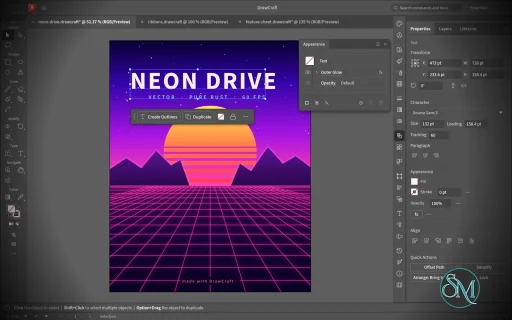
VectorCraft is an open-source vector illustration application designed as a clean-room reimplementation of the Adobe Illustrator workflow. Built entirely in Rust, it provides a native desktop application for Windows, macOS and Linux, along with a WebAssembly version that runs in the browser.
The project goes beyond basic vector drawing. It aims to reproduce a professional Illustrator-style workflow with Bézier editing, Pathfinder operations, multiple artboards, typography, gradients, live effects, PDF and SVG workflows, and extensive automation capabilities.
Features
VectorCraft provides a substantial collection of professional vector-illustration tools:
Pen and Direct Selection tools
Bézier anchors and handles
Pathfinder and exact Boolean operations
Multiple artboards
Layers and groups
Smart Guides
Rulers, grids and alignment tools
Live corners
Gradient and mesh tools
Gradient fills and strokes
Pattern and appearance controls
Blend tool
Radial Repeat
Envelope Distort
Puppet Warp
Liquify
Width tool
Perspective Grid
Freeform gradient editing
Recolor Artwork and Color Themes
Editable text and type-on-path
Variable and transformed vector content
Symbols
Clipping and masking
SVG import and export
PDF import and export
EPS export
DXF import
PNG, JPEG and WebP raster export
Export for Screens
Native .vectorcraft document format
Print engine
PDF layers and overprint support
The application also includes a command API that exposes its tools and interface to external automation. A JSON control channel and MCP server allow AI agents and scripts to manipulate documents, operate tools and export artwork.
This is one of VectorCraft's most distinctive features. It is not simply an image editor with an AI assistant added on top. The editing engine itself is designed to be programmatically controllable.
Download VectorCraft v0.10.0 - Software Mirrors |
|---|
VectorCraft v0.10.0 for Windowsvectorcraft-0.10.0-windows-x86.msi | 90.52 MB vectorcraft-0.10.0-windows-x86-portable.zip | 109.26 MB vectorcraft-0.10.0-windows-x64.msi | 92.72 MB vectorcraft-0.10.0-windows-x64-portable.zip | 113.43 MB vectorcraft-0.10.0-windows-arm64.msi | 87.78 MB vectorcraft-0.10.0-windows-arm64-portable.zip | 108.42 MB |
VectorCraft v0.10.0 for macOSvectorcraft-cli-0.10.0-macos-universal.zip | 98.4 MB vectorcraft-0.10.0-macos-universal.dmg | 122.72 MB |
VectorCraft v0.10.0 for Linuxvectorcraft-0.10.0-linux-x86_64.tar.gz | 111.36 MB vectorcraft-0.10.0-linux-x86_64.rpm | 112.25 MB vectorcraft-0.10.0-linux-x86_64.flatpak | 78.15 MB vectorcraft-0.10.0-linux-x86_64.deb | 112.98 MB vectorcraft-0.10.0-linux-x86_64.AppImage.zsync | 185.11 kB vectorcraft-0.10.0-linux-x86_64.AppImage | 105.64 MB vectorcraft-0.10.0-linux-riscv64.tar.gz | 109.76 MB vectorcraft-0.10.0-linux-aarch64.tar.gz | 107 MB vectorcraft-0.10.0-linux-aarch64.rpm | 108.78 MB vectorcraft-0.10.0-linux-aarch64.flatpak | 73.76 MB vectorcraft-0.10.0-linux-aarch64.deb | 109.68 MB vectorcraft-0.10.0-linux-aarch64.AppImage.zsync | 178.03 kB vectorcraft-0.10.0-linux-aarch64.AppImage | 101.59 MB |
VectorCraft v0.10.0 for BSDvectorcraft-0.10.0-freebsd-x86_64.tar.gz | 111.2 MB |
Others Download related to VectorCraft v0.10.0vectorcraft-web-0.10.0.zip | 22.55 MB |
VectorCraft v0.10.0 Source Code
VectorCraft v0.10.0 Source code (zip)
VectorCraft v0.10.0 Source code (tar.gz)
|
VectorCraft v0.10.0 Release Notes: What's Changed- #1063: a fill or stroke chosen with characters selected colours just them by @bflatastic in #1075
- Fix font size and horizontal scale after text/group scaling by @lollinoo in #1045
- Type: Proportional Metrics — full-width glyphs on the font's proportional widths,
palt (#966) by @imachus in #1067 - Object: Align, Move, Arrange and other commands that change nothing record no undo step by @dotCooCoo in #1060
- #1032: spot colours defined in Lab keep their Lab values by @bflatastic in #1076
- Build: generated sources are rewritten only when they change by @bobtherobot in #1051
- Gradient mesh: a fill colour recolours the point last clicked (#1050) by @MarekSpodBiedry in #1052
- fix(ui): keep All Tools drawer compact on wide screens by @Ni-zav in #1054
- fix(textwrap): reject malformed explicit object targets atomically by @Ni-zav in #1055
- fix(gradient): reject malformed freeform line index lists by @Ni-zav in #1056
- fix(corners): reject malformed explicit dialog targets by @Ni-zav in #1057
- fix(views): validate saved-view coordinates and rotation by @Ni-zav in #1058
- Tests: the command sweeps no longer skip junk scale, spacing and artboard values by @dotCooCoo in #1059
- EPS: arc and arcn with huge angles no longer hang the import by @dotCooCoo in #1062
- Align: a compound path or selected group that contains the key object stays in place by @dotCooCoo in #1074
- #1068: a .ai read as its PDF part keeps its artboard layout by @bflatastic in #1084
- fix(layers): validate explicit Layer Options targets by @Ni-zav in #1077
- fix(shaper): reject invalid explicit scribble targets by @Ni-zav in #1078
- fix(width): validate every explicit width-point removal index by @Ni-zav in #1079
- fix(ui): show Preferences checkbox outlines in every theme by @Ni-zav in #1080
- Adopt shared docking with panel menus and saved return locations by @skylartaylor in #1090
- #885: every checkbox keeps a visible box at rest by @bflatastic in #1112
- Width points: set and copy refuse a malformed index by @bflatastic in #1113
- #1102: an EPS keeps its page and stacked text strokes through its layers by @bflatastic in #1120
- #1085: the DMG's app passes codesign --strict by @bflatastic in #1121
- Drops: libraries, presets and plug-ins open on a drop, as File › Open opens them by @dotCooCoo in #1083
- Align: a key object needs two or more selected objects by @dotCooCoo in #1088
- Align: Align to Artboard uses the active artboard by @dotCooCoo in #1105
- Align, Reflect and Shear: object.align needs a direction; unknown choices are errors by @dotCooCoo in #1106
- MCP: object.setProps removes the objects it hides or locks from the selection by @dotCooCoo in #1107
- Part of #394: Align and Distribute move pattern tiles when Transform Pattern Tiles is on by @dotCooCoo in #1108
- Object: Lock and Hide › All Artwork Above deselect the objects they lock or hide by @dotCooCoo in #1109
- Swatches: swatch.library.save counts only the swatches the file holds by @dotCooCoo in #1110
- #1095: an artboard's name stays at its corner in a rotated view by @bflatastic in #1122
- #1111: Ctrl+Shift+L, C, R, J and F align paragraphs by @bflatastic in #1127
- Fix #867: macOS file dialogs are sheets, and no dialog runs inside the event handler by @Emlembow in #1099
- #893: Shape Builder merges leave no seams on grids of lines by @NoJuanNobody in #1081
- Type: Proportional Metrics in vertical type — upright glyphs on the font's proportional heights,
vpal (#966) by @imachus in #1082 - Plug-ins: whole-number parameters keep their exact value and stay in range by @webdevtodayjason in #1091
- PDF/.ai import: glyphs spaced each their own way keep their place by @p0lyg0n in #1101
- Direct Selection: drag paths selected whole by an anchor; Alt-copy at any time, snapping by that anchor by @bobtherobot in #1104
- #1129: the toolbar's paint buttons fit its width by @bflatastic in #1134
- #1089: an image copied in a browser pastes as the picture, also from its markup by @bflatastic in #1135
- #788: file.place frames an SVG by its viewBox when crop is given by @bflatastic in #1145
- Part of #812: Ctrl/Cmd and Alt shape a star while it's dragged by @bflatastic in #1146
- #1018: Edit Toolbar opens a drawer beside the toolbar; tools drag in and out by @bflatastic in #1149
- Icons: the Selection arrow is black and Direct Selection's white in every theme by @bflatastic in #1150
- fix(fonts): preserve highlighted font across menu list refreshes by @Ni-zav in #1116
- Fix #662: the Windows installer offers a desktop shortcut by @mateususa in #1128
- #819: more noise removal never gives more paths by @mateususa in #1130
- Lint: clippy -D warnings passes for the wasm32 web build by @dotCooCoo in #1132
- Fix #1140: gradient stops blend colour and opacity apart on the canvas, as the exports do by @Biromedic in #1142
- Fix #1141: SVG import keeps a mask whose art is all hidden, so its object stays hidden by @Biromedic in #1143
- #1139: Shift-click selects several artboards, which move and delete together by @bflatastic in #1154
- Render: a shape far beyond any page is left undrawn, never crashing the app by @bflatastic in #1155
- #1144: Live Corners round corners between curved segments too by @bflatastic in #1159
- #1133: Zig Zag's dialog has sliders and radio buttons, as in Illustrator by @bflatastic in #1160
- #1152: Offset Path opens on the values it was last applied with by @bflatastic in #1166
- #1103: a marquee selects only the objects whose paths it touches by @bflatastic in #1167
- #1151: Preferences › Performance › Linux Display Server opens the window through XWayland, where file drops work by @bflatastic in #1170
- #1111: a selected gradient mesh shows its mesh lines and points by @bflatastic in #1171
- #1111: a blend's spine bends into a curve by @bflatastic in #1174
- #1158: Alt-click on a layer's eye or lock isolates that layer by @bflatastic in #1175
- #1163: Release splits a path of several subpaths into one path each by @bflatastic in #1176
- #1163: MCP render_preview takes an artboard index by @bflatastic in #1177
- MCP: drawing tools describe inherited paint and export text options by @KnottyDyes in #1148
- Reject malformed desktop automation root arguments before startup by @piero-83 in #1157
- Review: house header for the root-argument integration test (#1157) by @bflatastic in #1178
- PDF export: warn when raster effects render below the requested resolution by @KnottyDyes in #1147
- #1163: command_batch can be one undo step by @bflatastic in #1179
- #1163: file.list lists a folder for agents, held to the read root by @bflatastic in #1181
- Type: Thai falls back to a font made for Thai by @bflatastic in #1185
- Type: the caret steps over whole clusters (Thai marks, accents, emoji) by @bflatastic in #1186
- Docs: type parity has one status line again by @bflatastic in #1187
- Type: Thai, Lao, Khmer and Myanmar lines break between words by @bflatastic in #1188
- Font menu: a Thai script filter by @bflatastic in #1190
- Type: Noto Sans Thai from craft-fonts is the Thai fallback, on the web too by @bflatastic in #1191
- Type: the caret and double-click take Thai word by word by @bflatastic in #1195
- Release: embed the current craft-fonts (Thai, Arabic, Chinese) by @bflatastic in #1204
- #1197: Make Compound Path cuts holes where paths overlap by @bflatastic in #1213
- Test: the idle place test waits for the link scan in real time by @bflatastic in #1214
- #1194: Direct3D 12 shaders compile with FXC by @bflatastic in #1215
- #1180: Align aligns the selected anchor points by @bflatastic in #1216
- #955: a move grabbed by an anchor lands it on another anchor by @bflatastic in #1217
- .ai import: copied area type and type on a path keep their own place by @p0lyg0n in #1208
- EPS/.ai import: a font is found by its exact PostScript name before the name is split by @p0lyg0n in #1207
- Part of #1102: type from the text document keeps its line spacing across paragraphs by @DisasterAreaDesigns in #1206
- pt-BR: translate the remaining UI labels and engine messages by @WladmirJunior in #1205
- i18n: complete the Czech (cs) catalog: panels, dialogs, plurals and messages by @Losminek in #1189
- Type: Digits — Default, Arabic, Hindi and Farsi numeral systems (Character panel menu, Middle Eastern options) by @zakariayacine in #1201
- Linux: Automatic draws on the GPU the Wayland compositor draws with by @atoslins in #1200
- perf: large documents (#1172): big selections 100×+, live effects 18×, Pathfinder 11–20×, 41% less undo memory by @arhammusheer in #1173
- Docs: record the large-document performance work (#1173) by @bflatastic in #1240
- fix: 複合パスの外観と塗り規則を修正する #1197 by @haranishi in #1225
- Object: Lock, Transform Each, Perspective and other commands that change nothing record no undo step by @dotCooCoo in #1233
- Part of #394: art moved or duplicated with an artboard follows Transform Pattern Tiles by @dotCooCoo in #1219
- Shape Builder: a line's loose end past a crossing no longer runs out and back in most cases by @dotCooCoo in #1230
- Align: Align to Key Object makes the topmost selected object the key by @dotCooCoo in #1221
- MCP: select.key checks its id, and agents can read the key object by @dotCooCoo in #1222
- Palette: the entry that cancels the key object reads Cancel Key Object by @dotCooCoo in #1224
- Tests: the command sweeps and import fuzz tests fail when a command panics by @dotCooCoo in #1218
- Tests: the envelope export test ignores the PDF's XMP dates and file ID by @dotCooCoo in #1220
- fix: macOSの保存画面に形式選択を追加する #866 by @haranishi in #1235
- Direct Selection: a click on an already selected anchor selects it alone by @zakariayacine in #1237
- Hand and Zoom cursors drawn like the tool cursors (Windows showed the move arrows, no magnifier) by @zakariayacine in #1238
- i18n (cs): Pathfinder Add reads "Sjednotit", plus the remaining looked-up strings by @Losminek in #1226
- Fix Rectangular Grid click options dialog by @FredApps in #1169
- Graph designs and marker designs: Object › Graph › Design… and Marker… by @IHAGI-c in #1092
- Graph Data: Transpose and Switch x/y; | line breaks in labels; pie Legend, Position and Sort by @IHAGI-c in #1115
- Graph Type: Add Drop Shadow and Add Legend Across Top by @IHAGI-c in #1119
- Graph Type: widths past 100%, First Row and First Column in Front, Draw Filled Lines by @IHAGI-c in #1136
- Graphs keep their label formatting when drawn again by @IHAGI-c in #1137
- Graph Data: a worksheet window by @IHAGI-c in #1138
- Preserve SVG data attributes and validate export artboard ranges by @sanyamsingh001 in #989
- Correct Arabic shaping assertions and cover embedded PDF fonts by @sanyamsingh001 in #993
- Fix Pen endpoint picking and commit handle previews by @sanyamsingh001 in #821
- Preserve placed links in editable exports and honor AI artboard options by @sanyamsingh001 in #718
- feat(ui): add horizontal and vertical center align button by @Muratv07 in #1073
- Color params: one scale per CMYK colour, not per component by @japbcoelho in #1249
- MCP: lost replies report uncertainty instead of replaying edits by @KnottyDyes in #1246
- Trace: colour mode keeps close dark tones apart by @japbcoelho in #1247
- Docs: ROADMAP progress for 2026-10-12 by @bflatastic in #1310
- fix: 線の色追加時にゼロ幅を既定値へ戻す #1253 by @haranishi in #1256
- Direct Selection: Shift-click deselects one anchor of a path selected whole by @itrycodinganditsbad in #1263
- fix: Direct Selectionで線分だけを選択・削除する #1278 by @haranishi in #1300
- fix: ロック中と隔離の外側の図形から色を取得する #1251 by @haranishi in #1260
- fix: スポイトの通常カーソルを十字表示から修正する #1269 by @haranishi in #1288
- fix: 動かないアンカー整列でUndo履歴を増やさない #1180 by @haranishi in #1276
- fix: フォントのフルネームを正しい書体へ解決する #1258 by @haranishi in #1267
- fix: Curvature Toolの点表示を整理する #1236 by @haranishi in #1284
- Type: Proportional Metrics bring their kerning —
apkn with palt, vkrn and vapk with vpal (#966) by @imachus in #1291 - perf: テクスチャ効果の距離判定を軽くする #1257 by @haranishi in #1265
- fix(packaging): RPMの必須依存を共有ライブラリ能力で宣言 (#1275) by @haranishi in #1290
- G2: add Artistic Film Grain live effect by @Tevinhead in #1282
- fix: Simplify後の選択を更新して点数を表示する #1272 by @haranishi in #1305
- Pen + Alt converts anchors of paths in a selected group (#1273) by @itrycodinganditsbad in #1306
- Part of #394: new and imported documents use the Gridline every and Subdivisions preferences by @dotCooCoo in #1314
- Transform: Transform Again repeats the options of the transform it repeats by @dotCooCoo in #1303
- Layers: Send to Current Layer refuses a hidden or locked current layer by @dotCooCoo in #1301
- Links: Find in Folder… looks for missing linked files in a folder and its subfolders by @dotCooCoo in #1287
- Fix Escape exiting Artboard editing by @LucaLorenz in #1296
- Fix Document Setup → Edit Artboards dialog handoff by @LucaLorenz in #1294
- Validate explicit targets in layer row commands (part of #785). by @FredApps in #1255
- i18n (cs): translate labels that bypass the catalog lookup (file filters, diagnostics, credits, gradients, print marks) by @Losminek in #1259
- i18n: add Hungarian (hu) UI translation by @Skaywalker in #1302
- Artboards: the Artboard tool starts on the active artboard by @dotCooCoo in #1309
- EPS: closepath no longer grows the path past its limit by @dotCooCoo in #1311
- Snap to Point: drag a selection by the anchor pressed near (#1274) by @itrycodinganditsbad in #1313
- Image Trace: an image over 64 megapixels is traced scaled down by @fabian-co in #1315
- Type: Change Case, Smart Punctuation and other commands that change nothing record no undo step by @dotCooCoo in #1316
- ci: upgrade actions to Node 24 to fix deprecation warnings by @dylanmtaylor in #1321
- fix(cad): set the closed bit on DXF SPLINE entities so closed curves import into CAM (#1299) by @rollroyces in #1320
- Docs: merge duplicated table rows, record the rest of 2026-10-12 by @bflatastic in #1323
- Select: Select All skips hidden isolated groups, and menu commands stay within what it selects by @dotCooCoo in #1325
- Plug-ins: whole-number fields keep values past 2^53 exactly as typed by @webdevtodayjason in #1327
- EPS: shading functions in shared arrays no longer hang the import by @dotCooCoo in #1330
- EPS: huge arcs, fine dashes and rectangle arrays in a loop no longer hang the import by @dotCooCoo in #1329
- Paint: fill, stroke, gradient and Appearance panel commands that change nothing record no undo step by @dotCooCoo in #1331
- EPS: loops under a long dash array no longer hang the import by @dotCooCoo in #1332
- Docs: ROADMAP 2026-10-12 adds #1325, #1327, #1329–#1332 by @bflatastic in #1333
- Transparency: opacity mask options that change nothing record no undo step by @dotCooCoo in #1336
- Path: Simplify and Add Anchor Points record no undo step when they change no path by @dotCooCoo in #1337
- perf: bound memory on large documents (#1244) by @arhammusheer in #1245
- EPS: the PostScript reader reads many tiling patterns, spot inks and shadings in linear time by @dotCooCoo in #1341
- Docs: ROADMAP 2026-10-12 adds #1245, #1336, #1337, #1341 by @bflatastic in #1343
- Part of #1286: constant alpha masks are drawn white by @bflatastic in #1359
- Adopt craft-print for desktop printing, preserving Windows 7 by @skylartaylor in #1324
- G16: Korean interface (ko) by @Johau91 in #1352
- PDF import: gradient-filled shapes open as one path, not a clipped rectangle (#1304) by @aguo890 in #1351
- PDF/.ai import: a .ai opens on its artboard with its bleed round it (#1266) by @aguo890 in #1349
- Part of #868: PDFs saved with the reference app's editing data open from it, as .ai files do by @dotCooCoo in #1345
- Layers: art moved into a hidden or locked layer, or hidden by a data set, is deselected by @dotCooCoo in #1355
- perf: deselect hidden and locked objects in linear time by @osaidahmed in #1353
- Part of #394: art moved whole with direct-selected anchors follows Transform Pattern Tiles by @dotCooCoo in #1354
- Part of #394: Appearance of Black › On Screen shows pure CMYK black as RGB black by @aguo890 in #1350
- fix(cad): DXFの制御点SPLINEの閉鎖を読み込みに反映する (#1299) by @haranishi in #1318
- fix(ui): 数値欄のフォーカス時にドラッグ選択を保つ (#1326) by @haranishi in #1339
- fix(pathfinder): 開いた切断線で図形を分割する (#1307) by @haranishi in #1335
- fix: Pathfinderの名前とSVG IDを保持する #1293 by @haranishi in #1308
- Align: Object › Align follows Align To, and the choice is kept across restarts by @dotCooCoo in #1347
- fix: 図形のクリックからアートボードを作成する #1227 by @haranishi in #1252
- feat: 定規の原点を変更・リセットする #1212 by @haranishi in #1250
- Live Corners: with Direct Selection, a click on a widget selects its corner by @zakariayacine in #1239
- Add a Polar Grid canvas-click dialog by @FredApps in #1192
- Part of #1264: an image on %_ lines of a .ai file's editing data is read as an image by @bflatastic in #1364
- PDF export: art beyond 1,000,000,000 pt is left out, so dev and test builds no longer abort by @dotCooCoo in #1360
- Part of #666: Affinity rectangles keep per-corner radii and straight corners by @callmeBalloch in #1369
- Toolbar: centre the tool buttons inside the panel's border by @AyberkA0 in #1363
- i18n(es): add 371 rows other catalogs already had by @diegozpy in #1371
- Part of #1358: the Image Trace section no longer widens the Properties panel by @bflatastic in #1374
New Contributors- @lollinoo made their first contribution in #1045
- @MarekSpodBiedry made their first contribution in #1052
- @skylartaylor made their first contribution in #1090
- @Emlembow made their first contribution in #1099
- @NoJuanNobody made their first contribution in #1081
- @webdevtodayjason made their first contribution in #1091
- @Biromedic made their first contribution in #1142
- @KnottyDyes made their first contribution in #1148
- @piero-83 made their first contribution in #1157
- @WladmirJunior made their first contribution in #1205
- @Losminek made their first contribution in #1189
- @zakariayacine made their first contribution in #1201
- @atoslins made their first contribution in #1200
- @arhammusheer made their first contribution in #1173
- @FredApps made their first contribution in #1169
- @sanyamsingh001 made their first contribution in #989
- @Muratv07 made their first contribution in #1073
- @itrycodinganditsbad made their first contribution in #1263
- @Tevinhead made their first contribution in #1282
- @LucaLorenz made their first contribution in #1296
- @Skaywalker made their first contribution in #1302
- @rollroyces made their first contribution in #1320
- @Johau91 made their first contribution in #1352
- @aguo890 made their first contribution in #1351
- @osaidahmed made their first contribution in #1353
- @diegozpy made their first contribution in #1371
Full Changelog: v0.9.0...v0.10.0 |
Performance and Compatibility
VectorCraft is implemented in Rust and uses a multithreaded rendering architecture. The project reports that 20,000 shapes can be rendered in approximately 27 milliseconds at full Retina resolution while maintaining a responsive interface.
Its geometry engine is designed around exact curve operations, while structural sharing provides effectively unlimited undo without requiring every operation to duplicate the entire document.
The project also places considerable emphasis on automated testing. Property-based tests are used for document round trips, while rendering and geometry have dedicated test infrastructure.
File compatibility is another strength. SVG is a first-class format, while PDF import/export and PDF-compatible AI files provide useful interoperability with established design workflows. DXF import and EPS export further extend its usefulness for technical and print-oriented work.
However, compatibility should not be confused with complete Illustrator parity. VectorCraft is still under active development, and the project roadmap indicates that some areas remain under construction.
System Requirements
VectorCraft supports:
Windows
macOS
Linux
FreeBSD
WebAssembly/browser
Prebuilt Linux packages are available in several formats, including:
Both x86_64 and ARM64 Linux builds are provided.
macOS has a universal build supporting Intel and Apple Silicon, while Windows is distributed as a native desktop application.
Developers can also build the application directly from source using Rust.
Pros and Cons
Pros
Open-source
MIT or Apache-2.0 licensing
Native Rust application
Windows, macOS and Linux support
Browser/WebAssembly version
Strong Bézier and vector-editing tools
Exact Pathfinder Boolean operations
Multiple artboards
Advanced gradients and appearance controls
Envelope Distort, Puppet Warp and Liquify
SVG and PDF support
EPS export
DXF import
Native document format
Excellent automation potential
JSON control interface
MCP support for AI agents
Multithreaded rendering
Extensive automated testing
Cons
Still under active development
Not yet a complete Illustrator replacement
Some workflows will still lack the maturity of established commercial software
Font availability and typography coverage are still developing
Professional production workflows should be tested before full migration
The large feature set can make the application more complex for beginners
How to Install
The easiest method is to download the appropriate prebuilt package from the project's GitHub releases.
Linux users can choose between AppImage, DEB, RPM and tarball packages. macOS users can install the universal application, while Windows users can use the provided Windows package.
Developers can build the desktop application from source:
git clone https://github.com/storytold/vectorcraft
cd vectorcraft
cargo run --release -p vectorcraft
A VectorCraft document can also be opened directly:
cargo run --release -p vectorcraft -- examples/dusk-poster.vectorcraft
For headless processing and automation, the project provides a CLI:
cargo run --release -p vectorcraft-cli -- run \
  --in examples/ribbons.vectorcraft \
  --export out.pdf
The MCP server can be launched with:
cargo run --release -p vectorcraft-cli -- mcp
This makes VectorCraft particularly interesting for automated graphics generation and AI-assisted design workflows.
Final Verdict
VectorCraft is an unusually ambitious open-source Illustrator alternative. It is not merely a basic SVG editor with a familiar interface. The project is attempting to recreate a substantial portion of the professional Illustrator workflow while building its own modern Rust-based rendering and document architecture.
Its strongest areas are vector geometry, Pathfinder operations, Bézier editing, advanced effects, SVG/PDF interoperability and automation. The MCP and JSON control interfaces are especially interesting because they allow the same editing engine to be operated by scripts and AI agents.
Performance is another major strength. The native Rust architecture and multithreaded rendering approach give VectorCraft a solid technical foundation for handling complex vector documents.
The biggest limitation is maturity. Established applications such as Illustrator have decades of compatibility work, plugins, fonts, production workflows and ecosystem support behind them. VectorCraft is still developing and should not yet be treated as a drop-in replacement for every professional Illustrator workflow.
For designers, developers and open-source users looking for a modern vector graphics application, however, VectorCraft is one of the most interesting projects in this category. Its combination of native performance, open licensing and agent-native automation makes it particularly worth watching.
Post a Comment/Report Broken Link: