Lap is a free and open-source photo manager designed for large local photo and video collections. Instead of uploading media to a cloud service or forcing files into a proprietary library, Lap works directly with existing folders and keeps its catalog and AI data on the local computer. It supports Windows, macOS, and Linux.
The application combines photo browsing, organization, searching, duplicate cleanup, face recognition, and basic editing in one desktop interface. It is particularly aimed at users managing large personal libraries and claims to be optimized for collections containing more than 100,000 files.
Features
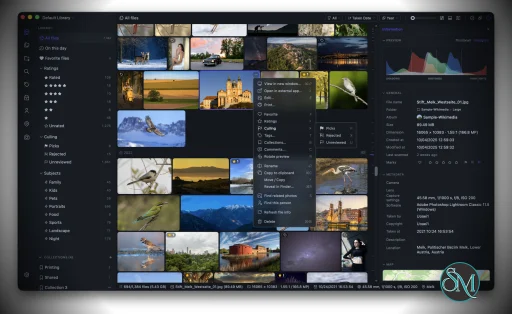
Lap provides a folder-first approach to photo management. Existing photos and videos remain ordinary files in their existing folders instead of being locked inside an application-specific storage system.
Its browsing and organization tools include:
Browsing by date, folder, location, camera, lens, tags, ratings, and faces
Smart Albums with customizable rules
Collections and tags
Favorites, ratings, comments, and culling states
Interactive map view for geotagged media
Duplicate detection and cleanup
Four-pane photo comparison
Multiple library support
Drag-and-drop and copy-paste import
Filesystem synchronization
Safe file move, copy, and delete operations
Lap also includes local AI capabilities. Users can search using natural-language descriptions, find visually similar images, identify subjects, cluster faces, and optionally perform multilingual searches in more than 50 languages. These AI functions run locally rather than requiring a cloud AI service.
The application supports Apple Live Photos and Google Motion Photos, while RAW and JPEG or HEIC pairs can be displayed as a single item. It also supports RAW thumbnail generation and a wide range of photo, RAW, and video formats.
Basic editing tools are included for cropping, rotating, flipping, resizing, and image adjustments.
Download Lap v0.3.3 - Local AI-powered Photo manager - Software Mirrors |
|---|
Lap v0.3.3 - Local AI-powered Photo manager for WindowsLap_0.3.3_x64_en-US.msi | 217.61 MB Lap_0.3.3_arm64_en-US.msi | 247.59 MB |
Lap v0.3.3 - Local AI-powered Photo manager for macOSLap_0.3.3_x64.dmg | 173.44 MB Lap_0.3.3_aarch64.dmg | 192.07 MB |
Lap v0.3.3 - Local AI-powered Photo manager for LinuxLap_0.3.3_arm64.deb | 196.58 MB Lap_0.3.3_amd64.deb | 205.22 MB Lap_0.3.3_amd64.AppImage | 267.66 MB Lap_0.3.3_aarch64.AppImage | 255.31 MB |
Others Download related to Lap v0.3.3 - Local AI-powered Photo managerLap_x86_64.app.tar.gz | 172.86 MB Lap_aarch64.app.tar.gz | 193.28 MB |
Lap v0.3.3 - Local AI-powered Photo manager Source Code
Lap v0.3.3 - Local AI-powered Photo manager Source code (zip)
Lap v0.3.3 - Local AI-powered Photo manager Source code (tar.gz)
|
Lap v0.3.3 - Local AI-powered Photo manager Release Notes: Lap v0.3.3 adds Photo Collage, tag groups, offline album browsing, and arbitrary-angle straightening. It also brings more RAW preview controls, faster startup and RAW browsing, simpler view switching and multi-select, and six new languages.
Highlights
- Photo Collage — Compose selected photos into a single shareable image with grid, justified-mosaic, and Picasa-style picture-pile layouts. Move, layer, rotate, and scale photos on the pile, randomize a layout, then export at full resolution from the originals or print to A4 or photo paper at 300 dpi, with customizable page size, orientation, background, spacing, borders, and optional drop shadows. (#358, #387)
- Tag Groups — Organize tags into collapsible, reorderable groups with inline editors for creating tags and groups, move tags between groups, and show the group name in content titles. A protected Default group keeps every tag categorized. (#304)
- Offline Album Browsing — Albums on disconnected or network storage stay visible across the library with a warning indicator, so you can browse cached thumbnails and metadata without the volumes mounted. Actions that need the original file are clearly gated. (#351)
- Arbitrary-Angle Straighten — Fine-tune horizons in crop mode with a ruler slider that snaps to zero, supports keyboard stepping, and live-previews the straightened, cropped result before saving. (#318)
- RAW Preview Controls — Choose the preview source (rendered or embedded), adjust render brightness, and control RAW+JPEG pair display, and switch between RAW modes and the paired JPEG/HEIC directly in the viewer. (#331, #369)
- Six New Languages — Lap is now available in Hungarian, Italian, Dutch, Polish, Ukrainian, and Traditional Chinese, bringing the total to fifteen languages. (#330, #336, #343, #364)
New Features and Improvements
- Added native file drag-out: drag photos and videos from the grid or the viewer straight into Finder, Explorer, or other apps as real files, with a thumbnail drag preview and support for up to 1,000 files at once. (#339)
- Added a thumbnail navigator to the File Info preview, showing the whole image with a draggable viewport box for quick navigation, scroll-to-zoom, double-click to fit, and rotation-aware positioning.
- Added in-view sorting and sidebar search, letting you reorder and filter results without leaving the current view. (#396)
- Unified grid, filmstrip, and map into mutually exclusive view modes with a single switch. (#315)
- Added configurable map photo marker size, and improved map clustering and transitions. (#307)
- Added per-album exclusions with a scan preview, replacing the global small-image filter with per-album file-type, small-image, and folder exclusions. (#322, #332)
- Added importing files directly into an album folder, respecting the album's exclusions and scan safety.
- Added "Refresh file info" for multi-selections to re-read metadata for several files at once. (#368)
- The image viewer now bidirectionally syncs the current photo with the main-window selection. (#328)
- Added per-library thumbnail cache cleanup in Manage Libraries, with cache sizes shown per library.
- Main-window dialog positions are now remembered across sessions.
- Added an optional navigator sharpness grid to compare focus across shots.
- Consolidated multi-select actions into the selection panel and removed the separate thumbnail double-click action setting. (#347)
- Reworked multi-select so the mode is independent of the selection panel: selecting no longer forces the panel open, and a floating count button opens it on demand, showing the selected count and total size alongside up to 15 selected thumbnails. (#407)
- Added an optional build against the system libheif (
LAP_SYSTEM_LIBHEIF=1) for distribution packaging. (#359)
- Improved management dialogs, folder actions, and the shared splitter indicator with a delayed hover fade-in.
- Date and time now format according to the system region by default, independent of the UI language. (#390)
- Bundled third-party license notices with the app for easier attribution and compliance.
- Faster startup: heavy background work is deferred until after the first content paints, and languages and sidebar views are now lazy-loaded.
- Faster RAW browsing with reduced-resolution previews and on-demand full-size rendering when zooming in. Distinct icons identify embedded, rendered, and brightened RAW previews.
- Collage page, layout, and style preferences now persist between sessions. Image editor preferences now sync between windows. (#358)
Bug Fixes
- Aligned video capture times with photos so images and videos from the same shoot sort together correctly. (#400)
- Fixed rotated NEF previews by matching embedded JPEG previews by long/short edge, and extracted embedded JPEGs independently of the RAW decoder. (#360, #361)
- Resolved the HEIF primary image for tiled-grid thumbnails and sizes, and added a robust HEIF decode fallback on Windows and Linux using FFmpeg with a format sniffer. (#349, #355)
- Fixed HEIC decoding on macOS by falling back to native ImageIO. (#321)
- Fixed grouped JPEG previews not fitting their geometry grid cells. (#398)
- Fixed the full image being replaced by the thumbnail when navigating quickly. (#367)
- Centered small RAW previews using explicit layout dimensions, and preserved the RAW preview mode across source changes.
- Restored RAW preview fallbacks: try rendering when an embedded preview is unavailable, and try the embedded preview when rendering fails. If neither works, attempt general image decoding, including JPEG content saved with a RAW extension.
- Fixed RAW+JPEG/HEIC badge highlighting and made switching from the paired image select the current RAW mode before cycling modes. Removed the default focus outline from RAW preview badges on Windows.
- Fixed Live Photo previews not restarting, and made fullscreen backgrounds opaque. (#347)
- Guarded video hover previews against a missing GStreamer sink. (#313)
- Detect database corruption per library and prompt you to switch libraries, preserving the original database file instead of silently rebuilding it. (#326)
- Made database storage migration safe, reporting cleanup failures rather than losing data. (#354)
- Fixed a crash on exit when Aptabase analytics is not enabled. (#372)
- Reloaded visible thumbnails after deletion in grouped view. (#325)
- Fixed inline rename losing focus and Enter unexpectedly opening the dialog.
- Refreshed the current album view after changing exclusions and avoided duplicate default names when creating tags.
- Stopped thumbnail drag from File Info previews and simplified album and preview fields.
- Tracked the satellite map theme separately for the map view and the info panel.
- Showed a duplicate-name warning on drag and drop. (#386)
- Clarified paired files in album scan status. (#392)
- Persisted the preview toolbar pinned position.
- Fixed Windows builds by compiling libde265 at
/O1 on MSVC. (#389, #393)
- Excluded bundled libsystemd and libudev from the AppImage to fix runtime conflicts. (#311)
- Refreshed file info in place without resetting the viewport or scroll position.
- Restored grouping when returning from filmstrip view.
- Stopped "Refresh file info" from downloading unchanged cloud-only files (OneDrive Files On-Demand and macOS dataless files) by detecting them from metadata instead of opening them. (#394, #411)
Downloads
Choose the correct package for your platform:
Auto Update
Existing macOS and Windows installations can use Lap’s built-in auto-update feature.
For Linux AppImage installations, download the new AppImage from the table above instead of using the built-in updater. This release includes update information and .zsync files for future delta updates through compatible external AppImage update tools.
Linux DEB installations can also be updated by downloading and installing the matching DEB package.
Contributors
This release includes community contributions across features, platform fixes, and translations. Many thanks to:
- ddcdk — the Photo Collage studio (grid, justified-mosaic, and picture-pile layouts) (#358, #387), the cloud-only file refresh fixes (#394, #411), and the MSVC libde265
/O1 Windows build fix (#389, #393).
- beneedict — the Fedora COPR release build (#370) and the optional system-libheif build flag (
LAP_SYSTEM_LIBHEIF=1) (#359).
- yi111 — the robust HEIF decode fallback on Windows and Linux using FFmpeg with a format sniffer (#349, #355).
- Daniel Benner — keeping the full image from being replaced by its thumbnail when navigating quickly (#367).
- Philip de Bruin — fixing the crash on exit when Aptabase analytics is not enabled (#372).
- Tomasz Gospodarczyk — the Polish locale and README translation (#343).
- OPGERUIMD97 — the Dutch translation (#364).
- Dmitry Yerokhin — Russian translation updates (#320).
- bakos-andras — the Hungarian translation (#330).
And thanks to everyone who reported issues and tested development builds.
Full Changelog |
Performance and Compatibility
Lap is built with Tauri and Rust for its core, with a Vue, Vite, and Tailwind CSS frontend. It uses SQLite for its local data. The project uses LibRaw, libheif, FFmpeg, ONNX Runtime, CLIP, and InsightFace for media processing and local AI functionality.
The application is designed around large local libraries and has been optimized for collections containing 100,000 or more files. Its local-first design also means that photos do not need to be uploaded to an external service.
One important consideration is that not all organization data is stored inside the original photo files. Collections, tags, comments, ratings, favorites, culling states, Smart Albums, AI data, thumbnails, and indexes are stored in Lap's local database or configuration. This information therefore does not automatically follow a photo when it is moved or copied outside Lap.
The project supports macOS on both Apple Silicon and Intel, Windows 10 and 11 on x64 and ARM64, and Linux on x64 and ARM64. The current release provides DEB and AppImage packages for Linux.
System Requirements
Lap supports:
Windows 10 and 11
macOS on Apple Silicon
macOS on Intel
Linux x64
Linux ARM64
Linux users can install Lap using DEB or AppImage packages. macOS users can also install it through Homebrew.
No specific minimum RAM or CPU requirement is published in the project's documentation. Because local AI features such as image search and face recognition require model inference, actual resource usage will depend on the size of the library and which AI features are being used.
Pros and Cons
Pros
Free and open source
Local-first design
No required cloud account
Works directly with existing folders
Windows, macOS, and Linux support
Local AI search
Visual similarity search
Face clustering
Smart Albums
Duplicate detection
RAW support
Live Photos and Motion Photos
Map view
Large-library support
Basic photo editing
Multiple library support
Supports Intel and Apple Silicon Macs
Windows ARM64 support
Linux ARM64 support
Cons
Some organization data is stored only in Lap's local database
Metadata such as tags and ratings does not automatically travel with files outside Lap
Large AI indexes can require significant storage and processing
The project is still evolving
Windows packages are currently unsigned, so SmartScreen may display a warning during installation
How to Install
Download the appropriate package from the Lap GitHub releases page.
On Windows, choose the x64 or ARM64 MSI package depending on the system architecture.
On macOS, choose the Apple Silicon or Intel DMG package. The project also supports Homebrew:
brew tap julyx10/lap
brew install --cask lap
On Debian-based Linux distributions, install the appropriate DEB package. AppImage packages are also available for Linux.
After launching Lap, add an existing photo folder or library and allow the application to scan and index the media. AI search and other local analysis features can then build their required indexes.
Final Verdict
Lap is a capable local photo manager aimed at users who want more than a basic folder browser but do not want to move their entire photo collection into a cloud service.
Its combination of local AI search, face clustering, duplicate detection, Smart Albums, RAW support, map browsing, and direct filesystem management gives it a broad feature set. The folder-first design is also useful for users who want to retain control of their original files.
The main consideration is the separation between the original media and Lap's local database. Tags, ratings, collections, AI data, and other organizational information are not automatically embedded into the files, so the Lap database should be included in backups if that information is important.
Post a Comment/Report Broken Link: