SoundCraft is a free, open-source digital audio workstation (DAW) designed as an alternative to Avid Pro Tools. Written in Rust, it combines multitrack audio recording, editing, mixing, MIDI production, audio effects, and automation in a cross-platform application.
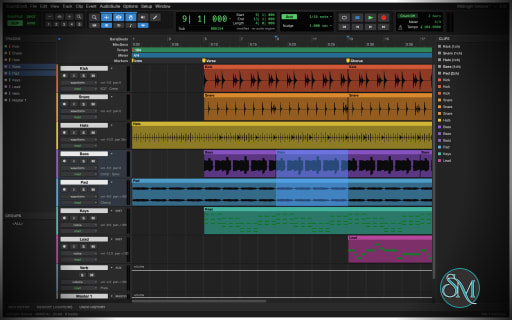
The software follows a familiar professional studio workflow, with dedicated Edit and Mix windows, track-based editing, audio routing, and extensive keyboard shortcuts. It also supports third-party audio plugins and provides command-line tools and Model Context Protocol (MCP) integration for automated audio production.
SoundCraft stands out because it combines traditional DAW functionality with AI-assisted workflows. However, it is still in pre-alpha development, so users should evaluate its stability and feature compatibility before relying on it for professional recording or mixing projects.
Features
Multitrack Recording and Audio Editing
SoundCraft provides tools for recording and arranging audio across multiple tracks. Its editing workflow includes Shuffle, Slip, Spot, and Grid modes, along with tools for trimming, separating, duplicating, moving, and consolidating clips.
Users can create fades and crossfades, adjust clip gain, manage playlists, and organize multiple takes using comping lanes. The application also includes loop recording, punch recording, input monitoring, and automatic recovery features.
These capabilities make SoundCraft suitable for exploring common recording and editing workflows, from music production to podcast editing.
Professional Mixing Console
The Mix window provides channel faders, pan controls, insert effects, sends, buses, auxiliary inputs, master faders, and VCA masters.
Users can organize complex sessions with routing folders, solo and mute groups, phase inversion, and automatic plugin delay compensation. Metering tools include peak hold, while sends can operate in pre-fader or post-fader configurations.
This layout will be familiar to users of professional recording software and provides the foundation for building multitrack mixes.
Audio Effects and Plugin Support
SoundCraft includes a collection of built-in audio processors covering common mixing and sound-design tasks.
Available effects include:
Parametric equalization and channel processing.
Compression, limiting, expansion, and noise gating.
De-essing and loudness maximization.
Room and plate reverbs.
Delay, chorus, flanger, and phaser effects.
Saturation, distortion, and lo-fi processing.
Pitch shifting and time shifting.
Gain adjustment, trimming, and DC removal.
Signal generation and dithering.
The application also supports CLAP and VST3 plugins, along with Audio Units on compatible platforms. Third-party plugins can use their own editors, and their state can be saved with the session.
SoundCraft also supports offline AudioSuite-style processing and user presets for supported processors.
MIDI Editing and Virtual Instruments
SoundCraft includes MIDI and instrument tracks, a piano-roll editor, velocity editing, step input, quantization, and transposition.
Users can import and export Standard MIDI Files, edit MIDI events, and work with musical timing and tempo changes. The application also includes a score editor and MusicXML export for transferring notation to compatible music notation software.
Built-in synthesizers and a drum synthesizer provide basic sound-generation capabilities without requiring third-party instruments.
Audio-to-MIDI functionality can also convert a sung or played melody into MIDI material, providing another way to develop musical ideas.
Automation and Tempo Controls
SoundCraft supports automation for volume, pan, mute, sends, and plugin parameters.
Automation can be recorded through Write, Touch, and Latch modes, allowing users to capture live adjustments during playback. Additional tools support trimming, smoothing, and consolidating automation data.
The timeline supports musical bars and beats, elapsed time, timecode, feet and frames, and samples. Tempo and meter maps include configurable tempo changes and linear, parabolic, and S-curve ramps.
These features are useful for detailed mixing, synchronization, and projects that require precise timing.
Audio Export and Mastering
SoundCraft can export complete mixes or individual stems to WAV, AIFF, and FLAC formats. Export options include multiple bit depths, floating-point output, dithering, and normalization.
The bounce process reports measurements such as peak level, true peak, and integrated loudness in LUFS.
The application also supports a range of audio import formats, including WAV, AIFF, FLAC, MP3, Ogg Vorbis, AAC, and ALAC. Audio from supported video files can also be imported.
This combination provides a practical foundation for preparing audio for distribution and further processing.
Video and Surround Audio
Beyond conventional stereo production, SoundCraft includes a picture track with video thumbnails and a dedicated Video window synchronized with the playhead.
Its documented video support includes H.264, ProRes, and Motion JPEG decoding, along with timecode burn-in and synchronization offsets.
For immersive audio workflows, the application supports formats ranging from stereo to 9.1.6 surround and Ambisonics. Its routing and panning tools include height controls, divergence, object and bed routing, and a renderer with live speaker-level monitoring.
These are ambitious features for an early-stage open-source DAW, although their suitability for production work should be assessed through practical testing.
Command-Line and AI Automation
One of SoundCraft's most distinctive features is its automation interface.
The application exposes commands through its graphical interface, keyboard shortcuts, CLI, JSON control channel, and MCP server. Scripts and compatible AI agents can create or modify tracks, adjust mixing parameters, add effects, control playback, and export audio.
The command-line workflow can also operate without opening the graphical interface. This enables automated rendering and repeatable processing tasks.
For example, a script can load a demo session, lower a track's volume, insert an equalizer, and export the resulting mix.
This makes SoundCraft particularly interesting for developers, audio engineers, and users experimenting with AI-assisted music production.
Download SoundCraft v0.13.1 - Software Mirrors |
|---|
SoundCraft v0.13.1 for Windowssoundcraft-0.13.1-windows-x86.msi | 11.25 MB soundcraft-0.13.1-windows-x86-portable.zip | 14.41 MB soundcraft-0.13.1-windows-x64.msi | 11.73 MB soundcraft-0.13.1-windows-x64-portable.zip | 15.54 MB |
SoundCraft v0.13.1 for macOS |
SoundCraft v0.13.1 for Linuxsoundcraft-0.13.1-linux-x86_64.tar.gz | 16.96 MB soundcraft-0.13.1-linux-x86_64.rpm | 17.27 MB soundcraft-0.13.1-linux-x86_64.pkg.tar.zst | 10.54 MB soundcraft-0.13.1-linux-x86_64.flatpak | 11.58 MB soundcraft-0.13.1-linux-x86_64.deb | 17.4 MB soundcraft-0.13.1-linux-x86_64.AppImage.zsync | 57.41 kB soundcraft-0.13.1-linux-x86_64.AppImage | 16.33 MB soundcraft-0.13.1-linux-riscv64.tar.gz | 16.28 MB soundcraft-0.13.1-linux-riscv64.rpm | 16.61 MB soundcraft-0.13.1-linux-riscv64.deb | 16.64 MB soundcraft-0.13.1-linux-aarch64.tar.gz | 15.56 MB soundcraft-0.13.1-linux-aarch64.rpm | 16.14 MB soundcraft-0.13.1-linux-aarch64.pkg.tar.zst | 9.81 MB soundcraft-0.13.1-linux-aarch64.flatpak | 10.03 MB soundcraft-0.13.1-linux-aarch64.deb | 16.31 MB |
SoundCraft v0.13.1 for BSD |
Others Download related to SoundCraft v0.13.1 |
SoundCraft v0.13.1 Source Code |
SoundCraft v0.13.1 Release Notes:What's Changed
New Contributors
|
Performance and Compatibility
SoundCraft is written in Rust and uses a modular architecture that separates audio processing, session management, playback, and the graphical interface.
Its mixing engine supports parallel processing, while copy-on-write undo is designed to reduce the overhead of editing large sessions. The project also emphasizes responsive interaction and provides native builds alongside a WebAssembly version.
The application supports Windows, macOS, Linux, FreeBSD, and modern web browsers. Desktop packages include installers and portable formats for supported platforms.
However, SoundCraft is still in pre-alpha development. Its documentation estimates that it covers approximately 94% of Pro Tools' menu items but only around two-thirds of its features in depth. Menu coverage should not be interpreted as complete feature parity.
Professional users should test audio-device compatibility, plugin behavior, session stability, and export results before moving important projects into SoundCraft. Compatibility with third-party plugins and complex sessions may vary by operating system and implementation maturity.
System Requirements
SoundCraft supports the following platforms:
Windows: x86, x86-64, and ARM64 builds.
macOS: Universal application for Intel and Apple Silicon computers.
Linux: x86-64 and ARM64 packages, depending on the distribution format.
FreeBSD: x86-64 builds.
Web: Browser-based WebAssembly application.
Building from source requires a recent stable Rust toolchain, Cargo, Git, and the dependencies specified by the project.
Linux users compiling the application need ALSA development headers. On Debian or Ubuntu, the required package is typically libasound2-dev; Fedora users can install alsa-lib-devel.
A compatible audio device is needed for normal recording and playback. Additional hardware and driver considerations depend on the operating system and connected audio equipment.
The project does not establish a universal minimum CPU, RAM, or storage requirement for every supported workload.
Pros and Cons
Pros
Free and open-source under the MIT or Apache-2.0 license.
Supports multitrack recording, editing, and mixing.
Includes a substantial collection of built-in audio effects.
Supports CLAP, VST3, and Audio Units plugins on compatible platforms.
Provides MIDI editing, synthesizers, and score export.
Includes automation, tempo mapping, and timecode support.
Supports audio export with loudness measurements and normalization.
Offers video synchronization and immersive audio capabilities.
Runs on Windows, macOS, Linux, FreeBSD, and the web.
Provides CLI and MCP integration for AI-assisted workflows.
Cons
Still in pre-alpha development, with potential stability issues.
Feature parity with established professional DAWs is incomplete.
Third-party plugin compatibility requires practical testing.
Complex recording sessions may expose missing features or unexpected behavior.
Professional users may encounter limitations in specialized production workflows.
Building from source requires a Rust development environment and platform dependencies.
How to Install
Option 1: Download a Prebuilt Release
Visit the official SoundCraft GitHub repository.
Open the Releases section.
Download the package for your operating system and processor architecture.
Install or extract the package according to its format.
Launch SoundCraft and open the included demo session or create a new project.
Available packages include Windows installers and portable archives, a universal macOS application, Linux AppImage, Flatpak, DEB and RPM packages, FreeBSD archives, and a browser-based build.
For Linux users, the AppImage offers a portable installation option, while DEB and RPM packages integrate with compatible distributions.
Option 2: Build from Source
Install Git and a recent stable Rust toolchain before compiling the application.
Clone the repository:
git clone https://github.com/storytold/soundcraft
Enter the project directory:
cd soundcraft
Build and launch SoundCraft with its demo session:
cargo run --release -p soundcraft -- --demo
The initial build may take some time while Cargo downloads dependencies and compiles the application.
On Debian or Ubuntu, install the ALSA development headers if they are missing:
sudo apt install libasound2-dev
Consult the official repository documentation for platform-specific dependencies and troubleshooting instructions.
Option 3: Run the Web Version
SoundCraft also offers a WebAssembly build that runs in a modern browser.
After installing the required Rust and Trunk tooling, enter the web application directory:
cd apps/soundcraft-web
Start the development server:
trunk serve --release
Open the local address displayed by Trunk in your browser.
The browser version provides another way to explore the application, although browser audio permissions and hardware access may differ from those of native desktop builds.
Final Verdict
SoundCraft is an ambitious open-source digital audio workstation that combines professional-style recording and mixing tools with MIDI production, plugin support, automation, video synchronization, and immersive audio capabilities.
Its biggest differentiator is its command-driven architecture. CLI and MCP support allow audio workflows to be automated, making the project especially interesting for developers and users who want to integrate AI agents into music production.
Nevertheless, SoundCraft remains in pre-alpha development. Its broad feature set is promising, but it should not yet be assumed to offer the stability, compatibility, or completeness of established professional DAWs.
SoundCraft is worth trying for experimentation, open-source audio production, and automated mixing workflows. For critical recording sessions or commercial production, test it carefully before making it part of your main workflow.
Post a Comment/Report Broken Link: