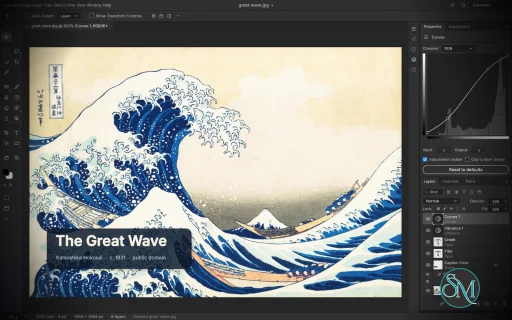
PhotoCraft is an open-source image editor designed as a clean-room reimplementation of Adobe Photoshop, built entirely in Rust. It provides a surprisingly broad set of professional image-editing features, including layers, masks, adjustment layers, filters, vector shapes, editable text, brushes, and native PSD support.
The project is particularly interesting for users who want a local, open-source Photoshop alternative without relying on Electron, cloud services, or proprietary software. However, PhotoCraft is still in early alpha, so it is better viewed as a promising alternative under active development than as a complete replacement for Photoshop.
Features
PhotoCraft offers a substantial collection of image-editing tools:
Layer groups, clipping masks, pixel and vector masks
Adjustment layers for Curves, Levels, Vibrance, Hue/Saturation, Black & White, Gradient Map, Selective Color and more
Layer styles including Drop Shadow, Inner Shadow, Glow, Bevel & Emboss, Stroke, and overlays
Brush, Pencil, Mixer Brush, Clone Stamp, Healing Brush and other painting tools
Marquee, Lasso, Magic Wand, Quick Selection, Object Selection and Select Subject
Editable point and paragraph text
Pen and vector shape tools
Smart objects and smart filters
Free Transform with scale, rotate, skew, distort and perspective
History and History Brush
Multiple blend modes, opacity, fill and layer controls
Color management with RGB, Grayscale, CMYK and Lab
8, 16 and 32-bit-per-channel documents
PSD and PSB support
PNG, JPEG, TIFF, WebP, GIF, BMP, TGA, ICO, OpenEXR, HDR, AVIF and other formats
Export preview with quality, transparency, scale and estimated file size
Command palette and recorded actions
Its PSD support is one of its strongest features. The project tests its implementation against real-world PSD files and reports very high rendering compatibility across its test corpora. Unsupported data is designed to be preserved rather than simply discarded when documents are saved.
Another unusual feature is its automation architecture. PhotoCraft exposes its editing engine through the desktop interface, CLI, JSON control channel and MCP, making the application suitable for scripted workflows and AI-agent automation.
Download PhotoCraft v0.16.0 - Software Mirrors |
|---|
PhotoCraft v0.16.0 for Windowsphotocraft-0.16.0-windows-x86.msi | 68.59 MB photocraft-0.16.0-windows-x86-portable.zip | 81.17 MB photocraft-0.16.0-windows-x64.msi | 71.3 MB photocraft-0.16.0-windows-x64-portable.zip | 85.85 MB photocraft-0.16.0-windows-arm64.msi | 66.13 MB photocraft-0.16.0-windows-arm64-portable.zip | 80.99 MB |
PhotoCraft v0.16.0 for macOSphotocraft-cli-0.16.0-macos-universal.zip | 68.66 MB photocraft-0.16.0-macos-universal.dmg | 94.4 MB |
PhotoCraft v0.16.0 for Linuxphotocraft-0.16.0-linux-x86_64.tar.gz | 83.78 MB photocraft-0.16.0-linux-x86_64.rpm | 84.52 MB photocraft-0.16.0-linux-x86_64.pkg.tar.zst | 66.23 MB photocraft-0.16.0-linux-x86_64.flatpak | 62.46 MB photocraft-0.16.0-linux-x86_64.deb | 85.1 MB photocraft-0.16.0-linux-x86_64.AppImage.zsync | 278.38 kB photocraft-0.16.0-linux-x86_64.AppImage | 79.47 MB photocraft-0.16.0-linux-riscv64.tar.gz | 81.31 MB photocraft-0.16.0-linux-riscv64.rpm | 82.11 MB photocraft-0.16.0-linux-riscv64.deb | 82.46 MB photocraft-0.16.0-linux-aarch64.tar.gz | 79.25 MB photocraft-0.16.0-linux-aarch64.rpm | 80.91 MB photocraft-0.16.0-linux-aarch64.pkg.tar.zst | 63.4 MB photocraft-0.16.0-linux-aarch64.flatpak | 57.68 MB photocraft-0.16.0-linux-aarch64.deb | 81.64 MB photocraft-0.16.0-linux-aarch64.AppImage.zsync | 264.03 kB photocraft-0.16.0-linux-aarch64.AppImage | 75.37 MB |
PhotoCraft v0.16.0 for BSDphotocraft-0.16.0-freebsd-x86_64.tar.gz | 83.21 MB |
Others Download related to PhotoCraft v0.16.0photocraft-web-0.16.0.zip | 11.63 MB |
PhotoCraft v0.16.0 Source Code
PhotoCraft v0.16.0 Source code (zip)
PhotoCraft v0.16.0 Source code (tar.gz)
|
PhotoCraft v0.16.0 Release Notes: What's Changed- Reuse filled-shape effect maps while moving styled groups by @kotulsky in #8993
- fix(ui-egui): a click on the bottom layer's Smart Filters selects them again (#8764) by @drunkeninja42 in #8974
- security(paint): cap spaced steps and procedural primitives by @dylanmtaylor in #8957
- i18n(zh-hans): translate status messages and preview labels by @IgnatAi401 in #8872
- perf(liquify): reuse interpolation taps and bound render buffers by @yongjip in #8855
- perf(mcp): move command list rows instead of cloning by @yongjip in #8844
- Codecs: warn when DPX or Cineon saves drop bits by @przemyslvw in #8793
- fix(type): type.edit with new text keeps the styles of unchanged text by @FinnNk in #8766
- perf(text): rasterise each text colour only over its own glyphs by @FinnNk in #8716
- fix(engine): refuse partial Color Balance and Hue/Saturation ATN exports by @FinnNk in #8701
- fix(geom): reject non-finite affine inverses by @Lucenx9 in #8651
- Crop default mode: moving the image under the box snaps (#8580) by @wanikhawar in #8622
- fix(engine): select files correctly in Windows Explorer by @ZFzuofeng in #8518
- Fix EngineData format_real emitting a bare trailing dot by @Silvertree2010 in #8486
- fix(app): no unused screen picker code on FreeBSD by @zuujiscom in #8469
- fix(ui): restore extras when showing the grid by @skylartaylor in #8962
- fix(text): lay out a variable font's named instance from its PostScri… by @jturnbach in #8909
- Fix XCF import with short linked-layer property lengths by @wanikhawar in #8865
- Soft Light: dark backdrops follow Photoshop's W3C curve (#8804) by @switch87 in #8817
- fix(actions): a recorded Layers-panel drag keeps its drop target by name by @FinnNk in #8781
- fix(gpu): rebuild the GPU canvas after an out-of-memory error by @FinnNk in #8774
- Layers: show effect row names through tl! by @hai5656a in #8754
- Black & White: keep 32-bit superwhites (#8537) by @HEOJUNFO in #8748
- feat(guides): New Guide Layout takes lengths with units by @FinnNk in #8719
- Write the Levels and Curves composite channel as Chnl.Cmps in .atn export by @mercuryVM in #8686
- fix(cms): reject malformed hex data in .look LUTs by @Lucenx9 in #8657
- Accept all-caps possessives in spell check by @Silvertree2010 in #8628
- Reject non-hex characters in engine hex color parser by @Silvertree2010 in #8541
- test(panic_hunt): give the panic-counting self-test its own deadline by @zuujiscom in #8473
- Puppet Warp pins go where they are dragged, without snapping by @paulou-jpg in #8217
- test(liquify): expand freeze-boundary regression coverage by @yongjip in #8082
- fix(layers): keep blend mode, Opacity, locks and Fill visible but greyed with no layer selected (#8880) by @MarekSpodBiedry in #8904
- fix(curves): 32-bit Curves continue past 0..1 like Photoshop by @FinnNk in #8782
- fix(codecs): WebP export keeps the resolution by @FinnNk in #8775
- PSD: write pattern transparency where Photoshop keeps it (#8054) by @Higgs32584 in #8756
- fix(ui): cap text fields and oversized text events by @FinnNk in #8722
- fix(export): report skipped layers in doc_export_layers (#8491) by @bommerts in #8713
- Slice tool: Style offers Fixed Ratio and Fixed Size (#8360) by @MatRanc in #8638
- Lost window device: quitting goes through while recovery can't be saved by @MatRanc in #8620
- Fix pasted shape group bounds and effects across documents by @kotulsky in #8992
- fix(io): preserve custom-domain Color Lookup LUTs by @ronibalthazar in #8879
- i18n(tr): fix mistranslations, inconsistencies and untranslated rows by @batuhangozegu in #8871
- IPP: preserve printer metadata across attribute groups by @ronibalthazar in #8828
- Levels, Curves and the other adjustments: ⌥ plus the shortcut opens the dialog at its last settings (#8900) by @marcoarnulfo in #8969
- fix(atn): keep Photoshop's other transform interpolation modes on import by @FinnNk in #8698
- fix(contributors): drop a duplicate people.toml table by @echelon in #9009
- Curves: the graph grows with the Properties panel and a resizable dialog (#8984) by @switch87 in #8998
- Perspective Crop: the swap button swaps W and H (#7059) by @davidmann4 in #7060
- Keep shape fill and stroke alpha through PSD round-trip (#6180) by @vbasky in #6868
- Color pickers: pick on press and follow small drags (#7793) by @hodd1444 in #7822
- fix(actions): match Selective Color ATN export to command parsing by @PerchAnton in #7681
- Auto-Align: a locked layer becomes the reference instead of being moved (#7080) by @davidmann4 in #7081
- Paste: keep the pasted image on the canvas (#6759) by @marmitoTH in #6798
- PSD smart filters: Sharpen, Dust & Scratches and Hue/Saturation stay editable (#6267) by @Higgs32584 in #6401
- Isolate live distortion tools per document (#5115) by @vbasky in #5447
- fix(format): report a failed directory flush after a save instead of ignoring it by @FinnNk in #5420
- fix(automation): release idle headless TCP server ports by @Ni-zav in #3914
- Crop: Delete Cropped Pixels keeps type and smart objects whole (#7116) by @davidmann4 in #7117
- PSD: keep Photoshop 2026 Light adjustment layers verbatim and warn (#6542) by @Higgs32584 in #6815
- perf: skip redundant smart object resamples and per-pixel reads by @osaidahmed in #6406
- New Document: category tabs and preset cards show a pointer, not a text cursor by @SiFuMax09 in #3647
- Make magnetic lasso edge direction polarity-independent by @imSlicedBread in #3415
- Integration batch: 44 PRs on main by @davidmann4 in #8663
- perf(camera-raw): exposure with all scopes under its 10 ms budget (P36), same output by @nicolasfalesy in #8465
- fix(atn): export Black & White adjustment layers with Photoshop's BanW class (#8481) by @Arian100 in #8527
- perf(gpu): layer pages that just miss the budget borrow the effect-map share, P60/P61 10× faster on integrated GPUs by @nicolasfalesy in #8547
- feat(styles): import and export .asl layer style libraries (#1051) by @echelon in #4049
- Options bar: the same tool options in every theme (#4178) by @DeWarePeb in #4221
- Keep adjustment clipping visible in compact Properties panels by @bommerts in #5248
- PSD: Distort smart filters and Invert open and save like Photoshop by @abc2cb in #5249
- fix(gpu): catch validation errors in watched compositor work by @geduful in #5370
- UI: split shape options and gradient stop helpers into reusable pieces (no behaviour change) by @Skyfuller1303 in #5452
- Add opt-out startup release checks and manual update status by @ZhuanTou33212 in #5485
- Plug-ins: wire Enable Generator (Image Assets needs it) by @reynold-hu in #5598
- PSD smart objects: keep Photoshop's Cylinder warp when re-rendered (#4112) by @alvarohn in #5769
- perf(doc): share the XMP packet, Duotone PSD data and unsupported adjustment bytes between snapshots by @FinnNk in #5815
- Color: a picked colour recolours the selected type and shapes by @bazmarth in #5842
- Preferences: old settings files take Shift-to-switch-tools on (#5647) by @Higgs32584 in #5878
- fix(compose): prevent outside stroke from bleeding into opaque character interior (#5861) by @seotarek in #5937
- Raw: charge the retained tile intermediates together (#4959) by @saad-mughal435 in #6041
- Color panel: Photoshop's panel-menu modes, the same in every theme (#6000) by @wanikhawar in #6055
- Fix legacy PSD point-text placement after font resolution by @bogusyogi in #6094
- feat(type): area type, text that wraps inside a closed path or shape by @SillySilk in #6230
- Selection: ⇧ mid-drag locks a selection-tool move to the axis (#6231) by @mroxso in #6254
- fix(engine): honor lock all on layer mask commands by @osaidahmed in #6352
- fix(ui): confirm opening damaged PSD/PSB documents by @DavidBonnier in #6658
- perf(canvas): skip occluded checker on CPU textures by @hogawish in #6966
- Eyedropper: a large sampling ring that reads on any colour (#6973) by @mroxso in #7021
- fix(atn): import a recorded Save As with its destination (#7102) by @ijasonwhite in #7202
- Gradient Overlay: add Method selector and retain editable source stops by @oRE-o in #7335
- photocraft-cli run: refuse an --out that is the input file unless --in-place (#7437) by @wanikhawar in #7455
- gpu, docs: fix timing test skip guard and document Windows ARM64 build on RTX Spark by @mweinbach in #7840
- Menu bar: a held Alt's auto-repeat doesn't re-arm the Alt tap by @Cl4VD3 in #7849
- CLI: reject ignored or conflicting mcp/serve launch options by @wanikhawar in #8035
- GPU compositor: build its pipelines in parallel; DX12 startup 13.2 s -> 7.3 s (part of #6419) by @00xJS in #8118
- fix(automation): doc.replaceSmartObject replaces Smart Object contents from the read root (#8061) by @VishnuByrraju in #8150
- fix(actions): strict .atn export keeps Apply Image's flat source fields (#7197) by @VishnuByrraju in #8180
- Image Assets: optionally keep a transparent artboard's full size by @IbrahimOezhan in #8254
- Keep the CPU canvas sharp at 100% zoom by @bommerts in #8354
- fix(ui-egui): expand layer visibility eye hitbox and render sunken well (#8467) by @kobaltgit in #8496
- fix(actions): accept Photoshop stringID blend modes (#8454) by @justinjohn0306 in #8502
- security(io): charge sparse layers, shape caches and shared decodes by @dylanmtaylor in #8955
- CMYK: Dissolve and post-adjustment rounding match the RGB compositor (#9033) by @davidmann4 in #9035
- security(engine): bound script, batch, adjustment, import and export work by @dylanmtaylor in #8954
- Make Crystallize 4x and Pointillize 3x faster on 24 MP layers by @excited-raccoon in #6200
- perf(retouch): releasing a Blur/Smudge/Dodge stroke takes its live pixels by @wanikhawar in #7281
- perf(seam): the shrink proxy drops its original-column map, same pixels (−15 % at 24 MP) by @ebosido444-ai in #8526
- PSD export: embed a linked file only when it is an image PhotoCraft can open by @davidmann4 in #9161
- CLI integration batch: clap for photocraft-cli and the desktop app (#7071) by @aiongg in #9167
- refactor(cli): split photocraft-cli into modules, no behaviour change (#7071) by @1Git2Clone in #8295
- refactor(cli): typed errors with thiserror instead of String (#7071) by @1Git2Clone in #8213
- Segmentation: anti-aliasing the full-resolution mask skips runs far from its edge by @xsvm in #8554
- fix(cli): help after a mistake, and mcp/serve option notes in --help (#7071) by @1Git2Clone in #9194
- fix(ui): keep repeated Tab presses in text editing by @denstu473 in #9030
- ui: highlight menu rows while dragging with the button held by @bfenty in #9112
- fix(ui): centre size-changing filter previews on the CPU canvas by @FinnNk in #8994
- fix(ui): show a filter dialog's preview on the CPU canvas by @FinnNk in #8978
- raster: translated surfaces share one rebuilt tile however many threads build it by @aiongg in #9230
- JPEG: open 12-bit and arithmetic-coded files through craft-jpeg (#4934, #5003) by @aiongg in #9195
- security(affinity): charge archive names, failed reads, corner arrays, attachments, pages and font names by @dylanmtaylor in #9257
- fix(ui): Liquify, Content-Aware Fill, Filter Gallery and Adaptive Wide Angle are modal, like Camera Raw by @wanikhawar in #9061
- Autosave: a recovery listing judges each key once, so an autosave in progress isn't listed twice by @aiongg in #9324
New Contributors- @drunkeninja42 made their first contribution in #8974
- @IgnatAi401 made their first contribution in #8872
- @ZFzuofeng made their first contribution in #8518
- @hai5656a made their first contribution in #8754
- @paulou-jpg made their first contribution in #8217
- @MatRanc made their first contribution in #8638
- @ronibalthazar made their first contribution in #8879
- @batuhangozegu made their first contribution in #8871
- @marmitoTH made their first contribution in #6798
- @SiFuMax09 made their first contribution in #3647
- @Arian100 made their first contribution in #8527
- @geduful made their first contribution in #5370
- @ZhuanTou33212 made their first contribution in #5485
- @alvarohn made their first contribution in #5769
- @bogusyogi made their first contribution in #6094
- @SillySilk made their first contribution in #6230
- @DavidBonnier made their first contribution in #6658
- @hogawish made their first contribution in #6966
- @ijasonwhite made their first contribution in #7202
- @oRE-o made their first contribution in #7335
- @mweinbach made their first contribution in #7840
- @IbrahimOezhan made their first contribution in #8254
- @kobaltgit made their first contribution in #8496
- @justinjohn0306 made their first contribution in #8502
Full Changelog: v0.15.1...v0.16.0 |
Performance and Compatibility
PhotoCraft is built as a native Rust application rather than a web wrapper or Electron application. Its rendering architecture uses wgpu for GPU compositing with support for graphics APIs including Metal, Vulkan, DirectX 12 and WebGPU.
The application also uses multithreaded filters and copy-on-write sparse tiles. This design is intended to reduce unnecessary copying and make large layered documents more manageable.
The project reports extensive automated testing, including PSD round-trip tests, compositor comparisons and multi-depth testing. Its architecture also includes a CPU compositor used as a reference against the GPU compositor.
PhotoCraft can run natively on Windows, macOS, Linux and FreeBSD, with a WebAssembly build for browser use.
The main limitation is maturity. The developers explicitly describe the project as early alpha and acknowledge that it is not yet suitable as a complete replacement for Photoshop in professional daily workflows. Missing areas include AI and generative features, some tools, deeper typography and professional workflows, and plugin compatibility.
System Requirements
PhotoCraft supports:
Windows
macOS
Linux
FreeBSD
WebAssembly/browser
Linux distributions can use AppImage, DEB, RPM, tarball or Flatpak packages.
Hardware requirements are not presented as a simple minimum specification. Because PhotoCraft uses GPU acceleration, actual performance will depend heavily on the graphics hardware and the size and complexity of the documents being edited.
Pros and Cons
Pros
Open-source and available under permissive MIT or Apache-2.0 licensing
Native Rust application
No Electron or embedded web browser required
Excellent focus on PSD compatibility
Extensive layer and adjustment-layer support
GPU-accelerated rendering
Supports CMYK, Lab and high-bit-depth documents
Strong brush and vector capabilities
Windows, macOS, Linux and FreeBSD support
Can also run through WebAssembly
Powerful CLI and automation capabilities
MCP support makes it interesting for AI-assisted workflows
Offline-first approach
Cons
Still early alpha
Not yet a complete Photoshop replacement
Missing some tools and professional workflows
No Photoshop plugin compatibility
AI and generative editing features are limited or absent
Typography capabilities are not yet as mature as established professional editors
Some rough edges should be expected
How to Install
The easiest approach is to download the appropriate package from the project's GitHub releases.
Linux users have several packaging options, including AppImage, DEB, RPM, tarball and Flatpak. Windows has a portable package, while macOS has a universal disk image.
Developers can also build PhotoCraft directly from source using Rust:
git clone https://github.com/storytold/photocraft
cd photocraft
cargo run --release -p photocraft -- image.psd
The repository also provides CLI functionality for automated editing and batch processing.
Final Verdict
PhotoCraft is one of the more ambitious open-source Photoshop alternatives currently available. Its combination of native Rust performance, extensive layer support, serious PSD compatibility work and an unusually capable automation architecture makes it much more than a basic image editor.
The strongest reason to watch PhotoCraft is its engineering approach. The project is building a real image-editing engine rather than simply creating a Photoshop-like interface, and its extensive PSD testing provides a useful foundation for compatibility.
The biggest problem is maturity. The project itself acknowledges that it is still early alpha and lacks several areas required for professional Photoshop replacement workflows. Users who depend on plugins, advanced typography, AI features or highly polished production workflows should not switch completely yet.
For enthusiasts, developers, Linux users, open-source advocates and anyone interested in building automated image-processing workflows, however, PhotoCraft is particularly compelling.
Post a Comment/Report Broken Link: