VectorCraft v0.24.1

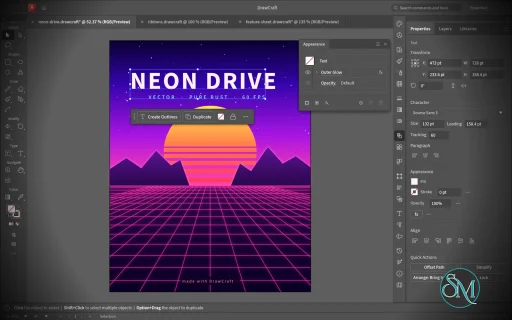
VectorCraft is an open-source vector illustration application designed as a clean-room reimplementation of the Adobe Illustrator workflow. Built entirely in Rust, it provides a native desktop application for Windows, macOS and Linux, along with a WebAssembly version that runs in the browser.

The project goes beyond basic vector drawing. It aims to reproduce a professional Illustrator-style workflow with Bézier editing, Pathfinder operations, multiple artboards, typography, gradients, live effects, PDF and SVG workflows, and extensive automation capabilities.

Features

VectorCraft provides a substantial collection of professional vector-illustration tools:

  • Pen and Direct Selection tools

  • Bézier anchors and handles

  • Pathfinder and exact Boolean operations

  • Multiple artboards

  • Layers and groups

  • Smart Guides

  • Rulers, grids and alignment tools

  • Live corners

  • Gradient and mesh tools

  • Gradient fills and strokes

  • Pattern and appearance controls

  • Blend tool

  • Radial Repeat

  • Envelope Distort

  • Puppet Warp

  • Liquify

  • Width tool

  • Perspective Grid

  • Freeform gradient editing

  • Recolor Artwork and Color Themes

  • Editable text and type-on-path

  • Variable and transformed vector content

  • Symbols

  • Clipping and masking

  • SVG import and export

  • PDF import and export

  • EPS export

  • DXF import

  • PNG, JPEG and WebP raster export

  • Export for Screens

  • Native .vectorcraft document format

  • Print engine

  • PDF layers and overprint support

The application also includes a command API that exposes its tools and interface to external automation. A JSON control channel and MCP server allow AI agents and scripts to manipulate documents, operate tools and export artwork.

This is one of VectorCraft's most distinctive features. It is not simply an image editor with an AI assistant added on top. The editing engine itself is designed to be programmatically controllable.

Download VectorCraft v0.24.1 - Software Mirrors

VectorCraft v0.24.1 for Windows

vectorcraft-0.24.1-windows-x64.msi | 123.98 MB

vectorcraft-0.24.1-windows-x64-portable.zip | 155.39 MB

vectorcraft-0.24.1-windows-arm64.msi | 115.46 MB

vectorcraft-0.24.1-windows-arm64-portable.zip | 147.3 MB

VectorCraft v0.24.1 for macOS

vectorcraft-cli-0.24.1-macos-universal.zip | 127.78 MB

vectorcraft-0.24.1-macos-universal.dmg | 170.14 MB

VectorCraft v0.24.1 for Linux

vectorcraft-0.24.1-linux-x86_64.tar.gz.asc | 228 B

vectorcraft-0.24.1-linux-x86_64.tar.gz | 150.36 MB

vectorcraft-0.24.1-linux-x86_64.rpm.asc | 228 B

vectorcraft-0.24.1-linux-x86_64.rpm | 151.69 MB

vectorcraft-0.24.1-linux-x86_64.pkg.tar.zst | 111.51 MB

vectorcraft-0.24.1-linux-x86_64.flatpak.asc | 228 B

vectorcraft-0.24.1-linux-x86_64.flatpak | 104.72 MB

vectorcraft-0.24.1-linux-x86_64.deb.asc | 228 B

vectorcraft-0.24.1-linux-x86_64.deb | 152.77 MB

vectorcraft-0.24.1-linux-x86_64.AppImage.zsync.asc | 228 B

vectorcraft-0.24.1-linux-x86_64.AppImage.zsync | 247.58 kB

vectorcraft-0.24.1-linux-x86_64.AppImage.asc | 228 B

vectorcraft-0.24.1-linux-x86_64.AppImage | 141.33 MB

vectorcraft-0.24.1-linux-riscv64.tar.gz.asc | 228 B

vectorcraft-0.24.1-linux-riscv64.tar.gz | 147.62 MB

vectorcraft-0.24.1-linux-riscv64.rpm.asc | 228 B

vectorcraft-0.24.1-linux-riscv64.rpm | 149.09 MB

vectorcraft-0.24.1-linux-riscv64.deb.asc | 228 B

vectorcraft-0.24.1-linux-riscv64.deb | 149.78 MB

vectorcraft-0.24.1-linux-aarch64.tar.gz.asc | 228 B

vectorcraft-0.24.1-linux-aarch64.tar.gz | 143.52 MB

vectorcraft-0.24.1-linux-aarch64.rpm.asc | 228 B

vectorcraft-0.24.1-linux-aarch64.rpm | 146.4 MB

vectorcraft-0.24.1-linux-aarch64.pkg.tar.zst | 106.95 MB

vectorcraft-0.24.1-linux-aarch64.flatpak.asc | 228 B

vectorcraft-0.24.1-linux-aarch64.flatpak | 97.05 MB

vectorcraft-0.24.1-linux-aarch64.deb.asc | 228 B

vectorcraft-0.24.1-linux-aarch64.deb | 147.79 MB

vectorcraft-0.24.1-linux-aarch64.AppImage.zsync.asc | 228 B

vectorcraft-0.24.1-linux-aarch64.AppImage.zsync | 236.9 kB

vectorcraft-0.24.1-linux-aarch64.AppImage.asc | 228 B

vectorcraft-0.24.1-linux-aarch64.AppImage | 135.23 MB

VectorCraft v0.24.1 for BSD

vectorcraft-0.24.1-freebsd-x86_64.tar.gz | 149.9 MB

vectorcraft-0.24.1-freebsd-aarch64.tar.gz | 141.5 MB

Others Download related to VectorCraft v0.24.1

vectorcraft-web-0.24.1.zip | 36.57 MB

release-signing-key.asc | 803 B

VectorCraft v0.24.1 Source Code

VectorCraft v0.24.1 Source code (zip)

VectorCraft v0.24.1 Source code (tar.gz)

VectorCraft v0.24.1 Release Notes:

What's Changed

  • EPS import: charge scanned strings, end failed filter decodes, bound data sources and JPEG/TIFF headers by @dylanmtaylor in #6627
  • i18n(ka): update the Georgian catalog (55 strings) by @devius in #6630
  • Guides: ruler guides are document objects on their layers by @dotCooCoo in #6632
  • Commands: every angle and rotation param says which way it turns (#6340) by @Hassan1305 in #6631
  • Scripts: File and Folder read files in the script's own folder by @dotCooCoo in #6615
  • JavaScript: new XML copies a one-item list's node, and insertChildAfter and insertChildBefore take fuel per child scanned by @dotCooCoo in #6626
  • G5: built-in Energy Beams brush library by @Messhias in #6603
  • Script checker: names follow Unicode ID_Start and ID_Continue by @dotCooCoo in #6641
  • Commands: ids null acts on the selection instead of being refused by @dotCooCoo in #6640
  • Tests: plug-in folder tests take turns on the folder last loaded by @dotCooCoo in #6636
  • Part of #6622: Help Bar hints and tool names show in full on hover when clipped by @dotCooCoo in #6639
  • PDF: an option writes pages longer than 200 in at full size in points by @dotCooCoo in #6643
  • Scripts: Math.random gets a new seed on every web page load by @dotCooCoo in #6645
  • Plug-ins: the fuzz test reads the runtime's fuel slice instead of a copy by @dotCooCoo in #6646
  • Type: Dynamic Text sizes type on a path to fill its brackets by @dotCooCoo in #6648
  • Scripts: an uncaught error that passes through a finally block is reported where it was thrown by @dotCooCoo in #6653
  • Scripts: test that the OS random value seeds Math.random by @dotCooCoo in #6657
  • Simplify: a closed subpath whose refits enclose no area keeps its outline by @dotCooCoo in #6651
  • ci: use StepSecurity's maintained actions by @dylanmtaylor in #6658
  • SVG import: references follow an id's first element, one read per linked file, bounded blank lines by @dylanmtaylor in #5409
  • CI: nightly release dry run by @FredApps in #6678
  • Graphs: graph.setType, setData and create refuse params of the wrong type by @dotCooCoo in #6735
  • Paragraph Styles: Style Options edits indents, spacing, composition, hyphenation and justification by @dotCooCoo in #6734
  • Symbols: the panel menu sorts by name and offers Small and Large List views by @dotCooCoo in #6733
  • Plug-ins: a failed rename back of a removed plug-in's settings is reported and undone later by @dotCooCoo in #6732
  • Edit: Paste in Place, in Front and in Back put a copy on each selected artboard by @dotCooCoo in #6743
  • Control bar: the panel menu turns each group of options on or off by @dotCooCoo in #6737
  • .ai/EPS import: gradient mesh corners in several inks take their tints last ink first by @dotCooCoo in #6730
  • Fix #6634: Pen closing drag no longer gives the first anchor symmetric handles by @dotCooCoo in #6718
  • Render: a long path is checked against the rasterizer's limits from its kept boxes by @dotCooCoo in #6742
  • Gradients: conic gradients sweep the stops once around the center by @dotCooCoo in #6728
  • Edit Colors: a switch or number of the wrong type is an error instead of the default by @dotCooCoo in #6741
  • Package, Place, Export: the Package, Place and export commands reject a param of the wrong type by @dotCooCoo in #6727
  • Type: Dynamic Text sets each line of area type to the frame width by @dotCooCoo in #6682
  • Tabs: indent drags on threaded frames set each story paragraph once, a split paragraph included by @dotCooCoo in #6719
  • Select: Object › Not Aligned to Pixel Grid selects paths without the pixel-aligned property by @dotCooCoo in #6736
  • Safe Mode: a plug-in found under several files is listed once in Help › Safe Mode by @dotCooCoo in #6721
  • Scripts: a missing file outside the script's folder is refused like an existing one by @dotCooCoo in #6707
  • Vector Halftone: a parameter of the wrong type is refused by @dotCooCoo in #6715
  • Tests: the empty-params command sweeps leave plug-in caches alone by @dotCooCoo in #6712
  • Document Info: Gradient Objects lists the objects painted with gradients by @dotCooCoo in #6711
  • Envelopes: type's strokes paint at their own weight along the bent outlines by @jmverges in #6724
  • MCP: library lists leave out paths outside a confined client's read roots by @dotCooCoo in #6725
  • i18n: Hindi and Turkish messages keep the command ids they name by @dotCooCoo in #6714
  • Metafile: drop PNG ICC and text chunks before decoding; Folder batch lists aliased folders once by @dylanmtaylor in #6723
  • Path ops: rejoining split curves tests only the input curves around the run by @dotCooCoo in #6698
  • Actions: Batch shows the data set File Name row only where it applies by @dotCooCoo in #6696
  • Objects on Path: the Move All widget slides every attached object along the path by @dotCooCoo in #6703
  • PDF: the in-points option leaves PDF/A pages within the standard's size limit by @dotCooCoo in #6680
  • Simplify: a flat closed loop keeps its outline when splitting reaches its limit by @dotCooCoo in #6672
  • Swatches: New Color Group, Delete, Move and Merge take named swatches in one pass by @dotCooCoo in #6691
  • Panels: a panel floated while the floating panels are hidden opens hidden by @dotCooCoo in #6692
  • PSD import: File › Open converts a PSD file's layers to objects by @dotCooCoo in #6690
  • Guides: sublayer guides survive layer effects and the canvas check by @dotCooCoo in #6676
  • Plug-ins: a light filter that reports progress runs in the background with Cancel by @dotCooCoo in #6675
  • Scripts: opening a macOS menu reads the Scripts folder again by @dotCooCoo in #6687
  • Guides: the ruler guide export test leaves out the PDF's dates by @dotCooCoo in #6664
  • Commands: Edit, guide and slice params of the wrong type are refused by @dotCooCoo in #6749
  • Clipboard: Linux and BSD reads wait 2 s at most for the app that copied by @dotCooCoo in #6661
  • Toolbars: a + button on a new toolbar adds and removes tools from a menu by @dotCooCoo in #6665
  • JavaScript: characters assigned in Unicode 17 are identifier characters by @dotCooCoo in #6684
  • Scripts: a return from a finally block drops the discarded error's throw site by @dotCooCoo in #6662
  • Scripts: #targetengine runs a script in a named engine that keeps its globals by @dotCooCoo in #6663
  • Docs: each progress line appears once in the shipped-features evidence list by @dotCooCoo in #6681
  • Trace: refuse a GIF frame larger than the pixel ceiling before decoding by @dylanmtaylor in #6695
  • Clipboard: quitting waits for the paste check so copied data reaches the clipboard manager by @dotCooCoo in #6673
  • Tests: malformed id cases check and restore isolation mode and the shown mask by @dotCooCoo in #6674
  • Text: bounded font fallback file searches, COLR layer outlines, frame baseline search and glyph outline size by @dylanmtaylor in #6677
  • PDF: note fonts once per walk, place repeated rasters without converting again, check image headers before embedding by @dylanmtaylor in #6668
  • Plug-ins: the approval dialog takes OK only once its question was shown for half a second by @dotCooCoo in #6655
  • i18n: plug-in limit messages are translated in every complete-message catalog by @dotCooCoo in #6660
  • EPS export: the thumbnail is made from the preview instead of drawing the document again by @dotCooCoo in #6750
  • Fix Flatpak updates and bump to 0.24.1 by @dylanmtaylor in #6649
Full Changelog: v0.24.0...v0.24.1

Performance and Compatibility

VectorCraft is implemented in Rust and uses a multithreaded rendering architecture. The project reports that 20,000 shapes can be rendered in approximately 27 milliseconds at full Retina resolution while maintaining a responsive interface.

Its geometry engine is designed around exact curve operations, while structural sharing provides effectively unlimited undo without requiring every operation to duplicate the entire document.

The project also places considerable emphasis on automated testing. Property-based tests are used for document round trips, while rendering and geometry have dedicated test infrastructure.

File compatibility is another strength. SVG is a first-class format, while PDF import/export and PDF-compatible AI files provide useful interoperability with established design workflows. DXF import and EPS export further extend its usefulness for technical and print-oriented work.

However, compatibility should not be confused with complete Illustrator parity. VectorCraft is still under active development, and the project roadmap indicates that some areas remain under construction.

System Requirements

VectorCraft supports:

  • Windows

  • macOS

  • Linux

  • FreeBSD

  • WebAssembly/browser

Prebuilt Linux packages are available in several formats, including:

  • AppImage

  • DEB

  • RPM

  • Tarball

Both x86_64 and ARM64 Linux builds are provided.

macOS has a universal build supporting Intel and Apple Silicon, while Windows is distributed as a native desktop application.

Developers can also build the application directly from source using Rust.

Pros and Cons

Pros

  • Open-source

  • MIT or Apache-2.0 licensing

  • Native Rust application

  • Windows, macOS and Linux support

  • Browser/WebAssembly version

  • Strong Bézier and vector-editing tools

  • Exact Pathfinder Boolean operations

  • Multiple artboards

  • Advanced gradients and appearance controls

  • Envelope Distort, Puppet Warp and Liquify

  • SVG and PDF support

  • EPS export

  • DXF import

  • Native document format

  • Excellent automation potential

  • JSON control interface

  • MCP support for AI agents

  • Multithreaded rendering

  • Extensive automated testing

Cons

  • Still under active development

  • Not yet a complete Illustrator replacement

  • Some workflows will still lack the maturity of established commercial software

  • Font availability and typography coverage are still developing

  • Professional production workflows should be tested before full migration

  • The large feature set can make the application more complex for beginners

How to Install

The easiest method is to download the appropriate prebuilt package from the project's GitHub releases.

Linux users can choose between AppImage, DEB, RPM and tarball packages. macOS users can install the universal application, while Windows users can use the provided Windows package.

Developers can build the desktop application from source:

git clone https://github.com/storytold/vectorcraft
cd vectorcraft
cargo run --release -p vectorcraft

A VectorCraft document can also be opened directly:

cargo run --release -p vectorcraft -- examples/dusk-poster.vectorcraft

For headless processing and automation, the project provides a CLI:

cargo run --release -p vectorcraft-cli -- run \
  --in examples/ribbons.vectorcraft \
  --export out.pdf

The MCP server can be launched with:

cargo run --release -p vectorcraft-cli -- mcp

This makes VectorCraft particularly interesting for automated graphics generation and AI-assisted design workflows.

Final Verdict

VectorCraft is an unusually ambitious open-source Illustrator alternative. It is not merely a basic SVG editor with a familiar interface. The project is attempting to recreate a substantial portion of the professional Illustrator workflow while building its own modern Rust-based rendering and document architecture.

Its strongest areas are vector geometry, Pathfinder operations, Bézier editing, advanced effects, SVG/PDF interoperability and automation. The MCP and JSON control interfaces are especially interesting because they allow the same editing engine to be operated by scripts and AI agents.

Performance is another major strength. The native Rust architecture and multithreaded rendering approach give VectorCraft a solid technical foundation for handling complex vector documents.

The biggest limitation is maturity. Established applications such as Illustrator have decades of compatibility work, plugins, fonts, production workflows and ecosystem support behind them. VectorCraft is still developing and should not yet be treated as a drop-in replacement for every professional Illustrator workflow.

For designers, developers and open-source users looking for a modern vector graphics application, however, VectorCraft is one of the most interesting projects in this category. Its combination of native performance, open licensing and agent-native automation makes it particularly worth watching.
VectorCraft v0.24.1
Free
Software Informations:
Developer:

Operating System:
Windows / macOS / Linux / BSD
Date Added:
2026-11-12T23:07:14.425Z
Categories:

Post a Comment/Report Broken Link: