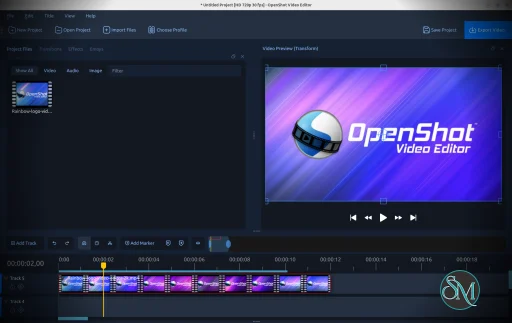
OpenShot Video Editor is a free and open source video editing application developed by the OpenShot Studios. It is available on Windows, macOS, and Linux.
The software provides a user friendly interface with tools for cutting, trimming, and enhancing videos without requiring advanced technical skills. It is often used for basic editing tasks, YouTube content creation, and small projects.
Download OpenShot v4.1.1 - Free Video Editor - Software Mirrors |
|---|
Download OpenShot for Windows 64bit (exe) Download OpenShot for macOS (dmg) Download OpenShot for Linux (AppImage) Download OpenShot for Windows 32bit(exe) |
OpenShot v4.1.1 - Free Video Editor Release Notes:Highlights & Features:
|
Key Features of OpenShot Video Editor
Simple Drag and Drop Interface
OpenShot uses a straightforward drag and drop workflow.
Users can:
Import media files easily
Arrange clips on the timeline
Trim and split video segments
This makes it accessible for beginners who are new to video editing.
Unlimited Layers
The editor supports unlimited layers on the timeline.
This allows users to:
Combine multiple video clips
Add overlays and effects
Create complex compositions
Layer based editing provides flexibility for creative projects.
Built In Transitions and Effects
OpenShot includes a variety of transitions and visual effects.
Examples include:
Fade and dissolve transitions
Brightness and contrast adjustments
Color correction tools
Blur and sharpening effects
These tools help enhance video quality without needing additional plugins.
Title Editor and 3D Animations
The software features a built in title editor for adding text to videos.
Users can create:
Simple titles and captions
Animated text
3D titles using Blender integration
This is useful for intros, credits, and branding.
Keyframe Animation
OpenShot supports keyframe animation for controlling properties over time.
Users can animate:
Position
Scale
Rotation
Opacity
This feature enables more dynamic and professional looking videos.
Wide Format Support
OpenShot supports a wide range of video, audio, and image formats.
This includes:
MP4, AVI, MOV
MP3, WAV
PNG, JPG
It relies on FFmpeg, allowing compatibility with many file types.
Cross Platform Availability
OpenShot works on multiple operating systems:
Windows
macOS
Linux
Projects can be created across different platforms, making it flexible for various workflows.
Performance and Usability
OpenShot is designed with simplicity in mind, making it easy for beginners to start editing videos quickly.
Performance characteristics:
Smooth editing for basic projects
Moderate system requirements
May experience lag with complex timelines or large files
While it is not as optimized as high end editors, it performs well for standard editing tasks.
Pros and Cons
Advantages
Free and open source
Easy to use interface
Cross platform support
Unlimited timeline layers
Built in transitions and effects
Limitations
Performance may slow with large projects
Limited advanced features compared to professional tools
Occasional stability issues reported by users
Despite these limitations, it remains a strong option for entry level video editing.
Who Should Use OpenShot Video Editor
This software is ideal for:
Beginners learning video editing
YouTubers and content creators
Students working on video projects
Users who want a free editing solution
Cross platform users
It is especially useful for users who need a simple editor without a steep learning curve.
Final Verdict
OpenShot Video Editor is a user friendly and versatile video editing tool that provides essential features for creating and editing videos. With its simple interface, cross platform support, and open source nature, it is an excellent choice for beginners and casual users.
For those looking for a free and easy to use video editor, OpenShot is a reliable and practical option.
Video editing software ranges from complex professional suites to simple tools for everyday creators. OpenShot Video Editor stands out as a free and open source solution that balances ease of use with essential editing features. It is designed for beginners, content creators, and users who need a reliable cross platform video editor.
Developer:
OpenShot Studios, LLC
Operating System:
Windows / macOS / Linux
Date Added:
2026-11-02T16:40:34.367Z
Categories:
Post a Comment/Report Broken Link: