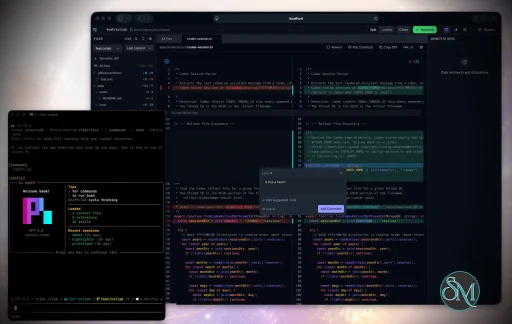
Plannotator is an open-source platform designed to review and validate plans and code generated by AI coding agents.
The platform provides a centralized interface where developers can:
Review AI-generated plans
Annotate proposed actions
Approve or reject tasks
Inspect code changes
Provide structured feedback
Improve agent outputs
Maintain human oversight
Rather than replacing developers, Plannotator aims to keep humans involved in critical decision-making during AI-assisted development.
As AI coding agents become increasingly capable, developers face a growing challenge: ensuring that AI-generated plans and code changes align with project requirements before they are executed. Plannotator addresses this problem by acting as a review layer between developers and AI coding agents.
Instead of generating code itself, Plannotator focuses on making AI-driven development more transparent and controllable. It allows teams to review, annotate, approve, reject, and refine agent-generated plans and code changes before they affect a project.
Download Plannotator v0.28.66 - Software Mirrors |
|---|
Plannotator v0.28.66 for Windowsplannotator-win32-x64.exe.gz | 82.07 MB plannotator-win32-x64.exe | 210.22 MB plannotator-win32-arm64.exe.gz | 77.11 MB plannotator-win32-arm64.exe | 195.86 MB |
Plannotator v0.28.66 for macOSplannotator-paste-darwin-x64 | 93.62 MB plannotator-paste-darwin-arm64 | 85.03 MB plannotator-darwin-x64.tar.xz | 46.72 MB plannotator-darwin-x64.gz | 71.36 MB plannotator-darwin-x64 | 193.9 MB plannotator-darwin-arm64.tar.xz | 42.54 MB |
Plannotator v0.28.66 for Linuxplannotator-paste-linux-x64 | 104.07 MB plannotator-paste-linux-arm64 | 104.17 MB plannotator-linux-x64.tar.xz | 54.16 MB plannotator-linux-x64.gz | 79.3 MB plannotator-linux-x64 | 204.35 MB plannotator-linux-arm64.tar.xz | 51.29 MB |
Plannotator v0.28.66 Source Code |
Plannotator v0.28.66 Release Notes:Follow @plannotator on X for updatesMissed recent releases?
What's New in v0.28.66TL;DR
Pick several threads and act on them at onceYou can now pick thread rows and act on all of them together. ⌘-click (Ctrl-click on Windows and Linux) adds or removes a row, and Shift-click picks a range. You can also choose Select in a row's right-click menu or a phone's long-press sheet, or Select threads in the list's ⋮ menu. While rows are picked, a bar takes the place of the list header. It shows how many are picked, with Archive, Snooze, Tidy…, Combine… and Done. On a phone the actions are a sheet at the bottom of the screen. A right-click on a picked row acts on every pick. Each action gives one toast with one Undo. A thread that lives on a linked machine goes to that machine; if the machine is asleep, the change waits for it. Tidy now takes your own words. Its popover has "Add instructions (optional)" and remembers the instructions you used recently. Tidy on picked threads asks each thread's own agent about those threads only. Combine asks one agent to write a new thread from the picked ones. You choose the agent and can say what the new thread is about. The picked threads are archived only once the new thread arrives. If the agent ends or stops first, nothing is archived and the window says so. While it waits, the rows read "Combining…", with "Stop combining" in their menu. Undo brings the threads back. On a phone, every bottom sheet now fits the screen and scrolls inside, so the first items of a long menu are always in reach. #3405, #3418, #3433Swipe a row, and show archived threads in the listOn a phone or an iPad, swipe a thread row as in Mail. Swipe right to mark it read (on a read row, the right side offers Mark unread). Swipe left to archive it. A long swipe or a flick runs the action when you lift your finger. A short swipe leaves the row open on its button, so you can tap it. Toasts, Undo and the "Set aside N open questions?" warning work as they do from the row menu. Archived threads can now show at the bottom of the list. Turn on Show archived in the list's ⋮ menu (it is off until you pick it). An Archived section then sits under Snoozed, closed until you open it. It shows the newest archived threads first, 20 at a time, up to 100, and then points you to Search. Each row says when it was archived. Unarchive is in the row's hover action, its menu, and a left swipe on a phone. The choice is the same on every linked machine and every open window. #3135, #3404Tags on rows, in the thread header, in Filter and in SearchRows take their tag's colour. Each tag now has a colour. A new tag gets one at once from a calm set (green, amber, the accent colour and grey), and tags you already have get one on the first load. A tagged row is tinted across its width and shows the tag's name. If you already use tags, your rows are coloured after you update. To change a tag's colour, right-click the tag in the sidebar and pick Highlight rows: five presets, your own recent colours, a hue strip, a hex field, or None. To turn every tint off, untick Show tag colors in the list's ⋮ menu. Colours and the switch are the same on every linked machine. A thread's tags show under its subject, each opening its tag's list, with a+ to add one. A thread with no tags looks as before.
Filter and Search. The list's Filter has a Tag section that shows how many threads each tag leaves, and you can tick several. Search has a Tag chip after "From anyone". With the Board off, resting on a #Tag in a message shows a preview of the tag's latest threads.
Add tag no longer loses what you type when the menu moves under a still mouse.
#3397, #3402, #3393
Every file an agent's message names opens beside the threadIn an agent's message, a link to a file, a code span that is a path (src/a.ts:42, README.md) and a bare path in the text now open that file beside the thread. :42, :6-13 and #L6-L13 jump to and mark the lines. Opening the file attaches nothing. Your first comment on it (a text selection, a code line, a point on a picture, a moment in a video) makes it an attachment of that message, and from then on it is counted and sent like any attachment. A relative path starts in the thread's folder. Secrets never open: dotenv files, SSH keys and credential stores are refused. Your own messages keep their links as they are.
#2875
Prototypes you can click through, and prototypes on the webAn agent's prototype page now behaves in the Inbox as it does in a browser tab. A link to the same page with a query (?variant=2) loads that variant in place, GET forms and # links work, and the "Try prototypes" window follows links to another option's page or to a web page (in a new tab). Each option can open the same attached file with its own query, so stepping between options switches the variant.
An agent can also point an option at a public https:// page. "Try prototypes" opens it straight from the web, with Comment for a whole-page comment and a button to open it in a new tab. Plain http:// on another host is still refused.
#3162, #3319
Reply to a new session when the one that asked has endedWhen the session that asked you has ended, the "who gets this reply" list now ends with a row such as "New Claude Code session in ledger". Pick it and your reply starts a new session of the same agent, in the same folder, on the same machine, and that session then owns the thread. The ended session stays the default, so nothing starts unless you pick the row. If the start fails, your reply is kept and the thread offers Try again. On a computer, that list now shows each session's title, with the agent and folder under it, as the phone already did. Two sessions with the same title get the agent's name added. In the sidebar, the Agents list keeps a fixed order (newest first seen at the top), so rows no longer jump when a turn starts or ends. An agent's name follows one rule on every device: the name you gave, then the name set in the agent, then its title. #3442, #3447 finishing #3343 by @sx4im, #3454, #3448Antigravity can use the InboxGoogle Antigravity (the app, the IDE and theagy command) can now write to your Inbox, and your reply starts a turn in the conversation that asked. When Antigravity is on the computer, plannotator inbox adds the Inbox to its MCP config. The app and the IDE need nothing else. An agy conversation is told to run plannotator inbox antigravity once per launch when the Inbox cannot reach it yet. Each reply goes in once. The wake was tested with agy on macOS. The IDE, Windows and Linux are not tested yet.
#3390, #3444
T3 Code: replies reach Codex threads tooA Codex thread running inside T3 Code could write to the Inbox, but your replies never showed up in T3. Now a reply to any T3 thread, Claude or Codex, goes in through T3's ownt3 thread send on this computer, with no setup. When T3 is closed, the reply says "Waiting for T3 Code" at once, and the list row says the same as the thread. A T3 started from a Claude Code terminal, or one of T3's own short runs, no longer takes a reply meant for the thread.
Settings → Agents has a T3 Code entry when T3 is on this computer. It says whether your replies arrive as a new turn, and when they cannot, it shows the sign-in command with Copy.
#3375, #3381, #3412, #3438
Orca gets the Inbox and the plannotator toolClaude Code chats in Orca now get what the VS Code panel gets: theplannotator_inbox tool with the reply wake, and the plannotator tool. This changes plan review in Orca: Orca shows its own "Review proposed plan" card, so Plannotator's plan review no longer opens there.
#3460 closing #3325 reported by @ninjz, with the Orca work from #3400 by @rudycelekli
Cloud agents use the whole InboxA paired cloud agent can now do what a local agent's Inbox tool does. It can list, read and search every thread in every project, reply in any thread, start threads in any project (named by project name), resolve and snooze threads, change a thread's pull requests, and send guided reviews. It can use cards and steps while those are on. It still cannot name a path on your computer. It can also attach files up to 100 MB, videos included, by sending them in pieces. #3306, #3318Plan review and annotate: source line numbers, coloured text, and Open in JetBrainsSource line numbers. Settings → Display has a Source line numbers switch, off by default. Turn it on and each block in plan review and annotate shows its source lines in a quiet gutter:42 for one line, 42–45 for a span. The numbers stay out of copied text and out of an annotation's quote, and they are hidden on phones and in print.
Coloured text. An author can now colour a few words with <span style="color: …"> or <font color="…">. The colour shows in plan review, annotate, Inbox messages and Markdown attachments, including table cells. Colours that are almost see-through are refused.
Open in JetBrains IDEs. The Open in menu now lists IntelliJ IDEA, WebStorm, PyCharm, GoLand, Rider, PhpStorm, RubyMine, CLion and RustRover when they are installed. The file opens at the line.
Annotate's default view. A new config.json key, annotateView ("wide", "focus" or "edit"), sets the view an annotate session opens in.
A table indented under a list item no longer draws its header one column to the right.
#3373 by @mvanhorn closing #1650 requested by @de-tre, #3378 closing #3345 requested by @zane668, #3372 by @mvanhorn (related to #3368 by @JasonLandbridge), #3463, #3314 by @BenNewman100
A quicker Inbox windowThe Inbox window now keeps the open thread in one cache and applies live changes to it in place, instead of reading the thread again. When you press Send, your words show in the thread at once with "Sending…". If the send fails, they come back into the reply box with the reason. In a long thread, one new message now redraws only itself (before, a 266-message thread redrew 291 parts). Each agent message across four windows takes half the requests it did. On an iPad, the first load no longer stalls before the first tap works. #3103, #3115, #3123, #3386Phones and iPads
config.json can live in your dotfilesThe Inbox used to write its own records intoconfig.json: when each one-time dialog was due or shown, the tour, and similar bookkeeping. These differ on every machine and change by themselves, so config.json could not be kept in a dotfiles repo. They now go to state.json next to it. Your settings stay in config.json. Old copies in config.json are read and never removed, so an older version or another machine sharing the file keeps working. plannotator uninstall --purge removes state.json too.
#3458 closing #2852 reported by @robsonpeixoto
Updates, installs and proxies
Routines: off by defaultA routine is a saved prompt with a name, a schedule and a folder. When it is due, the Inbox on this computer starts a fresh agent session in that folder, and every run lands in one thread. Turn Routines on in Settings → Capabilities (configinboxScheduledThreads). It is not offered on Windows, and it needs "Start agents from New message" on. While it is off, nothing runs and nothing is written.
Reach the Inbox through your own Cloudflare: off until you set it upFor people who do not use Tailscale, the Inbox and your review, annotate and last sessions can now be reached through your own Cloudflare Tunnel and Cloudflare Access. As over Tailscale, one owner gets in and nobody else does: only the e-mail you type at setup can sign in. Settings → Remote devices has a Cloudflare card with Set up. You can also runplannotator inbox cloudflare-access setup --email . Setup needs a Cloudflare account with a domain, an API token (never saved) and cloudflared. It creates the tunnel, the sign-in gate and two addresses, checks from outside that a request without your sign-in is refused, and only then turns it on and shows the address with a QR code. teardown removes everything it made. Sessions take --cloudflare-access.
#3388, requested in #3069
Additional Changes
Install / UpdatemacOS / Linux:claude is on your PATH. Otherwise, in a terminal:
/plugin marketplace update plannotator, then open /plugin → Installed → plannotator → Update now.
Pi:
What's Changed
New Contributors
Contributors@rudycelekli sent the most work from outside the project in this release, in his first contributions. He made Mod+Shift+Enter open the note composer in code review instead of posting (#3210), kept typed Windows paths whole on DeepSeek Harness (#3214), fixed links with parentheses in the guide viewer (#3213), added the Last 3 days filter (#3401), madeinstall.sh download the binary from a mirror (#3310), and fixed three CI path gates that let breaking changes skip the job meant to catch them (#3215). His Orca work (#3400) ships inside #3460.
@mvanhorn added source line numbers to plan review and annotate (#3373) and JetBrains IDEs to the Open in menu (#3372).
@sx4im made his first contribution: session titles in the reply picker (#3343, finished in #3447 with his commits kept). He also fixed the tag and recipient pickers that the reply box cut off (#3440) and malformed addresses in the Shapes routes (#3414).
@robfeldmann found and fixed a wrapped diff that jumped while he reviewed on his phone (#3170), with recordings from a real iPhone. First contribution.
@xunguangzlj-cloud made OpenCode's annotate-last open on the reply to your own prompt (#3358). First contribution.
@jiangjiang248 made Pi's TLS warning point to the host app when Pi runs inside Electron (#3351). First contribution.
@BenNewman100 fixed the header of a table indented under a list item (#3314).
@uvw reported and fixed the Inbox tool going "not connected" after /bg on a busy Claude Code session (#3369, #3370). His fix also made the Claude Code mod's test harness run on Windows.
Community reports and requests that shaped this release:
|
Key Features of Plannotator
Plan Review System
One of Plannotator's core capabilities is reviewing plans generated by AI agents before execution.
Developers can examine:
Proposed tasks
Implementation strategies
Agent reasoning
Planned file modifications
Workflow sequences
This visibility helps reduce unintended changes and costly mistakes.
Annotation Tools
The platform allows users to add comments, notes, and guidance directly to AI-generated plans.
These annotations can be used to:
Clarify requirements
Correct misunderstandings
Provide context
Guide future agent actions
AI Code Review
Plannotator extends the review process beyond planning by supporting inspection of generated code.
Developers can:
Review modifications
Analyze diffs
Leave comments
Request revisions
Validate implementation details
This workflow resembles modern pull-request review systems.
Human-in-the-Loop Workflows
A major design goal is ensuring that AI actions remain subject to human approval.
Organizations can establish review processes where important actions require validation before execution.
Open Source Foundation
Plannotator is open source, allowing teams to inspect, modify, and self-host the platform according to their needs.
This transparency is particularly valuable for organizations adopting AI-assisted software development.
User Experience
The interface is designed around review workflows rather than direct code generation.
Instead of interacting with a chatbot, users primarily:
Receive agent-generated plans
Review proposed actions
Add feedback
Approve or reject changes
Monitor execution results
The workflow feels familiar to developers accustomed to pull requests, code reviews, and project planning tools.
Productivity Benefits
As AI coding tools become more autonomous, review processes become increasingly important.
Plannotator helps organizations:
Reduce risky AI actions
Improve code quality
Increase accountability
Preserve architectural consistency
Encourage collaboration between developers and AI agents
For teams adopting AI-driven development, these safeguards can be as valuable as the coding agents themselves.
Collaboration Features
The platform supports collaborative review workflows where multiple team members can participate in evaluating AI-generated outputs.
This allows:
Peer review
Team approval processes
Shared annotations
Collective decision-making
Such features are especially useful for larger engineering teams.
Performance
Because Plannotator focuses on workflow management and review rather than model inference, performance largely depends on the connected AI agents and integrations.
The platform itself is lightweight and primarily serves as an orchestration and review layer.
Open Source Advantages
Being open source provides several benefits:
Transparent development
Self-hosting capabilities
Custom integrations
Community contributions
Vendor independence
Organizations concerned about compliance, security, or proprietary workflows may find these advantages particularly appealing.
Limitations
Plannotator is designed as a companion tool rather than a complete AI development platform.
Common limitations include:
Requires external AI coding agents
Best suited for teams already using AI-assisted development
Smaller ecosystem than mature developer platforms
Additional review steps may slow rapid prototyping
Some users may prefer fully autonomous workflows
The software delivers the most value in environments where oversight and quality control are priorities.
Pros
Improves transparency of AI-generated plans
Supports structured review workflows
Human-in-the-loop design
Useful annotation system
Open source
Self-hosting support
Familiar review experience for developers
Helps reduce AI-generated mistakes
Cons
Not a standalone coding agent
Requires integration with AI development tools
Smaller community than established developer platforms
Adds review overhead to workflows
Best suited for teams rather than casual users
Who Should Use Plannotator?
Plannotator is ideal for:
Software development teams
Engineering managers
AI-assisted development workflows
Organizations adopting coding agents
Open-source projects
Teams prioritizing code quality and governance
It is particularly valuable for environments where AI-generated code requires oversight before reaching production systems.
Plannotator fills an increasingly important role in the AI development ecosystem by providing visibility and control over AI-generated plans and code changes. Its focus on human oversight, structured reviews, and collaborative workflows makes it a useful companion for modern coding agents. While it is not a replacement for AI coding tools themselves, it offers a practical solution for teams seeking greater confidence and accountability in AI-assisted software development.
Developer:
backnotprop
Operating System:
Windows / macOS / Linux
Date Added:
2026-11-16T23:07:22.900Z
Categories:
Post a Comment/Report Broken Link: