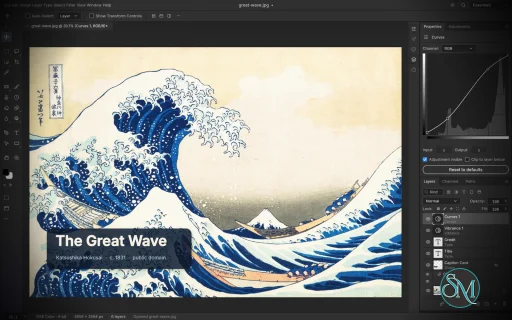
PhotoCraft is an open-source image editor designed as a clean-room reimplementation of Adobe Photoshop, built entirely in Rust. It provides a surprisingly broad set of professional image-editing features, including layers, masks, adjustment layers, filters, vector shapes, editable text, brushes, and native PSD support.
The project is particularly interesting for users who want a local, open-source Photoshop alternative without relying on Electron, cloud services, or proprietary software. However, PhotoCraft is still in early alpha, so it is better viewed as a promising alternative under active development than as a complete replacement for Photoshop.
Features
PhotoCraft offers a substantial collection of image-editing tools:
Layer groups, clipping masks, pixel and vector masks
Adjustment layers for Curves, Levels, Vibrance, Hue/Saturation, Black & White, Gradient Map, Selective Color and more
Layer styles including Drop Shadow, Inner Shadow, Glow, Bevel & Emboss, Stroke, and overlays
Brush, Pencil, Mixer Brush, Clone Stamp, Healing Brush and other painting tools
Marquee, Lasso, Magic Wand, Quick Selection, Object Selection and Select Subject
Editable point and paragraph text
Pen and vector shape tools
Smart objects and smart filters
Free Transform with scale, rotate, skew, distort and perspective
History and History Brush
Multiple blend modes, opacity, fill and layer controls
Color management with RGB, Grayscale, CMYK and Lab
8, 16 and 32-bit-per-channel documents
PSD and PSB support
PNG, JPEG, TIFF, WebP, GIF, BMP, TGA, ICO, OpenEXR, HDR, AVIF and other formats
Export preview with quality, transparency, scale and estimated file size
Command palette and recorded actions
Its PSD support is one of its strongest features. The project tests its implementation against real-world PSD files and reports very high rendering compatibility across its test corpora. Unsupported data is designed to be preserved rather than simply discarded when documents are saved.
Another unusual feature is its automation architecture. PhotoCraft exposes its editing engine through the desktop interface, CLI, JSON control channel and MCP, making the application suitable for scripted workflows and AI-agent automation.
Download PhotoCraft v0.22.0 - Software Mirrors |
|---|
PhotoCraft v0.22.0 for Windowsphotocraft-0.22.0-windows-x64.msi | 111.89 MB photocraft-0.22.0-windows-x64-symbols.zip | 6.87 MB photocraft-0.22.0-windows-x64-portable.zip | 134.66 MB photocraft-0.22.0-windows-arm64.msi | 105.57 MB photocraft-0.22.0-windows-arm64-symbols.zip | 6.39 MB photocraft-0.22.0-windows-arm64-portable.zip | 128.11 MB |
PhotoCraft v0.22.0 for macOSphotocraft-cli-0.22.0-macos-universal.zip | 114.37 MB photocraft-0.22.0-macos-universal.dmg | 257.23 MB |
PhotoCraft v0.22.0 for Linuxphotocraft-0.22.0-linux-x86_64.tar.gz.asc | 228 B photocraft-0.22.0-linux-x86_64.tar.gz | 130.79 MB photocraft-0.22.0-linux-x86_64.rpm.asc | 228 B photocraft-0.22.0-linux-x86_64.rpm | 131.9 MB photocraft-0.22.0-linux-x86_64.pkg.tar.zst | 104.88 MB photocraft-0.22.0-linux-x86_64.flatpak.asc | 228 B photocraft-0.22.0-linux-x86_64.flatpak | 98.78 MB photocraft-0.22.0-linux-x86_64.deb.asc | 228 B photocraft-0.22.0-linux-x86_64.deb | 132.79 MB photocraft-0.22.0-linux-x86_64.AppImage.zsync.asc | 228 B photocraft-0.22.0-linux-x86_64.AppImage.zsync | 217.46 kB photocraft-0.22.0-linux-x86_64.AppImage.asc | 228 B photocraft-0.22.0-linux-x86_64.AppImage | 124.12 MB photocraft-0.22.0-linux-riscv64.tar.gz.asc | 228 B photocraft-0.22.0-linux-riscv64.tar.gz | 128.18 MB photocraft-0.22.0-linux-riscv64.rpm.asc | 228 B photocraft-0.22.0-linux-riscv64.rpm | 129.37 MB photocraft-0.22.0-linux-riscv64.deb.asc | 228 B photocraft-0.22.0-linux-riscv64.deb | 129.97 MB photocraft-0.22.0-linux-aarch64.tar.gz.asc | 228 B photocraft-0.22.0-linux-aarch64.tar.gz | 125.29 MB photocraft-0.22.0-linux-aarch64.rpm.asc | 228 B photocraft-0.22.0-linux-aarch64.rpm | 127.59 MB photocraft-0.22.0-linux-aarch64.pkg.tar.zst | 101.38 MB photocraft-0.22.0-linux-aarch64.flatpak.asc | 228 B photocraft-0.22.0-linux-aarch64.flatpak | 92.31 MB photocraft-0.22.0-linux-aarch64.deb.asc | 228 B photocraft-0.22.0-linux-aarch64.deb | 128.7 MB photocraft-0.22.0-linux-aarch64.AppImage.zsync.asc | 228 B photocraft-0.22.0-linux-aarch64.AppImage.zsync | 208.68 kB photocraft-0.22.0-linux-aarch64.AppImage.asc | 228 B photocraft-0.22.0-linux-aarch64.AppImage | 119.1 MB |
PhotoCraft v0.22.0 for BSDphotocraft-0.22.0-freebsd-x86_64.tar.gz | 129.98 MB photocraft-0.22.0-freebsd-aarch64.tar.gz | 123.04 MB |
Others Download related to PhotoCraft v0.22.0release-signing-key.asc | 803 B photocraft-web-0.22.0.zip | 14.22 MB |
PhotoCraft v0.22.0 Source Code
PhotoCraft v0.22.0 Source code (zip)
PhotoCraft v0.22.0 Source code (tar.gz)
|
PhotoCraft v0.22.0 Release Notes: What's Changed- fix(export): preserve high-quality JPEG colour detail in Export As by @fokas-hoa in #7985
- Integration batch 19: epic PRs (WIP) by @davidmann4 in #11643
- fix(transform): a click on another layer's pixels commits the box; the next click picks it (#11100, #8208) by @Higgs32584 in #9862
- Move tool: an arrow nudge is one screen pixel, as in Photoshop (#9511) by @hectorviov in #10438
- Pen: Make Shape turns the path into a shape layer (#10934) by @DingusMcRinkyDinky in #11005
- Actions: load and save Blend If and Gradient Fill layers (#10771) by @NaufalDzz in #11249
- Right-click on the toolbar's "…" button opens a flyout with one row, Edit Toolbar… (#11378) by @TrevorBrown-dev in #11541
- i18n and Layers empty-area menu follow-ups to integration batch 18 (#11494, #11503, #11455, #11500) by @TrevorBrown-dev in #11648
- feat(ui): Path mode for the Shape tools (part of #9453) by @hectorviov in #9456
- Select and Mask: resize the brush with Alt+right-drag by @hectorviov in #10559
- Add Group filter to Layers panel (#10883) by @Nurana100 in #11092
- Crop: Contextual Task Bar under the crop frame, as a reusable task-bar widget (#10890) by @davidmann4 in #11669
- Integration batch 20: 7 i18n PRs (Thai, Hebrew, Urdu, Tamil, Azerbaijani, Romanian, Korean) by @davidmann4 in #11671
- Add Korean support by @arksky1 in #8185
- i18n: add Thai UI catalog by @Thanawatttt in #10241
- i18n(ui-egui): add Tamil (ta) translation by @newsbaba24x7 in #10359
- i18n: add Urdu (ur) UI translation by @tronicum in #10361
- i18n: add Hebrew (he) UI translation by @tronicum in #10365
- i18n: add Romanian (ro) UI translation by @tronicum in #10547
- i18n: add Azerbaijani UI language by @Taxperia in #10555
- perf(paint): Smudge start-up and selection sampling without per-pixel work by @vangel76 in #11146
- perf(paint): cache procedural brush textures between strokes by @vangel76 in #11148
- i18n: translate Contextual Task Bar in the Azerbaijani catalog (#11737) by @davidmann4 in #11738
- Crop: Always Show Overlay by default, Fill resets on another open document, and an untouched frame shows only itself (#10894, #10930) by @Hamza0101 in #11022
- fix(transform): refuse the Background among several layers and apply the box on a selection change by @NaufalDzz in #11252
- Marquee and Lasso: a drag after moving pixels moves only the outline (#11368) by @RickiNano in #11672
- i18n: no test fails on a missing translation (#11778) by @davidmann4 in #11780
- Toolbar slots and tool keys keep their last tool across launches (#3569) by @Saloouu in #11322
- Magnetic Lasso: a right-click while drawing opens no menu (#11689) by @RickiNano in #11692
- feat(move): options bar gets Distribute buttons, the ... icon panel and the gear menu (#11381) by @TrevorBrown-dev in #11540
- fix(ui): Delete with a note selected asks to delete the note, not the layer (#11788) by @DuBearte in #11841
- fix(paint): Pressure for Size starts off, as the reference does by @hnoerenberg in #11847
- fix(engine): deleting the current count group makes the first group current (#11771) by @DuBearte in #11851
- Show notes after creating one with the Note tool by @yoriswind in #11865
- Sample the targeted layer mask with the Eyedropper by @yoriswind in #11862
- Actions: typed text records as one step; Batch says which files failed (#10113, #10682) by @Lcoding15 in #10730
- Raw: decode Canon sRAW / mRAW CR2 files by @texjer in #7122
- Liquify: Preview checkbox and P show the image unwarped by @hectorviov in #10566
- Levels: Alt-drag clipping display (#3328) by @funkvay-star in #3693
- Context menus: an overflowing menu shows ▲/▼ scroll arrows (#2091) by @Higgs32584 in #6417
- docs: regenerate the scorecard so main is green again (#11983) by @davidmann4 in #11984
- Preferences: Skip Transform when Placing (#8492) by @indy2kro in #9075
- Print: Japanese paper sizes (はがき・往復はがき・JIS B5/B4・L判) by @midasdf in #8307
- feat(psd): parse legacy frame-animation metadata by @cloutier in #8633
- Drag a layer mask onto another layer or group to move it, ⌥ to copy it (#10485) by @hectorviov in #10549
- Save for Web: show slices in the preview and export selected slices by @hectorviov in #10557
- Replace Color: Add to Sample and Subtract from Sample (#6280) by @hectorviov in #10443
- Saves take maximizeCompatibility for a PSD/PSB's merged image (#8064) by @indy2kro in #10001
- chore(docs): regenerate docs/scorecard.md (prefs 193 -> 194) by @hnoerenberg in #12012
- fix(ui): Properties panel value fields: sliders keep a drag, a wheeled Transform field is one edit by @FinnNk in #10403
- Polygonal Lasso: the last corner of a small shape no longer closes it (#6578) by @vangel76 in #6734
- Affinity reader: table-based raster conversion and parallel tile decoding by @vangel76 in #9414
- raw: DNG saturation histogram per CFA row in parallel bands by @vangel76 in #9447
- raw: orientations 5-8 copy the frame in tiles (stacked on #9455) by @vangel76 in #9459
- raw: MHC and bilinear demosaic written out per row kind (stacked on #9455) by @vangel76 in #9464
- perf(psd): single-pass 16/32-bit ZIP prediction encode and decode by @vangel76 in #9745
- perf(cms): block the 8/16-bit matrix/TRC conversion over 64 pixels by @vangel76 in #9746
- perf(cms): tabulate the first-stage curves for 8-bit exact pipelines by @vangel76 in #9747
- Render Video: cap the total an animated GIF keeps staged (#6103) by @vangel76 in #10947
- fix(ui): Patch tool hides the selection it replaces and shows +/− badges (#11024) by @RickiNano in #11115
- Brush: Texture at a scale other than 100% samples about 1.6x faster, same pixels by @vangel76 in #11142
- perf(paint): Mixer Sample All Layers reads only the dab rectangle by @vangel76 in #11147
- Paint: stream the dab generator's steps, keep NaN brush values and points out (#11137) by @vangel76 in #11155
- Text fields: test that their text is centred in the box (#2084) by @RickiNano in #11608
- Windows: the pen's eraser end selects the Eraser (#2285) by @RickiNano in #11684
- Saving: the temporary file is no longer a dot file (#11624) by @ZIDAN44 in #11691
- Shapes: a selected shape's box resizes from anywhere along a side (#11473) by @ZIDAN44 in #11698
- Labels: match Photoshop's menu, tooltip and spelling conventions by @nikolainyegaard in #8239
- JPEG Options: remember the last quality and format (#9631) by @SofiaAFigueredo in #9661
- Curves: Option/Alt+2..6 select the dialog's channel (#7325) by @qvest-ssels in #10475
- Layers panel: Convert to Shape and Create Work Path on type layers by @rus152 in #9821
- raw: decode Nikon "lossy after split" NEFs by @luben93 in #10529
- Gradient Map: drag a stop off the strip to remove it by @DingusMcRinkyDinky in #10797
- Layer Style: a drag on the image moves a Gradient Overlay (#10763) by @TrevorBrown-dev in #10840
- fix(ui): Escape in the Brush Preset picker reverts what was typed (#11816) by @DuBearte in #11850
- raw: LinearRaw fill works out the black level once per row and phase (stacked on #9455) by @vangel76 in #9460
- Guide dialogs: add Position Tab navigation and preserve exact positions by @SvenCarstensen in #9876
- memory: a sandbox without a cgroup mount no longer reads as 0 bytes free by @diegochagas in #11538
- feat: Layer > Smart Objects > Reset Transform (#11662) by @hnoerenberg in #11675
- The Artboard tool's options bar gets the iPhone 8/7/6 default size, a background control, the Align panel and the gear menu (#11385) by @TrevorBrown-dev in #11545
- Magnetic Lasso: the edge comes from the visible composite, not the active layer (#11686) by @TrevorBrown-dev in #11710
- Magnetic Lasso: Shift+[ and Shift+] jump to the width limits (#11688) by @TrevorBrown-dev in #11701
- fix(ui): the Brush options bar gets the reference tooltips and Smoothing Options title (#11813) by @DuBearte in #11857
- Equalize: with a selection, choose the selected area only or the entire image based on it by @dotCooCoo in #9604
- Window > Arrange: drag the borders between arranged documents (#10101) by @Lcoding15 in #10695
- Curvature Pen: carry an open path on from its selected endpoint (#10726) by @Lcoding15 in #10744
- i18n: Georgian (ka) interface language by @devius in #5845
- fix(ui): remember foreground and background colors between launches (Photoshop parity) by @david419kr in #8485
- New Guide takes arithmetic in its position, as in Photoshop (#10440) by @hectorviov in #10445
- Paths: ⇧⌥⌘↩ intersects the path with the selection (#7726) by @hectorviov in #10429
- Brush Settings: align Angle and Roundness left of the tip widget by @augrclk in #5269
- fix(ui): live preview in the Fade dialog (#8230) by @Korg1ch in #8261
- Render live painting and canvas navigation in the input frame by @bommerts in #5238
- PSD: Photoshop's Puppet Warp smart filter, drawn with the mesh the file stores by @Tungtono in #8140
- Reset Tool gives the Brush a 13 px soft tip (#11810) by @RickiNano in #11856
- fix(type-tool): start the type tool at 50 pt by @hnoerenberg in #12110
- Move tool: Auto-Select target defaults to Layer; dropdown lists Group, Layer (#11380) by @hectorviov in #12166
- Select Behind with Shift+Alt+Q for Brush and Pencil by @yoriswind in #12092
- Free Transform: relative positioning toggle between X and Y (#11679) by @hectorviov in #12139
- Background Eraser: Alt+click picks the foreground colour (#11906) by @davidmann4 in #12190
- Add five Classic Actions panel commands by @yoriswind in #10766
- Actions: map Create Droplet and cover the Gradient tool's recorded steps (#10710) by @hectorviov in #12134
- Magnetic Lasso: fastening points are spaced as the reference measures (#11687) by @TrevorBrown-dev in #11700
- Smooth live preview for Work Path dragging by @FartmanAndBurps in #9306
- Select › Find Layers opens the Layers panel's Name filter (#10884) by @NaufalDzz in #11238
- Preserve Count groups in PSD resource 1080 by @yoriswind in #12093
- raw: decode Hasselblad 3FR/FFF (X2D II 100C, uncompressed) by @Gotya-OFFCIAL in #9058
- Color Sampler: a new point lands where the drag ends, markers follow the pointer, a click on a point moves it, Escape cancels (#11729) by @hectorviov in #12173
- Camera Raw: Done saves the raws' settings to their sidecars without opening them by @texjer in #7121
- Camera Raw: raws opened together share the dialog in a filmstrip by @texjer in #7120
- Patch tool: start Content-Aware Sample All Layers on (#12125) by @ElNeMeR70 in #12164
- Photo Filter opens at its last settings (#9879) by @ljkx in #9970
- Use whole-edge Free Transform handles and consistent rotate cursors by @yoriswind in #11221
- xtask: check that every panel button routes through a command id (#3495) by @davidmann4 in #3498
- Crop: Shift+H, Shift+P and Shift+I switch tools again (#9232) by @davidmann4 in #9233
- Scale Effects and Image Size scale Bevel & Emboss Texture's scale (#9254) by @davidmann4 in #9256
- Crop: refuse an invalid explicit rectangle instead of cropping to the selection (#9279) by @davidmann4 in #9280
- CMYK: the test reference keeps the source ink over nothing (#12079) by @davidmann4 in #12080
- CLI: --metadata none|all leaves document XMP out of convert, run --out and batch exports (#9466) by @ljkx in #9975
- Brush: opacity minimum 1 % and "00" sets 100 % (#11812) by @davidmann4 in #11823
- Background Eraser: number keys set the Tolerance (#11907) by @davidmann4 in #11920
- Color Sampler: right-click menu on the canvas (#11733) by @davidmann4 in #11921
- Background Eraser: Tolerance takes whole numbers 1-100 with an alert, bar tooltips (#11909) by @davidmann4 in #12188
- Toolbar: Star Tool in the shape slot between Polygon and Line (#11377) by @hectorviov in #12142
- ui-egui: support native file drag and drop on Wayland by @aethelisdev in #10222
- Export dialogs start in the last exported folder (#10192) by @qvest-ssels in #10448
- PDF: import pages as artboards, export a page per artboard (+ recursive group export) by @Triwarr in #11647
- Gradient stops dragged off the bar are removed in every stop editor (#10742) by @ljkx in #10823
- Brush Settings: place Both Axes on the Scatter header by @augrclk in #5250
- feat: add Indexed Color Matte options by @Firstbober in #9887
- Use toolbar order for fresh tool shortcuts by @yoriswind in #11852
- Blend mode keys leave Behind when they pick another mode by @hectorviov in #12248
- Rasterize prompt: the smart object wording as in the reference by @hectorviov in #12252
- Color Replacement: Alt+click picks the foreground like the Eyedropper by @hectorviov in #12256
- Background Eraser: the compact brush popup from the picker and a right-click by @hectorviov in #12257
- Color Replacement: History names each edit "Color Replacement Tool" by @hectorviov in #12263
- Eraser: in Block mode a right-click opens the Brush / Pencil / Block menu by @hectorviov in #12269
- Background Eraser: a 13 px hard tip at 25 % spacing after Reset Tool by @hectorviov in #12253
- Patch: Shift during the drag keeps the patch horizontal or vertical (#12129) by @TrevorBrown-dev in #12274
- Color Replacement: in Lab, Color keeps L and takes the foreground's a and b by @hectorviov in #12260
- Color Replacement: refuse RGB/32, Grayscale, Bitmap and Indexed documents by @hectorviov in #12265
- Brush: the reference's alert when it can't paint by @hectorviov in #12254
- Mixer Brush: Useful mixer brush combinations dropdown (#11946) by @hectorviov in #12293
- Zoom tool bar: 100%, Fit Screen and Fill Screen with the reference tooltips, no hint text by @DuBearte in #12286
- Hand tool: the canvas right-click menu lists only Fit on Screen, 100%, 200% and Print Size by @DuBearte in #12291
- Smoothing Options: greyed out at Smoothing 0 % (#11939) by @hectorviov in #12279
- Ruler: Shift snaps to 45 degree steps without making the ruler longer (#11985) by @hectorviov in #12307
- Mixer Brush: refuse Indexed Color and Bitmap documents with the alert (#11958) by @hectorviov in #12306
- Patch: History names as the tool's (fixes #12117) by @SBaksa in #12255
- Zoom tool menu: keep the view centre for Zoom In and Out by @Bobderto in #12102
- fix(ui): the Type options bar gets the reference tooltips (#12057) by @rmsff in #12328
- fix(ui): Escape commits a Type Mask session as Command+Return does (#12070) by @rmsff in #12333
- fix(ui): a Type Mask always replaces the selection when committed (#12073) by @rmsff in #12338
- Camera Raw sidecars: apply the crop, stop reporting RawFileName (#9985) by @ljkx in #9991
- fix(engine): the Type tool leaves a selection in Indexed Color by @hnoerenberg in #12144
- fix(engine): Straighten Layer greys out and refuses the states the reference does by @hnoerenberg in #12148
- Pencil: the Auto Erase checkbox shows its tooltip by @DuBearte in #12205
- Perspective Crop: the options bar's Cancel and Commit show only during a session (#11978) by @hectorviov in #12221
- Notes: new notes store the reference application's colour, popup rectangle and local-time date by @hectorviov in #12231
- Count tool: History names Add/Drag/Delete Count Object, Add Count Group and one name per group setting (#11763) by @hectorviov in #12203
- Brush Preset picker: the tip's angle/roundness widget at its top left by @hectorviov in #12238
- File: Open as Smart Object... opens a file as a new document holding one embedded smart object (#11678) by @TrevorBrown-dev in #12212
- Patch: an arrow badge over the selection shows that a drag moves the patch (#12130) by @TrevorBrown-dev in #12299
- fix(ui): vertical text gets Top / Center / Bottom alignment buttons (#12059) by @rmsff in #12341
- Background Eraser: Find Edges erases soft edges graded instead of cutting them hard (#11904) by @davidmann4 in #12152
- Background Eraser: alpha falls off over the whole Tolerance (#11901) by @davidmann4 in #12150
- PDF: opt-in editable import (paths and text) by @Triwarr in #12275
- test(ui): align Hand menu anchor checks with fixed zoom rows by @FredApps in #12375
- Brush Settings: combine the Spacing checkbox and percentage header by @augrclk in #5224
- Pen: carry on a shape's or vector mask's open path, and show the cont… by @kavishkashehan726-sudo in #9396
- paint: 12 more painting tools wrap across the canvas edges in Pattern Preview (#8883) by @VoiceLessQ in #9348
- fix(engine): Magic Wand Subtract and Intersect grow from the seed through the selection (#11779) by @DuBearte in #11848
- Background Eraser: partly erased pixels lose the sampled colour's tint (#11902) by @davidmann4 in #12154
- Count tool: adding a marker turns View > Show > Count back on (#11770) by @mzuniga37 in #11845
- Magic Wand: Anti-alias keeps the region whole and softens only near-matching neighbours (#11776) by @hectorviov in #12146
- Patch: in Destination mode the selection moves with the patch (#12119) by @TrevorBrown-dev in #12298
- Menus: Layer Via Copy and Layer Via Cut with a capital V, as in the reference (#12357) by @TrevorBrown-dev in #12382
- Brush: Clear on the Background paints as Normal and the Mode reads Normal by @DuBearte in #12049
- Magic Wand seed-outside tests expect the measured Anti-alias fringe, main green again (#12397) by @davidmann4 in #12399
- Filter dialogs: a click on the image centres the preview window (#9648) by @ljkx in #9981
- Hand tool: Scroll All Windows, or Shift while dragging, scrolls every shown document by @dotCooCoo in #9144
- Free Transform: redraw only what the box changes; prepare large layers as a job by @tjbbjt in #12312
- fix(ui): a Type tool click on a Lock All text layer shows the locked alert (#12040) by @rmsff in #12329
- Use standard macOS Settings, Hide and Minimize shortcuts by @andeecollard in #7809
- fix(ui): Reset Tool gives the Healing Brush a 19 px hard tip at 25 % spacing (#12099) by @rmsff in #12383
- Eraser: Opacity, Flow and Smoothing out of range show the Closest value inserted alert (#11938) by @hectorviov in #12277
- Content-Aware Move: warn "No pixels are selected." for a drag with no area (#12192) by @RickiNano in #12354
- Background Eraser: erase transparency-locked layers (#11905) by @davidmann4 in #12191
- Background Eraser: Protect Foreground Color fades with the distance (#11903) by @davidmann4 in #12153
- Layer › Copy CSS by @hectorviov in #10569
- Turn Content-Aware Move's Transform On Drop on by default by @hsmith-dev in #12389
- Background Eraser: Angle and Pressure for Size on the options bar (#11908) by @davidmann4 in #12186
- Show Content-Aware Move's slider popups, tooltips, and transform actions by @hsmith-dev in #12395
- feat(ui): drag the zones of a Hue/Saturation colour range (#9252) by @hectorviov in #9272
- fix(engine): Record Measurements labels a Count tool row "Count N" (#11775) by @DuBearte in #11853
- Updates: the updater reports installing, ready, installed and failed, and installs at exit by @dotCooCoo in #12384
- Updates: take craft-update from craft-libs main at 1b34eba41 by @dotCooCoo in #12435
- Naming: use RAW Develop for PhotoCraft's raw-processing feature by @FredApps in #12403
- fix: dismiss context menu without triggering tool action on outside click by @Kaedo17 in #9841
- Perspective Crop: dim the image outside the quad with a shield by @hectorviov in #12227
- fix(text): size faux bold by Photoshop's size/72 ring instead of a flat 3.6% (#9008) by @ebosido444-ai in #10344
- fix(ui-egui): the rasterize prompt no longer replays the click that opened it (#8806) by @Higgs32584 in #9864
New Contributors- @fokas-hoa made their first contribution in #7985
- @DingusMcRinkyDinky made their first contribution in #11005
- @Nurana100 made their first contribution in #11092
- @arksky1 made their first contribution in #8185
- @Thanawatttt made their first contribution in #10241
- @newsbaba24x7 made their first contribution in #10359
- @tronicum made their first contribution in #10361
- @Taxperia made their first contribution in #10555
- @Saloouu made their first contribution in #11322
- @funkvay-star made their first contribution in #3693
- @cloutier made their first contribution in #8633
- @SofiaAFigueredo made their first contribution in #9661
- @rus152 made their first contribution in #9821
- @luben93 made their first contribution in #10529
- @SvenCarstensen made their first contribution in #9876
- @devius made their first contribution in #5845
- @ElNeMeR70 made their first contribution in #12164
- @aethelisdev made their first contribution in #10222
- @Firstbober made their first contribution in #9887
- @Bobderto made their first contribution in #12102
- @mzuniga37 made their first contribution in #11845
- @tjbbjt made their first contribution in #12312
- @hsmith-dev made their first contribution in #12389
- @Kaedo17 made their first contribution in #9841
Full Changelog: v0.21.0...v0.22.0 |
Performance and Compatibility
PhotoCraft is built as a native Rust application rather than a web wrapper or Electron application. Its rendering architecture uses wgpu for GPU compositing with support for graphics APIs including Metal, Vulkan, DirectX 12 and WebGPU.
The application also uses multithreaded filters and copy-on-write sparse tiles. This design is intended to reduce unnecessary copying and make large layered documents more manageable.
The project reports extensive automated testing, including PSD round-trip tests, compositor comparisons and multi-depth testing. Its architecture also includes a CPU compositor used as a reference against the GPU compositor.
PhotoCraft can run natively on Windows, macOS, Linux and FreeBSD, with a WebAssembly build for browser use.
The main limitation is maturity. The developers explicitly describe the project as early alpha and acknowledge that it is not yet suitable as a complete replacement for Photoshop in professional daily workflows. Missing areas include AI and generative features, some tools, deeper typography and professional workflows, and plugin compatibility.
System Requirements
PhotoCraft supports:
Windows
macOS
Linux
FreeBSD
WebAssembly/browser
Linux distributions can use AppImage, DEB, RPM, tarball or Flatpak packages.
Hardware requirements are not presented as a simple minimum specification. Because PhotoCraft uses GPU acceleration, actual performance will depend heavily on the graphics hardware and the size and complexity of the documents being edited.
Pros and Cons
Pros
Open-source and available under permissive MIT or Apache-2.0 licensing
Native Rust application
No Electron or embedded web browser required
Excellent focus on PSD compatibility
Extensive layer and adjustment-layer support
GPU-accelerated rendering
Supports CMYK, Lab and high-bit-depth documents
Strong brush and vector capabilities
Windows, macOS, Linux and FreeBSD support
Can also run through WebAssembly
Powerful CLI and automation capabilities
MCP support makes it interesting for AI-assisted workflows
Offline-first approach
Cons
Still early alpha
Not yet a complete Photoshop replacement
Missing some tools and professional workflows
No Photoshop plugin compatibility
AI and generative editing features are limited or absent
Typography capabilities are not yet as mature as established professional editors
Some rough edges should be expected
How to Install
The easiest approach is to download the appropriate package from the project's GitHub releases.
Linux users have several packaging options, including AppImage, DEB, RPM, tarball and Flatpak. Windows has a portable package, while macOS has a universal disk image.
Developers can also build PhotoCraft directly from source using Rust:
git clone https://github.com/storytold/photocraft
cd photocraft
cargo run --release -p photocraft -- image.psd
The repository also provides CLI functionality for automated editing and batch processing.
Final Verdict
PhotoCraft is one of the more ambitious open-source Photoshop alternatives currently available. Its combination of native Rust performance, extensive layer support, serious PSD compatibility work and an unusually capable automation architecture makes it much more than a basic image editor.
The strongest reason to watch PhotoCraft is its engineering approach. The project is building a real image-editing engine rather than simply creating a Photoshop-like interface, and its extensive PSD testing provides a useful foundation for compatibility.
The biggest problem is maturity. The project itself acknowledges that it is still early alpha and lacks several areas required for professional Photoshop replacement workflows. Users who depend on plugins, advanced typography, AI features or highly polished production workflows should not switch completely yet.
For enthusiasts, developers, Linux users, open-source advocates and anyone interested in building automated image-processing workflows, however, PhotoCraft is particularly compelling.
Post a Comment/Report Broken Link: