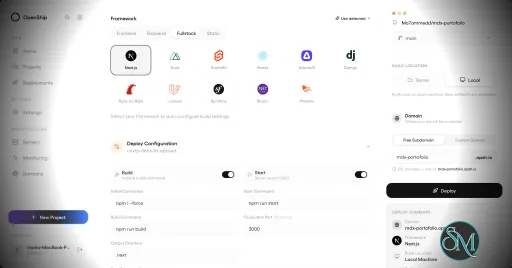
Openship is an open source application deployment platform that simplifies building, deploying, operating, and scaling applications on your own infrastructure. It combines Git-based deployments, container management, SSL automation, application monitoring, managed services, and a modern web interface into a single platform. Designed as an alternative to managed platforms such as Vercel, Netlify, and Render, Openship gives developers full ownership of their infrastructure while maintaining a streamlined deployment experience.
Deploying applications to self-managed servers often requires configuring Docker, reverse proxies, SSL certificates, deployment pipelines, and monitoring separately. Openship brings these capabilities together into a unified platform that works with cloud VPS providers, dedicated servers, and homelabs.
Unlike many self-hosted deployment tools that install build agents directly on production servers, Openship builds application images externally and deploys immutable containers over SSH. This keeps production systems focused on serving applications while simplifying rollbacks and updates.
The platform is fully open source under the AGPL-3.0 license and supports both self-hosting and managed cloud hosting.
Key Features of Openship
Git-Based Deployments
Applications are deployed automatically from Git repositories. Every commit can trigger a build, resulting in versioned container images that are easy to deploy or roll back.
Deploy Anywhere
Openship supports deployment to:
Virtual private servers
Dedicated servers
Home labs
Cloud virtual machines
Openship Cloud
The deployment workflow remains consistent regardless of the hosting environment.
Zero Downtime Deployments
The platform automatically routes traffic to newly deployed containers after they are ready, reducing downtime during updates. Previous versions remain available for quick rollback if necessary.
Automatic SSL
SSL certificates are automatically provisioned through Let's Encrypt, eliminating manual certificate management for hosted applications.
Integrated Monitoring
Developers can monitor deployments, view application logs, inspect metrics, and manage previous releases directly from the web dashboard, desktop application, or CLI.
Managed Infrastructure Services
Beyond application deployment, Openship includes managed services such as PostgreSQL, MySQL, Redis, MongoDB, and a built-in transactional email service with support for multiple domains.
Multiple Interfaces
Users can manage infrastructure through:
This flexibility makes Openship suitable for both manual administration and automation workflows.
Open Source
Every component of the platform is publicly available, allowing organizations to audit the source code, customize functionality, and avoid vendor lock-in.
Download OpenShip v1.0.0 - Software Mirrors |
|---|
OpenShip v1.0.0 for WindowsOpenship-win32-x64.zip | 249.9 MB |
OpenShip v1.0.0 for macOSOpenship-x64.dmg | 284.95 MB Openship-arm64.dmg | 288.49 MB |
OpenShip v1.0.0 for LinuxOpenship.AppImage | 218.6 MB openship-v1.0.0-linux-amd64.tar.gz | 93.12 MB openship-email-v1.0.0-linux-amd64.tar.gz | 76.63 MB Openship-arm64.AppImage | 218.85 MB |
Others Download related to OpenShip v1.0.0openship-dashboard-v1.0.0.tar.gz | 63.61 MB openship-cli-v1.0.0.tar.gz | 46.01 MB |
OpenShip v1.0.0 Source Code
OpenShip v1.0.0 Source code (zip)
OpenShip v1.0.0 Source code (tar.gz)
|
OpenShip v1.0.0 Release Notes: OpenShip 1.0 brings a refreshed dashboard, edge maintenance and custom pages,
deploy links, and scheduled mail workflows. Includes every change since 0.9.12,
with more reliable builds, imports, billing and recovery.
Recommended update: administrators should update all OpenShip components. This
release closes an authorization flaw that allowed ordinary organization members
to invoke administrative operations, including host command execution.
Security and access
- Require administrative authority across HTTP, SDK, native and MCP access.
Scoped tokens remain bounded by their owner's current organization role,
including after demotion. Preserve explicitly delegated, resource-scoped
administration (#1783, #1784).
- Choose a sign-in page or the browser's native authentication prompt for
self-hosted hostnames. Customize sign-in HTML and session duration, revoke
sessions, and see enabled protection directly on domain cards.
- Update the Actions worker to OpenTelemetry 1.47.0, fixing bypassed
attribute-length limits in its tracing dependency.
- Keep generated local mail credentials and runtime caches out of image build
contexts. Bundle the shared assistant client and its dependency patch so
release builds do not depend on a sibling checkout or baked development URLs.
- Include the website's client-message generator in its Docker build, and verify
the production website image and its public pages before release.
Edge pages and routing
- Serve maintenance HTML directly from the edge while the application keeps
running. Restore normal routing when maintenance is disabled.
- Upload HTML pages and assign error statuses, with server defaults and
project or hostname overrides. Customize unmatched-host and direct-IP pages.
- Accept larger authentication response headers and returning cookies at the edge,
with bounded defaults and preserved custom buffer settings (#1763).
- Organize Domains & Routes into routing, access, proxy, and page controls,
with inline protection settings, HTML previews, and visible loading and retry states.
- Target the correct project service and port when adding domains from the CLI.
Keep primary domains, aliases and www redirects consistent when editing routes.
Deployments, imports and recovery
- Add shareable deploy links and
openship launch, carrying the selected
repository and deployment intent through sign-in and installation.
- Copy selected services to the same server or another server as independent
projects. Validate dependencies and port bindings, preserve separate volumes,
and improve restoration and rollback if a transfer fails. Keep application
instance scaling distinct from independent copies.
- Review Compose changes in a shared before/after dialog and apply the exact
reviewed revision without repeating setup. Preserve deployment options and
saved overrides, mask credentials, and require a new review if source changes (#1796).
- Explain private-image pull failures with the affected image and a direct link
to registry connections. Preserve public-image recovery and distinguish registry
credentials from GitHub repository access (#1798).
- Reveal and hide service environment values through the shared Compose editor
while retaining the existing permission checks (#1771).
- Import Railway projects with multiple repositories as native services and
project connections, preserving source ownership and private service wiring.
- Show container ports declared with Compose
expose, explain how to publish
a TCP port for a web domain, and handle protocol suffixes and port ranges.
- Improve folder deployment names, scan errors and streamed uploads. Resolve
template placeholders consistently in service ports, and explain recovery
when duplicate containers block deployment.
- Retain warm BuildKit caches and reduce remote cleanup overhead without
dropping build ownership, cancellation or capacity checks.
- Back up verified empty Docker volumes and bind directories alongside populated
sources. Refuse missing sources and preserve errors for unavailable storage.
- Verify every Redis Sentinel has discovered the writable primary, its replicas
and the full voting group before reporting replicated databases ready.
- Fence event-stream admission while relocating the controller, restore access
when it resumes, and link server preparation to its deployment progress.
- Preserve the mail host's configured ignored IP addresses when updating its engine.
Mail and agents
- Schedule messages, cancel queued mail with Undo Send, and snooze conversations.
Recover interrupted or temporarily failed wake-ups, including messages moved
or deleted before their wake-up time.
- Connect mailbox-scoped agents and MCP clients with encrypted state, isolated
runtimes, scoped permissions and explicit approval for sending mail.
- Improve the agent workspace, shared conversation rendering, connection setup,
and empty and error states. Add the OpenShip plugin directory submission metadata.
Cloud, billing and CLI
- Move the Oblien integration to SDK 3.2.0 and the provider's native versioned
VM API. Preserve saved VM identities, customer metadata and purchased offers;
validate scoped credentials against the selected VM.
- Recover unfinished Cloud purchases instead of creating duplicate unpaid
spaces. Open checkout after its payment URL is ready and retain a fallback action.
- Keep billing accessible during pending renewals and show payment warnings in
Plans & billing. Align monthly and yearly pricing across the website and dashboard.
- Recover repeated signup attempts during Cloud linking and improve first-admin
recovery and Compose managed-edge setup.
- Keep the installed service's existing ports when
openship up runs again.
Support CLI login through public instance URLs and use Node.js for the
container-to-host connectivity probe.
- Limit the managed Cloud update banner to verified workload-security notices.
Dashboard and website
- Refresh billing, monitoring, jobs, backups, connections, server and agent
screens with shared illustrations, compact controls and theme-aware surfaces.
- Improve service inspectors and copy/scale flows, put actions before runtime
details, and replace native disclosure markers with shared icon controls.
- Add avatar and project icon URL settings, with inline editing, previews and reset.
- Refresh landing, Cloud, mail, download, migration and app-catalog pages;
improve Arabic headlines, language navigation and documentation navigation.
- Expand product comparisons, feature pages and search discovery, and publish
Cloud SLA, support and privacy information.
Upgrade notes
- Update the API and all its replicas, dashboard, Desktop, CLI and mail components
together. This release includes database migrations; retain a current instance
and database backup before updating.
- Ordinary organization members no longer have implicit administrative access.
Review membership roles and scoped grants for integrations that perform admin actions.
- Cloud operators must coordinate this release with the matching Oblien
/v1
API, database, gateway and scoped-credential rollout. Review old unversioned
OBLIEN_API_URL and gateway overrides, and verify existing-VM access before
directing customers to the upgraded provider.
- Maintenance, custom edge pages and hostname protection require the updated
self-hosted edge. These controls do not protect direct application ports or
hostnames outside their configured scope.
- Independent service copies are separate deployments. Managed database replicas
and failover use their existing database scaling flows. |
Performance and User Experience
Openship provides a polished user experience that lowers the barrier to self-hosting modern applications. The interface is clean, deployments are straightforward, and infrastructure management is considerably simpler than manually configuring Docker, reverse proxies, certificates, and monitoring tools.
One of its strongest advantages is keeping production servers free from build workloads. Images are built separately and transferred to the deployment target, improving reliability and reducing resource usage on live servers.
The project is under active development, with new features such as clustering and horizontal scaling planned for future releases. Community feedback has been largely positive, particularly regarding its ease of use and modern approach to self-hosted deployments.
Pros
Free and open source.
Supports deployment to your own infrastructure.
Zero downtime deployments.
Automatic SSL certificate management.
Git-based deployment workflow.
Built-in monitoring and rollback.
CLI, web, desktop, REST API, and MCP support.
No vendor lock-in.
Active development.
Cons
Still a relatively new platform.
Advanced clustering features are still under development.
Best suited for containerized applications.
Smaller community than established deployment platforms.
Who Should Use Openship?
Openship is an excellent choice for developers, DevOps engineers, startups, agencies, and organizations that want a modern deployment experience without relying entirely on managed cloud platforms.
It is especially appealing to users who want the simplicity of services like Vercel while maintaining complete ownership of their servers, applications, and deployment pipeline.
Final Verdict
Openship successfully bridges the gap between traditional self-hosting and modern cloud deployment platforms. Its Git-driven workflow, automated infrastructure management, integrated monitoring, and open source philosophy provide an impressive developer experience without sacrificing control.
Although the platform is still evolving, it already delivers a compelling alternative to commercial deployment services and has strong potential to become a leading open source application platform.
Post a Comment/Report Broken Link: