OpenBot v0.71.0

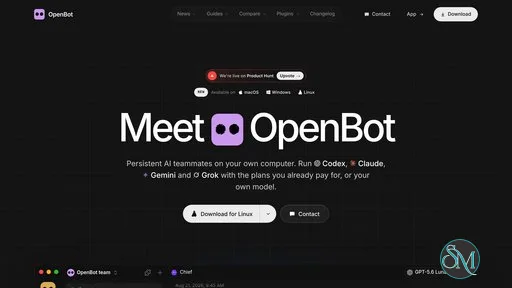
OpenBot is a desktop workspace for managing persistent AI agents from a single interface. Instead of switching between separate coding assistants and conversations, users can assign different agents their own workspaces, queue tasks, exchange files, and collaborate on projects.

The application supports several AI coding tools, including OpenAI Codex, Claude Code, Gemini, Grok, OpenCode, Cursor, and Cline. It also offers an embedded browser, agent-to-agent messaging, and remote access from mobile devices. OpenBot is designed primarily for developers and power users who want to coordinate multiple AI assistants while keeping their working files and conversations on their own computer.

Although the source code is publicly available on GitHub, the licensing distinction is important: current releases use the PolyForm Noncommercial License, so commercial use requires separate permission. Older releases up to and including 0.1.11 remain under Apache 2.0.

Features

Multiple AI Agents

OpenBot lets users create persistent agents with individual instructions, workspaces, conversations, and model settings. Supported providers include Codex, Claude Code, Grok, OpenCode, Gemini, Cursor, and Cline, with custom agents and compatible model endpoints also supported.

Each agent can maintain its own working context, making it easier to separate tasks such as writing code, investigating bugs, reviewing changes, and researching documentation.

Persistent Workspaces and Task Queues

Each agent receives a dedicated workspace for its files and ongoing work. Users can send tasks to an agent while it is busy, with messages waiting in a queue until the agent is ready.

Queue controls include pausing, resuming, cancelling, and recovering queued work after a crash. Context monitoring and automatic compaction also help agents manage longer conversations without exhausting their model context window.

Agent-to-Agent Collaboration

OpenBot supports communication between agents, including messages, replies, reactions, and file transfers. Shared desktop channels can organize collaborative tasks around a designated task owner, with options to delegate work and manage the task's progress.

This approach is useful for workflows that benefit from multiple perspectives, such as having one agent implement a feature while another reviews the result. However, dividing work among several agents does not automatically guarantee better output. Results still depend on the models, instructions, and task design.

Embedded Browser and Computer Use

The built-in browser allows agents to open, inspect, and interact with web pages. Optional Computer Use support can provide mouse, keyboard, and screen interaction on supported desktop platforms.

These capabilities extend OpenBot beyond code generation. Agents can assist with browser-based research, repetitive computer tasks, and workflows involving web interfaces.

Computer interaction also introduces additional risks. An agent that can operate a browser may encounter malicious instructions on web pages or interact with services in unintended ways.

Custom Models and Providers

OpenBot supports custom OpenAI-compatible endpoints and custom agents through the Agent Client Protocol. It can detect supported local model servers, including Ollama and LM Studio, and work with compatible providers.

This flexibility is useful for users who want to experiment with different models or integrate existing AI tools rather than commit to a single provider.

However, local model support does not make the entire application automatically offline. Cloud-based providers still receive the prompts sent to them, and browsing or connected services require network access.

File Sharing and Attachments

Agents can exchange managed files and share attachments through conversations. The application supports common document and project workflows, with support for audio, video, and ZIP attachments under documented file and message limits.

Agents can use their available tools to inspect supplied files, but OpenBot does not itself automatically transcribe every audio recording or decode every video attachment.

Mobile and Remote Access

OpenBot provides ways to connect to a running computer from supported mobile clients. This allows users to check conversations and interact with their agents without remaining at their desktop.

Remote access depends on the host and connection configuration. Some agents, particularly those tied to local command-line tools, continue to run on the computer where they were started rather than being transferred to the mobile device.

Local-First Data Storage

OpenBot is designed to keep workspaces, conversations, attachments, and browser data on the computer running the application. Cloud services support account and remote-access functionality, while AI providers receive the prompts sent to their models.

This separation gives users more control over local project data, but it is not equivalent to complete privacy or offline operation. Users should review the application's privacy documentation and each provider's data policies before using confidential material.

Download OpenBot v0.71.0 - Software Mirrors

OpenBot v0.71.0 for Windows

OpenBot-0.71.0-x64.exe | 224.54 MB

OpenBot v0.71.0 for macOS

OpenBot-0.71.0-x64.zip | 256.06 MB

OpenBot-0.71.0-x64.dmg | 265.43 MB

OpenBot-0.71.0-arm64.zip | 247.82 MB

OpenBot-0.71.0-arm64.dmg | 257.05 MB

OpenBot v0.71.0 for Linux

OpenBot-0.71.0-x86_64.AppImage | 238.84 MB

OpenBot-0.71.0-arm64.AppImage | 180.81 MB

Others Download related to OpenBot v0.71.0

OpenBot-Host-0.71.0-arm64.pkg | 50.1 MB

OpenBot v0.71.0 Source Code

OpenBot v0.71.0 Source code (zip)

OpenBot v0.71.0 Source code (tar.gz)

OpenBot v0.71.0 Release Notes:

What's Changed

  • Give the start failure reason when the remote desktop runtime has an unexpected error by @Sniezka1927 in #8906
  • Animate the theme change in the mobile app by @nrb-dev in #8909
  • Show the tax ID field on the payment page from the start by @NorbertBodziony in #8910
  • Keep the language header that a site sets on its own request by @Sniezka1927 in #8911
  • Give a new Pi process more time to answer its first request by @Sniezka1927 in #8913
  • Show a provider account as signed out when an agent start finds no login by @Sniezka1927 in #8923
  • Prepare shorter parts when a reply is read aloud at a higher speed by @Sniezka1927 in #8928
  • Say that the server did not accept the sign-in when its token step refuses it by @Sniezka1927 in #8853
  • Tell the user when a chat does not fit a local model's window by @Sniezka1927 in #8846
  • Start a new hosted server on a ready Leaseweb machine, and on boat when the pool has none by @NorbertBodziony in #8879
  • Tell the user when Gemini cannot open an account's settings file by @Sniezka1927 in #8849
  • Show "Using credits" when a ChatGPT plan limit is used and credits remain by @Sniezka1927 in #6633
  • Throttle browser tabs that nobody sees or uses by @Sniezka1927 in #8940
  • Give Grok agents the correct name for a deferred OpenBot tool by @Sniezka1927 in #8942
  • Name the MCP server in the notice for a declined request by @Sniezka1927 in #6513
  • Permit the storage access request of a frame from a different site in the browser by @Sniezka1927 in #8944
  • Name the frame when a secure input field is in a frame of another origin by @Sniezka1927 in #8950
  • Give an agent its correct permission level when it reads its setup by @Sniezka1927 in #8943
  • Show an arrow pointer on the empty agent display of a server by @Sniezka1927 in #8939
  • build(nix): install OpenBot 0.70.0 by @github-actions[bot] in #8967
  • Remove the iOS build warnings of the mobile app and sign with the Synthetify team by default by @nrb-dev in #8958
  • Add a live provider test that runs by hand on the Mac mini runner by @Sniezka1927 in #8838
  • Tell the agent that a memory is gone when it changes one that is not in the store by @Sniezka1927 in #8971
  • Prepare OpenBot mobile v1.4.10 by @nrb-dev in #8975
  • Read a failed model list again after a provider CLI update by @Sniezka1927 in #8977
  • Run the activity label light on the compositor by @Sniezka1927 in #6669
  • Stop an ACP turn that repeats the same failed tool call by @Sniezka1927 in #8980
  • Start a new OpenCode session when a local model cannot compact a chat by @Sniezka1927 in #8978
  • Recover an OpenCode chat after a model refuses an image it cannot read by @Sniezka1927 in #8992
  • Give an agent the page text of its earlier visual reply in history_read by @Sniezka1927 in #8984
  • Show why a channel request waits by @Sniezka1927 in #8934
  • Stop a routine run from the Routines canvas by @Sniezka1927 in #8986
  • Let an agent end quietly when a teammate answers a quiet routine run's request by @Sniezka1927 in #8996
  • Show an agent's answer when the chat keeps a stale streaming copy by @Sniezka1927 in #8995
  • Use the client metadata document when a server refuses each redirect address by @Sniezka1927 in #9021
  • Delete the member threads with a channel's history by @Sniezka1927 in #9034
  • Open the Claude sign-in page from OpenBot on Windows by @Sniezka1927 in #9040
  • Follow an MCP sign-in redirect to the server's own www host by @Sniezka1927 in #9041
  • Keep the microphone open at the end of a voice conversation turn by @Sniezka1927 in #9069
  • Tell agents to write a path with no local file as plain text by @Sniezka1927 in #9075
  • Show an uploaded image at once on a joined server by @Sniezka1927 in #9078
  • Replace a Gemini session that the Antigravity CLI cannot read by @Sniezka1927 in #9079
  • Let the empty right side panel be resized by @Sniezka1927 in #9091
  • Give each pool VPS the neutral reference pool and let a move select a free VPS by @NorbertBodziony in #9104
  • Show a GitHub Copilot model that the user adds while Copilot runs by @Sniezka1927 in #9105
  • Say that agents can read the API key files of other agents by @NorbertBodziony in #9106
  • Run a thread's empty turn of a teammate result again by @Sniezka1927 in #9115
  • Always turn off Codex plugin install suggestions by @Sniezka1927 in #9120
  • Let a pinch zoom the app around the pointer by @NorbertBodziony in #9135
  • Let chat videos from a joined server seek and play to the end by @Sniezka1927 in #9136
  • Send no failure text to a WhatsApp contact in the owner's name by @Sniezka1927 in #9134
  • Let only words stop a voice reply in a continuous noise by @Sniezka1927 in #9153
  • Show a server from an install command without a restart by @Sniezka1927 in #9155
  • Queue a provider change on a joined server while the agent works by @Sniezka1927 in #9156
  • Wait longer for a slow CLI version after a timeout by @Sniezka1927 in #9159
  • Show a Gemini model at capacity as busy, not as plan quota by @Sniezka1927 in #9164
  • Cap OpenRouter answer tokens so a small balance works by @Sniezka1927 in #9170
  • Keep a skill saved from the agent's own skill folder by @Sniezka1927 in #9175
  • Run an external chat's empty turn of a teammate result again by @Sniezka1927 in #9177
  • Ask for a Kimi sign-in when Kimi's server refuses the saved one by @Sniezka1927 in #9185
  • Show ClinePass models so Cline agents can use the subscription by @Sniezka1927 in #9183
  • Refuse a boat move when the sandbox stop fails or the sandbox has Docker containers by @NorbertBodziony in #9014
  • Steer a running Antigravity turn with a second prompt by @NorbertBodziony in #9196
  • Save reviewed memories in the language of the user by @Sniezka1927 in #9200
  • Tell the user to lower the effort when OpenCode cannot read a model's reasoning by @Sniezka1927 in #9203
  • Compact a channel's members after a restart, and say why it cannot by @Sniezka1927 in #9205
  • Show channel instructions in list_channels and name the channel tool fields by @Sniezka1927 in #9204
  • Attach Windows files from OpenCode agents by @Sniezka1927 in #9215
  • End a quiet routine run that stays silent after routine_no_update by @Sniezka1927 in #9222
  • Keep an Antigravity turn open while a background command runs by @Sniezka1927 in #9231
  • Stop a browser click that goes to another element after the page moves by @Sniezka1927 in #9236
  • Recover an OpenCode chat after Kimi refuses a PDF part by @Sniezka1927 in #9239
  • Run a Codex subagent's OpenBot tool calls as its parent agent by @Sniezka1927 in #9240
  • Tell the agent to ask for a new message when it cannot change a workflow by @Sniezka1927 in #9242
  • Keep a Vault login of another subdomain when saving a new password by @Sniezka1927 in #9248
  • Name the saved skill when a new skill name gives the same slug by @Sniezka1927 in #9251
  • Send the page storage of a site with a sign-in on this computer by @Sniezka1927 in #9255
  • Accept a provider's own model id in the agent tools by @Sniezka1927 in #9260
  • Tell the agent to send the user to Memories when it cannot delete a memory by @Sniezka1927 in #9266
  • Download voice models through the computer's proxy settings by @Sniezka1927 in #9279
  • Use a dictation model that knows the user's language by default by @Sniezka1927 in #9281
  • Hide the Codex multi_agent deprecation warning in chat by @Sniezka1927 in #9287
  • Accept a browser click on an icon that a web component puts in its button by @Sniezka1927 in #9290
  • Save the Codex session of a routine run so that subagents can fork it by @Sniezka1927 in #9296
  • Keep saved logins and show the error when Bitwarden cannot be read by @Sniezka1927 in #9298
  • Remove the blank last line from WhatsApp posts in the owner's own chat by @Sniezka1927 in #9301
  • Start a person's channel question before the lead's queued sub-tasks by @Sniezka1927 in #9305
  • Give the request again to a new session that continues a plan by @Sniezka1927 in #9306
  • Remove MongoDB Atlas from the Apps catalog because MongoDB does not accept the OpenBot sign-in by @Sniezka1927 in #9319
  • Delete the model discovery session of an agent that can delete sessions by @Sniezka1927 in #9320
  • Tell the agent when an idle browser tab was unloaded by @Sniezka1927 in #9329
  • Do not show an MCP Sign in card that the sign-in server will refuse by @Sniezka1927 in #9330
  • Show a Codex turn's last narration when its answer is empty by @Sniezka1927 in #9339
  • Cancel queued requests and give the correct reason when interrupt_agent refuses a stop by @Sniezka1927 in #9342
  • Stop a server move that would leave customer folders behind by @Sniezka1927 in #9347
  • Load Pi extensions for a tool-less turn on a model that an extension adds by @Sniezka1927 in #9353
  • Keep a Codex channel turn when turn/started comes after its start by @Sniezka1927 in #9354
  • Try an MCP connection once more when it could not open by @Sniezka1927 in #9365
  • Start a new Grok session when Grok cannot find the saved one by @Sniezka1927 in #9368
  • Alert the operator when a server starts on boat or the pool is almost empty by @NorbertBodziony in #9376
  • Tell the agent when a saved login id is wrong by @Sniezka1927 in #9380
  • Let a routine run pause its own routine when its task is done by @Sniezka1927 in #9383
  • Keep the Vault keys for every agent at the shared key path by @Sniezka1927 in #9382
  • Stop a Codex turn that compacts again and again with no progress by @Sniezka1927 in #9387
  • Start a new Kimi session when its MCP servers changed before a resume by @Sniezka1927 in #9386
  • Move a Claude agent to its backup when the monthly spend limit stops it by @Sniezka1927 in #9398
  • Let agents post files without text to a connected chat by @Sniezka1927 in #9401
  • Match Proton Pass logins on the whole saved site by @Sniezka1927 in #9410
  • Show Slack and Telegram connections that another server receives as not linked by @Sniezka1927 in #9404
  • Recover a chat that a model refuses with "more images than the limit" by @Sniezka1927 in #9417
  • Install socat on servers so that the Claude sandbox starts by @NorbertBodziony in #9423
  • Show small images sharp in the image viewer at display scales above 100% by @Sniezka1927 in #9424
  • Read video captions as the transcript in read_video by @Sniezka1927 in #9425
  • Keep a Claude agent on its own model when Claude Code changes its default by @Sniezka1927 in #9431
  • Keep the old path of a one-agent API key after the Vault move by @NorbertBodziony in #9430
  • Sell Starter again at 30 EUR with 25 GB on a VPS 1 by @NorbertBodziony in #9434
  • Let the Claude sandbox run on a server with Ubuntu 26.04 by @NorbertBodziony in #9439
  • Tell agents to set an avatar color with avatarHue, not an image by @Sniezka1927 in #9440
  • Show a channel member's work after its background command by @Sniezka1927 in #9444
  • Show when a Discord server moves to another OpenBot server by @Sniezka1927 in #9447
  • Drag Canvas nodes by their text by @NorbertBodziony in #9448
  • Prepare the v0.71.0 release by @NorbertBodziony in #9464
Full Changelog: v0.70.0...v0.71.0

Performance and Compatibility

OpenBot supports macOS 13 or newer on Apple silicon and Intel processors, Windows 10 or newer on x64 systems, and Linux on x64 or ARM64 through AppImage packages.

The application brings multiple AI tools into one desktop interface, potentially reducing the need to switch between separate applications. Persistent workspaces, queued messages, and agent collaboration are particularly useful for longer development projects.

Actual performance depends heavily on the selected AI provider, model, hardware, network connection, and number of active agents. Running several agents can increase API usage, consume additional system resources, and produce more output to review.

OpenBot is a development preview, so users should expect ongoing changes and possible limitations. It is better suited to experimentation and workflows that can tolerate occasional problems than to environments requiring strict operational guarantees.

Important security consideration: The project's documentation warns that agents currently run with full access to their permitted execution environment and an approval policy that does not require confirmation for every action. After the initial consent, agents may read or modify files, execute commands, access the network, and control the embedded browser without additional per-action approval. Use agents and tasks you trust, maintain backups, and carefully review the security documentation before granting access to important files or production systems.

System Requirements

OpenBot's published platform requirements are:

  • macOS: Version 13 or newer, supporting Apple silicon and Intel Macs.

  • Windows: Version 10 or newer on x64 systems.

  • Linux: x64 or ARM64 using the AppImage distribution.

Additional requirements depend on the AI providers and integrations selected. Some agents need their own command-line tools, authentication, subscriptions, or API credentials. Local model servers also require compatible models and sufficient hardware resources.

For Linux users, certain environments may require additional configuration. The documentation identifies AppArmor-related restrictions on Ubuntu 23.10 or newer and Debian 13, while remote desktop functionality has specific display-server and architecture limitations.

Pros and Cons

Pros

  • Manages multiple AI coding agents in one desktop application.

  • Provides separate workspaces and persistent conversations for individual agents.

  • Supports task queues, delegation, and agent-to-agent communication.

  • Includes an embedded browser and optional computer interaction.

  • Supports multiple AI providers and compatible custom endpoints.

  • Offers file sharing, attachments, and remote access from mobile clients.

  • Designed to keep workspaces and conversations on the host computer.

  • Provides Linux packages alongside Windows and macOS releases.

Cons

  • Development-preview status means features and behavior may change.

  • Agents currently have broad execution access without per-action approval.

  • Cloud-based providers still receive prompts and require network access.

  • Multiple agents can increase model usage, resource consumption, and review overhead.

  • Some providers require separate authentication, subscriptions, or API credentials.

  • Current licensing restricts commercial use without separate permission.

  • Linux users may need additional configuration for certain environments and features.

How to Install

  1. Visit the official OpenBot website.

  2. Open the download section and select the package for your operating system.

  3. Install the application using the downloaded package.

  4. Launch OpenBot and follow the onboarding instructions.

  5. Connect a supported AI provider or configure a compatible model endpoint.

  6. Create an agent, configure its instructions, and select its model and workspace.

  7. Test the agent with a low-risk task before granting access to important files or workflows.

  8. Review the security settings and project documentation before enabling browser control, computer interaction, or tasks involving sensitive information.

Linux users should follow the official installation instructions for their distribution, especially if AppArmor restrictions prevent the application from launching. For safety, obtain release packages from the project's official distribution channels and verify available checksums or build attestations.

Final Verdict

OpenBot is an interesting workspace for developers who want to coordinate several AI agents instead of managing each assistant separately. Its persistent workspaces, task queues, agent collaboration, browser integration, and support for different providers make it useful for experimenting with more advanced AI-assisted workflows.

Its local-first design is another advantage for users who prefer to keep project files and conversation history on their own computers. Nevertheless, local storage does not prevent cloud-based AI providers from receiving prompts, and the application's current full-access execution model deserves careful attention.

The development-preview status and noncommercial licensing are also important considerations. Users should distinguish between publicly available source code and software licensed for unrestricted commercial use.

OpenBot is worth exploring for developers and AI enthusiasts who want a flexible, multi-agent workspace. Its feature set is promising, but the security model, preview status, and current licensing restrictions make it less suitable for sensitive production workflows or commercial deployment without further evaluation.
OpenBot v0.71.0
Free
Software Informations:
Developer:

Operating System:
Windows / macOS / Linux
Date Added:
2026-11-15T09:07:19.235Z
Categories:

Post a Comment/Report Broken Link: