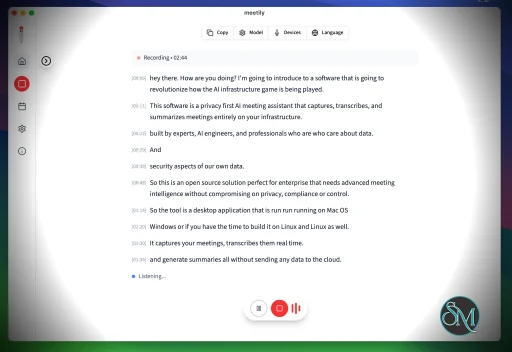
Meetily is an open source AI meeting assistant that automatically records, transcribes, and summarizes meetings. Designed for professionals, remote teams, and students, it helps users capture important discussions without manually taking notes. By leveraging modern AI models for speech recognition and summarization, Meetily turns lengthy conversations into organized meeting notes and actionable insights.
Taking notes during meetings can be distracting and often results in missed details. Meetily addresses this problem by automatically transcribing conversations and generating concise summaries after each meeting.
As an open source project, Meetily offers transparency and flexibility that many proprietary AI meeting assistants do not. Organizations can review the source code, customize deployments, and maintain greater control over their meeting data.
Key Features of Meetily
Automatic Meeting Transcription
Meetily converts spoken conversations into searchable text, allowing users to review discussions without replaying entire recordings.
AI-Generated Summaries
After transcription, the application produces concise summaries highlighting the main discussion points, making it easier to review long meetings.
Action Item Detection
Meetily can identify tasks, decisions, and follow-up items discussed during meetings, helping teams keep track of responsibilities.
Searchable Meeting History
Transcripts and summaries can be searched, making it simple to locate previous discussions, decisions, or specific topics.
Self-Hosted Option
Being open source, Meetily can be self-hosted by organizations that want greater privacy and control over sensitive meeting data.
Cross-Platform Accessibility
Meetily is designed to work across modern desktop environments and web-based workflows, making it suitable for distributed teams.
Download Meetily v0.5.0 - Software Mirrors |
|---|
Meetily v0.5.0 for Windows |
Meetily v0.5.0 for macOS |
Meetily v0.5.0 for Linux |
Others Download related to Meetily v0.5.0 |
Meetily v0.5.0 Source Code |
Meetily v0.5.0 Release Notes:What's Changed
InstallationWindows and macOS
Linux (recommended): one-line installRequires x86_64 Linux with glibc 2.35 or newer (.deb preferred, otherwise AppImage installed).Linux: installer options and manual installationPass options aftersh -s --:
--help to see all options.
Manual install (.deb / AppImage)
New Contributors
|
Performance and User Experience
Meetily provides a clean interface that emphasizes productivity rather than unnecessary complexity. Meeting recordings are processed automatically, and summaries are generated with minimal user interaction.
The quality of transcripts depends on factors such as microphone quality, speaker clarity, and the AI model being used. In most business meetings, transcription accuracy is generally strong enough to eliminate the need for extensive manual note-taking.
Since Meetily is an actively developed open source project, users can also benefit from regular improvements and community contributions.
Pros
Free and open source.
Automatic meeting transcription.
AI-generated summaries.
Detects action items and key decisions.
Searchable meeting archive.
Self-hosting support for improved privacy.
Active community development.
Cons
Transcription accuracy depends on audio quality.
Some AI features may require external models or API configuration.
Initial self-hosted setup may require technical knowledge.
Smaller ecosystem than established commercial meeting assistants.
Who Should Use Meetily?
Meetily is ideal for remote teams, software developers, project managers, educators, students, consultants, and businesses that regularly conduct online meetings. It is especially attractive to organizations that prefer open source software or need greater control over meeting recordings and transcripts.
Users looking for a privacy-focused alternative to commercial AI meeting assistants will likely appreciate Meetily's self-hosted capabilities.
Final Verdict
Meetily offers an impressive combination of automated transcription, AI-powered summaries, and meeting organization in an open source package. Its ability to generate searchable notes and identify action items can significantly improve meeting productivity while reducing manual documentation.
Although the project is still growing, its open source foundation, privacy-friendly deployment options, and practical feature set make it an excellent choice for teams seeking a capable AI meeting assistant.
Developer:
Zackriya Solutions
Operating System:
Windows / macOS
Date Added:
2026-11-14T17:07:18.262Z
Categories:
Post a Comment/Report Broken Link: