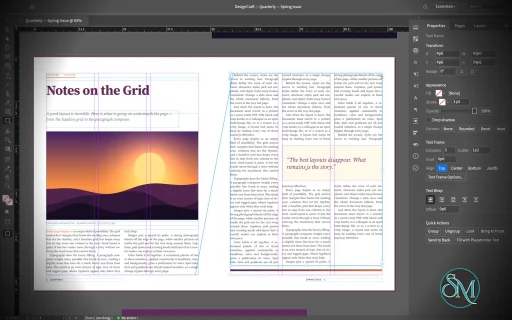
DesignCraft is a free, open-source desktop publishing application designed as an alternative to Adobe InDesign. Built in Rust by the ArtCraft team, it focuses on page layout, typography, multi-page documents, and print-oriented design. Its interface follows familiar desktop publishing conventions, making it approachable for users who already understand professional layout software.
The application supports Windows, macOS, and Linux, with a WebAssembly version for browsers. It also provides command-line tools and automation interfaces that allow compatible AI agents to interact with documents and design controls.
DesignCraft is an interesting option for creating magazines, brochures, newsletters, and other page-based publications without a commercial subscription. However, it is still an early-stage project, so users should carefully evaluate its export options and compatibility with existing publishing workflows before adopting it for production.
Features
Page Layout and Multi-Page Documents
DesignCraft provides a page-layout workspace with spreads, parent pages, layers, frames, and text stories. Its interface is inspired by familiar professional publishing applications, including conventional tools, panels, menus, and keyboard shortcuts.
Users can arrange text and graphics across multiple pages, build consistent layouts, and organize document elements into layers. Parent pages help maintain recurring elements across a publication, while spreads support designs that span facing pages.
These capabilities make DesignCraft suitable for experimenting with magazine layouts, newsletters, brochures, and other editorial projects.
Advanced Typography
Typography is one of DesignCraft's main strengths. Its text engine uses paragraph composition techniques designed to produce consistent line breaks and balanced text blocks.
Features include paragraph and character styles, multiple columns, threaded text stories, baseline grids, tabs, hyphenation, and text wrapping around objects. The engine also supports justification controls, optical margin alignment, and paragraph rules and shading.
These tools give designers greater control over text-heavy publications than a basic drawing application typically provides.
DesignCraft also supports international typography, including Japanese text handling. Its release builds bundle additional fonts to improve Japanese text rendering, while development builds can use the separate font collection or fall back to system fonts.
Frames, Layers, and Text Wrapping
DesignCraft uses frames to position text and graphics within a page. Threaded text frames allow a story to continue across multiple columns or pages, helping manage longer documents.
Layers provide a way to organize complex layouts and separate related elements. Text wrapping allows content to flow around objects such as images and decorative shapes.
These features are particularly useful when designing editorial spreads with headlines, captions, pull quotes, and multi-column body text.
Color and Design Tools
The application includes color management primitives for RGB, CMYK, and Lab color spaces, along with swatches, tints, and gradients.
These capabilities provide a foundation for creating consistent color palettes and designing layouts for different publishing needs. The project also includes tools for working with paths, geometry, measurements, and corner styles.
However, the presence of CMYK support does not automatically make DesignCraft a complete prepress solution. Designers preparing commercial print jobs should verify color output, embedded fonts, bleed settings, and print-production requirements before relying on it for final delivery.
Import, Export, and Document Formats
DesignCraft supports its own documented native document format and can import and export InDesign Markup Language (IDML). This provides a potential migration path for users who want to experiment with existing InDesign documents.
The application also supports PNG export, making it possible to render page layouts as images.
PDF export is listed on the project's roadmap rather than being a fully established production feature. This is a significant limitation for users who need print-ready PDFs as their primary deliverable.
Complex IDML documents should also be tested after import because advanced formatting and application-specific features may not transfer perfectly.
AI and Workflow Automation
DesignCraft includes a JSON control channel and a Model Context Protocol (MCP) server. These interfaces allow compatible automation tools and AI agents to interact with the application.
The control system is designed to expose interface operations, tools, panels, dialogs, and document commands, making it possible to automate layout work rather than relying entirely on manual mouse interactions.
A command-line application can also render documents in headless workflows. For example, the project provides a command for rendering every page of its sample document to PNG files.
This architecture makes DesignCraft particularly interesting for developers exploring automated publishing, template generation, and AI-assisted document creation.
EPUB Export and Digital Publishing
DesignCraft can export documents as EPUB files, extending its usefulness beyond printed publications. This provides an option for creating digital editions of magazines and other text-based layouts.
The export workflow is still evolving, so users should inspect the resulting EPUB in their intended reading applications, particularly when documents contain complex typography, columns, or custom layouts.
Download DesignCraft v0.21.1 - Software Mirrors |
|---|
DesignCraft v0.21.1 for Windowsdesigncraft-0.21.1-windows-x64.msi | 103.24 MB designcraft-0.21.1-windows-x64-portable.zip | 133.15 MB designcraft-0.21.1-windows-arm64.msi | 98.11 MB designcraft-0.21.1-windows-arm64-portable.zip | 127.63 MB |
DesignCraft v0.21.1 for macOSdesigncraft-cli-0.21.1-macos-universal.zip | 118.53 MB designcraft-0.21.1-macos-universal.dmg | 264.11 MB |
DesignCraft v0.21.1 for Linuxdesigncraft-0.21.1-linux-x86_64.tar.gz | 132.06 MB designcraft-0.21.1-linux-x86_64.rpm | 133.19 MB designcraft-0.21.1-linux-x86_64.pkg.tar.zst | 97.45 MB designcraft-0.21.1-linux-x86_64.flatpak | 90.84 MB designcraft-0.21.1-linux-x86_64.deb | 133.95 MB designcraft-0.21.1-linux-x86_64.AppImage.zsync | 217.92 kB designcraft-0.21.1-linux-x86_64.AppImage | 124.38 MB designcraft-0.21.1-linux-riscv64.tar.gz | 131.65 MB designcraft-0.21.1-linux-riscv64.rpm | 132.78 MB designcraft-0.21.1-linux-riscv64.deb | 133.27 MB designcraft-0.21.1-linux-aarch64.tar.gz | 127.26 MB designcraft-0.21.1-linux-aarch64.rpm | 129.43 MB designcraft-0.21.1-linux-aarch64.pkg.tar.zst | 94.39 MB designcraft-0.21.1-linux-aarch64.flatpak | 85.66 MB designcraft-0.21.1-linux-aarch64.deb | 130.35 MB designcraft-0.21.1-linux-aarch64.AppImage.zsync | 210 kB designcraft-0.21.1-linux-aarch64.AppImage | 119.85 MB |
DesignCraft v0.21.1 for BSDdesigncraft-0.21.1-freebsd-x86_64.tar.gz | 131.69 MB designcraft-0.21.1-freebsd-aarch64.tar.gz | 126.75 MB |
Others Download related to DesignCraft v0.21.1designcraft-web-0.21.1.zip | 30.68 MB |
DesignCraft v0.21.1 Source Code
DesignCraft v0.21.1 Source code (zip)
DesignCraft v0.21.1 Source code (tar.gz)
|
DesignCraft v0.21.1 Release Notes: Highlights
- Place: place several images at once with a loaded place cursor (with thumbnails and a count), drop images straight in, and make a contact sheet with File › Place Contact Sheet…. Images come in at the resolution stored in the file.
- Text and layout: Alpha Channel text wrap follows a transparent image's visible pixels, vertical justification is much more accurate in shaped and grid-aligned frames, and object styles can set paragraph styles and Text Frame General Options.
- Tables: diagonal lines in cells (Cell Options › Diagonal Lines) and Table › Go to Row….
- Faster editing: opening, preflight and recovery saves run in the background, and edits recompose only what changed, repaint only what moved and stop re-rendering every page thumbnail.
- Safer files: Save refuses to write a document that wouldn't reopen, PDF links allow only web and mail addresses, and many importers now refuse oversized or malformed input instead of exhausting memory.
- Fixes: Delete Unused Layers and Merge Layers keep grouped and anchored objects, cutting an object no longer pastes old text, whole-page PDF flattening respects non-printing layers, and pasting images from the system clipboard works.
What's Changed- Render: clamp the blur size before the filter planner squares it by @dylanmtaylor in #2640
- Type: type.align without a value is an error by @dotCooCoo in #2645
- Tests: type.align refusal cases name the check that refuses each by @dotCooCoo in #2662
- PPTX export: bound the retained glyph-to-character maps by @dylanmtaylor in #2643
- xtask: refuse an oversized corpus archive before extracting it by @dylanmtaylor in #2642
- Images: a WebP with an ICC chunk longer than the file is read without its profile by @dylanmtaylor in #2638
- Data merge: a record range stops expanding once the limit is met by @dylanmtaylor in #2636
- IDML: story export and object-style overlay in linear time, embedded image budget by @dylanmtaylor in #2263
- Format: a failed entry read counts against the archive budget by @dylanmtaylor in #2253
- Fonts: cap decoded names, bound outline flattening, cache fallback coverage by @dylanmtaylor in #2252
- Engine: bounded DTD validation, compound-path hole orientation by @dylanmtaylor in #2249
- Exports: leave out text the page doesn't show (inherited conditions, deletions, hidden layers) by @dylanmtaylor in #2234
- Engine: index style, tag, swatch and run lookups; bound polygon sides, Change All and spelling candidates by @dylanmtaylor in #2210
- Data Merge: a field in a table cell goes into the cell and is filled (#2315) by @Hamza0101 in #2341
- Automation roots: refuse COM¹ to LPT³ and a device name before a colon by @adikshan11 in #2383
- Save: a TIFF, BMP or PSD too big for opening to inflate is stored as is, so the document reopens by @jayzed80 in #2701
- Compose: vertical Center, Bottom and Justify measure to the last baseline by @dotCooCoo in #2648
- Preflight: check the document on a background worker, not on every edit by @dotCooCoo in #2656
- Text: paragraph spacing and justification values are checked by @dotCooCoo in #2650
- Justification: the dialog sets Auto Leading and Single Word Justification by @dotCooCoo in #2659
- Fix MCP temporary directory build on Windows by @dotCooCoo in #2355
- CMYK view: convert the blended inks to screen colours on the render threads by @dotCooCoo in #2660
- Text Frame Options: a non-rectangular frame shows one Inset field by @dotCooCoo in #2647
- Pages: an edit no longer renders every page thumbnail again by @dotCooCoo in #2653
- Reject ambiguous table IDs across stories by @dotCooCoo in #2354
- Anchored text frames: place a frame anchored inside another anchored frame by @dotCooCoo in #2589
- Paste: images on the system clipboard paste as embedded images by @dotCooCoo in #2665
- Copy: copied text gets text anchors and tables of its own by @dotCooCoo in #1843
- Data merge: an image field in text places the image, not its path by @dotCooCoo in #2649
- Render: keep drop shadow and outer glow images while an object moves by @dotCooCoo in #2657
- Render: satin and center inner glow on an image follow its painted edge by @dotCooCoo in #2671
- Canvas: an idle frame paints and looks up only the spreads in view by @dotCooCoo in #2696
- Text Frame Options: link the insets only when every selected frame has even sides by @dotCooCoo in #2703
- Tables: Table › Go to Row… selects a row by its number by @dotCooCoo in #1845
- Type: Justify All Lines ⇧⌘F, Em Space ⇧⌘M, En Space ⇧⌘N and Paragraph Rules ⌥⌘J by @dotCooCoo in #2664
- InDesign's type shortcuts: Justify All Lines ⇧⌘F, Em Space ⇧⌘M, En Space ⇧⌘N, Paragraph Rules ⌥⌘J by @marcoarnulfo in #1138
- Text Wrap: Alpha Channel contours follow a transparent image's visible pixels by @dotCooCoo in #2663
- Text Wrap: Alpha Channel contour traced from the image, holes with Include Inside Edges, open gaps kept by @moppeeer in #1084
- Render: a feathered object's bevel and inner effects fade with it by @dotCooCoo in #2668
- Compose: an edit composes only the paragraphs it can change by @dotCooCoo in #2699
- Place: images come in at the resolution stored in the file by @dotCooCoo in #2651
- Object styles: a style sets its frames' paragraph styles and Text Frame General Options by @dotCooCoo in #2669
- Object styles: Paragraph Styles (with Apply Next Style) and Text Frame General Options by @moppeeer in #1520
- Compose: vertical justification keeps text out of a wrap under it by @dotCooCoo in #2667
- Canvas: moving an object with a drop shadow repaints only its area by @dotCooCoo in #2654
- Recovery: the timer writes recovery data on a background thread by @dotCooCoo in #2666
- fix(engine): write automatic recovery off the interface thread by @hvfrancesco in #2275
- Text: Text Frame Options open from the Type tool and change the frame holding the caret by @dotCooCoo in #2652
- Compose: vertical justification keeps grid-aligned lines on the baseline grid by @dotCooCoo in #2658
- Render: placed images are premultiplied in their decoded buffer by @dotCooCoo in #2709
- Layers: Duplicate Layer copies a layer's settings and objects above it by @dotCooCoo in #1834
- Images: decode JPEG screen proxies at a reduced size by @dotCooCoo in #2707
- Anchored text frames: test nested hosts in groups, footnotes and table cells by @dotCooCoo in #2722
- Compose: vertical justification in a shaped frame tests lines to their baselines by @dotCooCoo in #2708
- Compose: vertical justification moves a line down between a contour's arms by @dotCooCoo in #2719
- Object styles: checks and fixes for corners, strokes and the style dialog by @dotCooCoo in #2721
- Properties: Text Frame section shows inset spacing and vertical justification by @dotCooCoo in #2661
- Tables: table commands are disabled with the caret in footnote text by @dotCooCoo in #2706
- Compose: vertical justification moves an object kept within its column with its line by @dotCooCoo in #2720
- Compose: count endnote, anchored object and cross-reference marks once per story by @dotCooCoo in #2705
- Compose: vertical justification in a shaped frame finds a band shorter than one scan step by @dotCooCoo in #2732
- CI: drop release.yml's copy of the git-sources job by @FredApps in #2634
- Text Frame Options: every dropdown and field has an accessible name by @dotCooCoo in #2733
- Tools: snap Gap tool drags to active snapping settings (#2637) by @AlPaka1234 in #2749
- Window: restore hidden panels when selecting panels, control bar or workspaces (#2742) by @AlPaka1234 in #2746
- Text Frame Options: insets and gutter in the ruler units (#2739) by @ZIDAN44 in #2754
- IDML export: keep endnote reference numbers (#2753) by @jayzed80 in #2764
- Cut over document formats and codecs to craft-libs (#778) by @dylanmtaylor in #2766
- Build: restore designcraft_format::write; render decode without the image crate by @aiongg in #2780
- Pin craft-psd to storytold/craft-libs by @aiongg in #2791
- PDF export: attach working CMYK profile as /DefaultCMYK (#2743) by @AlPaka1234 in #2751
- Images: background decoding, linked images and multi-image place by @aiongg in #2765
- Place: several images load the place cursor, with a thumbnail, count and grid by @texjer in #2302
- Place: File › Place Contact Sheet… puts the loaded images on new pages by @texjer in #2308
- Place: dropped images load the place cursor, in the order they came by @texjer in #2309
- Linked images: a save waits for link checks; warm accounting from #2717 by @aiongg in #2794
- ci: provision pinned fonts for Sonar coverage by @dylanmtaylor in #2793
- Stroke: object.stroke refuses out-of-range numbers and unknown names by @dotCooCoo in #2787
- Tests: the FIFO read test accepts a would-block error (main's FreeBSD nightly is red) by @FredApps in #2797
- PDF: allow only web and mail link schemes by @dylanmtaylor in #2804
- MCP: cap one request line at 4 MiB by @dylanmtaylor in #2803
- Release: DesignCraft v0.21.0 on main by @FredApps in #2807
- Refuse non-web URLs in PDF links and buttons by @dylanmtaylor in #2809
- Compose: drop caps and vertical justification skip a grid the lines can't count by @dotCooCoo in #2767
- Captions: live captions follow a gesture when it commits by @dotCooCoo in #2786
- Paste: params text gives the pasted image's size as its stored resolution by @dotCooCoo in #2783
- Tables: table.setCell records no undo step when the cells already have the values by @dotCooCoo in #2778
- Recovery: test that a write queued behind a cancelled one keeps its place by @dotCooCoo in #2771
- Updates: take craft-update from craft-libs main at e98299546 by @dotCooCoo in #2608
- Stroke: the text Weight field keeps its value between 0 and 800 pt by @dotCooCoo in #2808
- Captions: a live caption update gives the document a new revision by @dotCooCoo in #2773
- Pages: a new page takes the parent of the page it follows (#2788) by @jayzed80 in #2817
- Shortcuts: run Option shortcuts on character keys in the app, not the macOS menu bar (#2710) by @jayzed80 in #2818
- M0: reject invalid prerelease and overflowing versions by @MMexicann in #2834
- cli: report failures after keep-going scripts by @MMexicann in #2836
- cli: report an empty benchmark layout instead of panicking by @MMexicann in #2839
- fix: preserve book style source across chapter edits by @MMexicann in #2841
- Frame Fitting Options: crop amounts follow the document's ruler unit (#2812) by @gmrmad1 in #2845
- Justification: keep the spacing table out of the wide-control grid (#2525) by @gmrmad1 in #2848
- Reuse shared Base64 encoding for HTML and serialization by @dylanmtaylor in #2840
- fix: preserve selections when resolving tracked changes by @MMexicann in #2851
- docs: describe existing pull-request CI quality gate by @MMexicann in #2850
- Formats: port the craft-libs cutover follow-ups from #2734 to main by @FredApps in #2838
- Layer Options: Lock Guides, as InDesign's (and IDML's LockGuides) by @moppeeer in #1516
- Compose: apply 禁則 push-in/push-out priorities (JIS X 4051) by @midasdf in #1502
- cli: pin the argument surface, and fix the argument bugs pinning it found (photocraft#7071) by @Hamza0101 in #1482
- fix(ci): initialize guide lock in EPUB layer fixture by @dylanmtaylor in #2857
- docs: prefer shared Craft libraries for reusable features by @dylanmtaylor in #2866
- Contributors: add gmrmad1's name for the About window by @gmrmad1 in #2876
- Pages panel: a right-to-left spread label reads left page first (#2601) by @gmrmad1 in #2844
- Create Outlines: vertical text keeps its upright glyphs and its columns by @Hamza0101 in #2904
- fix(fonts): discover named instances before listing paragraph styles by @makesomethingshit in #1246
- Tables: Cell Options › Diagonal Lines draws diagonal lines across cells by @dotCooCoo in #1793
- Automation roots: refuse a network, device or non-disk verbatim path before the file system is asked about it by @adikshan11 in #2799
- Fonts: the PostScript name of a variable font's named instance (#1690) by @Hamza0101 in #1864
- Scroll overflowing document tabs by @weyert in #2357
- A cross-reference's PDF link covers the text it generated (#1446) by @Hamza0101 in #1495
- Hyphenation: a Korean word or an address is not broken by English rules (#1688) by @Hamza0101 in #1754
- Story Editor: View › Story Editor › Show/Hide Style Name Column, and a draggable column width by @dotCooCoo in #1797
- Separations: say when the resolution was lowered to fit the plate size by @Hamza0101 in #2946
- Data Merge: count fields after reopening IDML (#2694) by @makesomethingshit in #2954
- images: cut over EPS bounding_box and is_eps to craft-ps by @dylanmtaylor in #2972
- Place: a Photoshop file comes in at its own resolution by @pepen11 in #2550
- images: cut over reduced JPEG decode to craft_jpeg::decode_reduced by @dylanmtaylor in #2991
- fix(canvas): restart the text caret blink on typing, caret moves and clicks by @alejo-c in #1953
- test(images): fit 1-component progressive JPEG test under 512 MiB decoder budget by @dylanmtaylor in #2998
- Dependencies: unify craft-libs at 30a568b97 for shared cutovers by @dotCooCoo in #2889
- fix(ui): discover installed Arabic fallback fonts by @FredApps in #3019
- Images: use the shared BMP density probe by @FredApps in #3017
- mcp: cut over JSON-RPC/MCP framing to craft-mcp-server by @dylanmtaylor in #3042
- idml: separate designmap schema emission to craft-idml (#778) by @dylanmtaylor in #3044
- Adopt the shared AGENTS.md (RFC-0072) by @aiongg in #3046
- images: share resolution and header probes by @dylanmtaylor in #3022
- idml: delegate remaining IDML part schema emission to craft-idml (#778) by @dylanmtaylor in #3047
- images, render: align JPEG density/orientation and PNG output parity (storytold/craft-libs#778) by @dylanmtaylor in #3062
- mcp: add stdio protocol transcript tests for initialize, cancel, and batch by @dylanmtaylor in #3071
- render, images: align JPEG export guards and add export/probe parity tests (storytold/craft-libs#778) by @dylanmtaylor in #3073
- Open: read and parse documents off the UI thread by @aiongg in #2796
- images: replace local JPEG EXIF and PNG pHYs scans with shared readers (craft-libs#785) by @dylanmtaylor in #3101
- images: restore strict JPEG APP1 EXIF scan (craft-libs#785) by @dylanmtaylor in #3105
- Images: decode TIFF screen and link proxies at a reduced size (#2381) by @thib-cal in #3016
- test(images): expect upright swapped dimensions for orientation 6 reduced TIFF by @dylanmtaylor in #3125
- test(images): assert asymmetric pixel placement for orientation 6 reduced TIFF by @dylanmtaylor in #3127
- fix(links): preserve freshly placed artwork on immediate save by @skylartaylor in #3143
- build: pin craft-libs to main 33be356 (craft-libs#778) by @FredApps in #3148
- images: read JPEG EXIF orientation through the shared strict reader (craft-libs#778) by @FredApps in #3149
- ci(release): forward ARTCRAFT_SERVICES_DISPATCH_TOKEN to release workflow by @dylanmtaylor in #3170
- Save: refuse a document that would not reopen instead of writing it by @skylartaylor in #3155
- Layers: Merge Layers moves grouped and anchored objects too by @skylartaylor in #3156
- PDF: whole-page flattening respects printing and layer export by @skylartaylor in #3157
- Edit: cutting an object clears an earlier text copy by @skylartaylor in #3158
- Text: validate explicit targets before reading or editing a story by @skylartaylor in #1809
- ci(release): publish scheduled nightly prereleases by @dylanmtaylor in #3185
- Layers: Delete Unused Layers keeps layers used by grouped and anchored objects by @skylartaylor in #3184
- Release: bump designcraft to v0.21.1 by @FredApps in #3064
New Contributors- @adikshan11 made their first contribution in #2383
- @jayzed80 made their first contribution in #2701
- @hvfrancesco made their first contribution in #2275
- @AlPaka1234 made their first contribution in #2749
- @gmrmad1 made their first contribution in #2845
- @weyert made their first contribution in #2357
- @alejo-c made their first contribution in #1953
- @thib-cal made their first contribution in #3016
Full Changelog: v0.20.1...v0.21.1 |
Performance and Compatibility
DesignCraft is written in Rust and uses a modular architecture that separates document handling, typography, rendering, and the user interface. Its rendering engine supports multithreaded processing and cached text composition, while copy-on-write document snapshots help make undo operations efficient.
The application runs on Windows, macOS, Linux, and FreeBSD. A WebAssembly build also runs in modern browsers, using WebGPU when available and WebGL2 as a fallback.
For document interchange, DesignCraft supports IDML import and export. It also exports PNG, PDF, and EPUB files, although complex documents should be checked carefully before being used in professional production workflows. PDF export includes selectable text and embedded font subsets, with color and print-layout features such as bleed boxes and crop marks.
The main limitation is maturity. DesignCraft is an actively developed project, and compatibility with complex InDesign documents, advanced publishing features, and professional print requirements should not be assumed. Its own documentation identifies further work on publishing workflows and PDF/X-4 output.
System Requirements
Operating systems: Windows, macOS, Linux, and FreeBSD.
Browser support: WebAssembly build for modern browsers.
Windows architectures: x86, x64, and ARM64.
Linux architectures: x86-64 and ARM64.
macOS: Universal build for Intel and Apple silicon.
Build requirements: Rust 1.90 or newer, plus the documented development dependencies.
Browser rendering: WebGPU or WebGL2.
The project does not specify a comprehensive minimum RAM or processor requirement. Performance will depend on document complexity, font usage, image content, and the system's available resources.
Pros and Cons
Pros
Free and open-source under the MIT or Apache 2.0 license.
Available for major desktop operating systems and the web.
Familiar page-layout interface inspired by professional publishing software.
Advanced typography, paragraph composition, and text wrapping.
Supports spreads, parent pages, layers, and threaded text.
Imports and exports IDML documents.
Supports PNG, PDF, and EPUB export.
Includes CMYK, RGB, and Lab color tools.
Command-line tools enable headless rendering and automation.
JSON control channel and MCP support for AI-assisted design.
No mandatory subscription, license server, or telemetry.
Cons
Still under active development.
Complex InDesign documents may not transfer perfectly.
Professional print workflows require careful output validation.
PDF/X-4 output support is still a development priority.
Some advanced publishing and document-management capabilities remain incomplete.
Users may need to learn project-specific workflows and work around missing features.
How to Install
The easiest option is to download the appropriate package from the official DesignCraft website or its GitHub Releases page.
Windows users can choose an installer or portable archive. macOS users can download the universal disk image, while Linux users can choose AppImage, Flatpak, DEB, RPM, or a tarball. A browser-based build is also available.
To build and launch DesignCraft from source, install Rust 1.90 or newer and run:
git clone https://github.com/storytold/designcraft.git
cd designcraft
cargo run --release -p designcraft
To open the sample magazine:
cargo run --release -p designcraft -- --sample
To render every page of the sample document to PNG files without opening the graphical interface:
cargo run --release -p designcraft-cli -- run --sample --all-pages out/
To build the web version, install Trunk and the wasm32-unknown-unknown Rust target, then run:
cd apps/designcraft-web
trunk build --release
The resulting static files can be served using a web server. Refer to the official repository for additional build instructions and platform-specific details.
Final Verdict
DesignCraft is a promising open-source desktop publishing application that combines sophisticated typography, multi-page layout tools, color management, document interchange, and automation in a single Rust-based project.
Its typography engine and support for IDML, PDF, and EPUB make it more compelling than a simple page-layout prototype. The ability to automate document operations through a command-line interface and MCP also gives it an advantage for developers exploring template-driven publishing and AI-assisted design.
The biggest concern is production readiness. Although DesignCraft supports important publishing workflows, users who depend on complex InDesign documents, specialized print requirements, or established professional production processes should test it thoroughly before switching.
For hobbyists, independent publishers, developers, and users interested in open-source design software, DesignCraft is worth exploring. For professional publishing, it is best treated as a developing alternative rather than a drop-in replacement for Adobe InDesign.
Post a Comment/Report Broken Link: