DBX is an open-source cross-platform database client designed to connect to a wide range of databases from a single application. It supports more than 100 database and data services, including PostgreSQL, MySQL, SQLite, Redis, MongoDB, DuckDB, SQL Server, Oracle, Cloudflare D1, and ClickHouse.
The project goes beyond traditional database management tools by combining a native desktop application with Docker and web deployments, a command-line interface, AI-assisted SQL, and Model Context Protocol support for AI coding agents.
Features
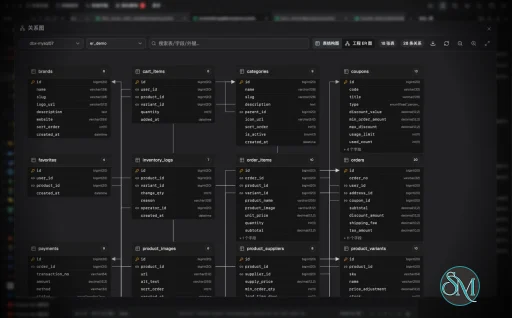
DBX provides a database browser with support for schemas, tables, columns, indexes, foreign keys, and triggers. Its query editor is based on CodeMirror 6 and includes SQL syntax highlighting, metadata-aware autocomplete, query history, saved SQL snippets, formatting, and diagnostics.
Key features include:
Support for 100+ databases and data services
PostgreSQL, MySQL, SQLite, Redis, MongoDB, DuckDB, SQL Server, Oracle, and more
Cloudflare D1 support
SQL editor with autocomplete
SQL formatting and diagnostics
Query history
Saved SQL snippets
Data grid with virtual scrolling
Inline data editing
SQL preview before saving changes
Filtering and sorting
Full-text search
CSV, JSON, Markdown, XLSX, and SQL INSERT exports
Schema browser
Database search
AI SQL assistant
SQL explanation and optimization
AI-generated SQL safety checks
Claude, OpenAI, Ollama, and OpenAI-compatible model support
MCP server
CLI
Docker deployment
Web interface
Plugin ecosystem
Kafka, RabbitMQ, Pulsar, MQTT, and other middleware consoles
The AI integration is particularly notable. Users can describe a database operation in natural language and have DBX generate SQL, explain existing queries, optimize them, or help diagnose errors. DBX also applies safety checks to AI-generated SQL before execution.
MCP support allows compatible AI coding tools such as Claude Code, Cursor, and Windsurf to interact with configured databases through DBX. The available operations include listing connections, browsing tables, executing SQL, and opening tables in the DBX interface.
Download DBX v0.6.73 - Software Mirrors |
|---|
DBX v0.6.73 for WindowsDBX_0.6.73_x64_en-US.msi | 43.5 MB DBX_0.6.73_x64-win7-server2008r2-offline-setup.exe | 180.07 MB DBX_0.6.73_x64-setup.exe | 33.44 MB DBX_0.6.73_x64-portable.zip | 43.96 MB DBX_0.6.73_x64-offline-setup.exe | 317.63 MB DBX_0.6.73_arm64_en-US.msi | 41.34 MB DBX_0.6.73_arm64-setup.exe | 30.85 MB DBX_0.6.73_arm64-portable.zip | 41.94 MB DBX_0.6.73-beta.20261123.1_x64_en-US.msi | 43.5 MB DBX_0.6.73-beta.20261123.1_x64-setup.exe | 33.44 MB DBX_0.6.73-beta.20261123.1_arm64_en-US.msi | 41.34 MB DBX_0.6.73-beta.20261123.1_arm64-setup.exe | 30.85 MB |
DBX v0.6.73 for macOSDBX_0.6.73_x64.dmg | 48.37 MB DBX_0.6.73_arm64.dmg | 44.48 MB DBX_0.6.73-beta.20261123.1_x64.dmg | 48.37 MB DBX_0.6.73-beta.20261123.1_arm64.dmg | 44.48 MB |
DBX v0.6.73 for LinuxDBX_0.6.73_arm64.rpm | 46.64 MB DBX_0.6.73_arm64.deb | 46.63 MB DBX_0.6.73_arm64.AppImage | 115.74 MB DBX_0.6.73_amd64.deb | 48.27 MB DBX_0.6.73_amd64.AppImage | 119.05 MB DBX_0.6.73-beta.20261123.1_arm64.rpm | 46.64 MB DBX_0.6.73-beta.20261123.1_arm64.deb | 46.63 MB DBX_0.6.73-beta.20261123.1_arm64.AppImage | 115.74 MB DBX_0.6.73-beta.20261123.1_amd64.deb | 48.27 MB DBX_0.6.73-beta.20261123.1_amd64.AppImage | 119.05 MB DBX-0.6.73-beta.20261123.1-1.x86_64.rpm | 48.27 MB DBX-0.6.73-1.x86_64.rpm | 48.27 MB |
Others Download related to DBX v0.6.73DBX_x64.app.tar.gz | 48.44 MB DBX_0.6.73_x64-browser-static.tar.gz | 43.44 MB DBX_0.6.73_arm64-browser-static.tar.gz | 41.6 MB DBX_0.6.73-beta.20261123.1_fnos.fpk | 79.33 kB DBX_0.6.73-beta.20261123.1_arm64.app.tar.gz | 44.82 MB dbx-web_0.6.73_x86_64-browser-static.zip | 41.53 MB dbx-jdbc-plugin-latest.zip | 9.33 MB dbx-jdbc-plugin-0.1.55.zip | 9.33 MB |
DBX v0.6.73 Source Code
DBX v0.6.73 Source code (zip)
DBX v0.6.73 Source code (tar.gz)
|
DBX v0.6.73 Release Notes: 新功能
- SQL 补全支持未执行的 CREATE TABLE / ALTER TABLE 等 DDL 的本地派生结构,无需先执行即可补全表和字段 (contributed by @zenisann) (PR #14994)
- 新增 SQL 补全自动激活延迟设置,默认 500ms,对齐 DBeaver 行为 (contributed by @dienaso) (PR #15380)
- 光标位于 SQL 的 BEGIN/END 关键字时高亮同一代码块的两端 (contributed by @ThugKd) (PR #15506)
- 代码片段支持 VS Code 风格的 $0 最终光标位置占位符 (contributed by @AndreasK79) (PR #14211)
- SQL 编辑器右键菜单可直接将选中语句添加为代码片段 (contributed by @AndreasK79) (PR #14212)
- 新增「切换行注释并移到下一行」可配置快捷键,便于连续注释多行 (contributed by @ThugKd) (PR #15527)
- 提交活动事务的操作支持自定义快捷键,默认 Shift+Ctrl/Cmd+C (contributed by @AndreasK79) (PR #14311)
- 单元格详情面板新增「引用行」页签,原地预览外键指向的行 (contributed by @x-labb) (PR #15419)
- BLOB 文本查看弹窗支持切换为沙箱 HTML 渲染预览 (contributed by @ThugKd) (PR #15400)
- SQL 结果单元格支持插件值解码扩展点,可在网格中解密业务密文字段 (contributed by @seaways1015-afk) (PR #14326)
- 设置新增全局数字千分位开关,逐位保留 BIGINT 和 DECIMAL 精度 (contributed by @ThugKd) (PR #15402)
- 单元格详情转换预览新增「文本 → Unicode 转义」 (contributed by @ThugKd) (PR #15170)
- 智能复制支持为单列选区单独配置格式(单行、SQL IN 列表、JSON 等) (contributed by @ThugKd) (PR #15530)
- 新增可配置的 Alt+1..5 快捷键,一键复制当前结果集第一行指定列的值 (contributed by @AndreasK79) (PR #14313)
- 可编辑单元格右键新增「将文本粘贴到此单元格」,多行文本可作为内容存入单格 (contributed by @ThugKd) (PR #15171)
- 网格选中多个单元格时 Ctrl/Cmd+D 用左上角单元格的值填充选区 (contributed by @ThugKd) (PR #15177)
- 表结构字段行支持复制 DDL,并可在目标表结构网格中粘贴导入字段定义 (contributed by @ThugKd) (PR #15179)
- 数据传输支持为每张源表设置目标表名 (contributed by @x-labb) (PR #15417)
- 侧栏普通视图支持复制/粘贴,直接发起同方言的结构或数据传输 (contributed by @ThugKd) (PR #15540)
- 架构比较支持一次比较多个 Schema,结果按 Schema 切换展示 (contributed by @BrydonJ) (PR #14410)
- 数据比较支持全局与按表的忽略列,仅忽略列有差异的行单独计数 (contributed by @woniuxia) (PR #14544)
- 表数据导入对话框支持保存和复用列映射模板 (contributed by @x-labb) (PR #15422)
- 连接导入支持 SQLark 配置备份 (contributed by @knqiufan) (PR #14820)
- 执行 SQL 文件对话框支持直接新建目标数据库 (contributed by @x-labb) (PR #15420)
- SQL 库与 SQL 文件面板支持按连接分组的显示模式 (contributed by @eryajf) (PR #15443)
- SQL 文件面板支持拖拽移动文件到其他目录,外部文件变更实时同步 (contributed by @Acd-kk) (PR #14620)
- 连接可继承所在分组的颜色,独立设置的颜色优先 (contributed by @ThugKd) (PR #15508)
- 标签页右键新增可搜索的「近期打开的表」选择器,支持绑定快捷键 (contributed by @ThugKd) (PR #15532)
- 多行平铺标签支持设置行数上限(1-10 行或不限) (contributed by @ThugKd) (PR #15401)
- 主工具栏支持固定「更多」菜单中的操作并拖拽排序,新增最近关闭标签页入口 (contributed by @ThugKd) (PR #15142)
- 新建数据库用户时可一键生成 24 位强密码 (contributed by @ThugKd) (PR #15172)
- 用户管理显示并筛选 MySQL 与 OceanBase(MySQL 模式)账号锁定状态,MySQL 同时显示密码过期标记 (contributed by @CSXFanMeng) (PR #15452)
- PostgreSQL 序列新增属性查看与编辑(PG 10 及以上) (contributed by @imcman) (PR #15281)
- PostgreSQL 侧栏支持重命名 Schema,联动刷新缓存与可见性配置 (contributed by @ThugKd) (PR #15544)
- MySQL 表右键菜单新增表维护动作(Analyze / Check / Optimize / Repair Table) (contributed by @x-labb) (PR #15415)
- SQL Server 连接在 trustServerCertificate=false 时校验服务器证书,支持 sslrootcert 与 hostNameInCertificate 参数 (contributed by @amwwgjj) (PR #14672)
- 达梦包和包体源码页显示成员面板,可按成员跳转到对应声明 (contributed by @ThugKd) (PR #15390)
- InfluxDB 连接支持 API 路径前缀,反向代理子路径部署可直接连接,influxdb:// URL 可粘贴 (contributed by @Gaiokane) (PR #14643)
- 支持 Oracle 到虚谷(Xugu)经验证的表结构和数据传输,未验证的类型显式报错 (contributed by @mapan0424) (PR #13847)
- DuckDB 执行计划支持估算计划(EXPLAIN) (contributed by @0verme) (PR #14899)
- SQLite 执行计划支持估算计划(EXPLAIN QUERY PLAN) (contributed by @0verme) (PR #14885)
- 插件中心不再向不满足主机版本要求的 DBX 提供需要更新版本的插件更新 (contributed by @Abeautifulsnow) (PR #13896)
改进
- 执行 SQL 语句时跳过不可能匹配的完整 SQL 解析,加速大批量 INSERT 导入和脚本执行 (contributed by @b84330808) (PR #15127)
- 降低 SQL 编辑器连续输入和拖拽选择的开销,改善大脚本下的输入延迟
- Quick Open 启动时复用连接树索引,大幅减少后台索引构建开销 (contributed by @ThugKd) (PR #15512)
- Doris DDL 弹窗先显示服务端原文,格式化改为按需执行,打开大表 DDL 不再等待 (contributed by @ThugKd) (PR #14988)
- MySQL 对象详情改为渐进加载并支持失败重试,先显示名称再后台补齐统计与详情 (contributed by @CN-Scars) (PR #14396)
- 备份调度器空闲时心跳写盘节流为每 30 秒一次,减少无谓磁盘写入 (contributed by @ThugKd) (PR #15385)
- SQL 参数对话框内按 Enter 直接执行查询 (contributed by @AndreasK79) (PR #15478)
- 分隔文本转换对话框内按 Enter 确认 (contributed by @AndreasK79) (PR #15476)
- 大小写转换快捷键扩展到网格内联编辑器和表结构文本输入框 (contributed by @ThugKd) (PR #15176)
- 双击补全列表中的字段直接插入该字段 (contributed by @ThugKd) (PR #15505)
- 手动事务等待提交或回滚时也在工具栏显示事务状态圆点 (contributed by @ThugKd) (PR #15457)
- 折叠的编辑器菜单中执行类动作固定排序并接入菜单自定义 (contributed by @eryajf) (PR #15363)
- 从已保存的 Oracle 存储过程/函数源码标签页发起调试时携带对象模式、名称与类型 (contributed by @ThugKd) (PR #15458)
- 查询结果网格与 SQL 编辑器的滚动条样式统一 (contributed by @CSXFanMeng) (PR #15453)
- 表头排序按钮旁新增下拉箭头,点击即可选择数据库或当前页的排序方式 (contributed by @ThugKd) (PR #15392)
- SQL 库保存新查询的默认文件名带连接名称前缀,便于区分来源 (contributed by @ThugKd) (PR #15383)
- MCP dbx_execute_query 普通调用返回 structuredContent.result,与批量执行和事务会话对齐 (contributed by @dienaso) (PR #15156)
- MCP 元数据与列表类工具补充 structuredContent 结构化结果,Agent 不再需要解析 Markdown 文本 (contributed by @LwClick) (PR #15224)
- MCP Nacos 与 Consul 工具补充 structuredContent 结构化结果 (contributed by @xiaou61) (PR #15202)
- 历史记录中 MCP 调用详情以独立 SQL 块展示调用语句,支持语法高亮和复制 (contributed by @x-labb) (PR #15300)
- MCP 被启动配置强制只读拦截写入时,错误信息明确指出需检查客户端启动配置 (contributed by @SuLea-IT) (PR #15335)
- SQL 文件 TXT 失败日志的运行摘要显示实际结束时间 (contributed by @lyinglyingl) (PR #15208)
- Web 版 SQL 执行错误改以 422 状态码返回,不再计入服务端 5xx 故警 (contributed by @caiyq925-cell) (PR #14309)
- 「导出到数据库」的目标连接选择器与相邻选择器样式统一,长连接名不再截断 (contributed by @saskuati-dev) (PR #15536)
- Kafka 旧驱动缺少 Broker 配置 RPC 时给出明确的驱动兼容性提示 (contributed by @ThugKd) (PR #15445)
- 补全插件中心西班牙语翻译缺失的 22 处文案 (contributed by @0scar07) (PR #15479)
- 补全葡萄牙语(巴西)通用翻译 (contributed by @saskuati-dev) (PR #15542)
修复
- 修复 MySQL 连接池换代后首次刷新误报 MYSQL_CLIENT_SESSION_LOST 的问题 (contributed by @dienaso) (PR #15240)
- 修复 MySQL 查询结果全选后导出 SQL UPDATE 只导出当前页的问题 (contributed by @jingouzhui) (PR #15371)
- 修复 MySQL 查询结果全量导出在临时表上报 1146 的问题,可判定只读的查询借用源会话导出 (contributed by @ThugKd) (PR #15399)
- MySQL 数据导入支持 b'...' / B'...' 位字面量写入 BIT 列 (contributed by @lxk955) (PR #13074)
- 修复 GoldenDB 对 COM_PING 无响应导致连接和测试连接超时失败的问题 (contributed by @wyeye) (PR #15516)
- 修复 PostgreSQL 经事务级连接池写入时偶发 prepared statement does not exist 报错 (contributed by @ThugKd) (PR #15449)
- 修复 PostgreSQL 文本协议路径下小于 1 的 numeric 结果缺少前导零的问题 (contributed by @LwClick) (PR #15234)
- 编辑 PostgreSQL 视图和物化视图注释改用 COMMENT ON VIEW,修复此前报错 (contributed by @Ray0907) (PR #15283)
- 修复 openGauss 账号无 pg_depend 权限时表结构编辑器字段注释显示为空的问题 (contributed by @imcman) (PR #15480)
- 修复 Vastbase GB18030 等非 UTF-8 字符集数据库查询结果显示乱码的问题 (contributed by @Acd-kk) (PR #15469)
- 数据比较向 Oracle 生成新增行 INSERT 时每语句单行,修复多行 VALUES 触发的 ORA-00933 (contributed by @xiaou61) (PR #15450)
- 修复 Oracle 系目标「导出到数据库」对话框把 Schema 当数据库列出、目标 Schema 只能手工输入的问题,Schema 改为可搜索下拉 (contributed by @Acd-kk) (PR #15336)
- 修复对象浏览中批量删除 Oracle 序列、包和包体时请求失败的问题 (contributed by @seaways1015-afk) (PR #15270)
- 修复 SQL Server 查询中补全候选替换表别名的问题 (contributed by @ThugKd) (PR #15384)
- SQL Server 空格确认补全时,快速输入的子句关键字也按设置转换大小写 (contributed by @ThugKd) (PR #15374)
- 修复 Trino 与 PrestoSQL 表数据分页第二页起 LIMIT ... OFFSET 报错的问题,改用 OFFSET ... FETCH FIRST (contributed by @0z5a) (PR #15232)
- 表结构编辑器允许为 Doris 创建单列索引 (contributed by @xiaou61) (PR #15236)
- 修复 Doris/StarRocks CREATE TABLE 含 FIXED RANGE 分区时 DDL 格式化失败的问题 (contributed by @sx4im) (PR #15322)
- 修复 ClickHouse 网格中筛选后删除单行会删除全部命中行的问题 (contributed by @xiaou61) (PR #15223)
- TDengine 时间戳按服务器 UTC 偏移显示,修复查询时间与服务器相差时区小时数的问题 (contributed by @xiaou61) (PR #15195)
- TDengine 导出 INSERT 正确转义反斜杠,修复回导后数据损坏的问题 (contributed by @dienaso) (PR #15459)
- 修复 Db2 查询结果 DECIMAL/NUMERIC 高小数位显示为科学计数法的问题 (contributed by @zipg) (PR #15350)
- 修复 MongoDB 4.0 旧版 Agent 下数字 _id 网格编辑保存失败的问题 (contributed by @AyhamJo7) (PR #15494)
- 修复 MongoDB 复合 _id 文档删除未命中的问题 (contributed by @ThugKd) (PR #15446)
- MongoDB 查询结果按全局日期格式和时区设置显示 BSON 日期 (contributed by @ThugKd) (PR #15447)
- 修复 MongoDB 子文档单元格详情未修改也被标记修改、提交后写入转义字符串的问题 (contributed by @ThugKd) (PR #15382)
- MongoDB Shell 插入支持多行反引号字符串,并修复集合方法名解析 (contributed by @thailoc-dev) (PR #15407)
- 修复 Redis 刷新 Key 列表后已展开分组未自动补扫前缀的问题 (contributed by @zipg) (PR #15314)
- 修复 MCP 数据库范围校验把仅含常量和 CTE 的 EXPLAIN/INSERT 语句误判为越界的问题 (contributed by @xiaou61) (PR #15309)
- 列补全候选上限从 20 提升到 200,修复第 21 个及以后字段无法选择的问题 (contributed by @chukui2005) (PR #15174)
- 补全元数据读取遇连接池忙时自动重试,修复大库下补全建议丢失 (contributed by @LwClick) (PR #15222)
- 修复批量选择字段时限定符被错误重新加引号、生成不同标识符的问题 (contributed by @LwClick) (PR #15216)
- DROP TABLE IF EXISTS 后补全表名,并按语句进度提示 IF/EXISTS 关键字 (contributed by @x-labb) (PR #15233)
- 修复拼音首字母松散命中的代码片段排在精确匹配关键字之前的问题 (contributed by @x-labb) (PR #15299)
- 远端补回缺失表后自动刷新已打开的 schema 限定表名补全列表 (contributed by @ThugKd) (PR #15454)
- SQL 诊断按最近作用域解析表别名,修复 CTE 内外同名别名的误报 (contributed by @ThugKd) (PR #15509)
- 关闭「Ctrl+Click 打开 DDL」设置后,视图和物化视图也遵循设置打开数据视图 (contributed by @xiaou61) (PR #15180)
- 匹配括号增加随编辑器前景色变化的轮廓,失焦后仍可辨认 (contributed by @ThugKd) (PR #15181)
- 修复简单派生表查询的结果列注释缺失的问题 (contributed by @bigdogcome) (PR #15246)
- 粘贴行数超过现有结果时自动追加,不再静默丢弃溢出行 (contributed by @LwClick) (PR #15440)
- 外部粘贴正确解析带引号的 TSV 单元格,保留格内换行与制表符 (contributed by @yifurusi9-cyber) (PR #15219)
- 修复 Web 版非安全上下文(HTTP 局域网访问)下「粘贴为新行」因缺少 Web Clipboard API 报错的问题 (contributed by @xiaou61) (PR #15166)
- 查询结果网格为纵向滚动条预留独立空间,表头与数据区宽度一致 (contributed by @ThugKd) (PR #15377)
- 修复切换标签后表数据标签的表信息抽屉丢失的问题 (contributed by @ThugKd) (PR #15403)
- 网格导出的默认文件名去除开头的点和空格,避免 macOS 上文件被隐藏 (contributed by @ThugKd) (PR #15455)
- 退出 DBX 时遵循编辑器设置的未保存 SQL 处理策略 (contributed by @ThugKd) (PR #15381)
- 最小化到托盘隐藏窗口时不再误弹未保存 SQL 确认 (contributed by @ThugKd) (PR #15378)
- 重启或重载工作区后,静默关闭的未保存查询草稿可从最近关闭列表恢复 (contributed by @ThugKd) (PR #15539)
- 修复多库执行对话框目标列表最后一行被截断,以及排序状态下文件夹无法拖出分组的问题 (contributed by @sx4im) (PR #15005)
- 修复 Windows 下经浏览器 RDP 返回桌面后窗口失去响应的问题 (contributed by @AnonPai) (PR #15197)
- 修复 Windows 便携版数据目录 verbatim 路径前缀导致内置 JRE 无法加载驱动 Agent、连接失败的问题 (contributed by @xiaou61) (PR #15468)
- 驱动 jar 校验改为确认清单声明的主类真实存在,损坏或不完整的驱动包会被明确拒绝而非连接时崩溃 (contributed by @xiaou61) (PR #15444)
- 修复 Linux Wayland 下任务栏和 Alt+Tab 显示通用图标的问题,app_id 与桌面项匹配 (contributed by @saskuati-dev) (PR #15293)
- 修复稳定更新通道下同基线不同 beta 版本检测不到稳定版更新的问题 (contributed by @xiaou61) (PR #15441)
- 修复 Web 免密部署下执行 SQL 文件始终报 Not authenticated 的问题 (contributed by @codegpt3) (PR #14627)
- Web 版静态资源在所有响应上补齐安全响应头 (contributed by @xiaou61) (PR #15451)
- Web/Docker 共享会话不再自动同步侧栏布局,修复多浏览器互相覆盖分组折叠状态的问题 (contributed by @Mo-Moore) (PR #15354)
- 手动上传 SQL 片段前校验远端版本基线,防止旧快步覆盖新内容 (contributed by @ryvengray) (PR #14581)
- 侧栏刷新表时同步更新表注释到树、搜索结果和缓存索引 (contributed by @imcman) (PR #15462)
- 修复插件中心标签栏在窄面板下文字互相覆盖的问题 (contributed by @ThugKd) (PR #15461)
- 插件开发 Svelte 模板恢复与 Vite 7 兼容的依赖版本,修复新建插件项目安装失败 (contributed by @zipg) (PR #15435)
- 修复全屏结果面板下左侧结果集标签无法点击的问题(tooltip 遮挡) (contributed by @xiaou61) (PR #15438)
- 修复架构比较结果弹窗尺寸记忆偏小和误读其他弹窗尺寸的问题 (contributed by @chukui2005) (PR #15298)
- 补齐表结构编辑器索引表格的右侧边框 (contributed by @chukui2005) (PR #15284)
- 修复设置搜索高亮结束后设置项圆角丢失的问题 (contributed by @chukui2005) (PR #15285)
- 修复侧栏面板收起后工具栏无法恢复紧凑层级的问题 (contributed by @Abeautifulsnow) (PR #15160)
- 修复两行分组模式下所选分组的标签不遵循标签栏换行设置的问题 (contributed by @ThugKd) (PR #15375)
|
Performance and Compatibility
DBX is built with Tauri 2, Vue 3, TypeScript, and Rust. Its backend uses technologies including SQLx, Tiberius, Redis libraries, and MongoDB support. The project emphasizes a small application footprint and states that the desktop application is approximately 25 MB without a bundled Java runtime, Python environment, or Chromium browser.
Native applications are available for Windows, macOS, and Linux. DBX can also run as a Docker-hosted web application, making it possible to provide database access through a browser or deploy it on a server. Published Docker images support both amd64 and arm64 architectures.
The Docker deployment stores application data in a persistent volume, while connection, plugin, AI, and tunnel credentials are encrypted before being stored in the DBX database. Desktop builds additionally use the operating system's credential storage facilities, including Windows Credential Manager, macOS Keychain, and Linux Secret Service.
The breadth of supported databases is a major advantage, but support is not necessarily identical across every connector. DBX uses a combination of native drivers and agent-based profiles, so the available capabilities can vary depending on the database and connection method.
System Requirements
DBX supports:
The desktop application is designed to run without a separate Java runtime, Python environment, or bundled Chromium installation.
Docker deployments support both amd64 and arm64 architectures.
For Windows, the project provides an MSI installer and also supports installation through Scoop and WinGet. macOS users can install it through Homebrew or a DMG package, while Linux users can use Flatpak or the available release packages.
Pros and Cons
Pros
Free and open source
Supports 100+ databases and services
Lightweight native desktop application
Windows, macOS, and Linux support
Docker and web deployment
SQL editor with autocomplete and formatting
Data editing and filtering
Multiple export formats
AI SQL assistant
Ollama support for local AI
MCP server
CLI
AI coding agent integration
PostgreSQL, MySQL, SQLite, Redis, MongoDB, and DuckDB support
Cloudflare D1 support
Middleware and message queue consoles
Plugin ecosystem
Encrypted credential storage
Cons
The large number of supported systems can make the interface and feature set feel complex
Functionality can differ between native and agent-based database connectors
AI features require an external or local model
Advanced MCP and CLI workflows require additional configuration
A broad feature set means it can take time to learn the application
How to Install
DBX provides several installation methods.
On Windows, install it through WinGet:
winget install t8y2.dbx
Scoop is also supported:
scoop bucket add dbx https://github.com/t8y2/scoop-bucket
scoop install dbx
On macOS, install it through Homebrew:
brew install --cask dbx
Linux users can install DBX through Flatpak or download the appropriate package from the project's releases.
For a self-hosted web deployment, Docker can be used:
docker run -d --pull=always --name dbx -p 4224:4224 \
  -v dbx-data:/app/data \
  t8y2/dbx:latest
The web interface is then available on port 4224. Docker Compose deployment is also supported.
After installation, create a database connection, enter the required credentials, and use the schema browser or SQL editor to begin working with the database.
Final Verdict
DBX is a broad database management tool that combines conventional database-client functionality with newer AI and developer-oriented capabilities. Its support for more than 100 databases, native desktop applications, Docker deployment, CLI, and web interface makes it suitable for users who regularly work across different database systems.
The AI and MCP integration is one of its more distinctive features. Instead of treating AI as a separate chatbot, DBX can expose configured database connections to compatible AI agents and let them browse schemas or execute SQL through an MCP interface.
Its lightweight Tauri and Rust architecture is also appealing for users who want a database client without the heavier runtime requirements associated with some established alternatives. However, the sheer breadth of supported databases and features means that connector capabilities and workflows can vary, and advanced AI or MCP functionality requires additional configuration.
Post a Comment/Report Broken Link: