DBX v0.6.71

DBX is an open-source cross-platform database client designed to connect to a wide range of databases from a single application. It supports more than 100 database and data services, including PostgreSQL, MySQL, SQLite, Redis, MongoDB, DuckDB, SQL Server, Oracle, Cloudflare D1, and ClickHouse.

The project goes beyond traditional database management tools by combining a native desktop application with Docker and web deployments, a command-line interface, AI-assisted SQL, and Model Context Protocol support for AI coding agents.

Features

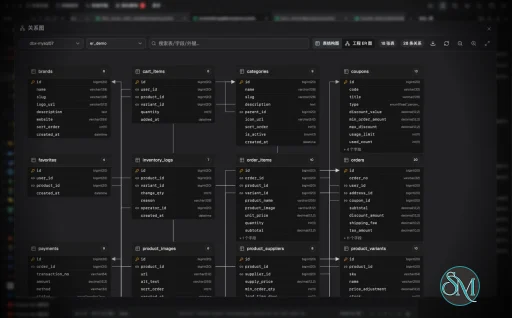
DBX provides a database browser with support for schemas, tables, columns, indexes, foreign keys, and triggers. Its query editor is based on CodeMirror 6 and includes SQL syntax highlighting, metadata-aware autocomplete, query history, saved SQL snippets, formatting, and diagnostics.

Key features include:

  • Support for 100+ databases and data services

  • PostgreSQL, MySQL, SQLite, Redis, MongoDB, DuckDB, SQL Server, Oracle, and more

  • Cloudflare D1 support

  • SQL editor with autocomplete

  • SQL formatting and diagnostics

  • Query history

  • Saved SQL snippets

  • Data grid with virtual scrolling

  • Inline data editing

  • SQL preview before saving changes

  • Filtering and sorting

  • Full-text search

  • CSV, JSON, Markdown, XLSX, and SQL INSERT exports

  • Schema browser

  • Database search

  • AI SQL assistant

  • SQL explanation and optimization

  • AI-generated SQL safety checks

  • Claude, OpenAI, Ollama, and OpenAI-compatible model support

  • MCP server

  • CLI

  • Docker deployment

  • Web interface

  • Plugin ecosystem

  • Kafka, RabbitMQ, Pulsar, MQTT, and other middleware consoles

The AI integration is particularly notable. Users can describe a database operation in natural language and have DBX generate SQL, explain existing queries, optimize them, or help diagnose errors. DBX also applies safety checks to AI-generated SQL before execution.

MCP support allows compatible AI coding tools such as Claude Code, Cursor, and Windsurf to interact with configured databases through DBX. The available operations include listing connections, browsing tables, executing SQL, and opening tables in the DBX interface.

Download DBX v0.6.71 - Software Mirrors

DBX v0.6.71 for Windows

DBX_0.6.71_x64_en-US.msi | 43.07 MB

DBX_0.6.71_x64-win7-server2008r2-offline-setup.exe | 179.72 MB

DBX_0.6.71_x64-setup.exe | 33.06 MB

DBX_0.6.71_x64-portable.zip | 43.53 MB

DBX_0.6.71_x64-offline-setup.exe | 240.88 MB

DBX_0.6.71_arm64_en-US.msi | 40.91 MB

DBX_0.6.71_arm64-setup.exe | 30.46 MB

DBX_0.6.71_arm64-portable.zip | 41.51 MB

DBX_0.6.71-beta.20261115.1_x64_en-US.msi | 43.07 MB

DBX_0.6.71-beta.20261115.1_x64-setup.exe | 33.06 MB

DBX_0.6.71-beta.20261115.1_arm64_en-US.msi | 40.91 MB

DBX_0.6.71-beta.20261115.1_arm64-setup.exe | 30.46 MB

DBX v0.6.71 for macOS

DBX_0.6.71_x64.dmg | 47.96 MB

DBX_0.6.71_arm64.dmg | 44.06 MB

DBX_0.6.71-beta.20261115.1_x64.dmg | 47.96 MB

DBX_0.6.71-beta.20261115.1_arm64.dmg | 44.06 MB

DBX v0.6.71 for Linux

DBX_0.6.71_arm64.rpm | 46.21 MB

DBX_0.6.71_arm64.deb | 46.21 MB

DBX_0.6.71_arm64.AppImage | 115.31 MB

DBX_0.6.71_amd64.deb | 47.84 MB

DBX_0.6.71_amd64.AppImage | 118.64 MB

DBX_0.6.71-beta.20261115.1_arm64.rpm | 46.21 MB

DBX_0.6.71-beta.20261115.1_arm64.deb | 46.21 MB

DBX_0.6.71-beta.20261115.1_arm64.AppImage | 115.31 MB

DBX_0.6.71-beta.20261115.1_amd64.deb | 47.84 MB

DBX_0.6.71-beta.20261115.1_amd64.AppImage | 118.64 MB

DBX-0.6.71-beta.20261115.1-1.x86_64.rpm | 47.83 MB

DBX-0.6.71-1.x86_64.rpm | 47.83 MB

Others Download related to DBX v0.6.71

DBX_x64.app.tar.gz | 48 MB

DBX_0.6.71_x64-browser-static.tar.gz | 43.04 MB

DBX_0.6.71_arm64-browser-static.tar.gz | 41.21 MB

DBX_0.6.71-beta.20261115.1_fnos.fpk | 79.33 kB

DBX_0.6.71-beta.20261115.1_arm64.app.tar.gz | 44.4 MB

dbx-web_0.6.71_x86_64-browser-static.zip | 41.14 MB

dbx-jdbc-plugin-latest.zip | 9.27 MB

dbx-jdbc-plugin-0.1.53.zip | 9.27 MB

DBX v0.6.71 Source Code

DBX v0.6.71 Source code (zip)

DBX v0.6.71 Source code (tar.gz)

DBX v0.6.71 Release Notes:

新功能

  • 设置新增工具栏自定义,可配置新建连接、新建查询、备份等按钮的显隐与顺序 (contributed by @ThugKd) (PR #14667)
  • 全局快速打开升级为统一搜索入口,可在连接、数据库、表、字段、SQL 文件与插件命令间结构化搜索,支持拼音匹配和范围筛选 (contributed by @eryajf) (PR #14826)
  • 顶部菜单新增可搜索的最近关闭标签选择器,关闭全部标签后也能快速找回 (contributed by @ThugKd) (PR #14558)
  • 侧栏连接和数据库节点新增新建数据库一级入口,并支持 Shift+F4 快捷键 (contributed by @ThugKd) (PR #14913)
  • 侧栏选中数据库或表分组时可用快捷键直接打开新建表编辑器 (contributed by @ThugKd) (PR #14910)
  • 侧栏列名双击行为可配置为生成条件查询语句 (contributed by @ThugKd) (PR #14552)
  • 执行 SQL 文件对话框新增目标 Schema 选择,批量导入可落入指定 Schema (contributed by @xiaou61) (PR #14590)
  • 数据网格新增条件面板 WHERE/ORDER BY 宽度比例设置和 ORDER BY 显隐开关 (contributed by @zhongtait) (PR #14612)
  • 数据库导出支持限制每张表的导出行数,并可按指定字段取最早或最新的 N 行 (contributed by @dienaso) (PR #14799)
  • SQL 编辑器支持自定义上一条/下一条补全项的快捷键 (contributed by @ThugKd) (PR #14763)
  • 字段补全新增设置:无歧义字段可不加表名前缀 (contributed by @ThugKd) (PR #14685)
  • SQL 编辑器双击括号可选中括号内的内容 (contributed by @x-labb) (PR #14783)
  • Oracle 表右键新增表授权查看,按受权者展示表级与列级权限 (contributed by @ThugKd) (PR #14953)
  • Oracle 存储过程、函数、序列、包和同义词支持导出对象 DDL 为 SQL 文件 (contributed by @ThugKd) (PR #14958)
  • Oracle 对象浏览器支持从右键菜单直接编译无效的存储过程、函数和视图 (contributed by @ThugKd) (PR #14954)
  • PostgreSQL 侧栏新增行级安全策略查看入口 (contributed by @ThugKd) (PR #14935)
  • PostgreSQL 模式下新增用户自定义聚合函数列表入口 (contributed by @ThugKd) (PR #14949)
  • PostgreSQL 序列查看显示步长、范围、缓存等选项,并提供新建序列模板 (contributed by @ThugKd) (PR #14941)
  • Redis 键列表支持按类型筛选,Stream 条目同时显示对应的本地时间 (contributed by @ThugKd) (PR #14942)

改进

  • MySQL 表列表新增 AUTO_INCREMENT 值列 (contributed by @x-labb) (PR #14850)
  • MySQL 补全支持 IGNORE INDEX 和 USE INDEX 索引提示 (contributed by @x-labb) (PR #14633)
  • MySQL WHERE 条件开头输入字符串字段时提供字段 = '' 补全 (contributed by @ThugKd) (PR #14947)
  • MySQL INSERT IGNORE 列清单中可补全表字段 (contributed by @jeff377) (PR #14655)
  • PostgreSQL 未选 Schema 时表补全可跨 Schema 查找,Schema 选择器支持清除 (contributed by @ThugKd) (PR #14934)
  • PostgreSQL 表 DDL 元数据批量查询失败时标明具体失败项,不再只显示 db error (contributed by @hongshuo-wang) (PR #14660)
  • Oracle INSERT 语句的 VALUES 与 SYSDATE 等表达式补全更准确 (contributed by @ThugKd) (PR #14661)
  • Oracle 短 RAW 值(如 SYS_GUID() 结果)在网格中直接显示十六进制 (contributed by @ThugKd) (PR #14761)
  • Oracle 对象列表元数据查询按请求的对象类型裁剪,大 Schema 下查询负担更低 (contributed by @Acd-kk) (PR #14979)
  • 达梦字段补全按未加引号标识符规则处理大小写,小写用户名也能匹配字段 (contributed by @ThugKd) (PR #14937)
  • 达梦编辑器高亮补齐原生数据类型、自增关键字和日期函数 (contributed by @ThugKd) (PR #14938)
  • SQL Server 批量执行遇旧版驱动时提示升级驱动,不再报反序列化错误 (contributed by @jeff377) (PR #14621)
  • SQL Server 结构比较延迟加载两侧同名表的 DDL,元数据查询数量减半 (contributed by @BrydonJ) (PR #14408)
  • Kafka 主题页新增按连接保存的自动加载主题开关 (contributed by @ThugKd) (PR #14936)
  • RabbitMQ 订阅列表新增消费者客户端地址列 (contributed by @ThugKd) (PR #14548)
  • StarRocks 视图 DDL 显示时对查询部分做格式化换行 (contributed by @ThugKd) (PR #14659)
  • TiDB 对象浏览器的行数列明确标注为估算行数 (contributed by @ThugKd) (PR #14917)
  • MongoDB 只读文档预览按 Mongo Shell 风格显示 ObjectId、BSON 日期等类型 (contributed by @ThugKd) (PR #14920)
  • CTE 体内的列补全仅引用当前 CTE 体及其之前声明的数据源 (contributed by @x-labb) (PR #14632)
  • CSV 导入支持多字符分隔符(如 |@|) (contributed by @ThugKd) (PR #14273)
  • ClickHouse 连接测试错误展示完整传输层原因链(DNS/TCP/TLS 等)
  • AI 预设列表更新:移除 Atlas Cloud 集成
  • AI 预设列表更新:下线 Jalapeno Cloud,优先展示 AICodeMirror
  • AI 助手识别虚谷(XuguDB)方言的 SQL 转换请求 (contributed by @mapan0424) (PR #14699)
  • 更新中心显示真实下载进度和更新全部的批量进度 (contributed by @hongshuo-wang) (PR #14570)
  • 更新中心弹窗高度随内容自适应,正文滚动时标题和操作按钮保持可见 (contributed by @ThugKd) (PR #14765)
  • SQL 参数对话框新增一键清除参数值历史 (contributed by @xiaou61) (PR #14903)
  • 结构比较结果与部署确认步骤顶部显示源/目标两端连接信息 (contributed by @xiaou61) (PR #14886)
  • SQL 编辑器数据库选择器选项可直接复制数据库名 (contributed by @heeeex100) (PR #14387)
  • 新查询保存到 SQL 库时默认归入同名数据库文件夹,图标按连接颜色区分 (contributed by @ThugKd) (PR #14956)
  • 表详情面板新增新建查询入口 (contributed by @ThugKd) (PR #14906)
  • 表数据页隐藏列后复制查询 SQL 只包含可见列 (contributed by @x-labb) (PR #14940)
  • 数据网格检索浮层可拖动到表格内其他位置 (contributed by @ThugKd) (PR #14904)
  • WHERE 字段下拉按网格自定义列顺序排列 (contributed by @xiaou61) (PR #14887)
  • 快捷筛选与排序构建器的候选字段跟随表格列布局排序 (contributed by @ThugKd) (PR #14914)
  • 表头排序图标左键点击直接切换升/降序,右键仍可打开完整菜单 (contributed by @ThugKd) (PR #14680)
  • 结果集筛选可视化:已筛选列头显示漏斗标识,可单独关闭某个字段的筛选 (contributed by @dienaso) (PR #14975)
  • 表格拖动表头调整列顺序后先确认再保存,避免误拖改变布局 (contributed by @ThugKd) (PR #14978)
  • 对象列表列设置按钮固定在表头右侧,不再遮挡列标题 (contributed by @ThugKd) (PR #14813)
  • 对象列表常用列(行数、注释等)前置,并补显示创建和更新时间 (contributed by @Acd-kk) (PR #14959)
  • 对象列表新增重置顺序操作,一键恢复内置列顺序 (contributed by @ThugKd) (PR #14694)
  • Oracle 对象浏览器默认视图搜索时匹配已加载的各类对象,不再只搜表名 (contributed by @ThugKd) (PR #14932)
  • 快速打开支持按 MySQL 字段名、字段注释和表注释搜索 (contributed by @ThugKd) (PR #14951)
  • 多语句执行摘要的耗时列按量级自适应显示单位 (contributed by @MomentarySixthSense) (PR #14902)
  • 新建查询等入口统一图标并显示快捷键提示 (contributed by @eryajf) (PR #14990)
  • 桌面主窗口最小宽度降至 760 逻辑像素,适配更窄窗口 (contributed by @ThugKd) (PR #14948)
  • 侧栏拖拽把手在浅色背景下清晰可见 (contributed by @sx4im) (PR #14928)
  • 拖动结果表横向滚动条时不再弹出 SQL 悬浮预览遮挡内容 (contributed by @chukui2005) (PR #14640)
  • Nacos 配置页窄分栏下筛选输入框显示更完整 (contributed by @chukui2005) (PR #14855)
  • SQL 编辑器主题样式跨标签生命周期复用,恢复缓存标签不再累积重复样式 (contributed by @Acd-kk) (PR #14463)
  • 西班牙语界面补齐 224 个缺失词条,回到与英文对齐 (contributed by @0scar07) (PR #14214)

修复

  • MySQL 服务器默认 autocommit=0 时,自动提交标签页的写入不再被静默回滚 (contributed by @Acd-kk) (PR #14662)
  • MySQL 查询标签切换数据库后保留会话变量、临时表和事务状态 (contributed by @Acd-kk) (PR #14927)
  • MySQL 大表导出中断后立即停止服务端查询,不再因排空结果集超时卡住导出队列 (contributed by @jeff377) (PR #14861)
  • MySQL 诊断不再把 TIMESTAMPDIFF/TIMESTAMPADD 的时间单位误报为未知字段 (contributed by @ThugKd) (PR #14810)
  • PostgreSQL 删除外表生成 DROP FOREIGN TABLE,侧栏删除外表不再报错 (contributed by @xiaou61) (PR #14771)
  • CockroachDB 索引与列元数据查询改用 concat(),不再报 unknown function: textcat (contributed by @Pius-x) (PR #14875)
  • GaussDB 列查询改用 ::int 简写,侧栏可正常列出表字段 (contributed by @xiaou61) (PR #15000)
  • PostgreSQL 视图与列注释在单对象 DDL 和数据库导出中完整保留 (contributed by @CN-Scars) (PR #14753)
  • openGauss 普通账号备份按 USAGE 权限过滤 Schema,不再因无权 Schema 整体失败 (contributed by @zipg) (PR #14275)
  • Greenplum、Cloudberry、Hologres 停用元组定位符,无主键表编辑不再报错
  • 数据网格排序被数据库拒绝时自动去掉行定位符重试 (contributed by @sx4im) (PR #14939)
  • Kingbase 查询工具栏不再误清除已保存的默认数据库 (contributed by @ThugKd) (PR #14816)
  • DROP INDEX CONCURRENTLY 语句不再被编辑器误标为语法错误 (contributed by @dienaso) (PR #14856)
  • Oracle 会话遵循客户端日期语言,中文 NLS 日期字面量不再报 ORA-01843 (contributed by @Lan-zk) (PR #14863)
  • Oracle 语义诊断解析 PUBLIC 同义词,DUAL 等不再误报未知表 (contributed by @zipg) (PR #14864)
  • Oracle 对象浏览器恢复显示表、视图和物化视图的注释 (contributed by @ThugKd) (PR #14687)
  • Oracle 以多层括号或前置注释开头的查询可正常返回结果行 (contributed by @ThugKd) (PR #14436)
  • Oracle 与 SQL Server 同义词的 DDL 和列信息解析到背后的底层对象 (contributed by @jeff377) (PR #14896)
  • Oracle 11g 下 PL/SQL 调试辅助标识符缩短到 30 字符内,调试功能恢复可用
  • SQL Server 临时表补全不再因 tempdb 目录锁阻塞整个连接的元数据请求 (contributed by @jeff377) (PR #14466)
  • 达梦实例缺少 ALL_OBJECTS 字典时回退 JDBC 元数据,表列表可正常显示 (contributed by @xiaou61) (PR #14998)
  • 达梦 CURRENT_USER 被拒绝时回退 USER,作业页面可正常打开
  • 达梦 dexp/dimp 对含 @ 或 / 的密码加引号处理,导出导入不再连接失败
  • ClickHouse 执行 USE 后查询跟随切换到新数据库,不再返回旧库数据
  • InfluxDB 语句错误随 HTTP 200 返回时如实报错,不再显示成功 0 行 (contributed by @xiaou61) (PR #15001)
  • Teradata 表预览与有界读改用 TOP/ROW_NUMBER 分页,不再生成报 3706 错误的 LIMIT (contributed by @dienaso) (PR #14630)
  • Doris 与 StarRocks 表在侧栏大小模式下正常显示表大小 (contributed by @xiaou61) (PR #14965)
  • Redis 值面板窄分栏下自动换行开关不再竖排换行并遮挡下方控件 (contributed by @Abeautifulsnow) (PR #14760)
  • MongoDB 集合筛选自动识别 BSON 日期类型,日期范围条件按日期比较 (contributed by @ThugKd) (PR #14909)
  • Nacos 服务实例筛选改为过滤已加载实例,未知集群不再残留旧列表 (contributed by @ThugKd) (PR #14907)
  • Consul 配置 SSH 传输层后 HTTP 请求正确经传输层路由,不再直连失败 (contributed by @eryajf) (PR #14403)
  • Navicat 兼容 HTTP 隧道接受 2.04 以外的脚本版本 (contributed by @heoo0124) (PR #14897)
  • 手动指定的 JDBC 驱动依赖与插件 classpath 隔离,不再触发 NoSuchMethodError (contributed by @CN-Scars) (PR #14772)
  • MCP 对 MySQL 静态 CTE 查询的数据库白名单校验不再误报越库 (contributed by @ThugKd) (PR #14916)
  • MCP 高风险 SQL 待审批时桌面端请求系统注意,主窗口在后台也能看到确认框 (contributed by @ThugKd) (PR #14943)
  • 分离 SQL 窗口中 AI 功能恢复可用,并在窗口标题栏提供 AI 开关 (contributed by @Acd-kk) (PR #14873)
  • 并发创建复用同一实际连接池时不再误报连接池发布凭据错误 (contributed by @lcq928) (PR #14546)
  • 保存连接配置不再拆除在线插件连接池导致已连接终端被重置 (contributed by @jinpy666) (PR #14827)
  • 从快捷连接新建查询时正确应用连接配置的默认 Schema (contributed by @lxk955) (PR #11865)
  • 代码片段同步的加密敏感信息勾选偏好保存后重新打开不再丢失 (contributed by @jingouzhui) (PR #14030)
  • 应用崩溃或重启后恢复后台导出任务及其日志 (contributed by @xiaou61) (PR #14997)
  • 手动事务空闲过期后导出给出明确提示并清理失效会话 (contributed by @Lan-zk) (PR #14882)
  • 导入多表 SQL 转储文件自动转交 SQL 文件执行,不再卡在单表向导报错 (contributed by @Acd-kk) (PR #14397)
  • 加载全部行完成后页脚统计状态正常结束,不再一直转圈 (contributed by @ThugKd) (PR #14930)
  • 仅修改外层 WHERE 条件重复执行时保留自定义列布局 (contributed by @ThugKd) (PR #14931)
  • 条件批量编辑空 WHERE 条件时提示填写,不再按整表计算影响行数 (contributed by @ThugKd) (PR #14950)
  • 导出菜单为选区、选中列等每个导出范围单独成列显示 (contributed by @xiaou61) (PR #14470)
  • 多库执行搜索筛选后全选仅选中可见目标,已选列表底部不再被裁切 (contributed by @ThugKd) (PR #14669)
  • 粘贴带尾部空行的 SQL 后当前语句快捷键仍能定位并执行语句 (contributed by @heeeex100) (PR #14784)
  • 文件内容搜索预览恢复选区高亮并支持 Ctrl+C 复制 (contributed by @wushuang3625) (PR #14817)
  • 超大 SQL 标签内容改存外部文件,不再导致每次启动解析卡死 (contributed by @xiaou61) (PR #14918)
  • 设置搜索框不再触发浏览器历史与凭据自动填充 (contributed by @sx4im) (PR #14952)
  • 手动安装稳定版后正确识别已晋升为稳定的 beta 版本号 (contributed by @sx4im) (PR #14929)
  • Windows 更新缓存提交遇杀软短暂锁定自动重试,应用内更新不再失败 (contributed by @knqiufan) (PR #14821)
  • 结构查看浮层与模态对话框不再争抢层级导致面板无法操作 (contributed by @xiaou61) (PR #14967)
  • 侧栏自定义刷新快捷键正确生效,刷新表节点不再强制展开 (contributed by @MomentarySixthSense) (PR #14924)
  • 全局侧栏搜索命中的未加载表可正常展开列和索引分组 (contributed by @ThugKd) (PR #14269)
  • 表按新列顺序重建后清除旧的本地列顺序,不再叠加错乱 (contributed by @jeff377) (PR #14866)
  • 表结构编辑器空草稿恢复不再白屏,元数据读取错误保留展示 (contributed by @Acd-kk) (PR #14858)
  • 结构比较中删表操作默认不勾选,需手动选择才会生成 DROP TABLE (contributed by @ThugKd) (PR #14756)
  • Transwarp Inceptor 方言正确注册,连接可正常解析方言能力 (contributed by @ThugKd) (PR #14981)
  • 插件能力为空时编码为空数组,插件初始化不再失败 (contributed by @sx4im) (PR #14973)

Performance and Compatibility

DBX is built with Tauri 2, Vue 3, TypeScript, and Rust. Its backend uses technologies including SQLx, Tiberius, Redis libraries, and MongoDB support. The project emphasizes a small application footprint and states that the desktop application is approximately 25 MB without a bundled Java runtime, Python environment, or Chromium browser.

Native applications are available for Windows, macOS, and Linux. DBX can also run as a Docker-hosted web application, making it possible to provide database access through a browser or deploy it on a server. Published Docker images support both amd64 and arm64 architectures.

The Docker deployment stores application data in a persistent volume, while connection, plugin, AI, and tunnel credentials are encrypted before being stored in the DBX database. Desktop builds additionally use the operating system's credential storage facilities, including Windows Credential Manager, macOS Keychain, and Linux Secret Service.

The breadth of supported databases is a major advantage, but support is not necessarily identical across every connector. DBX uses a combination of native drivers and agent-based profiles, so the available capabilities can vary depending on the database and connection method.

System Requirements

DBX supports:

  • Windows

  • macOS

  • Linux

  • Docker

  • Web browsers through the self-hosted web interface

The desktop application is designed to run without a separate Java runtime, Python environment, or bundled Chromium installation.

Docker deployments support both amd64 and arm64 architectures.

For Windows, the project provides an MSI installer and also supports installation through Scoop and WinGet. macOS users can install it through Homebrew or a DMG package, while Linux users can use Flatpak or the available release packages.

Pros and Cons

Pros

  • Free and open source

  • Supports 100+ databases and services

  • Lightweight native desktop application

  • Windows, macOS, and Linux support

  • Docker and web deployment

  • SQL editor with autocomplete and formatting

  • Data editing and filtering

  • Multiple export formats

  • AI SQL assistant

  • Ollama support for local AI

  • MCP server

  • CLI

  • AI coding agent integration

  • PostgreSQL, MySQL, SQLite, Redis, MongoDB, and DuckDB support

  • Cloudflare D1 support

  • Middleware and message queue consoles

  • Plugin ecosystem

  • Encrypted credential storage

Cons

  • The large number of supported systems can make the interface and feature set feel complex

  • Functionality can differ between native and agent-based database connectors

  • AI features require an external or local model

  • Advanced MCP and CLI workflows require additional configuration

  • A broad feature set means it can take time to learn the application

How to Install

DBX provides several installation methods.

On Windows, install it through WinGet:

winget install t8y2.dbx

Scoop is also supported:

scoop bucket add dbx https://github.com/t8y2/scoop-bucket
scoop install dbx

On macOS, install it through Homebrew:

brew install --cask dbx

Linux users can install DBX through Flatpak or download the appropriate package from the project's releases.

For a self-hosted web deployment, Docker can be used:

docker run -d --pull=always --name dbx -p 4224:4224 \
  -v dbx-data:/app/data \
  t8y2/dbx:latest

The web interface is then available on port 4224. Docker Compose deployment is also supported.

After installation, create a database connection, enter the required credentials, and use the schema browser or SQL editor to begin working with the database.

Final Verdict

DBX is a broad database management tool that combines conventional database-client functionality with newer AI and developer-oriented capabilities. Its support for more than 100 databases, native desktop applications, Docker deployment, CLI, and web interface makes it suitable for users who regularly work across different database systems.

The AI and MCP integration is one of its more distinctive features. Instead of treating AI as a separate chatbot, DBX can expose configured database connections to compatible AI agents and let them browse schemas or execute SQL through an MCP interface.

Its lightweight Tauri and Rust architecture is also appealing for users who want a database client without the heavier runtime requirements associated with some established alternatives. However, the sheer breadth of supported databases and features means that connector capabilities and workflows can vary, and advanced AI or MCP functionality requires additional configuration.
DBX v0.6.71
Free
Software Informations:
Developer:

Operating System:
Windows / macOS / Linux
Date Added:
2026-11-16T09:07:15.399Z
Categories:

Post a Comment/Report Broken Link: