Craft Anything is an open-source tool designed to help users understand existing software and create their own versions using AI. Developed by the ArtCraft team, the tool integrates software inspection, reverse engineering utilities, and AI-driven programming into a single workflow.
Rather than simply generating applications from text-based queries, Craft Anything analyzes a target website, desktop application, mobile app, or game. It then uses the gathered information to build a new project, compares the result against the original, and further refines the output.
Features
AI-Powered Software Recreation
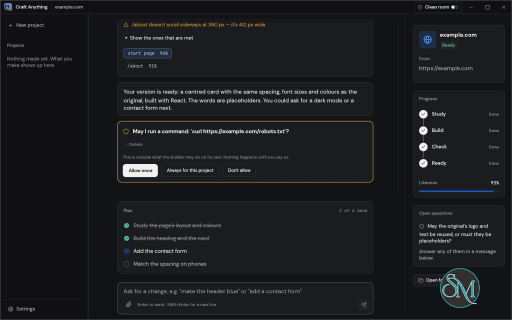
Craft Anything follows a four-stage workflow: Study, Build, Check, and Refine. Users provide a target and describe what they want to create. The software examines the target, sends the findings to a coding agent, generates a new project, and checks how closely the result matches the original.
It supports recreating websites, applications, and games. Users can also specify their preferred programming language, framework, or game engine.
Reverse Engineering and Inspection
The underlying engine is written in Rust and includes a large collection of inspection tools for different software formats and platforms.
It can examine native applications, Java and .NET programs, Android packages, Apple applications, Electron applications, websites, firmware, databases, game files, and other formats.
The Advanced workbench exposes tools such as disassembly, decompilation, function analysis, call graphs, hexadecimal inspection, and evidence records. Users can investigate software without necessarily starting a recreation project.
Clean Room and Deep Modes
One of the more interesting features is the separation between Clean Room and Deep modes.
Clean Room is the default mode. It studies software through publicly visible behavior, screenshots, and other permitted observations without reading the original application's source code or files. This approach is intended to reduce the risk of copying protected implementation details.
Deep mode enables more extensive inspection, including reading application files and using additional reverse-engineering tools. Ghidra integration provides further decompilation capabilities when installed.
AI Coding Agent Integration
Craft Anything relies on an external coding agent to build applications. Claude Code is the primary supported integration and runs using the user's existing installation and authentication.
The project also includes adapters for other agents, although some integrations are not yet verified in real-world installations.
For analysis and questions, it supports Anthropic, OpenAI, OpenRouter, and local OpenAI-compatible servers.
CLI and MCP Support
The software is not limited to its desktop interface. It also provides a command-line tool and an MCP server.
This allows compatible AI agents and automation workflows to use the same inspection engine. The project advertises 284 tools across its engine, AI, and setup layers, with each tool accessible through the CLI and MCP interfaces.
Build Verification
Generated applications are not simply accepted after the coding agent finishes. Craft Anything checks the output against the original target.
For websites, it captures and compares layouts at desktop, tablet, and mobile widths. It also identifies differences in layout, typography, spacing, page structure, and other visual details.
Game projects can use their own self-tests to check basic functionality. The system can then ask the coding agent to refine the result when checks identify problems.
Download Craft Anything v0.5.0 - Software Mirrors |
|---|
Craft Anything v0.5.0 for Windowscraft-anything-0.5.0-windows-x86.msi | 52.23 MB craft-anything-0.5.0-windows-x86-portable.zip | 61.69 MB craft-anything-0.5.0-windows-x64.msi | 54.52 MB craft-anything-0.5.0-windows-x64-portable.zip | 65.31 MB |
Craft Anything v0.5.0 for macOScraft-anything-web-0.5.0.zip | 2.53 MB |
Craft Anything v0.5.0 for Linuxcraft-anything-0.5.0-linux-x86_64.tar.gz.asc | 228 B craft-anything-0.5.0-linux-x86_64.tar.gz | 65.79 MB craft-anything-0.5.0-linux-x86_64.rpm.asc | 228 B craft-anything-0.5.0-linux-x86_64.rpm | 66.33 MB craft-anything-0.5.0-linux-x86_64.pkg.tar.zst | 51.64 MB craft-anything-0.5.0-linux-x86_64.flatpak.asc | 228 B craft-anything-0.5.0-linux-x86_64.flatpak | 48.33 MB craft-anything-0.5.0-linux-x86_64.deb.asc | 228 B craft-anything-0.5.0-linux-x86_64.deb | 66.74 MB craft-anything-0.5.0-linux-x86_64.AppImage.zsync.asc | 228 B craft-anything-0.5.0-linux-x86_64.AppImage.zsync | 218.51 kB craft-anything-0.5.0-linux-x86_64.AppImage.asc | 228 B craft-anything-0.5.0-linux-x86_64.AppImage | 62.36 MB craft-anything-0.5.0-linux-riscv64.tar.gz.asc | 228 B craft-anything-0.5.0-linux-riscv64.tar.gz | 64.43 MB craft-anything-0.5.0-linux-riscv64.rpm.asc | 228 B craft-anything-0.5.0-linux-riscv64.rpm | 65.13 MB craft-anything-0.5.0-linux-riscv64.deb.asc | 228 B craft-anything-0.5.0-linux-riscv64.deb | 65.37 MB craft-anything-0.5.0-linux-aarch64.tar.gz.asc | 228 B craft-anything-0.5.0-linux-aarch64.tar.gz | 62.76 MB craft-anything-0.5.0-linux-aarch64.rpm.asc | 228 B craft-anything-0.5.0-linux-aarch64.rpm | 63.99 MB craft-anything-0.5.0-linux-aarch64.pkg.tar.zst | 49.1 MB craft-anything-0.5.0-linux-aarch64.flatpak.asc | 228 B craft-anything-0.5.0-linux-aarch64.flatpak | 45.04 MB craft-anything-0.5.0-linux-aarch64.deb.asc | 228 B craft-anything-0.5.0-linux-aarch64.deb | 64.57 MB craft-anything-0.5.0-linux-aarch64.AppImage.zsync.asc | 228 B craft-anything-0.5.0-linux-aarch64.AppImage.zsync | 209.21 kB |
Craft Anything v0.5.0 for BSD |
Others Download related to Craft Anything v0.5.0 |
Craft Anything v0.5.0 Source Code |
Craft Anything v0.5.0 Release Notes:What's Changed
New Contributors
|
Performance and Compatibility
Craft Anything is built with Rust and uses its own inspection engine rather than depending entirely on external reverse-engineering utilities. Ghidra can be integrated for additional analysis in Deep mode.
The desktop application, CLI, and MCP server provide different ways to access its capabilities. Its supported release packages cover Windows, macOS, Linux, and FreeBSD, with a browser-based WebAssembly viewer also available for certain inspection tasks.
However, the project is still in early development. Some agent integrations, application behavior checks, and inspection tools are incomplete or have only been tested with limited inputs. The availability of a feature does not necessarily mean every supported software format has been thoroughly validated.
System Requirements
Craft Anything requires Rust 1.97 or newer when building from source.
On Debian and Ubuntu, compiling the desktop application also requires development libraries for X11, Wayland, GTK, and OpenGL.
Building applications with AI requires a compatible coding agent installed and authenticated on the computer. Additional AI providers may require their own API configuration.
Prebuilt installers are available for supported platforms, so users do not necessarily need to compile the application themselves.
Pros and Cons
Pros
Combines software inspection and AI-powered project creation.
Supports websites, desktop applications, mobile apps, and games.
Provides Clean Room and Deep inspection modes.
Includes extensive Rust-based reverse-engineering tools.
Supports CLI and MCP integrations.
Compares generated websites against original layouts.
Open-source under MIT or Apache-2.0 licensing.
Cons
Still in early alpha development.
Requires an external coding agent for building projects.
Some agent integrations and verification features are incomplete.
Deep analysis can require additional tools and substantial system resources.
Results depend on the quality of the target inspection and the coding agent.
How to Install
The easiest approach is to download a prebuilt package from the project's GitHub Releases page.
Available formats include MSI installers for Windows, DMG for macOS, and AppImage, Flatpak, DEB, and RPM packages for Linux.
Users who prefer compiling from source can clone the repository and run:
git clone https://github.com/storytold/craft-anything
cd craft-anything

cargo run --release -p craft-anything
The CLI can be installed separately:
cargo install --path apps/craft-anything-cliAfter installation, run the diagnostic command to check the environment:
craft-anything-cli doctorFinal Verdict
Craft Anything is an ambitious open-source project that combines reverse engineering with AI-assisted software development. Its biggest advantage is the complete workflow: inspect an existing application, understand how it behaves, generate a new implementation, and check the result against the original.
The Clean Room mode is particularly interesting because it provides a more controlled approach to recreating software based on observable behavior rather than directly copying its implementation. Meanwhile, Deep mode gives experienced developers access to more extensive analysis capabilities.
Its main limitation is maturity. The project is still in early alpha, and some integrations and verification features have not been fully validated. Users should treat generated results as development starting points rather than guaranteed replacements for existing software.
Overall, Craft Anything is a promising tool for developers interested in reverse engineering, software prototyping, and AI-powered application recreation. It is worth exploring, especially for technically experienced users who want more control over how AI studies and rebuilds software.
Post a Comment/Report Broken Link: