WordCraft v0.11.0

WordCraft is a free, open-source word processor designed as an alternative to Microsoft Word. Developed by the ArtCraft team, it is written in Rust and aims to reproduce familiar Word workflows while providing native applications for desktop operating systems and a browser-based version.

The application goes beyond basic text editing. It includes document formatting, styles, tables, page layout, references, comments, tracked changes, mail merge, and PDF export. It can open and save DOCX files, making it a potential option for users who regularly exchange documents with Microsoft Office users.

WordCraft also includes command-line tools and Model Context Protocol (MCP) integration, allowing compatible AI agents to create, inspect, edit, and export documents programmatically.

Although its feature set is extensive, WordCraft is still approaching maturity for everyday writing. Users who rely on complex Word documents or specialized publishing workflows should test compatibility before making it their primary word processor.

Features

Document Editing and Formatting

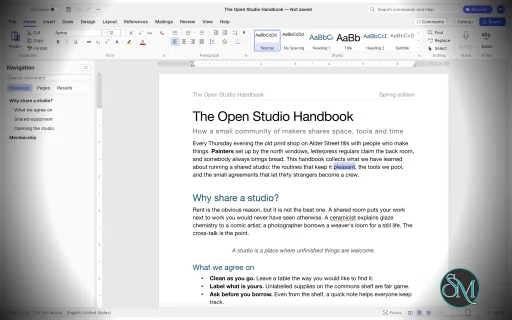
WordCraft provides a familiar ribbon-style interface with formatting controls for fonts, sizes, bold and italic text, underlining, colors, highlighting, superscript, and subscript.

It supports paragraph alignment, indentation, line spacing, tabs, borders, shading, and other layout options. The Format Painter lets users copy formatting between document elements, while built-in styles help maintain consistent formatting across longer documents.

The editor also includes AutoCorrect, smart quotes, automatic list formatting, find and replace with regular expressions, and standard undo and redo functionality.

These features make WordCraft suitable for writing reports, letters, essays, and other everyday documents.

DOCX Compatibility and File Formats

WordCraft supports reading and writing Microsoft Word's DOCX format. It also supports importing and exporting ODT, RTF, HTML, Markdown, and plain-text documents.

PDF export produces selectable text and supports links and bookmarks, making it useful for distributing reports and other finished documents.

The ability to work with common document formats is one of WordCraft's main advantages. However, opening a DOCX file does not guarantee that every element will render identically to Microsoft Word. Complex layouts, embedded objects, and less common formatting features should be checked after import.

Styles, Themes, and Page Layout

WordCraft includes paragraph and character styles, style sets, themes, and a live style gallery. Users can create or modify styles to maintain consistent formatting throughout a document.

Page-layout controls include margins, page size, orientation, columns, section breaks, page breaks, headers, footers, page numbers, watermarks, and page borders.

The application also supports automatic hyphenation, line numbering, drop caps, and text wrapping around pictures and shapes.

These capabilities are useful for creating structured reports, academic papers, business documents, and longer publications.

Tables, Images, and Graphics

WordCraft supports tables with merged and split cells, borders, shading, banded styles, sorting, and formulas. Rows can split across pages, and table headers can repeat on subsequent pages.

Images can be inserted, resized, cropped, rotated, recolored, and adjusted for brightness, contrast, and transparency. Additional features include picture styles, shapes, and text boxes with floating positioning and text wrapping.

The editor also supports converting text into tables and tables into text, helping users restructure information without recreating content manually.

References and Academic Writing

WordCraft provides a collection of tools for structured and academic documents, including:

  • Automatic tables of contents.

  • Footnotes and endnotes.

  • Citations and bibliographies in APA, MLA, Chicago, and IEEE styles.

  • Captions and tables of figures.

  • Cross-references and indexes.

  • Tables of authorities.

These tools make WordCraft particularly interesting for students, researchers, and professionals who work with long documents containing references and supporting material.

Users preparing formal academic submissions should verify that the generated references and formatting comply with their institution's requirements.

Comments, Track Changes, and Proofreading

WordCraft includes comments displayed in document margins or a dedicated pane. Track Changes allows users to review edits and accept or reject individual changes.

Document comparison, spelling and grammar suggestions, a thesaurus, word counting, and an accessibility checker provide additional support for reviewing and refining documents.

The application also includes document inspection and editing restrictions.

These features are valuable for collaborative editing and document review, although teams should test their specific review workflows before replacing established Microsoft Word processes.

Mail Merge

WordCraft supports mail merge using CSV data sources and document fields. Users can insert merge fields, configure address blocks and greeting lines, preview personalized documents, and generate merged output.

Envelope and label tools are also included.

This can help automate repetitive administrative tasks such as generating letters, notices, certificates, and personalized business documents.

AI and Command-Line Automation

WordCraft is designed to support both manual editing and programmatic document manipulation. Its editing engine exposes commands that are shared across the graphical interface, keyboard shortcuts, command search, CLI, JSON control channel, and MCP server.

The command-line interface supports document conversion, text extraction, structural inspection, rendering, and scripted editing.

For example, convert a Word document to PDF:

wordcraft-cli convert report.docx report.pdf

Extract its text:

wordcraft-cli text report.docx

Inspect the document structure as JSON:

wordcraft-cli inspect report.docx

These capabilities make WordCraft useful for batch processing, document-generation pipelines, and AI-assisted workflows. Compatible agents can inspect documents and execute editing commands without relying exclusively on screenshots or mouse interaction.

Download WordCraft v0.11.0 - Software Mirrors

WordCraft v0.11.0 for Windows

wordcraft-0.11.0-windows-x86.msi | 79.13 MB

wordcraft-0.11.0-windows-x86-portable.zip | 95.3 MB

wordcraft-0.11.0-windows-x64.msi | 80.59 MB

wordcraft-0.11.0-windows-x64-portable.zip | 98.13 MB

wordcraft-0.11.0-windows-arm64.msi | 77.36 MB

wordcraft-0.11.0-windows-arm64-portable.zip | 95.21 MB

WordCraft v0.11.0 for macOS

wordcraft-cli-0.11.0-macos-universal.zip | 86.26 MB

wordcraft-0.11.0-macos-universal.dmg | 109.07 MB

WordCraft v0.11.0 for Linux

wordcraft-0.11.0-linux-x86_64.tar.gz | 98.68 MB

wordcraft-0.11.0-linux-x86_64.rpm | 99.49 MB

wordcraft-0.11.0-linux-x86_64.pkg.tar.zst | 76.38 MB

wordcraft-0.11.0-linux-x86_64.flatpak | 70.72 MB

wordcraft-0.11.0-linux-x86_64.deb | 100.05 MB

wordcraft-0.11.0-linux-x86_64.AppImage.zsync | 329.04 kB

wordcraft-0.11.0-linux-x86_64.AppImage | 93.94 MB

wordcraft-0.11.0-linux-riscv64.tar.gz | 97.52 MB

wordcraft-0.11.0-linux-riscv64.rpm | 98.36 MB

wordcraft-0.11.0-linux-riscv64.deb | 98.72 MB

wordcraft-0.11.0-linux-aarch64.tar.gz | 95.75 MB

wordcraft-0.11.0-linux-aarch64.rpm | 97.17 MB

wordcraft-0.11.0-linux-aarch64.pkg.tar.zst | 74.42 MB

wordcraft-0.11.0-linux-aarch64.flatpak | 67.63 MB

wordcraft-0.11.0-linux-aarch64.deb | 97.82 MB

wordcraft-0.11.0-linux-aarch64.AppImage.zsync | 319.32 kB

wordcraft-0.11.0-linux-aarch64.AppImage | 91.16 MB

WordCraft v0.11.0 for BSD

wordcraft-0.11.0-freebsd-x86_64.tar.gz | 101.72 MB

Others Download related to WordCraft v0.11.0

wordcraft-web-0.11.0.zip | 16.72 MB

WordCraft v0.11.0 Source Code

WordCraft v0.11.0 Source code (zip)

WordCraft v0.11.0 Source code (tar.gz)

WordCraft v0.11.0 Release Notes:

What's Changed

  • Restrict Editing: the file commands, the user name and the post-check by @matstrange in #3285
  • The inspector's removals are tracked, and a version snapshot belongs to its document by @matstrange in #3286
  • test: mark the portal test's blocking sleep as intentional (SonarCloud rust:S7488) by @dylanmtaylor in #3989
  • Engine: no dead-code warnings on wasm by @MichaelMuClaude in #3542
  • Drop U+FFFE and U+FFFF from ODT export text by @Silvertree2010 in #3817
  • Cap the number of VML path commands parsed from a path attribute by @Silvertree2010 in #3951
  • Return None from parse_number when the value overflows f64 by @Silvertree2010 in #3577
  • Fix spurious 零 after a group's trailing zeros in Chinese numerals by @Silvertree2010 in #3745
  • picture.corrections: a tiny sharpen value no longer panics in the blur (#3646) by @fluorine in #3830
  • Reject signs and non-digits in parse_date fields by @Silvertree2010 in #3575
  • Layout: keep with next takes the 0.01 pt of slack the other fit checks take by @dfgodvan in #3816
  • Parse the Flat OPC part root tag once when inheriting namespaces by @Silvertree2010 in #3944
  • Write a text-box story shared by many shapes only once on docx save by @Silvertree2010 in #3983
  • Keep pending formatting revisions when Style Inspector clears formatting by @Silvertree2010 in #3971
  • Cap the headless ui_requests queue and keep one Paste Special request by @Silvertree2010 in #3997
  • Validate PNG extension in file.exportPng by @Higgs32584 in #3837
  • Khmer: ignore w14:ligatures when shaping Khmer text by @inmean in #3921
  • Skip quoted attribute values when scanning settings.xml tags by @Silvertree2010 in #3954
  • Rename kept docx parts whose names are not valid OPC part names by @Silvertree2010 in #3947
  • #3637: A table cell span from a .json file no longer overflows by @Jayesh-Prajapati9 in #3927
  • #3663: "NaN" in the Font dialog's Size box no longer closes the app by @Jayesh-Prajapati9 in #3928
  • Load ui.json with many unknown keys in linear time by @Silvertree2010 in #3968
  • docbin: mark format-mandated SHA-1 as reviewed (SonarCloud S4790) by @dylanmtaylor in #4020
  • Cap and deduplicate the .aff TRY alphabet at parse time by @Silvertree2010 in #3981
  • Render: a dimmed header's borders keep one tone where they meet (#2946) by @GabrielMatozo in #3725
  • Refuse arrange.group when members exceed the group child cap by @Silvertree2010 in #3958
  • Ignore docx chart number-format codes longer than 255 bytes by @Silvertree2010 in #3963
  • Format Painter: show the copy pointer over the text while armed (#3453) by @MatRanc in #3560
  • Ruler: dragging a margin edge leaves the view where it is by @pakiat in #3900
  • Save, export and print keep the view where it is by @marcoarnulfo in #3895
  • Layout: an empty paragraph with a hidden mark shows nothing, not even its list number (#3982) by @Menonro in #3992
  • Tables: a row fits on a page only with room for the border below it (#3814) by @dfgodvan in #3815
  • #3734: ui.resize refuses sizes that aren't positive and clamps to the GPU's limit by @mercuryVM in #3920
  • Backstage: non-Latin file names in the Recover list draw, not boxes by @MichaelMuClaude in #3545
  • Print and PDF export use the Numeral setting (#3784) by @MarekSpodBiedry in #3824
  • Fix .doc bookmark table desync on names longer than 40 characters by @Silvertree2010 in #3949
  • Status bar names the page in view, not only the caret's page (#3880) by @dhruvLearner8 in #3901
  • Inline shared Word 2003 headers, notes and comments once by @Silvertree2010 in #3985
  • G14: Romanian: translate the rows left in English; adjective agreement by @vioreltus in #3558
  • Keep inline content and formatting in Convert Text to Table by @Silvertree2010 in #3937
  • Compare: don't let a character-level diff scramble a reordered digit run by @MichaelMuClaude in #3224
  • Regression tests for #2 and #504 by @skylartaylor in #3860
  • Restrict Editing: read only and comments-only protection grey out edits by @pick2510 in #3264
  • Font: a selected text box's Font commands format all its text by @pakiat in #3898
  • packaging: use [[ for bash conditional tests (SonarCloud S7688) by @dylanmtaylor in #4024
  • A document with many relationships takes minutes to open by @matstrange in #3809
  • A word with no break opportunity in it makes the layout quadratic by @matstrange in #3808
  • doc: preserve rotated free endpoints when rerouting connectors by @mrzv in #3882
  • Selection bar: right margin for right-to-left text, and beside table rows (UI gap) by @dkhlapov in #2042
  • Mail merge: go to any record, and merge or print a range of records (#3028) by @VoiceLessQ in #3894
  • Translate ribbon disabled-reason tooltips (#2678) by @dkhlapov in #2680
  • CI: one test binary per crate, nextest, line tables only by @aiongg in #4025
  • CI: shared gate workflow; FreeBSD nightly and on release by @aiongg in #3913
  • i18n tests: missing translations never fail; one report lists them by @aiongg in #4043
  • ci(sonar): stop cancelling main-branch runs so coverage is published by @dylanmtaylor in #4070
  • Packaging: pin the signing client and appimagetool, and check their hashes by @aiongg in #3326
  • Change Case follows each run's language for Turkic casing by @SlavenDj in #3480
  • Options › Language names the proofing language at the caret (#3150) by @naxvog in #3177
  • i18n: interface translations from craft-i18n (pilot) by @benandez in #4072
  • Proofing options reach the Czech, Croatian, Indonesian, Italian, Polish and Portuguese checks by @FedeOlivares in #3966
  • PDF: pin craft-libs 9f75d3dc for the PNG and PDF input bounds by @aiongg in #4084
  • chore: resolve SonarCloud maintainability issues by @dylanmtaylor in #4083
  • Sonar S1612: fn paths instead of trivial method closures by @dylanmtaylor in #4103
  • Sonar S1612: use PoisonError::into_inner for poisoned locks by @dylanmtaylor in #4102
  • Sonar S7682: explicit return in packaging/env.sh helpers by @dylanmtaylor in #4105
  • Format negative zero as 0 in spreadsheet import by @Silvertree2010 in #4040
  • Ignore quoted text when detecting recipient CSV delimiter by @Silvertree2010 in #4125
  • Cap label and envelope text length in mailings commands by @Silvertree2010 in #4008
  • DOCX: a hinted East Asian or complex-script font no longer replaces the Latin font by @marcoarnulfo in #4067
  • Phonetic Guide dialog puts the keyboard in the Ruby text box on open (#3914) by @MarekSpodBiedry in #4021
  • Route ui.screenshot path writes through the guarded engine writer by @Silvertree2010 in #4048
  • Dialogs: draw real tabs (Paragraph, Find, About) by @fluorine in #4029
  • Outline: re-match collapsed headings only after edits, via a hash index by @Silvertree2010 in #4014
  • DOCX: write the default font size when the document leaves it unset by @narain1 in #4092
  • #3994: watermark font names round-trip through the textpath's CSS style by @SusieeTheLinuxUser in #4071
  • Keep the direction of left, up and down block arrows (#3919) by @MarekSpodBiedry in #4022
  • Insert › Table: the grid previews the hovered table on the page (#3931) by @marcoarnulfo in #4052
  • #3360, #3553: Spanish proofing (es-ES, es-MX, es-419, es-UY) by @FedeOlivares in #3562
  • Bump craft-print, craft-pdf, krilla and craft-i18n to craft-libs 1774443 by @aiongg in #4184
  • Merge 27 open PRs (tested batch) by @aiongg in #4194
  • #4001: A command that changes nothing is not an edit by @matstrange in #4004
  • Layout: a document of many pages paid a body-length scan per page by @MoriartyPuth in #4090
  • AutoCorrect: words after a no-break space are corrected by @dotCooCoo in #4101
  • Proofing: web addresses after a no-break space are not marked as misspelled by @dotCooCoo in #4109
  • MCP: type_text with paragraphs is one command, not a snapshot of the document per line (#3973) by @MichaelMuClaude in #4112
  • AutoFormat: Tab and Backspace at the start of a line set the paragraph's indents by @dotCooCoo in #4113
  • Engine: keep cell widths in step after Insert Column; validate a version restore before saving by @galagersharp-code in #4120
  • MCP: keep serving when the app isn't open yet (#4078) by @galagersharp-code in #4121
  • AutoFormat: Enter twice after a short line makes it a heading by @dotCooCoo in #4123
  • AutoFormat: border lines and +---+ tables track the characters they delete by @dotCooCoo in #4129
  • Reject '+' sign in print page ranges by @Silvertree2010 in #4147
  • Import LaTeX \^{} and \~{} as plain ^ and ~ by @Silvertree2010 in #4170
  • Read Mode: a Page color menu shows the columns on white, sepia or a dark page by @dotCooCoo in #4172
  • DOCX: a malformed main document part is an error, not a truncated document (#3599) by @fluorine in #3818
  • Web: a ?host=parent bridge for pages that keep WordCraft's files by @RobHones in #3822
  • Layout: a multiple-spaced line stays on the page while its text fits, as in Word by @jpc7k1 in #3836
  • SmartArt and charts: resize handles on the canvas and a Size group on SmartArt Design (#3852) by @fluorine in #3853
  • Release: embed the current craft-fonts, with the Georgian face by @devius in #3888
  • Resolve note separator revisions in Accept/Reject All by @Silvertree2010 in #3998
  • #3889, #3891: Update Table keeps a localized Word TOC's styles and columns by @RatkoR in #4039
  • cu20we: fix box float paragraph origins and preserve shape line caps by @nexotiq in #4074
  • Comments: times in the user's own time zone, in the pane and the balloons (#2322, #2337) by @seif9116 in #4079
  • Layout: include exact line-bottom contact for floating tables (#3977) by @OPUZZLES in #4097
  • Match highlight icon to selected color by @Vernsmoke in #4099
  • Merge the latest commits of #4100, #4133 and #4171 by @aiongg in #4215
  • autoscroll: make the cursor follow the scroll direction by @Galex-Z in #4100
  • #4085: toggle the last highlight colour with the keyboard shortcut by @LQRD in #4133
  • Picture memory limits for 6 audit issues: one decoder, TIFF strips, styles, Remove Background, Windows paste, render cache by @VoiceLessQ in #4171
  • security: require the data integrity check on encrypted DOCX packages by @dylanmtaylor in #4223
  • Merge 10 open PRs (fields, tables, AutoFormat, Track Changes; tested batch) by @aiongg in #4232
  • AutoFormat: border and table lines stay text in a paragraph numbered by its style by @dotCooCoo in #4139
  • Tables: Convert to Text asks for the separator and converts only the selected rows by @dotCooCoo in #4155
  • Tables: Split Table fixes the vertical merges and row content controls it splits by @dotCooCoo in #4162
  • Parity catalog: the checklist counts Read Mode's Column Width, Page Color and Layout by @dotCooCoo in #4182
  • Track Changes: Accept and Reject can move to the next change or stop tracking by @dotCooCoo in #4205
  • Fields: SUBJECT, KEYWORDS, COMMENTS, LASTSAVEDBY, REVNUM and NUMCHARS update with the others by @dotCooCoo in #4217
  • Restrict Editing: Enter and typing at the start or end of an exception line go inside it by @dotCooCoo in #4225
  • Fields: \ DollarText and \ Hex write the result, and PAGE reads \ ArabicDash by @dotCooCoo in #4226
  • Merge the late commits of #4098 and #4224 by @aiongg in #4238
  • AutoFormat: bold and _italic_ become real formatting as you type by @dotCooCoo in #4098
  • Fields: \ Upper, \ Lower, \ Caps and \* FirstCap change the result, and CardText is lowercase by @dotCooCoo in #4224

New Contributors

  • @MatRanc made their first contribution in #3560
  • @pakiat made their first contribution in #3900
  • @Menonro made their first contribution in #3992
  • @mercuryVM made their first contribution in #3920
  • @vioreltus made their first contribution in #3558
  • @mrzv made their first contribution in #3882
  • @VoiceLessQ made their first contribution in #3894
  • @FedeOlivares made their first contribution in #3966
  • @narain1 made their first contribution in #4092
  • @SusieeTheLinuxUser made their first contribution in #4071
  • @MoriartyPuth made their first contribution in #4090
  • @galagersharp-code made their first contribution in #4120
  • @RobHones made their first contribution in #3822
  • @jpc7k1 made their first contribution in #3836
  • @devius made their first contribution in #3888
  • @nexotiq made their first contribution in #4074
  • @Vernsmoke made their first contribution in #4099
  • @Galex-Z made their first contribution in #4100
Full Changelog: v0.10.0...v0.11.0

Performance and Compatibility

WordCraft is written in Rust and uses a modular architecture for document editing, typography, pagination, rendering, and file conversion. Its interface uses the native GPU-oriented egui framework rather than Electron or Tauri.

The project emphasizes responsive editing through cached paragraph layout and on-demand page rendering. Its developers report that typing in a 188-page document triggers layout recalculation in approximately 1.4 milliseconds. This is a project-reported benchmark rather than an independent performance test.

WordCraft supports macOS, Windows, Linux, BSD, and browsers through WebAssembly. It can read and write DOCX files and supports several additional document formats.

The main limitation is compatibility maturity. The project's roadmap identifies real-world DOCX testing, native printing, and signed application builds as remaining work. Charts, SmartArt, the equation editor, and the Draw tab are also listed as future development areas.

Consequently, WordCraft should not yet be assumed to offer complete feature parity with Microsoft Word, particularly for complex business documents and specialized workflows.

System Requirements

  • Operating systems: Windows, macOS, Linux, and BSD.

  • Browser support: WebAssembly build for compatible browsers.

  • Document formats: DOCX, ODT, RTF, HTML, Markdown, and plain text.

  • Export: PDF and page images, in addition to supported document formats.

  • Build requirements: Rust and the project's documented dependencies.

The project does not provide a comprehensive minimum hardware specification in the information reviewed. Actual performance will depend on document complexity, fonts, embedded images, and system resources.

Pros and Cons

Pros

  • Free and open-source under the MIT or Apache 2.0 license.

  • Familiar ribbon-style interface inspired by Microsoft Word.

  • DOCX reading and writing support.

  • Extensive formatting, styles, tables, and page-layout tools.

  • References, citations, footnotes, indexes, and tables of contents.

  • Comments, Track Changes, and proofreading tools.

  • Mail merge with CSV data sources.

  • PDF export with selectable text, links, and bookmarks.

  • Native desktop applications and a browser-based version.

  • CLI and MCP support for document automation.

  • Offline spelling and grammar features without requiring cloud processing.

Cons

  • Still approaching maturity for everyday writing and production use.

  • Complex DOCX compatibility needs more real-world validation.

  • Native printing and signed application builds remain development priorities.

  • Charts, SmartArt, and the equation editor are not yet complete features.

  • Does not provide full Microsoft Word feature parity.

  • Professional workflows may require additional testing and workarounds.

How to Install

The simplest option is to download a package from the project's GitHub Releases page, if a suitable build is available for your operating system.

To build and run WordCraft from source, install Rust and the required development dependencies, then execute:

git clone https://github.com/storytold/wordcraft
cd wordcraft
cargo run --release -p wordcraft -- --sample

To open an existing document:

cargo run --release -p wordcraft -- report.docx

For browser-based use, navigate to the web application directory and start the development server:

cd apps/wordcraft-web
trunk serve

The development server will provide a local address for opening WordCraft in a browser. Refer to the official repository for detailed build dependencies, release packages, and platform-specific instructions.

Final Verdict

WordCraft is an ambitious open-source word processor that combines familiar document editing with advanced formatting, references, review tools, mail merge, and automation. Its support for DOCX and PDF, together with additional formats and offline functionality, makes it a promising alternative for users who want more control over their document workflow.

Its command-line interface and MCP integration are especially interesting for developers and organizations that generate or process documents programmatically. The extensive feature set also makes it worth exploring for students, writers, and office users.

The biggest concern is maturity. WordCraft covers many of Microsoft Word's ribbon features, but feature coverage is not the same as complete behavioral compatibility. Users who depend on complex documents, advanced diagrams, equations, or established printing workflows should test their files carefully before switching.

For everyday writing and experimentation with open-source office software, WordCraft is worth trying. For mission-critical document production, it is better treated as a developing alternative until its compatibility and printing workflows have been validated against real-world requirements.
WordCraft v0.11.0
Free
Software Informations:
Developer:

Operating System:
Windows / macOS / Linux / BSD
Date Added:
2026-10-26T09:07:17.195Z
Categories:

Post a Comment/Report Broken Link: