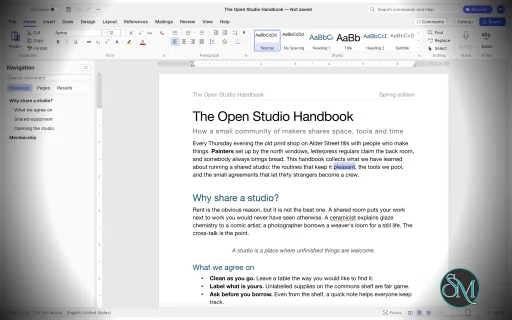
WordCraft is a free, open-source word processor designed as an alternative to Microsoft Word. Developed by the ArtCraft team, it is written in Rust and aims to reproduce familiar Word workflows while providing native applications for desktop operating systems and a browser-based version.
The application goes beyond basic text editing. It includes document formatting, styles, tables, page layout, references, comments, tracked changes, mail merge, and PDF export. It can open and save DOCX files, making it a potential option for users who regularly exchange documents with Microsoft Office users.
WordCraft also includes command-line tools and Model Context Protocol (MCP) integration, allowing compatible AI agents to create, inspect, edit, and export documents programmatically.
Although its feature set is extensive, WordCraft is still approaching maturity for everyday writing. Users who rely on complex Word documents or specialized publishing workflows should test compatibility before making it their primary word processor.
Features
Document Editing and Formatting
WordCraft provides a familiar ribbon-style interface with formatting controls for fonts, sizes, bold and italic text, underlining, colors, highlighting, superscript, and subscript.
It supports paragraph alignment, indentation, line spacing, tabs, borders, shading, and other layout options. The Format Painter lets users copy formatting between document elements, while built-in styles help maintain consistent formatting across longer documents.
The editor also includes AutoCorrect, smart quotes, automatic list formatting, find and replace with regular expressions, and standard undo and redo functionality.
These features make WordCraft suitable for writing reports, letters, essays, and other everyday documents.
DOCX Compatibility and File Formats
WordCraft supports reading and writing Microsoft Word's DOCX format. It also supports importing and exporting ODT, RTF, HTML, Markdown, and plain-text documents.
PDF export produces selectable text and supports links and bookmarks, making it useful for distributing reports and other finished documents.
The ability to work with common document formats is one of WordCraft's main advantages. However, opening a DOCX file does not guarantee that every element will render identically to Microsoft Word. Complex layouts, embedded objects, and less common formatting features should be checked after import.
Styles, Themes, and Page Layout
WordCraft includes paragraph and character styles, style sets, themes, and a live style gallery. Users can create or modify styles to maintain consistent formatting throughout a document.
Page-layout controls include margins, page size, orientation, columns, section breaks, page breaks, headers, footers, page numbers, watermarks, and page borders.
The application also supports automatic hyphenation, line numbering, drop caps, and text wrapping around pictures and shapes.
These capabilities are useful for creating structured reports, academic papers, business documents, and longer publications.
Tables, Images, and Graphics
WordCraft supports tables with merged and split cells, borders, shading, banded styles, sorting, and formulas. Rows can split across pages, and table headers can repeat on subsequent pages.
Images can be inserted, resized, cropped, rotated, recolored, and adjusted for brightness, contrast, and transparency. Additional features include picture styles, shapes, and text boxes with floating positioning and text wrapping.
The editor also supports converting text into tables and tables into text, helping users restructure information without recreating content manually.
References and Academic Writing
WordCraft provides a collection of tools for structured and academic documents, including:
Automatic tables of contents.
Footnotes and endnotes.
Citations and bibliographies in APA, MLA, Chicago, and IEEE styles.
Captions and tables of figures.
Cross-references and indexes.
Tables of authorities.
These tools make WordCraft particularly interesting for students, researchers, and professionals who work with long documents containing references and supporting material.
Users preparing formal academic submissions should verify that the generated references and formatting comply with their institution's requirements.
Comments, Track Changes, and Proofreading
WordCraft includes comments displayed in document margins or a dedicated pane. Track Changes allows users to review edits and accept or reject individual changes.
Document comparison, spelling and grammar suggestions, a thesaurus, word counting, and an accessibility checker provide additional support for reviewing and refining documents.
The application also includes document inspection and editing restrictions.
These features are valuable for collaborative editing and document review, although teams should test their specific review workflows before replacing established Microsoft Word processes.
Mail Merge
WordCraft supports mail merge using CSV data sources and document fields. Users can insert merge fields, configure address blocks and greeting lines, preview personalized documents, and generate merged output.
Envelope and label tools are also included.
This can help automate repetitive administrative tasks such as generating letters, notices, certificates, and personalized business documents.
AI and Command-Line Automation
WordCraft is designed to support both manual editing and programmatic document manipulation. Its editing engine exposes commands that are shared across the graphical interface, keyboard shortcuts, command search, CLI, JSON control channel, and MCP server.
The command-line interface supports document conversion, text extraction, structural inspection, rendering, and scripted editing.
For example, convert a Word document to PDF:
wordcraft-cli convert report.docx report.pdf
Extract its text:
wordcraft-cli text report.docx
Inspect the document structure as JSON:
wordcraft-cli inspect report.docx
These capabilities make WordCraft useful for batch processing, document-generation pipelines, and AI-assisted workflows. Compatible agents can inspect documents and execute editing commands without relying exclusively on screenshots or mouse interaction.
Download WordCraft v0.10.0 - Software Mirrors |
|---|
WordCraft v0.10.0 for Windowswordcraft-0.10.0-windows-x86.msi | 78.01 MB wordcraft-0.10.0-windows-x86-portable.zip | 93.71 MB wordcraft-0.10.0-windows-x64.msi | 79.4 MB wordcraft-0.10.0-windows-x64-portable.zip | 96.5 MB wordcraft-0.10.0-windows-arm64.msi | 76.42 MB wordcraft-0.10.0-windows-arm64-portable.zip | 93.78 MB |
WordCraft v0.10.0 for macOSwordcraft-cli-0.10.0-macos-universal.zip | 85.5 MB wordcraft-0.10.0-macos-universal.dmg | 107.15 MB |
WordCraft v0.10.0 for Linuxwordcraft-0.10.0-linux-x86_64.tar.gz | 97.37 MB wordcraft-0.10.0-linux-x86_64.rpm | 98.17 MB wordcraft-0.10.0-linux-x86_64.pkg.tar.zst | 75.52 MB wordcraft-0.10.0-linux-x86_64.flatpak | 69.93 MB wordcraft-0.10.0-linux-x86_64.deb | 98.71 MB wordcraft-0.10.0-linux-x86_64.AppImage.zsync | 324.78 kB wordcraft-0.10.0-linux-x86_64.AppImage | 92.73 MB wordcraft-0.10.0-linux-riscv64.tar.gz | 96.22 MB wordcraft-0.10.0-linux-riscv64.rpm | 97.04 MB wordcraft-0.10.0-linux-riscv64.deb | 97.4 MB wordcraft-0.10.0-linux-aarch64.tar.gz | 94.6 MB wordcraft-0.10.0-linux-aarch64.rpm | 95.98 MB wordcraft-0.10.0-linux-aarch64.pkg.tar.zst | 73.63 MB wordcraft-0.10.0-linux-aarch64.flatpak | 66.93 MB wordcraft-0.10.0-linux-aarch64.deb | 96.63 MB wordcraft-0.10.0-linux-aarch64.AppImage.zsync | 315.24 kB wordcraft-0.10.0-linux-aarch64.AppImage | 90 MB |
WordCraft v0.10.0 for BSDwordcraft-0.10.0-freebsd-x86_64.tar.gz | 100.35 MB |
Others Download related to WordCraft v0.10.0wordcraft-web-0.10.0.zip | 16.26 MB |
WordCraft v0.10.0 Source Code
WordCraft v0.10.0 Source code (zip)
WordCraft v0.10.0 Source code (tar.gz)
|
WordCraft v0.10.0 Release Notes: [!NOTE]
FreeBSD aarch64 is dropped from this release. We had to cut releases, and we cannot build this target within the 5-hour CI limit for any of the Craft apps, so we are dropping it for now. This is a known blocker, flagged for a future fix in storytold/craft-common-actions#39. FreeBSD x86_64 and every other platform are included.
What's Changed- docs: add SonarCloud and CodeRabbit badges to README by @dylanmtaylor in #2935
- Skip CodeRabbit reviews on Dependabot PRs by @echelon in #3302
- CI: run cargo xtask ci on pull requests and pushes to main (#754) by @isaac-levine in #800
- ci: switch to shared nix workflow from craft-common-actions by @dylanmtaylor in #2381
- #3243: File › Recover follows the app theme by @benandez in #3435
- Mini toolbar: scroll-under-ribbon test follows #1501's visible anchor (#1841) by @benandez in #1842
- Proofing: Check spelling as you type is remembered across restarts (#1792) by @benandez in #1837
- Double-clicking a later page's footer opens it without scrolling up (#2103) by @benandez in #2214
- The I-beam pointer shows on white paper on Windows (#1746) by @benandez in #2230
- Borders: triple borders draw as three lines on screen and in PDF (#1740) by @benandez in #2210
- Layout: text above a float's anchor wraps around it (#2048) by @benandez in #2237
- Focus fills the screen; Full Screen View is a bindable command (#1678) by @benandez in #1733
- security: enforce HTTPS on curl downloads (SonarCloud S6506) by @dylanmtaylor in #3532
- ci: pin GitHub Actions to full commit SHA (SonarCloud S7637) by @dylanmtaylor in #3531
- Shape fills: gradients and transparency (#1500) by @benandez in #1605
- Legacy menu keys: Alt, V, U and 17 more Word 2003 sequences (#1697) by @benandez in #1769
- Use chrono instead of hand-rolled UTC conversion by @dylanmtaylor in #3427
- #1281: English dialects in proofing — en-GB, en-CA, en-AU… flag each other's spellings (#1045) by @benandez in #2632
- #2617: centre equation-array rows without & by @benandez in #2690
- File › New: personal templates from a user templates folder (#2852) by @benandez in #3133
- Merge 178 open PRs (backlog round 1) by @aiongg in #3555
- Russian and Czech dictionaries are reported, not just checked (#3226) by @MichaelMuClaude in #3252
- Find box and Results list borrow a document font for Georgian etc. (#3248) by @MichaelMuClaude in #3257
- Docs: control protocol's Methods table renders again by @mikael2 in #3258
- Unstyle TOC entry links whose Hyperlink style has a localized id by @Silvertree2010 in #3260
- Markdown import: reference-style links by @Hamza0101 in #3267
- #3003: Save to a NAS share mounted by GVFS keeps working when it refuses a mode change by @Jayesh-Prajapati9 in #3269
- #3176: File › Home and New name each template and recent document for screen readers by @Jayesh-Prajapati9 in #3273
- #3271: edit.replace / edit.replaceAll without text or an earlier search fail by @D13GOOOO in #3287
- #2428: the table's move and resize handles show while the caret is in it by @rabis7575 in #3291
- Fix table formula ROUND erroring on large numbers with many digits by @Silvertree2010 in #3295
- M15: persist the default proofing language across restarts (#2882) by @LQRD in #3299
- Map Windows-1255 byte 0xCA to U+05BA by @Silvertree2010 in #3304
- fix(ui): shorten a long status message so it stops before the controls by @lab1207 in #3312
- Reject signs and repeated '#' in Rgb::parse by @Silvertree2010 in #3315
- Require hex digits in percent_decode escapes by @Silvertree2010 in #3320
- wasm: use the browser clock only on wasm32-unknown-unknown, not on WASI by @alexwine36 in #3322
- Translate the spooled sheet count in print confirmations by @Silvertree2010 in #3327
- M15: correct Cuban and Peruvian Spanish decimal separators by @MMexicann in #3333
- #3331: closing the header or footer returns to the body selection by @RatkoR in #3335
- #3341: the scrollbar page tip stays on one line by @RatkoR in #3342
- Spelling & Grammar button now shows suggestions by @MichaelMuClaude in #3351
- Add regression coverage for replying to a comment via its balloon (#3268) by @MichaelMuClaude in #3355
- Keep '&' in LaTeX \href and \url addresses on import by @Silvertree2010 in #3356
- List AutoFormat triggers in front of already-written text by @MichaelMuClaude in #3358
- #3368: right-clicking a link hides the hover tooltip by @SlavenDj in #3369
- #3370: the AutoSave text is part of the switch by @SlavenDj in #3372
- M2.1: stabilize font and shadow geometry checks by @finwarman in #3389
- ODT: table column widths are read, so a resized column survives a save by @Faabyy in #3391
- doc: a start override restarts only its own level by @urbanij in #3417
- Equations: the equation being edited is framed as in Word by @pick2510 in #3419
- Options: list the languages alphabetically by their own name by @nikolainyegaard in #3420
- Scope the File page's back-arrow hit area to the chevron by @SofiaAFigueredo in #3425
- #3415: banded rows shade the same rows in Word and WordCraft (table style band sizes) by @Nghiathan13 in #3429
- Save As no longer swallows a failed save silently by @SofiaAFigueredo in #3434
- A document with many content controls saves in the time they take by @matstrange in #3440
- List labels: a right-to-left label mirrors its brackets (#2916) by @GabrielMatozo in #3441
- Navigation pane: numbered headings show their list number (#3418) by @Bortlesboat in #3452
- Layout: superscript and subscript lines are as tall as full-size text by @pick2510 in #3460
- fix(docx): preserve East Asian language w:eastAsia on w:lang by @divyanshu2074 in #3463
- fix(ui): preserve Ctrl+Alt+Q and allow typing @ on German layout by @divyanshu2074 in #3471
- UI: the ribbon's font and size boxes say what they are to a screen reader (#3172) by @albayazid in #3476
- fix(engine, layout): evaluate FILENAME field and support \p switch by @divyanshu2074 in #3478
- fix(engine): toggle off style-inherited lists (#3459) by @OPUZZLES in #3481
- Date pictures: accept uppercase D and Y by @SlavenDj in #3496
- Date pictures: pad hh on the 12-hour clock by @SlavenDj in #3497
- fix(engine): preserve existing table cell margins when side is omitted by @divyanshu2074 in #3509
- fix(engine): validate bookmark names by character count and character classes by @divyanshu2074 in #3511
- fix(engine): do not treat decimal points as sentence boundaries in Sentence case by @divyanshu2074 in #3526
- Fonts: Times New Roman keeps Liberation Serif under the roman-font rule (#1613) by @xmaks82 in #2673
- Layout: a Symbol bullet's line keeps Symbol's height without the font by @xmaks82 in #2681
- Formatting revisions: track table, row, cell and section property changes by @vangel76 in #2692
- i18n: add Dutch and Danish interfaces by @pechnikov2026-star in #2722
- Layout: a line can break after a hyphen before a digit, like Word (#2712) by @albayazid in #2739
- #2738: Home › Underline drop-down shows its lines, None, More Underlines… and Underline Color by @Nghiathan13 in #2784
- Recovery: keep explicit New/Open visible after startup discovery by @ofdistress2 in #2886
- UI: the Full Screen button leaves full screen on a second click (#2864) by @albayazid in #2928
- Render: fade dimmed headers and footers as one layer by @dfgodvan in #2947
- Cross-references are links: Ctrl+click goes to the target (#2945) by @dhruvLearner8 in #2960
- #2959: show the formatting mini toolbar with text context menus by @Nghiathan13 in #2984
- #2964: align list labels with text after leading page breaks by @Nghiathan13 in #2991
- Insert Table of Figures: a dialog with the caption label (Table, Equation, your own) (#3013) by @tyrel in #3056
- Rendering reuses one render context, so typing starts no threads (#3027) by @rabis7575 in #3068
- Layout: Format Page Numbers dialog (#1113) by @PanSHIgg in #3071
- #1549: a Thai run with Latin finds one installed font covering it all by @mikael2 in #3078
- Breaks menu tests pin the English interface, so they pass on a non-English machine by @Axxxxpirine in #3098
- Insert Caption picks the label used last, as Word does (#3120) by @RatkoR in #3121
- Dark theme: the File page's side bar uses a deeper blue by @fluorine in #3125
- Rename: a name given with the document's extension keeps it, once by @Hamza0101 in #3128
- Fix #3137: Cannot insert a tab inside table cells (missing Ctrl+Tab shortcut) by @justinjohn0306 in #3139
- #2958: the Print page's button leads the settings, in the primary accent by @SlavenDj in #3142
- Crop any part of a picture: a side can take 95% of the source, not 45% (#3135) by @SlavenDj in #3147
- Layout: anchored objects thinner than a point keep their size by @abweil-fsspx in #3153
- Text: scaled letters (w:w) are stretched, not spaced out by @abweil-fsspx in #3155
- Watermark: the text fills its shape's box, as Word's textpath does by @abweil-fsspx in #3156
- Borders: dotted, dashed and dash-dot borders take Word's dash patterns by @abweil-fsspx in #3157
- CLI: run without --file uses the region's paper, like convert (#3152) by @naxvog in #3163
- Dragging a picture near the bottom of a page moves it off the page (#3169) by @RatkoR in #3178
- #2986: Search and three other boxes stop resetting the input method every frame by @vangel76 in #3190
- ODT: read an embedded equation's own MathML instead of its undecodable metafile preview by @vangel76 in #3193
- Word signature lines stay signable after saving a .docx by @vangel76 in #3199
- Go to Footer brings a new, empty footer into view by @przemek-arch in #3201
- Layout: justified lines shrink their spaces by Word's measured limits by @vangel76 in #3202
- G14: Romanian (ro) interface catalog by @vangel76 in #3203
- DOCX: majorBidi/minorBidi theme fonts follow the theme font language by @vangel76 in #3204
- #2802: Delete on whole table cells leaves one empty paragraph in each by @vangel76 in #3205
- A floating picture in a table cell grows the row to hold it (#3108) by @MichaelMuClaude in #3213
- A successful native print returns to the document (#3210) by @MichaelMuClaude in #3218
- Wait for recovery cleanup before the app exits (#3140) by @MichaelMuClaude in #3220
- Status bar names footnotes and endnotes, not just header/footer by @MichaelMuClaude in #3221
- i18n: File › Home greeting in every interface language by @CRBBeesy in #3231
- #2038: a click below a floating table goes to the text, not its last row by @rabis7575 in #3232
- Restrict Editing: forms protection greys out the content-control buttons by @pick2510 in #3234
- Substitute a system Khmer font for a missing Khmer document font by @inmean in #3245
- Align opens a menu with Left, Center and Right, not just center (#3242) by @MichaelMuClaude in #3246
- #1899: a picture cropped to a sliver is drawn at the size the file gives by @rabis7575 in #3247
- Reject non-digit characters in numeric HTML entities by @Silvertree2010 in #3249
- M15: fix Russian ё ordering and decomposed Cyrillic keys by @LQRD in #3289
- Layout: a tab whose text doesn't fit goes to the next line with it (#1839) by @dfgodvan in #1840
- Double-click switches between header and footer editing by @Silvertree2010 in #1943
- Floating objects are drawn in their stacking order (relativeHeight) by @Morzilla in #2034
- fix(export): pictures marked decorative are skipped by screen readers by @MyAIPlugins in #2086
- Opening a named pipe or a device no longer hangs or eats memory, whatever its name (#1444 follow-up) by @asystemoffields in #2098
- fix(pdf): shapes with a description are figures in tagged PDF by @MyAIPlugins in #2099
- File: recovery copies and .json files store pictures as base64 (#586 follow-up) by @asystemoffields in #2101
- Fonts: emoji prefer a colour emoji font on Windows (#1754, #1874) by @kilter-ecnvs in #2104
- Return 0 for SIGN(0) in table formulas by @Silvertree2010 in #2110
- Linux: scan the Flatpak host font folders (#1937) by @tydude001 in #2136
- fix(formats): support left alignment in markdown tables by @divyanshu2074 in #2140
- fix(formats): support distributed paragraph alignment in RTF by @divyanshu2074 in #2144
- fix(formats): support tab-separated list markers in markdown by @divyanshu2074 in #2153
- proof: emoji flags followed by U+FE0F load (RLA-ES Spanish) by @dmim2502-commits in #2164
- fix(formats): support column break in RTF import and export by @divyanshu2074 in #2171
- fix(formats): support small and big tags and relative/large font-size keywords in HTML by @divyanshu2074 in #2172
- fix(docbin): preserve external URLs with sublocations in doc hyperlink fields by @divyanshu2074 in #2185
- Typing: Option+Shift+- types an em dash outside Outline view (#1933) by @dhruvLearner8 in #2211
- fix(formats): support borderless and bordered tables in LaTeX import and export by @divyanshu2074 in #2232
- fix(docx, doc): support VML wrap side and case-insensitive float anchors by @divyanshu2074 in #2244
- fix(formats): support 4/8-digit hex, space-separated rgb and hsl in parse_color by @divyanshu2074 in #2249
- fix(docx): inspect textbox style for v-text-anchor and handle case-insensitivity by @divyanshu2074 in #2254
- fix(formats): support case-insensitive and spaced !important in HTML CSS by @divyanshu2074 in #2258
- fix(docx): correctly parse emu and case-insensitive units in measure by @divyanshu2074 in #2267
- fix(formats): parse case-insensitive and pica units in ODT lengths by @divyanshu2074 in #2268
- fix(formats): parse leading plus and case-insensitive units in LaTeX lengths by @divyanshu2074 in #2269
- fix(formats): support asian/complex scripts and underline/strike types in ODT by @divyanshu2074 in #2273
- fix(formats): support xs:time, string-value, and case-insensitive cell types in spreadsheets by @divyanshu2074 in #2280
- fix(formats): support bullet, top, bot, hslash, accents, bm, and mod in LaTeX math by @divyanshu2074 in #2292
- Comments: comments in headers, footers, notes and text boxes are listed, get balloons and are reached by Next/Previous (#2289) by @squaredcow in #2298
- fix(mathml): support linethickness=none and menclose notations by @divyanshu2074 in #2331
- fix(sheet/xls): track substream depth and support CONTINUE records on formula strings by @divyanshu2074 in #2334
- Fix numbered list levels that start at 0 or are overridden to 1 by @Silvertree2010 in #2343
- Tables: dragging a single selected cell's border resizes only that cell (UI gap) by @dkhlapov in #2373
- Objects: preview rotated picture and shape pixels while dragging (#2277) by @Nghiathan13 in #2378
- PDF export: lam-alef drawn as two glyphs at the same x extracts in reading order (#2310) by @rabis7575 in #2392
- fix(ui): borrow fallback fonts and preserve visual order for recent files (#2067) by @harshpsi9194 in #2407
- AltGr types ś, ł, ż… instead of opening KeyTips on Linux (#2388) by @D13GOOOO in #2412
- fix(formats): support table cell vertical alignment in rtf, html, and odt by @divyanshu2074 in #2416
- DOCX: keep Word's Table of Contents content control around a TOC the writer doesn't rebuild by @marcoarnulfo in #2429
- Keep headings with indented list paragraphs by @finwarman in #2431
- DOCX: preserve text boxes containing pictures by @finwarman in #2453
- DOCX: a text frame in the paragraph defaults frames nothing (#2360) by @Nghiathan13 in #2460
- File: a text file saved over itself closes without asking (#2376) by @Nghiathan13 in #2470
- DOCX: HYPERLINK fields read as links, so Word for the web TOCs keep their tabs and page fields (#2174) by @Nghiathan13 in #2477
- Resolve installed fonts by PostScript face name by @finwarman in #2500
- #2233, #2234: inline pictures drag to a dashed insertion cursor and stay inline by @Nghiathan13 in #2506
- #1653: RTF import decodes the East Asian multibyte code pages (932/936/949/950) by @midasdf in #2549
- #1681: HTML export and import keep furigana (ruby) by @midasdf in #2557
- Context menu: the ribbon's paste choices (Paste, Keep Text Only, Merge Formatting, Paste Special…) (#2583) by @Nghiathan13 in #2599
- #2625: recovery does not retry a snapshot that cannot be copied until the document changes by @benandez in #2689
- Equation arrays: centre &-less rows (First Property of Radicals, #2617) by @vangel76 in #2691
- SmartArt Text Pane: Tab demotes, Shift+Tab promotes the focused item (#2701) by @vangel76 in #2704
- ODT: read headers and footers from the master page (#863) by @NguyenDuc2309 in #873
- i18n: add Slovenian (sl) interface translation by @StrajnarFilip in #1076
- Ribbon: names for screen readers on the tab strip's drawn buttons (#1110) by @przemek-arch in #1249
- fix(geom): reject measurements that overflow to infinity in parse_measure (#1359) by @saadkhantareen in #1430
- Tables: a table with its own width is not squeezed to the margins (#1721) by @MarekSpodBiedry in #1728
- Tables nest 24 deep at most, so pasting a table into its own cell can't build a document that crashes (#1596) by @rabis7575 in #1739
- Tests: a table that starts mid-page never leaves a repeated header row alone (#1704) by @albayazid in #1749
- Tables: rows with gridBefore/gridAfter keep their grid columns by @dfgodvan in #1760
- Hyphenation: German text follows the German patterns by @naxvog in #1761
- engine: read_file reads only a bounded regular file, so a pipe or device path can't hang or exhaust memory by @midasmatterhorn in #1786
- formats: the Markdown code fence outgrows any backtick run in its content, so a round trip keeps it by @midasmatterhorn in #1788
- Layout: paragraph borders take their room and same-bordered paragraphs join in one shaded box by @dfgodvan in #1800
- test(layout): verify Farsi Yeh joins correctly in bidi shaping by @asmodeus-oos in #1831
- test(zotero): verify citation at document end stays closed through typing and reload by @asmodeus-oos in #1832
- test(formats): verify txt export preserves list item labels by @asmodeus-oos in #1833
- engine: reject malformed comment IDs before editing or caret fallback by @MMexicann in #1847
- engine: Check spelling as you type is saved with the proofing options, so it survives a restart by @midasmatterhorn in #1850
- engine: Update Field evaluates DOCPROPERTY against custom and built-in properties by @midasmatterhorn in #1851
- .doc import: symbol runs read their font and character, and paragraph borders are read by @midasmatterhorn in #1852
- Length fields show their unit in the interface language (#1734) by @switch87 in #1882
- Layout: floats in table cells are not pushed up by align center/bottom (#1887) by @vangel76 in #1889
- Charts: draw radar charts instead of a placeholder (#1890) by @vangel76 in #1892
- Draw EMF text records (EXTTEXTOUTW) in metafile pictures by @Silvertree2010 in #1915
- i18n(sv): translate 32 new strings by @kler in #1967
- Read ^0nnn character codes 128-159 as Windows-1252 characters by @Silvertree2010 in #1985
- #1976: breaks_menu tests use the English interface by @rabis7575 in #2017
- i18n(it): translate the 15 strings other catalogs added since #1244 by @fabiodalez-dev in #2041
- feat(navigation): implement collapsible headings in the navigation pane by @guruswarupa in #2043
- IME: the caret follows the composition text by @aiongg in #3556
- Header and footer: a click in the other band edits it there by @aiongg in #3557
- README: the app icon above the title by @bflatastic in #3598
New Contributors- @aiongg made their first contribution in #3555
- @MichaelMuClaude made their first contribution in #3252
- @mikael2 made their first contribution in #3258
- @Jayesh-Prajapati9 made their first contribution in #3269
- @LQRD made their first contribution in #3299
- @lab1207 made their first contribution in #3312
- @alexwine36 made their first contribution in #3322
- @RatkoR made their first contribution in #3335
- @urbanij made their first contribution in #3417
- @nikolainyegaard made their first contribution in #3420
- @SofiaAFigueredo made their first contribution in #3425
- @Bortlesboat made their first contribution in #3452
- @ofdistress2 made their first contribution in #2886
- @tyrel made their first contribution in #3056
- @Axxxxpirine made their first contribution in #3098
- @abweil-fsspx made their first contribution in #3153
- @CRBBeesy made their first contribution in #3231
- @inmean made their first contribution in #3245
- @MyAIPlugins made their first contribution in #2086
- @asystemoffields made their first contribution in #2098
- @kilter-ecnvs made their first contribution in #2104
- @tydude001 made their first contribution in #2136
- @dmim2502-commits made their first contribution in #2164
- @harshpsi9194 made their first contribution in #2407
- @midasdf made their first contribution in #2549
- @NguyenDuc2309 made their first contribution in #873
- @asmodeus-oos made their first contribution in #1831
- @kler made their first contribution in #1967
- @bflatastic made their first contribution in #3598
Full Changelog: v0.9.0...v0.10.0
|
Performance and Compatibility
WordCraft is written in Rust and uses a modular architecture for document editing, typography, pagination, rendering, and file conversion. Its interface uses the native GPU-oriented egui framework rather than Electron or Tauri.
The project emphasizes responsive editing through cached paragraph layout and on-demand page rendering. Its developers report that typing in a 188-page document triggers layout recalculation in approximately 1.4 milliseconds. This is a project-reported benchmark rather than an independent performance test.
WordCraft supports macOS, Windows, Linux, BSD, and browsers through WebAssembly. It can read and write DOCX files and supports several additional document formats.
The main limitation is compatibility maturity. The project's roadmap identifies real-world DOCX testing, native printing, and signed application builds as remaining work. Charts, SmartArt, the equation editor, and the Draw tab are also listed as future development areas.
Consequently, WordCraft should not yet be assumed to offer complete feature parity with Microsoft Word, particularly for complex business documents and specialized workflows.
System Requirements
Operating systems: Windows, macOS, Linux, and BSD.
Browser support: WebAssembly build for compatible browsers.
Document formats: DOCX, ODT, RTF, HTML, Markdown, and plain text.
Export: PDF and page images, in addition to supported document formats.
Build requirements: Rust and the project's documented dependencies.
The project does not provide a comprehensive minimum hardware specification in the information reviewed. Actual performance will depend on document complexity, fonts, embedded images, and system resources.
Pros and Cons
Pros
Free and open-source under the MIT or Apache 2.0 license.
Familiar ribbon-style interface inspired by Microsoft Word.
DOCX reading and writing support.
Extensive formatting, styles, tables, and page-layout tools.
References, citations, footnotes, indexes, and tables of contents.
Comments, Track Changes, and proofreading tools.
Mail merge with CSV data sources.
PDF export with selectable text, links, and bookmarks.
Native desktop applications and a browser-based version.
CLI and MCP support for document automation.
Offline spelling and grammar features without requiring cloud processing.
Cons
Still approaching maturity for everyday writing and production use.
Complex DOCX compatibility needs more real-world validation.
Native printing and signed application builds remain development priorities.
Charts, SmartArt, and the equation editor are not yet complete features.
Does not provide full Microsoft Word feature parity.
Professional workflows may require additional testing and workarounds.
How to Install
The simplest option is to download a package from the project's GitHub Releases page, if a suitable build is available for your operating system.
To build and run WordCraft from source, install Rust and the required development dependencies, then execute:
git clone https://github.com/storytold/wordcraft
cd wordcraft
cargo run --release -p wordcraft -- --sample
To open an existing document:
cargo run --release -p wordcraft -- report.docx
For browser-based use, navigate to the web application directory and start the development server:
cd apps/wordcraft-web
trunk serve
The development server will provide a local address for opening WordCraft in a browser. Refer to the official repository for detailed build dependencies, release packages, and platform-specific instructions.
Final Verdict
WordCraft is an ambitious open-source word processor that combines familiar document editing with advanced formatting, references, review tools, mail merge, and automation. Its support for DOCX and PDF, together with additional formats and offline functionality, makes it a promising alternative for users who want more control over their document workflow.
Its command-line interface and MCP integration are especially interesting for developers and organizations that generate or process documents programmatically. The extensive feature set also makes it worth exploring for students, writers, and office users.
The biggest concern is maturity. WordCraft covers many of Microsoft Word's ribbon features, but feature coverage is not the same as complete behavioral compatibility. Users who depend on complex documents, advanced diagrams, equations, or established printing workflows should test their files carefully before switching.
For everyday writing and experimentation with open-source office software, WordCraft is worth trying. For mission-critical document production, it is better treated as a developing alternative until its compatibility and printing workflows have been validated against real-world requirements.
Post a Comment/Report Broken Link: