Tinycast v0.11.19

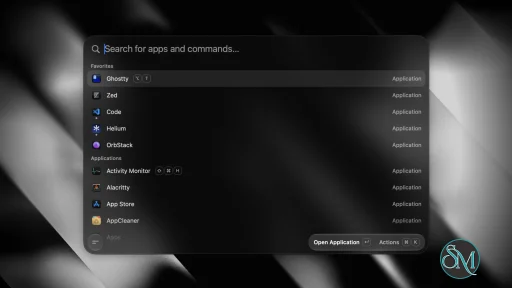
Tinycast is a free, open-source launcher for macOS that combines application search, global hotkeys, clipboard history, file search, quick actions, snippets, window management, and other utilities in a native SwiftUI and AppKit interface. It is designed as a lightweight alternative to larger launcher applications and uses no third-party dependencies or Electron.

Features

Tinycast provides a fuzzy-search application launcher that can find and open installed applications, pin favorites, show running applications, and quit applications. A global hotkey opens the launcher from anywhere in macOS. Per-application hotkeys can also be assigned to quickly focus or hide applications.

The built-in clipboard history stores searchable text and images and allows previously copied content to be pasted back into the application being used. File search uses Spotlight instead of maintaining a separate file index.

Tinycast includes a calculator with mathematical operations, unit conversions, and live currency and cryptocurrency conversions. Quicklinks can turn URLs, searches, files, and deep links into searchable commands.

The application also includes Apple Shortcuts integration, Markdown snippets, custom shell commands, system actions, and 34 window-management actions based on common Rectangle-style operations.

Additional features include calendar and meeting integration, a Markdown notes editor, an emoji picker, AI chat, text Quick Actions for rewriting and translation, and support for running Raycast extensions natively through SwiftUI. Settings can also be exported or imported from Raycast.

Download Tinycast v0.11.19 - Software Mirrors

Tinycast v0.11.19 for macOS

Tinycast-Universal-0.11.19.zip | 15.56 MB

Tinycast-Universal-0.11.19.dmg | 15.7 MB

Tinycast-0.11.19.zip | 8.41 MB

Tinycast-0.11.19.dmg | 8.48 MB

Tinycast v0.11.19 Source Code

Tinycast v0.11.19 Source code (zip)

Tinycast v0.11.19 Source code (tar.gz)

Tinycast v0.11.19 Release Notes:

What's Changed

  • Add local Dictation and expand keyboard shortcut capabilities by @Risengan in #1280
  • Preserve pinned clipboard state during Raycast import by @barissglc in #1284
  • Truncate a long extension toast instead of squeezing the actions by @list-jonas in #1287
  • Import Raycast scripts that are symlinks by @filiperocha in #1292
  • Hide side labels on double modifier shortcuts by @abue-ammar in #1304
  • Default tests to four workers and relax clipboard deadline by @abue-ammar in #1308
  • Add an option to disable automatic update checks by @abue-ammar in #1305
  • Keep launcher meetings in chronological order by @abue-ammar in #1306
  • Add month and year calculator conversions by @abue-ammar in #1307
  • Close AI Chat with Escape by @abue-ammar in #1309
  • Support undo and redo shortcuts in Notes by @abue-ammar in #1310
  • Keep the newest copy when one folder holds two versions of an app by @abue-ammar in #1320
  • Tidy the AI Chat composer: one row inside the glass, a + menu, and a Dictation mic by @notsoshu in #1322
  • Put the calculator's answer in the search bar on ⌘↵ by @mertkaradayi in #1324
  • Reload externally edited notes when reopening by @abue-ammar in #1345
  • Keep the Raycast import panel inside the Settings window by @abue-ammar in #1350
  • Mirror launcher shortcuts and aliases in settings.json by @abue-ammar in #1352
  • Add global microphone mute system action by @abue-ammar in #1347
  • Keep the camera preview live while reframing from the menu bar by @abue-ammar in #1348
  • Fix calculator bit-to-byte rate conversions by @abue-ammar in #1349
  • Run a custom command in the interpreter its #! line names by @abue-ammar in #1351
  • Fix Norwegian app name localization by @abue-ammar in #1353
  • Offer a quicklink's defaulted arguments as optional fields by @abue-ammar in #1354
  • Keep Backspace inside an IME composition by @abue-ammar in #1364
  • Keep an extension row's accessories at full width by @abue-ammar in #1368
  • Focus a dialog's text field once its panel is key by @abue-ammar in #1369
  • Focus a dialog's field when its panel turns key, and say when a snippet shortcut has nowhere to go by @abue-ammar in #1380
  • Create state lazily in EventEmitter impl by @aeons in #1367
  • Echo Gemini thought signatures back on tool calls by @ryan-manor in #1379
  • Fix Folder Search Buffer allocation and once listener receivers by @rwifeng in #1361
  • Preserve Codex web research across AI Chat follow-ups by @abue-ammar in #1381
  • Fix Quicklink prompts when selected text is missing by @abue-ammar in #1382
  • Toggle the AI Chat window with its own shortcut by @abue-ammar in #1383
  • Lock the screen from a hotkey without a synthetic shortcut by @abue-ammar in #1384
  • Say why Refresh Now cannot run while another command is busy by @abue-ammar in #1385
  • Let auto join skip events without a known meeting service by @abue-ammar in #1386
  • Fit the Notes window's height to its text by @abue-ammar in #1388
  • Answer now, today, tomorrow, yesterday and time on their own by @abue-ammar in #1390
  • Bring Finder forward when Show in Finder runs with Settings open by @abue-ammar in #1392
  • Fix Browser Bookmarks errors by @AlexanderWillner in #1393
  • Fire extension action shortcuts while the actions panel is open by @webpro in #1400
  • Let X.com recover stale OAuth locks by @list-jonas in #1410
  • Refresh website gallery with updated screenshots and feature videos by @Risengan in #1433
  • Cycle Center Half through ½, ⅓ and ⅔ by @abue-ammar in #1423
  • Stop meeting links at CRLF line breaks by @abue-ammar in #1425
  • Keep a quicklink prompt on the row it names by @abue-ammar in #1436
  • Add Edit Quicklink to the launcher and shortcuts to list actions by @abue-ammar in #1435
  • Add alias fields to window commands, sizes, layouts and rooms by @abue-ammar in #1437
  • Fix search state across extension navigation by @abue-ammar in #1439
  • Improve launcher category search by @abue-ammar in #1441
  • Respect macOS window reopening preference on restart and shutdown by @abue-ammar in #1442
  • Fix X-prefixed currency conversions after amounts by @abue-ammar in #1443
  • Fix Raycast Store install links by @abue-ammar in #1444
  • Remove Raycast extension OAuth PKCE support by @abue-ammar in #1445
  • Focus Swift reviews and remove extension OAuth remnants by @abue-ammar in #1451
  • Fix Quicklink hotkey input focus by @abue-ammar in #1470
  • Restore launcher search focus after closing menus by @abue-ammar in #1473
  • Support createRequire in the extension runtime by @AlexanderWillner in #1471
  • Add Copy Link action and shortcut for quicklinks by @abue-ammar in #1472
  • Fix palette menu clicks and cropping; prefer synchronous code by @abue-ammar in #1475
  • Fix Docker extension HTTP over Unix sockets by @abue-ammar in #1474
  • Fix extension text paste landing in palette search by @abue-ammar in #1476
  • Synchronize asynchronous Swift test fixtures by @quanru in #1457
  • Remove Traditional Chinese emoji keywords by @abue-ammar in #1479
  • Use sparkles for the Quick AI header icon by @abue-ammar in #1480
  • Fix live dictation model download progress by @abue-ammar in #1481
  • Add launcher forms for Snippets, Quicklinks, Custom Commands and Events by @Risengan in #1488
  • Keep the Notes window steady while editing a list by @notsoshu in #1483
  • Keep list markers on a wrapped item's first line of text by @notsoshu in #1484
  • Add AI Chat shortcuts to switch chats and toggle the sidebar by @abue-ammar in #1493
  • Follow directory symlinks when scanning for applications in configured scopes by @bl1nk in #1482
  • Load bundled extension dependencies by @szupzj18 in #1489

New Contributors

  • @barissglc made their first contribution in #1284
  • @filiperocha made their first contribution in #1292
  • @mertkaradayi made their first contribution in #1324
  • @aeons made their first contribution in #1367
  • @ryan-manor made their first contribution in #1379
  • @rwifeng made their first contribution in #1361
  • @AlexanderWillner made their first contribution in #1393
  • @webpro made their first contribution in #1400
  • @bl1nk made their first contribution in #1482
  • @szupzj18 made their first contribution in #1489
Channel: stable · Version: 0.11.19 · Bundle ID: com.tinycast.app Built from 126c998d87cd7e93bd5e3437098d9c646eb6a714. Full changelog Recommended: install via Homebrew — it clears the quarantine flag automatically on every install and update, so there's nothing to run by hand:
brew trust --tap abue-ammar/tinycast
brew install --cask abue-ammar/tinycast/tinycast
On an Intel Mac, install abue-ammar/tinycast/tinycast-universal instead — same app, built with both slices. This build is self-signed. If you download the DMG directly instead of using Homebrew, macOS will refuse to open it until you clear the quarantine flag once:
xattr -dr com.apple.quarantine "/Applications/Tinycast.app"

Performance and Compatibility

Tinycast is built with SwiftUI and AppKit rather than Electron. The project states that it has zero third-party dependencies and targets a memory footprint of under 100 MB.

The current development requirements specify macOS 26 or later and Xcode 26 for building the application from source. The project provides separate installation options for Apple silicon and Intel Macs running macOS 26.

macOS 15 Sequoia is supported through a separate Homebrew package, but the project identifies this build as no longer maintained. This means users on Sequoia can still install the dedicated version, but it does not receive the same ongoing maintenance as the current macOS 26 release.

Tinycast requires Accessibility permission for features that paste or expand text into other applications. The project states that snippet keystrokes are matched locally and are not stored or sent elsewhere.

System Requirements

Current version:

  • macOS 26 or newer

  • Apple silicon or Intel Mac

  • Accessibility permission for text pasting and snippet expansion

macOS 15 Sequoia:

  • A dedicated Sequoia build is available

  • The Sequoia build is no longer maintained

Developers building Tinycast from source need macOS 26 or later and Xcode 26.

Pros and Cons

Pros

  • Free and open source

  • Native SwiftUI and AppKit application

  • No Electron

  • No third-party dependencies

  • Low memory target

  • Fast application launcher

  • Global and per-app hotkeys

  • Searchable clipboard history

  • File search through Spotlight

  • Calculator and conversions

  • Apple Shortcuts support

  • Markdown snippets

  • Custom shell commands

  • Window management

  • System actions

  • Markdown notes

  • AI chat

  • Text rewriting, translation, and summarization

  • Native Raycast extension support

  • Raycast settings import

  • Backup and restore

  • No telemetry

Cons

  • Current maintained release requires macOS 26

  • macOS 15 Sequoia build is no longer maintained

  • Accessibility permission is required for some features

  • AI functionality requires the user to provide an AI key or have a supported AI account

  • Raycast extension compatibility may vary by extension

How to Install

The easiest installation method is Homebrew. First, add the Tinycast Homebrew tap and trust the third-party tap, then install the package matching your Mac. Apple silicon Macs running macOS 26 use the standard Tinycast package, while Intel Macs use the universal package.

For macOS 15 Sequoia, the project provides a separate tinycast-sequoia package. Beta builds are also available for Apple silicon Macs running macOS 26 or newer.

After installation, open Tinycast and configure a global shortcut under Settings > General. Pressing the shortcut opens the launcher, where applications and commands can be searched immediately. Additional shortcuts, snippets, and other features can be configured from their respective settings sections.

Final Verdict

Tinycast is a feature-rich macOS launcher that goes beyond application search. Its native implementation combines launching, clipboard history, file search, shortcuts, snippets, window management, notes, system controls, and Raycast extension support without relying on Electron.

The biggest limitation is its current operating system requirement. The maintained release targets macOS 26, while the macOS 15 Sequoia build is no longer maintained. Users who meet the current requirements get a lightweight, open-source launcher with a broad feature set.

For Mac users looking for a native alternative to larger launcher utilities, Tinycast provides a comprehensive collection of everyday productivity tools in a single application.
Tinycast v0.11.19
Free
Software Informations:
Developer:

Operating System:
macOS
Date Added:
2026-10-10T16:05:39.366Z
Categories:

Post a Comment/Report Broken Link: