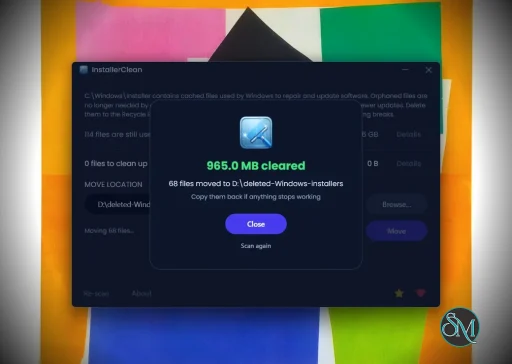
InstallerClean is a small Windows tool that helps detect and remove leftover files, folders, and registry entries created by installed software. It is built for users who want to keep their system clean without manually digging through directories.
InstallerClean is a focused utility designed to clean up files and traces that remain after uninstalling programs. While many uninstallers remove the main application, leftover data often stays behind. InstallerClean aims to fix that with a simple and lightweight approach.
The application is typically portable, meaning it can run without installation and does not add extra load to your system.
Download InstallerClean v3.1.2 - Software Mirrors |
|---|
InstallerClean v3.1.2 for Windowsinstallerclean-cli.exe | 36.97 MB |
InstallerClean v3.1.2 Source Code |
InstallerClean v3.1.2 Release Notes:InstallerClean 3.1.2On a PC with Microsoft 365, InstallerClean now offers the unneeded installer files that Office's registration made it hold back.Microsoft 365Office registers its features with Windows Installer as a program of its own, with no saved installer and no record of where it was installed from. InstallerClean couldn't tell what that program was installed from, so on a PC with Microsoft 365 it could hold back every installation package inC:\Windows\Installer. Windows Installer has nothing in the folder to open for a program like that. So where it's installed for every user on the PC, and both Windows Installer and the registry say it has neither, InstallerClean no longer lets it hold files back.
InstallerClean also offers the old copies of an Office installer that Office updates leave behind. Windows Installer can record, in lower case, the folder it last used to install one of Office's components, and InstallerClean held the old copies back because that spelling didn't match the same folder on the component's list of places it can be installed from. It now checks the file in that folder instead of the spelling.
Files less than a day oldInstallerClean holds back a file that's less than a day old, in case an install or update is still using it. It now says how many files it held back for that reason, their size and from when a scan will probably be able to offer them. The line is on the screen after a Move or Delete, on "Nothing offered on this PC" and on the command line.Numbers when you pick a languagePicking a language from the language button changes the app's words and now leaves numbers in your PC's regional format, as they are when you haven't picked one and on the command line. With English picked on a PC set to German formats, a size reads 1,24 GB. The time and date in the line about files less than a day old follow your regional format where it's a format of the language the app is showing, and that language's own format otherwise.The command lineIf a write to its output fails, such as one to a redirect on a full disk,installerclean-cli now carries on with the run instead of stopping there, and the lines after it go out once the disk has room. A Delete or Move goes ahead and exits as its batch did. A scan that finishes, --help and --version exit 1 when any of their output couldn't be written, since their output is what they're run for.
On /s, the notes about the scan now print above the line counting the files it found, so the list of files sits straight under that line.
The anonymous reportThe report now carries the Country or region set in Windows, the setting that decides whether the "Send anonymous report" box starts ticked. It also carries a count of installations like Office's registration above. Like everything else in the report it names no program, file or account, and the privacy policy lists what it holds. The report is only ever sent from a PC's first finished run, and only if the "Send anonymous report" box is ticked on the screen InstallerClean shows when that run finishes. The changelog has the full list.Downloads
Build it yourselfBuilt with .NET SDK 10.0.112 from the v3.1.2 tag. The portable and the command-line tool are single-file builds published with compression on. Release builds are deterministic, so building that tag yourself, on that SDK and with those flags, gives you the same bytes and the same hashes for the portable and the command-line tool; the README's Checking the download itself section has the detail. The installer is a different case: Inno Setup packs it and stamps the build year into it, so don't expect its hash to match.VirusTotal
DonateAny small donation is much appreciated. |
Key Features of InstallerClean
Leftover File Detection
InstallerClean scans your system for files and folders that remain after uninstalling applications. This helps free up disk space and reduce clutter.Registry Cleanup
It can identify unused or orphaned registry entries related to removed programs, helping maintain system organization.Simple Interface
The tool is designed to be straightforward. Users can scan and clean with minimal steps, making it accessible even for non technical users.Portable Usage
InstallerClean often runs as a portable application, so you can use it on multiple systems without installation.Fast Scanning
The scanning process is quick and does not heavily impact system performance.
User Experience
InstallerClean is easy to use, with a minimal interface that focuses on functionality. It does not overwhelm users with advanced settings, which makes it suitable for quick maintenance tasks.
However, advanced users may find it lacks deeper customization compared to more comprehensive system cleanup tools.
Performance and Compatibility
The software performs efficiently and works on most Windows systems. It is lightweight and does not consume significant resources during scanning or cleaning.
Because it targets leftover files specifically, it complements rather than replaces full system maintenance tools.
Pros
Lightweight and fast
Simple and easy to use
Helps remove leftover files and registry entries
Portable and convenient
Cons
Limited advanced features
Not as comprehensive as full system cleaners
Requires careful review before deleting files
InstallerClean is ideal for users who frequently install and uninstall software and want to keep their system tidy. It is also useful for those who prefer simple tools over complex system utilities.
InstallerClean delivers a focused solution for removing leftover files after uninstallations. While it is not a full system optimizer, its simplicity and efficiency make it a valuable addition to basic PC maintenance tools.
Post a Comment/Report Broken Link: