Stirling PDF is a free and open source PDF toolkit that brings a large collection of document tools into one application. Instead of installing separate utilities for merging, splitting, converting, compressing, signing, OCR, or editing PDFs, Stirling PDF provides them through a unified web interface that can run locally or on your own server.
Its self-hosted design is one of its biggest advantages. Documents can be processed on infrastructure you control, making Stirling PDF an attractive alternative to many online PDF services for users who care about privacy and data ownership.
Working with PDF files often means jumping between different applications and websites. One service might handle compression while another is needed for OCR or conversion. Stirling PDF takes a more centralized approach by providing a broad collection of PDF operations from a single interface.
The application can be installed locally or deployed with Docker, making it suitable for both individual users and organizations. It can also be used as a self-hosted document processing service that other users access through a browser.
Key Features of Stirling PDF
Merge and Split PDFs
Stirling PDF makes common document operations straightforward. Multiple PDF files can be merged into a single document, while large PDFs can be split into individual pages or smaller sections.
This is particularly useful for preparing reports, combining scanned documents, or reorganizing large document collections.
PDF Compression
The built-in compression tools can reduce file sizes for documents that need to be uploaded, emailed, or stored more efficiently.
Users can choose different compression settings depending on whether they prioritize smaller files or maintaining document quality.
PDF Conversion
Stirling PDF supports numerous document conversion workflows, including converting between PDF and common office or image formats.
This makes it useful as a general-purpose document conversion utility rather than simply a PDF editor.
OCR
Optical Character Recognition allows scanned documents and images containing text to become searchable and easier to process.
OCR is particularly useful for digitizing scanned paperwork, archival documents, invoices, and other PDFs that do not contain an actual text layer.
PDF Editing
The application provides tools for manipulating PDF pages and content, including rotating, reordering, extracting, and adding elements to documents.
It is not intended to completely replace a professional desktop PDF editor for advanced layout editing, but it covers a large number of everyday tasks.
Digital Signatures
Stirling PDF includes tools for working with PDF signatures and certificates. This is useful when documents need to be signed or prepared for digital workflows.
Watermarks and Page Numbers
Users can add watermarks, headers, footers, page numbers, and other repeated elements to documents.
These features are particularly useful for reports, internal documentation, and business paperwork.
Security Tools
Stirling PDF includes functionality for encrypting and decrypting PDFs, removing passwords where authorized, and managing document permissions.
This gives users more control over sensitive documents without needing to upload them to an external website.
Self-Hosted Deployment
One of Stirling PDF's biggest strengths is its deployment flexibility. It can run locally or through Docker, allowing users to keep document processing within their own infrastructure.
This makes it particularly appealing to businesses, developers, homelab users, and privacy-conscious individuals.
Download Stirling PDF v3.2.2 - Software Mirrors |
|---|
Stirling PDF v3.2.2 for Windows |
Stirling PDF v3.2.2 for macOS |
Stirling PDF v3.2.2 for LinuxStirling-PDF-linux-x86_64.rpm | 246.55 MB |
Stirling PDF v3.2.2 for Java (Cross-Platform) |
Stirling PDF v3.2.2 Source Code |
Stirling PDF v3.2.2 Release Notes:Another small release with some bug fixes
What's ChangedBug Fixes
Enhancements
Development Tools
Other Changes
New Contributors
|
Performance and User Experience
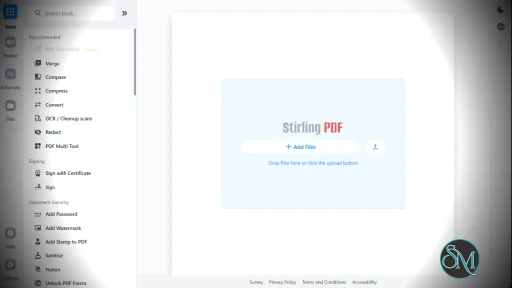
Stirling PDF has a clean web interface that makes its large collection of tools relatively easy to navigate. Instead of learning command-line utilities or installing multiple applications, users can select the operation they need from the dashboard and upload their document.
The browser-based interface also makes it convenient for organizations. A single Stirling PDF installation can provide PDF tools to multiple users without requiring everyone to install separate software.
Performance depends on the hardware available to the server, particularly for demanding operations such as OCR, large document conversions, and image-heavy PDFs. Docker makes it relatively easy to allocate additional resources when necessary.
The project has also developed into a much broader document-processing platform rather than remaining a simple collection of PDF utilities.
Pros
Free and open source.
Large collection of PDF tools.
Self-hosted and privacy-friendly.
Docker support.
Browser-based interface.
PDF merging and splitting.
Compression and conversion.
OCR support.
Digital signature tools.
Encryption and security features.
Useful for both personal and business environments.
Active open source development.
Cons
Some advanced PDF editing features are less sophisticated than commercial applications.
Large OCR and conversion jobs can require significant system resources.
The large number of tools can initially feel overwhelming.
Server administration is required for self-hosted deployments.
Who Should Use Stirling PDF?
Stirling PDF is an excellent choice for developers, IT administrators, businesses, students, researchers, and privacy-conscious users who regularly work with PDF files.
It is particularly useful for organizations that want to provide centralized PDF processing without sending confidential documents to third-party online services.
For homelab users, it is also an attractive addition to a self-hosted stack because Docker makes deployment and upgrades relatively straightforward.
Final Verdict
Stirling PDF is one of the strongest open source alternatives to commercial and online PDF tool collections. Its biggest advantage is not one particular feature, but the sheer range of useful operations available from a single application.
The combination of OCR, conversion, compression, document manipulation, security tools, signatures, and self-hosting makes it a practical everyday utility rather than a niche PDF application.
It may not completely replace a professional PDF editor for highly specialized design work, but for most routine document-processing tasks, Stirling PDF provides an impressive feature set while keeping your files under your control.
Developer:
Stirling PDF
Operating System:
Windows / macOS / Linux
Date Added:
2026-10-24T12:07:19.117Z
Categories:
Post a Comment/Report Broken Link: