qBittorrent is a free and open source BitTorrent client designed as an alternative to heavier or ad-supported options. Built with the goal of providing a clean experience, it integrates powerful tools while maintaining an intuitive interface.
qBittorrent has earned a strong reputation as one of the best torrent clients available today. It delivers a balance of performance, simplicity, and advanced features, all without ads or unnecessary extras. For users who want full control over downloads while keeping things lightweight, it remains a top choice.
It is available on Windows, macOS, and Linux, making it widely accessible.
Download qBittorrent v5.2.4 - Software Mirrors |
|---|
Download qBittorrent v5.2.4 Download qBittorrent v5.2.4 Download qBittorrent v5.2.4 Download qBittorrent v5.2.4 Download qBittorrent v5.2.3 Download qBittorrent v5.2.4 |
qBittorrent v5.2.4 Release Notes:
|
Key Features of qBittorrent
Integrated Search Engine
qBittorrent includes a built in search feature that allows users to find torrents directly inside the application. This reduces the need to rely on external websites.No Ads or Bundled Software
Unlike many torrent clients, qBittorrent is completely free from ads and bundled installers, offering a clean and trustworthy experience.Advanced Download Controls
Users can prioritize files, set bandwidth limits, schedule downloads, and manage queues efficiently. This level of control is useful for both casual and advanced users.Remote Web Interface
The built in web UI allows you to control downloads from another device through a browser. This is especially useful for managing a home server.RSS Feed Support
qBittorrent can automatically download content using RSS feeds, making it ideal for users who follow regular updates like podcasts or series.
User Experience
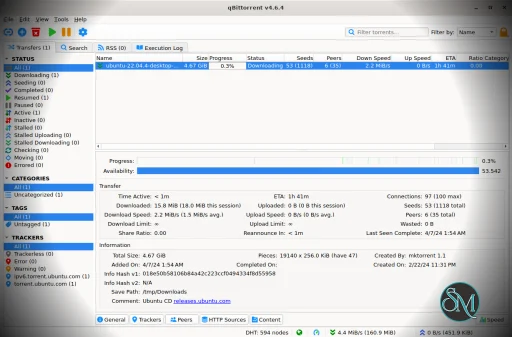
The interface is simple and familiar, especially for users who have used traditional torrent clients. Navigation is straightforward, and most features are easy to access.
Despite its simplicity, it still offers deep customization options for users who want more control.
Performance and Compatibility
qBittorrent is known for stable performance and efficient resource usage. It handles large downloads well and remains responsive even when managing multiple torrents.
Cross platform support ensures consistent performance across different operating systems.
Pros
Free and open source
No ads or unwanted software
Built in search functionality
Advanced control over downloads
Lightweight and efficient
Cons
Search feature may require manual plugin setup
Interface feels slightly outdated to some users
Advanced settings can be overwhelming for beginners
qBittorrent is ideal for users who want a reliable and clean torrent client without distractions. It suits both beginners who need a simple downloader and advanced users who want detailed control over their downloads.
qBittorrent stands out as a powerful and user friendly torrent client. Its combination of performance, features, and zero ads makes it one of the best choices for torrenting today.
Developer:
The qBittorrent project
Operating System:
Windows / macOS / Linux
Date Added:
2026-10-12T15:21:41.000Z
Categories:
Post a Comment/Report Broken Link: