OBS Studio, short for Open Broadcaster Software Studio, is a free and open source application that allows users to record screens and stream live video to popular platforms. It supports Windows, macOS, and Linux. The software is known for its stability, customization options, and professional grade features, despite being completely free to use.
OBS Studio is commonly used for live streaming on platforms such as YouTube, Twitch, Facebook Live, and custom RTMP servers. It is also widely used for creating tutorials, gameplay recordings, online classes, webinars, and professional presentations.
Download OBS Studio 33.0.0 | ||
|---|---|---|
OBS Studio 33.0.0 for WindowsDownload Installer (arm64/zip) | 190.91 MB | ||
OBS Studio 33.0.0 for macOSDownload Installer (arm64/Apple Silicon) | 199.92 MB | ||
OBS Studio 33.0.0 for LinuxDownload Installer (x86_64/DEB) | 151.97 MB | ||
OBS Studio 33.0.0 Source Code | ||
OBS Studio 33.0.0 Release Notes:33.0 New Features--------------
---------
-----------
-----------------------
Checksums🔅 OBS-Studio-33.0.0-Sources.tar.gz: c1ae3c98c1bb70ebdced33e894a526fcbbbda9bfd95806970a3fc31f74b08f6c 🔅 OBS-Studio-33.0.0-Ubuntu-26.04-x86_64-dbsym.ddeb: 12045838dfd0202ba26b77fb2e8572f4db27c709b3aabe425ac979ee0532a61c 🔅 OBS-Studio-33.0.0-Ubuntu-26.04-x86_64.deb: f5844914eadd560314f3a9db020afa7a8afbefb67a26c488f2956dc339704918 🔅 OBS-Studio-33.0.0-Windows-arm64-PDBs.zip: e43139f467ccedb4fbb583f09ce64341a7c96b44030181ef57abd1528142b947 🔅 OBS-Studio-33.0.0-Windows-arm64.zip: 02c53d7bff3f9c159401da79fc375d7b75b00c9ca62d2b4ec5fc05a575d2fa1f 🔅 OBS-Studio-33.0.0-Windows-x64-Installer.exe: 3bf55dae6d9db651505828090de74540296c742ed2a94a28cf055cb6ddc6bed3 🔅 OBS-Studio-33.0.0-Windows-x64-PDBs.zip: dbda0e1e9967262380e619e071de068809ccae2ccb3f68f52034db9a8276475d 🔅 OBS-Studio-33.0.0-Windows-x64.zip: 3369a3ecd67b5669a8a08d77357f87cc786d1fba42fbbd1054d841a69f6271a7 🔅 OBS-Studio-33.0.0-macOS-Apple-dSYMs.tar.xz: 6b162ccbafc2eaaee3ced192a851eb5d3d616ad8d54125ce5cd701d26e6939bf 🔅 OBS-Studio-33.0.0-macOS-Apple.dmg: b36f4e9da5f2f17c733ba711c8fe0656d6b0cd573cfe96eeb3e68325cffef739 🔅 OBS-Studio-33.0.0-macOS-Intel-dSYMs.tar.xz: 997ba41207e9fd7b045b955561cdd5c32b29f12d98ea3ea5a43de7c9edd8f1c7 🔅 OBS-Studio-33.0.0-macOS-Intel.dmg: 8524ff428f038573f8905a206841081d3da9ec607063906f7bbfe38d55810c1c | ||
Support the OBS Project | ||
Key Features of OBS Studio
High Quality Screen Recording
OBS Studio captures full screen, specific windows, or custom regions in high resolution. Users can record videos with smooth frame rates and clear audio, suitable for professional content creation.
Advanced Live Streaming
The software supports live streaming to multiple platforms with configurable bitrates, resolutions, and encoders. This ensures stable and high quality streams even during long sessions.
Scene and Source Management
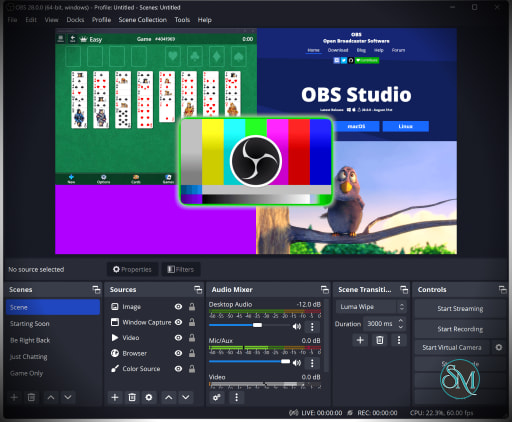
Users can create multiple scenes and switch between them instantly. Each scene can include screen capture, webcam, images, text, media files, and browser sources.
Real Time Audio and Video Mixing
OBS Studio includes a built in audio mixer with noise suppression, gain control, and audio monitoring. Video filters such as color correction and chroma key are also supported.
Studio Mode
Studio Mode allows users to preview scenes before pushing them live. This feature is useful for professional broadcasts where smooth transitions are important.
Plugin and Extension Support
OBS Studio supports a wide range of plugins created by the community. These plugins extend functionality with features such as virtual cameras, advanced transitions, and automation tools.
Hardware Acceleration
The software supports hardware encoding using modern GPUs. This improves performance and reduces CPU usage during recording or streaming.
Custom Output Settings
Advanced users can fine tune recording formats, streaming protocols, bitrates, and encoder settings for maximum control and quality.
Benefits of Using OBS Studio
Completely Free and Open Source
OBS Studio offers professional features without any cost. There are no subscriptions, watermarks, or usage limits.
Trusted by Professionals
Many professional streamers and production teams rely on OBS Studio for daily broadcasts and recordings.
Highly Customizable
From layouts to hotkeys, almost every aspect of OBS Studio can be customized to match user workflows.
Cross Platform Support
OBS Studio works on multiple operating systems, making it accessible to a wide range of users.
Strong Community Support
The software has a large and active community that provides tutorials, plugins, themes, and troubleshooting help.
OBS Studio is one of the most powerful and dependable tools for screen recording and live streaming. With advanced features, deep customization, and zero cost, it stands as an industry standard for creators and professionals alike. Whether you are streaming games, teaching online, or producing high quality video content, OBS Studio provides everything needed for reliable and professional results.
OBS Studio is a widely used open source software for screen recording and live streaming. It is trusted by content creators, gamers, educators, and professionals around the world. OBS Studio offers advanced capture tools, real time audio video mixing, and flexible output settings, making it one of the most powerful and reliable broadcasting solutions available today.
Developer:
OBS Project
Operating System:
Windows / Mac / Linux
Date Added:
2026-10-24T13:07:20.697Z
Categories:
Post a Comment/Report Broken Link: