LightCraft v0.6.0

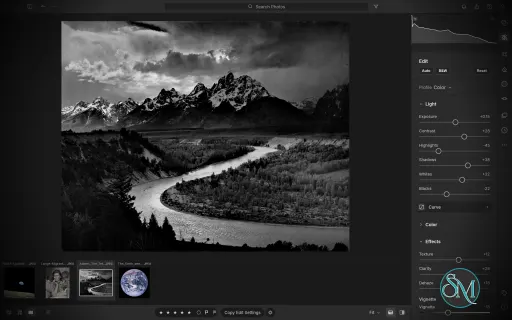
LightCraft is a free, open-source photo management and RAW development application designed as an alternative to Adobe Lightroom. Built in Rust, it combines photo library organization with a comprehensive set of image editing tools, allowing photographers to adjust exposure, refine colors, apply local corrections, and prepare images for export without modifying their original files.

LightCraft is designed for desktop use on Windows, macOS, and Linux, with a WebAssembly version that runs in a browser. It also supports automation through a command-line interface and the Model Context Protocol (MCP), making it an interesting option for photographers who want local control over their workflow.

Features

Non-Destructive Photo Editing

LightCraft keeps original images intact and stores editing operations separately. You can experiment with different adjustments without permanently changing the source files.

Its editing tools include exposure, contrast, highlights, shadows, whites, blacks, tone curves, white balance, vibrance, and saturation. The application uses a wide-gamut, 32-bit floating-point processing pipeline designed to preserve tonal and color information throughout editing.

Color Grading and Presets

The color tools include an eight-band Color Mixer, RGB tone curves, and separate color grading controls for shadows, midtones, and highlights. These features provide flexibility for natural photo correction as well as creative color treatments.

LightCraft also includes built-in presets and lets users save custom looks. You can copy, paste, or synchronize selected adjustments across multiple photos, which is useful when editing a collection of images from the same shoot.

Local Masking and Adjustments

LightCraft supports brush masks, linear gradients, and radial gradients, along with selection tools for luminance, color, sky, subject, and background. Masks can be combined, subtracted, intersected, and inverted.

Local adjustments let you change exposure, contrast, color, texture, sharpness, and other properties in specific parts of an image. This helps users refine skies, brighten subjects, or create more controlled lighting effects without applying every adjustment globally.

Crop, Geometry, and Black-and-White Editing

The cropping tools support common aspect ratios, straightening, rotation, flipping, and manual geometric transformations. Composition overlays help photographers align images and refine framing.

For monochrome photography, LightCraft includes black-and-white conversion, an eight-band monochrome mixer, and additional color grading controls for creating tinted or split-tone results.

Photo Library Management

LightCraft includes tools for organizing photo collections, including folders, albums, smart albums, stacks, virtual copies, ratings, flags, labels, filtering, searching, and sorting.

Its local-first approach avoids requiring an online account or cloud catalog. The project describes its catalog as a human-readable log of editing operations, making it easier to inspect, back up, and replay changes.

Command-Line and AI Automation

In addition to its graphical interface, LightCraft provides a command-line application for rendering images and applying adjustments. MCP support allows compatible AI agents to interact with the application through an automation interface.

These capabilities are useful for repeatable editing tasks, scripted workflows, and experimentation with AI-assisted photo processing.

Download LightCraft v0.6.0 - Software Mirrors

LightCraft v0.6.0 for Windows

lightcraft-0.6.0-windows-x86.msi | 77.62 MB

lightcraft-0.6.0-windows-x86-portable.zip | 91.24 MB

lightcraft-0.6.0-windows-x64.msi | 78.85 MB

lightcraft-0.6.0-windows-x64-portable.zip | 94.25 MB

lightcraft-0.6.0-windows-arm64.msi | 75.51 MB

lightcraft-0.6.0-windows-arm64-portable.zip | 90.86 MB

LightCraft v0.6.0 for macOS

lightcraft-cli-0.6.0-macos-universal.zip | 92.88 MB

lightcraft-0.6.0-macos-universal.dmg | 96.55 MB

LightCraft v0.6.0 for Linux

lightcraft-0.6.0-linux-x86_64.tar.gz | 93.88 MB

lightcraft-0.6.0-linux-x86_64.rpm | 94.62 MB

lightcraft-0.6.0-linux-x86_64.flatpak | 69.16 MB

lightcraft-0.6.0-linux-x86_64.deb | 95.15 MB

lightcraft-0.6.0-linux-x86_64.AppImage.zsync | 313.08 kB

lightcraft-0.6.0-linux-x86_64.AppImage | 89.38 MB

lightcraft-0.6.0-linux-riscv64.tar.gz | 91.9 MB

lightcraft-0.6.0-linux-aarch64.tar.gz | 90.37 MB

lightcraft-0.6.0-linux-aarch64.rpm | 91.74 MB

lightcraft-0.6.0-linux-aarch64.flatpak | 65.92 MB

lightcraft-0.6.0-linux-aarch64.deb | 92.35 MB

lightcraft-0.6.0-linux-aarch64.AppImage.zsync | 301.79 kB

lightcraft-0.6.0-linux-aarch64.AppImage | 86.15 MB

LightCraft v0.6.0 for BSD

lightcraft-0.6.0-freebsd-x86_64.tar.gz | 93.72 MB

Others Download related to LightCraft v0.6.0

lightcraft-web-0.6.0.zip | 97.06 MB

LightCraft v0.6.0 Source Code

LightCraft v0.6.0 Source code (zip)

LightCraft v0.6.0 Source code (tar.gz)

LightCraft v0.6.0 Release Notes:

What's Changed

  • Integrate 59 community PRs (batches 21–23) by @echelon in #657
  • LR-IMP-CAMERA-COVERAGE: Sony ILCE-7CR samples in the corpus by @AlexChambers in #524
  • LR-PROF-CAMERACOLOR: bundled Sony ILCE-7CR camera profile by @AlexChambers in #526
  • LR-PRE-AMOUNT: presets with the Grain group apply at any amount by @AlexChambers in #530
  • LR-PROF-CAMERACOLOR: calibrate rejected every ILCE-7RM4 file (camera JPEG proxy a pixel short) by @rock-meister in #531
  • LRC-DEV-PROCESS: process versions, so a look change can ship without changing existing edits (#146) by @AlexChambers in #533
  • LRC-LIB-SMARTCOLL: grouped rule menu, 17 new fields, validation, smart-album references, date and album pickers by @nledford in #536
  • LRC-LIB-CATALOG-IMPORT: read Lightroom's Custom white balance by its as-shot shift on relative-WB raws (#510) by @bitshiftza in #540
  • i18n: add French translation catalog and menu options by @enzoflayac in #541
  • LR-IMP-CAMERA-COVERAGE: Sony black levels: SR2 layouts and lossless M/S pedestal by @AlexChambers in #542
  • #538: breadcrumbs open their folder as spelled; fix browse test on Windows by @HarrisXiu in #549
  • LR-CROP-STRAIGHTEN: rotation pointer, angle readout and an Angle field in the crop tool (#534) by @nledford in #550
  • LR-BEHAV-BG-TASKS: demo scenes: a rayon worker renders a scene alone, never in parallel (deadlock) by @AlexChambers in #557
  • LR-BEHAV-TEXTFIELD: a shared text field with Cut / Copy / Paste, Esc and Return that work by @nledford in #561
  • Use the system clock in the CLI and headless MCP sessions (#554) by @MarekSpodBiedry in #562
  • Export a contact sheet of photos to a paginated PDF by @vbasky in #563
  • Add Ukrainian interface translation by @dmatviichuk in #564
  • LR-PROF-CAMERACOLOR: Sony ARWs shot with DRO no longer start with the camera JPEG's lifted shadows (#244) by @AlexChambers in #568
  • Cmd+= / Cmd+- / Cmd+0 zoom the photo, not egui's interface scale (#566) by @bitshiftza in #570
  • LR-EDIT-OPTICS-PROFILE: Reload from Disk reads a file's lens data and turns the correction on for untouched photos by @radialmonster in #571
  • Keep the current-view selection after permanent photo deletion by @midasdf in #572
  • docs: explain Codex MCP setup and external libraries by @pikkemaat in #574
  • LR-IMP-CAMERA-COVERAGE: Sony ARW white balance and black level from one SR2SubIFD decryptor by @AlexChambers in #575
  • LRC-LIB-KEYWORDS: a Keyword List to create, edit and reorganize keywords (stacked on #561) by @nledford in #578
  • LR-IMP-CAMERA-COVERAGE: Sony 16:9 crop on pre-crop-tag bodies by @AlexChambers in #580
  • LR-IMP-PROFILES: XMP channel curves only with the master and all three channel curves by @Exalted5373 in #581
  • LR-PROF-CAMERACOLOR: a partial camera look instead of the dark neutral fallback when the full look misses the gates by @radialmonster in #583
  • Nix: bump craft-fonts pin to fix nix build / nix run by @GarrettGR in #584
  • LRC-LIB-KEYWORDS: a selection-aware Keywording box (stacked on #578) by @nledford in #585
  • LR-IMP-FORMATS: treat DNG samples piled up below the stated white level as clipped (#548) by @radialmonster in #586
  • LRC-LIB-KEYWORDS: Edit Keyword Set (stacked on #585) by @nledford in #588
  • LRC-LIB-KEYWORDS: import and export keyword lists by @nledford in #592
  • LRC-LIB-LIBFOLDERS: folder colour labels (folder records, catalog format v4) by @nledford in #597
  • LR-IMP-FORMATS: read the two-field 12-bit ORF layout of old Olympus compacts by @radialmonster in #600
  • raw: name Nikon High Efficiency NEFs instead of blaming a missing table (#193) by @DWAA1660 in #603
  • LRC-LIB-LIBFOLDERS: Synchronize Folder (stacked on #597) by @nledford in #604
  • LR-IMP-ADD-DIALOG: initialize layouts before import timing and tag clicks by @sanyamsingh001 in #608
  • LR-IMP-FORMATS: HEIC decodes like libheif; release builds include it by @Exalted5373 in #609
  • LR-PREF-DISPLAY: monitor ICC profiles (display colour management) by @kelanna in #612
  • LR-IMP-CAMERA-COVERAGE: CR2 black level from the masked columns only by @Exalted5373 in #615
  • LR-PROF-CAMERACOLOR: Olympus ORF starting look fitted to its own JPEG by @Exalted5373 in #616
  • chore: bump github actions to fix Node 20 deprecation warnings by @dylanmtaylor in #621
  • docs: register the MCP server from an installed release by @sawizzle in #623
  • LR-EDIT-AUTO: Lightroom-like Auto, calibrated on Lightroom's Auto results by @AlexChambers in #628
  • LR-IMP-FORMATS: decode Nikon "lossy after split" NEF by @radialmonster in #633
  • Add OmaStore manifest by @KitsuneSemCalda in #636
  • LR-IMP-FORMATS: Sony DSC-R1 .SR2 decodes (big-endian 16-bit words in a little-endian TIFF) by @radialmonster in #640
  • HDR editing and HDR export: gain map JPEG, PQ AVIF, float TIFF by @akvaithi in #646
  • LR-IMP-FORMATS: decode the padded 12.8 bpp Olympus ORF layout (E-300, E-500, E-330; E-M5 II and PEN-F high res) by @radialmonster in #651
  • LR-EDIT-DETAIL-DENOISE: fix shared-memory races in GPU denoising by @QuirkyTurtle94 in #500
  • LR-LIB-CAPTURETIME: reject impossible anchor dates before shifting photos by @sanyamsingh001 in #502
  • LR-BEHAV-BG-TASKS: render export batches side by side (issue #496) by @HarrisXiu in #504
  • LR-LIB-FOLDER: delete populated album folders with one-step undo by @QuirkyTurtle94 in #505
  • LR-IMP-FORMATS: name GoPro GPR (VC-5 DNG) in the unsupported-raw error instead of 'TIFF compression 9' by @radialmonster in #508
  • LR-LIB-RATING: fix relative ratings and grid bracket shortcuts by @sanyamsingh001 in #509
  • Fix DNG 1.7 row/column-interleaved rasters (JPEG XL DNGs decoded as a purple 2×2 grid) by @AER00 in #513
  • Issue #399: Windows MSI: choose the install folder, finish dialog with Launch LightCraft by @HarrisXiu in #520
  • Hide the mask overlay when applying local adjustments by @QuirkyTurtle94 in #522
  • Fix brush subtraction and new brush mask creation by @QuirkyTurtle94 in #527
  • LR-PROF-CAMERACOLOR: fit the camera look without clipped sensor pixels by @radialmonster in #528
  • Integrate #607 follow-up, #655, #656 by @echelon in #659
  • LR-EDIT-LIGHT-HIGHLIGHTS: clipped highlights stay neutral when darkened (#523) by @AlexChambers in #607
  • LR-VIEW-ZOOM: zoom windows cover a canvas wider than 2048 px (issue #652) by @HarrisXiu in #655
  • LR-BEHAV-GPU: no render is inside the GPU driver when the app quits (issue #620) by @HarrisXiu in #656
  • Integrate #573, #498, #602, #601, #560, #555, #480, #590 by @echelon in #692
  • LR-EDIT-OPTICS-PROFILE: apply embedded A7R IVA distortion corrections by @QuirkyTurtle94 in #498
  • LR-IMP-FORMATS: decode Hasselblad lossless JPEG with selection value 8 (FFF, H3D/H4D/CFV-50c 3FR) by @radialmonster in #555
  • M11.4: raws from 52 camera models start from matrices fitted to measured spectral sensitivities by @rossaai in #560
  • LR-CLOUD-SMARTPREVIEW: smart previews record the camera-look fit version and are rebuilt when it is older by @radialmonster in #590
  • Issue #345: activity stack — one progress indicator for long-running tasks by @cajax in #601
  • Fix TIFF detection for camera-authored files (#281) by @peiyan0 in #480
  • Progress docs: full parity re-measure (alpha, ~55% ready) and the standard doc set by @echelon in #788
  • Release prep: 0.6.0 and Linux riscv64 release build by @echelon in #844

New Contributors

  • @AlexChambers made their first contribution in #524
  • @bitshiftza made their first contribution in #540
  • @enzoflayac made their first contribution in #541
  • @vbasky made their first contribution in #563
  • @dmatviichuk made their first contribution in #564
  • @pikkemaat made their first contribution in #574
  • @GarrettGR made their first contribution in #584
  • @kelanna made their first contribution in #612
  • @dylanmtaylor made their first contribution in #621
  • @sawizzle made their first contribution in #623
  • @KitsuneSemCalda made their first contribution in #636
  • @akvaithi made their first contribution in #646
  • @AER00 made their first contribution in #513
  • @rossaai made their first contribution in #560
  • @cajax made their first contribution in #601
Full Changelog: v0.5.0...v0.6.0

Performance and Compatibility

LightCraft is written in Rust and uses background rendering to keep the interface responsive during common editing operations. The project reports that it can display embedded camera previews or cached renders quickly while preparing full-resolution images in the background.

The application supports Windows, macOS, and Linux, as well as a browser-based WebAssembly build. Available Linux packages include AppImage, DEB, and RPM formats, with builds for x86-64 and ARM64 systems.

However, LightCraft is still a developing project. Its feature list should not be interpreted as proof of complete Adobe Lightroom compatibility. Photographers with established Lightroom workflows should verify RAW camera support, editing results, and catalog migration before moving their primary library.

System Requirements

  • Operating systems: Windows, macOS, and Linux.

  • Browser support: A WebAssembly build is available.

  • Processor architectures: Linux releases include x86-64 and ARM64 builds.

  • Build requirements: Rust and the project's documented dependencies are needed to compile from source.

The project does not establish a comprehensive minimum hardware specification in the information reviewed. Actual performance will depend on image resolution, RAW processing requirements, and available system resources.

Pros and Cons

Pros

  • Free and open-source under the MIT and Apache 2.0 licenses.

  • Non-destructive editing preserves original photos.

  • Extensive controls for exposure, tone curves, color grading, and local adjustments.

  • Photo library organization tools for managing larger collections.

  • Native applications for major desktop operating systems.

  • Browser-based build for experimentation without a traditional desktop installation.

  • Command-line and MCP support for automation.

  • Local-first workflow without a mandatory cloud account or subscription.

Cons

  • Still under active development, so feature completeness and reliability may vary.

  • Compatibility with existing Lightroom catalogs and established workflows needs verification.

  • RAW format support may not cover every camera model or file variation.

  • Users accustomed to Lightroom may encounter differences in editing behavior and output.

  • Advanced automation and browser workflows may require additional setup.

  • Published minimum hardware requirements are limited.

How to Install

The simplest option is to download a suitable package from the project's GitHub Releases page. Linux users can choose the available AppImage, DEB, or RPM package, while macOS and Windows packages are also provided.

For users who prefer to build from source, install Rust and the required development tools, then run:

git clone https://github.com/storytold/lightcraft
cd lightcraft
cargo run --release -p lightcraft

To open a specific photo folder, pass its path when launching the application:

cargo run --release -p lightcraft -- ~/Pictures/trip

To try the browser-based build, follow the project's WebAssembly setup instructions and run:

cargo xtask web --serve

The project also provides a command-line renderer for scripted workflows. Consult the official documentation for supported formats, available adjustment parameters, and platform-specific installation details.

Final Verdict

LightCraft is a promising open-source alternative for photographers who want a local photo library and RAW editing workflow without relying on a commercial subscription. Its combination of non-destructive editing, color grading, masking, presets, and catalog management makes it more ambitious than a basic image editor.

Its strongest differentiators are its Rust-based architecture, local-first design, and automation support. These features may appeal to technical users and photographers interested in building repeatable editing workflows.

The main reservation is maturity. Before switching from Lightroom, users should test their own camera RAW files, compare exported images, and confirm that the library features they depend on are available and reliable. LightCraft is worth trying, but photographers with demanding production workflows should evaluate it alongside their existing tools rather than assume full feature parity.
LightCraft v0.6.0
Free
Software Informations:
Developer:

Operating System:
Windows / macOS / Linux / BSD
Date Added:
2026-10-11T05:03:27.648Z
Categories:

Post a Comment/Report Broken Link: