EffectCraft is an open-source motion graphics and visual effects application designed as a clean-room reimplementation of Adobe After Effects. Written in Rust, it provides a native desktop editor for Windows, macOS, and Linux, alongside a browser-based version.
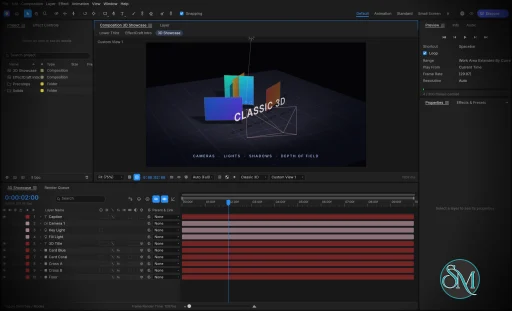
The application focuses on professional animation and compositing workflows, including keyframes, animated text, masks, visual effects, 3D cameras, lights, and a render queue. Its interface follows familiar After Effects conventions, making it easier for experienced motion designers to understand its workflow.
EffectCraft also stands out for its automation capabilities. Projects use a readable JSON-based format, and the application exposes its editing engine through a command-line interface, a JSON control channel, and an MCP server for AI agents.
Features
EffectCraft includes a broad collection of tools for motion graphics and visual effects.
Timeline and keyframes: Animate layer properties with linear, Bezier, hold, and eased interpolation. The Graph Editor provides value and speed graphs for adjusting animation curves.
Layer compositing: Combine text, shapes, footage, nested compositions, adjustment layers, solids, cameras, and lights. Parenting, track mattes, blend modes, and motion blur are supported.
Shape animation: Create shape layers with trim paths, repeaters, rounded corners, gradient strokes, and other procedural shape operators.
Masks and selection: Draw and edit masks with feathering, expansion, and different compositing modes.
Text animation: Work with point text, paragraph text, text animators, range selectors, and text-on-path workflows.
Expressions: Use JavaScript expressions with familiar After Effects-style objects and functions, including wiggle, loopOut, and layer references.
Puppet tools: Animate character and object deformations with pins, mesh controls, rigging, and follow-through.
Visual effects: Apply blur, sharpening, color correction, distortion, keying, noise, stylization, transitions, simulation, and audio effects.
Layer styles: Apply effects such as Drop Shadow, Inner Glow, Outer Glow, Bevel and Emboss, Satin, Stroke, and color overlays.
3D scenes: Work with 3D layers, cameras, lights, depth of field, and shadows.
Motion tracking: Use tracking and analysis tools for motion-related workflows.
Audio support: Preview animations with synchronized audio, waveforms, meters, and audio effects.
Lottie integration: Import and export supported animations for use in websites and applications.
Render queue: Export animations and compositions to video, audio, image sequences, and animated formats.
Automation: Control editing operations through the CLI, JSON interface, and MCP server.
The effects library is particularly ambitious, covering hundreds of effects inspired by familiar After Effects categories. It includes tools for color correction, distortion, keying, simulation, perspective, time manipulation, audio processing, and stylization.
Lottie import and export is another practical advantage. It allows compatible animations to move between EffectCraft and web or application workflows without requiring a separate export plugin.
Download EffectCraft v0.8.0 - Software Mirrors |
|---|
EffectCraft v0.8.0 for Windowseffectcraft-0.8.0-windows-x86.msi | 45.17 MB effectcraft-0.8.0-windows-x86-portable.zip | 58.12 MB effectcraft-0.8.0-windows-x64.msi | 46.1 MB effectcraft-0.8.0-windows-x64-portable.zip | 61.17 MB effectcraft-0.8.0-windows-arm64.msi | 41.07 MB effectcraft-0.8.0-windows-arm64-portable.zip | 56.6 MB |
EffectCraft v0.8.0 for macOSeffectcraft-cli-0.8.0-macos-universal.zip | 54.85 MB effectcraft-0.8.0-macos-universal.dmg | 58.85 MB |
EffectCraft v0.8.0 for Linuxeffectcraft-0.8.0-linux-x86_64.tar.gz | 58.22 MB effectcraft-0.8.0-linux-x86_64.rpm | 59.23 MB effectcraft-0.8.0-linux-x86_64.flatpak | 37.8 MB effectcraft-0.8.0-linux-x86_64.deb | 59.6 MB effectcraft-0.8.0-linux-x86_64.AppImage.zsync | 189 kB effectcraft-0.8.0-linux-x86_64.AppImage | 53.93 MB effectcraft-0.8.0-linux-riscv64.tar.gz | 56.75 MB effectcraft-0.8.0-linux-aarch64.tar.gz | 54.31 MB effectcraft-0.8.0-linux-aarch64.rpm | 56.32 MB effectcraft-0.8.0-linux-aarch64.flatpak | 33.34 MB effectcraft-0.8.0-linux-aarch64.deb | 56.88 MB effectcraft-0.8.0-linux-aarch64.AppImage.zsync | 176.61 kB effectcraft-0.8.0-linux-aarch64.AppImage | 50.39 MB |
EffectCraft v0.8.0 for BSDeffectcraft-0.8.0-freebsd-x86_64.tar.gz | 57.92 MB |
Others Download related to EffectCraft v0.8.0effectcraft-web-0.8.0.zip | 17.47 MB |
EffectCraft v0.8.0 Source Code
EffectCraft v0.8.0 Source code (zip)
EffectCraft v0.8.0 Source code (tar.gz)
|
EffectCraft v0.8.0 Release Notes: What's Changed- Land 49 community PRs, with follow-ups by @bflatastic in #598
- i18n: add Brazilian Portuguese (pt-br) UI translation by @RicSchonfelder in #217
- G2: Fix effect self-inputs, CC Composite, and control activation by @cdinhoo in #423
- Add rendered-frame fidelity scoring by @vbasky in #427
- Fix live preview freezing during rapid property edits by @cdinhoo in #442
- Viewer: the shape tools draw their own shape while dragging, and a layer drag moves the picture by @Aavirash in #443
- ui: import dropped media files with a drop-target hint by @David-T-Campos in #447
- Render Essential Graphics templates from CLI values by @sanyamsingh001 in #451
- MCP: return on write errors while stdin is open; document requests during a render by @storybored379 in #458
- Add Spanish (es) UI translation by @llopjulen in #460
- Relink missing footage by scanning a folder for compatible files by @vbasky in #461
- i18n: Japanese for the panels, dialogs and tooltips (396 rows) by @haranishi in #469
- Preserve 3D child position when changing parents by @sanyamsingh001 in #471
- i18n: Ukrainian panels and platform Reveal labels (#333) by @dmatviichuk in #472
- fix: CLI --bitrate now applies to VP9 WebM (#440) by @mjohnson7cd in #478
- Scripting: importFile(ImportOptions) imports one file unless sequence is set (#475) by @MarekSpodBiedry in #479
- Expressions: Add Expression applies to the selected properties (#476) by @MarekSpodBiedry in #480
- EXR: do not double the part name of Blender 5 per-pass parts (#481) by @MarekSpodBiedry in #487
- i18n: the text the interface below the menu bar draws reaches the catalog by @cjcwwww in #490
- Preserve exact frame boundaries and timecode cancellation by @sanyamsingh001 in #497
- Fix web playback performance with stacked footage by @daijro in #507
- Return to Settings after dismissing GPU Information by @sanyamsingh001 in #512
- chore: bump github actions to fix Node 20 deprecation warnings by @dylanmtaylor in #516
- docs: register the MCP server from an installed release by @sawizzle in #517
- Appearance modes: sync with system and separate light/dark themes by @luniiya in #519
- fix(engine): layer.setText schema requires optional OpenType keys (#520) by @mjohnson7cd in #521
- Honor explicit time bases in property and keyframe commands by @sanyamsingh001 in #522
- Preserve keyframe selection order during attribute edits by @sanyamsingh001 in #524
- Issue #543: Scripting: layers.addSolid keeps the requested pixel aspect by @LloydNicholson in #555
- Preserve exported audio sample positions at work-area starts by @sanyamsingh001 in #556
- PDF: bound what any stream filter may decode to by @haranishi in #557
- Scripts: a script name is a file name, not a path by @haranishi in #558
- fix(script): honor Item.selected=false while retaining other Project selections by @Ni-zav in #559
- fix(script): keep pending TextDocument baseline reads in sync (#549) by @Ni-zav in #560
- fix(expr): keep pending TextStyle baseline getters in sync by @Ni-zav in #561
- fix(app): open .ecprojx files passed to the desktop executable by @Ni-zav in #562
- fix(engine): validate new text layer positions without panicking by @Ni-zav in #563
- fix(render-queue): accept Render Settings templates when adding jobs by @Ni-zav in #564
- fix(render-queue): honor height-only edits with locked aspect ratio by @Ni-zav in #565
- fix(script): deselect individual properties with Property.selected=false by @Ni-zav in #566
- Import animated GIFs as movies by @Limestudio90 in #567
- i18n: wrap hardcoded UI strings for Chinese localization by @seldoms in #571
- Preserve the shown panel when removing inactive tabs by @sanyamsingh001 in #573
- PDF colour spaces and functions: bound sizes, depth and stacks by @haranishi in #575
- Tests: four failures on Windows (autosave paths, GPU viewer adapter, audio preview race) by @KattKnight in #579
- macOS: projects open from Finder; .pcraft is PhotoCraft's again by @LloydNicholson in #582
- Clarify property-group errors in property commands and MCP by @DWAA1660 in #299
- Progress docs: re-measure parity against After Effects 2026 26.5 by @echelon in #617
- Land community PRs, batch 2, with follow-ups by @bflatastic in #639
- Reload Footage shows new pixels and keeps Photoshop layers; Reload Footage Changed on Disk by @KattKnight in #578
- Rotation: dragging the degrees field can go negative by @itrycodinganditsbad in #584
- Effect reset: restore parameters inside twirl-down groups by @itrycodinganditsbad in #585
- Support continuous numeric scrubbing across monitor edges by @kikikikier in #592
- Add inline font family search in Character and Properties by @kikikikier in #593
- Preserve reachable history branches during trimming by @sanyamsingh001 in #597
- Keep work-area edits inside the composition by @vbasky in #605
- Move separated Position on canvas resize and crop by @vbasky in #606
- Move layers when Position is edited with separated dimensions by @vbasky in #607
- Show a layer through its first Intersect or Darken mask by @vbasky in #608
- Startup: a launch that stops as its window is shown switches the next to OpenGL (AMD Vulkan crash) by @JeremyYao in #589
- Land community PRs, batch 3, with follow-ups by @bflatastic in #643
- Keep the playhead on the displayed current time by @vbasky in #610
- Start Linux audio preview without a silence preroll by @vbasky in #614
- Interface: probe Hangul so Korean text isn't drawn as boxes (#599) by @MarekSpodBiedry in #616
- Viewer: passive Composition viewers apply the monitor color conversion (#547) by @MarekSpodBiedry in #618
- Locked viewer: re-convert pixels when the display profile or output simulation changes (#546) by @MarekSpodBiedry in #619
- Effects: CC Power Pin Unstretch reverses the pin mapping (#534) by @MarekSpodBiedry in #620
- CC Simple Wire Removal: Frame Offset takes the strip from the previous or next frame (#533) by @MarekSpodBiedry in #621
- Rove Across Time keeps roving keys off the neighbouring fixed keys' times (#532) by @MarekSpodBiedry in #622
- Convert Expression to Keyframes: sort the keys by layer time on a time-reversed layer (#531) by @MarekSpodBiedry in #623
- Fix recording a shortcut: the field no longer types the key too, and Cmd++ parses (#467) by @MarekSpodBiedry in #626
- Render queue: unsaved project outputs go to ~/Movies or home, not the working directory (#446) by @MarekSpodBiedry in #627
- Let pan and zoom work while 3D Camera Tracker points are shown (#505) by @MarekSpodBiedry in #628
- Reopen panels from the Window menu when the dock is empty (#529) by @MarekSpodBiedry in #629
- fix(effect): expose parameter metadata in effect.list (#441) by @Ni-zav in #631
- fix(ui): drag all selected Project items into compositions by @Ni-zav in #634
- UI: one After Effects-style colour picker with a hex field for every colour input by @FrederoxDev in #638
- Fix 28 community-reported issues (crash, security, AE parity) by @bflatastic in #645
- Land #641: GPU precomp layers, with follow-ups by @bflatastic in #648
- GPU: render precomp layers resident on the GPU (#640) by @MatejKozlovsky in #641
- Fix community-reported issues: multi-layer edits, stacked-panel tabs, 32 bpc blend modes, and more by @bflatastic in #655
- Fix community-reported issues: Light theme contrast, macOS Sync with System, Timeline eyedropper, DX12 kernel fallback by @bflatastic in #667
- Community batch: font folders, empty-Timeline drop, AE auto-Bezier tangents, clippy 1.95 by @bflatastic in #668
- Lint: clippy's collapsible_match passes on Rust 1.95 by @tylerjenningsw in #646
- Keyframes: auto-Bezier spatial tangents follow After Effects by @KattKnight in #650
- fix(timeline): create first composition from a footage drop by @Ni-zav in #662
- fonts: extra font folders from EFFECTCRAFT_FONT_DIRS by @johnstockertutorial-afk in #665
- Issue fixes: GPU device loss, motion-path vertex tools, rename focus, macOS sheet dialogs, MCP file confinement, desktop shortcut by @bflatastic in #674
- Community batch: pointer-wrap test texture deltas, device-lost dialog by @bflatastic in #675
- Tests: pointer-wrap frames drain egui's texture deltas (freebsd CI) by @vbasky in #671
- Issue fixes: drag render pile-up, CC Smear/Tiler past text bounds, relative footage paths, GIF playback test by @bflatastic in #676
- Release prep: 0.8.0 and a Linux riscv64 release build by @echelon in #669
New Contributors- @RicSchonfelder made their first contribution in #217
- @vbasky made their first contribution in #427
- @Aavirash made their first contribution in #443
- @David-T-Campos made their first contribution in #447
- @llopjulen made their first contribution in #460
- @haranishi made their first contribution in #469
- @mjohnson7cd made their first contribution in #478
- @MarekSpodBiedry made their first contribution in #479
- @daijro made their first contribution in #507
- @dylanmtaylor made their first contribution in #516
- @sawizzle made their first contribution in #517
- @luniiya made their first contribution in #519
- @LloydNicholson made their first contribution in #555
- @Ni-zav made their first contribution in #559
- @Limestudio90 made their first contribution in #567
- @seldoms made their first contribution in #571
- @KattKnight made their first contribution in #579
- @itrycodinganditsbad made their first contribution in #584
- @kikikikier made their first contribution in #592
- @JeremyYao made their first contribution in #589
- @FrederoxDev made their first contribution in #638
- @MatejKozlovsky made their first contribution in #641
- @tylerjenningsw made their first contribution in #646
- @johnstockertutorial-afk made their first contribution in #665
Full Changelog: v0.7.0...v0.8.0 |
Performance and Compatibility
EffectCraft is written in Rust and uses a modular architecture intended to keep the editing engine independent of the graphical interface. Its rendering system supports GPU acceleration, while CPU-based processing remains available for relevant operations.
The project is designed to run on Windows, macOS, and Linux. A WebAssembly build also allows the editor to run in a browser, with browser storage used for projects and related data.
Its rendering pipeline supports H.264, ProRes, HEVC, AV1, VP9, and Opus, alongside image sequences and other export formats. The project emphasizes Rust-based media processing rather than depending on FFmpeg as its internal encoding and decoding foundation.
EffectCraft also offers a useful approach to project files. Its native .ecproj format uses versioned JSON, making projects easier to inspect, compare, and manage in version control than opaque binary documents.
However, EffectCraft cannot open native After Effects .aep or .aepx project files, and third-party After Effects plugins cannot run in it. Compatibility with individual effects and workflows should therefore be tested before considering a complete migration.
The project is also relatively young. Although its feature list is extensive, the developers acknowledge that real-world workflow reliability and output fidelity still need further validation. Having an equivalent tool does not necessarily mean that it behaves identically to its After Effects counterpart.
System Requirements
EffectCraft supports:
Prebuilt desktop packages are available for supported platforms. Linux distributions have access to AppImage, DEB, RPM, and tarball packages, including x86_64 and ARM64 builds.
Building from source requires Rust and the appropriate platform dependencies. The browser version requires a WebAssembly-compatible browser and suitable graphics support.
Because EffectCraft can process complex compositions, performance will depend on the GPU, available memory, footage resolution, effect complexity, and output settings. The project does not yet provide sufficient real-world benchmarking to establish reliable performance expectations for every workload.
Pros and Cons
Pros
Free and open-source
Native Rust architecture
Windows, macOS, and Linux support
Browser-based WebAssembly version
Extensive keyframe and animation controls
Graph Editor with value and speed graphs
Large collection of visual effects
Masks, shape layers, and text animation
Expressions and puppet tools
3D cameras, lights, and depth of field
GPU-accelerated rendering
Broad video and audio export support
Lottie import and export
Readable JSON-based project format
CLI and MCP automation
No telemetry by default
Designed to work offline
Cons
Still a young project
Cannot open native After Effects project files
No compatibility with third-party After Effects plugins
Output fidelity against After Effects has not been comprehensively measured
Some platform-specific workflows still need refinement
Performance on complex projects requires more independent benchmarking
Certain advanced features remain under development
Professional production workflows may require workarounds
How to Install
The easiest way to install EffectCraft is to download a prebuilt package from the project's GitHub releases.
Windows users can use the portable ZIP package. macOS users can install the universal disk image, while Linux users can choose from AppImage, DEB, RPM, or tarball packages.
Developers can build the application from source with Rust:
git clone https://github.com/storytold/effectcraft
cd effectcraft
cargo run --release -p effectcraft
To render a composition from the command line, use the companion CLI:
cargo run --release -p effectcraft-cli -- render --out intro.mp4
For AI-agent integration, launch the MCP server:
cargo run --release -p effectcraft-cli -- mcp
These capabilities make EffectCraft particularly interesting for developers building automated animation pipelines or integrating motion graphics into AI-assisted workflows.
Final Verdict
EffectCraft is an ambitious open-source After Effects alternative that combines a familiar animation workflow with a modern Rust-based engine. Its extensive effects library, keyframe controls, expressions, compositing tools, 3D features, and broad export support make it much more than a basic animation editor.
Its most distinctive advantage is automation. The CLI, JSON control channel, readable project files, and MCP server make it possible to integrate motion graphics into scripted and AI-assisted workflows. Lottie support also provides a practical bridge between desktop animation and web development.
The biggest limitation is compatibility and maturity. EffectCraft cannot open native After Effects projects or use its third-party plugins, and its own documentation acknowledges that feature coverage does not yet guarantee production-level reliability or equivalent output quality.
For motion designers, developers, and open-source enthusiasts looking for a capable alternative to proprietary animation software, EffectCraft is a promising project. It is particularly attractive for new projects that can use its native format and automation tools without depending on an existing After Effects workflow.
Post a Comment/Report Broken Link: