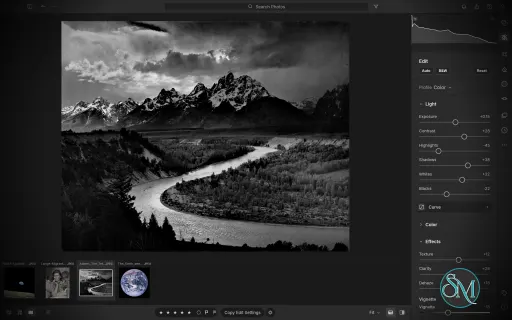
LightCraft is a free, open-source photo management and RAW development application designed as an alternative to Adobe Lightroom. Built in Rust, it combines photo library organization with a comprehensive set of image editing tools, allowing photographers to adjust exposure, refine colors, apply local corrections, and prepare images for export without modifying their original files.
LightCraft is designed for desktop use on Windows, macOS, and Linux, with a WebAssembly version that runs in a browser. It also supports automation through a command-line interface and the Model Context Protocol (MCP), making it an interesting option for photographers who want local control over their workflow.
Features
Non-Destructive Photo Editing
LightCraft keeps original images intact and stores editing operations separately. You can experiment with different adjustments without permanently changing the source files.
Its editing tools include exposure, contrast, highlights, shadows, whites, blacks, tone curves, white balance, vibrance, and saturation. The application uses a wide-gamut, 32-bit floating-point processing pipeline designed to preserve tonal and color information throughout editing.
Color Grading and Presets
The color tools include an eight-band Color Mixer, RGB tone curves, and separate color grading controls for shadows, midtones, and highlights. These features provide flexibility for natural photo correction as well as creative color treatments.
LightCraft also includes built-in presets and lets users save custom looks. You can copy, paste, or synchronize selected adjustments across multiple photos, which is useful when editing a collection of images from the same shoot.
Local Masking and Adjustments
LightCraft supports brush masks, linear gradients, and radial gradients, along with selection tools for luminance, color, sky, subject, and background. Masks can be combined, subtracted, intersected, and inverted.
Local adjustments let you change exposure, contrast, color, texture, sharpness, and other properties in specific parts of an image. This helps users refine skies, brighten subjects, or create more controlled lighting effects without applying every adjustment globally.
Crop, Geometry, and Black-and-White Editing
The cropping tools support common aspect ratios, straightening, rotation, flipping, and manual geometric transformations. Composition overlays help photographers align images and refine framing.
For monochrome photography, LightCraft includes black-and-white conversion, an eight-band monochrome mixer, and additional color grading controls for creating tinted or split-tone results.
Photo Library Management
LightCraft includes tools for organizing photo collections, including folders, albums, smart albums, stacks, virtual copies, ratings, flags, labels, filtering, searching, and sorting.
Its local-first approach avoids requiring an online account or cloud catalog. The project describes its catalog as a human-readable log of editing operations, making it easier to inspect, back up, and replay changes.
Command-Line and AI Automation
In addition to its graphical interface, LightCraft provides a command-line application for rendering images and applying adjustments. MCP support allows compatible AI agents to interact with the application through an automation interface.
These capabilities are useful for repeatable editing tasks, scripted workflows, and experimentation with AI-assisted photo processing.
Download LightCraft v0.14.0 - Software Mirrors |
|---|
LightCraft v0.14.0 for Windowslightcraft-0.14.0-windows-x86.msi | 85.89 MB lightcraft-0.14.0-windows-x86-portable.zip | 102.34 MB lightcraft-0.14.0-windows-x64.msi | 87.15 MB lightcraft-0.14.0-windows-x64-portable.zip | 106.2 MB lightcraft-0.14.0-windows-arm64.msi | 83.48 MB lightcraft-0.14.0-windows-arm64-portable.zip | 101.89 MB |
LightCraft v0.14.0 for macOSlightcraft-cli-0.14.0-macos-universal.zip | 104.45 MB lightcraft-0.14.0-macos-universal.dmg | 109.52 MB |
LightCraft v0.14.0 for Linuxlightcraft-0.14.0-linux-x86_64.tar.gz | 105.53 MB lightcraft-0.14.0-linux-x86_64.rpm | 106.42 MB lightcraft-0.14.0-linux-x86_64.pkg.tar.zst | 82.53 MB lightcraft-0.14.0-linux-x86_64.flatpak | 76.5 MB lightcraft-0.14.0-linux-x86_64.deb | 107.04 MB lightcraft-0.14.0-linux-x86_64.AppImage.zsync | 175.37 kB lightcraft-0.14.0-linux-x86_64.AppImage | 100.07 MB lightcraft-0.14.0-linux-riscv64.tar.gz | 102.92 MB lightcraft-0.14.0-linux-riscv64.rpm | 103.85 MB lightcraft-0.14.0-linux-riscv64.deb | 104.27 MB lightcraft-0.14.0-linux-aarch64.tar.gz | 101 MB lightcraft-0.14.0-linux-aarch64.rpm | 102.72 MB lightcraft-0.14.0-linux-aarch64.pkg.tar.zst | 79.64 MB lightcraft-0.14.0-linux-aarch64.flatpak | 72.08 MB lightcraft-0.14.0-linux-aarch64.deb | 103.45 MB lightcraft-0.14.0-linux-aarch64.AppImage.zsync | 168.03 kB lightcraft-0.14.0-linux-aarch64.AppImage | 95.88 MB |
LightCraft v0.14.0 for BSDlightcraft-0.14.0-freebsd-x86_64.tar.gz | 105.09 MB |
Others Download related to LightCraft v0.14.0lightcraft-web-0.14.0.zip | 67.99 MB |
LightCraft v0.14.0 Source Code
LightCraft v0.14.0 Source code (zip)
LightCraft v0.14.0 Source code (tar.gz)
|
LightCraft v0.14.0 Release Notes: What's Changed- fix: document the deliberate buffer leak during thread teardown (SonarCloud) by @dylanmtaylor in #2700
- packaging: bash tests, named positional parameters and stderr errors (SonarCloud S7688/S7679/S7682/S7677) by @dylanmtaylor in #2655
- Packaging: pin the signing client and appimagetool, and check their hashes by @aiongg in #2413
- CI: one test binary per crate, line tables only, one WASM check by @aiongg in #2710
- coverage: keep the body scan linear and build the zero counter with dict.fromkeys (SonarCloud S8786/S7519) by @dylanmtaylor in #2713
- CI: shared gate workflow; FreeBSD nightly and on release by @aiongg in #2667
- Catalog import: resolve catalog paths with craft-docpath's resolve_absolute by @aiongg in #2412
- i18n: missing translations are reported, never a failure by @aiongg in #2729
- ci(sonar): stop cancelling main-branch runs so coverage is published by @dylanmtaylor in #2737
- Integration batch 43: 21 community PRs by @echelon in #2744
- Show an empty view when Find Similar has no matches by @Silvertree2010 in #2109
- Masking: outline every visible mask when the all-masks overlay is on by @csy2006 in #2210
- LR-META-XMP: Preserve foreign namespace collisions by @ronibalthazar in #2526
- Read embedded metadata from PSD and PSB files by @ronibalthazar in #2546
- Library lock: Don't write through a link at the owner note's name by @Matoo125 in #2596
- Find Missing Photos matches Windows paths by file name on macOS and Linux by @clydecbrown in #2618
- MENU-BAR: the native menu really gives its keys up to a text field and to shortcut recording on macOS by @nledford in #2621
- docs: add gap 30 — multi-select metadata editing UI by @sylvainv in #2622
- view.maskOverlayColor refuses signed hex digits by @clydecbrown in #2626
- Regression test for #49 by @skylartaylor in #2630
- lightcraft-cli commands: list commands sorted by id by @clydecbrown in #2665
- LR-CROP-AUTO: Auto straighten turns by at most 10° on at least 3 lines, and says when it finds nothing by @ingolfteetz in #2688
- LR-META-LOCATION: the command sweep no longer starts a GeoNames download by @nledford in #2702
- LR-LIB-FILTER: Cmd+L / Ctrl+L (View > Enable Filters) switches the library filter off and on again as it was by @marcoarnulfo in #2709
- LR-BEHAV-ACCESS: Tab leaves the name field of New Album, New Smart Album and the name prompts by @nledford in #2727
- Take photos removed by Synchronize Folder out of their stacks by @Silvertree2010 in #2543
- Corpus tests: Z 8 / Z 6II profile tests pair through the lens warp; Hasselblad TIFF previews pass by @francoisgn in #2620
- perf(pipeline): Highlights/Shadows median about 2× faster on the CPU, bit for bit the same by @nicolasfalesy in #2694
- LR-IMP-ADD-DIALOG: the import-selection test holds the import until the photo is chosen by @nledford in #2612
- Colour-range mask: cap the number of samples from automation by @Matoo125 in #2670
- Fix smart album gte/lte rules missing equal f-number and focal length by @Silvertree2010 in #2728
- security: bounded keyword, repair and journal-recovery work (CodeRabbit) by @dylanmtaylor in #2763
- security: bound codec allocation to what a hostile file declares by @dylanmtaylor in #2769
- security: harden dev-tool scripts and the testkit skip-log test (CodeRabbit) by @dylanmtaylor in #2760
- Round 3a integration: 42 PRs of #2580, built and tested locally by @francoisgn in #2689
- LR-EDIT-COLOR-GRADING: a wheel drag holds the pointer and puts it back where it was pressed (#1899) by @marcoarnulfo in #1979
- #1944: keyword.export refuses library originals and writes durably by @G6bill in #2015
- Export: add Thai glyph fallback only (#2052, partial) by @AlexChambers in #2072
- LR-BEHAV-BG-TASKS: one progress bar, spinner and busy button by @nledford in #2077
- MENU-BAR: menu switches are named for what they show, and no two commands share a name by @nledford in #2195
- LR-IMP-DRAGDROP: files dragged over the window show what a drop will do, and a drop opens the import review by @nledford in #2205
- LR-LIB-CULL: adjustable burst gap and similarity in Assisted Culling (#2275) by @helgehelge123 in #2279
- Gap 9: cargo xtask ci on every PR (Linux x64); ci --quick; one local ci at a time by @mattsivak in #2302
- #2312: culling goes on from a photo rated out of the view by @alvarogonjim in #2327
- PERF-SMART: count every smart album once per pass, not once per album that tests it by @nledford in #2422
- LRC-LIB-SMARTCOLL: the move engine for reordering smart album rules by @nledford in #2424
- fix(web): import picker accept list misses many raw formats by @joblonfk001 in #2430
- Web: the page title names the open photo and unsaved changes (#2397) by @Bruno-Alumn in #2453
- Web: lightcraft.command refuses params that aren't a JSON object by @Bruno-Alumn in #2455
- Print: Japanese photo and postcard paper sizes (L判・2L・KG・はがき) by @midasdf in #2468
- LR-MERGE-HDR: full-size alignment refinement and local alignment (2/3 of #1887) by @mattsivak in #2482
- LR-VIEW-INFOOVERLAY: the info overlay clears the macOS window controls and shows the rating and flag (#2460) by @chordpli in #2501
- LRC-LIB-IMPORT: month names in date templates (%B January, %b Jan) by @bdebyl in #2502
- LRC-LIB-MISSING: the availability worker sweeps a list of files at low priority and gives way to file work by @nledford in #2503
- Edit Capture Time leaves a capture time it can't fully read as it was by @clydecbrown in #2506
- docs: fix four dead links in README.zh-hans.md by @IgnatAi401 in #2507
- KEY-GRID: show the cycle shortcut in the View menu (#2500) by @tylerphotos in #2513
- Make control-server timeout tests independent of client rescheduling by @AlexChambers in #2541
- Write exact 1/N EXIF ExposureTime for fast shutter speeds by @Silvertree2010 in #2542
- Dehaze no longer crushes dark pixels next to bright ones (#2504), split from #2174 by @francoisgn in #2550
- i18n(fr): native-speaker review of key terms (gap 21) by @francoisgn in #2593
- LRC-LIB-CATALOG-IMPORT: ask whether a Lightroom catalog merges into the open library or gets a new one (#2672) by @francoisgn in #2685
- LRC-LIB-CATALOG-SWITCH: choose what opens at launch, the last library or a list of recent ones (#1290) by @francoisgn in #2701
- LR-VIEW-ZOOM: diagnostic overlays render zoom windows; soft proofing on the GPU (stacked on #1027) by @emmertex in #1074
- LR-PREF-GENERAL: the Settings window is one size on every tab, and nothing in it runs off the side by @nledford in #1287
- Help ▸ Debug ▸ Show Frame Rate: a frame-rate display for watching drags and zooms by @mattsivak in #1313
- Issue #1184: a pull request template by @nledford in #1385
- Edit in PhotoCraft: say why it didn't open; find PhotoCraft on macOS and Linux by @emmertex in #1417
- Bump quick-xml to 0.41 (RUSTSEC-2026-0194, RUSTSEC-2026-0195) by @natocool2 in #1464
- Fix graphic watermark aspect/orientation and HDR JPEG file-size limits by @nevicia2010-hub in #1499
- LRC-LIB-KEYWORDS: the Keyword List marks a keyword that has an applied keyword inside it by @nledford in #1603
- fix(gpu): no popup when renderer falls back from DX12 at probe (#1624) by @mjohnson7cd in #1644
- i18n(pl): finish the format messages, counts right for every number, test and notes by @lewandowskit in #1846
- Workspace rust-version is 1.95, what the workspace needs (#1841) by @wstock in #1859
- LR-MERGE-HDR: click the merge preview to zoom in, drag to pan by @mattsivak in #1878
- LR-BEHAV-DIALOGS: optionally close a dialog by clicking outside it by @Ketbome in #1914
- LR-VIEW-ZOOM: a middle-button drag pans the photo whatever tool is active by @Ketbome in #1922
- GUM-3201: Reduce guided-filter coefficient allocations by @ternarybits in #1976
- LR-LIB-RATING: one shared star rating for every rating on screen by @nledford in #2076
- Contributors: add my name for the About window by @valenfys in #2255
- feat(shortcuts): Lock Aspect Ratio as a listed row on A by @mahmatias in #2345
- Integration batch 44: 11 community PRs by @echelon in #2814
- LR-IMP-FORMATS: decode Nikon small raw (sRAW) NEFs as 4:2:2 luma/chroma by @radialmonster in #673
- LRC-LIB-LIBFOLDERS: catalog queries and streamed file hashing for locating a folder (part 1 of 3) by @nledford in #1122
- Tone Curve: draw the parametric curve from the renderer's own model, and let it be dragged by @deunderscorepaul in #1956
- Histogram: drag its tonal zones to adjust the Basic tones by @deunderscorepaul in #2011
- LR-FILT-LABEL: the label chip and filter bar show what label and labels let through together, not their union by @marcoarnulfo in #2699
- Reject fractional and out-of-range ratings in photo.rate by @Silvertree2010 in #2755
- LR-VIEW-PHOTOGRID: an op that fails leaves no touched photos behind in the catalog by @nledford in #2761
- LRC-LIB-FILTERBAR: showing an album drops the album the filter held by @nledford in #2762
- Fix relative-date view and source-count cache expiry by @ronibalthazar in #2775
- Forget Local records directly in drive and share roots by @Silvertree2010 in #2788
- i18n(de): review the German interface strings and formats messages by @Enthendor in #2800
- Integration batch: 10 community PRs (slideshow, print templates, View Options, Info panel, keyword and metadata keys) by @aiongg in #2876
- Tests: the launch-list read-only test compares a held lock file without reading it (Windows) by @dotCooCoo in #2816
- KEYC-METADATA: Cmd+Alt+Shift+C / V copy and paste metadata by @dotCooCoo in #2824
- LR-PREF-SHORTCUTS: a declared shortcut yields to a key the saved keymap gives another command by @dotCooCoo in #2832
- KEYC-METADATA: Alt+0 / Alt+Shift+0 go to the next / previous keyword set by @dotCooCoo in #2846
- KEYC-METADATA: Cmd+K / Ctrl+K puts the cursor in the Add keyword box by @dotCooCoo in #2870
- LRC-PRINT-TEMPLATES: print templates export to a file and import from one by @dotCooCoo in #2778
- LRC-SS-PLAYBACK: a manual slideshow waits for the arrow keys by @dotCooCoo in #2786
- LRC-DEV-VIEWOPTIONS: the info overlay can show briefly when the photo changes by @dotCooCoo in #2790
- LRC-DEV-VIEWOPTIONS: View Options can turn off the loupe's "Rendering…" message by @dotCooCoo in #2792
- LR-META-INFO: the Info panel can show metadata for the selected photos by @dotCooCoo in #2810
- Info panel Target Photo edits, Add Keywords cursor request and Fixed keys follow-ups by @aiongg in #2889
New Contributors- @Matoo125 made their first contribution in #2596
- @clydecbrown made their first contribution in #2618
- @sylvainv made their first contribution in #2622
- @nicolasfalesy made their first contribution in #2694
- @alvarogonjim made their first contribution in #2327
- @joblonfk001 made their first contribution in #2430
- @bdebyl made their first contribution in #2502
- @natocool2 made their first contribution in #1464
- @mjohnson7cd made their first contribution in #1644
- @lewandowskit made their first contribution in #1846
- @Ketbome made their first contribution in #1914
- @deunderscorepaul made their first contribution in #1956
- @Enthendor made their first contribution in #2800
- @dotCooCoo made their first contribution in #2816
Full Changelog: v0.13.0...v0.14.0 |
Performance and Compatibility
LightCraft is written in Rust and uses background rendering to keep the interface responsive during common editing operations. The project reports that it can display embedded camera previews or cached renders quickly while preparing full-resolution images in the background.
The application supports Windows, macOS, and Linux, as well as a browser-based WebAssembly build. Available Linux packages include AppImage, DEB, and RPM formats, with builds for x86-64 and ARM64 systems.
However, LightCraft is still a developing project. Its feature list should not be interpreted as proof of complete Adobe Lightroom compatibility. Photographers with established Lightroom workflows should verify RAW camera support, editing results, and catalog migration before moving their primary library.
System Requirements
Operating systems: Windows, macOS, and Linux.
Browser support: A WebAssembly build is available.
Processor architectures: Linux releases include x86-64 and ARM64 builds.
Build requirements: Rust and the project's documented dependencies are needed to compile from source.
The project does not establish a comprehensive minimum hardware specification in the information reviewed. Actual performance will depend on image resolution, RAW processing requirements, and available system resources.
Pros and Cons
Pros
Free and open-source under the MIT and Apache 2.0 licenses.
Non-destructive editing preserves original photos.
Extensive controls for exposure, tone curves, color grading, and local adjustments.
Photo library organization tools for managing larger collections.
Native applications for major desktop operating systems.
Browser-based build for experimentation without a traditional desktop installation.
Command-line and MCP support for automation.
Local-first workflow without a mandatory cloud account or subscription.
Cons
Still under active development, so feature completeness and reliability may vary.
Compatibility with existing Lightroom catalogs and established workflows needs verification.
RAW format support may not cover every camera model or file variation.
Users accustomed to Lightroom may encounter differences in editing behavior and output.
Advanced automation and browser workflows may require additional setup.
Published minimum hardware requirements are limited.
How to Install
The simplest option is to download a suitable package from the project's GitHub Releases page. Linux users can choose the available AppImage, DEB, or RPM package, while macOS and Windows packages are also provided.
For users who prefer to build from source, install Rust and the required development tools, then run:
git clone https://github.com/storytold/lightcraft
cd lightcraft
cargo run --release -p lightcraft
To open a specific photo folder, pass its path when launching the application:
cargo run --release -p lightcraft -- ~/Pictures/trip
To try the browser-based build, follow the project's WebAssembly setup instructions and run:
cargo xtask web --serve
The project also provides a command-line renderer for scripted workflows. Consult the official documentation for supported formats, available adjustment parameters, and platform-specific installation details.
Final Verdict
LightCraft is a promising open-source alternative for photographers who want a local photo library and RAW editing workflow without relying on a commercial subscription. Its combination of non-destructive editing, color grading, masking, presets, and catalog management makes it more ambitious than a basic image editor.
Its strongest differentiators are its Rust-based architecture, local-first design, and automation support. These features may appeal to technical users and photographers interested in building repeatable editing workflows.
The main reservation is maturity. Before switching from Lightroom, users should test their own camera RAW files, compare exported images, and confirm that the library features they depend on are available and reliable. LightCraft is worth trying, but photographers with demanding production workflows should evaluate it alongside their existing tools rather than assume full feature parity.
Post a Comment/Report Broken Link: