GridCraft is a free, open-source spreadsheet application designed as an alternative to Microsoft Excel. Written in Rust, it combines a familiar spreadsheet interface with formulas, charts, PivotTables, data formatting, and Excel workbook compatibility.
The application follows a conventional spreadsheet workflow, with a ribbon interface, formula bar, cell formatting tools, sheet tabs, and keyboard shortcuts. It also includes advanced calculation features such as dynamic arrays, structured table references, and support for more than 500 worksheet functions.
One of GridCraft's most distinctive features is its automation support. Its command-line interface (CLI), JSON control channel, and Model Context Protocol (MCP) server allow scripts and compatible AI agents to read, modify, calculate, and format spreadsheet data programmatically.
GridCraft is an interesting option for users seeking an open-source alternative to proprietary spreadsheet software. However, it remains in pre-alpha development, so users should verify compatibility with their existing workbooks before adopting it for important business tasks.
Features
Spreadsheet Editing and Formatting
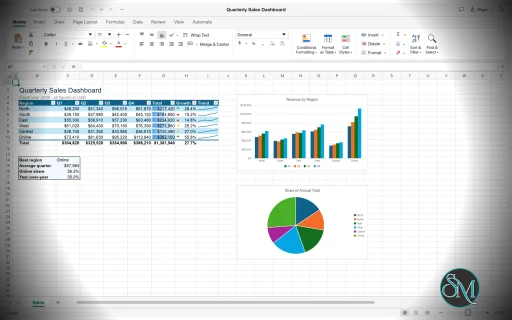
GridCraft provides a spreadsheet interface designed to feel familiar to Excel users. Its ribbon, formula bar, Name Box, sheet tabs, and keyboard shortcuts support common spreadsheet operations.
Users can format cells, adjust row heights and column widths, merge cells, freeze headers, and apply borders, fills, fonts, and number formats. The application also supports conditional formatting, color scales, data validation, and paste-special operations.
These features cover many everyday spreadsheet tasks, including financial calculations, business reports, data organization, and academic work.
Formulas and Calculation Engine
GridCraft includes a calculation engine with more than 500 worksheet functions. It supports familiar formulas for mathematical operations, text manipulation, logical conditions, date calculations, statistics, and data lookup.
Advanced formula features include:
Dynamic arrays and automatic spilling.
LET and LAMBDA for reusable calculations.
MAP, REDUCE, SCAN, BYROW, and BYCOL for array processing.
Structured references to table columns.
Dependency tracking and incremental recalculation.
Formula parsing and reference adjustment when copying cells.
These capabilities make GridCraft more than a basic spreadsheet editor. Users can build complex calculations and reusable formula logic without depending entirely on external scripts.
Nevertheless, differences in formula behavior and calculation compatibility may occur when opening workbooks created in other spreadsheet applications.
Charts and Data Visualization
GridCraft supports 17 chart types for visualizing spreadsheet data. Users can insert charts, select source ranges, and customize chart presentation through its formatting interface.
The application also supports sparklines, which provide compact visual representations of trends within individual cells.
These features help users turn raw data into charts and dashboards without exporting information to a separate visualization application.
Chart compatibility should still be tested when exchanging complex workbooks with Excel, especially when they contain specialized formatting or advanced chart configurations.
PivotTables and Data Analysis
GridCraft includes PivotTables with a field list, filters, layout controls, date grouping, and show-values-as options.
These features allow users to summarize larger datasets, group records, compare categories, and calculate aggregated values without writing complicated formulas manually.
The application also supports sorting, AutoFilter, Flash Fill, outlining, and subtotals.
This combination is useful for business reporting, sales analysis, budgeting, and other workflows involving structured data.
However, advanced Excel analysis features such as Solver and slicers remain development priorities rather than established capabilities.
Tables and Data Management
GridCraft supports structured tables with named columns and references. Table-related functionality integrates with formulas and other spreadsheet operations.
Users can sort ranges, filter records, validate input, and organize related data into manageable structures. These tools are particularly helpful when working with product inventories, financial records, customer lists, and operational reports.
The application also supports hyperlinks, comments, and cell-level formatting to make workbooks easier to navigate and understand.
Microsoft Excel File Compatibility
GridCraft uses XLSX as its native workbook format. It can open and save workbooks containing formulas, styles, themes, tables, conditional formatting, data validation, comments, hyperlinks, charts, pictures, sparklines, PivotTables, and print settings.
It also supports importing and exporting CSV and TSV files, making it suitable for exchanging structured data with databases, scripts, and other business applications.
The project emphasizes preserving workbook features during import and export. However, its documentation identifies real-world XLSX fidelity as an ongoing development priority.
Users should therefore check formulas, formatting, charts, PivotTables, and print layouts after exchanging complicated files with Excel. Compatibility with VBA macros, password-protected workbooks, and other specialized Excel features should not be assumed.
Printing and PDF Export
GridCraft includes print settings, page breaks, and page-break preview. Users can configure printing layouts and export spreadsheets to PDF.
These capabilities are useful for producing printable reports, invoices, financial summaries, and other documents that need to retain a structured page layout.
However, users who depend on precise Excel print layouts should verify page breaks, scaling, margins, and formatting before distributing exported documents.
AI and Command-Line Automation
One of GridCraft's strongest differentiators is its extensive automation interface.
The application exposes commands through its CLI, JSON control channel, and MCP server. These interfaces allow compatible scripts and AI agents to inspect worksheets, read and write cell ranges, evaluate formulas, format cells, create tables, insert charts, and execute spreadsheet commands.
For example, a script can open a sample workbook, apply formatting, and save the result as an XLSX file. The CLI can also evaluate formulas and display selected workbook ranges as text.
This makes GridCraft particularly interesting for developers and users who regularly generate reports, process spreadsheets, or automate repetitive office tasks.
The MCP integration can be especially useful for AI-assisted workflows, although the quality of automated results depends on the agent, its instructions, and the complexity of the spreadsheet.
Cross-Platform Support
GridCraft runs as a native desktop application on Windows, macOS, Linux, and FreeBSD. A WebAssembly build also allows users to run it in a compatible browser.
Its Rust-based architecture separates the spreadsheet engine from the graphical interface, supporting multiple application targets from a shared codebase.
The project does not require a subscription or license server and states that it does not include telemetry.
Download GridCraft v0.12.1 - Software Mirrors |
|---|
GridCraft v0.12.1 for Windowsgridcraft-0.12.1-windows-x86.msi | 13.55 MB gridcraft-0.12.1-windows-x86-portable.zip | 17.28 MB gridcraft-0.12.1-windows-x64.msi | 14.21 MB gridcraft-0.12.1-windows-x64-portable.zip | 18.75 MB |
GridCraft v0.12.1 for macOS |
GridCraft v0.12.1 for Linuxgridcraft-0.12.1-linux-x86_64.tar.gz | 19.85 MB gridcraft-0.12.1-linux-x86_64.rpm | 20.22 MB gridcraft-0.12.1-linux-x86_64.pkg.tar.zst | 11.75 MB gridcraft-0.12.1-linux-x86_64.flatpak | 13.47 MB gridcraft-0.12.1-linux-x86_64.deb | 20.35 MB gridcraft-0.12.1-linux-x86_64.AppImage.zsync | 66.55 kB gridcraft-0.12.1-linux-x86_64.AppImage | 18.94 MB gridcraft-0.12.1-linux-riscv64.tar.gz | 19.17 MB gridcraft-0.12.1-linux-riscv64.rpm | 19.55 MB gridcraft-0.12.1-linux-riscv64.deb | 19.6 MB gridcraft-0.12.1-linux-aarch64.tar.gz | 18.44 MB gridcraft-0.12.1-linux-aarch64.rpm | 19.14 MB gridcraft-0.12.1-linux-aarch64.pkg.tar.zst | 10.84 MB gridcraft-0.12.1-linux-aarch64.flatpak | 11.7 MB gridcraft-0.12.1-linux-aarch64.deb | 19.33 MB |
GridCraft v0.12.1 for BSD |
Others Download related to GridCraft v0.12.1 |
GridCraft v0.12.1 Source Code |
GridCraft v0.12.1 Release Notes:What's Changed
New Contributors
|
Performance and Compatibility
GridCraft is built in Rust and uses a calculation engine designed around dependency tracking and incremental recalculation. Instead of recalculating an entire workbook after every change, the engine can update affected formulas as needed.
Its copy-on-write workbook model is designed to make undo snapshots inexpensive, while the virtualized spreadsheet grid limits layout work to the portion of the sheet currently visible.
These architectural choices are promising for interactive spreadsheet workloads. However, they do not guarantee superior performance for every workbook, especially very large files with complex formulas and extensive formatting.
The project estimates that it covers approximately 93% of Excel's worksheet functions and around 65% of the functionality that advanced Excel users rely on when accounting for implementation depth. These figures are the project's own estimates, not independent compatibility benchmarks.
GridCraft remains in pre-alpha development. Its issue tracker documents ongoing problems involving areas such as cell selection, formatting, text rendering, menus, and keyboard shortcuts.
Users who mainly create ordinary spreadsheets may find the current feature set sufficient for experimentation. Organizations that rely on complex Excel workbooks, macros, specialized add-ins, or strict formatting fidelity should retain a compatible alternative until GridCraft meets their requirements.
System Requirements
GridCraft supports the following platforms:
Windows: 32-bit and 64-bit x86 systems, with ARM64 builds also available.
macOS: Intel and Apple Silicon computers through a universal application.
Linux: x86-64 and ARM64 packages, depending on the distribution format.
FreeBSD: x86-64 builds.
Web: Modern browsers that support its WebAssembly application.
Prebuilt packages are available in several formats, including Windows installers, portable archives, macOS disk images, Linux AppImages, Flatpak packages, Debian packages, RPM packages, and compressed archives.
Building from source requires Rust development tools, Cargo, Git, and the project's other dependencies. Running the browser version from source requires Trunk and the wasm32-unknown-unknown Rust target.
The project does not specify a universal minimum CPU, RAM, or storage requirement for all spreadsheet workloads.
Pros and Cons
Pros
Free and open-source under the MIT or Apache-2.0 license.
Familiar spreadsheet interface for users transitioning from Excel.
Supports more than 500 worksheet functions.
Includes dynamic arrays, LET, LAMBDA, and structured table references.
Provides charts, PivotTables, conditional formatting, and data validation.
Supports XLSX, CSV, and TSV file formats.
Includes PDF export and printing tools.
Offers CLI, JSON, and MCP interfaces for spreadsheet automation.
Supports Windows, macOS, Linux, FreeBSD, and web browsers.
Uses a Rust-based architecture with incremental recalculation and virtualized rendering.
Cons
Still in pre-alpha development.
Excel compatibility and workbook fidelity are not complete.
Some interface and formatting bugs remain.
VBA macros and certain advanced Excel capabilities are not available as complete replacements.
Advanced features such as Solver and slicers remain development priorities.
Large or complicated workbooks require practical performance and compatibility testing.
How to Install
Option 1: Download a Prebuilt Release
Visit the official GridCraft GitHub repository.
Open the Releases section.
Download the package matching your operating system and processor architecture.
Install or extract the downloaded package.
Launch GridCraft and create a workbook or open an existing spreadsheet.
On Windows, choose the installer or portable archive. On Linux, select an appropriate format such as AppImage, Flatpak, DEB, or RPM. Mac users can use the universal application package.
For Linux users who prefer portable applications, the AppImage format is a convenient option. Flatpak and distribution-specific packages are alternatives for users who prefer managed application installation.
Option 2: Build from Source
If you prefer compiling the application yourself, install Git and a recent stable Rust toolchain first.
Clone the repository:
git clone https://github.com/storytold/gridcraft
Enter the project directory:
cd gridcraft
Build and launch the desktop application:
cargo run --release -p gridcraft
To open a sample sales workbook instead, run:
cargo run --release -p gridcraft -- --sample sales
The initial build may take some time while Cargo downloads dependencies and compiles the project.
Option 3: Use the Web Version
GridCraft also provides a WebAssembly build.
After installing the required Rust and Trunk tooling, enter the web application directory:
cd apps/gridcraft-web
Start the development server:
trunk serve --release
Open the local address displayed by Trunk in your browser.
The browser version can open workbooks through the browser's file picker or drag-and-drop. Saving a workbook downloads the resulting file.
Final Verdict
GridCraft is a promising open-source spreadsheet application that combines a familiar Excel-style interface with a substantial collection of formulas, charts, PivotTables, formatting tools, and data-management features.
Its support for XLSX files makes it relevant to users who need to exchange workbooks with Microsoft Excel, while its CLI and MCP integration offer an additional advantage for developers and users interested in AI-assisted spreadsheet automation.
The main limitation is maturity. Although GridCraft already implements many spreadsheet functions and familiar workflows, its developers are still working toward broader compatibility and a more complete feature set. Users should not assume that every Excel workbook, macro, or advanced calculation will work identically.
GridCraft is worth trying for everyday spreadsheet tasks, open-source experimentation, and automated data workflows. However, users who depend on complex Excel features should treat it as an emerging alternative rather than a complete replacement for Microsoft Excel.
Post a Comment/Report Broken Link: