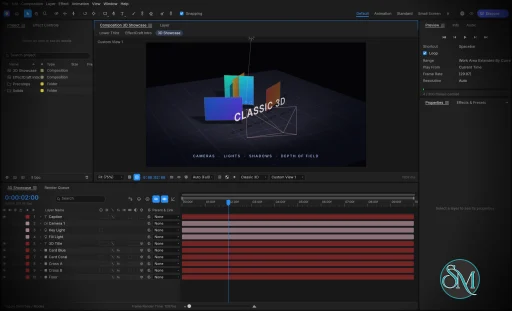
EffectCraft v0.10.0

EffectCraft is an open-source motion graphics and visual effects application designed as a clean-room reimplementation of Adobe After Effects. Written in Rust, it provides a native desktop editor for Windows, macOS, and Linux, alongside a browser-based version.

The application focuses on professional animation and compositing workflows, including keyframes, animated text, masks, visual effects, 3D cameras, lights, and a render queue. Its interface follows familiar After Effects conventions, making it easier for experienced motion designers to understand its workflow.

EffectCraft also stands out for its automation capabilities. Projects use a readable JSON-based format, and the application exposes its editing engine through a command-line interface, a JSON control channel, and an MCP server for AI agents.

Features

EffectCraft includes a broad collection of tools for motion graphics and visual effects.

  • Timeline and keyframes: Animate layer properties with linear, Bezier, hold, and eased interpolation. The Graph Editor provides value and speed graphs for adjusting animation curves.

  • Layer compositing: Combine text, shapes, footage, nested compositions, adjustment layers, solids, cameras, and lights. Parenting, track mattes, blend modes, and motion blur are supported.

  • Shape animation: Create shape layers with trim paths, repeaters, rounded corners, gradient strokes, and other procedural shape operators.

  • Masks and selection: Draw and edit masks with feathering, expansion, and different compositing modes.

  • Text animation: Work with point text, paragraph text, text animators, range selectors, and text-on-path workflows.

  • Expressions: Use JavaScript expressions with familiar After Effects-style objects and functions, including wiggle, loopOut, and layer references.

  • Puppet tools: Animate character and object deformations with pins, mesh controls, rigging, and follow-through.

  • Visual effects: Apply blur, sharpening, color correction, distortion, keying, noise, stylization, transitions, simulation, and audio effects.

  • Layer styles: Apply effects such as Drop Shadow, Inner Glow, Outer Glow, Bevel and Emboss, Satin, Stroke, and color overlays.

  • 3D scenes: Work with 3D layers, cameras, lights, depth of field, and shadows.

  • Motion tracking: Use tracking and analysis tools for motion-related workflows.

  • Audio support: Preview animations with synchronized audio, waveforms, meters, and audio effects.

  • Lottie integration: Import and export supported animations for use in websites and applications.

  • Render queue: Export animations and compositions to video, audio, image sequences, and animated formats.

  • Automation: Control editing operations through the CLI, JSON interface, and MCP server.

The effects library is particularly ambitious, covering hundreds of effects inspired by familiar After Effects categories. It includes tools for color correction, distortion, keying, simulation, perspective, time manipulation, audio processing, and stylization.

Lottie import and export is another practical advantage. It allows compatible animations to move between EffectCraft and web or application workflows without requiring a separate export plugin.

Download EffectCraft v0.10.0 - Software Mirrors

EffectCraft v0.10.0 for Windows

effectcraft-0.10.0-windows-x86.msi | 46.89 MB

effectcraft-0.10.0-windows-x86-portable.zip | 60.36 MB

effectcraft-0.10.0-windows-x64.msi | 48.13 MB

effectcraft-0.10.0-windows-x64-portable.zip | 63.53 MB

effectcraft-0.10.0-windows-arm64.msi | 42.86 MB

effectcraft-0.10.0-windows-arm64-portable.zip | 58.81 MB

EffectCraft v0.10.0 for macOS

effectcraft-cli-0.10.0-macos-universal.zip | 57.01 MB

effectcraft-0.10.0-macos-universal.dmg | 61.07 MB

EffectCraft v0.10.0 for Linux

effectcraft-0.10.0-linux-x86_64.tar.gz | 60.48 MB

effectcraft-0.10.0-linux-x86_64.rpm | 61.51 MB

effectcraft-0.10.0-linux-x86_64.flatpak | 39.24 MB

effectcraft-0.10.0-linux-x86_64.deb | 61.9 MB

effectcraft-0.10.0-linux-x86_64.AppImage.zsync | 196.16 kB

effectcraft-0.10.0-linux-x86_64.AppImage | 55.98 MB

effectcraft-0.10.0-linux-riscv64.tar.gz | 59.01 MB

effectcraft-0.10.0-linux-riscv64.rpm | 60.14 MB

effectcraft-0.10.0-linux-riscv64.deb | 60.26 MB

effectcraft-0.10.0-linux-aarch64.tar.gz | 56.47 MB

effectcraft-0.10.0-linux-aarch64.rpm | 58.54 MB

effectcraft-0.10.0-linux-aarch64.flatpak | 34.62 MB

effectcraft-0.10.0-linux-aarch64.deb | 59.14 MB

effectcraft-0.10.0-linux-aarch64.AppImage.zsync | 183.22 kB

effectcraft-0.10.0-linux-aarch64.AppImage | 52.28 MB

EffectCraft v0.10.0 for BSD

effectcraft-0.10.0-freebsd-x86_64.tar.gz | 60.17 MB

Others Download related to EffectCraft v0.10.0

effectcraft-web-0.10.0.zip | 18.15 MB

EffectCraft v0.10.0 Source Code

EffectCraft v0.10.0 Source code (zip)

EffectCraft v0.10.0 Source code (tar.gz)

EffectCraft v0.10.0 Release Notes:

What's Changed

  • Track matte on an adjustment layer limits where its effects show by @marcoarnulfo in #1204
  • UI: Quick Apply keeps an IME composition while pinyin is typed by @cjcwwww in #1206
  • fix(effects): CC Particle World / Systems II replace their layer; Time effects see earlier effects by @eliasx45 in #1111
  • Tracker: a track point can be grabbed when zoomed out by @marcoarnulfo in #1112
  • Keyboard Shortcuts: OK button in view, Enter is OK, visible scroll bar handles by @pravdomil in #1113
  • docs: re-audit gaps.md and parity docs against main (2026-10-12) by @vangel76 in #1114
  • Floating panels: no widget ID clash when dragged past the window edge [skip ci] by @pravdomil in #1115
  • Expressions: layer.source and a Layer Control's layer work (refs #809) by @nanox333 in #1122
  • Script: sourcePointToComp and compPointToSource follow the layer's transform (refs #808) by @nanox333 in #1123
  • Script tests: the include test reads the file name on Windows (refs #759) by @nanox333 in #1124
  • Text: fallback tries a script's usual families before faces loaded earlier by @dotCooCoo in #1126
  • Viewer eyedropper: stay armed until there is a frame to sample by @pravdomil in #1127
  • PSD import: bound group nesting at 64 (#1128) by @vangel76 in #1129
  • PSD: drop non-finite values, no panic in Warp::apply / Rect::new (#1130) by @vangel76 in #1131
  • PSD: share the duplicated decode, placed-transform and writer helpers (#1133) by @vangel76 in #1134
  • #1132: a damaged PSD layer section keeps the merged image by @vangel76 in #1135
  • PSD: avoid redundant plane copies, per-pixel mask tests and repeated quad solves (#1136) by @vangel76 in #1137
  • PSD: a memory budget for one decode and a capped smart-object bake (#1138) by @vangel76 in #1139
  • Preview: say so in the viewer and Timeline when Video is off (#1118) by @FredApps in #1142
  • Timeline: Quick Offset layers and keyframes in selection order (#1012) by @tylerjenningsw in #1144
  • Timeline: Reset keeps an animated property's keyframes and keys the default (#1078) by @redonion23 in #1146
  • macOS: open the window on Intel Metal by skipping indirect-call validation by @fabian-co in #1153
  • Scripting: key calls fetch only the key they need, so removeKey stays fast (#814) by @redonion23 in #1156
  • Preview: Shift+Spacebar plays every frame by default (fixes #551) by @nanox333 in #1158
  • Keep a static Orientation's Y angle precise near gimbal lock (refs #1010) by @nanox333 in #1159
  • Scripts: find the Levels Alpha controls by their script names (refs #1063) by @nanox333 in #1160
  • Scripts: report an undefined name at its first use inside a function wrapper (refs #1063) by @nanox333 in #1161
  • Scripts: find a light's Casts Shadows option by its After Effects name (refs #1063) by @nanox333 in #1162
  • Shapes: keep the Gradient Ramp inside the layer's alpha (refs #1063) by @nanox333 in #1163
  • Dialogs: drag a modal dialog by its title to move it off the viewer by @marcoarnulfo in #1166
  • Viewer: adding a marker keeps the cached frames (fixes #1167) by @nanox333 in #1168
  • Audio: blend the two samples around each time when a layer is stretched (fixes #1169) by @nanox333 in #1170
  • Scripting: a stroke's Dashes use After Effects' match names (#815) by @redonion23 in #1172
  • Layer Styles: OK and Cancel stay in view (#1062) by @tylerjenningsw in #1173
  • M6.7: reject Roto Brush span edits past trimmed strokes by @storybored379 in #1175
  • Workspaces: report failed saves instead of returning success (#696) by @tylerjenningsw in #1176
  • layer.addMarker: add composition marker when no layers are selected by @maxaeexe in #1180
  • Graph editor: speed graph handles keep dragging once their key leaves the plot by @marcoarnulfo in #1182
  • #473: Cryptomatte: resolve the rank planes once and reduce them on all cores (GPU path ~9.5 s → ~0.2 s per 1440p frame) by @MatejKozlovsky in #1183
  • #879: cap GPU frames in flight during export by @MatejKozlovsky in #1184
  • Scripting: CompItem.saveFrameToPng writes the frame as a PNG (#816) by @redonion23 in #1188
  • i18n: the Settings pages reach the Chinese catalogs by @marcoarnulfo in #1189
  • Scripting: footage proxies, replaceWithSequence and mainSource.conformFrameRate (#813) by @redonion23 in #1191
  • i18n: an effect's name draws in the interface language, the generated Effect menu included (#821) by @cjcwwww in #1199
  • Add Copy Presets Folder Path to Effects & Presets by @arnav-hiwarkar in #1210
  • #783: Object Matte effect from a point / box prompt, tracked by @vangel76 in #792
  • i18n(es): Spanish panels, dialogs and tooltips by @diegozpy in #996
  • Desktop: an unknown option or a bad --control port stops the launch (#997) by @Nael-Nathanael in #1005
  • Render Queue: the failure toast says why the render failed (#568) by @marcoarnulfo in #1008
  • New comps from footage get a unique name, as Duplicate does by @Themolx in #1013
  • Rotation tool: keep counting past a full turn, as in After Effects by @Themolx in #1014
  • text: the Chinese fallback families follow the script the locale asks for by @FeiLiuEM in #1015
  • Shortcuts: Numpad * marks the selected layers (#976) by @marcoarnulfo in #1017
  • GPU Information: Enter presses OK by @pravdomil in #1018
  • UI: confirm before deleting a user template or a shortcut preset by @pravdomil in #1019
  • Timeline: UU reveals an effect's changed parameters only by @pravdomil in #1021
  • theme: the symbol test asks the definitions, not epaint's replacement-face check by @FeiLiuEM in #1026
  • Cover timeline right-click Pre-compose grouping the whole selection (#985, #1003) by @vbasky in #1027
  • Nudge selected layers with the arrow keys from any panel but Project (#961) by @vbasky in #1028
  • Share the Scale Constrain Proportions link between Properties and Timeline (#956) by @vbasky in #1029
  • Reveal enabled Time Remap on U even with no keys left (#990) by @vbasky in #1030
  • Timeline: expression row takes its property row's background by @pravdomil in #1034
  • Cover mask vertex multi-select: Shift-click toggle and marquee (#1004) by @vbasky in #1035
  • Keep closed comps' layer selections across scripts (#1001) by @vbasky in #1037
  • Compensate cameras and lights when parenting, preserving the world frame (#1010, #1020) by @vbasky in #1038
  • Fix #989: paste animated effects at the playhead by @onlymoein in #1039
  • Timeline: expression row matches the normal row height by @pravdomil in #1041
  • Sample footage pixels in script expressions (#1000) by @vbasky in #1043
  • Cmd/Alt-click a twirl arrow opens its whole tree by @pravdomil in #1044
  • Create Shapes/Masks from Text in the layer context menu (#872) by @vbasky in #1046
  • Cover keyframe interpolation and ease on effect parameters (#994) by @vbasky in #1048
  • Interpret Footage: looped footage lasts its loops on new and re-timed layers by @marcoarnulfo in #1051
  • Shortcuts: keyboard-only commands for navigation, layers and panels by @pravdomil in #1054
  • Layer sampling toggle, Show Channel grayscale and colorized, Timeline zoom back in by @pravdomil in #1057
  • Project panel: Composition Settings… in a comp's right-click menu by @marcoarnulfo in #1065
  • i18n(ja): finish the Japanese panel, dialog and tooltip catalog by @zitann2020 in #1066
  • #1061: Enter renames the selected effect, text animator, mask or shape group by @vangel76 in #1075
  • SVG: percentages in the root resolve against its own width and height by @webdevtodayjason in #1082
  • SVG: non-finite viewBox and nested sizes no longer panic the importer by @webdevtodayjason in #1084
  • #1070: a fresh import or opened project reads overwritten footage again by @vangel76 in #1086
  • Path vertices win over the bounding-box handles (#1042) by @vangel76 in #1088
  • Orient Along Path keeps its heading at the end of the path (#1081) by @vangel76 in #1090
  • EPS: arc and arcn with huge angles no longer hang the import by @dotCooCoo in #1091
  • Fix #1063 item 8: render carriage-return text as paragraphs by @onlymoein in #1093
  • Marker dialog: Cmd+Enter is OK by @pravdomil in #1097
  • Gap 21: percentage guides and effect colour labels (#1095) by @vangel76 in #1098
  • Fix #978: keep form choices and buttons inside the dialog by @pravdomil in #1101
  • Gap 7: 23 original Backgrounds animation presets (#1096) by @vangel76 in #1102
  • feat(import): import an EffectCraft project into the open project (file.importProject) by @eliasx45 in #1104
  • feat(timeline): AE trim zones, click-to-deselect, Type tool on overlapping text, ruler labels by @eliasx45 in #1108
  • feat(shortcuts): AZERTY physical-key bindings, Go to Work Area keys, Graph Editor zoom and fit by @eliasx45 in #1109
  • feat(xtask): cargo xtask bench render benchmark with --compare and --fail-over by @eliasx45 in #1110
  • Scripting: Google Earth Studio camera scripts key the camera by @marcoarnulfo in #1119
  • contributors: add my own people.toml entry by @nanox333 in #1125
  • UI: a Simplified Chinese interface picks a face with the simplified hanzi by @marcoarnulfo in #1143
  • UI: add an Effects submenu to the layer context menu by @elZanco in #1152
  • GPU: resident effect stacks, in-frame texture reuse, upload-cache budget, stable footprint keys (#687) by @MatejKozlovsky in #688
  • Project panel: Replace with Precomposition (used N times) by @Themolx in #933
  • Portable mode: a portable.txt beside the exe keeps settings in EffectCraftData (#993) by @marcoarnulfo in #1009
  • Shortcuts: Fast Previews and Show Channel, Default keys, Second keys by @pravdomil in #1050
  • feat(footage): relink footage that moved by @eliasx45 in #1106

New Contributors

  • @marcoarnulfo made their first contribution in #1204
  • @eliasx45 made their first contribution in #1111
  • @dotCooCoo made their first contribution in #1126
  • @FredApps made their first contribution in #1142
  • @fabian-co made their first contribution in #1153
  • @maxaeexe made their first contribution in #1180
  • @arnav-hiwarkar made their first contribution in #1210
  • @diegozpy made their first contribution in #996
  • @Nael-Nathanael made their first contribution in #1005
  • @onlymoein made their first contribution in #1039
  • @zitann2020 made their first contribution in #1066
  • @elZanco made their first contribution in #1152
Full Changelog: v0.9.2...v0.10.0

Performance and Compatibility

EffectCraft is written in Rust and uses a modular architecture intended to keep the editing engine independent of the graphical interface. Its rendering system supports GPU acceleration, while CPU-based processing remains available for relevant operations.

The project is designed to run on Windows, macOS, and Linux. A WebAssembly build also allows the editor to run in a browser, with browser storage used for projects and related data.

Its rendering pipeline supports H.264, ProRes, HEVC, AV1, VP9, and Opus, alongside image sequences and other export formats. The project emphasizes Rust-based media processing rather than depending on FFmpeg as its internal encoding and decoding foundation.

EffectCraft also offers a useful approach to project files. Its native .ecproj format uses versioned JSON, making projects easier to inspect, compare, and manage in version control than opaque binary documents.

However, EffectCraft cannot open native After Effects .aep or .aepx project files, and third-party After Effects plugins cannot run in it. Compatibility with individual effects and workflows should therefore be tested before considering a complete migration.

The project is also relatively young. Although its feature list is extensive, the developers acknowledge that real-world workflow reliability and output fidelity still need further validation. Having an equivalent tool does not necessarily mean that it behaves identically to its After Effects counterpart.

System Requirements

EffectCraft supports:

  • Windows

  • macOS

  • Linux

  • WebAssembly-compatible browsers

Prebuilt desktop packages are available for supported platforms. Linux distributions have access to AppImage, DEB, RPM, and tarball packages, including x86_64 and ARM64 builds.

Building from source requires Rust and the appropriate platform dependencies. The browser version requires a WebAssembly-compatible browser and suitable graphics support.

Because EffectCraft can process complex compositions, performance will depend on the GPU, available memory, footage resolution, effect complexity, and output settings. The project does not yet provide sufficient real-world benchmarking to establish reliable performance expectations for every workload.

Pros and Cons

Pros

  • Free and open-source

  • Native Rust architecture

  • Windows, macOS, and Linux support

  • Browser-based WebAssembly version

  • Extensive keyframe and animation controls

  • Graph Editor with value and speed graphs

  • Large collection of visual effects

  • Masks, shape layers, and text animation

  • Expressions and puppet tools

  • 3D cameras, lights, and depth of field

  • GPU-accelerated rendering

  • Broad video and audio export support

  • Lottie import and export

  • Readable JSON-based project format

  • CLI and MCP automation

  • No telemetry by default

  • Designed to work offline

Cons

  • Still a young project

  • Cannot open native After Effects project files

  • No compatibility with third-party After Effects plugins

  • Output fidelity against After Effects has not been comprehensively measured

  • Some platform-specific workflows still need refinement

  • Performance on complex projects requires more independent benchmarking

  • Certain advanced features remain under development

  • Professional production workflows may require workarounds

How to Install

The easiest way to install EffectCraft is to download a prebuilt package from the project's GitHub releases.

Windows users can use the portable ZIP package. macOS users can install the universal disk image, while Linux users can choose from AppImage, DEB, RPM, or tarball packages.

Developers can build the application from source with Rust:

git clone https://github.com/storytold/effectcraft
cd effectcraft
cargo run --release -p effectcraft

To render a composition from the command line, use the companion CLI:

cargo run --release -p effectcraft-cli -- render --out intro.mp4

For AI-agent integration, launch the MCP server:

cargo run --release -p effectcraft-cli -- mcp

These capabilities make EffectCraft particularly interesting for developers building automated animation pipelines or integrating motion graphics into AI-assisted workflows.

Final Verdict

EffectCraft is an ambitious open-source After Effects alternative that combines a familiar animation workflow with a modern Rust-based engine. Its extensive effects library, keyframe controls, expressions, compositing tools, 3D features, and broad export support make it much more than a basic animation editor.

Its most distinctive advantage is automation. The CLI, JSON control channel, readable project files, and MCP server make it possible to integrate motion graphics into scripted and AI-assisted workflows. Lottie support also provides a practical bridge between desktop animation and web development.

The biggest limitation is compatibility and maturity. EffectCraft cannot open native After Effects projects or use its third-party plugins, and its own documentation acknowledges that feature coverage does not yet guarantee production-level reliability or equivalent output quality.

For motion designers, developers, and open-source enthusiasts looking for a capable alternative to proprietary animation software, EffectCraft is a promising project. It is particularly attractive for new projects that can use its native format and automation tools without depending on an existing After Effects workflow.

EffectCraft v0.10.0
Free
Software Informations:
Developer:

Operating System:
Windows / macOS / Linux / BSD
Date Added:
2026-10-15T04:07:17.736Z
Categories:

Post a Comment/Report Broken Link: