DeckCraft is a free, open-source presentation application designed as an alternative to Microsoft PowerPoint. Written entirely in Rust, it allows users to create slide decks, edit PowerPoint files, add animations, and present slideshows across desktop operating systems and modern web browsers.
Developed as part of the ArtCraft collection of creative applications, DeckCraft combines a graphical presentation editor with command-line tools and AI agent integration. This makes it interesting not only for people creating presentations manually but also for developers who want to automate slide creation.
Although DeckCraft already offers an extensive set of presentation features, it remains in early development. Users looking for a dependable replacement for PowerPoint should consider its development status and verify that their existing presentations work correctly.
Features
Presentation Creation and Themes
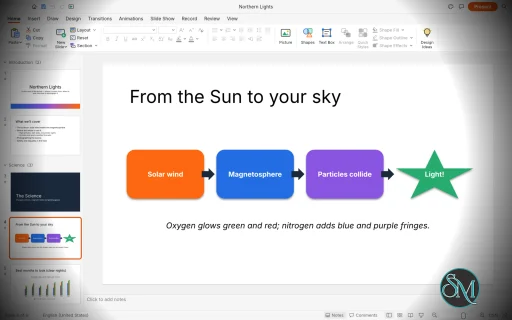
DeckCraft provides tools for building presentations with slide masters, layouts, placeholders, and customizable slide dimensions. Users can organize slides into sections, add notes and comments, and apply themes with coordinated color and font schemes.
These features make it suitable for creating business presentations, educational materials, and visual slide decks without relying on proprietary presentation software.
Shapes and Drawing Tools
The application includes more than 150 preset shapes, connectors, curves, freeform drawing, and shape-merging operations. Users can customize outlines, gradients, picture fills, shadows, glow effects, and other visual properties.
These tools provide flexibility when creating diagrams, illustrations, flowcharts, and other visual elements directly within a presentation.
Text, Tables, and Charts
DeckCraft supports in-place text editing, paragraph formatting, bullets, numbering, columns, hyperlinks, and vertical text. It also includes tables, charts, and basic SmartArt functionality.
These capabilities cover many common presentation tasks, although compatibility with complex formatting imported from Microsoft PowerPoint should be tested before using the application for important documents.
Animations and Slide Transitions
Users can add slide transitions, including Morph, alongside entrance, emphasis, and exit animations. Motion paths and paragraph-based animation builds are also supported.
DeckCraft includes a full-screen slideshow mode, presenter view, presentation timing tools, and media playback. This makes it useful for presentations that require more than static slides.
PowerPoint File Compatibility
DeckCraft can open and save PowerPoint PPTX files. It also supports exporting presentations to PDF, PNG, JPEG, and outline formats.
PDF exports include options for slides, notes pages, and handouts with selectable text. An AutoRecover feature helps preserve unsaved work.
However, file-format support does not guarantee perfect compatibility with every PowerPoint feature. Complex presentations should be checked after importing and exporting.
Command-Line and AI Automation
One of DeckCraft's most distinctive features is its command-driven architecture. The application exposes more than 200 commands that can be used through its CLI, a JSON control channel, and a Model Context Protocol (MCP) server.
This enables scripts and compatible AI agents to create slides, modify presentation content, and automate repetitive tasks. Developers can also use the CLI to render sample presentations and perform operations without manually interacting with the graphical interface.
For users who regularly generate reports, product presentations, or other structured slide decks, this automation capability could be particularly valuable.
Cross-Platform Availability
DeckCraft is designed for Windows, macOS, Linux, FreeBSD, and modern web browsers. Prebuilt packages are available for supported platforms, including Windows installers, macOS disk images, Linux AppImages, Debian packages, RPM packages, and browser-based builds.
Its Rust-based implementation and cross-platform distribution make it an interesting option for users who want presentation software beyond the Microsoft ecosystem.
Download DeckCraft v0.11.1 - Software Mirrors |
|---|
DeckCraft v0.11.1 for Windowsdeckcraft-0.11.1-windows-x86.msi | 60.42 MB deckcraft-0.11.1-windows-x86-portable.zip | 75.51 MB deckcraft-0.11.1-windows-x64.msi | 61.41 MB deckcraft-0.11.1-windows-x64-portable.zip | 77.74 MB deckcraft-0.11.1-windows-arm64.msi | 58.48 MB deckcraft-0.11.1-windows-arm64-portable.zip | 74.99 MB |
DeckCraft v0.11.1 for macOSdeckcraft-cli-0.11.1-macos-universal.zip | 69.51 MB deckcraft-0.11.1-macos-universal.dmg | 83.33 MB |
DeckCraft v0.11.1 for Linuxdeckcraft-0.11.1-linux-x86_64.tar.gz | 77.82 MB deckcraft-0.11.1-linux-x86_64.rpm | 78.6 MB deckcraft-0.11.1-linux-x86_64.pkg.tar.zst | 58.1 MB deckcraft-0.11.1-linux-x86_64.flatpak | 54.07 MB deckcraft-0.11.1-linux-x86_64.deb | 78.96 MB deckcraft-0.11.1-linux-x86_64.AppImage.zsync | 257.27 kB deckcraft-0.11.1-linux-x86_64.AppImage | 73.44 MB deckcraft-0.11.1-linux-riscv64.tar.gz | 76.99 MB deckcraft-0.11.1-linux-riscv64.rpm | 77.8 MB deckcraft-0.11.1-linux-riscv64.deb | 78.01 MB deckcraft-0.11.1-linux-aarch64.tar.gz | 75.41 MB deckcraft-0.11.1-linux-aarch64.rpm | 76.74 MB deckcraft-0.11.1-linux-aarch64.pkg.tar.zst | 56.42 MB deckcraft-0.11.1-linux-aarch64.flatpak | 51.44 MB deckcraft-0.11.1-linux-aarch64.deb | 77.18 MB deckcraft-0.11.1-linux-aarch64.AppImage.zsync | 249.18 kB deckcraft-0.11.1-linux-aarch64.AppImage | 71.12 MB |
DeckCraft v0.11.1 for BSDdeckcraft-0.11.1-freebsd-x86_64.tar.gz | 77.69 MB |
Others Download related to DeckCraft v0.11.1deckcraft-web-0.11.1.zip | 10.57 MB |
DeckCraft v0.11.1 Source Code
DeckCraft v0.11.1 Source code (zip)
DeckCraft v0.11.1 Source code (tar.gz)
|
DeckCraft v0.11.1 Release Notes: What's Changed- packaging: [[ ]] tests, named positional parameters, explicit returns and a default case (SonarCloud S7688, S7679, S7682, S131) by @dylanmtaylor in #1212
- Use chrono instead of hand-rolled UTC conversion by @dylanmtaylor in #1116
- CI: one test binary per crate, nextest, line tables only by @aiongg in #1213
- CI: shared gate workflow; FreeBSD nightly and on release by @aiongg in #1214
- Packaging: pin the signing client and appimagetool, and check their hashes by @aiongg in #1082
- ci(sonar): stop cancelling main-branch runs so coverage is published by @dylanmtaylor in #1243
- Keep the slide show in a window for "Browsed by an individual" (#1229) by @MarekSpodBiedry in #1235
- Render: a shape with no fill and no line draws no glow round its box by @leobasilio in #1240
- Read a newline in pasted HTML text as a space by @Silvertree2010 in #820
- Fix dropped rapid mouse-wheel slide navigation steps by @kinower in #872
- fix(design): propagate Format Background Apply to All to slide masters (#891) by @kk376 in #894
- About: Contributors and Models get their own fixed-size block below the tabs (#843) by @MarekSpodBiedry in #906
- Declare the a: and r: namespaces on the modern comments part (#974) by @HyakoV3 in #986
- Duplicate: a copy that was moved is duplicated the same distance further on (#966) by @Zetenypapp in #988
- Media: look a clip up on the slide it belongs to (#994) by @Faabyy in #999
- Canvas: resizing snaps the edge being dragged (#961) by @Faabyy in #1003
- Insert: keep the Icons popup open when clicking the search box (#971) by @MarekSpodBiedry in #1007
- Keep the crop of a PPTX video and apply it in the poster and playback (#972) by @MarekSpodBiedry in #1008
- Show: draw shapes stacked above a playing video over its frame (#1005) by @MarekSpodBiedry in #1009
- Play animated GIFs inside groups by @Silvertree2010 in #1026
- Reject non-hex characters such as '+' in Rgba::from_hex by @Silvertree2010 in #1027
- Format General scientific notation like Excel (1.5E+12) by @Silvertree2010 in #1035
- Apply trailing-comma thousands scaling to formats with decimals by @Silvertree2010 in #1036
- Control server: a rejected line's reason survives a pipelined peer by @Hamza0101 in #1039
- Fix extra empty histogram bin with a fixed bin count by @Silvertree2010 in #1054
- The AppImage and DeckCraft.app ship the licence files by @oracola91 in #1056
- Control server: wait after a failed accept instead of retrying at once by @oracola91 in #1060
- Escape carriage return as
in XML text content by @Silvertree2010 in #1064
- Keep rounded corners round in non-uniformly scaled groups by @Silvertree2010 in #1085
- M8: honor explicit empty chart number-format sections by @MMexicann in #1091
- Add angle adjust handles to partial-circle presets by @Silvertree2010 in #1101
- Render: 3-D sizes in a scaled group stay in points by @pick2510 in #1134
- PPTX: a theme's spDef anchor is for new shapes, not the file's own by @pick2510 in #1136
- Text: table text takes the master's other-text style by @pick2510 in #1145
- Use a relative coefficient threshold in trendline equations by @Silvertree2010 in #1148
- Thumbnails: count the renders, not only the thumbnails held (#969) by @Hamza0101 in #1160
- Keep the slide backdrop while animations play by @kbarni in #1161
- Apply group fill and outline edits to member shapes by @samirhvbr in #1187
- Cap the PDF slide raster by total pixel count (#1178) by @MarekSpodBiedry in #1193
- Animation Pane: Play From the selected effect by @marcoarnulfo in #1199
- Design Ideas: switching ideas removes the Full-bleed title band (#1201) by @xc4pr in #1207
- Presenter View: speaker notes keep their bullets, numbers and formatting by @marcoarnulfo in #1211
- Show: refuse a show.start from that is not a slide by @marcoarnulfo in #1228
- Pictures: Set Transparent Color picks the colour by clicking the picture, as in PowerPoint by @marcoarnulfo in #1233
- Shape Fill and Shape Outline: the button applies the last colour picked from its menu by @marcoarnulfo in #1234
- Canvas: scroll bars when the zoomed slide is larger than the window by @marcoarnulfo in #1239
- Find: Ctrl+F puts the caret in "Find what:" (#951) by @Zetenypapp in #989
- Fix scientific number format for subnormal values by @Silvertree2010 in #1099
- text: remap symbol-font U+F0xx codes to the installed Symbol face's real Unicode by @Bryson14 in #896
- Count line breaks as one char in Find/Replace by @Silvertree2010 in #1002
- README: Linux runtime libraries for tarball and musl installs (#955) by @FabPei in #1037
- Format Painter: apply on text selection by @fchinu in #1076
- Treat CRLF as a single paragraph break in text.set by @Silvertree2010 in #1097
- Show All slides in the Presenter View window, not on the audience screen (#1130) by @MarekSpodBiedry in #1191
- Media: use craft-media for bitstream, isobmff and matroska by @aiongg in #1034
- Media: a clip opened from a .pptx gets its length and size from its headers by @aiongg in #1250
- PDF: pin craft-pdf and krilla to craft-libs main by @aiongg in #1253
- chore: resolve SonarCloud maintainability issues by @dylanmtaylor in #1255
- refactor: replace redundant closures with method paths (SonarCloud S1612) by @dylanmtaylor in #1261
- security: use exclusive temporary directories for macOS cert import and media fixtures by @dylanmtaylor in #1263
- security: clamp alpha_num bullet expansion and sanitize filename logging by @dylanmtaylor in #1264
- perf(chart): optimize axis plotted extent scan and cache non-bar error bar stats by @dylanmtaylor in #1266
- perf(engine): bound HTML entity semicolon scan window and formatting stack search by @dylanmtaylor in #1267
- refactor: explicit imports for table modules (SonarCloud S2208) by @dylanmtaylor in #1262
- security(engine): check regular file and size bound on read, preserve permissions and symlinks on save by @dylanmtaylor in #1265
- security(metafile): harden EMF+ parsing, clipping complexity, and memory accounting by @dylanmtaylor in #1280
- perf(pptx): index export lookups and deduplicate relationship parts by @dylanmtaylor in #1281
- fix(pptx): harden import resource budgets, deduplication, and lookup caching by @dylanmtaylor in #1283
- Integration batch 1: 35 contributor PRs (charts, shapes, slides, text editing, dialogs, outline files) by @aiongg in #1260
- Status bar: keep a long language name from overlapping by @Katacc in #1244
- Reject '+'-signed numeric character references in HTML paste by @Silvertree2010 in #1252
- Web: point web app favicon to deckcraft.ico by @GhostMitra in #384
- Files: save and open outlines as RTF by @NikitkaRa in #565
- UI: close About dialog on Cancel and test Options Cancel from File tab (#782) by @GhostMitra in #793
- Preferences: checkboxes and slider rails show in light mode by @marcoarnulfo in #805
- Canvas: the resize cursor follows the handle's rotated diagonal (#745) by @albayazid in #806
- engine: a hostile text selection can't drive paragraph commands past the body by @midasmatterhorn in #813
- Shapes: Edit Points — Straight/Curved Segment and Open/Close Path from the right-click menu by @marcoarnulfo in #833
- Canvas: the Format and Animation Painter override the cursor (#830) by @albayazid in #846
- Render: quick styles render on empty placeholder text boxes (#832) by @albayazid in #848
- Review: reject revisions after Compare, one or all by @marcoarnulfo in #850
- PPTX: paragraph builds edited in PowerPoint keep their clicks by @marcoarnulfo in #883
- Clamp text.selectParagraph paragraph index to avoid overflow by @Silvertree2010 in #904
- Header & Footer: the automatic date takes a format by @Hamza0101 in #927
- Thumbnails: navigating slides scrolls the pane to keep the current slide visible (#917) by @albayazid in #945
- Charts: a series' own data-label setting decides whether its labels show (#868) by @albayazid in #956
- Tests: the Options dialog's Cancel, Esc and the close button restore the settings (#878) by @albayazid in #962
- Tests: Ctrl+A in the slide sorter selects every slide (#936) by @albayazid in #965
- Hide the slide show media controls when the pointer is idle (#967) by @MarekSpodBiedry in #978
- Chart text can be coloured (chart.options textColor, format.color) and follows the theme by default by @zberry in #1015
- Render: table body text on tinted cells picks the theme colour that contrasts with the fill, so default tables stay readable on dark themes by @zberry in #1016
- Replace Fonts test: a window wide enough to hold Home's ribbon by @Hamza0101 in #1043
- Indent table rows in outline export so they stay on their slide by @Silvertree2010 in #1075
- Make chart axis flatness thresholds relative to data magnitude by @Silvertree2010 in #1198
- Design Ideas: no ideas for slides with diagrams, connectors or other graphics (#1200) by @xc4pr in #1205
- Theme: text fields show in the light theme (#1204) by @xc4pr in #1208
- Title: arrange.group: nest groups at most 32 deep by @Katacc in #1245
- Fix arrange.distribute span to use the selection's full extent by @Silvertree2010 in #1251
- Reject invalid index in slide.hide and slide.layout by @Silvertree2010 in #1254
- security(anim): bound custom-show and timeline lookups, share motion paths across paragraph effects by @dylanmtaylor in #1341
- Merge 14 open PRs (tested batch) by @aiongg in #1344
- Text: AutoFormat starts bulleted and numbered lists as you type by @dotCooCoo in #1258
- Paste: a table, bullet or slide from another deck keeps its own pictures and sounds by @dotCooCoo in #1289
- Tests: UI tests that render with wgpu take turns, so the Windows test run no longer crashes by @dotCooCoo in #1292
- Control server: a peer refused as busy still reads why, and two tests no longer race by @dotCooCoo in #1298
- Text: a Columns dialog sets the number of columns and the spacing between them by @dotCooCoo in #1301
- Edit Points: Esc before releasing the mouse button cancels a point or handle drag by @dotCooCoo in #1325
- Docs: Play From and the .potx/.ppsx content types are no longer listed as missing by @dotCooCoo in #1327
- Edit Points: right-click a segment for Add Point, Delete Segment and Open/Close Path by @dotCooCoo in #1332
- Format: Pattern fill shows a gallery of every preset with Foreground and Background colors by @dotCooCoo in #1335
- Format: Fill shows Color and Transparency only for fills they change by @dotCooCoo in #1338
- Tables: dragging across cells selects a range of cells by @dotCooCoo in #1282
- Tests: the Notes-button test clicks where the button is laid out, so it passes without Inter by @dotCooCoo in #1300
- Status bar: screen readers can name its controls and read the slide counter and status message by @dotCooCoo in #1307
- Edit Points: Shift, Ctrl or Alt while dragging a handle makes the point smooth, straight or corner by @dotCooCoo in #1308
- Colour names, media ids after a paste, and pressing a table outside its cells (#1344 follow-ups) by @aiongg in #1348
New Contributors- @aiongg made their first contribution in #1213
- @leobasilio made their first contribution in #1240
- @kinower made their first contribution in #872
- @kk376 made their first contribution in #894
- @HyakoV3 made their first contribution in #986
- @oracola91 made their first contribution in #1056
- @pick2510 made their first contribution in #1134
- @kbarni made their first contribution in #1161
- @samirhvbr made their first contribution in #1187
- @Bryson14 made their first contribution in #896
- @fchinu made their first contribution in #1076
- @Katacc made their first contribution in #1244
- @GhostMitra made their first contribution in #384
- @zberry made their first contribution in #1015
Full Changelog: v0.10.0...v0.11.1 |
Performance and Compatibility
DeckCraft is built with Rust and supports native desktop applications as well as browser-based use. Its architecture also separates presentation commands from the graphical interface, enabling headless automation and scripted workflows.
However, programming language alone does not establish real-world performance. Responsiveness will depend on the presentation's complexity, media content, hardware, and implementation maturity.
The most important limitation is that DeckCraft remains in early development. Although its feature list is extensive, its developers are still working toward the first alpha release. Some features may behave differently from PowerPoint, and compatibility with complicated existing presentations may be incomplete.
Users should test important PPTX files, animations, embedded media, and exported documents before adopting DeckCraft for professional presentations.
System Requirements
DeckCraft supports the following platforms:
Windows: 32-bit and 64-bit x86 systems, plus ARM64 devices where supported by the available builds.
macOS: Apple Silicon and Intel Macs through a universal application build.
Linux: x86-64 and ARM64 packages, depending on the distribution format.
FreeBSD: x86-64 builds.
Web: Modern browsers that support its browser-based application.
Running a prebuilt package is generally the simplest installation method. Building from source requires Rust development tooling, Cargo, Git, and the project's other build dependencies.
Linux developers compiling the application also need the appropriate ALSA development headers for slideshow audio support. The exact requirements depend on the operating system and whether users install a prebuilt package or compile the project themselves.
Pros and Cons
Pros
Free and open-source presentation software.
Supports opening and saving PowerPoint PPTX files.
Includes themes, layouts, shapes, charts, tables, and animations.
Offers slideshow and presenter-view functionality.
Exports presentations to PDF and image formats.
Provides CLI commands and MCP integration for AI-assisted automation.
Supports Windows, macOS, Linux, FreeBSD, and web browsers.
Available under the MIT or Apache-2.0 license.
Cons
Still in early development, with potential stability issues.
PowerPoint compatibility may be incomplete for complex presentations.
Some advanced presentation features may not behave identically to Microsoft PowerPoint.
Users may encounter rendering differences when importing existing files.
Building from source requires development tools and additional dependencies.
How to Install
Option 1: Download a Prebuilt Package
Visit the official DeckCraft GitHub repository.
Open the Releases section.
Download the package for your operating system and processor architecture.
Install or extract the downloaded package according to its format.
Launch DeckCraft and create a new presentation or open an existing PPTX file.
On Linux, available formats include AppImage, Flatpak, DEB, RPM, and compressed tar archives. Choose the format that best matches your distribution and installation preferences.
Option 2: Build from Source
Users who prefer compiling the application can build it with Rust and Cargo.
First, clone the repository:
git clone https://github.com/storytold/deckcraft
Enter the project directory:
cd deckcraft
Then run the documented command to build the CLI and render the included sample presentations:
cargo run --release -p deckcraft-cli -- render --sample --all --scale 1 out/
This command is useful for verifying the rendering workflow, but it is not the same as launching the graphical presentation editor.
Additional dependencies may be required, particularly on Linux. Consult the repository's build documentation for instructions specific to your platform.
Final Verdict
DeckCraft is an ambitious open-source PowerPoint alternative with an unusually broad feature set for a project still in early development. Its combination of presentation editing, PPTX support, animations, cross-platform distribution, and AI-driven automation makes it appealing to developers, open-source enthusiasts, and users looking for alternatives to proprietary office software.
The command-line interface and MCP integration are particularly noteworthy because they allow presentations to be generated and modified programmatically. This could make DeckCraft useful for automated reports and other workflows where presentations are produced repeatedly.
Its main weakness is maturity. A large feature list does not guarantee complete compatibility, reliability, or a polished experience across every platform. Users who depend on complex PowerPoint files should test their workflows before making the switch.
Overall, DeckCraft is worth watching and experimenting with, especially for users interested in open-source presentation tools and AI automation. However, its early development status makes it difficult to recommend as a complete replacement for Microsoft PowerPoint in critical production workflows.
Post a Comment/Report Broken Link: