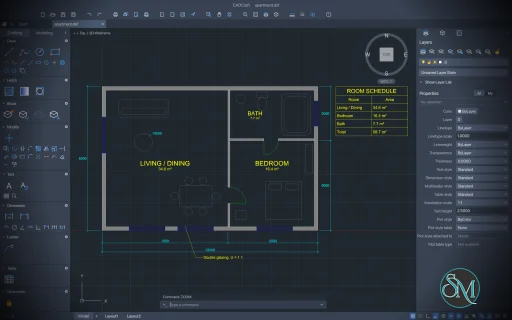
CADCraft is a free, open-source computer-aided design (CAD) application designed as an alternative to Autodesk AutoCAD. Written in Rust, it provides a familiar drafting workflow with a command line, object snapping, layers, dimensions, hatching, blocks, and support for industry-standard CAD file formats.
Unlike browser-based CAD tools that depend on a web application framework, CADCraft uses a native desktop interface built with egui. It supports Windows, macOS, Linux, and FreeBSD, with an additional WebAssembly build for browser-based use.
One of CADCraft's most interesting features is its automation support. Users can control drawings through command-line tools, JSON commands, and the Model Context Protocol (MCP), making the application suitable for scripted drafting and AI-assisted design workflows.
However, CADCraft is still in early development. Although it already supports many everyday 2D drafting operations, it is not yet a complete replacement for AutoCAD, particularly for advanced engineering workflows and 3D modeling.
Features
2D Drawing and Editing Tools
CADCraft includes a broad collection of drawing commands for creating technical illustrations and engineering drawings. Users can create lines, polylines, circles, arcs, rectangles, polygons, ellipses, splines, and other geometric objects.
Its editing tools include moving, copying, rotating, scaling, mirroring, stretching, offsetting, trimming, extending, filleting, and chamfering objects. Array operations and other geometry-management commands are also available.
The command-line workflow resembles traditional CAD software. Users can enter commands, specify coordinates, use relative measurements, and repeat previous commands without relying exclusively on toolbar interactions.
Precision Drawing and Object Snapping
CADCraft provides object snapping for locating important geometric points, including endpoints, midpoints, centers, intersections, and tangency points.
Additional tools include polar tracking, orthographic drawing, grid snapping, direct distance entry, and coordinate-based input.
These features help users create accurate technical drawings rather than relying on approximate mouse positioning.
Layers and Object Properties
The application includes layer management tools for organizing drawing elements. Users can configure layer visibility, locking, freezing, colors, linetypes, and plotting properties.
A Properties palette allows individual drawing objects to be inspected and modified. Additional layer commands support operations such as isolating layers, matching properties, and restoring previous layer settings.
This functionality is particularly useful for architectural plans, mechanical drawings, electrical diagrams, and other projects that require structured drawing organization.
Dimensions, Text, and Annotations
CADCraft supports dimensioning tools, dimension styles, text, multiline text, leaders, and tables.
Its annotation features include configurable arrowheads, dimension overrides, TrueType fonts, text formatting, and associative dimensions that can follow changes to the underlying geometry.
These tools help users communicate measurements and technical information directly within their drawings. However, some advanced annotation features and compatibility details remain under development.
Hatching, Blocks, and Reusable Components
CADCraft supports boundary-based hatching, pattern fills, solid fills, gradient fills, blocks, attributes, and nested blocks.
Hatching is useful for distinguishing materials and areas in architectural or mechanical drawings. Blocks allow frequently reused objects to be inserted into multiple locations without recreating their geometry.
These capabilities provide a practical foundation for producing structured technical drawings.
DXF and DWG File Support
CADCraft reads and writes DXF drawings, including ASCII and binary formats. It also supports reading and writing DWG files through the open-source acadrust library.
The project documents support for DXF files from R12 through 2018 and DWG files from R13 through 2018.
Additional export options include SVG, PNG, and PDF, allowing drawings to be shared in vector, image, and document formats.
File-format support is an important advantage, but it does not guarantee perfect compatibility with every CAD application. Complex drawings should be tested for missing entities, formatting differences, and data loss when imported or exported.
Layouts and PDF Plotting
CADCraft includes paper-space layouts, viewports, page setups, and plotting commands. Users can work between model space and paper space, configure viewport scales, and export drawings to PDF.
These features are important for preparing technical drawings for printing, documentation, and distribution.
However, some advanced plotting functions and workflows are still incomplete, so users with demanding production requirements should verify that the available tools meet their needs.
Parametric Constraints
CADCraft includes geometric and dimensional constraints for defining relationships between drawing elements.
Its constraint tools can help maintain intended geometric relationships when objects are edited. The application also supports parameter expressions, automatic constraint generation, and conflict detection.
These capabilities are useful for users interested in more structured and editable CAD designs. Nevertheless, the implementation is still evolving, and its behavior should be evaluated against the requirements of a particular design workflow.
CLI, MCP, and AI Automation
One of CADCraft's distinguishing features is its extensive automation interface.
The project provides a command-line application, a JSON control channel, and an MCP server. These interfaces allow scripts and compatible AI agents to execute CAD commands, inspect drawings, query entities, and render results.
For example, a command-line workflow can create a drawing from a sample, execute a sequence of commands, save the result as a DXF file, and export a rendered image.
This approach could be useful for automatically generating repetitive diagrams, producing drawing variations, validating CAD files, or incorporating technical drawings into larger software workflows.
Download CADCraft v0.13.0 - Software Mirrors |
|---|
CADCraft v0.13.0 for Windowscadcraft-0.13.0-windows-x86.msi | 48.88 MB cadcraft-0.13.0-windows-x86-portable.zip | 59.71 MB cadcraft-0.13.0-windows-x64.msi | 49.54 MB cadcraft-0.13.0-windows-x64-portable.zip | 61.65 MB |
CADCraft v0.13.0 for macOS |
CADCraft v0.13.0 for Linuxcadcraft-0.13.0-linux-x86_64.tar.gz | 62.09 MB cadcraft-0.13.0-linux-x86_64.rpm | 62.6 MB cadcraft-0.13.0-linux-x86_64.pkg.tar.zst | 47.14 MB cadcraft-0.13.0-linux-x86_64.flatpak | 44.33 MB cadcraft-0.13.0-linux-x86_64.deb | 63 MB cadcraft-0.13.0-linux-x86_64.AppImage.zsync | 206.51 kB cadcraft-0.13.0-linux-x86_64.AppImage | 58.93 MB cadcraft-0.13.0-linux-riscv64.tar.gz | 61.04 MB cadcraft-0.13.0-linux-riscv64.rpm | 61.64 MB cadcraft-0.13.0-linux-riscv64.deb | 61.87 MB cadcraft-0.13.0-linux-aarch64.tar.gz | 59.63 MB cadcraft-0.13.0-linux-aarch64.rpm | 60.74 MB cadcraft-0.13.0-linux-aarch64.pkg.tar.zst | 45.55 MB cadcraft-0.13.0-linux-aarch64.flatpak | 41.47 MB cadcraft-0.13.0-linux-aarch64.deb | 61.25 MB |
CADCraft v0.13.0 for BSD |
Others Download related to CADCraft v0.13.0 |
CADCraft v0.13.0 Source Code |
CADCraft v0.13.0 Release Notes:What's Changed
New Contributors
|
Performance and Compatibility
CADCraft is written in Rust and uses egui for its desktop interface. Its architecture separates core geometry, document management, rendering, and command processing from the graphical interface.
The project also uses spatial indexing and incremental updates to improve drawing interaction. Its roadmap reports fast object picking in large drawings, although these internal performance measurements should not be treated as independent benchmarks for every workload.
CADCraft supports multiple operating systems and offers both native applications and a browser-based build. The available release packages include installers and portable formats for supported platforms.
The primary limitation is feature maturity. CADCraft already implements many common 2D drafting operations, but its roadmap identifies substantial gaps in overall AutoCAD compatibility. Advanced 3D modeling, including solids, surfaces, meshes, and rendering, remains a major area of planned development.
Users who primarily create 2D technical drawings may find the current feature set promising. Professionals who depend on advanced 3D modeling, specialized CAD extensions, complex external references, or highly specific DWG workflows should not assume those requirements are fully supported.
System Requirements
CADCraft supports the following platforms:
Windows: 32-bit and 64-bit x86 systems, with ARM64 builds also available.
macOS: Intel and Apple Silicon computers through a universal application.
Linux: x86-64 and ARM64 packages, depending on the distribution format.
FreeBSD: x86-64 builds.
Web: Modern browsers compatible with its WebAssembly application.
Prebuilt releases are the easiest way to get started. Depending on the platform, downloads include Windows installers, portable archives, macOS disk images, Linux AppImages, Flatpak packages, Debian packages, RPM packages, and compressed archives.
Building from source requires Rust and Cargo, Git, and the dependencies specified by the project. Linux developers may also need ALSA development headers.
The project does not establish a universal minimum CPU, RAM, or GPU requirement for every supported drawing workload.
Pros and Cons
Pros
Free and open-source under the MIT or Apache-2.0 license.
Familiar AutoCAD-style command-line workflow.
Extensive 2D drawing and editing tools.
Supports layers, object snapping, dimensions, hatching, blocks, and constraints.
Reads and writes DXF files and supports DWG import and export.
Exports drawings to PDF, SVG, and PNG.
Provides CLI, JSON, and MCP interfaces for automation.
Supports Windows, macOS, Linux, FreeBSD, and web browsers.
Built with Rust and a native graphical interface rather than Electron.
Cons
Still in early development, with incomplete feature parity.
Advanced 3D modeling and rendering are not yet implemented.
Some specialized CAD commands and workflows remain incomplete.
Complex DWG files may not retain every feature or property during conversion.
Advanced plotting, annotation, and interoperability workflows require further validation.
Not yet a dependable replacement for every professional AutoCAD workflow.
How to Install
Option 1: Download a Prebuilt Release
Visit the official CADCraft GitHub repository.
Open the Releases section.
Download the package matching your operating system and processor architecture.
Install or extract the package.
Launch CADCraft and create a new drawing or open an existing CAD file.
For Windows, choose the installer or portable archive. On Linux, select an appropriate format such as AppImage, Flatpak, DEB, or RPM. Mac users can use the universal application package.
Option 2: Build from Source
If you prefer compiling the application yourself, first clone the repository:
git clone https://github.com/storytold/cadcraft
Enter the project directory:
cd cadcraft
Then run the application with its sample drawing:
cargo run --release -p cadcraft -- --sample
This command builds and launches the desktop application with a sample drawing. The initial build may take some time while Cargo downloads dependencies and compiles the project.
Consult the repository's build documentation if additional platform-specific dependencies are required.
Option 3: Use the Browser Version
CADCraft also provides a WebAssembly build. Developers can run the web application locally using Trunk, provided the necessary Rust and WebAssembly development tools are installed.
For example:
cd apps/cadcraft-web
trunk serve
This starts the local development server for the browser-based application. For regular use, check the official releases for a prebuilt web package where available.
Final Verdict
CADCraft is an ambitious open-source CAD project that combines a familiar 2D drafting workflow with modern development practices and automation capabilities. Its support for DXF and DWG, precision drawing tools, layers, dimensions, layouts, and PDF exports makes it a promising option for users who need a free alternative to proprietary drafting software.
Its CLI and MCP integration are particularly noteworthy. They make CADCraft more than a graphical drawing application by enabling scripted operations and AI-assisted workflows that could benefit developers, engineers, and technical teams.
The main drawback is its early development status. Although many everyday 2D drafting features are already available, advanced 3D modeling and several specialized workflows remain incomplete. Compatibility with complex files also needs careful testing before the application can be trusted for critical production work.
CADCraft is worth trying for 2D drafting, CAD experimentation, and automated drawing generation. However, professionals who depend on complete AutoCAD compatibility or advanced 3D design should treat it as an emerging alternative rather than a full replacement.
Post a Comment/Report Broken Link: