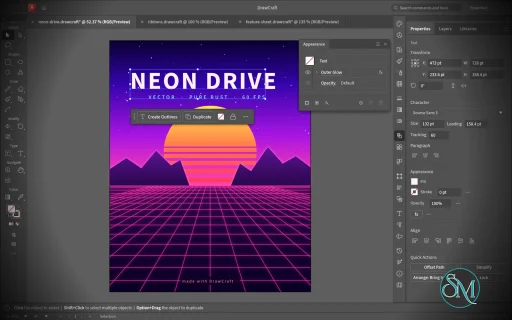
VectorCraft is an open-source vector illustration application designed as a clean-room reimplementation of the Adobe Illustrator workflow. Built entirely in Rust, it provides a native desktop application for Windows, macOS and Linux, along with a WebAssembly version that runs in the browser.
The project goes beyond basic vector drawing. It aims to reproduce a professional Illustrator-style workflow with Bézier editing, Pathfinder operations, multiple artboards, typography, gradients, live effects, PDF and SVG workflows, and extensive automation capabilities.
Features
VectorCraft provides a substantial collection of professional vector-illustration tools:
Pen and Direct Selection tools
Bézier anchors and handles
Pathfinder and exact Boolean operations
Multiple artboards
Layers and groups
Smart Guides
Rulers, grids and alignment tools
Live corners
Gradient and mesh tools
Gradient fills and strokes
Pattern and appearance controls
Blend tool
Radial Repeat
Envelope Distort
Puppet Warp
Liquify
Width tool
Perspective Grid
Freeform gradient editing
Recolor Artwork and Color Themes
Editable text and type-on-path
Variable and transformed vector content
Symbols
Clipping and masking
SVG import and export
PDF import and export
EPS export
DXF import
PNG, JPEG and WebP raster export
Export for Screens
Native .vectorcraft document format
Print engine
PDF layers and overprint support
The application also includes a command API that exposes its tools and interface to external automation. A JSON control channel and MCP server allow AI agents and scripts to manipulate documents, operate tools and export artwork.
This is one of VectorCraft's most distinctive features. It is not simply an image editor with an AI assistant added on top. The editing engine itself is designed to be programmatically controllable.
Download VectorCraft v0.23.0 - Software Mirrors |
|---|
VectorCraft v0.23.0 for Windowsvectorcraft-0.23.0-windows-x64.msi | 120.88 MB vectorcraft-0.23.0-windows-x64-portable.zip | 151.37 MB vectorcraft-0.23.0-windows-arm64.msi | 112.76 MB vectorcraft-0.23.0-windows-arm64-portable.zip | 143.57 MB |
VectorCraft v0.23.0 for macOSvectorcraft-cli-0.23.0-macos-universal.zip | 124.49 MB vectorcraft-0.23.0-macos-universal.dmg | 165.93 MB |
VectorCraft v0.23.0 for Linuxvectorcraft-0.23.0-linux-x86_64.tar.gz.asc | 228 B vectorcraft-0.23.0-linux-x86_64.tar.gz | 146.71 MB vectorcraft-0.23.0-linux-x86_64.rpm.asc | 228 B vectorcraft-0.23.0-linux-x86_64.rpm | 147.97 MB vectorcraft-0.23.0-linux-x86_64.pkg.tar.zst | 108.84 MB vectorcraft-0.23.0-linux-x86_64.flatpak.asc | 228 B vectorcraft-0.23.0-linux-x86_64.flatpak | 102.25 MB vectorcraft-0.23.0-linux-x86_64.deb.asc | 228 B vectorcraft-0.23.0-linux-x86_64.deb | 149.02 MB vectorcraft-0.23.0-linux-x86_64.AppImage.zsync.asc | 228 B vectorcraft-0.23.0-linux-x86_64.AppImage.zsync | 241.93 kB vectorcraft-0.23.0-linux-x86_64.AppImage.asc | 228 B vectorcraft-0.23.0-linux-x86_64.AppImage | 138.1 MB vectorcraft-0.23.0-linux-riscv64.tar.gz.asc | 228 B vectorcraft-0.23.0-linux-riscv64.tar.gz | 143.83 MB vectorcraft-0.23.0-linux-riscv64.rpm.asc | 228 B vectorcraft-0.23.0-linux-riscv64.rpm | 145.22 MB vectorcraft-0.23.0-linux-riscv64.deb.asc | 228 B vectorcraft-0.23.0-linux-riscv64.deb | 145.9 MB vectorcraft-0.23.0-linux-aarch64.tar.gz.asc | 228 B vectorcraft-0.23.0-linux-aarch64.tar.gz | 140.07 MB vectorcraft-0.23.0-linux-aarch64.rpm.asc | 228 B vectorcraft-0.23.0-linux-aarch64.rpm | 142.81 MB vectorcraft-0.23.0-linux-aarch64.pkg.tar.zst | 104.42 MB vectorcraft-0.23.0-linux-aarch64.flatpak.asc | 228 B vectorcraft-0.23.0-linux-aarch64.flatpak | 94.89 MB vectorcraft-0.23.0-linux-aarch64.deb.asc | 228 B vectorcraft-0.23.0-linux-aarch64.deb | 144.16 MB vectorcraft-0.23.0-linux-aarch64.AppImage.zsync.asc | 228 B vectorcraft-0.23.0-linux-aarch64.AppImage.zsync | 231.22 kB vectorcraft-0.23.0-linux-aarch64.AppImage.asc | 228 B vectorcraft-0.23.0-linux-aarch64.AppImage | 131.98 MB |
VectorCraft v0.23.0 for BSDvectorcraft-0.23.0-freebsd-x86_64.tar.gz | 146.23 MB vectorcraft-0.23.0-freebsd-aarch64.tar.gz | 138.11 MB |
Others Download related to VectorCraft v0.23.0vectorcraft-web-0.23.0.zip | 35.19 MB release-signing-key.asc | 803 B |
VectorCraft v0.23.0 Source Code
VectorCraft v0.23.0 Source code (zip)
VectorCraft v0.23.0 Source code (tar.gz)
|
VectorCraft v0.23.0 Release Notes: What's Changed- Path booleans: check the windings against the operands' areas and resolve the operands when they don't add up (#5478) by @mockydevs in #5917
- Drop Shadow: a swatch beside Color opens the Color Picker (#5364) by @mockydevs in #5918
- Find and Replace: type inside a locked or hidden group is left alone (#5900) by @Hamza0101 in #5921
- Find Whole Word: a change of style inside a word is not a word boundary (#5901) by @Hamza0101 in #5922
- fix(text): a gutter too huge to step past no longer stalls area type layout by @jayzed80 in #5924
- Effects: a Transform effect's copies of a filled and stroked path stack one above another by @mockydevs in #5927
- Don't copy a library on every save when its format keeps no title by @adikshan11 in #5928
- Perspective grid: a grid dragged off its preset reports no preset name by @mockydevs in #5931
- Type: pin that a Type-range paste into new point type keeps its formatting (#5929) by @Hamza0101 in #5932
- Snap to Glyph: each glyph's bounding-box corners are snap points, and the box turns with rotated type by @mockydevs in #5937
- 3D effects: Extrude & Bevel, Inflate and Rotate apply to groups, turned about one shared axis by @mockydevs in #5938
- Type: Alt + numeric-keypad codes (Alt+0176 → °) type their character on Windows; type.insert takes a code by @mockydevs in #5939
- Appearance and Eyedropper: reading an object's paint does not measure its bounds by @dotCooCoo in #5940
- Paste: cells copied from a spreadsheet paste as a table of type over gridlines by @mockydevs in #5942
- Direct Selection: with Snap to Grid, a dragged straight segment lands its anchors on the grid by @mockydevs in #5947
- Languages: Bulgarian, with its quote marks and the fonts' Bulgarian forms (#5945) by @Hamza0101 in #5948
- Opening a slow file shows a progress window with Cancel and Continue in Background by @mockydevs in #5950
- .ai save: the editing copy names the active artboard by @dotCooCoo in #5951
- .ai import: the other Effect › Pathfinder operations open as live effects on a group by @dotCooCoo in #5952
- Legacy .ai export: a flattened transparent image's clip follows its edge smoothly by @mockydevs in #5953
- Type: layout keeps each font face's shaping plans by @dotCooCoo in #5955
- UI: centre the Home screen and use the accent for the Discord button (#4684) by @SofiaAFigueredo in #4732
- Transform fields: Tab moves from one field to the next, one press each by @FractalEncrypt in #5957
- Shape tools: move the selection from its centre point and turn it outside a corner by @FractalEncrypt in #5958
- .ai import: ASCII85 data in a section does not hide the section's end by @dotCooCoo in #5959
- PDF export: members of a plain group or layer are measured once to leave out off-page art, and the link walk measures only what it reads by @dotCooCoo in #5963
- .ai import: envelopes map from their stroked box when the file saves its size by @dotCooCoo in #5966
- .ai import: paths with an Art brush open with the brush on their stroke by @dotCooCoo in #5967
- Fix #5714: widths run smoothly between width points by @slafebre in #5968
- Type: switching to the Eyedropper keeps a whole-story selection by @dotCooCoo in #5969
- Part of #5964: stroke gradients cover an arrowhead to the end of its reach by @slafebre in #5971
- Canvas: selection outlines and anchors are reused between frames by @dotCooCoo in #5972
- .ai save: the editing copy keeps type as type by @dotCooCoo in #5965
- Add hyphenation for eleven Indian languages by @ruchirguitar in #5946
- SVG: centred and right-aligned type on a path keeps its place by @kylekanouse in #5977
- .ai import: images, meshes, blends and styled objects keep the knockout shape flag by @dotCooCoo in #5978
- Links: a link check whose worker ends without a result no longer stops later checks by @dotCooCoo in #5982
- Artboards: the panel menu's New Artboard makes the new artboard active by @dotCooCoo in #5986
- Docs: PDF password export says when the file ID and the bytes vary by @dotCooCoo in #5989
- .ai import: opacity mask art of one object opens as that object by @dotCooCoo in #5990
- Save: notes on unread save options name the legacy or non-PDF-compatible .ai, in every save command by @dotCooCoo in #5993
- EPS import: bind leaves the procedures it already bound alone (Ghostscript eps2write files open) by @mockydevs in #6000
- EPS import: SubFileDecode reads counts past 4 MiB (eps2write files with long streams open) by @mockydevs in #6001
- EPS import: cvi and cvr read radix numbers (eps2write spot colours with spaces) by @mockydevs in #6002
- EPS import: an image too large to read skips its data instead of failing the file by @mockydevs in #6003
- Image Trace: the logo fitter keeps no piece over its tolerance by @dotCooCoo in #6008
- Artboards: the Artboard tool's canvas menu cuts, copies, pastes, renames, rearranges and exports artboards by @dotCooCoo in #5983
- Offset Path: the spurious-contour check tests only the source segments near each contour by @dotCooCoo in #5988
- Dialogs: a held Enter or Escape stops at the dialog it opened or closed by @dotCooCoo in #6004
- Preferences: prefs.set refuses a missing or unusable recovery or plug-ins folder by @dotCooCoo in #6005
- EPS/.ai editing data: symbols defined before the art styles take them by @mockydevs in #5992
- EPS/.ai editing data: blends with no spine written come in live by @mockydevs in #6011
- EPS/.ai editing data: a transparency set inside a clipping group stays after it by @mockydevs in #6014
- .ai import: drawn looks in pattern and brush art count in the note by @dotCooCoo in #6017
- Type: story-wide panel changes follow the story's current thread by @dotCooCoo in #5985
- .ai import: legacy type keeps its writing direction, Tate-chu-yoko runs and upright Roman characters by @dotCooCoo in #6012
- vectorcraft-web: window.vectorcraft takes its request functions from craft-web-api by @helenkwok in #6015
- Release: refresh contributor credits for each release (#5997) by @Luis-0508 in #5998
- #5980: macOS save sheet uses alloc/init instead of +savePanel by @BOXELS in #5984
- Engine: execute refuses keys a command doesn't name, in every build by @dotCooCoo in #5890
- .ai save: a reopened file opens on the artboard active when it was saved by @dotCooCoo in #5975
- Artboards: duplicate, copy, cut, move and rearrange journal whether locked and hidden art goes by @dotCooCoo in #5994
- Simplify: fitted curves stay within the tolerance of the path, and serpentines simplify faster by @dotCooCoo in #5995
- .ai import: type on a path keeps its effect, alignment and flip by @dotCooCoo in #5996
- .ai import: spot colors in a kept brush's art become swatches by @dotCooCoo in #6006
- .ai save: the editing copy keeps variables, data sets and bindings by @dotCooCoo in #6024
- Actions: Insert Stop pauses playback and shows a message by @dotCooCoo in #6028
- Color fields: a pasted hex code replaces the field's digits by @dotCooCoo in #6030
- .ai import: a filled clipping path keeps its fill by @dotCooCoo in #6032
- Dimension tool: Expand keeps a dimension as plain art after it moves by @dotCooCoo in #6033
- .ai import: legacy overflow breaks keep the direction and paragraph attributes they were read with by @dotCooCoo in #6034
- Fix #5347: a floating panel's menu scrolls inside its window by @dotCooCoo in #6036
- Menus: Delete Empty Artboards' enabled check does not walk the document every frame by @dotCooCoo in #6037
- Panels: floating panels reopen on the monitor where they were left by @dotCooCoo in #6038
- Paste: skips relinking copies with no renames, global swatches or styles, and finds type in one walk by @dotCooCoo in #6044
- i18n: the Turkish params and effect errors name their own keys by @dotCooCoo in #6045
- Tests: the Mac menu bar tests do not depend on fonts other tests install by @dotCooCoo in #6046
- Fix #5813: floating panels hide while a tool group's flyout is open by @dotCooCoo in #6049
- Panels: long swatch, preset and Add New Effect popups scroll inside a short window by @dotCooCoo in #6050
- Docs: the stroke outline reuse line is listed once by @dotCooCoo in #6051
- Menus: the wasm build has no unused import warning for menu_open by @dotCooCoo in #6053
- Open: the first frame drawn after the open uses the layouts it made for type objects by @dotCooCoo in #6054
- i18n: Turkish error messages keep the parameter keys they name by @dotCooCoo in #6055
- Tests: the shape builder and large edit guards count work instead of timing it by @dotCooCoo in #6056
- PDF export: warn when a PDF/X file leaves out the document's bleed by @dotCooCoo in #6057
- Font menu: the wasm build has no unread wheel-field warnings by @dotCooCoo in #6058
- Keyboard Shortcuts: Export Text saves the shortcut list as a text file by @dotCooCoo in #6068
- Graphs: Appearance commands and the Eyedropper update a series' stored paint by @dotCooCoo in #6069
- Canvas: a pan by whole pixels copies the pixels that stay on screen by @dotCooCoo in #6070
- Selection: a group dragged with Real-time Drawing off shows each member's outline by @dotCooCoo in #6073
- History: the New Document button makes a document from the selected state by @dotCooCoo in #6074
- Tests: the CSS, glow and .ai Zstandard guards count work instead of timing it by @dotCooCoo in #6075
- Symbols: Reset Transformation returns an instance to its symbol's scale, rotation and shear by @dotCooCoo in #6076
- Fix #5816: CJK and other fallback faces in the interface sit on the Latin baseline by @dotCooCoo in #6079
- Type: Cmd+Enter (Ctrl+Enter) ends text editing and keeps the text by @dotCooCoo in #6080
- i18n: error messages keep the keys and values they name without backticks by @dotCooCoo in #6081
- Type: layout looks up each style run's face once by @dotCooCoo in #6082
- Smart Guides: Snap to Last Location puts a moved selection back where it began by @dotCooCoo in #6086
- Shortcuts: export, import, set, list and preset reject a param of the wrong type by @dotCooCoo in #6087
- Preferences: a search field finds a setting and goes to its category by @dotCooCoo in #6088
- .ai import: type on a later page of a PDF of some artboards goes to its artboard by @dotCooCoo in #6091
- Canvas: moving anchors of a long path redraws only around them by @dotCooCoo in #6092
- Object: Reset Bounding Box also squares the objects inside the selection by @dotCooCoo in #6095
- Path ops: stroke outlining and unions sweep long, low paths along their length by @dotCooCoo in #6097
- Tests: huge-selection vertex counts leave out the art's raster by @dotCooCoo in #6102
- SVG import: each linked file keeps image keys of its own by @dotCooCoo in #6103
- Control bar: the panel menu and the gripper dock it to the top or the bottom of the window by @dotCooCoo in #6090
- Color: Recent Colors keeps the last 30 colors used, across documents by @dotCooCoo in #6108
- .ai import: legacy type in CJK fonts decodes by the font's CMap by @dotCooCoo in #6114
- Type: find and replace and Type menu commands reject a param of the wrong type by @dotCooCoo in #6116
- Artboard Options: Fade Region Outside Artboard darkens the area outside the artboards by @dotCooCoo in #6118
- Image Trace: buttons above the Preset menu choose the Auto Color, High Color, Low Color, Grayscale, Black and White and Outline presets by @dotCooCoo in #6119
- Links: links inside symbols, patterns and masks follow a moved folder and are updated like links in the layers by @dotCooCoo in #6120
- Build: linesweeper from craft-libs' vendored copy at 481f66d by @dotCooCoo in #6122
- Envelopes: commands reject a style, orientation or preserveShape of the wrong type by @dotCooCoo in #6124
- Fix #6110: pattern brush corner tiles line up with the side tiles by @dotCooCoo in #6126
- Flattening: stop building a group's regions at the first one past the region limit by @dotCooCoo in #6127
- Color management: commands reject a param of the wrong type by @dotCooCoo in #6129
- Blend: Smooth Color counts a step per level of color change by @dotCooCoo in #6130
- .ai import: warped type that draws differently from the file opens as its drawn art by @dotCooCoo in #6133
- Text styles: load character and paragraph styles from another document by @dotCooCoo in #6141
- PDF import: cropTo, password, colorMode and textAs reject a value of the wrong type by @dotCooCoo in #6142
- .ai save: the editing copy keeps live effects by @dotCooCoo in #6150
- Fields: Tab moves from a field to the next past its spinner and preset chevron by @dotCooCoo in #6151
- 3D and Materials: Window › 3D and Materials edits the selection's 3D effect in place by @dotCooCoo in #6153
- JavaScript: vectorcraft-js parses ES5 scripts into a syntax tree, checked with cargo xtask test262 by @dotCooCoo in #6155
- Reference point: the locator is one Tab stop, and the arrow keys move the point by @dotCooCoo in #6159
- Commands: an id that is not an object id is refused by commands that otherwise use the selection by @dotCooCoo in #6163
- Shortcuts: holding a tool's single-key shortcut uses the tool until the key is let go by @dotCooCoo in #6172
- Envelopes: type maps from its glyph outline bounds by @dotCooCoo in #6173
- Plug-ins: manifests list permissions, the user grants them at install, and the host enforces the grant by @dotCooCoo in #6176
- Swatches: Add Used Colors, Select All Unused and new swatch naming use hash lookups for colors and names by @dotCooCoo in #6177
- Links: Relink can replace all instances, the folder's missing links or each link separately by @dotCooCoo in #6182
- .ai import: legacy binding punctuation opens as Burasagari's Force setting by @dotCooCoo in #6183
- Plug-ins: API level 2 lets a plug-in report progress, see Cancel and write log lines by @dotCooCoo in #6184
- Dialogs: New Workspace and New Toolbar fit their contents instead of opening 420 pt tall by @dotCooCoo in #6186
- Color: Generic CMYK separates nearby colors alike when an ink sits at 0 or 100% by @dotCooCoo in #6187
- .ai import: Scatter brushes in Tints open in Tints, and brush art drops its frame by @dotCooCoo in #6188
- Plug-ins: a run keeps the fuel left in a slice at a bulk memory instruction by @dotCooCoo in #6190
- Fix #2786: the web build uses WebAssembly SIMD, so the canvas renders about 2.5x faster by @vangel76 in #5284
- SVG: keep CSS classes of imported elements on export (#2414) by @vangel76 in #2480
- Variables: a second text variable on one type object is refused by @dotCooCoo in #2642
- Image Trace: Flat Logo can trace only the named colors, without a white of its own by @dotCooCoo in #3946
- Document: document.compare measures how far an artboard's render is from an image by @dotCooCoo in #3995
- Image Trace: Expand can group the traced paths by color by @dotCooCoo in #4058
- Actions: Batch over data sets keeps Save and Close and warns when each data set saves over one file by @dotCooCoo in #5015
- Canvas: a General option makes Cmd/Ctrl-wheel scroll the canvas sideways
by @dotCooCoo in #5023- Paragraph: Reset Panel also resets the Mojikumi Set and tab stops
by @dotCooCoo in #5025- Type: Type Orientation is a setting of the whole thread
by @dotCooCoo in #5027- Render: the decoded-image cache can grow to a quarter of installed memory on every desktop OS
by @dotCooCoo in #5034- Type: add a VectorCraft preference for typed list detection
by @dotCooCoo in #5039- Type: typed
+, # and > start lists with a hollow circle, square and dash
by @dotCooCoo in #5040- Shortcuts: F2, F3 and F4 also cut, copy and paste on Windows and Linux
by @dotCooCoo in #5041- Perspective grid: Snap to Grid moves objects at every depth by one plane offset by @dotCooCoo in #5196
- Drawing tools: Escape on an arc, spiral or grid drag puts back the options it changed by @dotCooCoo in #5202
- Title bar: the app bar shows no brand mark under the desktop's own frame by @dotCooCoo in #5211
- Document Info: Pattern Objects lists the objects painted with patterns by @dotCooCoo in #5220
- Selection QoL: marquee modes with visible feedback by @dotCooCoo in #5313
- Workspace: add an option to keep Tools beside the canvas with left-side panels by @dotCooCoo in #5395
- File formats: HEIC and HEIF images open and place by @dotCooCoo in #5518
- Type: upright glyphs on a vertical path face the path's start, so ligatures read in order by @dotCooCoo in #5557
- .ai import: Bas Relief opens with its settings by @dotCooCoo in #5227
- Save: include a PDF in new native files by default by @dotCooCoo in #5320
- DXF: a CNC / CAM preset sets the export options for cutting software by @dotCooCoo in #5500
- Layers: a document opened after a close keeps its thumbnail jobs by @dotCooCoo in #5814
- Symbols: Direct Selection sets the solid fill and stroke of one object in a dynamic instance by @dotCooCoo in #5962
- .ai import: placed PDF and .ai pages open as placed documents by @dotCooCoo in #6083
- Graphs: graphic styles and Default and Swap Fill and Stroke update a series' stored paint by @dotCooCoo in #6094
- i18n: error messages in every catalog keep true, false, null and the keys they name by @dotCooCoo in #6100
- Title bar: a Linux and BSD preference uses the app bar where the desktop draws the frame by @dotCooCoo in #6101
- Artboard tool: buttons on the selected artboard's edges add an artboard beside it by @dotCooCoo in #6111
- .ai save: the editing copy keeps symbols and their instances by @dotCooCoo in #6136
- Path ops: region building lists the shapes covering each region instead of a flag per shape by @dotCooCoo in #6144
- Actions: Load Actions… reads action sets saved as .aia files by @dotCooCoo in #6149
- Asset Export: 3D objects export as USDA, USDZ, glTF or OBJ meshes by @dotCooCoo in #6168
- Transform: Align to Pixel Grid keeps an object's horizontal and vertical edges on the pixel grid by @dotCooCoo in #6169
- JavaScript: vectorcraft-js runs ES5 scripts with a garbage-collected heap and execution limits by @dotCooCoo in #6178
- Plug-ins: Safe Mode starts without plug-ins, offered after a launch stops while one loads by @dotCooCoo in #6185
- Path ops: Merge finds every fill's faces in a few contour passes instead of one per fill by @dotCooCoo in #6191
- Envelopes: a top object's sides share the content by control polygon length by @dotCooCoo in #6195
- Plug-ins: the fuzz test generates bulk memory operations by @dotCooCoo in #6198
- Effects: placed gradients move with Transform and Free Distort effects by @dotCooCoo in #6199
- Effects: Effect › SVG Filters applies the document's SVG filters as live effects by @dotCooCoo in #6200
- .ai import: the editing-copy paragraph in the file-format doc appears once by @dotCooCoo in #6202
- Panels: tests pin the palette windows staying shown for torn-off strips and new toolbars by @dotCooCoo in #6203
- SVG export: type on a path with Skew, 3D Ribbon, Stair Step or Gravity keeps its look by @dotCooCoo in #6206
- Legacy .ai: the type attributes warning covers kerning, margins, Align to Path and end brackets by @dotCooCoo in #6207
- Type: docs say Escape returns to the tool that double-clicked into the type by @dotCooCoo in #6208
- Docs: the Reset Transformation entry is listed once in the evidence list by @dotCooCoo in #6216
- .ai import: type keeps Standard Vertical Roman Alignment from its editing data by @dotCooCoo in #6217
- Tests: workspace and toolbar dialog test checks the gap above OK and Cancel's place by @dotCooCoo in #6218
- .ai import: a palette gradient swatch's paint is not linked to itself by @dotCooCoo in #6219
- Swatches: a new swatch holds no link or placement from the paint it is made from by @dotCooCoo in #6222
- .ai save: the editing copy keeps Standard Vertical Roman Alignment by @dotCooCoo in #6226
- .ai import: objects in pattern and brush art take the file's art styles by @dotCooCoo in #6230
- Scale the EPS operation budget with the program's length by @Silvertree2010 in #5423
- Typographer's Quotes: a lone typed ” opens like a straight quote by @VladimirCeric in #5459
- Affinity import: one shared work and name budget across repeated links by @dylanmtaylor in #5491
- Select Text by Font: limit it to artboards or layers (#5529) by @ruchirguitar in #5578
- EPS/.ai editing data: art-style strokes aligned inside or outside keep their alignment by @mockydevs in #6010
- .ai import: opacity mask art without its own paint takes the paint before its dictionary by @magyarb in #6021
- i18n(ka): Georgian for 1 new string by @devius in #6062
- Fix #5960: a narrow part of a variable-width stroke paints over a wide part only where they overlap by @slafebre in #6093
- Cut PSD Unicode layer names on a character boundary by @Silvertree2010 in #6096
- Alt + keypad codes: with NumLock off the keypad keys count as digits and don't move the caret by @mockydevs in #6105
- Fix #5188: a Shift-click on a corner widget of a whole path picks its corner by @slafebre in #6106
- Strip CSS comments from style attributes and rule declarations by @Silvertree2010 in #6128
- Pen: Copy and Cut take the anchors a Cmd-lent Direct Selection picked (#6123) by @slafebre in #6132
- UI tests: gradient and rotation controls are found in release builds by @thisisgomaa in #6156
- Preferences: inputs expose their labels to accessibility tools by @thisisgomaa in #6157
- Ignore non-digit suffixes in next_asset_name by @Silvertree2010 in #6167
- Text styles: double-click opens Character/Paragraph Style Options, and the dialog scrolls in a fixed width by @sadkotheguest in #6171
- Layers: Delete clears the selection after the last row is deleted (#5870) by @alosslessdev in #6175
- Export for Screens: an artboard name keeps its dots (fixes #6143) by @SBaksa in #6180
- Canvas: a document opens at the zoom of the settled window by @KaboomFox in #6196
- Reject a plus sign in Windows GPU PCI id hex digits by @Silvertree2010 in #6197
- Don't treat a pattern named "Name +N" as a numbered copy on import by @Silvertree2010 in #6213
- Fix #6205: support Registration and named swatches in AI art styles by @el-j in #6214
- Fix #6135: opening a .ai with editing data skips the Import PDF dialog by @slafebre in #6225
- 3D effects: resolve overlapping contours before building a solid by @addibble in #6229
- Reject a plus sign in type.insert unicode hex digits by @Silvertree2010 in #6240
- EPS import: composite fonts draw their Type 42 glyphs (pdftops EPS shows its type) by @mockydevs in #5999
- .ai import: images past 2^25 pixels in the editing data keep the layers by @dotCooCoo in #5143
- Commands: an ids list with an entry that is not an id is refused instead of dropping the entry by @dotCooCoo in #6179
- Plug-ins: a plug-in keeps settings and a cache of its own by @dotCooCoo in #6228
- Links: a missing linked file keeps its relative folder when a moved document is saved by @dotCooCoo in #6231
- Asset Export: the 3D mesh triangle limit bounds memory across all exported objects by @dotCooCoo in #6241
- Type: Composite Fonts… sets each class of character in a font of its own by @dotCooCoo in #6244
- Color: Generic CMYK tints gain as CGATS TR 001 gives for SWOP printing by @dotCooCoo in #6245
- Keyboard Shortcuts: each Object › Plug-ins filter has a row of its own by @dotCooCoo in #6246
- Type: Align to Path moves each character by its own font's metrics by @dotCooCoo in #6247
- .ai import: the editing-copy paragraph in the file-format doc appears once again by @dotCooCoo in #6249
- Effects: hidden layer children and edited freeform gradients follow the Transform and Free Distort effects by @dotCooCoo in #6250
- Image Trace: Ignore Color can leave out only the background by @dotCooCoo in #3952
- Type: Tab and Shift+Tab move a list item down and up a level
by @dotCooCoo in #5037- Exit isolation on empty double-click with Direct Selection (#4466) by @onion3130 in #4595
- Symbols: symbol.instance.setAppearance refuses a fill or stroke an object does not draw by @dotCooCoo in #6232
- Preferences: the settings filter builds without a clippy warning on macOS by @dotCooCoo in #6235
- 3D export: Revolve mesh normals are unit length and short walls face out by @dotCooCoo in #6251
- SVG export: outlined type keeps its text as an accessible name by @dotCooCoo in #6255
- SVG Filters: export writes a filter live only when import can read it back by @dotCooCoo in #6256
- M2.1: blend Align-to-Path smooth on curved spines by @adambelis in #6254
- Type: docs say Escape returns to the tool whose double-click chose the Type tool by @dotCooCoo in #6257
- Image Trace: keepColors traces only the listed palette colors by @dotCooCoo in #3968
- Plug-ins: clearing every plug-in's cache is tested in a binary of its own by @dotCooCoo in #6258
- .ai import: opacity mask art in pattern and brush art takes document ids by @dotCooCoo in #6259
- Spiral: Decay applies once per full wind by @dotCooCoo in #5475
- Fix #3748: in isolation mode, art outside a clip group's mask can be selected and dragged
by @dotCooCoo in #5030- Artboards: a Cut or Copy with the Artboard tool replays on its artboards by @dotCooCoo in #6052
- Effects: placed gradients move and scale with the Warp effects by @dotCooCoo in #6236
- Export: the export commands refuse an unknown option key by @dotCooCoo in #6061
- Outline Stroke: geometry effects reshape the path that is outlined, as on the canvas
by @dotCooCoo in #5024- Graphs: a series keeps the object opacity and blend modes set on one of its marks by @dotCooCoo in #6104
- .ai import: symbol libraries open with their symbols by @dotCooCoo in #6109
- Actions: Batch's Override Export sends Export for Screens files to the destination folder
by @dotCooCoo in #5029- Plug-ins: a plug-in adds menu commands of its own under Object › Plug-ins by @dotCooCoo in #6193
- Character: Anti-aliasing Method sets how a type object's edges are drawn as pixels by @dotCooCoo in #5058
- .ai save: the editing copy keeps graphic styles and links to them by @dotCooCoo in #6161
- JavaScript: a realm has the String, Number, RegExp and Date built-ins by @dotCooCoo in #6194
- Reject non-digit object ids in MCP object resource URIs by @Silvertree2010 in #6253
- EPS import: gradients drawn as abutting strips come in as one gradient, without seams by @mockydevs in #5991
- Numeric fields: step on wheel hover without taking focus by @ruchirguitar in #6113
- UI: show or hide the Help Bar independently by @dotCooCoo in #5355
- Path ops: boolean contour passes test the shapes covering each face instead of a flag per shape by @dotCooCoo in #6152
- Tests: the filter plug-in shortcut test accepts the macOS chord text by @dotCooCoo in #6261
- i18n(ka): update the Georgian catalog (59 strings) by @devius in #6262
- Type: type in a composite font is measured in its own document's definition by @dotCooCoo in #6260
- 3D (Classic): Extrude & Bevel (Classic) extrudes art with Wireframe, No Shading, Diffuse and Plastic surfaces by @dotCooCoo in #6174
- Plug-ins: a permission grant covers only the module that was approved by @dotCooCoo in #6263
- Effects: fitted gradients turn with the Transform effect by @dotCooCoo in #6233
- Blend: a pending pick starts over when the document's history changes by @dotCooCoo in #4599
- Paragraph: Kinsoku Shori Type chooses Push In First, Push Out First or Push Out Only by @dotCooCoo in #5070
- Fix #6252: selecting an object gives new art its fill, stroke and weight by @slafebre in #6267
- Plug-ins: importer plug-ins open file types VectorCraft does not read by @dotCooCoo in #6264
- JavaScript: vectorcraft-js adds ES5 Object, Array, Math, JSON and Function.prototype.bind by @dotCooCoo in #6189
- .ai save: the editing copy stops at the reader's object limit by @dotCooCoo in #6220
- .ai import: Art brushes in the older form of their objects come into the Brushes panel by @mockydevs in #6007
- Drawing tools: Escape on a polygon, star or rounded rectangle drag puts back the option it changed by @dotCooCoo in #5213
- Gradients: freeform points that share a color model mix in that model by @dotCooCoo in #6268
- Recolor: report the locked and hidden art a recolor of everything left out by @dotCooCoo in #4536
- Variables: a visibility variable shows and hides locked art by @dotCooCoo in #2780
- Fix #3526: the bounding box follows a resize drag by @dotCooCoo in #5042
- Plug-ins: live effects at API level 2 can paint the pieces they return by @dotCooCoo in #6265
- File formats: JPEG XL (.jxl) images open and place by @dotCooCoo in #2606
- Linux: VECTORCRAFT_TITLEBAR takes precedence over System Title Bar for the run it is set in by @dotCooCoo in #5036
- Updates: the updater reports installing, ready, installed and failed, and installs at exit by @dotCooCoo in #6271
- Plug-ins: settings and the cache total stay in memory between storage calls by @dotCooCoo in #6269
- Print: Copies per Sheet prints as many copies of each artboard as fit the sheet by @dotCooCoo in #2552
- Type: a pushed-in line leaves the gap after inline art open by @dotCooCoo in #6274
- Docs: a plug-in with no permissions list needs no grant by @dotCooCoo in #6270
- Part of #978: Window › Color Wheel picks colors on a hue ring and a saturation and brightness square by @dotCooCoo in #2279
- Tools: setting another tool's option leaves a drag's options alone by @dotCooCoo in #6273
- Plug-ins: removing a plug-in moves the revision while it holds the set by @dotCooCoo in #6272
- Plug-ins: filters can ask to read type, images and symbol instances by @dotCooCoo in #6223
- EPS/.ai editing data: paths keep art styles of several fills and strokes live by @mockydevs in #6016
- Plug-ins: lastError keeps a failed run's error, and hit tests follow swatch changes by @dotCooCoo in #6276
- Updates: take craft-update from craft-libs main at 1b34eba41 by @dotCooCoo in #6275
- .ai import: names that aren't UTF-8 can be read in a legacy code page by @dotCooCoo in #5158
- Save: the save commands and Export for Screens refuse an unknown option key by @dotCooCoo in #6234
- Linux: docs say which VECTORCRAFT_TITLEBAR values take precedence by @dotCooCoo in #6277
- Shape Builder: a large selection merges on another thread by @dotCooCoo in #4379
- .ai/EPS import: type keeps its tab stops, and right-aligned lines with tabs lay out as the file's page by @magyarb in #6148
- Workspace: the Tools panel docks on the right too, left of the panels by @vecteza in #6280
- Docs: docs/mcp.md lists save_file once by @dotCooCoo in #6279
- .ai import: objects with a centered variable-width stroke come in as their drawn outline by @dotCooCoo in #5200
- Plug-ins: docs say when pixelsOmitted is set by @dotCooCoo in #6283
- New Document: the name field is labeled Document Name by @dotCooCoo in #6284
- Add collapse-to-icons arrows to floating panels and rail flyouts by @ruchirguitar in #6215
- EPS import: sampled functions interpolate between their samples (function shadings no longer come in as flat blocks) by @mockydevs in #6018
- M2.1: split ordinary path objects after deletion by @ruchirguitar in #6078
- Workspace: window.panel.dock rejects a Tools side that isn't text by @vecteza in #6287
- Plug-ins: a filter's read-only objects stay in its input and failed decodes count by @dotCooCoo in #6282
- Plug-ins: docs limit the 64 MiB decoder note to non-CMYK images by @dotCooCoo in #6288
- Plug-ins: replacing a granted plug-in with one that lists no permissions removes the grant by @dotCooCoo in #6286
- EPS import: an image's transient data stops counting against the memory budget by @mockydevs in #6019
- New Document: screen readers hear each Preset Details field's name by @dotCooCoo in #6289
- Part of #4936: text.spelling.check lists unknown words, text.spelling.suggest suggests by @Hassan1305 in #6212
- Updates: the update dialogs hold the keyboard and floating windows, and updates wait for running work by @dotCooCoo in #6291
- Plug-ins: permissions and a heavy budget need a person's approval or a start-up flag by @dotCooCoo in #6285
- Follow-up to #6252: a selected colorized image gives new art its fill by @slafebre in #6293
- EPS import: CID-keyed fonts draw the glyphs of the CIDFonts the file carries by @mockydevs in #6031
- EPS import: Type 42 fonts take their characters and widths from the font they carry; show spacing kept as tracking by @mockydevs in #6023
- Show 0 instead of -0 for tiny negative graph labels by @Silvertree2010 in #6294
- EPS import: kshow runs its procedure between the characters of live type by @mockydevs in #6064
- EPS import: embedded Type 1 fonts draw and space their type with their own glyphs by @mockydevs in #6035
- EPS import: CMap mappings to base fonts' codes and glyph names draw their glyphs by @mockydevs in #6066
- EPS import: CID-keyed fonts in a FontSet's CFF data draw their glyphs by @mockydevs in #6065
- EPS import: CIDFonts only named, over a Unicode CMap, set their characters as live type by @mockydevs in #6067
- Follow-up to #6254: the blend spine keeps only the subpath it samples by @adambelis in #6297
- EPS/.ai editing data: a ligature glyph named by a private-use character matches its text object by @mockydevs in #6047
- Part of #4936: custom dictionary and Ignore All commands by @Hassan1305 in #6296
New Contributors- @SofiaAFigueredo made their first contribution in #4732
- @slafebre made their first contribution in #5968
- @kylekanouse made their first contribution in #5977
- @helenkwok made their first contribution in #6015
- @Luis-0508 made their first contribution in #5998
- @BOXELS made their first contribution in #5984
- @magyarb made their first contribution in #6021
- @alosslessdev made their first contribution in #6175
- @SBaksa made their first contribution in #6180
- @onion3130 made their first contribution in #4595
Full Changelog: v0.22.0...v0.23.0 |
Performance and Compatibility
VectorCraft is implemented in Rust and uses a multithreaded rendering architecture. The project reports that 20,000 shapes can be rendered in approximately 27 milliseconds at full Retina resolution while maintaining a responsive interface.
Its geometry engine is designed around exact curve operations, while structural sharing provides effectively unlimited undo without requiring every operation to duplicate the entire document.
The project also places considerable emphasis on automated testing. Property-based tests are used for document round trips, while rendering and geometry have dedicated test infrastructure.
File compatibility is another strength. SVG is a first-class format, while PDF import/export and PDF-compatible AI files provide useful interoperability with established design workflows. DXF import and EPS export further extend its usefulness for technical and print-oriented work.
However, compatibility should not be confused with complete Illustrator parity. VectorCraft is still under active development, and the project roadmap indicates that some areas remain under construction.
System Requirements
VectorCraft supports:
Windows
macOS
Linux
FreeBSD
WebAssembly/browser
Prebuilt Linux packages are available in several formats, including:
Both x86_64 and ARM64 Linux builds are provided.
macOS has a universal build supporting Intel and Apple Silicon, while Windows is distributed as a native desktop application.
Developers can also build the application directly from source using Rust.
Pros and Cons
Pros
Open-source
MIT or Apache-2.0 licensing
Native Rust application
Windows, macOS and Linux support
Browser/WebAssembly version
Strong Bézier and vector-editing tools
Exact Pathfinder Boolean operations
Multiple artboards
Advanced gradients and appearance controls
Envelope Distort, Puppet Warp and Liquify
SVG and PDF support
EPS export
DXF import
Native document format
Excellent automation potential
JSON control interface
MCP support for AI agents
Multithreaded rendering
Extensive automated testing
Cons
Still under active development
Not yet a complete Illustrator replacement
Some workflows will still lack the maturity of established commercial software
Font availability and typography coverage are still developing
Professional production workflows should be tested before full migration
The large feature set can make the application more complex for beginners
How to Install
The easiest method is to download the appropriate prebuilt package from the project's GitHub releases.
Linux users can choose between AppImage, DEB, RPM and tarball packages. macOS users can install the universal application, while Windows users can use the provided Windows package.
Developers can build the desktop application from source:
git clone https://github.com/storytold/vectorcraft
cd vectorcraft
cargo run --release -p vectorcraft
A VectorCraft document can also be opened directly:
cargo run --release -p vectorcraft -- examples/dusk-poster.vectorcraft
For headless processing and automation, the project provides a CLI:
cargo run --release -p vectorcraft-cli -- run \
  --in examples/ribbons.vectorcraft \
  --export out.pdf
The MCP server can be launched with:
cargo run --release -p vectorcraft-cli -- mcp
This makes VectorCraft particularly interesting for automated graphics generation and AI-assisted design workflows.
Final Verdict
VectorCraft is an unusually ambitious open-source Illustrator alternative. It is not merely a basic SVG editor with a familiar interface. The project is attempting to recreate a substantial portion of the professional Illustrator workflow while building its own modern Rust-based rendering and document architecture.
Its strongest areas are vector geometry, Pathfinder operations, Bézier editing, advanced effects, SVG/PDF interoperability and automation. The MCP and JSON control interfaces are especially interesting because they allow the same editing engine to be operated by scripts and AI agents.
Performance is another major strength. The native Rust architecture and multithreaded rendering approach give VectorCraft a solid technical foundation for handling complex vector documents.
The biggest limitation is maturity. Established applications such as Illustrator have decades of compatibility work, plugins, fonts, production workflows and ecosystem support behind them. VectorCraft is still developing and should not yet be treated as a drop-in replacement for every professional Illustrator workflow.
For designers, developers and open-source users looking for a modern vector graphics application, however, VectorCraft is one of the most interesting projects in this category. Its combination of native performance, open licensing and agent-native automation makes it particularly worth watching.
Post a Comment/Report Broken Link: