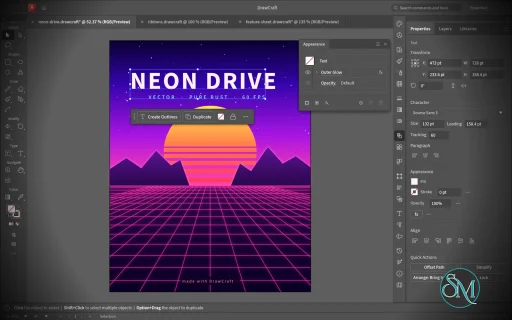
VectorCraft is an open-source vector illustration application designed as a clean-room reimplementation of the Adobe Illustrator workflow. Built entirely in Rust, it provides a native desktop application for Windows, macOS and Linux, along with a WebAssembly version that runs in the browser.
The project goes beyond basic vector drawing. It aims to reproduce a professional Illustrator-style workflow with Bézier editing, Pathfinder operations, multiple artboards, typography, gradients, live effects, PDF and SVG workflows, and extensive automation capabilities.
Features
VectorCraft provides a substantial collection of professional vector-illustration tools:
Pen and Direct Selection tools
Bézier anchors and handles
Pathfinder and exact Boolean operations
Multiple artboards
Layers and groups
Smart Guides
Rulers, grids and alignment tools
Live corners
Gradient and mesh tools
Gradient fills and strokes
Pattern and appearance controls
Blend tool
Radial Repeat
Envelope Distort
Puppet Warp
Liquify
Width tool
Perspective Grid
Freeform gradient editing
Recolor Artwork and Color Themes
Editable text and type-on-path
Variable and transformed vector content
Symbols
Clipping and masking
SVG import and export
PDF import and export
EPS export
DXF import
PNG, JPEG and WebP raster export
Export for Screens
Native .vectorcraft document format
Print engine
PDF layers and overprint support
The application also includes a command API that exposes its tools and interface to external automation. A JSON control channel and MCP server allow AI agents and scripts to manipulate documents, operate tools and export artwork.
This is one of VectorCraft's most distinctive features. It is not simply an image editor with an AI assistant added on top. The editing engine itself is designed to be programmatically controllable.
Download VectorCraft v0.21.0 - Software Mirrors |
|---|
VectorCraft v0.21.0 for Windowsvectorcraft-0.21.0-windows-x86.msi | 108.22 MB vectorcraft-0.21.0-windows-x86-portable.zip | 132.94 MB vectorcraft-0.21.0-windows-x64.msi | 111.6 MB vectorcraft-0.21.0-windows-x64-portable.zip | 139.06 MB vectorcraft-0.21.0-windows-arm64.msi | 104.68 MB vectorcraft-0.21.0-windows-arm64-portable.zip | 132.23 MB |
VectorCraft v0.21.0 for macOSvectorcraft-cli-0.21.0-macos-universal.zip | 114.35 MB vectorcraft-0.21.0-macos-universal.dmg | 153.03 MB |
VectorCraft v0.21.0 for Linuxvectorcraft-0.21.0-linux-x86_64.tar.gz | 135.07 MB vectorcraft-0.21.0-linux-x86_64.rpm | 136.18 MB vectorcraft-0.21.0-linux-x86_64.pkg.tar.zst | 100.52 MB vectorcraft-0.21.0-linux-x86_64.flatpak | 94.18 MB vectorcraft-0.21.0-linux-x86_64.deb | 137.12 MB vectorcraft-0.21.0-linux-x86_64.AppImage.zsync | 222.87 kB vectorcraft-0.21.0-linux-x86_64.AppImage | 127.21 MB vectorcraft-0.21.0-linux-riscv64.tar.gz | 132.61 MB vectorcraft-0.21.0-linux-riscv64.rpm | 133.86 MB vectorcraft-0.21.0-linux-riscv64.deb | 134.46 MB vectorcraft-0.21.0-linux-aarch64.tar.gz | 129.41 MB vectorcraft-0.21.0-linux-aarch64.rpm | 131.78 MB vectorcraft-0.21.0-linux-aarch64.pkg.tar.zst | 96.78 MB vectorcraft-0.21.0-linux-aarch64.flatpak | 88.21 MB vectorcraft-0.21.0-linux-aarch64.deb | 132.97 MB vectorcraft-0.21.0-linux-aarch64.AppImage.zsync | 213.88 kB vectorcraft-0.21.0-linux-aarch64.AppImage | 122.08 MB |
VectorCraft v0.21.0 for BSDvectorcraft-0.21.0-freebsd-x86_64.tar.gz | 134.62 MB vectorcraft-0.21.0-freebsd-aarch64.tar.gz | 127.63 MB |
Others Download related to VectorCraft v0.21.0vectorcraft-web-0.21.0.zip | 31.42 MB |
VectorCraft v0.21.0 Source Code
VectorCraft v0.21.0 Source code (zip)
VectorCraft v0.21.0 Source code (tar.gz)
|
VectorCraft v0.21.0 Release Notes: What's Changed- Paste: in front or back of a compound path's member, other art goes beside the compound path by @dotCooCoo in #5120
- .ai import: version 7 palettes keep their swatches without names by @dotCooCoo in #5123
- Variables: Rename reports a missing variable or data set before a taken name by @dotCooCoo in #5135
- Variables: a graph variable's data set applies its CSV as graph.setData does by @dotCooCoo in #5136
- Variables: Lock Variables' description names the refused import by @dotCooCoo in #5137
- Variables: a text value on threaded type replaces the whole story by @dotCooCoo in #5138
- Recolor Artwork: color sliders in a chosen color mode edit the selected row's new color by @dotCooCoo in #5113
- Native format: take the .vectorcraft envelope from craft-vectorcraft-format by @dotCooCoo in #5146
- Fix #3818: the chosen brightness holds when the system theme differs by @dotCooCoo in #5164
- Fix #2089: Affinity strokes keep their Width tool profile by @dotCooCoo in #5171
- Fix #3437: Spiral segments follow the spiral by @dotCooCoo in #5178
- PDF export: a white stop linked to a process swatch keeps a spot gradient on its ink by @dotCooCoo in #5182
- Symbols: Replace Symbol clears the old symbol's dynamic overrides by @dotCooCoo in #5183
- EPS: spot inks named All or None print as spot inks by @dotCooCoo in #5184
- Legacy .ai: type with rotated characters is written as outlines that keep the rotation by @dotCooCoo in #5186
- Variables: Edit Data Set keeps an empty text value when OK changes nothing by @dotCooCoo in #5127
- Fix #3797: documents open in Preview, and Outline is a setting of each document by @dotCooCoo in #5134
- .ai import: a clipping path keeps its stroke by @dotCooCoo in #5132
- .ai import: legacy type keeps its spacing, hanging punctuation and hyphenation by @dotCooCoo in #5125
- .ai import: paths keep their notes and Show Center by @dotCooCoo in #5129
- Variables: Undo and Redo clear a highlight that names no variable by @dotCooCoo in #5131
- Variables: Export Data Sets refuses more data sets or variables than Import Data Sets reads by @dotCooCoo in #5124
- Variables: Import Data Sets reports why a cell was refused by @dotCooCoo in #5133
- Variables: a CSV header that names one variable twice is refused by @dotCooCoo in #5128
- Variables: a command that changes nothing adds no undo step by @dotCooCoo in #5130
- Variables: Update Data Set keeps a row's values when every bound object is locked by @dotCooCoo in #5126
- Variables: an import or library load that changes nothing adds no undo step by @dotCooCoo in #5145
- Variables: Export Data Sets marks visibility and image columns with # and @ by @dotCooCoo in #5141
- .ai import: Stylize effects open with their saved settings by @dotCooCoo in #5140
- .ai import: Convert to Shape opens live on paths and type by @dotCooCoo in #5142
- Docs: .ai guides are no longer listed as lost by @dotCooCoo in #5071
- Docs: list every case where an unread .ai object still sends the file to its page by @dotCooCoo in #5074
- .ai import: page art moved to its artboard takes its pattern tiles along by @dotCooCoo in #5076
- .ai import: Objects on Path records measure each group once by @dotCooCoo in #5077
- Place: the Word .doc reader resolves each style once and refuses damaged property tables by @dotCooCoo in #5073
- Live Paint: the Live Paint Bucket highlights an edge thinner than a face by @dotCooCoo in #5052
- Actions: the panel menu's Duplicate copies the selected action or set by @dotCooCoo in #5068
- Swatch libraries: Patterns › Geometric Patterns adds a pattern with its swatch by @dotCooCoo in #5049
- i18n: open, save and recovery messages name their counts in the singular or the plural by @dotCooCoo in #5084
- .ai import: a file whose PDF part can't be read opens from its editing data by @dotCooCoo in #5051
- .ai import: area type flows around its text wrap objects by @dotCooCoo in #5082
- .ai import: area type keeps its rows, columns, gutters and first baseline by @dotCooCoo in #5069
- Objects on Path: the Rotate All widget turns every attached object about its attachment point by @dotCooCoo in #5081
- .ai import: vertical type keeps its orientation and Tate-chu-yoko runs by @dotCooCoo in #5086
- Export for Screens: a folder named with dotless ı is not merged into i by @dotCooCoo in #5093
- Accessibility: Tab no longer stops on the Simplify and Smooth sliders' backdrop by @dotCooCoo in #5091
- Appearance: effect.move reports the effect's index in the object whose row it names by @dotCooCoo in #5087
- Mesh: Create Gradient Mesh at a point outside the object keeps the path by @dotCooCoo in #5095
- Brushes: Pattern Brush Options keeps Original after a swatch is chosen by @dotCooCoo in #5097
- Transparency: makeOpacityMask refuses objects in ids that cannot be edited by @dotCooCoo in #5104
- File formats: JPEG 2000 prefers the display resolution box over the capture box in either order by @dotCooCoo in #5105
- Type: choosing Optical kerning clears manual pair values, as Auto does by @dotCooCoo in #5101
- OpenType: the panel's Position menu sets superscript, subscript, numerator or denominator glyphs by @dotCooCoo in #5098
- Character Styles: Style Options sets scale, baseline shift, rotation and language by @dotCooCoo in #5094
- Symbols: symbol editing mode keeps every instance in step, and its UI entry points are tested by @dotCooCoo in #5106
- Variables: Import Data Sets reads CSV files that are not UTF-8 as Windows-1252 by @dotCooCoo in #5116
- Variables: Edit Data Set's Name field renames the data set by @dotCooCoo in #5121
- .ai import: anchors are smooth or corners by the case of their segment operators by @dotCooCoo in #5122
- .ai import: artboard display options, raster effects settings and the header's author come in by @dotCooCoo in #5102
- .ai import: graphs open as their drawn art, with a note by @dotCooCoo in #5115
- .ai import: multi-layer masks open as a clipping group in each layer by @dotCooCoo in #5117
- Separations Preview: Gamut Check counts colors in the singular and the plural by @dotCooCoo in #5190
- Fix #2181: PDF layer forms get real boxes and lose their off-page marks by @dotCooCoo in #5191
- Canvas: a drag ends where its button went up by @dotCooCoo in #5195
- Artwork Cleanup: Simplify Anchors and Deep Ungroup leave hidden and locked art alone by @dotCooCoo in #5197
- Artwork Cleanup: Empty Text and Off-Artboard Art leave type that clips art by @dotCooCoo in #5203
- Document Info: Save writes the category the panel shows by @dotCooCoo in #5212
- Recolor: the Global Adjust sliders change every color at once by @dotCooCoo in #5214
- Fix #785: commands refuse an id that isn't an object id instead of using the selection by @dotCooCoo in #5167
- Fix #4995: Above Text moves a Tabs panel that already floats by @dotCooCoo in #5162
- Actions: the current set is kept after a restart by @dotCooCoo in #5169
- Actions: the panel menu's Action Options… renames the selected action by @dotCooCoo in #5172
- Variables: Save Variable Library… writes the variables and data sets as an XML library by @dotCooCoo in #5147
- .ai import: Offset Path, Outline Object and Outline Stroke open live by @dotCooCoo in #5148
- .ai import: a line width of 0 draws as a hairline by @dotCooCoo in #5174
- .ai import: placed files are found by the folder they keep relative to the document by @dotCooCoo in #5176
- .ai import: the document's graphic styles open in the panel with their objects linked by @dotCooCoo in #5155
- Type: manual kerning in right-to-left text spaces the pair it is set on by @dotCooCoo in #5185
- Fonts: Find Font and Replace Missing Fonts reach the type in symbols by @dotCooCoo in #5199
- Keyboard Shortcuts: commands a key cannot run without a value are not listed by @dotCooCoo in #5194
- Actions: Save Actions… and Load Actions… save a set to a file and load it back by @dotCooCoo in #5192
- .ai import: a group still open at the end of the art is an error by @dotCooCoo in #5198
- .ai import: placed EPS files in the version 7 form are read by @dotCooCoo in #5187
- Fix #5161: Shape Builder merges across a line under a merged shape's edge by @dotCooCoo in #5215
- Tabs: Above Text keeps the ruler at the zoom when the panel comes out wider by @dotCooCoo in #5207
- Selection: with Real-time Drawing off, the bounding box moves with a move drag by @dotCooCoo in #5208
- Selection: a drag with Real-time Drawing off shows the bounds of a selection too big to outline by @dotCooCoo in #5210
- .ai import: legacy files without layers open through the format reader by @dotCooCoo in #5209
- Type: Tate-chu-yoko Settings move a block up, down, left or right by @dotCooCoo in #5206
- Window: Arrange > Tile shows every open document side by side by @dotCooCoo in #5216
- Toolbars: New Toolbar makes a named toolbar filled from the All Tools drawer
by @dotCooCoo in #5038- Brushes: Calligraphic and Scatter values follow pen tilt, bearing and rotation
by @dotCooCoo in #5031- Clipboard: a bitmap pasted from another app is decoded off the UI thread by @dotCooCoo in #4277
- Asset Export: Import Preset and Export Preset read and write preset files
by @dotCooCoo in #5032- Validate hyphen placement and days in month in parse_date by @Silvertree2010 in #4001
- fix(path): recurse into groups and compound paths for path.average by @WadahBadawi in #4898
- perf(canvas): zero-copy texture upload and progressive worker frame acceptance (#4615) by @el-j in #4961
- Fix #4919: Create Swatch Legend by @mockydevs in #5066
- Units: Preferences › East Asian Type reads, with Q and Ha units (#394) by @Taha-Mahmoodi in #4845
- Type tools: a Type tool that uses the clicked path, pointers that say what a click makes, and an icon per tool by @ham9zah in #4644
- Appearance panel: UI improvements and parity for row editing by @FarmerGeorg in #4154
- Limit the ZIP writer to 65534 files so Archive::open can read it by @Prin-Ing in #5109
- Fix #3296: Effect menu items take keyboard shortcuts of their own by @mockydevs in #5110
- Fix #2898: Up and Down change the corner kind while dragging a widget by @mockydevs in #5090
- Fix #5218: the artboard navigator's buttons are commands Keyboard Shortcuts lists by @ruchirguitar in #5222
- G4: Type orientation menu unchecked for mixed vertical/horizontal selection by @nrq6993-a11y in #4324
- Filter invalid XML characters from SVG Dublin Core metadata by @Prin-Ing in #5075
- Decode DXF surrogate pairs by @TheGalitube in #5107
- Fix #5152: placed-document bitmap test no longer races its worker by @mockydevs in #5154
- Fix #5054: a double-click on a repeat isolates it to edit its source by @mockydevs in #5078
- File formats: .dib and .rle bitmaps, .pdd Photoshop files and .pns PNGs open and place by @dotCooCoo in #5223
- Select: Same › Link Block Series selects every frame of a text thread by @dotCooCoo in #5224
- Variables: art on a locked artboard is not bound or rewritten by a data set by @dotCooCoo in #5118
- Effects: a Transform effect on a fill or stroke honors Scale Strokes & Effects and Transform Patterns by @dotCooCoo in #5221
- Symbols: a scaled instance of a symbol with 9-slice guides keeps its corners and edges unstretched by @dotCooCoo in #5079
- Pathfinder: blends, envelopes and warped objects can be compound shape members by @dotCooCoo in #5226
- Fix #3118: PDF export writes CMYK inks, gray and spot tints as the document holds them by @dotCooCoo in #5080
- Fix #5159: ⌘V from the macOS menu bar pastes a picture another app copied by @Hassan1305 in #5230
- Envelope: Distort Appearance keeps a Transform effect's Scale Strokes & Effects and Transform Patterns by @dotCooCoo in #5232
- File formats: Pixar (.pxr) images open and place by @dotCooCoo in #5231
- .ai import: open the variable library and data sets from the editing data by @dotCooCoo in #5156
- .ai import: type keeps its Distort & Transform effects live by @dotCooCoo in #5139
New Contributors- @FarmerGeorg made their first contribution in #4154
- @Prin-Ing made their first contribution in #5109
- @ruchirguitar made their first contribution in #5222
Full Changelog: v0.20.0...v0.21.0 |
Performance and Compatibility
VectorCraft is implemented in Rust and uses a multithreaded rendering architecture. The project reports that 20,000 shapes can be rendered in approximately 27 milliseconds at full Retina resolution while maintaining a responsive interface.
Its geometry engine is designed around exact curve operations, while structural sharing provides effectively unlimited undo without requiring every operation to duplicate the entire document.
The project also places considerable emphasis on automated testing. Property-based tests are used for document round trips, while rendering and geometry have dedicated test infrastructure.
File compatibility is another strength. SVG is a first-class format, while PDF import/export and PDF-compatible AI files provide useful interoperability with established design workflows. DXF import and EPS export further extend its usefulness for technical and print-oriented work.
However, compatibility should not be confused with complete Illustrator parity. VectorCraft is still under active development, and the project roadmap indicates that some areas remain under construction.
System Requirements
VectorCraft supports:
Windows
macOS
Linux
FreeBSD
WebAssembly/browser
Prebuilt Linux packages are available in several formats, including:
Both x86_64 and ARM64 Linux builds are provided.
macOS has a universal build supporting Intel and Apple Silicon, while Windows is distributed as a native desktop application.
Developers can also build the application directly from source using Rust.
Pros and Cons
Pros
Open-source
MIT or Apache-2.0 licensing
Native Rust application
Windows, macOS and Linux support
Browser/WebAssembly version
Strong Bézier and vector-editing tools
Exact Pathfinder Boolean operations
Multiple artboards
Advanced gradients and appearance controls
Envelope Distort, Puppet Warp and Liquify
SVG and PDF support
EPS export
DXF import
Native document format
Excellent automation potential
JSON control interface
MCP support for AI agents
Multithreaded rendering
Extensive automated testing
Cons
Still under active development
Not yet a complete Illustrator replacement
Some workflows will still lack the maturity of established commercial software
Font availability and typography coverage are still developing
Professional production workflows should be tested before full migration
The large feature set can make the application more complex for beginners
How to Install
The easiest method is to download the appropriate prebuilt package from the project's GitHub releases.
Linux users can choose between AppImage, DEB, RPM and tarball packages. macOS users can install the universal application, while Windows users can use the provided Windows package.
Developers can build the desktop application from source:
git clone https://github.com/storytold/vectorcraft
cd vectorcraft
cargo run --release -p vectorcraft
A VectorCraft document can also be opened directly:
cargo run --release -p vectorcraft -- examples/dusk-poster.vectorcraft
For headless processing and automation, the project provides a CLI:
cargo run --release -p vectorcraft-cli -- run \
  --in examples/ribbons.vectorcraft \
  --export out.pdf
The MCP server can be launched with:
cargo run --release -p vectorcraft-cli -- mcp
This makes VectorCraft particularly interesting for automated graphics generation and AI-assisted design workflows.
Final Verdict
VectorCraft is an unusually ambitious open-source Illustrator alternative. It is not merely a basic SVG editor with a familiar interface. The project is attempting to recreate a substantial portion of the professional Illustrator workflow while building its own modern Rust-based rendering and document architecture.
Its strongest areas are vector geometry, Pathfinder operations, Bézier editing, advanced effects, SVG/PDF interoperability and automation. The MCP and JSON control interfaces are especially interesting because they allow the same editing engine to be operated by scripts and AI agents.
Performance is another major strength. The native Rust architecture and multithreaded rendering approach give VectorCraft a solid technical foundation for handling complex vector documents.
The biggest limitation is maturity. Established applications such as Illustrator have decades of compatibility work, plugins, fonts, production workflows and ecosystem support behind them. VectorCraft is still developing and should not yet be treated as a drop-in replacement for every professional Illustrator workflow.
For designers, developers and open-source users looking for a modern vector graphics application, however, VectorCraft is one of the most interesting projects in this category. Its combination of native performance, open licensing and agent-native automation makes it particularly worth watching.
Post a Comment/Report Broken Link: