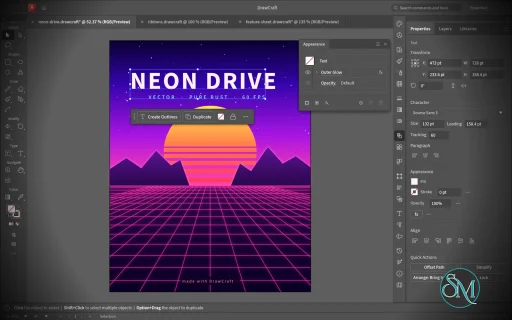
VectorCraft is an open-source vector illustration application designed as a clean-room reimplementation of the Adobe Illustrator workflow. Built entirely in Rust, it provides a native desktop application for Windows, macOS and Linux, along with a WebAssembly version that runs in the browser.
The project goes beyond basic vector drawing. It aims to reproduce a professional Illustrator-style workflow with Bézier editing, Pathfinder operations, multiple artboards, typography, gradients, live effects, PDF and SVG workflows, and extensive automation capabilities.
Features
VectorCraft provides a substantial collection of professional vector-illustration tools:
Pen and Direct Selection tools
Bézier anchors and handles
Pathfinder and exact Boolean operations
Multiple artboards
Layers and groups
Smart Guides
Rulers, grids and alignment tools
Live corners
Gradient and mesh tools
Gradient fills and strokes
Pattern and appearance controls
Blend tool
Radial Repeat
Envelope Distort
Puppet Warp
Liquify
Width tool
Perspective Grid
Freeform gradient editing
Recolor Artwork and Color Themes
Editable text and type-on-path
Variable and transformed vector content
Symbols
Clipping and masking
SVG import and export
PDF import and export
EPS export
DXF import
PNG, JPEG and WebP raster export
Export for Screens
Native .vectorcraft document format
Print engine
PDF layers and overprint support
The application also includes a command API that exposes its tools and interface to external automation. A JSON control channel and MCP server allow AI agents and scripts to manipulate documents, operate tools and export artwork.
This is one of VectorCraft's most distinctive features. It is not simply an image editor with an AI assistant added on top. The editing engine itself is designed to be programmatically controllable.
Download VectorCraft v0.20.0 - Software Mirrors |
|---|
VectorCraft v0.20.0 for Windowsvectorcraft-0.20.0-windows-x86.msi | 107.28 MB vectorcraft-0.20.0-windows-x86-portable.zip | 131.65 MB vectorcraft-0.20.0-windows-x64.msi | 110.55 MB vectorcraft-0.20.0-windows-x64-portable.zip | 137.65 MB vectorcraft-0.20.0-windows-arm64.msi | 103.79 MB vectorcraft-0.20.0-windows-arm64-portable.zip | 130.96 MB |
VectorCraft v0.20.0 for macOSvectorcraft-cli-0.20.0-macos-universal.zip | 113.4 MB vectorcraft-0.20.0-macos-universal.dmg | 151.47 MB |
VectorCraft v0.20.0 for Linuxvectorcraft-0.20.0-linux-x86_64.tar.gz | 133.75 MB vectorcraft-0.20.0-linux-x86_64.rpm | 134.86 MB vectorcraft-0.20.0-linux-x86_64.pkg.tar.zst | 99.6 MB vectorcraft-0.20.0-linux-x86_64.flatpak | 93.32 MB vectorcraft-0.20.0-linux-x86_64.deb | 135.78 MB vectorcraft-0.20.0-linux-x86_64.AppImage.zsync | 220.83 kB vectorcraft-0.20.0-linux-x86_64.AppImage | 126.05 MB vectorcraft-0.20.0-linux-riscv64.tar.gz | 131.38 MB vectorcraft-0.20.0-linux-riscv64.rpm | 132.59 MB vectorcraft-0.20.0-linux-riscv64.deb | 133.2 MB vectorcraft-0.20.0-linux-aarch64.tar.gz | 128.17 MB vectorcraft-0.20.0-linux-aarch64.rpm | 130.5 MB vectorcraft-0.20.0-linux-aarch64.pkg.tar.zst | 95.9 MB vectorcraft-0.20.0-linux-aarch64.flatpak | 87.16 MB vectorcraft-0.20.0-linux-aarch64.deb | 131.68 MB vectorcraft-0.20.0-linux-aarch64.AppImage.zsync | 211.87 kB vectorcraft-0.20.0-linux-aarch64.AppImage | 120.92 MB |
VectorCraft v0.20.0 for BSDvectorcraft-0.20.0-freebsd-x86_64.tar.gz | 133.33 MB vectorcraft-0.20.0-freebsd-aarch64.tar.gz | 126.47 MB |
Others Download related to VectorCraft v0.20.0vectorcraft-web-0.20.0.zip | 30.94 MB |
VectorCraft v0.20.0 Source Code
VectorCraft v0.20.0 Source code (zip)
VectorCraft v0.20.0 Source code (tar.gz)
|
VectorCraft v0.20.0 Release Notes: What's Changed- Updates: shared check-result dialog from craft-update by @aiongg in #4814
- docs: tidy agent, contributor and asset docs by @aiongg in #4807
- Shortcuts: in the web build a key-position shortcut uses the key of the same press by @dotCooCoo in #4867
- Fix #4864: a search pick of an Asset Export command opens the panel by @dotCooCoo in #4869
- Part of #4516: Windows renders start workers only for the cores the process may use by @dotCooCoo in #4874
- Fix #4819: Convert to Smooth and Corner convert a selected blend's spine by @dotCooCoo in #4857
- Select Same: Fill Color from a Live Paint face stays in its Live Paint group by @dotCooCoo in #4859
- Fix #4837: the saved color scheme, accent and canvas color show at launch by @dotCooCoo in #4848
- Docs: the type.underline line no longer repeats the end of the sentence before it by @dotCooCoo in #4847
- Swatches: the delete prompt for several swatches uses each language's plural forms by @dotCooCoo in #4844
- Find Font: Find leaves out hidden and locked text by @dotCooCoo in #4843
- Outline Stroke, Expand: hidden and locked objects stay hidden and locked by @dotCooCoo in #4842
- DXF export: an open path of one straight segment is written as a LINE by @dotCooCoo in #4839
- DXF export: ellipses and unevenly scaled circles are written as ELLIPSE by @dotCooCoo in #4841
- DXF export: Alter Paths for Appearance outlines only strokes a CAD line can't draw by @dotCooCoo in #4840
- Blob Brush: Tool Options set the brush's Angle and Roundness by @dotCooCoo in #4838
- Brushes: opacity masks on art brush pieces bend with the art by @dotCooCoo in #4828
- Render: an object used as an opacity mask keeps its own opacity mask by @dotCooCoo in #4789
- Render: pattern tiles draw undecoded-image marks when the view does by @dotCooCoo in #4787
- Transparency: Make Opacity Mask over several layers masks their art by @dotCooCoo in #4853
- Find Font: Change and Change All leave hidden and locked text alone by @dotCooCoo in #4852
- Part of #3229: setting type in a font or style that isn't available warns by @dotCooCoo in #4866
- Appearance: Add New Fill copies the selected fill row right above it by @dotCooCoo in #4863
- Appearance: Reduce to Basic Appearance keeps the selected fill or stroke row by @dotCooCoo in #4858
- Perspective Selection: Shift constrains a move to the plane's axes and diagonals by @dotCooCoo in #4804
- Geometry: a perspective point that overflows maps to nothing instead of infinity by @dotCooCoo in #4846
- Shortcuts: Shift+Comma and Shift+Period follow key positions only with Shift alone by @dotCooCoo in #4782
- Keyboard Shortcuts: a shortcut on the Turkish Q quotation-mark key shows " and runs by @dotCooCoo in #4851
- Fix #3592: a gradient mesh from a file is budgeted at about a million quads by @Taha-Mahmoodi in #4876
- SVG export: a gradient mesh patch is cut no finer than its colour changes by @mockydevs in #4811
- Fix #2651: Grid Repeat Options has a Preview checkbox by @Taha-Mahmoodi in #4875
- Fix #995: a width-profile stroke keeps its shape when the view zooms out by @Taha-Mahmoodi in #4871
- Swatch libraries: a library titled with a Windows device name is saved under another name (#3602) by @marshiyar in #4802
- Fix #3604: automation file access refuses an NTFS alternate data stream name on Windows by @Taha-Mahmoodi in #4868
- Snapping: a line end dragged with Direct Selection snaps square to straight paths and tangent to curves (#2530) by @Taha-Mahmoodi in #4850
- Fix closing smart quote read as opening after same-glyph quote by @Silvertree2010 in #4823
- Show 0.00 instead of -0.00 in Unit::readout for tiny negatives by @Silvertree2010 in #4810
- Reject multiple leading '#' in the colour panel hex parser by @Silvertree2010 in #4805
- fix(ai-import): type from the text document takes its character style's attributes by @mockydevs in #4801
- .ai/EPS import: area type's first line goes where the file lays it out by @mockydevs in #4791
- .ai/EPS import: a transparency set in a dictionary's art stays after it by @mockydevs in #4790
- .ai/EPS import: an envelope's contents being edited aren't read as art by @mockydevs in #4793
- Engine guard: a recovered panic restores every document's undo history and the active document (#3599) by @marshiyar in #4798
- Fix #3085: DXF LAYOUT objects write only the group codes the DXF Reference defines by @mockydevs in #4796
- Keep an empty text value in dataset CSV export and import by @Silvertree2010 in #4788
- Type: lam-alef highlight follow-up: optional features, all marks, exact ligature test (#394) by @mockydevs in #4786
- SVG import: a feConvolveMatrix order that overflows usvg's multiply is refused by @SusieeTheLinuxUser in #4785
- PDF import: installed fonts named with hyphens or a composite font's CMap are found by @mockydevs in #4815
- EPS import: big operators are charged for the bytes and objects they touch (#3584) by @marshiyar in #4800
- Fix #4803: Enter or Escape in a floating panel's field stays in the field by @bflatastic in #4883
- Fix #4835: Artwork Cleanup's Duplicate Objects finds type set twice in the same place by @bflatastic in #4886
- Fix #4817: Properties' Quick Actions has Blend Options for a selected blend with any tool by @bflatastic in #4887
- i18n: Dutch names a brush "penseel" everywhere by @dotCooCoo in #4880
- Fix enhanced_preset Shapes for decorated High Fidelity Photo names by @Silvertree2010 in #4881
- Reject repeated '#' in perspective grid colour parser by @Silvertree2010 in #4884
- Respect SVG image-rendering pixelated attribute by @yssy1982 in #4888
- contributors: add names for marshiyar by @marshiyar in #4795
- Fix #4826: Artwork Cleanup's Join Point Text stacks one-line type into one object by @bflatastic in #4889
- Export for Screens: the dialog works as the reference app's by @bflatastic in #4895
- Add-ons: Arrange Tools — Arrange in Grid, Swap, Replace with Top Object, Set Size of Each, Zoom to Selection by @bflatastic in #4903
- Fix #4890, #4891: Direct Selection's Alt-marquee and center point by @bflatastic in #4904
- Docs: ROADMAP progress log for 2026-10-31 by @bflatastic in #4902
- Fix #4882: Rasterize to CMYK makes a CMYK image by @bflatastic in #4906
- Fix #4893: New Document saves a preset after More Settings by @bflatastic in #4907
- Smooth: Auto-Smooth takes a shaky line to one curve, and direct-selected anchors smooth only their section by @bflatastic in #4929
- Fix #4892: a file opened while VectorCraft runs opens in that window by @bflatastic in #4930
- Part of #3602: a node thumbnail reports the size it is drawn at by @dotCooCoo in #4915
- Appearance: paint, stroke and effect edits change the active row of the first selected object by @dotCooCoo in #4914
- Perspective: a homography product that overflows is refused instead of stored or drawn by @dotCooCoo in #4912
- Fix #3325: art nested in Affinity text is clipped to the characters by @dotCooCoo in #4910
- Blob Brush: the tip preview is a named Angle slider with arrow keys by @dotCooCoo in #4905
- fix(pathops): enable object.pathfinder.crop on single selected group by @WadahBadawi in #4896
- fix(intertwine): allow object.intertwine.arrange with explicit id without selection by @WadahBadawi in #4897
- PDF/EPS export: see-through and colorized pattern tile images are flattened by @dotCooCoo in #4783
- Images: SVG and EPS export write colorized grayscale and 1-bit images in their fill color by @dotCooCoo in #4813
- .ai import: type comes from the text document alone when every shown story reads by @dotCooCoo in #4865
- Intertwine: a right-click where three or more objects overlap arranges the nearest one by @dotCooCoo in #4862
- Eyedropper: Shift-click samples the color of a pattern or gradient mesh by @dotCooCoo in #4861
- Symbols: Delete Symbol asks first, and Alt-click deletes an unused symbol without asking by @dotCooCoo in #4860
- Contextual Task Bar: a basic shape shows its properties in place of Lock by @dotCooCoo in #4854
- Isolation mode: Lock, Unlock All, Hide and Show All work on the isolated art by @dotCooCoo in #4849
- Brushes: Delete Brush asks first, and Alt-click deletes unused brushes without asking by @dotCooCoo in #4829
- Brushes: each Pattern Brush Options tile can be set to a pattern swatch or None by @dotCooCoo in #4821
- Type: Kerning has an Optical option that spaces characters by their shapes by @dotCooCoo in #4825
- Character Styles: Style Options edits the name and Basic Character Formats by @dotCooCoo in #4809
- File formats: JPEG 2000 images open and place by @dotCooCoo in #4822
- Actions: Batch names data set files File + Number, File + Data Set Name or Data Set Name by @dotCooCoo in #4812
- i18n: package, missing-font, missing-link and CSS counts use plural catalog rows by @dotCooCoo in #4872
- Mesh tool: a click on a mesh's edge from just outside adds the lines there by @dotCooCoo in #4954
- Replace non-finite type values in DocSetup::keep_in_range by @Silvertree2010 in #4952
- Accessibility: Tab no longer stops on window, dialog, panel-grip and ruler drag regions by @dotCooCoo in #4951
- .ai import: a Zstandard frame that ends in a zero byte keeps it by @dotCooCoo in #4945
- Fix #2678: Ungroup no longer multiplies the group's opacity into its members by @dotCooCoo in #4932
- Fix #4931, #4933, #4944, #4953: save version menu, refused-save alert, Contributors header, freeform point swatch by @bflatastic in #4957
- Fix #4940, #4946: text is shaped in its language, with a Language setting per text and Indian languages (#4943) by @bflatastic in #4959
- Cursors: Caps Lock gives the drawing tools the crosshair by @dotCooCoo in #4960
- Part of #3187: a gradient mesh made from an ellipse keeps its shape by @dotCooCoo in #4958
- Add-ons: Group Overlapping Objects, Divide into Dashes, Save a Timestamped Copy, New Symbols from Layers by @bflatastic in #4974
- Fix #4942: native Indic digits in the Digits menu by @bflatastic in #4981
- Fix #4939: Global Edit finds and edits groups like the selected one by @bflatastic in #4983
- Fix #4937: artboard background colours are included in exports and print by @bflatastic in #4991
- Fix #4938: Dynamic symbols keep per-instance appearance linked to the symbol by @bflatastic in #4993
- Fix #2105: the window asks the GPU for no more than it offers by @dotCooCoo in #4989
- Objects on Path: double-clicking the tool opens its options, and Pivot and Rotate apply to the objects attached next by @dotCooCoo in #4984
- Properties: an Objects on Path group shows Objects on Path Options with Pivot and Rotate by @dotCooCoo in #4985
- Fix #2960: Recolor Artwork keeps its Preserve checkboxes between uses by @dotCooCoo in #4982
- Eyedropper: color samples match the canvas and stay within their work limit by @dotCooCoo in #4979
- Actions: Delete Selection deletes the selected action set by @dotCooCoo in #4976
- Appearance: effect.apply reports the new effect's index in the object whose row it names by @dotCooCoo in #4973
- Accessibility: Tab no longer stops on a dialog's backdrop by @dotCooCoo in #4970
- Perspective: a stored projection with large entries is judged by a scaled copy, so it reads back by @dotCooCoo in #4969
- Fix #3826: the toolbar's Gradient chip lines up with Color and None by @dotCooCoo in #4966
- PDF export: a gradient that mixes a spot color with process colors keeps the spot ink by @dotCooCoo in #4965
- Fix #4967: a drawing tablet's pen draws on a Wayland session by default by @bflatastic in #4998
- packaging(flatpak): add OCI image build and GHCR publishing helper by @dylanmtaylor in #4987
- Tests: artboard fill in EPS and print matches the red by hue on every platform by @bflatastic in #5003
- Fix #4980: Pen with Cmd/Ctrl drags the path, not hidden bounding-box handles by @bflatastic in #5004
- Fix #4978: Area Type Options › Text Flow by rows or by columns by @bflatastic in #5005
- EPS export: gradients of spot colors keep their spot inks by @dotCooCoo in #4994
- Fix #4820: the Layers panel lists a blend's spine by @mockydevs in #5000
- i18n(pt-br): translate the rows the sibling catalogs cover by @RicSchonfelder in #4996
- Tabs: Ctrl-dragging a tab stop moves all the stops together by @dotCooCoo in #4997
- Fix #4977: Blob Brush and Eraser show their tip's outline at the pointer by @bflatastic in #5009
- Place: Word 97-2003 .doc files place as area type with their formatting by @dotCooCoo in #5008
- OpenType: the panel turns Stylistic and Titling Alternates on and off, and offers Proportional Lining figures by @dotCooCoo in #5006
- i18n: link, font and export status messages use real plural forms instead of "(s)" by @dotCooCoo in #5002
- Fix #4918: Symbols panel Select All Unused by @mockydevs in #5007
- Languages: Serbian (Cyrillic, Latin) and Croatian, with their quote marks by @VladimirCeric in #4975
- Fix #4925: Randomize Opacity gives each selected object a random opacity in a range by @bflatastic in #5016
- Fix #4917: Sort Objects sorts the selection by one attribute and applies that order to another by @bflatastic in #5017
- Tests: the backtick menu test passes on macOS by @dotCooCoo in #5014
- ci(xtask): print the i18n report without recompiling the workspace by @FredApps in #5001
- Transparency: a layer on top gives its topmost object as the opacity mask by @dotCooCoo in #5010
- PDF export: a Perceptual gradient of one spot ink's tints keeps its ink by @dotCooCoo in #5018
- Type: Standard Vertical Roman Alignment stands half-width characters upright in vertical type by @dotCooCoo in #5020
- Live Paint: Live Paint Bucket Options set what a click paints and the highlight by @dotCooCoo in #5021
- Grid tools: F, V, X and C change the divider skews by 10 while a grid is dragged out by @dotCooCoo in #5019
- Fix #4908: Glyphs panel highlights the selected character by @bflatastic in #5047
- Fix #4922: Expand Dashes into Paths by @bflatastic in #5048
- Tests: .doc import fuzzing also damages the compound-file container by @dotCooCoo in #5045
- Knife: a straight cut's ends snap to the anchors and paths Smart Guides snap to by @dotCooCoo in #5044
- Eyedropper: Shift-click samples a blend's steps and an envelope's distorted art by @dotCooCoo in #4949
- .ai import: one object the reader can't read comes in as the page's art, and the layers stay by @dotCooCoo in #5050
- Fix #4920: Document Tools exports every open document by @mockydevs in #5022
- Fix #4687: the Artboards panel reorders artboards by dragging a row by @bflatastic in #5060
- .ai import: template layers and ruler guides open as they were set by @dotCooCoo in #5057
- .ai import: Objects on Path groups open live with their path, Pivot and Rotate by @dotCooCoo in #5059
- .ai import: envelopes open as live envelopes by @dotCooCoo in #5065
- Character: Font Size can measure the cap height, x-height or ICF box
by @dotCooCoo in #5026- Type: Character panel toggles show off for a mixed selection, and text.setFormat checks on/off values by @dotCooCoo in #5063
- Type: Touch Type moves a character rotated near 90 degrees across its line by @dotCooCoo in #5061
- Symbols: Edit Symbol opens the symbol in its own editing mode, and every instance follows each edit by @dotCooCoo in #5064
- Export for Screens: a second file with a taken name is numbered instead of skipped
by @dotCooCoo in #5028- PDF export: a Perceptual gradient that mixes spot and process inks keeps its inks by @dotCooCoo in #5056
- Export All Open Documents: one file per copy (#4920 follow-up) by @mockydevs in #5055
- Fix #4923: Find Nearest Swatch in the document or a swatch library by @bflatastic in #5067
- ci: run the desktop printing check through the shared gate by @FredApps in #5062
New Contributors- @marshiyar made their first contribution in #4802
- @SusieeTheLinuxUser made their first contribution in #4785
- @yssy1982 made their first contribution in #4888
- @WadahBadawi made their first contribution in #4896
- @VladimirCeric made their first contribution in #4975
Full Changelog: v0.19.0...v0.20.0 |
Performance and Compatibility
VectorCraft is implemented in Rust and uses a multithreaded rendering architecture. The project reports that 20,000 shapes can be rendered in approximately 27 milliseconds at full Retina resolution while maintaining a responsive interface.
Its geometry engine is designed around exact curve operations, while structural sharing provides effectively unlimited undo without requiring every operation to duplicate the entire document.
The project also places considerable emphasis on automated testing. Property-based tests are used for document round trips, while rendering and geometry have dedicated test infrastructure.
File compatibility is another strength. SVG is a first-class format, while PDF import/export and PDF-compatible AI files provide useful interoperability with established design workflows. DXF import and EPS export further extend its usefulness for technical and print-oriented work.
However, compatibility should not be confused with complete Illustrator parity. VectorCraft is still under active development, and the project roadmap indicates that some areas remain under construction.
System Requirements
VectorCraft supports:
Windows
macOS
Linux
FreeBSD
WebAssembly/browser
Prebuilt Linux packages are available in several formats, including:
Both x86_64 and ARM64 Linux builds are provided.
macOS has a universal build supporting Intel and Apple Silicon, while Windows is distributed as a native desktop application.
Developers can also build the application directly from source using Rust.
Pros and Cons
Pros
Open-source
MIT or Apache-2.0 licensing
Native Rust application
Windows, macOS and Linux support
Browser/WebAssembly version
Strong Bézier and vector-editing tools
Exact Pathfinder Boolean operations
Multiple artboards
Advanced gradients and appearance controls
Envelope Distort, Puppet Warp and Liquify
SVG and PDF support
EPS export
DXF import
Native document format
Excellent automation potential
JSON control interface
MCP support for AI agents
Multithreaded rendering
Extensive automated testing
Cons
Still under active development
Not yet a complete Illustrator replacement
Some workflows will still lack the maturity of established commercial software
Font availability and typography coverage are still developing
Professional production workflows should be tested before full migration
The large feature set can make the application more complex for beginners
How to Install
The easiest method is to download the appropriate prebuilt package from the project's GitHub releases.
Linux users can choose between AppImage, DEB, RPM and tarball packages. macOS users can install the universal application, while Windows users can use the provided Windows package.
Developers can build the desktop application from source:
git clone https://github.com/storytold/vectorcraft
cd vectorcraft
cargo run --release -p vectorcraft
A VectorCraft document can also be opened directly:
cargo run --release -p vectorcraft -- examples/dusk-poster.vectorcraft
For headless processing and automation, the project provides a CLI:
cargo run --release -p vectorcraft-cli -- run \
  --in examples/ribbons.vectorcraft \
  --export out.pdf
The MCP server can be launched with:
cargo run --release -p vectorcraft-cli -- mcp
This makes VectorCraft particularly interesting for automated graphics generation and AI-assisted design workflows.
Final Verdict
VectorCraft is an unusually ambitious open-source Illustrator alternative. It is not merely a basic SVG editor with a familiar interface. The project is attempting to recreate a substantial portion of the professional Illustrator workflow while building its own modern Rust-based rendering and document architecture.
Its strongest areas are vector geometry, Pathfinder operations, Bézier editing, advanced effects, SVG/PDF interoperability and automation. The MCP and JSON control interfaces are especially interesting because they allow the same editing engine to be operated by scripts and AI agents.
Performance is another major strength. The native Rust architecture and multithreaded rendering approach give VectorCraft a solid technical foundation for handling complex vector documents.
The biggest limitation is maturity. Established applications such as Illustrator have decades of compatibility work, plugins, fonts, production workflows and ecosystem support behind them. VectorCraft is still developing and should not yet be treated as a drop-in replacement for every professional Illustrator workflow.
For designers, developers and open-source users looking for a modern vector graphics application, however, VectorCraft is one of the most interesting projects in this category. Its combination of native performance, open licensing and agent-native automation makes it particularly worth watching.
Post a Comment/Report Broken Link: