Unsloth is an open-source AI platform for running and training open models locally. It combines Unsloth Studio, a graphical interface for running and training models, with Unsloth Core, a code-based library for fine-tuning and machine learning workflows. It supports language, vision, audio, embedding, and diffusion models across Windows, Linux, WSL, and macOS.
The project is particularly focused on making model fine-tuning more efficient by reducing memory usage and improving training performance. It can also run local models and connect them to coding agents and other tools.
Features
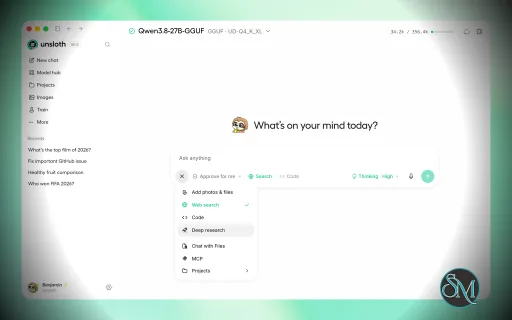
Unsloth provides a graphical environment for downloading, running, and training open models. Users can search for models, run them locally, fine-tune them, and export the resulting models to formats such as GGUF and safetensors.
Key features include:
Local LLM inference
LLM fine-tuning
Vision and multimodal models
Audio models
Embedding models
Diffusion models
GGUF support
MLX support
LoRA and other fine-tuning workflows
Model export
RAG
Web search
Tool calling
Code execution
MCP support
Multi-GPU support
Claude Code integration
OpenAI Codex integration
OpenCode integration
Docker support
Self-hosted web interface
Python API and notebooks
Unsloth Start can connect local models to supported AI coding agents, allowing tools such as Claude Code and Codex to use models running through Unsloth.
The platform also supports several hardware backends. The project lists NVIDIA, AMD, Intel, CPU, and Vulkan support, although capabilities differ depending on the hardware and workload.
Download Unsloth v0.1.919-beta - Software Mirrors |
|---|
Unsloth v0.1.919-beta for Windows |
Unsloth v0.1.919-beta for macOS |
Unsloth v0.1.919-beta for LinuxUnsloth-Desktop-Ubuntu.deb | 22.98 MB |
Others Download related to Unsloth v0.1.919-beta |
Unsloth v0.1.919-beta Source Code |
Unsloth v0.1.919-beta Release Notes:This update brings computer use (beta), letting local models see your screen and interact with apps, plus MCP integrations for Unity, Unreal Engine, Blender and Roblox. MiniMax-H3-Image now supports GGUF, FP8 and INT8, with LoRA training. We've also introduced a new model picker, redesigned Connections and improved project folders.Highlights
Computer Use (Beta)Models can now see your screen and control the mouse and keyboard across macOS, Windows and Linux.
Game Engines + Creative AppsUnity, Unreal Engine, Godot, Figma and Roblox are now available in the MCP menu alongside Blender. Connect your apps to let models build scenes, create games and interact with creative projects. Figma is read-only. Game engines guide: https://unsloth.ai/docs/basics/mcp/mcp-enginesMiniMax-H3-ImageMiniMax-H3-Image now supports more hardware and faster inference.
Model Picker + ProjectsThe new composer model picker replaces the Thinking pill, bringing model selection and reasoning settings into one place. Projects also get redesigned folders, a Files tab, Git change tracking and quicker folder navigation.Connections + CompactionConnections now display live statuses, including Connected, Key rejected, No credit and Rate limited. The provider gallery adds xAI, NVIDIA NIM, Perplexity, Cohere, Vercel AI Gateway, Azure OpenAI, Amazon Bedrock, Google Vertex AI and SGLang. Long conversations on connected providers are now automatically summarized instead of losing older messages. You can configure compaction limits per connection, and/compact now works with cloud models.
Engram TablesQwen3.8-Flash-Next and DeepSeek-V4.1 GGUFs keep their Engram table in its own file, so you can now run any quant with a smaller or lossless table. The Qwen3.8-Flash-Next and DeepSeek-V4.1 guides list each table's size.
Training + Performance
What's ChangedThis release also includes extensive improvements across Unsloth Studio and training:
Contributors for the release:@danielhanchen, @wasimysaid, @oobabooga, @Etherll, @LeoBorcherding, @shimmyshimmer, @dependabot[bot], @NilayYadav, @Imagineer99, @Aafimalek, @vineethsaivs, @lonexreb, @jaeminbird, @DimitriChrysafis, @MohammadHijjawi97, @gabrielkmbo, @csun365, @sfjchen, @debojyoti-dev, @bezabyte, @CelesteHeartsong, @TaskPuppyNatani, @hsusul, @RioPlay, @YakshithK, @Lluczel, @taking-lying-flat, @chuenchen309, @bjornts, @ellaslan11, @zubincarvalho, @Tofuwang45, @Lyxot, @indrajeetapacheNew Contributors
|
Performance and Compatibility
Performance is one of Unsloth's main purposes. Its training optimizations are designed to reduce memory requirements and speed up fine-tuning compared with conventional training workflows.
Actual performance depends heavily on the model, quantization, GPU, available VRAM, dataset, batch size, and training configuration. The project supports multi-GPU setups and provides specialized guidance for newer NVIDIA hardware, AMD GPUs, Intel GPUs, and Apple silicon.
Unsloth Studio can run on Windows, Linux, WSL, and macOS. The project also provides native desktop packages for Windows, macOS, and Linux, while the Studio interface can be installed separately and accessed through a local web interface.
macOS users can run models through MLX and GGUF, while supported Apple Silicon systems can also perform training workflows. NVIDIA GPUs provide the broadest support for training workloads, while AMD and Intel support varies by backend and feature.
Because Unsloth works with local models, storage requirements can become significant. Model weights, datasets, checkpoints, caches, and exported models can consume substantially more storage than the application itself.
System Requirements
Unsloth does not have one fixed hardware requirement because different workloads have very different resource requirements.
Supported platforms include:
Windows
Linux
WSL
macOS
NVIDIA GPUs
AMD GPUs
Intel GPUs
Apple Silicon
CPU-only operation for supported workloads
For the code-based installation, the current documentation uses Python 3.13 with uv for Linux, WSL, and Windows installations.
GPU training requires a compatible backend and sufficient memory for the selected model and training configuration. Larger models generally require more VRAM or system memory, while quantized models can substantially reduce the memory requirement.
Docker is also supported, with official images available for different environments and GPU configurations.
Pros and Cons
Pros
Free and open source
Local model inference
Fine-tuning support
Memory-efficient training optimizations
Supports multiple model types
GGUF support
MLX support
RAG capabilities
MCP support
Tool calling
Code execution
Multi-GPU support
Windows, Linux, WSL, and macOS support
NVIDIA, AMD, Intel, and CPU support
Apple Silicon support
Docker support
Desktop application
Web interface
Python-based workflows
Supports AI coding agents
Cons
Hardware requirements vary significantly by model
Large models require substantial VRAM or system memory
Training workflows can be technically complex
Different hardware backends do not provide identical capabilities
Model files and training datasets can consume considerable storage
Some advanced workflows require command-line or Python knowledge
How to Install
The simplest option is Unsloth Desktop. The project provides native packages for Windows, macOS, and Linux. Linux users can choose DEB or AppImage packages, while macOS and Windows have dedicated installers.
For Unsloth Studio, macOS, Linux, and WSL can use:
curl -fsSL https://unsloth.ai/install.sh | shWindows can use:
irm https://unsloth.ai/install.ps1 | iexAfter installation, start the Studio interface with:
unsloth studioThe interface runs locally and can be accessed through a web browser.
For developers who prefer the Python package, Unsloth Core can be installed inside a virtual environment. The project currently recommends using uv to create the environment and install Unsloth with automatic PyTorch backend selection.
Docker is another option for users who prefer an isolated environment or need a reproducible setup.
Final Verdict
Unsloth is more than a fine-tuning library. Its current ecosystem combines local model inference, training, model conversion, RAG, tool calling, AI agents, and a graphical Studio interface into a single open-source platform.
Its biggest strength is flexibility. Users can start with the desktop application and local models, then move to Python-based fine-tuning or Docker when they need more control. Support for multiple hardware platforms also makes it useful across a wider range of systems, although the available capabilities vary between backends.
The main limitation is complexity. Unsloth is aimed at users working with local AI models rather than people looking for a simple chatbot. Model size, VRAM, training configuration, and hardware compatibility all have a significant impact on the experience.
Post a Comment/Report Broken Link: