Stirling PDF is a free and open source PDF toolkit that brings a large collection of document tools into one application. Instead of installing separate utilities for merging, splitting, converting, compressing, signing, OCR, or editing PDFs, Stirling PDF provides them through a unified web interface that can run locally or on your own server.
Its self-hosted design is one of its biggest advantages. Documents can be processed on infrastructure you control, making Stirling PDF an attractive alternative to many online PDF services for users who care about privacy and data ownership.
Working with PDF files often means jumping between different applications and websites. One service might handle compression while another is needed for OCR or conversion. Stirling PDF takes a more centralized approach by providing a broad collection of PDF operations from a single interface.
The application can be installed locally or deployed with Docker, making it suitable for both individual users and organizations. It can also be used as a self-hosted document processing service that other users access through a browser.
Key Features of Stirling PDF
Merge and Split PDFs
Stirling PDF makes common document operations straightforward. Multiple PDF files can be merged into a single document, while large PDFs can be split into individual pages or smaller sections.
This is particularly useful for preparing reports, combining scanned documents, or reorganizing large document collections.
PDF Compression
The built-in compression tools can reduce file sizes for documents that need to be uploaded, emailed, or stored more efficiently.
Users can choose different compression settings depending on whether they prioritize smaller files or maintaining document quality.
PDF Conversion
Stirling PDF supports numerous document conversion workflows, including converting between PDF and common office or image formats.
This makes it useful as a general-purpose document conversion utility rather than simply a PDF editor.
OCR
Optical Character Recognition allows scanned documents and images containing text to become searchable and easier to process.
OCR is particularly useful for digitizing scanned paperwork, archival documents, invoices, and other PDFs that do not contain an actual text layer.
PDF Editing
The application provides tools for manipulating PDF pages and content, including rotating, reordering, extracting, and adding elements to documents.
It is not intended to completely replace a professional desktop PDF editor for advanced layout editing, but it covers a large number of everyday tasks.
Digital Signatures
Stirling PDF includes tools for working with PDF signatures and certificates. This is useful when documents need to be signed or prepared for digital workflows.
Watermarks and Page Numbers
Users can add watermarks, headers, footers, page numbers, and other repeated elements to documents.
These features are particularly useful for reports, internal documentation, and business paperwork.
Security Tools
Stirling PDF includes functionality for encrypting and decrypting PDFs, removing passwords where authorized, and managing document permissions.
This gives users more control over sensitive documents without needing to upload them to an external website.
Self-Hosted Deployment
One of Stirling PDF's biggest strengths is its deployment flexibility. It can run locally or through Docker, allowing users to keep document processing within their own infrastructure.
This makes it particularly appealing to businesses, developers, homelab users, and privacy-conscious individuals.
Download Stirling PDF v3.4.0 - Software Mirrors |
|---|
Stirling PDF v3.4.0 for WindowsStirling-PDF-windows-x86_64.msi | 208.36 MB Stirling-PDF-windows-arm64-setup.exe | 196.76 MB |
Stirling PDF v3.4.0 for macOSStirling-PDF-macos-universal.dmg | 260.21 MB Stirling-PDF-macos-universal.app.tar.gz | 260.03 MB |
Stirling PDF v3.4.0 for LinuxStirling-PDF-linux-x86_64.rpm | 211.36 MB Stirling-PDF-linux-x86_64.deb | 213.67 MB Stirling-PDF-linux-x86_64.AppImage | 292.47 MB |
Stirling PDF v3.4.0 for Java (Cross-Platform)Stirling-PDF.jar | 309.63 MB Stirling-PDF-with-login.jar | 394.46 MB Stirling-PDF-server.jar | 217.42 MB |
Stirling PDF v3.4.0 Source Code
Stirling PDF v3.4.0 Source code (zip)
Stirling PDF v3.4.0 Source code (tar.gz)
|
Stirling PDF v3.4.0 Release Notes: A big release! Lots of changes in this release around the PDF Text Editor, such as it now works directly inside the viewer by clicking the edit text button in the top bar.
Other changes for it include:
- It can use fonts from the server including any custom provided fonts that are placed in customFiles/static/fonts/.
- It does a much better job of matching scanned (OCRed) documents to their fonts
- Brand new font picker for those OCR scenarios
- General text editor fixes for typed text and lag issues
- Embedded fonts are now subset, so saved files are smaller.
Other features in this release include:
- OneDrive support has been added to our pro plan with more to come soon
- Brand new check PDF accessibility tool which checks PDFs against PDF/UA-1 or PDF/UA-2 and generates reports (More to come soon!)
- New setup wizard for new server setups to help onboard users easier
- Enterprise users get SCIM 2.0 user provisioning
- Admins concerned about users editting and invalidating signatures can now disable users from doing that, this also comes with a new signature detection interface
Other changes are:
- New settings menu submenu with easy access logout button
- Custom page size option for Scale Pages
- New “Clear recents” button in the file sidebar
- Odd-even merge in Reorganize Pages
- Pixel comparison mode is back in the Compare tool
- Metadata updates can now keep the fields you leave out (keepOmitted=true)
- The feedback button is back (admins can turn it off with system.enableFeedback: false)
- Faster desktop startup with large temp folders and on first launch
- Desktop keeps open files locked on Windows so a DMS doesn’t check them in
- Lots of dependency updates
We also fixed some bugs including:
- Page numbers being placed wrong on rotated and cropped pages
- Uploads from Safari not always sending correctly
- A held-back file drop leaving the desktop UI stuck
- MCP convert tool missing its convert operation, and AI engine errors not showing as MCP tool errors
This release also includes several security and stability improvements
Note: the PostScript vector conversion endpoints have been removed (/convert/vector/pdf for PS/EPS to PDF, and /convert/pdf/vector for PDF to PS/EPS/PCL/XPS)
What's Changed
Breaking Changes- refactor(convert)!: remove PostScript vector conversion endpoints by @balazs-szucs in #8735
Bug Fixes- fix: implement odd-even merge in reorganize pages by @SomSamantray in #7649
- fix(desktop): slide the tool view instead of using a View Transition by @EthanHealy01 in #8680
- fix(editor): PWA name respects configured appName by @SomSamantray in #7420
- fix(desktop): keep the installed version visible when updates are managed off by @samuelsl27 in #8437
- fix(page-numbers): place numbers correctly on rotated and cropped pages by @yuvrajtiwary-bitmesraece in #8896
- fix(mcp): surface AI engine HTTP client errors as MCP tool errors by @VISHAL55UIET in #8944
- fix(mcp): expose convert op in stirling_convert tool with tests by @Azadan in #8673
- fix(security): stream stored job files instead of loading them into heap by @reecebrowne in #8688
- fix(saas): serialise first-request user provisioning to stop duplicate-key errors by @ConnorYoh in #8935
Enhancements- chore(rust): add Clippy to Rust crates, tasks, and CI by @balazs-szucs in #8785
- Re-add feedback system to app by @jbrunton96 in #8727
- Add ability to add accessibility tags to untagged documents in Text Editor by @jbrunton96 in #8772
- Enterprise procurement page by @reecebrowne in #8771
- Followup fixes to Text Editor accessibility tagging of text elements by @jbrunton96 in #8783
- Team checkout from a single /team link by @reecebrowne in #8800
- build(deps): bump log from 0.4.34 to 0.4.35 in /frontend/src-tauri by @dependabot[bot] in #8818
- build(deps): bump notify from 8.2.0 to 8.2.1 in /frontend/src-tauri by @dependabot[bot] in #8822
- build(deps): bump the react group across 1 directory with 2 updates by @dependabot[bot] in #8829
- Combine Processor and Editor theme providers by @jbrunton96 in #8797
- Stop the SEO text flashing on SaaS page load by @Frooodle in #8801
- feat(licenses): surface JPDFium native component licenses in third-party notices by @balazs-szucs in #8477
- Enterprise page follow-ups by @reecebrowne in #8805
- Stop logging chapter titles when splitting by chapters by @Frooodle in #8812
- Send in-memory copies of every upload from Safari by @Frooodle in #8802
- Update Italian translations for various terms by @albanobattistella in #8845
- Send every Save back to where the file came from by @Frooodle in #8794
- Stop awaiting backend startup on desktop first launch by @jbrunton96 in #8846
- Fix slow desktop startup with large temp folders by @Frooodle in #8833
- Add a first-run setup wizard for self-hosted servers by @EthanHealy01 in #8500
- Keep the input's filename across tools so pipeline outputs stop stacking suffixes by @ConnorYoh in #8718
- Fix colour contrast failures in accent text, hints and version badge by @Frooodle in #8866
- test(cert-sign): add regression tests for visible signature without reason and signing failures by @KauanHolstein in #8663
- Fix flaky Page Editor tests by @jbrunton96 in #8867
- Connect OneDrive, SharePoint and Google Drive accounts to pipelines by @Frooodle in #8697
- Support accessibility tagging of page furniture (page numbers, watermarks, etc.) in Text Editor by @jbrunton96 in #8857
- Add a forgot-password link to the desktop Cloud sign-in by @ConnorYoh in #8870
- Serve only bundled fonts from the public fonts route by @Frooodle in #8806
- Add support for accessibility tagging of links in Text Editor by @jbrunton96 in #8868
- Add a Check PDF accessibility tool by @EthanHealy01 in #8863
- Keep line-end hyphens when the text editor redraws a paragraph by @Frooodle in #8881
- Keep the file name when saving in the PDF Text Editor by @Frooodle in #8882
- Subset the fonts the text editor embeds when saving by @Frooodle in #8883
- Bound logged tool output and the XMP size checked by veraPDF by @ConnorYoh in #8705
- Set up Rust formatting by @jbrunton96 in #8897
- Fix files not being selected properly when loading in some states by @jbrunton96 in #8885
- Fix the caret landing one character off in multi-line plain text boxes by @Frooodle in #8887
- Update Frontend 3rd Party Licenses by @stirlingbot[bot] in #8359
- build(deps-dev): bump vite from 7.3.6 to 7.3.8 in /frontend by @dependabot[bot] in #8889
- feat(files): add a Clear recents button to the sidebar by @reecebrowne in #8625
- Add SCIM 2.0 user provisioning as an Enterprise feature by @Frooodle in #8874
- Restore the pixel comparison mode toggle in the Compare tool by @Frooodle in #8931
- Let administrators block changes to digitally signed PDFs by @Frooodle in #8815
- Add server-provided fonts to the PDF text editor by @Frooodle in #8796
- Match scanned text, installed fonts and subset fonts to the right typeface in the PDF text editor by @Frooodle in #8798
- Fix how the PDF text editor embeds fonts when saving by @Frooodle in #8908
- feat(page-scale): Custom page size for Scale Pages by @EthanHealy01 in #8489
- l10n: complete Swedish interface refinements by @yeager in #7833
- Log desktop file drops and stop a held-back drop leaving the UI stuck by @ConnorYoh in #8899
- Keep open files locked on Windows desktop so a DMS doesn't check them in by @ConnorYoh in #8898
- Log repeated policy read and source failures once by @Frooodle in #8938
- Preserve omitted PDF metadata and support URL conversion in background jobs by @Frooodle in #8779
- Add Server license registration and user-count reporting by @ConnorYoh in #8510
- Hide the accessibility report download when the check failed by @EthanHealy01 in #8964
- Edit text inside the viewer by @reecebrowne in #8925
- Open OneDrive and Google Drive files from the editor by @Frooodle in #8698
- Add accessibility tagging support to Text Editor for forms by @jbrunton96 in #8884
- Put the tooltip close button in the header as a quiet icon by @EthanHealy01 in #8968
Minor Enhancements- chore: ignore local test-state exit markers by @balazs-szucs in #8782
Docker Updates- Fix issues causing intermittent nightly failures by @jbrunton96 in #8787
- build(deps): bump step-security/harden-runner from 2.22.1 to 2.22.4 by @dependabot[bot] in #8915
- build(deps): bump sigstore/cosign-installer from 4.1.2 to 4.1.3 by @dependabot[bot] in #8919
- build(deps): bump docker/login-action from 4.7.0 to 4.8.0 by @dependabot[bot] in #8921
Translation Changes- Fix translations check script by @jbrunton96 in #8855
Development Tools- build(deps): bump astral-sh/setup-uv from 10.3.2 to 10.3.3 by @dependabot[bot] in #8827
Other Changes- Fix the race in the MCP oversized-body 413 test by @reecebrowne in #8799
- build(deps): bump the simple-java-mail group across 1 directory with 2 updates by @dependabot[bot] in #8817
- build(deps-dev): bump reportlab from 5.0.1 to 5.1.0 in /engine by @dependabot[bot] in #8819
- build(deps): bump imageioVersion from 3.15.2 to 3.15.3 by @dependabot[bot] in #8821
- build(deps): bump com.hierynomus:smbj from 0.14.0 to 0.15.0 by @dependabot[bot] in #8823
- Restrict base image publishing to maintainers and update security report response time by @Frooodle in #8869
- Switch to Pyrefly for Python type checking by @jbrunton96 in #6365
- build(deps-dev): bump fpdf2 from 2.8.9 to 2.9.0 in /engine by @dependabot[bot] in #8824
- build(deps-dev): bump fastapi from 0.141.1 to 0.162.2 in /engine by @dependabot[bot] in #8917
- build(deps-dev): bump pydantic-settings from 2.15.0 to 2.16.2 in /engine by @dependabot[bot] in #8923
- build(deps): bump org.springdoc:springdoc-openapi-starter-webmvc-ui from 3.0.3 to 3.2.0 by @dependabot[bot] in #8825
- build(deps): bump com.tngtech.archunit:archunit-junit5 from 1.5.0 to 1.5.1 by @dependabot[bot] in #8914
- build(deps): bump peter-evans/create-pull-request from 8.1.1 to 8.1.2 by @dependabot[bot] in #8918
- build(deps): bump softprops/action-gh-release from 3.0.3 to 3.0.4 by @dependabot[bot] in #8920
- build(deps): bump jackson2Version from 2.22.3 to 2.22.4 by @dependabot[bot] in #8922
- test(stamp): add regression test for periods and umlauts in roman alphabet by @yuvrajtiwary-bitmesraece in #8803
- Improve PDF text editor fidelity: fonts, typing, undo, scans, images and tables by @Frooodle in #8906
- Account menu on the avatar, matched to each mode's settings pages by @Frooodle in #8195
New Contributors- @SomSamantray made their first contribution in #7649
- @KauanHolstein made their first contribution in #8663
- @yuvrajtiwary-bitmesraece made their first contribution in #8803
- @yeager made their first contribution in #7833
- @VISHAL55UIET made their first contribution in #8944
- @Azadan made their first contribution in #8673
Full Changelog: v3.3.0...v3.4.0 |
Performance and User Experience
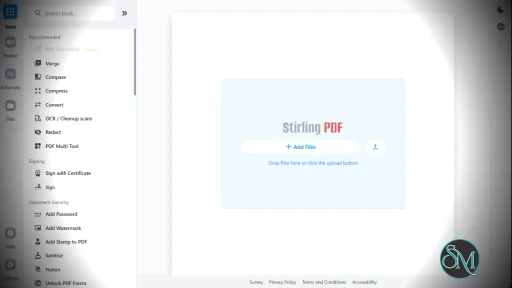
Stirling PDF has a clean web interface that makes its large collection of tools relatively easy to navigate. Instead of learning command-line utilities or installing multiple applications, users can select the operation they need from the dashboard and upload their document.
The browser-based interface also makes it convenient for organizations. A single Stirling PDF installation can provide PDF tools to multiple users without requiring everyone to install separate software.
Performance depends on the hardware available to the server, particularly for demanding operations such as OCR, large document conversions, and image-heavy PDFs. Docker makes it relatively easy to allocate additional resources when necessary.
The project has also developed into a much broader document-processing platform rather than remaining a simple collection of PDF utilities.
Pros
Free and open source.
Large collection of PDF tools.
Self-hosted and privacy-friendly.
Docker support.
Browser-based interface.
PDF merging and splitting.
Compression and conversion.
OCR support.
Digital signature tools.
Encryption and security features.
Useful for both personal and business environments.
Active open source development.
Cons
Some advanced PDF editing features are less sophisticated than commercial applications.
Large OCR and conversion jobs can require significant system resources.
The large number of tools can initially feel overwhelming.
Server administration is required for self-hosted deployments.
Who Should Use Stirling PDF?
Stirling PDF is an excellent choice for developers, IT administrators, businesses, students, researchers, and privacy-conscious users who regularly work with PDF files.
It is particularly useful for organizations that want to provide centralized PDF processing without sending confidential documents to third-party online services.
For homelab users, it is also an attractive addition to a self-hosted stack because Docker makes deployment and upgrades relatively straightforward.
Final Verdict
Stirling PDF is one of the strongest open source alternatives to commercial and online PDF tool collections. Its biggest advantage is not one particular feature, but the sheer range of useful operations available from a single application.
The combination of OCR, conversion, compression, document manipulation, security tools, signatures, and self-hosting makes it a practical everyday utility rather than a niche PDF application.
It may not completely replace a professional PDF editor for highly specialized design work, but for most routine document-processing tasks, Stirling PDF provides an impressive feature set while keeping your files under your control.
Post a Comment/Report Broken Link: