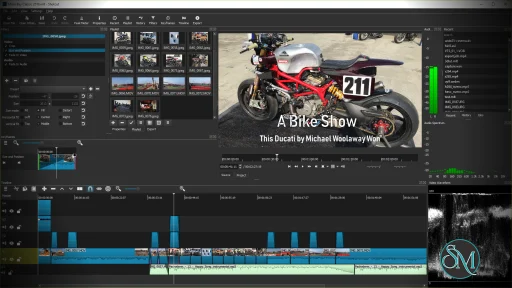
Shotcut is a cross platform video editor that allows users to edit videos without converting files beforehand. It is built on the FFmpeg framework, which gives it strong format compatibility and reliable performance.
Because it is open source, Shotcut is continuously improved by the community.
Download Shotcut 26.10.30 - Software Mirrors |
|---|
Download Shotcut 26.10.30
Windows x64 Installer Download Shotcut 26.10.30
Windows x64 Portable Download Shotcut 26.10.30
Windows x64 Installer Download Shotcut 26.10.30
Windows x64 Portable | Download Shotcut 26.10.30
macOS Universal dmg Download Shotcut 26.10.30
macOS Unsigned dmg | Download Shotcut 26.10.30
Linux AppImage Download Shotcut 26.10.30
Linux Portable |
Shotcut 26.10.30 Release Notes: What's Changed
- Fixed a crash when drag-n-drop video suggesting conversion when Settings > Timeline > Automatically Add Tracks is on (broke in v26.9).
- Fixed Timeline interactions slow when something is using Windows UI Automation (broke in v26.9).
- Fixed copy and paste of multiple clips including dissolve video transitions (broke in v26.9).
- Fixed audio playback might sound scratchy (broke in v26.9).
- Fixed
Ctrl+mouse-wheel and context menus in the numeric fields of filters on Windows (broke in v26.9).
- Fixed crash when using hardware decoding and preview scaling with GPU processing mode (broke in v26.9).
- Fixed scrubbing audio in the Source player (broke in v26.9).
- Fixed pasting filters to a track (broke in v26.9).
- Fixed moving a clip in Timeline with drag-n-drop was slower (broke in v26.9).
- Fixed some VST2 plugins made app hang on start or make the app or export jobs crash on exit (broke in v26.8).
- Typewriter filter: fixed changing the text can temporarily break timing in preview (broke in v26.4).
- Fixed launching Glaxnimate installed to
Program Files on Windows (broke in v26.4).
- Fixed possible crash when drag-moving a clip beyond a transition to end of track.
- Fixed resizing a transition by dragging the clip before it.
- Fixed saving a preset export with
/ in the name.
- Fixed the macOS 27 font dialog does not work.
- Fixed crash opening a file dialog in AppImage/Snap on Ubuntu 26.04.1.
- Fixed snapping to the playhead or a marker is inaccurate when Timeline is zoomed out.
- Subtitle Burn In filter: fixed failing to render beyond an item with blank lines.
- Reduced the memory usage of audio transitions.
- Improved the performance of dissolve video transitions in 8-bit processing mode.
- Added "Remove Old Program Files" to the Windows installer when doing upgrade.
This fixes problems caused by old, incompatible DLLs no longer being used.
- Added support for Premiere and Resolve video proxy file conventions:
Proxy or Proxies subfolder, case insensitive, same as source name but possibly different extension, optionally with _Proxy suffix before extension.
- Reduced playhead thickness.
- GPS Graphic filter: optimized drawing by skipping overlapping lines.
- GPS Text filter: added support for decimals X argument for datetime keywords.
- GPS filters: added support for parsing plain text files such as dashcam logs.
- Added support for rectangle parameters to the experimental add-on filter UI generator including a player overlay control (VUI).
- Added a camcorder viewfinder (recording) animation to Elements > Graphics.
- Added a search field (English only) to Elements.
- Added Settings > Shortcuts (an alias for Help > Actions and Shortcuts).
- Added Settings > Timeline > Rounded Rectangles option to turn off that cosmetic feature.
- Added Settings > Timeline > Sync Zoom With Keyframes.
- Added Timeline > Edit > Audio Mixing Assistant dialog.
See https://github.com/mltframework/shotcut/pull/1905 for more info.
- General performance and stability improvements.
- Center startup logo by ignoring shadow by @MoutonBinoclard in #1927
- Correction of the shadow on the startup logo by @MoutonBinoclard in #1928
- Fix minor grammar mistakes in documentation by @Lucatacos in #1930
- Fix validator variable name and typo by @Lucatacos in #1937
- Add unit tests for DataQueue by @juliusniittymaa in #1934
- Percent-encode export preset filenames by @WMikhail in #1938
- Keep the first filter section heading visible when scrolling by @WMikhail in #1940
New Contributors- @MoutonBinoclard made their first contribution in #1927
- @Lucatacos made their first contribution in #1930
- @juliusniittymaa made their first contribution in #1934
- @WMikhail made their first contribution in #1938
Full Changelog: v26.9.27...v26.10.30 |
Key Features of Shotcut
Shotcut provides essential and advanced editing tools in a simple package.
Main features include:
Native timeline editing without import conversion
Support for 4K and high resolution video
Wide format support for video and audio files
Advanced video and audio filters
Keyframe animation support
Audio waveform and scopes
Multi track timeline
Hardware encoding support
These features make Shotcut suitable for many types of video projects.
Supported Platforms and Formats
Shotcut is available on:
It supports common and professional formats such as MP4, MKV, MOV, AVI, WebM, MP3, AAC, FLAC, and more.
Performance and Editing Experience
Shotcut performs well on modern systems and can handle high resolution footage, including 4K. Proxy editing and preview scaling help improve performance on lower end hardware.
The interface is clean but may feel different from traditional editors, which can require some adjustment for new users.
Ease of Use
Shotcut is beginner friendly once the basics are understood, but it has a learning curve. Some workflows are less guided compared to commercial editors, which may confuse first time users.
However, the software offers strong control for users who take time to learn it.
Is Shotcut Safe to Use
Yes, Shotcut is safe to use when downloaded from the official website. It contains no ads, no watermarks, and no hidden restrictions.
As open source software, it is transparent and trusted by the community.
Pros and Cons of Shotcut
Pros:
Completely free and open source
No watermark or time limits
Cross platform support
Strong format compatibility
Suitable for 4K editing
Cons:
Interface may feel unconventional
Limited built in effects compared to premium editors
Occasional performance drops on very large projects
Despite these limitations, Shotcut remains a strong free option.
Common Use Cases
Shotcut is commonly used for:
YouTube and social media videos
Basic to intermediate video editing
Educational and personal projects
Simple color correction and effects
Cross platform editing workflows
It is ideal for users who want control without cost.
Final Verdict
Shotcut is a solid free video editor that delivers reliable performance and useful features without forcing users into subscriptions or watermarks. While it may not replace high end professional editors, it is more than capable for most everyday video editing needs.
For users looking for a free, open source, and cross platform video editor, Shotcut is a smart choice. Shotcut is a free and open source video editing software designed for users who want powerful editing tools without paying for a subscription. It is suitable for beginners, content creators, and hobbyists who need a reliable editor for everyday video projects.
Shotcut supports a wide range of formats and runs smoothly on multiple operating systems.
Post a Comment/Report Broken Link: