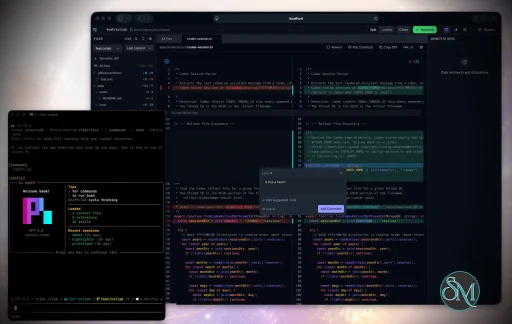
Plannotator is an open-source platform designed to review and validate plans and code generated by AI coding agents.
The platform provides a centralized interface where developers can:
Review AI-generated plans
Annotate proposed actions
Approve or reject tasks
Inspect code changes
Provide structured feedback
Improve agent outputs
Maintain human oversight
Rather than replacing developers, Plannotator aims to keep humans involved in critical decision-making during AI-assisted development.
As AI coding agents become increasingly capable, developers face a growing challenge: ensuring that AI-generated plans and code changes align with project requirements before they are executed. Plannotator addresses this problem by acting as a review layer between developers and AI coding agents.
Instead of generating code itself, Plannotator focuses on making AI-driven development more transparent and controllable. It allows teams to review, annotate, approve, reject, and refine agent-generated plans and code changes before they affect a project.
Download Plannotator v0.29.1 - Software Mirrors |
|---|
Plannotator v0.29.1 for Windowsplannotator-win32-x64.exe.gz | 83.63 MB plannotator-win32-x64.exe | 231.73 MB plannotator-win32-arm64.exe.gz | 78.67 MB plannotator-win32-arm64.exe | 217.38 MB |
Plannotator v0.29.1 for macOSplannotator-paste-darwin-x64 | 93.62 MB plannotator-paste-darwin-arm64 | 85.03 MB plannotator-darwin-x64.tar.xz | 49.14 MB plannotator-darwin-x64.gz | 72.92 MB plannotator-darwin-x64 | 215.42 MB plannotator-darwin-arm64.tar.xz | 44.28 MB |
Plannotator v0.29.1 for Linuxplannotator-paste-linux-x64 | 104.07 MB plannotator-paste-linux-arm64 | 104.17 MB plannotator-linux-x64.tar.xz | 56.99 MB plannotator-linux-x64.gz | 80.87 MB plannotator-linux-x64 | 225.87 MB plannotator-linux-arm64.tar.xz | 54.12 MB |
Plannotator v0.29.1 Source Code |
Plannotator v0.29.1 Release Notes:Follow @plannotator on X for updatesMissed recent releases?
What's New in v0.29.1TL;DR
The Inbox turns on only when you run itOn a computer where the Inbox has never run, nothing starts it on its own any more. Claude Code gets noplannotator_inbox tool and no Inbox reminder, and a background start by a plugin or an agent's Inbox call answers with one line instead:
The Plannotator Inbox is off on this computer.
The Inbox turns on when you run plannotator inbox yourself (bare, --no-open or --open; /plannotator-inbox runs --open), or when your agent runs plannotator inbox --open from the Inbox setup prompt. That first --open also connects the agents it finds, within half a minute.
If you have already run the Inbox on this computer, nothing changes: the first time Plannotator checks after the update, it sees that the Inbox ran here and records that once. One edge: a Claude Code session that already had the plugin loaded before you first turned the Inbox on needs one restart to get the tool, because a session decides at its start whether it has it.
#3729
Start agents in RexRex is a terminal server with sessions, tabs and panes. The Inbox can now start its agents there instead of in the background. Settings → Agents → Start new agents in has two choices: In the background (the default) and Rex. The row shows while Rex is running on this computer, or while Rex is already the choice. With Rex picked, a New message, or a reply that starts a session, opens a new tab named for the agent, in a Rex session the Inbox keeps for that project. The agent runs its ordinary interactive command there and keeps running after the Inbox closes. Rex's app is not brought to the front when a tab opens. Your message never goes on a command line; the agent receives it as its first turn through its own Inbox connection.
Search the list's filterWhen a section of the list's Filter menu has more than eight rows, a Search filters field sits at the top of the menu. Typing narrows every section at once (Agent, Project, Tag, Pull request, Routine and the rest), bolds the matching part of each row and ignores case and accents. A section with no match goes away, and a row you already ticked stays so you can untick it. The arrow keys move through the rows while the field keeps focus, Enter ticks a row and leaves the menu open, and Escape clears the field before it closes the menu. On a phone the field sits under the sheet's title, and opening the menu with a tap does not raise the keyboard. With short lists the menu is the same as before. #3620Start a thread from a pull requestOn a pull request's page in Reviews, when no thread is about that pull request yet, the Review thread section offers Start a thread. The page turns into an empty thread for the pull request in place: its header line with title, branch, changes and checks, one line ("Ask anything about this pull request. Your first message starts the thread."), and the reply box. The reply box's To control lists this computer's live agents in the pull request's project, then a new session of each agent. Nothing is made until you press Send. Your words come first in the message, and the pull request's details follow under a fold, "Sent with: this PR's details", which shows exactly what the agent received. From then on the pull request's row in Reviews and its page open that thread. Closed and merged pull requests, stacks of several pull requests, and pull requests outside a project do not get the button. #3629Picture it/picture-it is a new built-in skill, first among the built-ins in the reply box's / list. It asks the agent for one self-contained HTML page that explains what you are discussing, mostly drawings with short labels: for a code change, what changed and why. The skill tells the agent to take file names, lines and numbers from the code or the thread, to make the page read at phone width and take your Inbox theme, and not to change code while it makes the page. The agent sends the page back in the same thread as an attachment.
The Inbox also recognises a page made this way from a mark in its head, and records which attachment it is. Nothing in the window uses that yet.
#3723
Before and after on a question cardA question that proposes a change, to words, a screen, code or a setting, can now show it. The agent writesWhere:, Before: and After: lines, and the Inbox draws them as a quiet Now and After pair: removed words struck through on a red tint, added words on a green tint. A line that changes almost entirely is shown whole instead of marked word by word. A value can be a picture, and two pictures sit side by side on a wide card. Each choice can carry its own After:, so a question about three wordings shows three versions.
The agent tool's instructions, plannotator inbox --help before-after and the plannotator skill teach agents the format. Plan review, annotate and older Inboxes show these lines as plain text, and a question without them looks exactly as before.
#3714
Threads side by sideSettings → General → Appearance → Threads side by side is a new switch, off by default. Turned on, a thread's right-click menu offers Open to the side, and you can drag a thread next to the open one. The change applies at once in every open Inbox window, with no reload. Turned off, the Inbox works exactly as it does today. A phone always shows one thread, so the row is not shown there. If you had turned on the hidden preview inconfig.json (inboxSplitView), the switch is already on.
The panes themselves were also improved: Escape closes only the pane you are in, closing a pane by keyboard moves focus to the pane that is left, a column holds at most two panes, and the panes you are not in have a stronger grey header. When the window narrows and a pane steps aside, a toast says so, and the pane comes back when the window widens.
#3719
Agent status marksShow agent status (Settings → General → Appearance, under Sidebar, and in the list's ⋮ menu) puts a status mark on every agent in the sidebar's Agents list, not only on agents in Rex. It is off by default. A mark shows when an agent is working, when it waits on a prompt where it runs ("Waiting for your permission in the agent" or "Waiting for your answer in the agent"), and when a thread waits on you. An agent at rest draws nothing. Marks show only in the Agents list, never on thread rows or the Board. A mark that could stay on "Waiting for your permission in the agent" when a prompt was answered within a second was fixed before release. Permission and question prompts are reported by Claude Code (questions, and permission prompts for Bash on Claude Code 2.1.326 and later), OpenCode 2, Pi and Oh My Pi. One part of this applies with the setting off: an agent that does not report when it is working (Codex, T3 Code, Antigravity and cloud agents, for example) is no longer called "Idle". Its hover card says "Doesn't say when it's working". #3710, #3735Tag a projectA project's ⋯ menu has Add tag, with the same tag list as a thread's menu. Picking a tag in the list's Filter then keeps threads that have the tag and threads in a project that has it, and the Board's tag filter does the same. This lets you see, say, every Work project together. Nothing looks different until you tag a project. Tags on a linked machine's project are kept on that machine. #3697Play a sound: for every agent messagePlay a sound (Settings → General, under "When an agent sends you something") now has a choice: when an agent asks you (the behaviour until now) and for every agent message, which is the new default. With the default, a plain reply, a new thread or a question from an agent rings the bell. Either way it rings only while no Inbox tab is in front, once for a burst of messages within 30 seconds, and never for your own messages or for snoozed threads. If you had turned the sound off, it stays off. #3695The new-messages barThe "N new · Show" bar above the list now stays at the top while you scroll, and says what came on one line, for exampleClaude Code replied in “Checkout redesign” · Show or 2 replies from Claude Code and Codex · Show. In a project or filter view, news from elsewhere gets a second line with Show all. The bar arriving no longer moves the rows you are reading. The floating New pill now shows only after you press Show, for rows that landed out of view.
#3616
Code review: the symbol hover cardMoving the pointer from a symbol into its hover card ("8 references") often closed the card a moment later, with the pointer still in it. It now stays open until the pointer leaves the card. The hover underline and hand cursor now show only on names that can open a card, so comments, keywords and; no longer look clickable. The card's footer is one line: "Click to jump · ⌘ click for all references" (Ctrl+click on other systems).
#3728, #3732
Code review fixes
Your Inbox rules reach MCP sessionsSessions that connect to the Inbox over MCP, such as every session T3 Code starts, only ever saw the built-in server instructions. The rules and reminder under Prompts → Inbox reached sessions started from a terminal but not these. The MCP server now adds your rules for all agents, then your reminder, after its built-in lines, and follows the same reminder switch. How much room they get depends on the client: Claude Code 2.1.296 and later keeps more than older Claude Code and other Claude apps, and other clients get the terminal path's limit. Rules and reminder are each sent whole or left out whole, never cut. Settings → Prompts shows the count against Claude Code's room and a "Not sent to …" note when your text is too long for some agents. A change applies to the next session, with no restart. By @sx4im in #3567, closing #3555 from @stjepanvrbicFixes from @rudycelekliFourteen fixes from @rudycelekli, merged together in #3658 with each pull request's commits and authorship kept:
Theme contrastSome text in the built-in themes was hard or impossible to read.
Which version of an attachment you are viewingWhen an attachment opened beside a thread has changed since it was sent, the line above it now says which version is on screen, for example "Viewing the current file (edited 5:51 PM). Claude Code sent an earlier version at 3:41 PM." with View sent version, or "Viewing the version Claude Code sent at 3:41 PM." with View current file. Full screen's chip uses the same sentence and link. #3704Additional Changes
Known issues
Install / UpdatemacOS / Linux:claude is on your PATH. Otherwise, in a terminal:
/plugin marketplace update plannotator, then open /plugin → Installed → plannotator → Update now.
Pi:
What's Changed
Contributors@rudycelekli sent fourteen fixes this time, across the relay connection, Oh My Pi, pull request stacks, bulk actions, linked machines, review diffs and comment boxes (#3636 to #3651). They landed together in #3658 with each commit and its authorship kept. Two of them close reported issues: the dead relay socket and Oh My Pi's/new.
@sx4im made the MCP server carry your Inbox rules and reminder, sized to what each client keeps of its instructions, with a count and notes in Settings → Prompts (#3567).
Thanks also to the people whose reports shaped this release:
|
Key Features of Plannotator
Plan Review System
One of Plannotator's core capabilities is reviewing plans generated by AI agents before execution.
Developers can examine:
Proposed tasks
Implementation strategies
Agent reasoning
Planned file modifications
Workflow sequences
This visibility helps reduce unintended changes and costly mistakes.
Annotation Tools
The platform allows users to add comments, notes, and guidance directly to AI-generated plans.
These annotations can be used to:
Clarify requirements
Correct misunderstandings
Provide context
Guide future agent actions
AI Code Review
Plannotator extends the review process beyond planning by supporting inspection of generated code.
Developers can:
Review modifications
Analyze diffs
Leave comments
Request revisions
Validate implementation details
This workflow resembles modern pull-request review systems.
Human-in-the-Loop Workflows
A major design goal is ensuring that AI actions remain subject to human approval.
Organizations can establish review processes where important actions require validation before execution.
Open Source Foundation
Plannotator is open source, allowing teams to inspect, modify, and self-host the platform according to their needs.
This transparency is particularly valuable for organizations adopting AI-assisted software development.
User Experience
The interface is designed around review workflows rather than direct code generation.
Instead of interacting with a chatbot, users primarily:
Receive agent-generated plans
Review proposed actions
Add feedback
Approve or reject changes
Monitor execution results
The workflow feels familiar to developers accustomed to pull requests, code reviews, and project planning tools.
Productivity Benefits
As AI coding tools become more autonomous, review processes become increasingly important.
Plannotator helps organizations:
Reduce risky AI actions
Improve code quality
Increase accountability
Preserve architectural consistency
Encourage collaboration between developers and AI agents
For teams adopting AI-driven development, these safeguards can be as valuable as the coding agents themselves.
Collaboration Features
The platform supports collaborative review workflows where multiple team members can participate in evaluating AI-generated outputs.
This allows:
Peer review
Team approval processes
Shared annotations
Collective decision-making
Such features are especially useful for larger engineering teams.
Performance
Because Plannotator focuses on workflow management and review rather than model inference, performance largely depends on the connected AI agents and integrations.
The platform itself is lightweight and primarily serves as an orchestration and review layer.
Open Source Advantages
Being open source provides several benefits:
Transparent development
Self-hosting capabilities
Custom integrations
Community contributions
Vendor independence
Organizations concerned about compliance, security, or proprietary workflows may find these advantages particularly appealing.
Limitations
Plannotator is designed as a companion tool rather than a complete AI development platform.
Common limitations include:
Requires external AI coding agents
Best suited for teams already using AI-assisted development
Smaller ecosystem than mature developer platforms
Additional review steps may slow rapid prototyping
Some users may prefer fully autonomous workflows
The software delivers the most value in environments where oversight and quality control are priorities.
Pros
Improves transparency of AI-generated plans
Supports structured review workflows
Human-in-the-loop design
Useful annotation system
Open source
Self-hosting support
Familiar review experience for developers
Helps reduce AI-generated mistakes
Cons
Not a standalone coding agent
Requires integration with AI development tools
Smaller community than established developer platforms
Adds review overhead to workflows
Best suited for teams rather than casual users
Who Should Use Plannotator?
Plannotator is ideal for:
Software development teams
Engineering managers
AI-assisted development workflows
Organizations adopting coding agents
Open-source projects
Teams prioritizing code quality and governance
It is particularly valuable for environments where AI-generated code requires oversight before reaching production systems.
Plannotator fills an increasingly important role in the AI development ecosystem by providing visibility and control over AI-generated plans and code changes. Its focus on human oversight, structured reviews, and collaborative workflows makes it a useful companion for modern coding agents. While it is not a replacement for AI coding tools themselves, it offers a practical solution for teams seeking greater confidence and accountability in AI-assisted software development.
Developer:
backnotprop
Operating System:
Windows / macOS / Linux
Date Added:
2026-11-19T23:07:17.615Z
Categories:
Post a Comment/Report Broken Link: