Plannotator is an open-source platform designed to review and validate plans and code generated by AI coding agents.
The platform provides a centralized interface where developers can:
Review AI-generated plans
Annotate proposed actions
Approve or reject tasks
Inspect code changes
Provide structured feedback
Improve agent outputs
Maintain human oversight
Rather than replacing developers, Plannotator aims to keep humans involved in critical decision-making during AI-assisted development.
As AI coding agents become increasingly capable, developers face a growing challenge: ensuring that AI-generated plans and code changes align with project requirements before they are executed. Plannotator addresses this problem by acting as a review layer between developers and AI coding agents.
Instead of generating code itself, Plannotator focuses on making AI-driven development more transparent and controllable. It allows teams to review, annotate, approve, reject, and refine agent-generated plans and code changes before they affect a project.
Download Plannotator v0.29.0 - Software Mirrors |
|---|
Plannotator v0.29.0 for Windowsplannotator-win32-x64.exe.gz | 83.53 MB plannotator-win32-x64.exe | 231.38 MB plannotator-win32-arm64.exe.gz | 78.57 MB plannotator-win32-arm64.exe | 217.02 MB |
Plannotator v0.29.0 for macOSplannotator-paste-darwin-x64 | 93.62 MB plannotator-paste-darwin-arm64 | 85.03 MB plannotator-darwin-x64.tar.xz | 49.06 MB plannotator-darwin-x64.gz | 72.82 MB plannotator-darwin-x64 | 215.07 MB plannotator-darwin-arm64.tar.xz | 44.15 MB |
Plannotator v0.29.0 for Linuxplannotator-paste-linux-x64 | 104.07 MB plannotator-paste-linux-arm64 | 104.17 MB plannotator-linux-x64.tar.xz | 56.89 MB plannotator-linux-x64.gz | 80.76 MB plannotator-linux-x64 | 225.52 MB plannotator-linux-arm64.tar.xz | 54.02 MB |
Plannotator v0.29.0 Source Code |
Plannotator v0.29.0 Release Notes:Follow @plannotator on X for updatesMissed recent releases?
What's New in v0.29.0TL;DR
plannotator review and /plannotator-review open has been rebuilt: a new file tree, two panes with tabs, semantic diffs, image diffs, a minimap, one launch pad for guided reviews and review agents, and review comments that become conversations with your agent. In the Inbox, the Code review switch is now in Settings for everyone. The release also fixes two problems that stopped things working: Plannotator could not open from the agent on Claude Code 2.1.326 for Team and Enterprise accounts, and a linked machine could stay unreachable after Tailscale came back. The release has 48 PRs. Thirteen come from outside contributors: twelve fixes from @rudycelekli and a playback speed menu from @MaxKless, their first contribution.
Fixed: Plannotator would not open from the agent on Claude Code 2.1.326 (Team and Enterprise)Claude Code 2.1.326 added an "early run" rule to its built-incc-plugin-sec-default guard, which is on for Team and Enterprise accounts and on machines with managed settings. The rule refuses a plugin that starts a program repeating a tool call the model just made. Plannotator's Claude Code plugin starts the review window at exactly that moment, so on these accounts an agent's plannotator call (annotate, review, last) failed with:
Bash(plannotator:*) allow rule did not help. Slash commands you typed yourself, such as /plannotator-review, still worked, and so did the Inbox.
The plugin now waits for the tool's run step, where the guard allows it, and opens the window there. On a guarded machine the call first goes through your session's own permission check (your rules, mode or a prompt), as the guard requires. On older Claude Code versions nothing changes. One cost remains on guarded machines whose organization has its own tools, such as managed MCP servers or organization plugins: Claude Code may print one "plannotator: its hook was skipped" line per session. It is harmless, and it does not stop Plannotator from opening.
This was tested on Claude Code 2.1.287, 2.1.325 and 2.1.327 against a stand-in that follows the guard's rule, not on a guarded account itself. If Plannotator still does not open for you on a Team or Enterprise account after updating, please open an issue with the message you see.
#3619
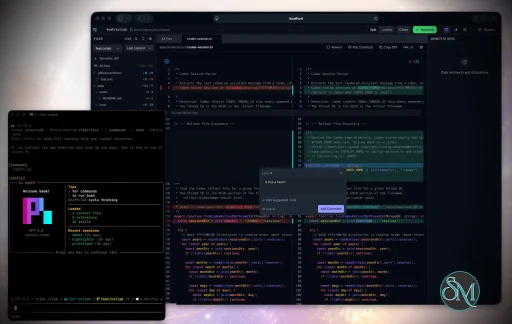
A new code review windowThe review window has been rebuilt from the file tree out. Everything it did before still works, with these changes:
Semantic diffs: moved and renamed code, drawn as suchA plain diff shows moved code as a deletion in one place and an addition in another. With semantic diffs, the review window draws it as what it is:
Talk through a review comment with your agentWhen the Inbox is running, a comment in the review window can go straight to your agent as a conversation. Type@ in the comment box to pick a connected agent and send it now, or leave comments as before and use Send or Send all in the new Threads tab. Send all goes to the agent as one review, with each comment as its own thread.
Replies show under the lines they are about, with Queued, Delivered and Read, a reply box, and Resolve. If the code changes under a thread, the thread stays on the lines that took its place and shows the old code. If the code moved, the thread follows it. Each conversation is an ordinary Inbox thread, and Open the review of … in that thread's header opens the review again with its threads in place.
The first comment goes to the agent that opened the review (Claude Code, Pi and OpenCode). Without a running Inbox, the comment box works as it did.
#3383
Code review in the Inbox, now in SettingsSettings → Capabilities → Code review is now shown to everyone. It is off until you turn it on, and the Inbox does not offer it in a pop-up. If you already had it on, it stays on. Turning it on gives you:
plannotator review, which works the same with the switch on or off.
#3626, #3610, #3613, #3609, #3627, #3612, #3628, #3653, #3622, with earlier work in #2640 and #2694
Fixed: a linked machine stayed "asleep" after Tailscale came backTwo faults on the far machine kept a linked machine unreachable:
Typing on long threadsOn a heavy page, such as a list of about 550 threads or a thread of about 600 messages, every key in the reply box did work that grew with the page, so holding Backspace could fall seconds behind. Each key now does a fixed, small amount of work. Chrome's undo also takes back a whole run of typing again instead of one letter at a time, and a pick from the/, $ or @ list is its own undo step. That last part is for Chrome and other Chromium browsers; Safari is listed under Known issues. A /, $ or @ list now opens only when you type, not when you delete back into a trigger.
#3603, #3632
RoutinesFor people who use Routines:
Playback speed for videos and recordingsVideos and recordings in the Inbox have a speed menu: 1x, 1.2x, 1.5x, 1.7x and 2x. The speed you pick applies to every video and recording you open in that tab until you close it. On a video, the "1x" chip sits in the line under the film, so it never covers the browser's own controls. On a phone, the menu opens as a sheet. By @MaxKless in #3534, their first contribution, finished in #3582 with their commits keptFixes from @rudycelekli@rudycelekli sent twelve fixes, each with a test that failed before it:
Additional Changes
Known issues
Install / UpdatemacOS / Linux:claude is on your PATH. Otherwise, in a terminal:
/plugin marketplace update plannotator, then open /plugin → Installed → plannotator → Update now.
Pi:
What's Changed
New ContributorsContributors@rudycelekli sent twelve fixes across code review, annotate, OpenCode Ask AI, Inbox uploads and Routines (#3541 to #3552). Each one came with a test that failed before the fix, most of them against a real Git repository: the first commit in Last commit reviews, staged files before the first commit, file names with brackets, submodule pointers, rejected OpenCode prompts, a duplicate OpenCode server, linked document order, annotate drafts, uploaded video details, and two races in Routines. @MaxKless built the playback speed menu for Inbox videos and recordings (#3534), with keyboard and screen reader support and tests, and recorded it in Chrome, Safari and on a phone. It ships in #3582 with their commits kept. First contribution. Thanks also to @luwanglin, who asked for code review to cover submodules in #3533. #3542 makes the submodule pointer show the same way under every Git setting; reviewing inside a submodule is still open there. The new review tree and diffs are built on Pierre's@pierre/trees and @pierre/diffs libraries.
Full Changelog: v0.28.67...v0.29.0 |
Key Features of Plannotator
Plan Review System
One of Plannotator's core capabilities is reviewing plans generated by AI agents before execution.
Developers can examine:
Proposed tasks
Implementation strategies
Agent reasoning
Planned file modifications
Workflow sequences
This visibility helps reduce unintended changes and costly mistakes.
Annotation Tools
The platform allows users to add comments, notes, and guidance directly to AI-generated plans.
These annotations can be used to:
Clarify requirements
Correct misunderstandings
Provide context
Guide future agent actions
AI Code Review
Plannotator extends the review process beyond planning by supporting inspection of generated code.
Developers can:
Review modifications
Analyze diffs
Leave comments
Request revisions
Validate implementation details
This workflow resembles modern pull-request review systems.
Human-in-the-Loop Workflows
A major design goal is ensuring that AI actions remain subject to human approval.
Organizations can establish review processes where important actions require validation before execution.
Open Source Foundation
Plannotator is open source, allowing teams to inspect, modify, and self-host the platform according to their needs.
This transparency is particularly valuable for organizations adopting AI-assisted software development.
User Experience
The interface is designed around review workflows rather than direct code generation.
Instead of interacting with a chatbot, users primarily:
Receive agent-generated plans
Review proposed actions
Add feedback
Approve or reject changes
Monitor execution results
The workflow feels familiar to developers accustomed to pull requests, code reviews, and project planning tools.
Productivity Benefits
As AI coding tools become more autonomous, review processes become increasingly important.
Plannotator helps organizations:
Reduce risky AI actions
Improve code quality
Increase accountability
Preserve architectural consistency
Encourage collaboration between developers and AI agents
For teams adopting AI-driven development, these safeguards can be as valuable as the coding agents themselves.
Collaboration Features
The platform supports collaborative review workflows where multiple team members can participate in evaluating AI-generated outputs.
This allows:
Peer review
Team approval processes
Shared annotations
Collective decision-making
Such features are especially useful for larger engineering teams.
Performance
Because Plannotator focuses on workflow management and review rather than model inference, performance largely depends on the connected AI agents and integrations.
The platform itself is lightweight and primarily serves as an orchestration and review layer.
Open Source Advantages
Being open source provides several benefits:
Transparent development
Self-hosting capabilities
Custom integrations
Community contributions
Vendor independence
Organizations concerned about compliance, security, or proprietary workflows may find these advantages particularly appealing.
Limitations
Plannotator is designed as a companion tool rather than a complete AI development platform.
Common limitations include:
Requires external AI coding agents
Best suited for teams already using AI-assisted development
Smaller ecosystem than mature developer platforms
Additional review steps may slow rapid prototyping
Some users may prefer fully autonomous workflows
The software delivers the most value in environments where oversight and quality control are priorities.
Pros
Improves transparency of AI-generated plans
Supports structured review workflows
Human-in-the-loop design
Useful annotation system
Open source
Self-hosting support
Familiar review experience for developers
Helps reduce AI-generated mistakes
Cons
Not a standalone coding agent
Requires integration with AI development tools
Smaller community than established developer platforms
Adds review overhead to workflows
Best suited for teams rather than casual users
Who Should Use Plannotator?
Plannotator is ideal for:
Software development teams
Engineering managers
AI-assisted development workflows
Organizations adopting coding agents
Open-source projects
Teams prioritizing code quality and governance
It is particularly valuable for environments where AI-generated code requires oversight before reaching production systems.
Plannotator fills an increasingly important role in the AI development ecosystem by providing visibility and control over AI-generated plans and code changes. Its focus on human oversight, structured reviews, and collaborative workflows makes it a useful companion for modern coding agents. While it is not a replacement for AI coding tools themselves, it offers a practical solution for teams seeking greater confidence and accountability in AI-assisted software development.
Developer:
backnotprop
Operating System:
Windows / macOS / Linux
Date Added:
2026-11-18T23:07:20.808Z
Categories:
Post a Comment/Report Broken Link: