Plannotator is an open-source platform designed to review and validate plans and code generated by AI coding agents.
The platform provides a centralized interface where developers can:
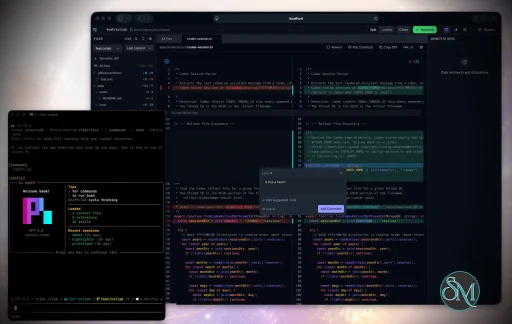
Review AI-generated plans
Annotate proposed actions
Approve or reject tasks
Inspect code changes
Provide structured feedback
Improve agent outputs
Maintain human oversight
Rather than replacing developers, Plannotator aims to keep humans involved in critical decision-making during AI-assisted development.
As AI coding agents become increasingly capable, developers face a growing challenge: ensuring that AI-generated plans and code changes align with project requirements before they are executed. Plannotator addresses this problem by acting as a review layer between developers and AI coding agents.
Instead of generating code itself, Plannotator focuses on making AI-driven development more transparent and controllable. It allows teams to review, annotate, approve, reject, and refine agent-generated plans and code changes before they affect a project.
Download Plannotator v0.28.61 - Software Mirrors |
|---|
Plannotator v0.28.61 for Windowsplannotator-win32-x64.exe | 207.68 MB plannotator-win32-arm64.exe | 193.32 MB |
Plannotator v0.28.61 for macOSplannotator-paste-darwin-x64 | 93.62 MB plannotator-paste-darwin-arm64 | 85.03 MB |
Plannotator v0.28.61 for Linuxplannotator-paste-linux-x64 | 104.07 MB plannotator-paste-linux-arm64 | 104.17 MB |
Plannotator v0.28.61 Source Code |
Plannotator v0.28.61 Release Notes:Follow @plannotator on X for updatesMissed recent releases?
What's New in v0.28.61TL;DR
Updates now update the Claude Code plugin tooAn update could finish with the app on the new version and the Claude Code plugin left on its old one, with nothing to tell you. The install script updates the plugin only when it can runclaude, and it looked for claude only on your PATH. Claude Code's own installer puts claude in ~/.local/bin, and that folder is often missing from the PATH an update runs with: for example when you pressed Update now in an Inbox or review window that was started from an app, at login or over SSH. The script then wrote the manual steps into the update log and reported success.
If you updated that way, your app is current but your Claude Code sessions may still run an older plugin. Features that need a newer plugin, such as Side (Ask AI) in the Inbox and session names, were then missing with no reason given.
The install script now also looks in ~/.local/bin and ~/.claude/local, the folders Claude Code installs itself into, on macOS, Linux and Windows. From the next update on, Update now in the Inbox also hands the installer the PATH of your login shell, which covers claude installed with npm or Homebrew. #3070
The sidebar tells you when your plugin is behindThe sidebar's "Reload Claude Code" row used to count only sessions that a reload alone would fix, so it read 0 when the plugin itself was old. It now also counts sessions whose plugin needs an update, and it opens the steps in Settings → Agents: update the plugin, then run/reload-plugins. Once the plugin is updated, the row stays only for the reload. When every session is reloaded, the row is gone. #3071
If your plugin is already behindUpdating to 0.28.61 repairs it: this update findsclaude and brings the plugin up to date by itself. Afterwards, run /reload-plugins in each Claude Code session that is open, or restart Claude Code. The sidebar's "Reload Claude Code" row lists the sessions that still need it.
If the plugin is still behind after the update, run these two commands in a terminal, then /reload-plugins:
An agent's chosen face shows on every icon of itThe face you pick for an agent in the sidebar's Agents section (its own mark, a Glass colour, Transparent or Face) now shows on every icon of that agent, with no reload: list rows, message authors, the thread's participants, the reply box's "to" pill, the@ menu, New message, Board cards and more. Every Inbox window open on this computer shows it at once, including a phone or tablet connected to it. A face belongs to one conversation, so two Claude Code sessions keep two faces. A conversation that goes on under a new session id keeps its face, and so does an agent that has ended, so its old threads look as they did.
Places that name a kind of agent rather than one agent, such as Settings and "New Claude Code session", keep the plain mark. No row changes size. #3059
Filter the Inbox list by pull request stateThe list filter has a Pull request group: Open, Draft, Merged, Closed, Has a PR and No PR. You can pick several. It reads the same pull request marks the rows already show, and appears once a thread in the list has a pull request. A thread whose pull request has not been read yet counts under Has a PR only. #3020Modern dark shows section bands and the Reply buttonOn Plannotator Modern in dark mode, several surfaces had the same colour as the card behind them, so they could not be seen: the list's section bands (Waiting on you, New since you looked and the others), the Reply and open questions buttons at a thread's foot, row hovers, chips, menus, and in plan review the inline code chips, table headers and toolbar buttons. Each one now stands a step off the card, about as far as in Plannotator dark. Modern light and every other theme are unchanged. The Themes dialog's two Modern dark pictures are retaken with the new greys. #3058, #3061One conversation no longer shows as two agents0.28.60 joined a Claude Code conversation that moved to a new session id into one row in Agents, but some still showed twice: the same name on two rows, both selected when its thread was open. The plugin now finds Claude Code's hand-over record anywhere in the old conversation, and it follows a chain of several hand-overs. Sessions already running pick this up after the update without a restart. Two separate sessions in one folder are still two agents. #3057Additional Changes
Install / UpdatemacOS / Linux:claude is on your PATH. Otherwise, in a terminal:
/plugin marketplace update plannotator, then open /plugin → Installed → plannotator → Update now.
Pi:
What's Changed
|
Key Features of Plannotator
Plan Review System
One of Plannotator's core capabilities is reviewing plans generated by AI agents before execution.
Developers can examine:
Proposed tasks
Implementation strategies
Agent reasoning
Planned file modifications
Workflow sequences
This visibility helps reduce unintended changes and costly mistakes.
Annotation Tools
The platform allows users to add comments, notes, and guidance directly to AI-generated plans.
These annotations can be used to:
Clarify requirements
Correct misunderstandings
Provide context
Guide future agent actions
AI Code Review
Plannotator extends the review process beyond planning by supporting inspection of generated code.
Developers can:
Review modifications
Analyze diffs
Leave comments
Request revisions
Validate implementation details
This workflow resembles modern pull-request review systems.
Human-in-the-Loop Workflows
A major design goal is ensuring that AI actions remain subject to human approval.
Organizations can establish review processes where important actions require validation before execution.
Open Source Foundation
Plannotator is open source, allowing teams to inspect, modify, and self-host the platform according to their needs.
This transparency is particularly valuable for organizations adopting AI-assisted software development.
User Experience
The interface is designed around review workflows rather than direct code generation.
Instead of interacting with a chatbot, users primarily:
Receive agent-generated plans
Review proposed actions
Add feedback
Approve or reject changes
Monitor execution results
The workflow feels familiar to developers accustomed to pull requests, code reviews, and project planning tools.
Productivity Benefits
As AI coding tools become more autonomous, review processes become increasingly important.
Plannotator helps organizations:
Reduce risky AI actions
Improve code quality
Increase accountability
Preserve architectural consistency
Encourage collaboration between developers and AI agents
For teams adopting AI-driven development, these safeguards can be as valuable as the coding agents themselves.
Collaboration Features
The platform supports collaborative review workflows where multiple team members can participate in evaluating AI-generated outputs.
This allows:
Peer review
Team approval processes
Shared annotations
Collective decision-making
Such features are especially useful for larger engineering teams.
Performance
Because Plannotator focuses on workflow management and review rather than model inference, performance largely depends on the connected AI agents and integrations.
The platform itself is lightweight and primarily serves as an orchestration and review layer.
Open Source Advantages
Being open source provides several benefits:
Transparent development
Self-hosting capabilities
Custom integrations
Community contributions
Vendor independence
Organizations concerned about compliance, security, or proprietary workflows may find these advantages particularly appealing.
Limitations
Plannotator is designed as a companion tool rather than a complete AI development platform.
Common limitations include:
Requires external AI coding agents
Best suited for teams already using AI-assisted development
Smaller ecosystem than mature developer platforms
Additional review steps may slow rapid prototyping
Some users may prefer fully autonomous workflows
The software delivers the most value in environments where oversight and quality control are priorities.
Pros
Improves transparency of AI-generated plans
Supports structured review workflows
Human-in-the-loop design
Useful annotation system
Open source
Self-hosting support
Familiar review experience for developers
Helps reduce AI-generated mistakes
Cons
Not a standalone coding agent
Requires integration with AI development tools
Smaller community than established developer platforms
Adds review overhead to workflows
Best suited for teams rather than casual users
Who Should Use Plannotator?
Plannotator is ideal for:
Software development teams
Engineering managers
AI-assisted development workflows
Organizations adopting coding agents
Open-source projects
Teams prioritizing code quality and governance
It is particularly valuable for environments where AI-generated code requires oversight before reaching production systems.
Plannotator fills an increasingly important role in the AI development ecosystem by providing visibility and control over AI-generated plans and code changes. Its focus on human oversight, structured reviews, and collaborative workflows makes it a useful companion for modern coding agents. While it is not a replacement for AI coding tools themselves, it offers a practical solution for teams seeking greater confidence and accountability in AI-assisted software development.
Developer:
backnotprop
Operating System:
Windows / macOS / Linux
Date Added:
2026-11-10T23:07:23.236Z
Categories:
Post a Comment/Report Broken Link: