Plannotator is an open-source platform designed to review and validate plans and code generated by AI coding agents.
The platform provides a centralized interface where developers can:
Review AI-generated plans
Annotate proposed actions
Approve or reject tasks
Inspect code changes
Provide structured feedback
Improve agent outputs
Maintain human oversight
Rather than replacing developers, Plannotator aims to keep humans involved in critical decision-making during AI-assisted development.
As AI coding agents become increasingly capable, developers face a growing challenge: ensuring that AI-generated plans and code changes align with project requirements before they are executed. Plannotator addresses this problem by acting as a review layer between developers and AI coding agents.
Instead of generating code itself, Plannotator focuses on making AI-driven development more transparent and controllable. It allows teams to review, annotate, approve, reject, and refine agent-generated plans and code changes before they affect a project.
Download Plannotator v0.28.51 - Software Mirrors |
|---|
Plannotator v0.28.51 for Windowsplannotator-win32-x64.exe | 202.27 MB plannotator-win32-arm64.exe | 187.91 MB |
Plannotator v0.28.51 for macOSplannotator-paste-darwin-x64 | 93.62 MB plannotator-paste-darwin-arm64 | 85.03 MB |
Plannotator v0.28.51 for Linuxplannotator-paste-linux-x64 | 104.07 MB plannotator-paste-linux-arm64 | 104.17 MB |
Plannotator v0.28.51 Source Code |
Plannotator v0.28.51 Release Notes:Follow @plannotator on X for updatesMissed recent releases?
What's New in v0.28.51Starred threads, a note when an agent's session has ended, "Back from snooze", an Ask box in Settings → Decision data, and expand arrows in guided reviews. 25 PRs, all from @backnotprop.Plannotator InboxStarred threadsPins are now stars. A filled star replaces the pin, and the menus say Star thread and Unstar thread. Click a row's star (tap it on a phone) to unstar the thread. This doesn't open the thread or mark it read, and the toast offers Undo, or pressZ. The second click of a double click does nothing, so it can't open the thread you just unstarred. You still star a thread from its right-click menu or its ⋯ menu, and your existing pins show as stars.
On a touch screen the star's target is 45 px wide. A tap near the end of a row's preview may unstar the thread instead of opening it, and Undo covers that. #2685
See when an agent's session has endedBefore, nothing told you that the session behind a thread had ended, and replies to it just waited. Now the row says Session ended. The thread's note says what to do, with Send to another session and Archive beside Reply. A reply already saved for that session says so: "Saved for Pi. That session has ended; it gets this only if it's resumed." Send to another session moves the saved reply, and any earlier ones waiting with it, to a live session. That session then takes over the thread, so your next Send goes there. The Inbox checks that the session really ended before it moves anything. Agents that connect only through MCP don't report when they end, so their rows show nothing. #2637Back from snoozeWhen a snooze runs out, the open thread says "Back from snooze · 8:00 AM". If there is news, the line sits on the divider above the first new message. If nothing is new, it sits above the last message. The thread opens at that line, and the line stays until you leave the thread or snooze it again. It doesn't show after an Unsnooze or a reply. Also, an archived thread no longer says "Snoozed until …" after that time has passed. #2675Ask about a past decisionSettings → Decision data has an Ask box. Type a question about something you decided earlier and press Ask. The question goes to a running agent as a new message, with instructions to search the threads your Inbox has stored, in every project. The agent answers with what was asked, the choices, what you chose and when, your own words and a link to the thread. If the answer isn't stored, the agent is told to say so and not to guess. The answer comes back as an ordinary thread, and the Inbox opens it. If several sessions are running, pick one from the list. If none is running, the box says "No agent is running" and offers Copy. The Inbox stores and shows only your words, not the instructions. #2681Show more of a file in a guided reviewA guided review in a thread now has the "N unmodified lines" rows and arrows from Plannotator's code review, so you can open the lines around a change, up to the whole file. Each file's box is as tall as its content, with no height limit, and the page scrolls. Nothing is read until you press an arrow, and the file comes from your own repository, not from GitHub. If your repository doesn't have that version of the file, the arrows go away on the first press. You can comment on an opened line, and your agent receives the comment marked "(not in the diff)" with the code quoted. A large file no longer freezes the page when it appears, because it is no longer read whole and highlighted on the page's main thread. In headless Chromium, with other work running on the machine, a 5,000-line changed file showed its first row in 422 ms instead of 6,826 ms, and the longest freeze went from 5,080 ms to 61 ms. #2635"These might help" in the Feedback dialogAs you type in the Feedback box, the dialog lists related links under "These might help": Plannotator features with a one-line description, open issues, pull requests and release note headings. It shows five at most, or three on a phone. The search runs in the window, so nothing you type reaches a server before you send. If nothing is similar, the form looks as before. Words you typed but didn't send come back when you reopen the dialog, until the window closes. #2641Feedback sends the names of the agents you usePrivacy change: feedback you send from the Inbox's Feedback dialog now also includes the names of the agents you use with the Inbox, for example "Claude Code, Codex". Only the names are sent. No session ids, paths, thread titles, counts or text go with them. The Inbox builds the list from the agent messages it has stored and uses Plannotator's own name for each agent. It never sends an agent it doesn't know or a name an agent gave itself. The list holds at most 8 names, most recently used first, and the page can't add names of its own. The dialog's "what is sent" line now says so: "Sends your message (and the category and email, if you add them), Plannotator {version}, the name of your OS and the names of the agents you use. Nothing from your threads or files."plannotator feedback on the command line is unchanged and sends no names. #2712
Smaller changes
Not yet onThis release also carries work on starting agents from the Inbox, code review in the Inbox and Shape boards. All three stay off by default, and their switches stay hidden until a later release. #2451, #2678, #2683, #2640, #2661, #2665, #2679, #2660, #2710, #2715PlannotatorLong command output arrives wholeWhen their output went to a pipe or a socket,plannotator card list (text and --json), plannotator inbox projects --json and plannotator guide export --out - could lose the end of their output and still exit 0. An agent reading a long card list could be missing cards without knowing it. These commands now exit only after all of their output is written, and the text is the same. One difference: if the program reading the output stops reading but keeps the pipe open, the command now waits until it reads or closes, as cat does. #2653
Smaller changes
Install / UpdatemacOS / Linux:claude is on your PATH. Otherwise, in a terminal:
/plugin marketplace update plannotator, then open /plugin → Installed → plannotator → Update now.
Pi:
What's Changed
Community
|
Key Features of Plannotator
Plan Review System
One of Plannotator's core capabilities is reviewing plans generated by AI agents before execution.
Developers can examine:
Proposed tasks
Implementation strategies
Agent reasoning
Planned file modifications
Workflow sequences
This visibility helps reduce unintended changes and costly mistakes.
Annotation Tools
The platform allows users to add comments, notes, and guidance directly to AI-generated plans.
These annotations can be used to:
Clarify requirements
Correct misunderstandings
Provide context
Guide future agent actions
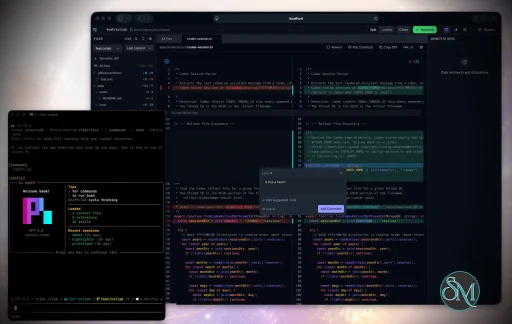
AI Code Review
Plannotator extends the review process beyond planning by supporting inspection of generated code.
Developers can:
Review modifications
Analyze diffs
Leave comments
Request revisions
Validate implementation details
This workflow resembles modern pull-request review systems.
Human-in-the-Loop Workflows
A major design goal is ensuring that AI actions remain subject to human approval.
Organizations can establish review processes where important actions require validation before execution.
Open Source Foundation
Plannotator is open source, allowing teams to inspect, modify, and self-host the platform according to their needs.
This transparency is particularly valuable for organizations adopting AI-assisted software development.
User Experience
The interface is designed around review workflows rather than direct code generation.
Instead of interacting with a chatbot, users primarily:
Receive agent-generated plans
Review proposed actions
Add feedback
Approve or reject changes
Monitor execution results
The workflow feels familiar to developers accustomed to pull requests, code reviews, and project planning tools.
Productivity Benefits
As AI coding tools become more autonomous, review processes become increasingly important.
Plannotator helps organizations:
Reduce risky AI actions
Improve code quality
Increase accountability
Preserve architectural consistency
Encourage collaboration between developers and AI agents
For teams adopting AI-driven development, these safeguards can be as valuable as the coding agents themselves.
Collaboration Features
The platform supports collaborative review workflows where multiple team members can participate in evaluating AI-generated outputs.
This allows:
Peer review
Team approval processes
Shared annotations
Collective decision-making
Such features are especially useful for larger engineering teams.
Performance
Because Plannotator focuses on workflow management and review rather than model inference, performance largely depends on the connected AI agents and integrations.
The platform itself is lightweight and primarily serves as an orchestration and review layer.
Open Source Advantages
Being open source provides several benefits:
Transparent development
Self-hosting capabilities
Custom integrations
Community contributions
Vendor independence
Organizations concerned about compliance, security, or proprietary workflows may find these advantages particularly appealing.
Limitations
Plannotator is designed as a companion tool rather than a complete AI development platform.
Common limitations include:
Requires external AI coding agents
Best suited for teams already using AI-assisted development
Smaller ecosystem than mature developer platforms
Additional review steps may slow rapid prototyping
Some users may prefer fully autonomous workflows
The software delivers the most value in environments where oversight and quality control are priorities.
Pros
Improves transparency of AI-generated plans
Supports structured review workflows
Human-in-the-loop design
Useful annotation system
Open source
Self-hosting support
Familiar review experience for developers
Helps reduce AI-generated mistakes
Cons
Not a standalone coding agent
Requires integration with AI development tools
Smaller community than established developer platforms
Adds review overhead to workflows
Best suited for teams rather than casual users
Who Should Use Plannotator?
Plannotator is ideal for:
Software development teams
Engineering managers
AI-assisted development workflows
Organizations adopting coding agents
Open-source projects
Teams prioritizing code quality and governance
It is particularly valuable for environments where AI-generated code requires oversight before reaching production systems.
Plannotator fills an increasingly important role in the AI development ecosystem by providing visibility and control over AI-generated plans and code changes. Its focus on human oversight, structured reviews, and collaborative workflows makes it a useful companion for modern coding agents. While it is not a replacement for AI coding tools themselves, it offers a practical solution for teams seeking greater confidence and accountability in AI-assisted software development.
Developer:
backnotprop
Operating System:
Windows / macOS / Linux
Date Added:
2026-11-06T23:07:18.196Z
Categories:
Post a Comment/Report Broken Link: