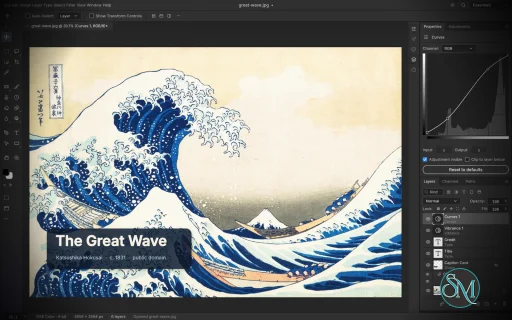
PhotoCraft is an open-source image editor designed as a clean-room reimplementation of Adobe Photoshop, built entirely in Rust. It provides a surprisingly broad set of professional image-editing features, including layers, masks, adjustment layers, filters, vector shapes, editable text, brushes, and native PSD support.
The project is particularly interesting for users who want a local, open-source Photoshop alternative without relying on Electron, cloud services, or proprietary software. However, PhotoCraft is still in early alpha, so it is better viewed as a promising alternative under active development than as a complete replacement for Photoshop.
Features
PhotoCraft offers a substantial collection of image-editing tools:
Layer groups, clipping masks, pixel and vector masks
Adjustment layers for Curves, Levels, Vibrance, Hue/Saturation, Black & White, Gradient Map, Selective Color and more
Layer styles including Drop Shadow, Inner Shadow, Glow, Bevel & Emboss, Stroke, and overlays
Brush, Pencil, Mixer Brush, Clone Stamp, Healing Brush and other painting tools
Marquee, Lasso, Magic Wand, Quick Selection, Object Selection and Select Subject
Editable point and paragraph text
Pen and vector shape tools
Smart objects and smart filters
Free Transform with scale, rotate, skew, distort and perspective
History and History Brush
Multiple blend modes, opacity, fill and layer controls
Color management with RGB, Grayscale, CMYK and Lab
8, 16 and 32-bit-per-channel documents
PSD and PSB support
PNG, JPEG, TIFF, WebP, GIF, BMP, TGA, ICO, OpenEXR, HDR, AVIF and other formats
Export preview with quality, transparency, scale and estimated file size
Command palette and recorded actions
Its PSD support is one of its strongest features. The project tests its implementation against real-world PSD files and reports very high rendering compatibility across its test corpora. Unsupported data is designed to be preserved rather than simply discarded when documents are saved.
Another unusual feature is its automation architecture. PhotoCraft exposes its editing engine through the desktop interface, CLI, JSON control channel and MCP, making the application suitable for scripted workflows and AI-agent automation.
Download PhotoCraft v0.21.0 - Software Mirrors |
|---|
PhotoCraft v0.21.0 for Windowsphotocraft-0.21.0-windows-x86.msi | 103.61 MB photocraft-0.21.0-windows-x86-symbols.zip | 6.21 MB photocraft-0.21.0-windows-x86-portable.zip | 122.39 MB photocraft-0.21.0-windows-x64.msi | 106.8 MB photocraft-0.21.0-windows-x64-symbols.zip | 6.5 MB photocraft-0.21.0-windows-x64-portable.zip | 128.14 MB photocraft-0.21.0-windows-arm64.msi | 101.15 MB photocraft-0.21.0-windows-arm64-symbols.zip | 6.04 MB photocraft-0.21.0-windows-arm64-portable.zip | 122.37 MB |
PhotoCraft v0.21.0 for macOSphotocraft-cli-0.21.0-macos-universal.zip | 108.97 MB photocraft-0.21.0-macos-universal.dmg | 245.18 MB |
PhotoCraft v0.21.0 for Linuxphotocraft-0.21.0-linux-x86_64.tar.gz.asc | 228 B photocraft-0.21.0-linux-x86_64.tar.gz | 124.53 MB photocraft-0.21.0-linux-x86_64.rpm.asc | 228 B photocraft-0.21.0-linux-x86_64.rpm | 125.55 MB photocraft-0.21.0-linux-x86_64.pkg.tar.zst | 100.09 MB photocraft-0.21.0-linux-x86_64.flatpak.asc | 228 B photocraft-0.21.0-linux-x86_64.flatpak | 93.98 MB photocraft-0.21.0-linux-x86_64.deb.asc | 228 B photocraft-0.21.0-linux-x86_64.deb | 126.41 MB photocraft-0.21.0-linux-x86_64.AppImage.zsync.asc | 228 B photocraft-0.21.0-linux-x86_64.AppImage.zsync | 207.33 kB photocraft-0.21.0-linux-x86_64.AppImage.asc | 228 B photocraft-0.21.0-linux-x86_64.AppImage | 118.33 MB photocraft-0.21.0-linux-riscv64.tar.gz.asc | 228 B photocraft-0.21.0-linux-riscv64.tar.gz | 122.3 MB photocraft-0.21.0-linux-riscv64.rpm.asc | 228 B photocraft-0.21.0-linux-riscv64.rpm | 123.41 MB photocraft-0.21.0-linux-riscv64.deb.asc | 228 B photocraft-0.21.0-linux-riscv64.deb | 123.99 MB photocraft-0.21.0-linux-aarch64.tar.gz.asc | 228 B photocraft-0.21.0-linux-aarch64.tar.gz | 119.63 MB photocraft-0.21.0-linux-aarch64.rpm.asc | 228 B photocraft-0.21.0-linux-aarch64.rpm | 121.75 MB photocraft-0.21.0-linux-aarch64.pkg.tar.zst | 97.03 MB photocraft-0.21.0-linux-aarch64.flatpak.asc | 228 B photocraft-0.21.0-linux-aarch64.flatpak | 88.46 MB photocraft-0.21.0-linux-aarch64.deb.asc | 228 B photocraft-0.21.0-linux-aarch64.deb | 122.84 MB photocraft-0.21.0-linux-aarch64.AppImage.zsync.asc | 228 B photocraft-0.21.0-linux-aarch64.AppImage.zsync | 199.56 kB photocraft-0.21.0-linux-aarch64.AppImage.asc | 228 B photocraft-0.21.0-linux-aarch64.AppImage | 113.89 MB |
PhotoCraft v0.21.0 for BSDphotocraft-0.21.0-freebsd-x86_64.tar.gz | 123.73 MB photocraft-0.21.0-freebsd-aarch64.tar.gz | 117.61 MB |
Others Download related to PhotoCraft v0.21.0release-signing-key.asc | 803 B photocraft-web-0.21.0.zip | 13.74 MB |
PhotoCraft v0.21.0 Source Code
PhotoCraft v0.21.0 Source code (zip)
PhotoCraft v0.21.0 Source code (tar.gz)
|
PhotoCraft v0.21.0 Release Notes: What's Changed- Save the flattened document at full size into .pcraft files as an option by @dotCooCoo in #9913
- Add guarded scratch storage and owned memory supervision by @vistaero in #5330
- Save: stop doubling the encoded file in memory (#6607) by @VishnuByrraju in #8115
- Stream native PSD/PSB and EXR imports through bounded bands by @vistaero in #5331
- Size PSD import memory limits from available RAM by @wanikhawar in #10897
- Portable mode: create the write probe exclusively, never through an existing entry by @dylanmtaylor in #10963
- codecs: refuse EXR preview attributes larger than their value by @dylanmtaylor in #10982
- security(affinity): charge allocation records, empty subpaths, paint lists, tile indexes and shape lookups by @dylanmtaylor in #10966
- Stream GPU viewport pages with bounded staging and cancellation by @vistaero in #5332
- fix(ui): Save for Web Matte takes only whole colours while typed (#8830) by @hnoerenberg in #8890
- test(ui): pin the options-bar swatch's rounded checker clip (#8741) by @hnoerenberg in #8898
- fix(ui): the Stroke Path dialog remembers Simulate Pressure (#10527) by @hnoerenberg in #10583
- fix(plugins): the install error names the format the file actually is (#10362) by @hnoerenberg in #10633
- fix(ui): Ctrl+Alt + wheel zooms the canvas like Alt + wheel (#10488) by @hnoerenberg in #10517
- TIFF Options: compression, image pyramid and Save Transparency (#8827) by @Yuki-init in #10932
- fix(ui): Minimum and Maximum preview at the scale they apply (#10474) by @hnoerenberg in #10524
- Type: add OpenType Numerals submenu (figure styles) by @tareq-halaby in #11051
- fix(ui): Roundness previews its radius within 1 px, and a held frame survives a factor change (#10474) by @FredApps in #11081
- fix(ui): Overscroll off keeps an image smaller than the window centred (#10488) by @FredApps in #11085
- Don't auto-select off-canvas layers from the pasteboard (#10665) by @RickiNano in #10731
- Integrate streamed PSB saves with the shared save service by @vistaero in #5333
- Integration batch 13: 13 parity epic PRs on main by @davidmann4 in #10952
- Record actions in a document-independent form (#219) [depends on #4496] by @FabioLissi in #4514
- Batch: subfolders, open documents, file naming, stop on error, error log, progress and cancel (#219) by @FabioLissi in #4579
- Layers panel: the filter row lists linked, missing or embedded smart objects by @dotCooCoo in #9211
- Layers panel: filter by Color, as in Photoshop (#5898) by @hectorviov in #10439
- Layers panel: show the filter row in every theme by @Psychotoxical in #10752
- Support newer recorded Action events by @yoriswind in #10755
- Actions: support direct Gradient Map and Lab-range Replace Color by @yoriswind in #10765
- ATN: keep encoding fallbacks among the top-scoring candidates by @neversaynv3r in #10832
- Crop with Delete Cropped Pixels off turns the Background into Layer 0 (#10867) by @ljkx in #10905
- Actions: a recorded Save As or Save for Web with the suggested name saves each document under its own (#5305) by @Daktyl198 in #5430
- Actions: Check Spelling records and saves as the spellCheck event by @dotCooCoo in #8726
- Crop: ⇧-corner drag follows the frame's diagonal (#10871) by @ljkx in #10941
- CMYK: adjustment layers in the special eight keep the Fill rule on the ink path (#10386) by @davidmann4 in #10387
- text: find paragraphs and trailing blanks without rescanning by @dylanmtaylor in #11045
- Integration batch 14: 9 PRs planned by @davidmann4 in #11157
- fix(ui): Free Transform keeps plain layers over the moving one under a blend or adjustment layer (#9387) by @x-labb in #9573
- Fix Crop Clear retaining custom proportions by @vanvo in #9842
- Crop: the Info panel shows the crop frame's W and H (#3145) by @indy2kro in #10453
- Free Transform: lift a pixel's coverage up to all of it, as Move does by @hectorviov in #10565
- Crop: no frame around the cropped image until the next press by @D-monized in #10642
- fix(algo): Filter Gallery reach no longer overflows on out-of-range stored effect values by @jayzed80 in #10850
- Crop: a Ctrl-held Straighten line keeps the frame size (#10870) by @ljkx in #10950
- Actions: map recorded Shear curves by @yoriswind in #10955
- Actions: map recorded Scale Effects and Create Layers by @yoriswind in #10998
- Crop: give each overlay its own glyph in the menus and on the options-bar button (#10889) by @Raghav2012Code in #11019
- Layers panel: filter by layer effect (#10880) by @Psychotoxical in #11067
- Crop: turning the image keeps the frame inside it (#10869) by @ljkx in #11109
- Crop: H and P pick the Hand and Pen tools over the default frame (#9731) by @Luis-0508 in #9855
- text: group glyphs by colour once instead of rescanning per colour by @dylanmtaylor in #11069
- text: merge a run of union components once when fitting area type by @dylanmtaylor in #11065
- fix(gpu): saturate effect band edges at the coordinate ceiling by @dylanmtaylor in #11057
- ipp: resume the reply's header search where the last read stopped by @dylanmtaylor in #11049
- raw: check retone's pixel count with checked multiplication by @dylanmtaylor in #11043
- raw: refuse lossy DNG tiles that carry Extended XMP by @dylanmtaylor in #11042
- raw: decode a tile range once when several tiles share it by @dylanmtaylor in #11041
- raw: refuse JPEG XL tiles with compressed metadata boxes or splines by @dylanmtaylor in #11039
- raw: keep at most 64 GainMap opcodes from one list by @dylanmtaylor in #11023
- codecs: leave Extended XMP fragments out of zune-jpeg's header parse by @dylanmtaylor in #10981
- codecs: charge dropped PNG text against the metadata budget by @dylanmtaylor in #10980
- codecs: admit animated GIF screens, sparse RLE BMPs and icon PNG profiles by @dylanmtaylor in #10979
- format: bound blob inflation by the remaining load budget; browser budgets by @dylanmtaylor in #10984
- Toolbar: Alt/Option-click cycles the flyout tool slot by @tareq-halaby in #10301
- Properties: W/H/X/Y take a typed percentage (#10784) by @RickiNano in #10802
- Preferences: show Effect Cache, which the engine reads (#204) by @RickiNano in #10921
- perf(bench): split command and refresh time; refresh like the app; stop rows timing setup by @RickiNano in #10750
- PSD: keep stylistic sets in Txt2 for PhotoCraft-native documents by @tareq-halaby in #10313
- fix(layers): refuse to ungroup the sole empty layer group (#11118) by @hnoerenberg in #11163
- fix(atomic): report where the original survives when the Windows restore fails by @hnoerenberg in #11189
- fix(assets): bind post-save generation to the saved document's identity by @hnoerenberg in #11244
- feat(filters): Lens Flare looks like Photoshop's (SSIM 0.97–0.995 per lens) by @the-unknown in #8705
- Integration batch 15: Crop, Free Transform and Actions epic PRs by @davidmann4 in #11203
- fix(gpu): build compositor pipelines without sharing FXC shader blobs across threads (#9173) by @FinnNk in #9182
- feat(ui): live preview in Color Pickers for dialog colour fields and the Crop shield (#9886) by @ljkx in #9979
- fix(ui): open export dialog for Data Sets as Files and gate on data sets by @kk376 in #10203
- Edit › Transform › Distort: side handles move their edge, Perspective's side handles skew (#10085) by @ljkx in #10814
- Load Actions: Mac Roman step names with accented letters or a degree sign read as Mac Roman (#10774) by @TrevorBrown-dev in #10837
- Free Transform: Shift-rotate snaps the turn made by the drag (#11099) by @vangel76 in #11162
- contributors: set names for vangel76 by @vangel76 in #11207
- Crop: centred 48-point grid while turning by @yoriswind in #11220
- fix(ui): a save that failed some Image Assets reports which outputs (#11117) by @hnoerenberg in #11168
- Integration batch 16: 9 epic PRs on main by @davidmann4 in #11278
- feat(zoom): refine zoom field input handling, focus rules, and animation by @sn-o-w in #6647
- Crop: Esc hides the crop frame until the next press (#10370) by @qvest-ssels in #10396
- Group action playback into one history state by @yoriswind in #10965
- Actions: map recorded Content-Aware Fill settings by @yoriswind in #10986
- Layers filter: fill layers match no Kind button, and the Mode list has no Pass Through (#10878) by @Hamza0101 in #11017
- Layers panel: filter by layer attribute (#10881) by @Psychotoxical in #11077
- Actions: support recorded Type Create Work Path by @yoriswind in #11222
- Actions: map supported classic Gradient recordings by @yoriswind in #11223
- Layers panel: applying a filter deselects the layers it hides (#10879) by @NaufalDzz in #11235
- Free Transform: linked layers transform together (#11217) by @chamber074 in #11243
- Pass the Linux signing key to the release workflow by @dylanmtaylor in #11344
- PDF export: keep the top text and shape layers as vectors, with selectable text by @wanikhawar in #10355
- perf(paint): create a large dab's new coverage tiles on the workers by @wanikhawar in #11349
- perf(ui): cache Adaptive Wide Angle preview mesh for constraint overlays by @wanikhawar in #9872
- Add a headless GPU backend for composition and flat export by @wanikhawar in #10842
- Use native Pen cursors to avoid canvas-frame delay by @wanikhawar in #10860
- Paste into another artboard keeps the place on the board (#8788) by @Probler-Yt in #10538
- bs: Add Bosnian (bs) to the interface languages by @nine-codes in #10290
- feat(paint): add History Brush opacity/flow controls, source selection, and custom icon by @davidvhk in #4446
- Expose optional GPU composition and export in photocraft-cli by @wanikhawar in #10912
- Fix imported gradient presets sharing selection names by @wanikhawar in #10521
- Type: add OpenType Stylistic Sets submenu (Set 1–20) by @wanikhawar in #10304
- Move tool: auto-nest layers into the artboard they're dropped on (#10218) by @Probler-Yt in #10512
- Bound Photomerge memory and safely reject out-of-budget jobs (#7851) by @wanikhawar in #10463
- Art History Brush: Opacity on the options bar (#10263) by @wanikhawar in #10278
- UI: 2-column Home screen with recent file cards and centered workspace by @coqui-software in #7231
- perf(io): build JPEG/PNG tiles straight from the decoded rows, in parallel (#10259) by @wanikhawar in #10281
- fix(compose): align CMYK adjustment Fill and Posterize with split rendering by @wanikhawar in #11001
- Home screen: hide the tools, options bar, status bar and docks while Home is up by @wanikhawar in #11253
- PSD: flat files keep their spot and alpha channels by @wanikhawar in #10260
- Selection: Grow and Similar match only selected colours, Grow starts from the frontier by @wanikhawar in #9673
- perf(paint): cache sampled-tip mipmaps between strokes by @wanikhawar in #9617
- MCP headless: waited commands run as jobs, with progress and cancel (#8129) by @wanikhawar in #8132
- feat(frame): rework the Frame tool's selection, handles and placement by @wanikhawar in #8920
- test(engine): cover File Info exposure 1/n formatting by @mroxso in #6983
- Select sky beneath an obstructed top border by @wanikhawar in #9693
- fix(compose): keep CMYK backdrop inks exact at zero Fill by @wanikhawar in #10985
- MCP bridge: waited commands poll the app's job, with progress and cancel (#8130) by @wanikhawar in #8134
- perf: JPEG/PNG open bench with per-phase timings and peak memory (#10259) by @wanikhawar in #10271
- Make Select and Mask refinement and previews tile-sparse by @wanikhawar in #10732
- Guides: integrate edit-session previews and interaction-check scenarios by @PerchAnton in #9190
- Artboards: clipping groups move between boards together; pastes off the boards and into masks land right by @FredApps in #11441
- perf(io): stream large PNGs row by row into the layer's tiles (#10259) by @wanikhawar in #10305
- Canvas: a right-click that moved a few pixels still opens its menu (#10183) by @ZIDAN44 in #10351
- Add recipe-driven checks for PSD exports by @wanikhawar in #10307
- fix(ui): About credits table columns can be dragged wider or narrower by @FredApps in #11182
- Release: refresh contributor credits for each release (#8737) by @Luis-0508 in #11426
- Type: a duplicated type layer is renamed after its new text (#9023) by @ZIDAN44 in #10352
- Integration batch 17: 14 epic PRs by @davidmann4 in #11320
- Free Transform: hide the reference point behind a Toggle Reference Point check box (#11098) by @NaufalDzz in #11247
- Color Lookup: apply a .3dl's shaper before the table (#8982) by @hectorviov in #9170
- Layers panel: the filter row lists the artboards that hold the selected layers by @dotCooCoo in #9315
- feat(ui): add a Reset button to the Crop tool's options bar (#9730) by @x-labb in #9739
- fix(ui): a click during a background Free Transform commit runs when it lands (#9974) by @DuBearte in #10360
- Free Transform takes soft edges whole after a move, leaving no outline behind (#10461) by @Lcoding15 in #10505
- Run the selected action in Batch and Create Droplet by @yoriswind in #10612
- Support recorded dialog filters, Calculations and Batch naming by @yoriswind in #10788
- Crop: Fill labels follow Delete Cropped Pixels, and the Selection preset entry (#10872) by @Raghav2012Code in #11011
- Free Transform: a click outside the box on the image no longer commits (#11100) by @vangel76 in #11165
- Expose Move transform controls through the control channel by @yoriswind in #11210
- feat(atn): map Batch steps inside actions to file.automate.batch (#7104) by @HirthikBalaji in #7170
- Fix Paint Bucket target with Gradient-style crosshair by @envy-ai in #7994
- Grow and Similar: budget the colour index and report allocation failures by @wanikhawar in #9825
- perf(algo): build Remove Tool target masks with a bounded separable dilation (#10179) by @wanikhawar in #10194
- Select Subject: keep parts that run off the image edge and detached parts near the subject by @wanikhawar in #10160
- Web build: big operations that won't fit fail with an error instead of trapping, and a trap says so by @wanikhawar in #10129
- perf(paint): sampled, textured and wet-edge dabs rasterize on all cores by @wanikhawar in #11369
- Build the GPU compositor off the UI thread by @wanikhawar in #9969
- Place decodes and fits in the background: dropping a large file no longer freezes the window by @wanikhawar in #10147
- Preview spot inks over the RGB/CMYK composite as an overprint by @wanikhawar in #10276
- GPU plan: cache adjustment LUT rows between plans (#11498) by @RickiNano in #11539
- SVG: refuse filters too costly to render (#9409) by @davidmann4 in #9410
- SVG: a drawing the renderer panics on is an error, not a crash (#9404) by @davidmann4 in #9405
- Crop: the options-bar swap button turns the frame instead of shrinking it (#7738) by @davidmann4 in #7739
- History snapshots: follow-ups to #3567 (#6087) by @davidmann4 in #6088
- Export to files: a Custom JPEG quality in Artboards, Layers and Layer Comps to Files (#11481) by @ZIDAN44 in #11558
- Channels: the panel menu has the channel commands, New Spot Channel among them (#11451) by @ZIDAN44 in #11557
- SVG: the fallback font search reads each font's character map once (#9671) by @davidmann4 in #9672
- Crop / Perspective Crop: a drag held past the canvas edge scrolls the view (#9307) by @davidmann4 in #9310
- Layers: separators between the Blend Mode groups (#5532) by @davidmann4 in #5533
- Crop: Esc in full screen cancels a drag on the default frame (#9275) by @davidmann4 in #9276
- Crop: a tool switch during a frame drag ends the drag (#9223) by @davidmann4 in #9224
- Crop W x H budgets the hidden pixels it resamples (#9212) by @davidmann4 in #9213
- SVG: a DTD entity can't hide nesting from the depth check (#9669) by @davidmann4 in #9670
- Image Size: refuse a resolution outside 1..30000 ppi instead of clamping it (#9260) by @davidmann4 in #9261
- Crop: a click on the frame or a handle never snaps it (#9283) by @davidmann4 in #9284
- Crop: a Straighten line inside the frame no longer snaps like a frame move (#9277) by @davidmann4 in #9278
- Crop: History jumps wait for a pending crop (#9285) by @davidmann4 in #9286
- Crop: switching documents leaves the old document's view turned (#9202) by @davidmann4 in #9204
- History Options: Automatically Create First Snapshot, New Snapshot When Saving, Show New Snapshot Dialog by Default (#2966) by @davidmann4 in #3634
- Single Row / Column Marquee: a drag from inside the selection moves it (#11392) by @RickiNano in #11534
- Integration batch 18: 23 epic PRs (toolbar, move, selection, artboard, menus) by @davidmann4 in #11563
- Selection tools: dragging the outline records Move Selection, as the reference does (#11390) by @TrevorBrown-dev in #11444
- Polygonal Lasso: History step "Polygonal Lasso" and Shift diagonals snap to the shorter offset (#11393) by @Hamza0101 in #11453
- Shortcuts: Ctrl+Alt+0 also zooms to 100% and F9 also opens Actions, the reference's second keys (#11396) by @TrevorBrown-dev in #11456
- Elliptical Marquee: the anti-aliased edge ramps across the pixel, matching the reference within 1 level (#11391) by @Hamza0101 in #11461
- Menus: Edit › Preferences says Plugins… and Camera Raw… and has the reference's separators (#11398) by @TrevorBrown-dev in #11494
- Artboard tool: the first board drawn in a document takes the Background in as "Layer 0" (#11387) by @TrevorBrown-dev in #11496
- Menus: View › Guides submenu in the reference's order, with Edit Selected Guides and Clear Selected Guides (#11400) by @TrevorBrown-dev in #11497
- Layers panel: a right-click on the empty area opens the reference's menu (#11404) by @TrevorBrown-dev in #11500
- The document tab's right-click menu lists the reference's eight entries in order, with its two separators (#11403) by @TrevorBrown-dev in #11502
- Layer > Smart Objects says Reveal in Explorer, Embed Linked and Embed All Linked, in the reference order, without the Warp rows (#11401) by @TrevorBrown-dev in #11503
- Select and Mask: E switches the tool mode between add and subtract (#11402) by @TrevorBrown-dev in #11511
- Shift+letter cycles a tool group in toolbar order and the anchor point tools no longer take the letter P (#11376) by @TrevorBrown-dev in #11521
- The Artboard tool's Add New Artboard button switches on a placing mode where a click puts a bar-sized board at the click (#11386) by @TrevorBrown-dev in #11532
- The healing slot starts on Spot Healing Brush and the brush slot lists Color Replacement before Mixer Brush (#11375) by @TrevorBrown-dev in #11535
- Actions: replay recorded Perspective Warp steps by @yoriswind in #11553
- feat(ui): bounding box with eight handles for several selected shape layers (#11107) by @x-labb in #11295
- Move tool: Shift+drag of a layer locks to the eight directions, as the reference does (#11382) by @TrevorBrown-dev in #11436
- Shortcuts: Ctrl+/ opens Layer › Lock Layers…, shown in the Layer menu and the Layers panel menu (#11397) by @TrevorBrown-dev in #11437
- Move tool: History names its steps Move, Nudge and Duplicate as the reference does (#11383) by @TrevorBrown-dev in #11443
- Marquee: with no selection, Shift and Alt held from the press constrain the shape (#11389) by @Hamza0101 in #11449
- Menus: Combine Shapes, Open Recent, Arrange and Proof Setup items carry the reference's names (#11399) by @TrevorBrown-dev in #11455
- Crop: fill the active layer and Background with Content-Aware Fill by @yoriswind in #11458
- Actions: play recorded Stack Modes and Video Frame events by @yoriswind in #11495
- Copy the shared house rules into AGENTS.md by @FredApps in #11632
- Image: Trim (Transparent Pixels) ignores alpha that rounds to 0 at the document's depth (#9299) by @davidmann4 in #9300
- PSD write recipes: keep every exported candidate and pin the base file by @wanikhawar in #11607
- Match Rotation leaves a pending crop's turn out (#9308) by @davidmann4 in #9309
- ui.click / ui.move reject coordinates beyond the screen range (#9137) by @davidmann4 in #9138
- Review follow-up to #10328: Liquify saved twirl, copied type brings its styles, restored tests (#10500) by @davidmann4 in #10501
- Interface: remove the Enable animations preference (#9479) by @davidmann4 in #9480
- Image Rotation: a flip reverses an Angle gradient fill's sweep (#9243) by @davidmann4 in #9244
- Windows: count scratch room when opening large files; refusal names the build's limit by @wanikhawar in #11513
- Keep each colour's values in the Selective Color dialog by @wanikhawar in #11474
- Windows: run explorer.exe and reg.exe by full path (#9666) by @davidmann4 in #9667
- Content-Aware Scale works on the Background with a selection (#7717) by @davidmann4 in #7719
- Rotated view: Type box and Move marquee previews follow the document axes (#7063) by @davidmann4 in #7064
- Stop stale settings overriding edits to adjustment smart filters by @wanikhawar in #11609
- Stop an adjustment smart filter losing settings when its dialog is confirmed by @wanikhawar in #11613
- Web build: Place runs a slice per frame, so a large PNG no longer freezes the page by @wanikhawar in #10164
- Network scratch folders report their own free space, or say they can't by @wanikhawar in #11628
- A scratch folder that stops answering no longer freezes the app by @wanikhawar in #11652
- A little free memory no longer refuses every PSD; the refusal says what to do by @wanikhawar in #11641
- Add an opt-in WinTab backend for pen pressure on Windows by @Triwarr in #11331
- CI: run the GPU tests on lavapipe on Linux and fail if they skip by @FredApps in #7975
New Contributors- @vistaero made their first contribution in #5330
- @tareq-halaby made their first contribution in #11051
- @Psychotoxical made their first contribution in #10752
- @x-labb made their first contribution in #9573
- @indy2kro made their first contribution in #10453
- @jayzed80 made their first contribution in #10850
- @Raghav2012Code made their first contribution in #11019
- @Luis-0508 made their first contribution in #9855
- @kk376 made their first contribution in #10203
- @TrevorBrown-dev made their first contribution in #10837
- @qvest-ssels made their first contribution in #10396
- @chamber074 made their first contribution in #11243
- @nine-codes made their first contribution in #10290
- @davidvhk made their first contribution in #4446
- @coqui-software made their first contribution in #7231
- @ZIDAN44 made their first contribution in #10351
- @Lcoding15 made their first contribution in #10505
- @HirthikBalaji made their first contribution in #7170
- @Triwarr made their first contribution in #11331
Full Changelog: v0.20.2...v0.21.0 |
Performance and Compatibility
PhotoCraft is built as a native Rust application rather than a web wrapper or Electron application. Its rendering architecture uses wgpu for GPU compositing with support for graphics APIs including Metal, Vulkan, DirectX 12 and WebGPU.
The application also uses multithreaded filters and copy-on-write sparse tiles. This design is intended to reduce unnecessary copying and make large layered documents more manageable.
The project reports extensive automated testing, including PSD round-trip tests, compositor comparisons and multi-depth testing. Its architecture also includes a CPU compositor used as a reference against the GPU compositor.
PhotoCraft can run natively on Windows, macOS, Linux and FreeBSD, with a WebAssembly build for browser use.
The main limitation is maturity. The developers explicitly describe the project as early alpha and acknowledge that it is not yet suitable as a complete replacement for Photoshop in professional daily workflows. Missing areas include AI and generative features, some tools, deeper typography and professional workflows, and plugin compatibility.
System Requirements
PhotoCraft supports:
Windows
macOS
Linux
FreeBSD
WebAssembly/browser
Linux distributions can use AppImage, DEB, RPM, tarball or Flatpak packages.
Hardware requirements are not presented as a simple minimum specification. Because PhotoCraft uses GPU acceleration, actual performance will depend heavily on the graphics hardware and the size and complexity of the documents being edited.
Pros and Cons
Pros
Open-source and available under permissive MIT or Apache-2.0 licensing
Native Rust application
No Electron or embedded web browser required
Excellent focus on PSD compatibility
Extensive layer and adjustment-layer support
GPU-accelerated rendering
Supports CMYK, Lab and high-bit-depth documents
Strong brush and vector capabilities
Windows, macOS, Linux and FreeBSD support
Can also run through WebAssembly
Powerful CLI and automation capabilities
MCP support makes it interesting for AI-assisted workflows
Offline-first approach
Cons
Still early alpha
Not yet a complete Photoshop replacement
Missing some tools and professional workflows
No Photoshop plugin compatibility
AI and generative editing features are limited or absent
Typography capabilities are not yet as mature as established professional editors
Some rough edges should be expected
How to Install
The easiest approach is to download the appropriate package from the project's GitHub releases.
Linux users have several packaging options, including AppImage, DEB, RPM, tarball and Flatpak. Windows has a portable package, while macOS has a universal disk image.
Developers can also build PhotoCraft directly from source using Rust:
git clone https://github.com/storytold/photocraft
cd photocraft
cargo run --release -p photocraft -- image.psd
The repository also provides CLI functionality for automated editing and batch processing.
Final Verdict
PhotoCraft is one of the more ambitious open-source Photoshop alternatives currently available. Its combination of native Rust performance, extensive layer support, serious PSD compatibility work and an unusually capable automation architecture makes it much more than a basic image editor.
The strongest reason to watch PhotoCraft is its engineering approach. The project is building a real image-editing engine rather than simply creating a Photoshop-like interface, and its extensive PSD testing provides a useful foundation for compatibility.
The biggest problem is maturity. The project itself acknowledges that it is still early alpha and lacks several areas required for professional Photoshop replacement workflows. Users who depend on plugins, advanced typography, AI features or highly polished production workflows should not switch completely yet.
For enthusiasts, developers, Linux users, open-source advocates and anyone interested in building automated image-processing workflows, however, PhotoCraft is particularly compelling.
Post a Comment/Report Broken Link: