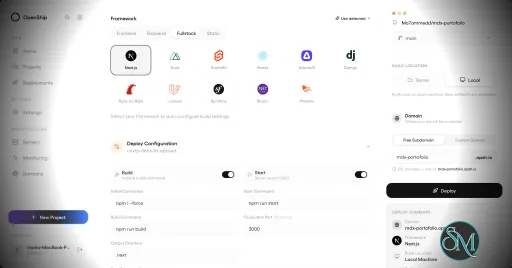
Openship is an open source application deployment platform that simplifies building, deploying, operating, and scaling applications on your own infrastructure. It combines Git-based deployments, container management, SSL automation, application monitoring, managed services, and a modern web interface into a single platform. Designed as an alternative to managed platforms such as Vercel, Netlify, and Render, Openship gives developers full ownership of their infrastructure while maintaining a streamlined deployment experience.
Deploying applications to self-managed servers often requires configuring Docker, reverse proxies, SSL certificates, deployment pipelines, and monitoring separately. Openship brings these capabilities together into a unified platform that works with cloud VPS providers, dedicated servers, and homelabs.
Unlike many self-hosted deployment tools that install build agents directly on production servers, Openship builds application images externally and deploys immutable containers over SSH. This keeps production systems focused on serving applications while simplifying rollbacks and updates.
The platform is fully open source under the AGPL-3.0 license and supports both self-hosting and managed cloud hosting.
Key Features of Openship
Git-Based Deployments
Applications are deployed automatically from Git repositories. Every commit can trigger a build, resulting in versioned container images that are easy to deploy or roll back.
Deploy Anywhere
Openship supports deployment to:
Virtual private servers
Dedicated servers
Home labs
Cloud virtual machines
Openship Cloud
The deployment workflow remains consistent regardless of the hosting environment.
Zero Downtime Deployments
The platform automatically routes traffic to newly deployed containers after they are ready, reducing downtime during updates. Previous versions remain available for quick rollback if necessary.
Automatic SSL
SSL certificates are automatically provisioned through Let's Encrypt, eliminating manual certificate management for hosted applications.
Integrated Monitoring
Developers can monitor deployments, view application logs, inspect metrics, and manage previous releases directly from the web dashboard, desktop application, or CLI.
Managed Infrastructure Services
Beyond application deployment, Openship includes managed services such as PostgreSQL, MySQL, Redis, MongoDB, and a built-in transactional email service with support for multiple domains.
Multiple Interfaces
Users can manage infrastructure through:
Web dashboard
Desktop application
Command-line interface
REST API
MCP integration for AI agents
This flexibility makes Openship suitable for both manual administration and automation workflows.
Open Source
Every component of the platform is publicly available, allowing organizations to audit the source code, customize functionality, and avoid vendor lock-in.
Download OpenShip v1.0.2 - Software Mirrors |
|---|
OpenShip v1.0.2 for Windows |
OpenShip v1.0.2 for macOS |
OpenShip v1.0.2 for Linuxopenship-v1.0.2-linux-amd64.tar.gz | 93.21 MB |
Others Download related to OpenShip v1.0.2 |
OpenShip v1.0.2 Source Code |
OpenShip v1.0.2 Release Notes:Recommended update for GitLab connections, Cloud deployment reliability, Compose imports, and certificate renewal on remote edges.Git and deployments
extra_hosts.
Validate health check durations in openship.json (#1827, #1846, #1847, #1849, #1850).
Cloud, networking, and TLS
Mail and webhook delivery
Dashboard, CLI, and website
Upgrade notes
|
Performance and User Experience
Openship provides a polished user experience that lowers the barrier to self-hosting modern applications. The interface is clean, deployments are straightforward, and infrastructure management is considerably simpler than manually configuring Docker, reverse proxies, certificates, and monitoring tools.
One of its strongest advantages is keeping production servers free from build workloads. Images are built separately and transferred to the deployment target, improving reliability and reducing resource usage on live servers.
The project is under active development, with new features such as clustering and horizontal scaling planned for future releases. Community feedback has been largely positive, particularly regarding its ease of use and modern approach to self-hosted deployments.
Pros
Free and open source.
Supports deployment to your own infrastructure.
Zero downtime deployments.
Automatic SSL certificate management.
Git-based deployment workflow.
Built-in monitoring and rollback.
CLI, web, desktop, REST API, and MCP support.
No vendor lock-in.
Active development.
Cons
Still a relatively new platform.
Advanced clustering features are still under development.
Best suited for containerized applications.
Smaller community than established deployment platforms.
Who Should Use Openship?
Openship is an excellent choice for developers, DevOps engineers, startups, agencies, and organizations that want a modern deployment experience without relying entirely on managed cloud platforms.
It is especially appealing to users who want the simplicity of services like Vercel while maintaining complete ownership of their servers, applications, and deployment pipeline.
Final Verdict
Openship successfully bridges the gap between traditional self-hosting and modern cloud deployment platforms. Its Git-driven workflow, automated infrastructure management, integrated monitoring, and open source philosophy provide an impressive developer experience without sacrificing control.
Although the platform is still evolving, it already delivers a compelling alternative to commercial deployment services and has strong potential to become a leading open source application platform.
Developer:
Oblien LLC
Operating System:
Windows / macOS / Linux
Date Added:
2026-11-24T01:07:22.010Z
Categories:
Post a Comment/Report Broken Link: