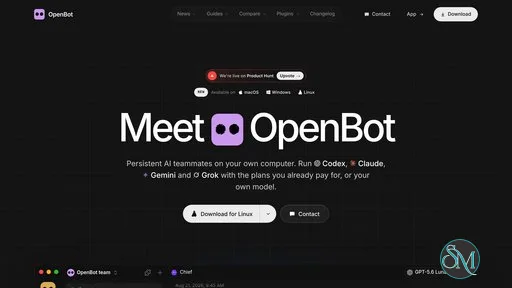
OpenBot is a desktop workspace for managing persistent AI agents from a single interface. Instead of switching between separate coding assistants and conversations, users can assign different agents their own workspaces, queue tasks, exchange files, and collaborate on projects.
The application supports several AI coding tools, including OpenAI Codex, Claude Code, Gemini, Grok, OpenCode, Cursor, and Cline. It also offers an embedded browser, agent-to-agent messaging, and remote access from mobile devices. OpenBot is designed primarily for developers and power users who want to coordinate multiple AI assistants while keeping their working files and conversations on their own computer.
Although the source code is publicly available on GitHub, the licensing distinction is important: current releases use the PolyForm Noncommercial License, so commercial use requires separate permission. Older releases up to and including 0.1.11 remain under Apache 2.0.
Features
Multiple AI Agents
OpenBot lets users create persistent agents with individual instructions, workspaces, conversations, and model settings. Supported providers include Codex, Claude Code, Grok, OpenCode, Gemini, Cursor, and Cline, with custom agents and compatible model endpoints also supported.
Each agent can maintain its own working context, making it easier to separate tasks such as writing code, investigating bugs, reviewing changes, and researching documentation.
Persistent Workspaces and Task Queues
Each agent receives a dedicated workspace for its files and ongoing work. Users can send tasks to an agent while it is busy, with messages waiting in a queue until the agent is ready.
Queue controls include pausing, resuming, cancelling, and recovering queued work after a crash. Context monitoring and automatic compaction also help agents manage longer conversations without exhausting their model context window.
Agent-to-Agent Collaboration
OpenBot supports communication between agents, including messages, replies, reactions, and file transfers. Shared desktop channels can organize collaborative tasks around a designated task owner, with options to delegate work and manage the task's progress.
This approach is useful for workflows that benefit from multiple perspectives, such as having one agent implement a feature while another reviews the result. However, dividing work among several agents does not automatically guarantee better output. Results still depend on the models, instructions, and task design.
Embedded Browser and Computer Use
The built-in browser allows agents to open, inspect, and interact with web pages. Optional Computer Use support can provide mouse, keyboard, and screen interaction on supported desktop platforms.
These capabilities extend OpenBot beyond code generation. Agents can assist with browser-based research, repetitive computer tasks, and workflows involving web interfaces.
Computer interaction also introduces additional risks. An agent that can operate a browser may encounter malicious instructions on web pages or interact with services in unintended ways.
Custom Models and Providers
OpenBot supports custom OpenAI-compatible endpoints and custom agents through the Agent Client Protocol. It can detect supported local model servers, including Ollama and LM Studio, and work with compatible providers.
This flexibility is useful for users who want to experiment with different models or integrate existing AI tools rather than commit to a single provider.
However, local model support does not make the entire application automatically offline. Cloud-based providers still receive the prompts sent to them, and browsing or connected services require network access.
File Sharing and Attachments
Agents can exchange managed files and share attachments through conversations. The application supports common document and project workflows, with support for audio, video, and ZIP attachments under documented file and message limits.
Agents can use their available tools to inspect supplied files, but OpenBot does not itself automatically transcribe every audio recording or decode every video attachment.
Mobile and Remote Access
OpenBot provides ways to connect to a running computer from supported mobile clients. This allows users to check conversations and interact with their agents without remaining at their desktop.
Remote access depends on the host and connection configuration. Some agents, particularly those tied to local command-line tools, continue to run on the computer where they were started rather than being transferred to the mobile device.
Local-First Data Storage
OpenBot is designed to keep workspaces, conversations, attachments, and browser data on the computer running the application. Cloud services support account and remote-access functionality, while AI providers receive the prompts sent to their models.
This separation gives users more control over local project data, but it is not equivalent to complete privacy or offline operation. Users should review the application's privacy documentation and each provider's data policies before using confidential material.
Download OpenBot v0.78.0 - Software Mirrors |
|---|
OpenBot v0.78.0 for Windows |
OpenBot v0.78.0 for macOSOpenBot-0.78.0-x64.zip | 253.08 MB OpenBot-0.78.0-x64.dmg | 262.32 MB |
OpenBot v0.78.0 for Linux |
Others Download related to OpenBot v0.78.0 |
OpenBot v0.78.0 Source Code |
OpenBot v0.78.0 Release Notes:What's Changed
|
Performance and Compatibility
OpenBot supports macOS 13 or newer on Apple silicon and Intel processors, Windows 10 or newer on x64 systems, and Linux on x64 or ARM64 through AppImage packages.
The application brings multiple AI tools into one desktop interface, potentially reducing the need to switch between separate applications. Persistent workspaces, queued messages, and agent collaboration are particularly useful for longer development projects.
Actual performance depends heavily on the selected AI provider, model, hardware, network connection, and number of active agents. Running several agents can increase API usage, consume additional system resources, and produce more output to review.
OpenBot is a development preview, so users should expect ongoing changes and possible limitations. It is better suited to experimentation and workflows that can tolerate occasional problems than to environments requiring strict operational guarantees.
Important security consideration: The project's documentation warns that agents currently run with full access to their permitted execution environment and an approval policy that does not require confirmation for every action. After the initial consent, agents may read or modify files, execute commands, access the network, and control the embedded browser without additional per-action approval. Use agents and tasks you trust, maintain backups, and carefully review the security documentation before granting access to important files or production systems.
System Requirements
OpenBot's published platform requirements are:
macOS: Version 13 or newer, supporting Apple silicon and Intel Macs.
Windows: Version 10 or newer on x64 systems.
Linux: x64 or ARM64 using the AppImage distribution.
Additional requirements depend on the AI providers and integrations selected. Some agents need their own command-line tools, authentication, subscriptions, or API credentials. Local model servers also require compatible models and sufficient hardware resources.
For Linux users, certain environments may require additional configuration. The documentation identifies AppArmor-related restrictions on Ubuntu 23.10 or newer and Debian 13, while remote desktop functionality has specific display-server and architecture limitations.
Pros and Cons
Pros
Manages multiple AI coding agents in one desktop application.
Provides separate workspaces and persistent conversations for individual agents.
Supports task queues, delegation, and agent-to-agent communication.
Includes an embedded browser and optional computer interaction.
Supports multiple AI providers and compatible custom endpoints.
Offers file sharing, attachments, and remote access from mobile clients.
Designed to keep workspaces and conversations on the host computer.
Provides Linux packages alongside Windows and macOS releases.
Cons
Development-preview status means features and behavior may change.
Agents currently have broad execution access without per-action approval.
Cloud-based providers still receive prompts and require network access.
Multiple agents can increase model usage, resource consumption, and review overhead.
Some providers require separate authentication, subscriptions, or API credentials.
Current licensing restricts commercial use without separate permission.
Linux users may need additional configuration for certain environments and features.
How to Install
Visit the official OpenBot website.
Open the download section and select the package for your operating system.
Install the application using the downloaded package.
Launch OpenBot and follow the onboarding instructions.
Connect a supported AI provider or configure a compatible model endpoint.
Create an agent, configure its instructions, and select its model and workspace.
Test the agent with a low-risk task before granting access to important files or workflows.
Review the security settings and project documentation before enabling browser control, computer interaction, or tasks involving sensitive information.
Linux users should follow the official installation instructions for their distribution, especially if AppArmor restrictions prevent the application from launching. For safety, obtain release packages from the project's official distribution channels and verify available checksums or build attestations.
Final Verdict
OpenBot is an interesting workspace for developers who want to coordinate several AI agents instead of managing each assistant separately. Its persistent workspaces, task queues, agent collaboration, browser integration, and support for different providers make it useful for experimenting with more advanced AI-assisted workflows.
Its local-first design is another advantage for users who prefer to keep project files and conversation history on their own computers. Nevertheless, local storage does not prevent cloud-based AI providers from receiving prompts, and the application's current full-access execution model deserves careful attention.
The development-preview status and noncommercial licensing are also important considerations. Users should distinguish between publicly available source code and software licensed for unrestricted commercial use.
OpenBot is worth exploring for developers and AI enthusiasts who want a flexible, multi-agent workspace. Its feature set is promising, but the security model, preview status, and current licensing restrictions make it less suitable for sensitive production workflows or commercial deployment without further evaluation.
Developer:
nightly-labs
Operating System:
Windows / macOS / Linux
Date Added:
2026-11-25T09:07:20.815Z
Categories:
Post a Comment/Report Broken Link: